
Browser Infrastructure for AI Agents with Browser Cloud
Give Your AI Agents Real Cloud Browsers with Session Persistence, a Localhost Tunnel, and Session Replay.

Patchright: How to Set It Up, What It Patches and Its Limits
Patchright is a drop-in Playwright fork that hides common automation leaks. Install it in Python or Node, see what it patches and what still gets blocked.
Published on:
Patchright is a patched, drop-in fork of Playwright which removes the usual automation leaks (the Runtime.enable CDP call and the navigator.webdriver flag) so Chromium sessions don't look quite so much like a bot. You just swap one import, launch real Chrome, and your Playwright code is untouched. It doesn't solve CAPTCHAs or fix a flagged IP.
Patchright is important when a site you're allowed to automate keeps blocking plain Playwright. As to whether it beats Playwright? Sometimes by a small margin, and mostly when used in conjunction with real Chrome.
This guide looks at what Patchright actually does, how to install it in Python and Node.js, the setup that its maintainers recommend, what a public benchmark found, and the limitations you'll still encounter.
TL;DR
Patchright is an open-source, drop-in fork of Playwright that patches the driver, so Chromium sessions stop sending the Runtime.enable and Console.enable CDP calls and the default automation launch flags. You install it with pip or npm, change one import, and launch real Chrome. It does not solve CAPTCHAs or clean a flagged IP.
How Is Patchright Different From Playwright?
- Driver patches: Patchright runs page JavaScript in isolated execution contexts instead of calling Runtime.enable, turns off the Console API, and drops --enable-automation and four other default launch flags, so navigator.webdriver no longer gives the session away.
- Same Playwright API: The patchright Playwright fork keeps the Playwright API, so locators, waits and assertions keep working after one import swap in the patchright Python package or the patchright Node.js package. Firefox and WebKit support: No.
Which Patchright Setup Holds Up on a Bot Test Page?
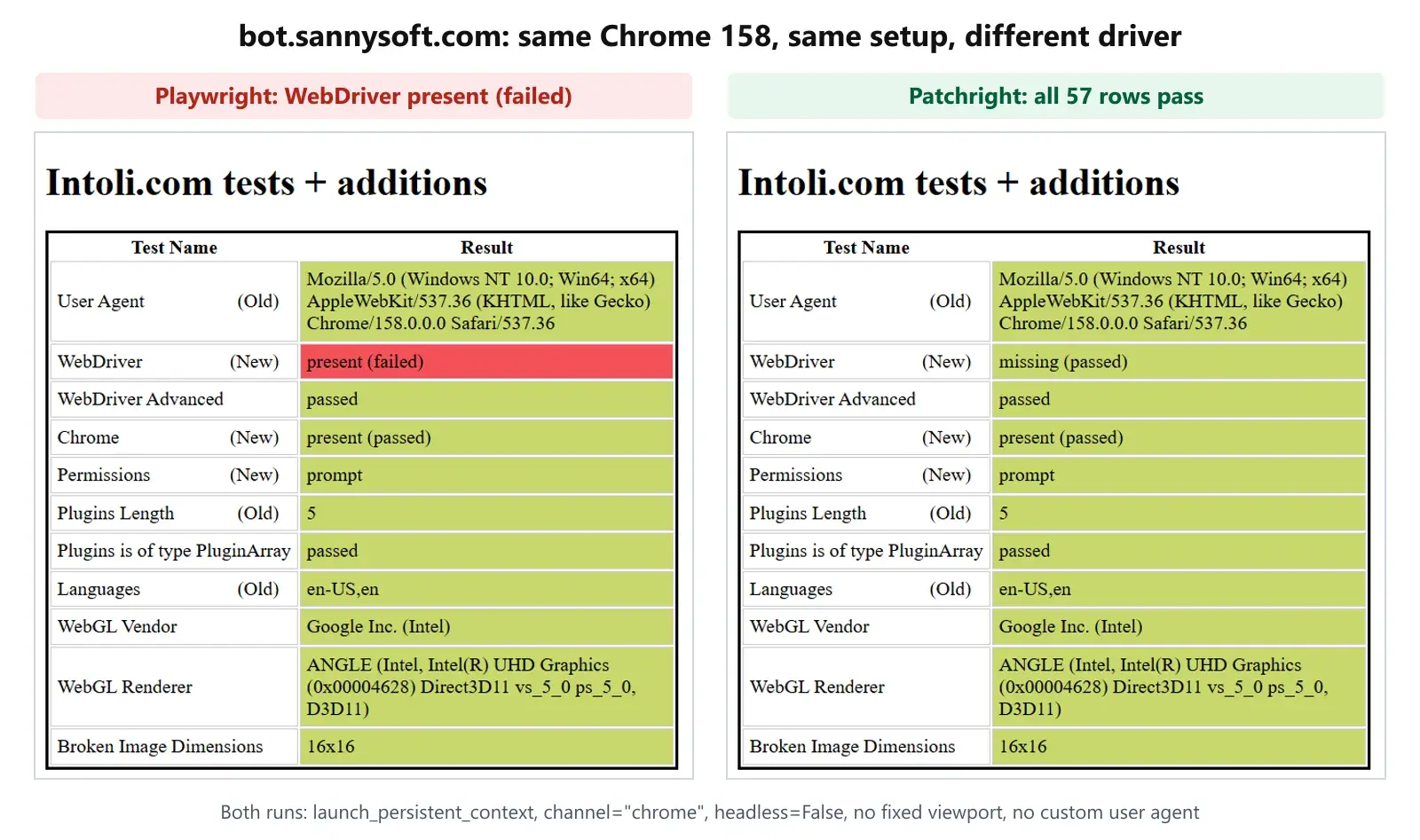
- Persistent real Chrome: The Patchright maintainers' setup is launch_persistent_context with channel="chrome", headless=False, no fixed viewport and no custom user agent. With that setup on Chrome 158, Patchright passes all 57 rows on bot.sannysoft.com, while plain Playwright on the same Chrome fails the WebDriver row.
- Headless mode: Headless Chrome still reports HeadlessChrome in its user agent, so a headless Patchright run keeps failing that bot.sannysoft.com row even with the driver patches applied. Run headed when the target checks the user agent.
Patchright vs Camoufox or a Cloud Browser?
- Camoufox: Camoufox is a Firefox-based stealth browser, not a Playwright patch. In the 2026 public benchmark it tied Patchright at 25 OK and 3 blocked out of 31 targets, so pick it only if you can leave Chromium behind.
- TestMu AI Browser Cloud: TestMu AI Browser Cloud Stealth Mode applies best-effort stealth to Playwright sessions created with a stealthConfig object: init-script patches, user-agent and viewport randomization, and optional human-like delays. Patchright itself is not documented for Browser Cloud sessions.
What Is Patchright?
Patchright is an open-source, Apache 2.0-licensed fork of Playwright that patches the detection points in the Playwright driver. The Patchright GitHub repo had 4.6k stars when we checked on 23 November 2026, and the patchright package on PyPI was at version 1.64.4 (released 2nd November 2026 for Python 3.10 to 3.14).
Patchright ships as separate client packages:
- Python: patchright on PyPI (patchright-python repo)
- Node.js: patchright on npm (patchright-nodejs repo)
- .NET: patchright-dotnet, which the main repo lists as community-driven
Patchright only supports patching of Chromium-based browsers. The maintainers make it very clear that Firefox and WebKit are not supported. As the API is the same as Playwright's existing locators, waits, and assertions will all continue to work once you've changed the import.
If you're planning to run these sessions on a managed cloud browser such as TestMu AI Browser Cloud rather than on your own machine, then our Browserbase vs TestMu Browser Cloud comparison looks at how each of the cloud services deals with stealth, CAPTCHAs and session limits.
For a quick visual walkthrough of this concept, watch the video below from TestMu AI.
Subscribe to the TestMu AI YouTube channel for more tutorials on testing and automation.
What Does Patchright Patch?
Patchright changes the way Playwright talks to Chrome and the launch flags that it sends. The table below is taken from the Patchright driver repo documentation.
| Leak | Playwright | Patchright |
|---|---|---|
Runtime.enable CDP call | Sent, and detectable by anti-bot scripts | Avoided; JavaScript runs in isolated execution contexts |
Console.enable CDP call | Sent | Console API disabled entirely |
navigator.webdriver | Exposed through automation flags | Hidden with --disable-blink-features=AutomationControlled |
| Automation launch flags | --enable-automation, --disable-extensions, --disable-popup-blocking, --disable-component-update, --disable-default-apps | Removed |
| Closed shadow roots | Not reachable by normal locators | Locators and XPath work inside them |
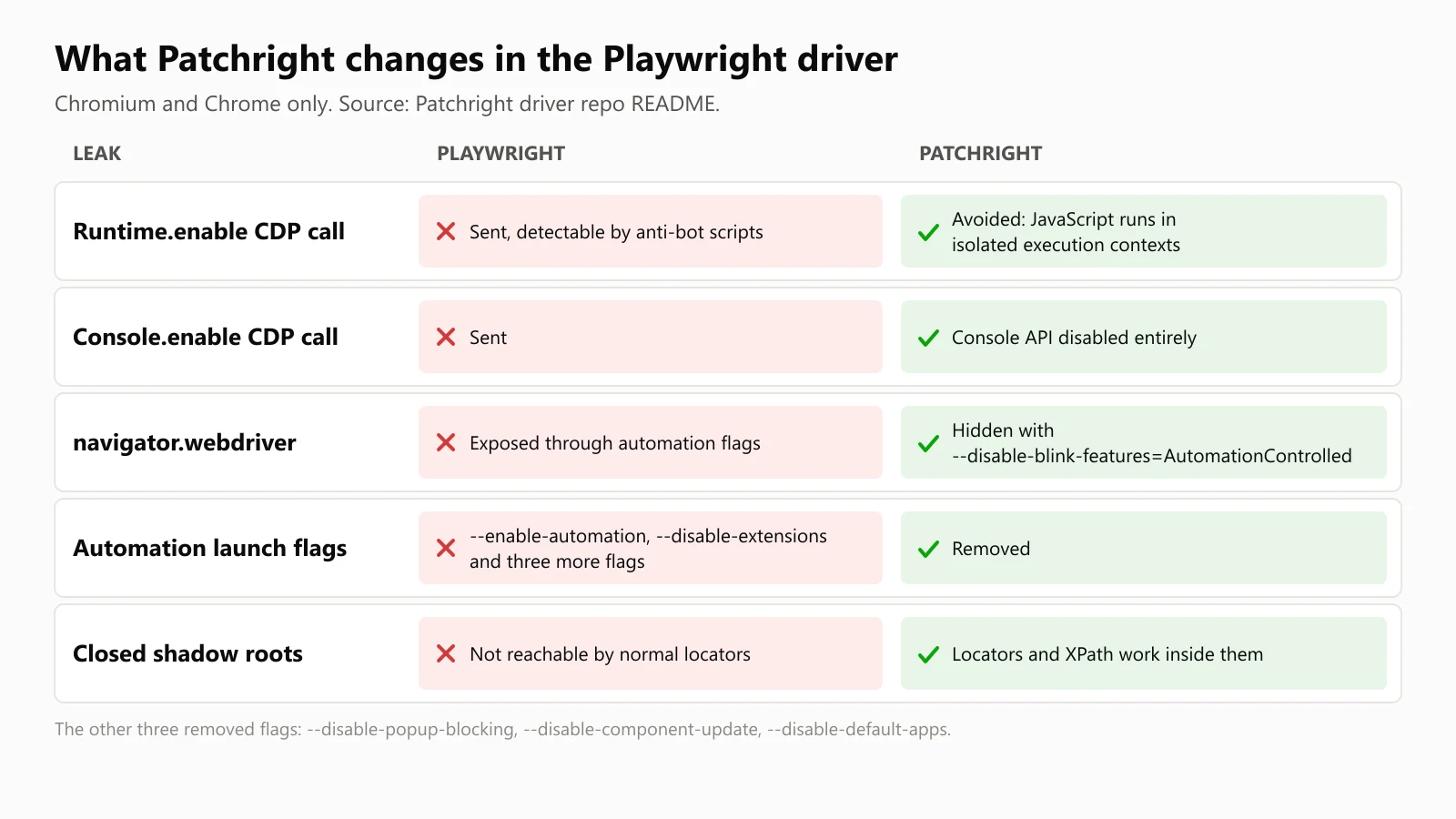
Two changes have side effects that you should be aware of if you're switching. Firstly, console output from the page is no longer going to your script. Secondly, in Python, the evaluate, evaluate_handle and evaluate_all calls all take an isolated_context option which defaults to True, so your page scripts and your evaluations no longer share a context.
How Do You Install Patchright in Python and Node.js?
Patchright installs in much the same way as Playwright (it has its own browser download command). The maintainers recommend Google Chrome over the bundled Chromium.
Python
pip install patchright
patchright install chrome      # or: patchright install chromium
Node.js
npm i patchright
npx patchright install chrome  # or: npx patchright install chromium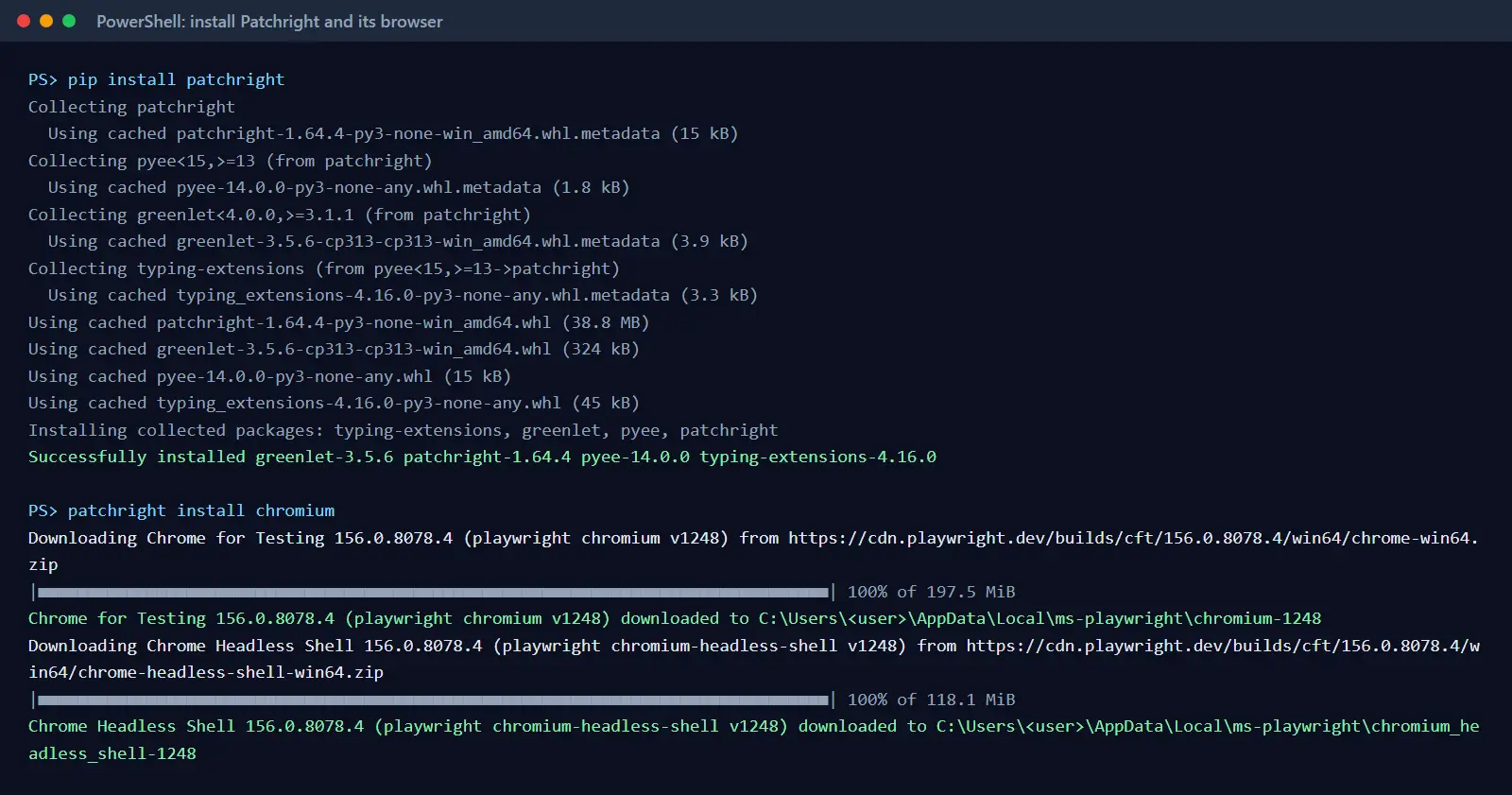
Then change the import and nothing else:
# before: from playwright.sync_api import sync_playwright
from patchright.sync_api import sync_playwright
// before: const { chromium } = require('playwright');
const { chromium } = require('patchright');
Note: Run the same session on cloud Chrome. TestMu AI Browser Cloud provides Playwright scripts with real Chrome sessions (complete with built-in best-effort Stealth Mode, session recordings and a localhost tunnel). Free to start on Browser Cloud.
What Is the Recommended Patchright Setup?
Patchright's maintainers are of the view that a default launch is not sufficient. Their "best practice" setup, as described in the patchright-python README (and mirrored in the Node.js README) is one with a persistent profile, real Chrome, a visible window, no fixed viewport, and it explicitly warns against the use of custom headers or a custom user agent.
Python (sync API)
import os
import sys
from patchright.sync_api import sync_playwright

def open_page(url: str, profile_dir: str) -> str:
    """Open one URL with the maintainers' recommended Patchright setup."""
    with sync_playwright() as p:
        context = p.chromium.launch_persistent_context(
            user_data_dir=profile_dir,
            channel="chrome",   # real Google Chrome, not bundled Chromium
            headless=False,     # visible window, as the maintainers recommend
            no_viewport=True,   # no fixed Playwright viewport
            # do not set user_agent or extra HTTP headers
        )
        page = context.new_page()
        page.goto(url)
        title = page.title()
        context.close()
        return title

if __name__ == "__main__":
    if len(sys.argv) < 2:
        sys.exit("usage: python open_page.py <url>")
    target_url = sys.argv[1]  # pass the URL as a parameter
    profile = os.environ.get("PATCHRIGHT_PROFILE_DIR", "./patchright-profile")
    print(open_page(target_url, profile))
Run it with python open_page.py https://staging.example.com/login.
Node.js
const { chromium } = require('patchright');

async function openPage(url, profileDir) {
  const context = await chromium.launchPersistentContext(profileDir, {
    channel: 'chrome',
    headless: false,
    viewport: null, // no fixed viewport
    // do not set userAgent or extra HTTP headers
  });
  const page = await context.newPage();
  await page.goto(url);
  const title = await page.title();
  await context.close();
  return title;
}

openPage(process.argv[2], process.env.PATCHRIGHT_PROFILE_DIR || './patchright-profile')
  .then(console.log)
  .catch((err) => { console.error(err); process.exit(1); });
Each of the four profiles removes a difference between your session and a person's browser. A clean profile with no history, a headless window, a fixed 1280x720 viewport, and an overridden user agent are all things that a detection script can look for.
Patchright vs Stealth Plugins vs Camoufox: Driver Patch or Page Script?
Patchright patches the driver; stealth plugins patch the page. That's the one difference that determines which you need.
A plugin runs init scripts that go in and overwrite browser properties after the page has started, whereas Patchright patches the CDP calls and the launch flags, which is what exposes the automation in the first instance. The facts below are as of 23rd November 2026.
| Layer | Option | What it patches | Setup | Main limit |
|---|---|---|---|---|
| Driver | Patchright | CDP calls (Runtime.enable, Console.enable) and launch flags | One import | Chromium and Chrome only; page console disabled |
| Page | Stealth plugins (playwright-stealth, playwright-extra) | Browser properties via init scripts | Add a plugin | Scripts themselves can be detected |
| Browser build | Camoufox | A Firefox-based stealth browser | New launcher | Leaves Chromium behind |
| Managed | Browser Cloud Stealth Mode | Fingerprint masking, UA and viewport randomization, optional humanized input | SDK session plus client.playwright.connect | Best-effort; you don't control the patches |
For the page-level options (including the setup code for playwright-stealth and playwright-extra and why they're still getting blocked), see our Playwright stealth guide. Selenium teams can have a look at our guide to Selenium stealth mode to compare Selenium Stealth and undetected-chromedriver.
How Much Does Patchright Actually Help?
Patchright does help on some targets, though a public benchmark showed the gain over plain Playwright was minimal. In 'Anti-detect browser benchmark 2026' (Ian L. Paterson, DEV Community, posted 18th May 2026), seven tools were tested against 31 targets over three headed sweeps from a single residential IP.
| Tool (browser) | OK | Gated | Blocked |
|---|---|---|---|
Patchright (Chrome 148, channel=chrome) | 25 | 3 | 3 |
| Plain Playwright (Chromium 147) | 24 | 2 | 5 |
| Camoufox (Firefox 135 beta) | 25 | 3 | 3 |
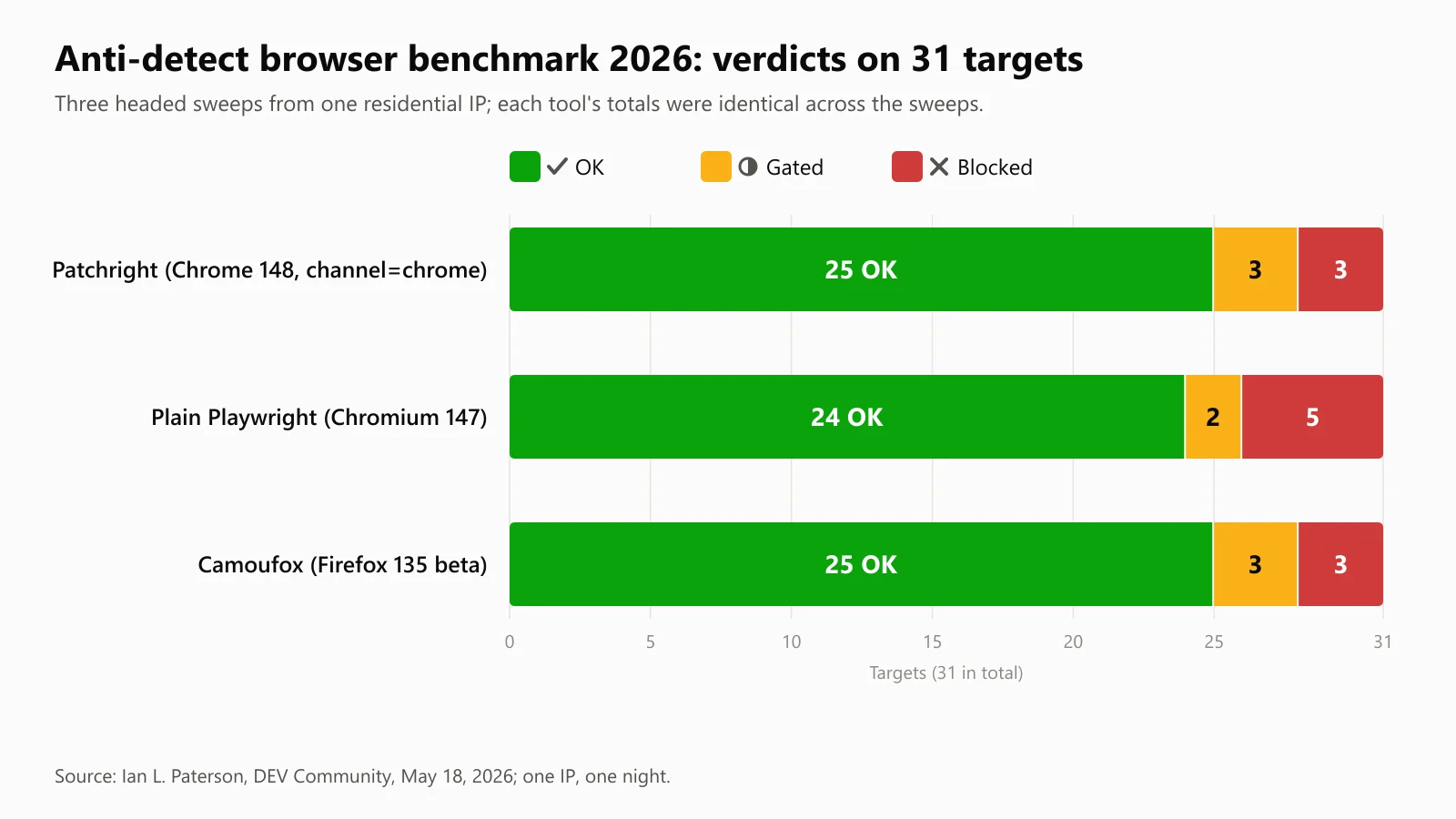
Patchright passed one target where Playwright had failed and was blocked on two fewer. The author points to running the system in Chrome as much as the patches themselves. The test was run on one IP, one OS and one night, so treat it as directional.
As that run was Patchright on Chrome 148 versus Playwright on Chromium 147, it can't isolate the patches from the browser. The fair test has three arms on your hardest 20 permitted URLs: plain Playwright with Chromium, plain Playwright with channel="chrome", and Patchright with Chrome. Count the blocks per arm, and if arm two is closing most of the gap, then real Chrome has done the work.
What Can't Patchright Hide?
Patchright deals with leaks that occur within the browser session. It says it does nothing at all with signals that come from outside of it.
- CAPTCHAs. Patchright has no challenge-solving code and makes no claim in its repo as to having CAPTCHAs. There may be fewer leaks, which would result in fewer challenges, but if there is one that does appear, it still has to be dealt with in a separate way.
- IP reputation and rate limiting. A data center IP or a burst of requests will be flagged prior to any fingerprint check even taking place.
- Behavior. Instant typing, straight-line mouse paths and fixed timing all remain visible.
- Console logging. The Console API is disabled, and the maintainers note that JavaScript loggers can also be detected.
- Init scripts. Without
Runtime.enablePatchright injects init scripts by rewriting the HTML responses via routes, which can have side effects in your own routing code. - Release lag. The maintainers are very clear that Playwright code changes can break Patchright, and fixes can take a few days.
- Non-Chromium browsers. Firefox and WebKit runs get no patches.
Patchright doesn't give you the go-ahead at all. The repo itself states it's for educational purposes. You can use it on your own sites, on sites whose terms allow for automation, etc.
Just check the target's terms and robots rules first.
Should You Use Patchright on a Cloud Browser?
Patchright's launch flag changes only kick in when Patchright launches the browser, so a browser that's been launched by a cloud provider won't have them. Its driver-level changes (the ones that avoid Runtime.enable and Console.enable) are in the client and could potentially still apply over a CDP connection, but TestMu AI has not documented or tested Patchright against Browser Cloud sessions. The documented path is via the Browser Cloud SDK with Stealth Mode enabled.
Browser Cloud Stealth Mode (per the Browser Cloud stealth docs) will pick a user agent from a pool of 7 strings (Chrome 119-120 and Firefox 121), add +/- 20 pixels of viewport jitter, and add some human-like delays to clicks and typing. Playwright sessions get their stealthiness via init scripts. The product page refers to this as best effort, and the session options also include solveCaptcha, proxy and geoLocation.
// npm install @testmuai/browser-cloud
// Set LT_USERNAME and LT_ACCESS_KEY in your environment or CI secrets.
const { Browser } = require('@testmuai/browser-cloud');

const client = new Browser();

async function run(url) {
  const session = await client.sessions.create({
    adapter: 'playwright',
    stealthConfig: {
      humanizeInteractions: true, // off by default
      randomizeUserAgent: false,  // keep the real Chrome UA (see note below)
      randomizeViewport: true,    // ±20 px jitter on the base viewport
    },
    lambdatestOptions: {
      build: 'stealth-check',
      name: 'login page',
      user: process.env.LT_USERNAME,
      accessKey: process.env.LT_ACCESS_KEY,
    },
  });

  const { browser, page } = await client.playwright.connect(session);
  try {
    await page.goto(url);
    console.log(await page.title());
  } finally {
    await browser.close();
    await client.sessions.release(session.id);
  }
}

run(process.argv[2]).catch((err) => { console.error(err); process.exit(1); });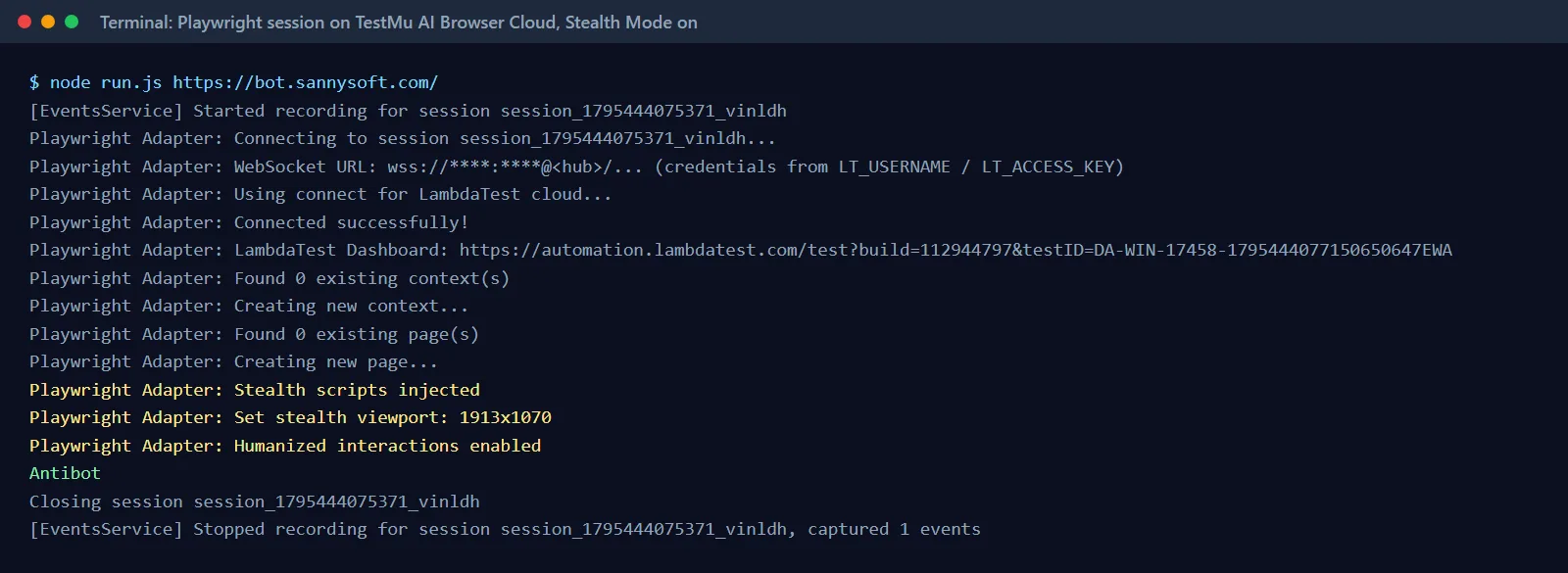
Why randomizeUserAgent: false. The same advice from the Patchright section applies here. A user agent that doesn't match the real browser is a signal.
The doc's pool is Chrome 119-120 and Firefox 121, so on a current Chrome session, a randomized string could be reporting an older version of Chrome or Firefox. The option defaults to true if stealthConfig is set, so you need to explicitly set it to false. Viewport jitter doesn't change the browser identity, so it's left on.
The connection call comes via the connect to a session guide (Playwright stealth is "Good", Puppeteer stealth is "Best"). Sessions run until they are released or have timed out, so always call client.sessions.release(session.id) as the guide demonstrates.
| Factor | Patchright | Browser Cloud Stealth Mode |
|---|---|---|
| Who maintains the evasion? | You, plus the open-source maintainers | TestMu AI |
| Browser | Your local Chrome | Cloud Chrome |
| Scale | Limited by your hardware | Concurrency depends on plan |
| Debugging | Your own logs (page console disabled) | Video replay, console and network capture per session |
| Languages | Python, Node.js, .NET | Node.js SDK |
The PATCH Checklist Before You Ship a Patchright Script
Use this five-step checklist to work out whether Patchright is the right fix and to get it set up so that it actually does the job.
- P - Permission first. Make sure you own the site or that its terms permit automation.
- A - Actual Chrome. Launch with
channel="chrome", a persistent profile, and a visible window. - T - Touch nothing in the fingerprint. No custom user agent, headers, or fixed viewport.
- C - Check with a control. Run three arms on your 20 hardest permitted URLs (Playwright + Chromium, Playwright + Chrome, Patchright + Chrome) and record blocks per arm.
- H - Hand off what Patchright can't fix. IP reputation, CAPTCHAs, behavior, and scale all need infrastructure, not a driver patch.
How Do You Fix Common Patchright Problems?
console.log messages from the page never get through. As expected, Patchright has disabled the Console API. Log from your script instead.
My route handlers do things differently. Patchright injects the init scripts via routes that are rewriting the HTML requests. You need to look for any conflicts with your own page.route() handlers.
Firefox or WebKit launches are still going to be detected. Patchright won't patch those. Use Chromium or Chrome.
page.evaluate can't see a page variable. Python evaluations default to isolated_context=True. If you want that call to have access to the page's context, you'll need to pass isolated_context=False (though you'll know it's doing it in a more detectable way).
Still blocked on one site. Check the IP and request rate first, then try the site from a normal Chrome window on the same network. If that's still blocked, then a driver patch will do nothing.
Note: Scale past one machine. Run Playwright sessions on real cloud Chrome (with Stealth Mode, recordings and a localhost tunnel). Try TestMu AI Browser Cloud free.
Watch: What Playwright Stealth Hides (and What It Can't)
Conclusion
Patchright is the lowest effort way to deal with the most well-known Playwright driver-level automation leaks: just change one import, launch real Chrome with a persistent profile, and stop overriding the fingerprint. It will do nothing to deal with CAPTCHAs, won't clean a flagged IP, and won't make the agent behave like a person.
Its measured gain over plain Playwright in one public benchmark was actually quite small. Test it against a real Chrome control on your own permitted targets before you go any further.
Giving an AI agent a browser? TestMu AI's Browser Cloud runs each task in a real, isolated Chrome session in the cloud, so the browser stays off your laptop.
Author

Sri Harsha
Blogs: 16

Sri Harsha is Engineering Manager of the Open Source Program Office at TestMu AI, where he leads open-source engineering behind the Selenium and Appium automation grid and builds agentic AI systems for quality engineering. He is a member of the Selenium Technical Leadership Committee and a committer to WebdriverIO and Appium, and was recognized with the LambdaTest Delta Award 2023 for Best Contributor in open-source testing. He brings over 10 years of experience in software testing and automation, with earlier roles at EPAM Systems and ZenQ. Sri Harsha holds a B.Tech in Computer Science from Jawaharlal Nehru Technological University.
Reviewer

Mayank Bhola
Reviewer
Mayank Bhola is Co-Founder and Head of Products at TestMu AI, where he leads the entire product portfolio across KaneAI, Kane CLI, HyperExecute, SmartUI, the Real Device Cloud, Accessibility, and other software testing product lines. As an early Lead Architect he designed and built the company's flagship Tunnel technology from scratch, created the React-based automation platform, and architected the data-intensive pipelines and FAAS services that scale it. He brings more than 10 years of experience in software development and product engineering, with earlier roles as Head of Technology at Juggernaut Books and Senior Software Engineer at PressPlay TV and Zomato. Mayank holds a B.Tech in Computer Engineering from JIIT Noida.


Patchright FAQs
Did you find this page helpful?
More Related Blogs

TestMu AI forEnterprise
Get access to solutions built on Enterprise
grade security, privacy, & compliance
- Advanced access controls
- Advanced data retention rules
- Advanced Local Testing
- Premium Support options
- Early access to beta features
- Private Slack Channel
- Unlimited Manual Accessibility DevTools Tests