
Run End-to-End Tests from Your Terminal with Kane CLI
Author and Run Tests Right from the Terminal in Natural Language, with an Evidence-Backed Pass or Fail from a Real Browser.
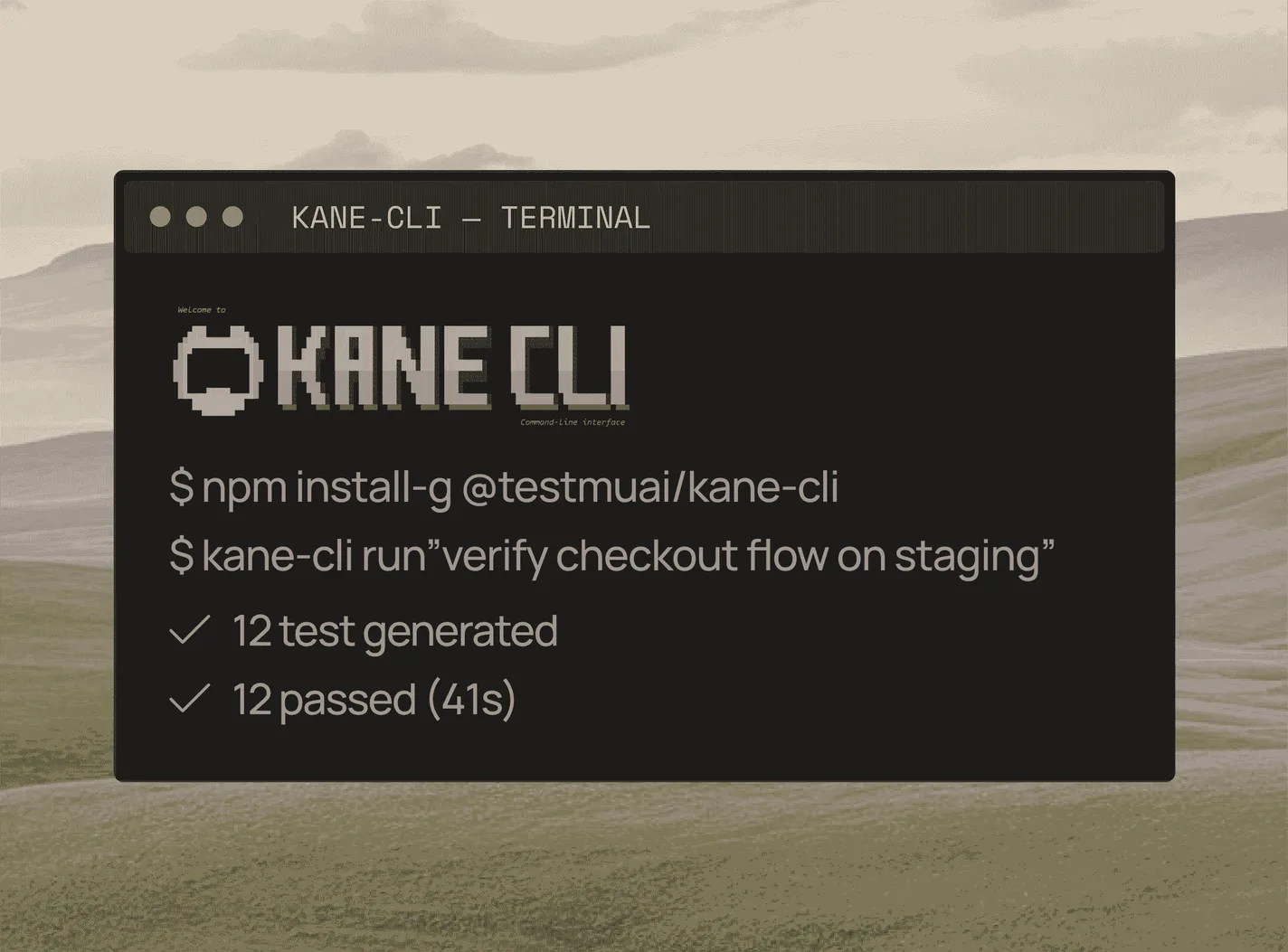
npm install -g @testmuai/kane-cli
Claude Code Tokens: Where They Go and How to Cut Them
Where Claude Code tokens go, how to check them with /usage and /context, and how to stop browser test loops from re-spending tokens on every run.
Published on:
Short answer: Claude Code tokens are the text tokens that the model reads and writes on every request. Usage is up because every request re-sends the conversation and every tool result. See it via /usage and /context.
You can cut it by clearing between tasks, trimming CLAUDE.md and the MCP servers, filtering the test output, and not having the agent re-drive the browser on every test run.
This guide also looks at plan limits and a fairly obscure token driver that a number of people use: asking Claude Code to 'check it in the browser' after every single change.
TL;DR
Claude Code tokens are the text the model reads and writes on each request, and usage climbs because every request re-sends the conversation and its tool results. Check Claude Code usage with /usage and /context, then cut it by clearing between tasks, trimming CLAUDE.md and MCP servers, and replaying browser checks instead of re-driving them.
Where do Claude Code tokens go?
- Claude Code usage limits: On Pro, Max and Team plans, Claude Code usage counts against limits that reset on a five-hour window and a weekly window, while usage-based Enterprise plans and the Claude Console bill each token at API rates.
- /usage: The Claude Code /usage command shows a session's input, output and cache tokens by model and, on paid plans, what share of recent plan usage went to each MCP server, skill, plugin and subagent.
- /context: The Claude Code /context command shows what fills the context window right now, which is the input that gets re-sent with your next request.
- Browser checks: When Claude Code drives a browser through Playwright MCP or playwright-cli, each snapshot and action result becomes input for the next turn, and the agent re-decides the whole path on every run.
- Replayed checks: Kane CLI by TestMu AI records a browser check once, replays unchanged steps from cache with no LLM cost, and gives Claude Code an exit code and one final NDJSON line to read.
What Counts as a Token in Claude Code?
A token is the unit of text that the model works with, essentially a short word or part of a word. In Claude Code, the tokens come from four sources, according to the Anthropic Claude Code cost docs:
- Conversation history, re-sent with every request (cheaper when cached, but it still counts).
- Tool results. A test log or page snapshot becomes the input on the next turn.
- Output and thinking. Extended thinking is billed as output tokens.
- Fixed overhead. CLAUDE.md, skill descriptions and MCP server instructions all load at session start.
How Do You Check Claude Code Token Usage?
| What you want to know | Where to look |
|---|---|
| Session tokens and estimated cost | /usage Session block: input, output and cache tokens per model. The dollar figure is for API users; Pro and Max subscribers see plan usage bars. |
| Which MCP server, skill, plugin or subagent uses your plan | /usage on Pro, Max, Team or Enterprise: a share per source, with suggested fixes. Press f to apply the ones Claude Code can. |
| Whether the prompt cache is working | The Prompt cache (main) line in /usage: share of input from cache, misses, warm or cold |
| What fills the context window right now | /context |
| Output from the current turn | The live count beside the spinner |
For scale, Anthropic has the enterprise average at around $13 per dev per active day and $150-$250 per month. 90% of users are under $30 per active day.
Do Claude Code Tokens Count Towards a Usage Limit?
It varies depending on how you sign in. On most paid plans, Claude Code isn't charged per token. Your usage is against the plan limits that the Claude pricing page details (per 5 hours and per week).
Team and seat-based Enterprise seats are reset on a rolling 5-hour window and a weekly window, which is shared with Claude chat and Cowork.
"You've hit your session limit" or "weekly limit" applies to all models, so /model won't be of any use in that situation (the message will tell you when it resets). An "Opus limit" message is model-specific, and switching model family will get you going again.
On the Claude Console API and the various cloud providers, you're billed per token. An auto-compact warning is not a usage limit at all; it simply means your conversation is approaching the auto-compact window. For Codex, see our Codex usage guide.
Why Does Claude Code Use So Many Tokens?
Long sessions re-send their entire history; a cache miss following a break will re-process everything, and sub-agents and scheduled tasks will each send their own requests. Large tool results compound as well: Claude Code will issue a warning when a single MCP result surpasses 10k tokens and will default to a cap of 25k (MCP docs). A browser check will stack a number of these.
How Do You Save Tokens in Claude Code?
| Fix | What it saves | How |
|---|---|---|
| Clear between unrelated tasks | Stale history on every request | /clear (use /rename first to /resume later) |
| Compact long sessions with instructions | Keeps continuity in less space | /compact Focus on test output and code changes |
| Keep CLAUDE.md short; move workflows into skills | Fixed per-session overhead | Under 200 lines; skills load on demand |
| Disable unused MCP servers; prefer CLI tools | Tool listings and server instructions | /mcp |
| Match model and effort to the job | Price per token and thinking tokens | /model, /effort |
| Filter verbose output before Claude reads it | Log tokens | A PreToolUse Claude Code hook that keeps only failures |
| Push verbose work into subagents | Keeps logs out of the main thread | Subagents return a summary |
One caveat from the docs: /compact reads the conversation it's summarising, so it's a fairly large request on its own. /clear costs nothing.
All of these shrink tokens per turn. None of it has any effect on how many turns a browser check takes or the fact that it starts from scratch again the next time.

Try it on your own suite
Note: Install Kane CLI, the end-to-end testing agent from TestMu AI, with npm install -g @testmuai/kane-cli. New accounts get 10,000 free credits for 30 days. The testmd docs show the replay model described below.
Why Does Browser Testing Burn Up So Many Claude Code Tokens?
When Claude Code is checking a UI via Playwright MCP or playwright-cli (browser options), the model is driving: snapshot, decide, click, repeat. Two costs accumulate.
Cost 1: tokens per action. Playwright MCP's default --snapshot-mode is full (README), and Playwright recommends playwright-cli for coding agents as it avoids the overhead of loading "large tool schemas and verbose accessibility trees" (playwright.dev).
The measured gaps are very much setup-dependent. TO THE NEW reported about 20k tokens for a fairly standard 20-step MCP interaction and around 500 per interaction after they'd moved to playwright-cli with a skill file in their CI pipeline (Aug 2026; not a controlled benchmark).
Checkly found essentially no gap in fresh Claude Code sessions at 48k-50k against 45k-48k (Jul 2026).
Cost 2: re-deciding the path on every run. That's the problem with switching from MCP to CLI. Slack Engineering ran agent-driven end-to-end tests through non-interactive Claude Code (claude -p).
On their search/discovery flow, they saw 40 turns with Playwright MCP and 85 with Playwright CLI (about 3.8M and 6M tokens respectively, Opus 4.6 per Slack's table). Agent-driven runs are typically $15-$30 per run (Slack Engineering, June 2026), and Slack has them in the debugging/exploration bucket rather than in the high-frequency CI.
Our agentic testing deep dive covers that study.
How Does Kane CLI Reduce the Token Cost of Browser Checks?
Kane CLI splits the browser check into three phases so the model only kicks in when something is new or broken:
- Author (model cost, once). On the first run, the agent works out the path through your plain English steps and records it.
- Replay (no LLM cost). Subsequent runs are a deterministic cached run: each unaltered step 'replays from cache with no LLM cost and much faster execution' (testmd docs). Commit the
output-<stem>/folder, and the CI and your colleagues can then all replay the same recording. - Heal (model cost, only on failure). On replay failure, the runner will attempt up to three smaller and smaller replay windows before fully re-authoring the authorable steps (CLI reference). The product page details the two cases: step-heal re-finds one moved element, and flow-heal only kicks in when a step can't be healed. The re-authored steps are recorded for review, and
--no-adaptive-healwill turn healing off.
Healing changes the path, not the verdict. According to the Kane CLI product page, reasoning determines the path, and a separate assessment step then decides whether or not to pass against your acceptance criteria. A wrong total is reported as a bug and is never healed into a pass.
What a Check Looks Like
A test is a Markdown file in your repo:
---
mode: testing
max_steps: 30
---

# Guest checkout

## Open the staging store

Open https://staging.example.com.

## Add a product to the cart

Search for 'running shoes', click on the first result and add it to the cart.

## Check the cart total

Open the cart. It should show 1 item, and the total should be the item price plus shipping.
Run it the way Claude Code would:
npm install -g @testmuai/kane-cli
kane-cli login                      # once, interactively
kane-cli testmd run tests/checkout_test.md --agent --headless > run.ndjson
echo "exit=$?"                      # 0 passed, 1 a step failed, 2 error, 3 canceled or timed out
tail -n 1 run.ndjson                # read only the final event (test_md_done)
In CI, pass credentials from environment variables:
kane-cli testrun run --match '^tests/' --parallel 4 --headless \
  --username "$LT_USERNAME" --access-key "$LT_ACCESS_KEY"
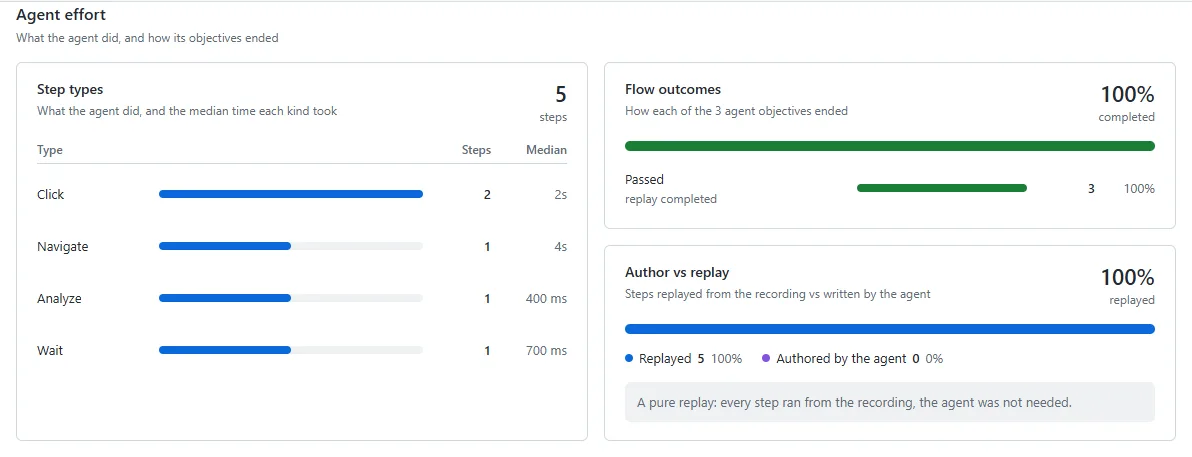
Point a three-step version of this guest checkout at the TestMu AI ecommerce playground and the first run authors it in about 136 seconds. Run the same file again and it replays in about 34 seconds, with exit code 0 and this final event:
{"type":"test_md_done","overall_status":"passed","duration_s":34,"session_id":"9a6c8af5-d9d0-4506-a3fa-836f9a6a4828","coverage":{"status":"skipped"},"v":1,"ts":"2026-11-19T13:33:28.423Z"}The replay's evidence pack, opened in the Kane CLI evidence viewer, shows every step taken from the recording and none written by the agent:
Keep Claude Code's Side of the Bill Small
With --agent stdout is purely NDJSON and the agent mode docs instruct agents to check the exit code first, then read the final event.
In TestMu AI's own measurement of one store task, Playwright MCP returned 42,333 tokens of page text with full snapshots and 4,076 with browser_find. A Kane CLI replay printed 3,575 tokens of NDJSON in total.
Its final result line (the only line an agent needs) was 65 tokens, and the replay used no LLM credits (measurement write-up). The counts in Claude Code will be different.
For a quick visual walkthrough of this concept, watch the video below from TestMu AI.
The tuned text volumes are in the same ballpark. The actual difference is in the number of model turns per run.
With MCP, the coding model makes every click decision on every run. With a Kane replay, Claude Code makes one call and reads one verdict.
To do this, you install the skill (npx @testmuai/kane-cli-skill; walkthrough of using Claude Code for testing with Kane CLI) and add to CLAUDE.md: "For browser checks, run kane-cli testmd run <file> --agent --headless, check the exit code and just read the final NDJSON line. Open the evidence pack on failure only."
On cost: Kane CLI runs use KaneAI credits, not Claude tokens. Authoring and healing spend credits; replay spends no LLM credits. Editing step N re-authors step N and all authorable later steps.
Worked Example: Where Does the Model Run in a Month of Smoke Checks?
Assume 20 browser checks, 5 CI pipelines per workday, and 22 workdays: 2,200 check runs a month.
| Agent re-drives every run | Agent-written Playwright Test suite | Kane CLI author-once replay | |
|---|---|---|---|
| Setup | None | One agent session per test (20) | One authoring run per test (20) |
| Each green CI run | A model session (2,200 a month) | No model | No model |
| When the UI changes | Model re-explores anyway | You or an agent edit the code; the healer agent may patch locators, waits or data, or skip the test | Heal re-finds the path in the run; re-authored steps recorded for review |
| Who decides pass/fail | The driving model | Assertions in the test code (written by you or the agent) | Separate verification against your criteria |
The first column is the expensive one, and Slack would have you avoid that for CI. The last two columns both cost zero model tokens per green run.
Kane CLI is all about UI changes and verdict ownership. A broken Playwright test requires a fix: either an engineer's time or an agent session that consumes Claude Code tokens. If your UI is very static, then a Playwright suite is the cheapest option.
Token Cost by Tool: Kane CLI and Playwright Compared (Nov 2026)
| Kane CLI | Playwright | |
|---|---|---|
| Price | Free to install; runs use KaneAI credits; 10,000 free credits for 30 days | Free and open source (Apache-2.0); you pay for runners, plus model tokens when an agent drives it |
| Model use in a CI run | None on replay; credits mainly to author or heal | Playwright Test: none. Agent-driven MCP or CLI run: every turn. |
| What the coding agent reads | Exit code + final NDJSON event | Tool results or snapshot files per action; reporter output for Playwright Test |
| When the UI changes | Adaptive heal; re-authored steps recorded; wrong results fail as bugs | Edit the test, or run the healer test agent (test agents docs) |
| Proof of a run | .evidence pack (steps, screenshots, console and network logs), viewable at evidence.lambdatest.com | HTML report and trace viewer |
| Where it runs | Real Chrome; Android emulator, iOS simulator, real devices; --remote runs a suite as one HyperExecute job (HyperExecute plan) | Chromium, Firefox and WebKit, on your machine or CI runners |
| Lock-in | Flows export as Playwright code (kane-cli testmd export) | Code is yours |
For a quick visual walkthrough of this concept, watch the video below from TestMu AI.

Subscribe to the TestMu AI YouTube channel for more tutorials on testing and automation.
When Is Playwright the Better Choice?
- Stable UI, hand-written tests. A fully finished Playwright test suite runs in CI with zero model cost.
- Cross-engine coverage. Playwright 'drives Chromium, Firefox, and WebKit with a single API' (GitHub). The Kane CLI desktop runs use real Chrome.
- One-off debugging. Playwright MCP or playwright-cli in Claude Code is quick, and you pay once.
- Code-level control of fixtures and network handling.
Kane CLI is ideal when an agent is writing the code, and you've got rapidly changing flows that need to be checked repeatedly without having to go in and hand repair them or do any self-grading. You can use both of them (see the Kane CLI vs Playwright page).
The Replay-First Checklist for Browser Checks in Claude Code
- Measure first. Run the
/usageafter a browser check; check the MCP and subagent shares. - Split exploration from regression. Investigate with Playwright MCP or playwright-cli; regress with replays.
- Write the check as the acceptance criteria. Define what "passed" means (the cart total, not "page loaded").
- Commit the recording (
output-<stem>/) so that CI will replay rather than re-author. - Read the verdict, not the page. Exit code and final NDJSON line; open the evidence only on failure.
- Review heals just like any test change.
- Batch edits. An edit re-authors all the authorable steps below it.
Conclusion
For browser checks: author once, replay, heal only what broke. Install Kane CLI with npm install -g @testmuai/kane-cli, add the skill to Claude Code, and run your first test on TestMu AI's 10,000 free credits.
Start with the check you ask Claude Code to repeat most often, such as a login or a checkout. Write it as a test file, let one run author it, then point your CLAUDE.md and your CI pipeline at the replay and keep Playwright MCP for one-off debugging.
Testing from the terminal? Kane CLI by TestMu AI lets SDETs and developers plan, write, run and debug tests from the command line.
Author

Srinivasan Sekar
Blogs: 21


Srinivasan Sekar is Director of Engineering at TestMu AI, where he leads engineering and open-source initiatives behind the Selenium and Appium automation grid and owns TestMu AI's MCP Server. A committer to Appium and a contributor to Selenium, WebdriverIO, Taiko, and AppiumTestDistribution, he brings over 15 years of experience in quality engineering and open-source technologies. He is the author of the Apress book 'The MCP Standard: A Developer's Guide to Building Universal AI Tools with the Model Context Protocol,' a Certified Kubernetes and Cloud Native Associate, and an international conference speaker. Before TestMu AI he spent over eight years at Thoughtworks as a Principal Consultant and Quality Architect. Srinivasan holds a B.Tech in Information Technology from Anna University.
Reviewer

Mayank Bhola
Reviewer
Mayank Bhola is Co-Founder and Head of Products at TestMu AI, where he leads the entire product portfolio across KaneAI, Kane CLI, HyperExecute, SmartUI, the Real Device Cloud, Accessibility, and other software testing product lines. As an early Lead Architect he designed and built the company's flagship Tunnel technology from scratch, created the React-based automation platform, and architected the data-intensive pipelines and FAAS services that scale it. He brings more than 10 years of experience in software development and product engineering, with earlier roles as Head of Technology at Juggernaut Books and Senior Software Engineer at PressPlay TV and Zomato. Mayank holds a B.Tech in Computer Engineering from JIIT Noida.


Claude Code Tokens FAQs
Did you find this page helpful?
More Related Blogs

TestMu AI forEnterprise
Get access to solutions built on Enterprise
grade security, privacy, & compliance
- Advanced access controls
- Advanced data retention rules
- Advanced Local Testing
- Premium Support options
- Early access to beta features
- Private Slack Channel
- Unlimited Manual Accessibility DevTools Tests