

Power Your Software Testing with AI Agents and Cloud
The Native AI-Agentic Cloud Platform to Supercharge Quality Engineering. Test Intelligently and Ship Faster.


- TestMu AI (Formerly LambdaTest)
- /
- Learning Hub
- /
- Cross Browser Testing: Complete Guide, Matrix & Checklist
The Complete Guide to Cross Browser Testing
Cross browser testing keeps a site consistent across the engines your audience actually uses. This guide covers the rendering engines behind compatibility bugs, how to size a browser matrix from real usage data, and a checklist to run every release.
Last Updated on:
On This Page
- What Is Cross Browser Testing?
- Why Compatibility Issues Happen
- Which Browsers to Test On
- The Testing Workflow
- Manual vs Automated Testing
- What to Check in Every Test
- Choosing a Testing Tool
- Where to Run the Tests
- Running the Matrix on a Cloud Grid
- Cross Browser Testing in CI/CD
- Measuring Effectiveness
- Cross Browser Testing Checklist
- Challenges and Fixes
Cross browser testing catches the defects that surface in only one browser: a checkout button that misaligns in Safari, or a form that fails silently in Firefox.
Those users never see an error message. They simply leave.
This guide covers why compatibility issues happen, how to size a browser matrix from real usage data, and how to run that matrix at scale.
Overview
Is cross browser testing still necessary if most traffic is Chrome?
Yes. Chrome holds roughly 68% of worldwide usage, but Safari and Firefox together account for about one visitor in five, and both run different engines.
Which frameworks can run cross browser tests?
Four frameworks cover almost every cross browser suite running in production today.
- Selenium: WebDriver standard covering Java, Python, C#, JavaScript, Ruby, and PHP.
- Cypress: JavaScript-first, with fast execution and built-in assertions for front-end teams.
- Playwright: native Chromium, WebKit, and Gecko support with strong auto-waiting.
- WebdriverIO: Selenium-compatible JavaScript runner that also drives mobile apps.
What Is Cross Browser Testing?
Cross browser testing is the process of testing a website or web application across multiple browsers, browser versions, and operating systems to confirm it delivers a consistent experience to every user.
The goal is not just "does it load" but "does it look and behave the same" whether the visitor uses Chrome on Windows, Safari on an iPhone, or Firefox on Linux.
Cross browser testing is easily confused with responsive testing. Responsive testing checks how a layout adapts to different screen sizes, while cross browser testing checks how different engines interpret the same code.
The two overlap but are not the same discipline, as explained in this guide on the difference between cross browser and responsive testing.
Getting this right protects revenue, accessibility, and brand trust across the entire audience, not just the browser the developer happened to build on.
Bugs live at the engine level, so coverage has to be measured in engines rather than in browser logos.
Teams that need these checks on demand typically use a hosted cross browser testing tool instead of maintaining local installs of every browser and operating system version.
Why Do Browser Compatibility Issues Happen?
The root cause of most compatibility issues is the browser rendering engine, the component that parses HTML and CSS and paints the page.
Different browsers use different engines, and each engine interprets the same code with subtle differences in defaults, timing, and feature support.
There are only three engines that matter at scale. The diagram below maps each engine to the browsers built on it.

Browser shares below are worldwide figures for July 2026 from StatCounter Global Stats, with engine totals derived by grouping each browser under its engine.
| Rendering Engine | Browsers | Share of Traffic | What It Means for Testing |
|---|---|---|---|
| Blink | Chrome, Edge, Opera, Samsung Internet, Brave | ~77.5% (Chrome 68.22, Edge 5.37, Samsung Internet 2.06, Opera 1.88) | The most common engine, but versions and vendor tweaks still differ, so testing one Blink browser does not cover all of them. |
| WebKit | Safari (macOS and iOS) | ~16.5% | Safari lags on some modern CSS and JavaScript APIs and is only available on Apple hardware, making it the most common source of surprises. |
| Gecko | Firefox | ~3.3% | Independent implementation that can differ on flexbox, form controls, and rendering edge cases. |
The three engines together account for roughly 97% of worldwide usage. That is the practical argument for organizing a test matrix by engine first and by individual browser second.
None of this is abstract. Below is one file input, from identical HTML, rendered live by all three engines.

Three engines produce three button labels and three status strings. A test asserting on the text "No file chosen" passes in Chrome and fails in both Safari and Firefox.
Rendering engines are not the only cause. Uneven support for new CSS and JavaScript features, differences in default form styling, font rendering across operating systems, and device pixel ratios all contribute to divergent output.
Feature support is the one variable you can check before writing a test. Baseline classifies a feature as Widely available once it has been interoperable across Chrome, Edge, Firefox, and Safari for 30 months.
A feature that has only just reached all four is Newly available, and anything below that needs a fallback plus explicit test coverage.
Some sites also serve different content based on the browser's user-agent string, so those paths need their own coverage in the matrix.
Which Browsers Should You Actually Test On?
Test the browsers your users actually use, in the proportion they use them. Worldwide share tells you where to start; your own analytics tell you where to finish.
The naive approach multiplies every browser by every operating system by every version and produces a matrix nobody can maintain.
Five browsers, four operating systems, and two versions each is 40 combinations, and most of them protect almost no traffic.
A better method is to score combinations and keep the ones that earn their place. Work through four passes.
- Cover every engine first. One current Blink browser, one WebKit, and one Gecko gives you roughly 97% engine coverage in three combinations.
- Add the operating systems your analytics show, because font rendering, form controls, and scrollbars differ by OS even on the same engine.
- Add one previous version of each major browser, since users on managed corporate devices frequently lag the current release.
- Add business-critical or accessibility-mandated configurations even where traffic share is small, such as a screen reader pairing or a client-mandated browser.
Applied to a typical product with a desktop-heavy audience, that collapses 40 candidate combinations into a defensible set of ten.
| # | Browser and OS | Engine | Why It Is in the Matrix |
|---|---|---|---|
| 1 | Chrome latest, Windows 11 | Blink | Largest single share of desktop traffic. |
| 2 | Chrome latest, macOS | Blink | Same engine, different font and scrollbar rendering. |
| 3 | Chrome previous version, Windows 11 | Blink | Catches regressions for users on delayed enterprise updates. |
| 4 | Safari latest, macOS | WebKit | Only desktop WebKit target and the most common source of layout surprises. |
| 5 | Safari, iOS (real device) | WebKit | Mobile WebKit behaves differently from desktop and cannot be emulated reliably. |
| 6 | Firefox latest, Windows 11 | Gecko | Independent implementation; differs on flexbox and form controls. |
| 7 | Edge latest, Windows 11 | Blink | Vendor tweaks on top of Blink, and the default in many enterprises. |
| 8 | Chrome, Android (real device) | Blink | Mobile viewport, touch input, and device pixel ratio differences. |
| 9 | Samsung Internet, Android | Blink | Meaningful share in specific regions and ships its own tweaks. |
| 10 | Business-critical configuration | Varies | Whatever a contract, regulator, or accessibility requirement obliges you to support. |
A matrix decays. Chrome and Firefox ship stable releases on roughly four-week cycles, and Safari moves with macOS and iOS, so "latest" means something different every month.
Three things shift underneath it. Version numbers advance, feature support crosses the Baseline threshold and stops needing fallbacks, and your own audience mix changes.
Rebuild the matrix quarterly from current analytics rather than treating it as fixed. Pin explicit versions in the suite so an upstream browser release cannot silently change what you tested.
Deciding which configurations matter is covered further in this guide on which browsers are important for your cross browser testing.
What Does the Cross Browser Testing Workflow Look Like?
The cross browser testing workflow runs in four stages: plan the matrix, build to web standards, execute the matrix, then reproduce and re-verify every defect.
Keeping those stages explicit is what stops cross browser testing from becoming an endless, ad-hoc chore.
- Take the matrix from the previous section as your scope, and let a formal test plan hold the schedule.
- Build to web standards, run linting, and use progressive enhancement so a baseline experience works on every engine.
- Execute the matrix using manual live sessions for exploratory checks and automated frameworks for repeatable regression.
- Reproduce each defect on the engine where it appeared, fix it, and re-verify on every browser the bug touched.
Manual vs Automated: Which Should You Use When?
Cross browser testing uses two complementary approaches, and mature teams use both rather than choosing one.
What Is Manual Cross Browser Testing?
Manual cross browser testing is a tester opening the application in each browser on the matrix and walking the critical journeys by hand, with no script involved.
Manual live testing means interacting directly with a real remote browser, inspecting the page as a user would. It suits exploratory testing, bug reproduction, and visual judgment calls that are hard to assert in code.
TestMu AI live testing spins up a real browser or OS instantly, with native developer tools attached.
Automated testing uses a framework to drive the browser programmatically, so the same checks run repeatably across the matrix and inside CI. The main frameworks solve different problems:
- Selenium is the WebDriver standard, covering Java, Python, C#, JavaScript, Ruby, and PHP. Best for broad cross-language matrices.
- Cypress is a JavaScript-first framework with fast execution and built-in assertions. Best for front-end teams already in the JS ecosystem.
- Playwright natively supports Chromium, WebKit, and Gecko with strong auto-waiting. Best for new suites wanting engine coverage out of the box.
- WebdriverIO is a Selenium-compatible JavaScript framework that also drives mobile, useful when a team wants one runner across web and mobile.
A common pattern is manual live testing for discovery and visual review, then automated regression to lock the behavior in.
Learn the automated path in depth in this Selenium WebDriver tutorial for cross browser testing.

Note: Run live and automated cross browser tests across 3,000+ browser and OS combinations with TestMu AI. Start testing free!
What Should You Check in Every Cross Browser Test?
Check four dimensions on every combination in the matrix: layout fidelity, functional behavior, performance under real network conditions, and accessibility.
Reducing the pass to "does it look right" misses defects that cost far more than a misaligned button.
| Dimension | What Differs Across Browsers | What to Verify |
|---|---|---|
| Layout and design | Flexbox and grid edge cases, default form control styling, font rendering, scrollbar behavior | Alignment, spacing, overflow, text truncation, and z-index stacking at each breakpoint. |
| Functionality | JavaScript API availability, event ordering, date and file input handling, clipboard access | Core journeys end to end: sign-up, search, add to cart, checkout, and form validation messages. |
| Performance | JavaScript engine differences, image format support, caching behavior | Load and interaction timings on real devices and throttled networks, not just on a developer laptop. |
| Accessibility | Focus order, ARIA implementation, and screen reader pairing all vary by browser | Keyboard-only navigation, visible focus states, and one screen reader pairing per engine. |
Accessibility is the dimension teams most often skip, and it is engine-dependent: a screen reader pairing that works in Chrome can behave differently in Safari because the accessibility tree is built by the browser.
How Do You Choose a Cross Browser Testing Tool?
Choose a cross browser testing tool by scoring it against seven capabilities: real browser coverage, real device access, framework support, parallel execution, live testing, debugging artifacts, and CI integration.
Scoring capabilities beats ranking vendors, because the criteria stay true after the vendor list changes.
Use the table below to score any tool you consider, or start from our shortlist of the best cross browser testing tools grouped by category.
| Capability | Why It Matters | What to Look For |
|---|---|---|
| Real browser and OS coverage | Emulators miss engine-level bugs | Real Chrome, Safari, Firefox, and Edge across current and legacy OS versions. TestMu AI offers 3,000+ browser and OS combinations. |
| Real device access | Mobile web behaves differently on real hardware | Physical Android and iOS devices, not just resized viewports. TestMu AI provides a real device cloud of 10,000+ real devices. |
| Automation framework support | Avoid rewriting existing tests | Native Selenium, Cypress, Playwright, Puppeteer, and WebdriverIO support with no proprietary lock-in. |
| Parallel execution | Sequential matrix runs block releases | Hundreds of concurrent sessions to cut suite runtime from hours to minutes. |
| Live testing | Exploratory checks need a real browser now | Instant live browser and OS sessions with native developer tools. |
| Debugging artifacts | You cannot fix what you cannot reproduce | Automatic video, screenshots, network logs, and console logs on every run. |
| CI/CD and local app testing | Testing belongs in the pipeline | Integrations with major CI tools and a secure tunnel for locally hosted or staging apps. |
Score each tool on how many of these it genuinely covers with real browsers, not emulated approximations.
A platform that combines broad real coverage, framework freedom, parallel execution, and built-in debugging removes the two biggest cross browser bottlenecks at once: incomplete coverage and slow feedback.
Where Should You Run Cross Browser Tests?
Cross browser tests run in one of three places: local browser installs, a self-hosted Selenium Grid, or a cloud grid. Each trades setup cost against coverage and speed.
| Where It Runs | Setup and Maintenance | Coverage Ceiling | When It Fits |
|---|---|---|---|
| Local browser installs | Nothing beyond installing the browsers you already use | One operating system and a handful of browsers. Safari cannot run on Windows at all. | Early development and reproducing a single reported bug. |
| Self-hosted Selenium Grid | You own the hub, the nodes, the virtual machines, and every browser upgrade | Whatever hardware you buy, and only the operating systems you can license | Strict data residency rules or an air-gapped network. |
| Cloud grid | The provider owns the infrastructure and keeps browser versions current | Thousands of browser and OS combinations, plus real mobile devices | Any matrix beyond a handful of combinations. |
The diagram below shows what a self-hosted grid actually comprises. A cloud grid runs every one of these components for you.
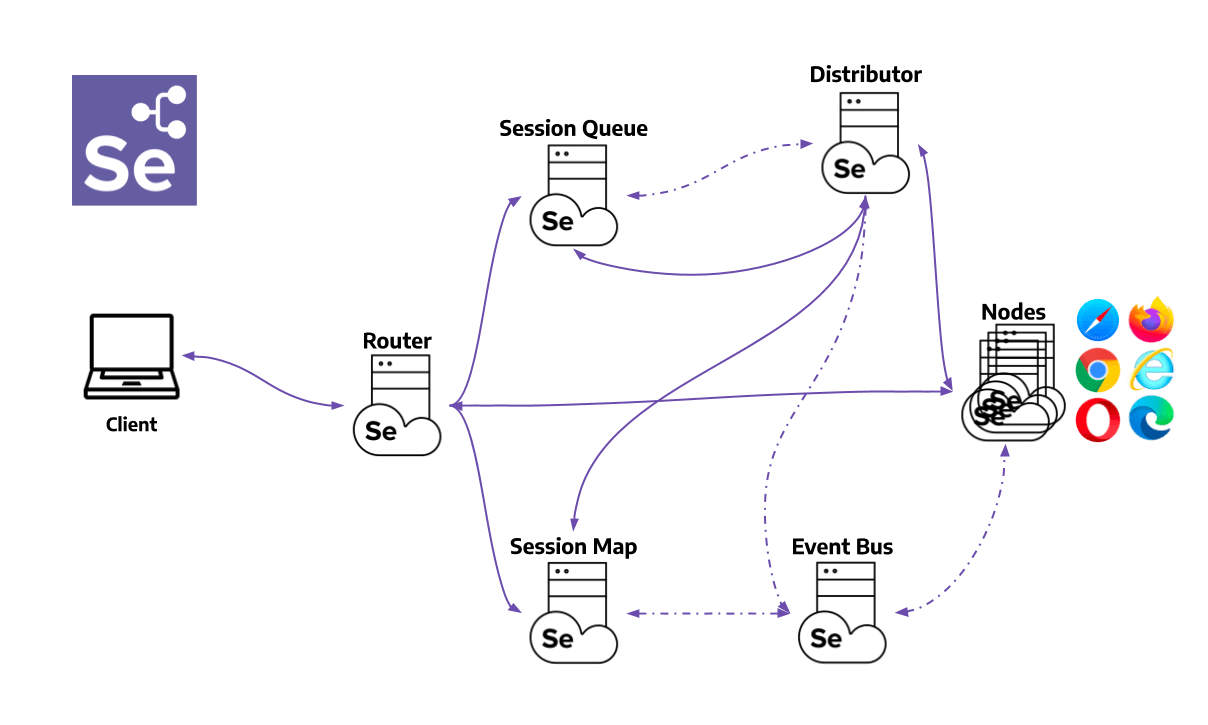
Maintenance, not licence cost, is the honest tradeoff. A self-hosted grid looks cheaper until you count the engineering hours spent patching nodes and chasing browser upgrades every few weeks.
Most teams run a hybrid: local installs during development for fast feedback, then a cloud grid for the full matrix in CI.
How Do You Run the Matrix on a Cloud Grid?
The practical way to run cross browser tests at scale is to keep your Selenium script and point the WebDriver at a cloud grid instead of a local browser.
You pass desired capabilities (browser, version, and OS) to select the environment, and the same script runs on any combination.
The example below opens the Selenium Playground on Chrome and Windows using the TestMu AI grid.
from selenium import webdriver
from selenium.webdriver.chrome.options import Options

username = "YOUR_USERNAME"
access_key = "YOUR_ACCESS_KEY"

options = Options()
options.browser_version = "latest"
options.platform_name = "Windows 11"
options.set_capability("LT:Options", {
    "username": username,
    "accessKey": access_key,
    "build": "Cross Browser Testing Demo",
    "name": "CBT Playground Test",
    "video": True,
    "network": True,
    "console": True,
})

driver = webdriver.Remote(
    command_executor="https://hub.lambdatest.com/wd/hub",
    options=options,
)

driver.get("https://www.testmuai.com/selenium-playground/")
print(driver.title)
driver.quit()
Cypress and Playwright follow the same principle with different syntax. In Playwright, engine coverage is declared as projects in the config, so one command runs the suite on Chromium, WebKit, and Gecko.
// playwright.config.js
import { devices } from "@playwright/test";

export default {
  projects: [
    { name: "chromium", use: { ...devices["Desktop Chrome"] } },
    { name: "webkit",   use: { ...devices["Desktop Safari"] } },
    { name: "firefox",  use: { ...devices["Desktop Firefox"] } },
    { name: "mobile-safari", use: { ...devices["iPhone 14"] } },
  ],
};
In Cypress the browser is chosen at run time rather than in a matrix block, so the same spec runs once per browser from the command line or a CI job.
WebKit is the exception. Cypress support for it is still experimental, so it needs the engine installed and experimentalWebKitSupport enabled in the config before that third command works.
# WebKit is experimental in Cypress: install the engine first,
# then set experimentalWebKitSupport: true in cypress.config.js
npm install --save-dev playwright-webkit

# run the same spec across three engines
npx cypress run --browser chrome  --spec "cypress/e2e/checkout.cy.js"
npx cypress run --browser firefox --spec "cypress/e2e/checkout.cy.js"
npx cypress run --browser webkit  --spec "cypress/e2e/checkout.cy.js"
To cover the full matrix, run the same script with different capability values in parallel (for example Safari on macOS and Firefox on Windows) instead of maintaining a local Selenium Grid.
Exact capability keys and the current hub endpoint should be generated from the TestMu AI capabilities generator, and the getting started with Selenium documentation walks through the full setup.
Every run captures video, network, and console logs automatically so a failure in one browser is easy to reproduce and fix.
The short demo below walks through both paths end to end, a live session and an automated run, on the same grid.

How Do You Fit Cross Browser Testing into CI/CD?
Tier the matrix by pipeline stage. Run a small smoke set on every pull request, the full matrix on merge, and the long tail of legacy combinations nightly.
Running every combination on every commit is what makes teams disable cross browser testing. The suite becomes the slowest thing in the pipeline, so somebody switches it off.
| Pipeline Stage | What Runs | Target Feedback Time |
|---|---|---|
| Pull request | Critical journeys on one browser per engine, so three combinations | Under ten minutes |
| Merge to main | The full matrix from earlier in this guide, fanned out in parallel | Under thirty minutes |
| Nightly | Legacy browser versions, rare operating systems, and the full real-device set | Overnight |
Two practical details decide whether this holds. Preview and staging builds need a secure tunnel so cloud browsers can reach a host that is not publicly routable.
Second, decide which failures block a merge. Engine-specific functional failures should fail the build; minor visual variance should report without blocking, or the team learns to ignore red.
How Do You Measure Cross Browser Testing Effectiveness?
Measure five numbers: traffic coverage, browser-specific escape rate, engine parity, suite runtime, and flake rate per engine.
| Metric | How to Compute It | What It Tells You |
|---|---|---|
| Traffic coverage | Share of sessions in your analytics matched by at least one combination in the matrix | What percentage of real users the matrix actually protects. |
| Browser-specific escape rate | Production defects reproducible in only one browser, divided by total production defects | The single most direct measure of whether cross browser testing is working. |
| Engine parity | Pass rate per engine, compared side by side across the same suite | A persistent gap on one engine points at a code problem, not a flaky test. |
| Suite runtime | Wall-clock time for the full matrix at your current parallel limit | Whether the matrix can run on merge or is confined to nightly. |
| Flake rate per engine | Tests that both pass and fail on the same commit, grouped by engine | Separates genuine engine bugs from timing and locator problems. |
Escape rate is the one to watch. Coverage that climbs while escape rate stays flat means the matrix is testing the wrong combinations, not too few of them.
Track these per release rather than per run. A single run tells you almost nothing; the trend across a quarter tells you whether coverage decisions were correct.
Cross Browser Testing Checklist
Run this before every release. It assumes the matrix from earlier in this guide is already defined.
Before the run:
- Refresh the browser matrix against the last 90 days of analytics.
- Confirm every new feature shipped this cycle is Baseline Widely available, or has a tested fallback.
- Identify the critical user journeys that must pass on every combination, not just on the primary browser.
- Make the build reachable from test environments, using a secure tunnel if it is only hosted locally.
During the run:
- Execute the automated regression suite across the full matrix in parallel.
- Check layout at every breakpoint, including text truncation, overflow, and z-index stacking.
- Walk the critical journeys manually on at least one real device per engine.
- Verify keyboard-only navigation and visible focus states on each engine.
- Record load and interaction timings on a throttled network rather than office broadband.
- Capture video, screenshots, console logs, and network logs for every failure as it happens.
After the run:
- Reproduce each defect on the specific engine and version where it surfaced.
- Re-verify every fix on all browsers the bug touched before closing the ticket.
- Add a regression test for any defect that reached a release build.
- Log which combinations were skipped and why, so coverage gaps stay visible.
What Are the Most Common Cross Browser Testing Challenges?
Five challenges recur on almost every project: engine-level layout differences, flaky timing-based tests, brittle locators, unreachable local builds, and sequential runs that are too slow for CI.
Knowing each fix in advance saves hours.
| Challenge | Fix |
|---|---|
| Layout differs across engines (flexbox, grid, fonts) | Test on real Blink, WebKit, and Gecko instances; use standards-based CSS and feature detection instead of browser sniffing. |
| Flaky automated tests from timing issues | Replace fixed sleeps with smart, actionability-based waits so a step runs only when the element is ready. |
| Tests break when the UI changes locators | Use stable selectors, and enable auto-healing where resilience matters more than catching every cosmetic change. |
| Local or staging apps are not publicly reachable | Use a secure tunnel so cloud browsers can reach localhost or internal hosts without a public URL. |
| Sequential runs are too slow for CI | Run the matrix in parallel across cloud sessions to collapse hours into minutes. |
For deeper, practical tactics, see these common cross browser testing challenges and solutions and this collection of cross browser testing hacks.
Running confirmation testing across every affected browser keeps a resolved bug from quietly reopening for users on another engine.
The fastest way to apply all of this is to run your existing suite on a cloud grid: keep your Selenium, Cypress, or Playwright tests, repoint the driver, and fan the matrix out in parallel.
For large suites, TestMu AI HyperExecute orchestrates that run with intelligent test splitting and auto-retry, so cross browser coverage stops being the bottleneck at your merge gate.

Author

Shantanu Wali
Blogs: 8

Shantanu Wali is Vice President of Product Management at TestMu AI (formerly LambdaTest), where he owns several product lines across the testing platform, including the Real Device Cloud and the Digital Experience Testing Cloud. He has also contributed significantly to the development and scaling of KaneAI, TestMu AI's flagship GenAI-native testing agent that uses natural language to make software testing faster and more reliable in this AI era. He brings 7+ years of experience across software development and product management, starting as a backend developer at Infosys building solutions for Fortune 500 clients. Shantanu holds an MBA from IIM Calcutta and a B.Tech in Mechanical Engineering.
Reviewer

Sirajuddin Khan
Reviewer
Sirajuddin Khan is Vice President of Product Management at TestMu AI (formerly LambdaTest), where he drives the company's agentic AI product strategy, building a suite of autonomous agents that includes Agentic Browsers and Agentic Visual Testing and shifting the unit of work from test execution to autonomous outcomes. One of the company's earliest product leaders, he has owned the roadmap for the high-performance execution cloud and grew the cross-browser testing products from early adoption to market leadership. He brings over a decade of experience across SaaS, B2B, and eCommerce, with earlier product roles at Wydr and ShopClues, where his catalog and search work cut delivery SLAs and lifted seller activity. Sirajuddin holds an MBA in Information Technology from Sikkim Manipal University and a B.Tech in Computer Science Engineering from Maharshi Dayanand University.


Cross Browser Testing FAQs
Did you find this page helpful?
More Related Learning Hubs
TestMu AI forEnterprise
Get access to solutions built on Enterprise
grade security, privacy, & compliance
- Advanced access controls
- Advanced data retention rules
- Advanced Local Testing
- Premium Support options
- Early access to beta features
- Private Slack Channel
- Unlimited Manual Accessibility DevTools Tests