

Power Your Software Testing with AI Agents and Cloud
The Native AI-Agentic Cloud Platform to Supercharge Quality Engineering. Test Intelligently and Ship Faster.


- TestMu AI (Formerly LambdaTest)
- /
- Learning Hub
- /
- What Is Retesting: With Examples And Best Practices
What Is Retesting: With Examples And Best Practices
A complete tutorial on retesting that sheds light on its features, importance, pros and cons, and how to perform it.
Last Updated on:
Retesting is a process of validating a specific feature whose function failed during the previous test. It is done to verify whether the test cases reported with some bugs during the execution time are fixed or not.
In the software development life cycle, the major crucial elements are testing the software's functionality, performance, security, and other aspects, which involves checking the software for any errors. However, the major challenge is validating the software's working in line with the target audience. It is crucial to ensure the effectiveness and dependability of the developed software, and here retesting dives in as the savior.
The primary goal of software testing is to identify the error or bugs in the software application. Test engineers are responsible for identifying those and reporting to the development team for further evaluation. Later, such issues are resolved and sent to the test engineer for re-verification.
Retests ensure that additional issues do not arise during the software release. Such a process can be executed manually using a specific test case set. Irrespective of the complexity involved in retests, we should understand this as the root part of software testing to deliver high-quality products.
What is Retesting?
Retesting is a crucial software testing process where specific test cases are executed again to ensure that defects identified in previous tests have been fixed correctly. It helps verify that the modifications or bug fixes haven't introduced new issues. Retesting guarantees the reliability and quality of the software before its release.
It is part of the defect life cycle where testing of failed test cases is done, which was non-functional at the time of the earlier test fixed by developers.
Follow these points to get more information on a retest process:
- Failed test cases corresponding to reported bugs are retested.
- Another name for retesting is confirmation testing.
- For the reported error in the new build, similar test data and processes should be utilized to validate its reproducibility.
A comprehensive example of the retest process will help you get a clearer picture.
Why is Retesting important?
Retesting being part of the software testing life cycle surrounds several significance related to the effective delivery of the product. Undoubtedly, it is the principal part of the standard software testing process. It gives the product an extra layer of assurance, screening its technical and functional performance before release to the end users.
Businesses should guarantee high-quality digital applications in this highly competitive software development market. This requires no compromise in the quality of the final product.
Automation testing platforms can often help you get better ROI for your released product. However, a retest gives more confidence by verifying every bug. Compared with the initial testing process, it neither adds extra cost to test resources nor incurs huge time. It is known to be executed in the same environment with similar data related to failed test cases.
Additionally, the retest process addresses particular issues or bugs noted in specific application modules. Therefore, you don't have to set up any new testing environment and give more effort to verify the quality of the product with end-to-end testing.

Example of Retesting
Although the above-explained example can help you gain superficial information. Below, we will deal with a similar example, with deeper sight into its process.
Scenario: As a part of the software development process, Build 2.0 is released. During its testing, the team identified a defect (say, Defect 2.0.1) and released it. Similar Defect 2.0.1 is to be tested in Build 2.1 (in the condition that this defect is stated in Release Note off Build 2.1) to ensure the fixation of the defect.
Process of execution: According to the Bug Life Cycle, as the bug is logged, it is immediately shared or reported to the development team. Its status is marked as "New." Now, it's up to the development team to accept or reject the bug.
Upon acceptance of the bug, the developer will fix it and then release it in the next phase. Its status is marked as "Ready for QA." At this time, the testers validate the bug to figure out its resolution. Hence, you can say that a retest is a planned test.
The tester uses the same test cases and test data in the previous build. If no bug is found, its status will be marked as "Fixed." On the contrary, the status remains "Not Fixed." Then, the Defect Retesting Document is shared with the development team.
To have good insight into retests, you must know their key features. It will not only help to diversify your test but also magnify the dimensions for the quality building of software.
Features of Retesting
Top-notch user experience in software testing follows an iterative process. For this, retaining information on the critical aspects of a retest process allows better application delivery.
Below are its key features:
- It is implemented in a similar document as the previous one and processes in the new build.
- Execution is done when specific test cases are considered to be failed.
- It occurs when a complete software requires retests to validate its quality.
- Where the original test was automated, the retest is usually the same automated test re-run against the new build.
- The retest process relies on the development team, which is responsible for accepting or rejecting the bug.
- Granular details are considered for the changed aspect of functionality by the tester.
When should you perform Retesting?
Being a tester, it is important to decide when you should do a retest. The answer to this is straightforward. You have to consider your project's size along with the features, which requires testing.
For example, retest becomes a normal process if an organization holds an extensive product line distributed across various products. The reason is the need for the timely release of the software application, as this may also impact other parts of systems in diverse ways.
There are different scenarios when we can use retesting as the process. Some of them are explained below:
- On detection of the rejected bug
- Need for bug fix highlighted in release note
- Customer request
- Other scenarios
It may happen many times when the bug issued by the tester is refused by the developer and marked as "Not Reproducible". In such instances, a retest is done for the same bug to inform the developer that the issue is reproducible and valid.
In the process of software development, when the development team releases a new build, retesting prevails. Here, the tester tests the previously reported bugs to ensure their fixation.
Software quality is a major concern for every organization. To ensure this, a customer may request to run a retest for particular use cases to ensure the product's quality.
Whenever a bug is fixed, developers often create additional test cases. This indicates that more time should be spent writing test cases rather than fixing them. However, even though you are confident about your codebase, it is still vital to retest crucial parts of the application at the time of every release.
For example, a new functionality causes unexpected behavior and challenges in detecting bugs at the first instance. It could only be possible when such issues become apparent during testing or based on user feedback. This situation requires you to perform "retesting" to overcome skepticism about newly identified bugs.
Benefits of Retesting
The quality of a software application depends on the success of the retest process. It ensures the application's stability in the software development life cycle.
Some of its key benefits are highlighted below:
- Ensures whether the bug is fixed or not.
- Enhances the quality of the product and application developed.
- Ensures the working of the application or product is according to the user's expectation.
- Involves less time fixing the bugs as the specified issue is targeted.
- Works with the same data and processes with a new build for its working.
- Doesn't require a new test environment setup.
Despite having several benefits, the retest process also holds some drawbacks. Let us understand this from the below-given section.
Drawbacks of Retesting
A retest process also has some drawbacks, which can hamper or create challenges in the testing process. Knowing such limitations will help you address those while retesting to avoid any issues.
Let us understand what they are.
- Needs a new build for authentication of defects.
- Test cases of retests can only be fetched when it is initiated.
- Retests of defects found during exploratory or manual testing have no existing script to re-run, so they need a tester to reproduce the steps by hand.
- Retesting failed test cases needs additional time and effort.
- Retests cannot be guaranteed as part of the testing process except in cases where a bug is identified or corrected.
Addressing the drawbacks of retests, it can be said that a retest may be challenging for some testers. Especially the new tester often tries to find some alternative way to fix the issue. Here, what confuses them is the term regression testing. However, regression testing and retesting hold major differences.

What is the difference between Regression testing and Retesting?
If you are new to software testing, you might think that the terms "retesting" and "regression testing" are similar. However, it is a fact that they both are different, although related. We will explore in this section how the retest process is distinct from regression testing.
First, regression and retest are part of software validation in the software development process. Retest is mainly done at the end of a specific phase of development. In other words, when you want to ensure that a working product is not riddled with bugs from previous testing, you do a retest. In contrast, regression testing can be executed in any development phase to ensure the correct working of the specific aspect of codes.
In some situations, testers can run retests by simply reading earlier test outputs or reports to check any issue and its fixation. A comprehensive investigation can also be done by individually checking on the earlier issues to ensure they are taken care of. However, regression testing is mainly done through a test plan and executing it on every application version, initiating with the latest. In such an approach, you need to ensure that every application change is appropriately tested.
Below are some key pointers on the differences between regression and retest processes:
| Component | Regression Testing | Retesting |
|---|---|---|
| Purpose | It is executed to check the impact of the code level changes, which often require retests. | It is done to ensure changes executed in the software that doesn't lead to regressions. |
| Method | It is executed with the use of automation testing tools. | Re-runs the specific failed test, either as an automated re-run or manually when the defect was found by hand. |
| Target | It is done to check existing bugs in the software. | Retest verifies the functionality of the software. |
| Time involved | It is more time-consuming because extensive research is needed in previous software versions. | It is less time-consuming because a specific defect is only retested. |
| Focus | It aims to check if the functionality of prior versions is maintained corresponding to the update or change to the application. | It does not focus on the functionality of previous versions. Instead, it aims to ensure the restoration of functionality following a bug fix. |
Understanding Regression testing and Retesting with an Example
The difference between regression and retest can be explained by the example below.
Say, if there is an issue in a banking web application's login page where customers cannot access their account details. Even though they were asked to try to log in again, they failed to login into their account. The support team looked into the issue and ensured that such a thing did not happen again.
The developer team made code-level changes to ensure successful login to the account page in every browser. However, the testing here not only involves a login page but also ensures that code changes do not affect other functionality of banking web applications. Here, the testing done will test the application for modification. This is called regression testing.
On checking for the issue again corresponding to the modification done, the testing team tried to log in to the page, but it failed. The support team communicated with the concerned developer and explained the issue. However, the developer informed that they had fixed the issue. QA team testing the working of the web application to check whether the issue is fixed, called retesting.
Hence, a retest is important in the software testing process and is a prerequisite to ensure its working.
We addressed the significance of the retest process, which gives an idea of its relation with software testing. Let us understand some of its typical applications in software testing. Here are some of the applications of retests in software testing:
- Applied to rectify any specific error or bugs, which require verification.
- Checks the working of the complete system to validate the final functionality.
- Checks the quality of a particular part of the system.
Phases of Retesting
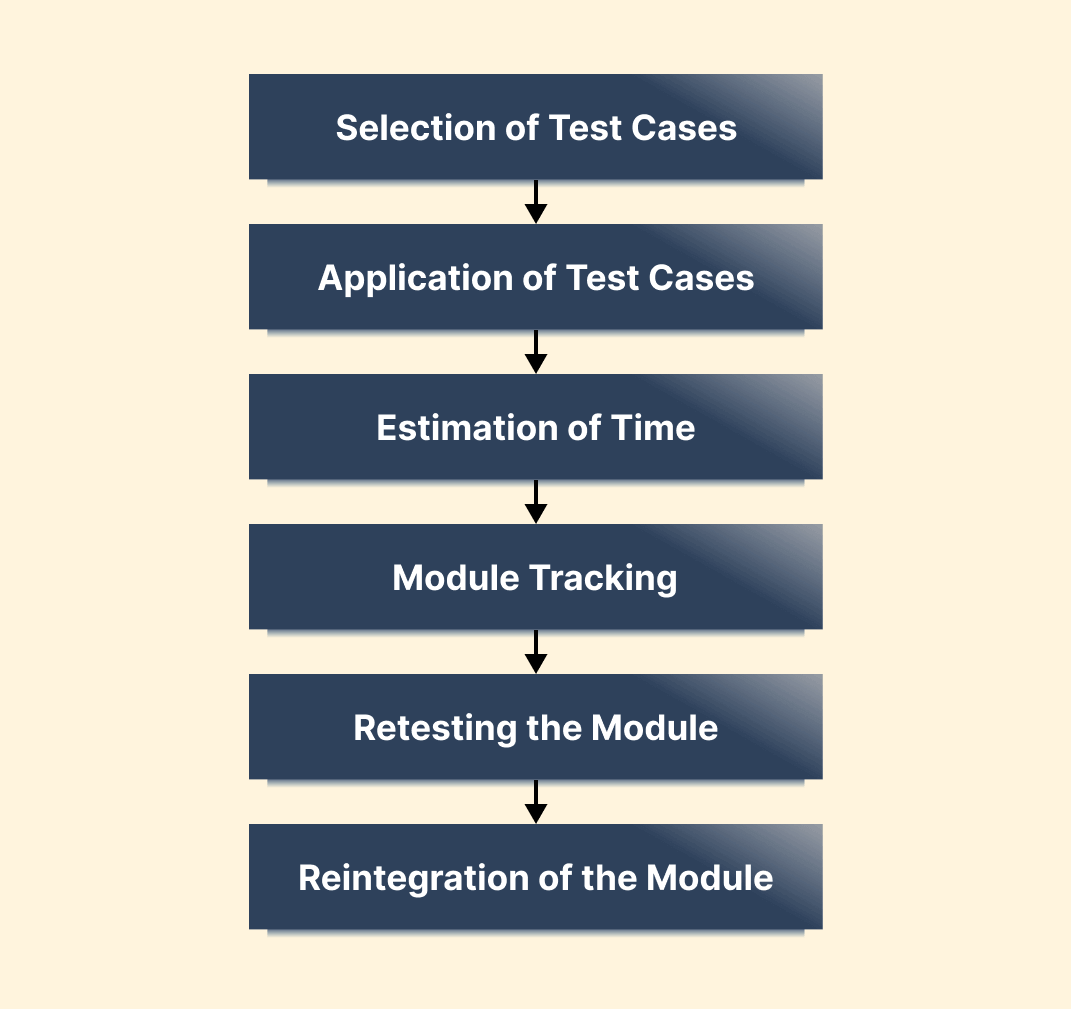
The retest process runs through the same primary phases whether you re-run an existing automated test or reproduce the steps by hand.
Below are the phases involved in a retest process:
- Selection of test cases: Test selection is an approach in which specific test cases from the test suite are executed to invigilate whether the correction of errors in software is done or not. Generally, test cases are differentiated into reusable and obsolete, where reusable test cases are used to run retest.
- Application of test cases: The main focus of the retest process is to compare the anticipated output of the test cases. Therefore, the test cases with standard pre-executed result sheets need to be applied.
- Estimation of time: On identifying the test cases, testers should consider the total execution time to be involved in retests. The factors like test case evaluation may add extra time.
- Module tracking: In situations of failing test cases, it is a major challenge to identify the corresponding modules for the error. Hence, the software part is divided into different individual modules.
- Retesting the module: Retest the defective module until it is fixed.
- Reintegration of the module: On fixation of the defective module, complete integration of the test cases are applied to the software. Further, the working of the software is checked.
To do this, small test cases are implemented for specific individual modules. The modules not showing expected outcomes are marked as defective modules. In such a way, tracking of defective modules is accomplished.
How to perform Retesting?
How you run a retest depends on how the defect was found in the first place. If the failing test was already automated, the retest is simply that same test re-run against the build containing the fix, usually straight from your CI pipeline. If the defect was found during exploratory or manual testing, there is no script to re-run, so a tester reproduces the original steps by hand.
Either way, the defining constraint is the same: use the same test data, the same steps, and the same environment as the original failure. A retest that runs against a different environment proves nothing, because you cannot tell whether the fix worked or the environment differed.
Follow these steps to run a retest:
- Confirm the fix is actually in the build you are about to test, using the release note or the commit linked to the defect ticket.
- Identify the failed test cases tied to that defect, and check whether an automated test already covers them.
- Re-run the automated test if one exists, or reproduce the original steps manually if the defect came from exploratory testing.
- Compare the actual output against the expected result recorded on the original failure, not against a fresh guess at what should happen.
- Mark the defect Fixed if it passes. If it fails, document what you saw and reopen it with the new evidence.
- Run a targeted regression suite once the retest passes, to confirm the fix did not break anything nearby.
Can Retesting be automated?
Yes. Re-running a failed automated test against a new build is one of the most commonly automated steps in QA, and it is what a CI pipeline does every time it re-runs a suite after a fix lands. What cannot be automated in advance is the selection step: until a defect exists and is fixed, you do not know which test to re-run, which is why retesting is planned reactively while regression suites are planned ahead.
These cases still need a human:
- Defects found through exploratory or manual testing have no existing script, so reproducing them by hand is faster than writing an automated test for a one-off check.
- Visual, layout, and usability defects are hard to assert on reliably in code, so a tester confirms the fix by looking at it.
- One-off defects in rarely touched code may not justify the cost of writing and maintaining an automated test that will run once.
- Defects that only reproduce under a specific manual sequence, timing, or device state can be quicker to verify directly than to encode.
Things to consider while doing Retesting
By now, we have understood the significance of a retest process and how to perform it. However, the existence of valid consideration in retests requires attention. Below are some points that need to be taken into account.
- The retest process necessitates the formation of a new software build when the issue is fixed based on the first report.
- There is the possibility that software sent for retests might undergo code-level changes. Therefore, it is essential to conduct regression testing before the release of the application.
- The retest coverage and scope are only known after the issue is fixed, so unlike a regression suite you cannot plan and build the retest set in advance.
- Application's development time may surge if issues found in retest remain to exist. A more comprehensive and strategic evaluation is needed to investigate the root cause.
However, despite the challenges encountered in a retest process, the organization must focus on testing methods conscientiously. This could be better done by running retests on the cloud. Let us see this in detail.
How to perform Retesting on the Cloud?
The hard part of a retest is rarely running it, it is standing up the exact environment where the defect appeared. If a bug was reported on Safari 17 on macOS Sonoma and nobody on the team has that combination to hand, the retest either waits or runs somewhere else and proves nothing. Cloud testing platforms like TestMu AI remove that wait by taking on the test infrastructure problem, giving you a live session on any of 3,000+ browser and OS combinations, plus 10,000+ real devices, from an online browser farm.
Below are the steps to run a retest of your web or mobile applications on a cloud-based platform like TestMu AI. For demonstration, let's retest web applications.
Step 1: Sign up for free and log in to your TestMu AI account.
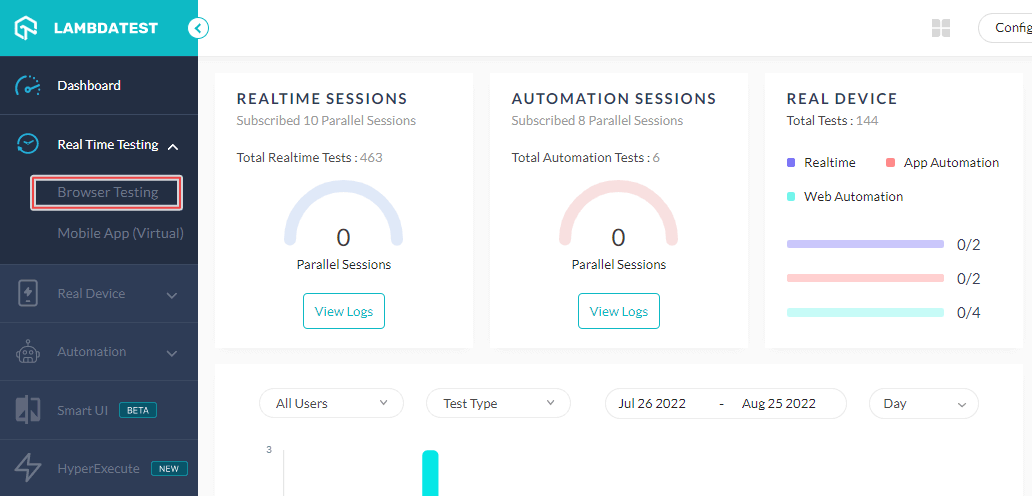
Step 2: Choose Real Time Testing > Browser Testing from the left-side menu bar.
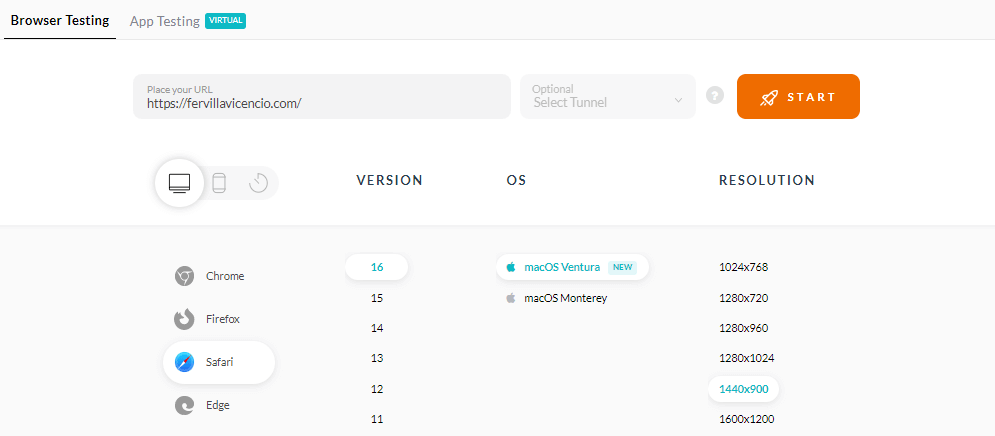
Step 3: Now, you have to enter the website URL in the provided field. You can select the browser you want to test, its VERSION, OS, and RESOLUTION, and hit START.
A cloud-based real operating system will be launched where you can access different features offered by TestMu AI's in-session tools, including capturing screenshots, logging bugs, video recording test sessions, and more.

TestMu AI also provides a real device cloud for more accurate test results. You can learn more about real device testing on TestMu AI through this video.

You can also subscribe to the TestMu AI YouTube Channel and stay updated with the latest tutorial around Selenium automation testing, Playwright, Appium, and more.
Best practices for Retesting
Now, to know how to run a retest, it is necessary to understand its best practices. It will help to decide whether to retest and the way of doing it correctly. Here are some of its best practices:
- Provide complete information on the issue noted
- Ensures all test pass before release is ready
- Include regression tests
- Full functional product
- Release of a stable version with the bug fix
While retesting and committing to fixing a bug, it is recommended to include sufficient information on the scenarios in terms of the issue. It will allow other team members to reproduce it and run retests efficiently and faster.
In the process of developing new and old features in an application, it is important to be definitive that all test pass before release are ready to retest. However, when it is not ready, the QA team should be asked to test them and ensure that bugs are fixed. Consider that although it is possible to fix the bug yourself, there is always a chance of making a mistake.
In the software development cycle, regression testing is one of the best practices when there is a need to add or eliminate any features of the applications. Regression testing should be a part. The significant advantage associated with this is the reduction of risk related to fixing regression due to modification done during the development of different features on top of it.
When you are about to release a beta version of any product, it is vital to ensure its complete functionality. Additionally, also make sure that all the bugs are fixed.
When you want to release stable versions of the applications, it is vital to assure that all the bugs are fixed. It is crucial to fix bugs while developing different features on top of the release features. However, if they are not considered in their corresponding releases, then users trying the new feature of the application may experience issues due to such changes.
Conclusion
The next time a developer marks a defect fixed, check one thing before you re-run anything: that you are testing on the same browser, OS, and data as the original failure. Environment drift is what turns a passing retest into a defect that reappears in production, and it is the single most common way a retest gives a false green.
Then run the retest, and only once it passes, run a targeted regression suite around the change. Keeping that exact environment available on demand is where a cloud grid helps: TestMu AI's real time testing is built for customer-bug reproduction and fix verification, giving you a live session on any of 3,000+ browser, OS, and virtual device configurations, with DevTools, network simulation, and one-click bug logging in the same session. The automation documentation covers re-running an existing suite against a new build from your CI pipeline.
Author

Nazneen Ahmad
Blogs: 39


Nazneen Ahmad is a freelance Technical Content SEO Writer with over 6 years of experience in crafting high ranking content on software testing, web development, and medical case studies. She has written 60+ technical blogs, including 50+ top-ranking articles focused on software testing and web development. Certified in Automation Basic and Advanced Training - XO 10, she blends subject knowledge with SEO strategies to create user focused, authoritative content. Over time, she has shifted from quick, keyword-heavy drafts to producing content that prioritizes user intent, readability, and topical authority to deliver lasting value.


Retesting FAQs
Did you find this page helpful?
More Related Learning Hubs
TestMu AI forEnterprise
Get access to solutions built on Enterprise
grade security, privacy, & compliance
- Advanced access controls
- Advanced data retention rules
- Advanced Local Testing
- Premium Support options
- Early access to beta features
- Private Slack Channel
- Unlimited Manual Accessibility DevTools Tests