
Power Your Software Testing with AI Agents and Cloud
The Native AI-Agentic Cloud Platform to Supercharge Quality Engineering. Test Intelligently and Ship Faster.


- TestMu AI (Formerly LambdaTest)
- /
- Learning Hub
- /
- What Is System Integration Testing (SIT Testing)? Guide
What Is System Integration Testing (SIT Testing)?
SIT stands for System Integration Testing. See how SIT differs from integration testing and UAT, its entry and exit criteria, and how to write a SIT test plan.
Last Updated on:
On This Page
- What SIT Testing Means
- SIT vs Integration Testing
- Why Teams Run SIT
- SIT Example
- Advantages of SIT
- Limitations of SIT
- SIT Granularity
- Prerequisites
- How to Perform SIT
- Data-Driven SIT
- SIT vs System Testing
- SIT vs UAT
- SIT vs SAT
- Entry and Exit Criteria
- SIT Test Plan
- SIT Techniques
- SIT Challenges
- Who Performs SIT
- SIT Tester Skills
- SIT Tools
- Cross-System SIT Flows
- AI and SIT
- References
- Where to Start
System integration testing (SIT) checks that separately built systems, subsystems and third-party services work together correctly through their interfaces, after each part has been tested on its own and before user acceptance testing. SIT stands for System Integration Testing, so SIT testing and system integration testing name the same test level.
Every system in a release can pass its own tests, and the release can still break the moment they are wired together. SIT is the stage of the software development life cycle that tests those connections. This guide covers what SIT verifies, how it differs from integration testing, system testing and UAT, the entry and exit criteria worth holding to, and how to write a SIT test plan.
TL;DR
SIT stands for System Integration Testing: the test level that checks whether separately built systems, subsystems and third-party services exchange data correctly through their interfaces. It runs after each system has passed its own tests and before user acceptance testing, and it targets the seams between systems rather than the code inside them.
What Does SIT Actually Verify?
- Interface contracts: SIT verifies that the data one system sends is the data the next one expects, in the format, encoding, and order it expects it, including the fields nobody documented.
- Data integrity across boundaries: SIT verifies that a record created in one system arrives intact in the next, with no silent truncation, rounding, or timezone shift introduced in transit.
- Error handling at the seams: SIT verifies that a downstream failure surfaces as a handled error rather than a timeout, a partial write, or a success response that hides a rollback.
- End-to-end business flow: SIT verifies that a transaction crossing several systems ends in a consistent state in each of them. No single system test can confirm that.
- SIT vs component integration testing: Component integration testing joins modules inside one application. SIT joins complete systems, often built and run by different teams, such as your application and a payment gateway.
When Does SIT Run?
SIT runs after every participating system passes its own tests and before UAT begins. Running UAT against an unintegrated system spends the time of business users on defects QA should have caught.
SIT Key Facts
- Full form: SIT stands for System Integration Testing, and SIT testing means the same test level.
- Runs before UAT: Yes. SIT should reach its exit criteria before user acceptance testing starts.
- Who runs it: QA engineers and test specialists run SIT, while business users run UAT.
- Where it runs: A controlled test environment that mimics production. TestMu AI runs the browser-facing steps of a SIT flow across 3,000+ browser and OS combinations.
What Does SIT Testing Mean in Software Testing?
In software testing, SIT means system integration testing, a test level aimed at how complete systems interact rather than how code units inside one system fit together. The ISTQB glossary defines it as "a test level that focuses on the integration of systems." Wikipedia describes SIT as testing "a complete system of many subsystem components or elements," where those components have already been through their own subsystem testing.
A system here can be your own application, a database, a message queue, a payment gateway, a CRM or ERP package, or hardware with embedded software. SIT checks what crosses the boundary between them: the data each system sends, the data the next one receives, and what happens when one of them fails or answers slowly.
Where Does SIT Sit in the Testing Order?
When several systems are integrated, Wikipedia places SIT after each of them has passed system testing, with a round of SIT before user acceptance testing. For a release built from several applications, that gives this order:
- Unit testing: Each function, method or class is tested on its own.
- Component integration testing: Modules inside each application are tested together.
- System testing: Each application is tested as a whole against its own requirements.
- System integration testing: The applications and external services are tested together through their interfaces.
- User acceptance testing (UAT): Business users confirm the integrated release meets their needs.
On a project with one application and a few external services, many teams run SIT earlier, between unit testing and system testing of the whole release. The comparison with system testing below covers both orders.
Unit testing checks a unit, the smallest piece of code, such as a function, method, or property. Popular frameworks for it include JUnit and Jest.
System testing helps you to validate the complete software product. It falls under the category of black box testing, which is all about the external functionalities of the software from the user's perspective.
The end-user or client performs user acceptance testing (UAT) to verify the software product or system before it is moved to the production environment. UAT is completed at the final stages once the functional, integration, and system testing are completed.

System Integration Testing vs Integration Testing: Scope, Owners and Defects
Integration testing checks how components or systems interact, and system integration testing is the part of it that joins complete systems. The ISTQB glossary defines integration testing as "a test level that focuses on interactions between components or systems" and gives the module-level version its own name, component integration testing. In practice, when a team says integration testing it usually means modules inside one application, and when it says SIT it means separate applications and services talking to each other.
The difference shows up in who owns the failure. A component integration test that fails points at code one team owns and can fix in the same sprint. A SIT failure often sits between your order service and a payment provider, a CRM, or an ERP that another team or vendor runs, so diagnosis needs logs from both sides and the fix needs coordination across teams.
| Factor | Integration Testing (Component Level) | System Integration Testing (SIT) |
|---|---|---|
| Scope | Modules, classes or services inside one application, tested through internal APIs and function calls. | Complete systems and external services, such as an application, a payment gateway, a CRM and a message queue, tested through their public interfaces. |
| Who runs it | Developers, usually as automated tests in the same repository and CI pipeline as the code. | QA engineers or a dedicated SIT team, with developers and the owners of each connected system on call for defects. |
| Environment | A developer machine or CI runner, with databases and outside services replaced by stubs, mocks or containers. | A shared SIT environment close to production, with real instances or sandboxes of each system and test doubles only where a system is unavailable. |
| Typical defects | Wrong function signatures, null handling between modules, broken dependency wiring, mismatched internal data models. | Mismatched payload formats, contract drift between services, authentication and timeout failures, data lost or altered between systems. |
| Example | The cart module calls the pricing module and gets the right discounted total. | An order placed in the storefront reaches the payment gateway, the warehouse system and the email service with the same order ID and amount. |
| When it runs | Continuously, on every commit, after unit tests pass. | After each participating system has passed its own tests, and before user acceptance testing. |
The two levels do not replace each other. Component integration tests catch internal wiring faults early and cheaply, which keeps SIT runs focused on the defects that only a multi-system environment can reveal. If a defect could have been found with one application running on a laptop, finding it in SIT is late.
Why Do Teams Run System Integration Tests?
Teams perform system integration testing to confirm that separately built subsystems exchange data correctly, handle failures at their boundaries, and work together as one system.
Some factors that highlight why it is crucial for your product's success and quality:
- Incompatibility Mitigation - It helps us to avoid errors by identifying and correcting software module incompatibilities.
- Database Interaction Validation - It helps developers verify that each software module and the database work together effectively. The benefit of this is a better data flow and higher system efficiency.
- Adaptation to Changing Requirements - It confirms that newly created requirements (that come from customer feedback) are carefully tested and seamlessly integrated into the existing system.
- Hardware Compatibility Assurance - It helps resolve potential hardware compatibility issues in advance before the deployment of the software.
- Third-Party API and Tool Interaction Verification - It carefully verifies the accuracy of the data shared with external tools and APIs. This ensures error-free and smooth interoperability, essential for the overall system functionality.
SIT Example: Testing an E-Commerce Order Across Connected Systems
A typical SIT example is an e-commerce platform where the web app, product catalog, payment service, and order system are tested together on a full checkout.
Let's consider an e-commerce platform that comprises a web application, a product catalog database, payment processing services, and shipping logistics. The complete system integration testing ensures that all the required systems work according to the defined functionality.
Scenario: Placing an Order
Components Involved:
- Web Application - The user interface where customers browse products, add items to the cart, and initiate checkout.
- Product Catalog Database - Stores product information, including availability, prices, and descriptions.
- Payment Processing Service - Handles secure transactions, validates payments, and communicates with external payment gateways.
- Shipping Logistics System - Manages order fulfillment, inventory management and coordination with shipping carriers.
Steps for System Integration Testing:
- Add to Cart Functionality -
- Objective - Ensure selected products are successfully added to the cart.
- Testing Steps - Perform tests to verify that the web application communicates effectively with the product catalog database to update the cart.
- Checkout Process -
- Objective - Confirm a smooth transition from cart to checkout without data loss.
- Testing Steps - Test the interaction between the web application and the payment processing service to validate that user details and selected products are accurately passed during checkout.
- Payment Processing -
- Objective - Validate secure and error-free payment transactions.
- Testing Steps - Simulate different payment scenarios, including successful payments, declined transactions, and refunds, to ensure proper communication between the web application and the payment processing service.
- Inventory Management -
- Objective - Prevent overselling and ensure accurate stock levels.
- Testing Steps - Confirm that the product catalog database and shipping logistics system sync real-time inventory data, preventing users from purchasing out-of-stock items.
- Order Fulfillment -
- Objective - Guarantee accurate and timely shipping of orders.
- Testing Steps - Test the coordination between the payment processing service and the shipping logistics system to verify that orders are fulfilled promptly and tracking information is updated accordingly.
What Are the Advantages of SIT Testing?
SIT detects defects early, identifies interoperability issues between subsystems, and validates that data flows correctly between integrated components.
Here are the main benefits of system integration testing.
- Detect defects early - It helps you identify defects early. The defects found are set back to the development teams for fixing. This means you can deliver high-quality software solutions and save considerable development efforts in the long run.
- Identification of Interoperability Issues - It helps identify interoperability between different subsystems or components. This is crucial to ensure that all parts of the system work together seamlessly.
- Validate data flow - It ensures correct data flow by validating seamless and accurate transfer of information between integrated components, enhancing the overall reliability and functionality of the system.
- Cost-effective - Detecting and fixing integration issues early in the development process is more cost-effective than addressing them in later stages or after the software has been deployed.
What Are the Limitations of System Integration Testing?
SIT is time-consuming, cannot test every possible integration path, and produces test cases with limited reuse across projects or changing architectures.
Here are the main disadvantages of system integration testing to be aware of:
- Time-consuming - It takes time to unit test all the modules in a system separately. It is possible that subsystems can fail even if they are tested individually since many issues arise when they interact with one another.
- Difficulty in Achieving 100% Test Coverage - It may be impossible to test all possible integration pathways and scenarios, leaving some areas untested.
- Limited Reusability of Test Cases - Test cases developed for a specific integration scenario may have limited reusability for other projects or components, particularly if the system architecture changes.
Boost your testing expertise by exploring Detailed Guide On Test Coverage: With Best Practices.
We discussed the pros and cons of system integration testing, but it all comes down to your experience and expertise in handling different testing types that apply to your product.

SIT Granularity: Intra-System, Pairwise and Inter-System Testing
The granularity of system integration testing refers to the extent or level of detail at which the integration testing is performed. It helps to determine what components or modules are included in the process and how they are grouped for testing. System Integration Testing can be categorized into three levels: Intra-System Testing, Pairwise Testing, and Inter-System Testing. The differences among them are as follows:-
| Factor | Intra-System testing | Pairwise testing | Inter-System Testing |
|---|---|---|---|
| What does it mean? | Low-level testing involves individual components or modules within a single system. | Moderate-level testing involves only two systems. | High-level testing involves multiple independently tested systems within the overall integrated application. |
| Scope | Limited to components or modules within a system. | Limited to two subsystems in the entire system. | Involves interfaces and interactions between multiple systems. |
| Complexity | Generally less complex due to focusing on a smaller unit. | Moderately complex. | Highly complex due to the involvement of multiple systems. |
| Example | Testing of the user-authentication system in an e-commerce platform. | Testing of the interaction between the inventory management system and the product catalog system in an e-commerce platform. | Testing the interaction between multiple systems, such as the user authentication system, product catalog system, inventory management system, and payment processing system in an e-commerce platform. |
What Do You Need in Place Before Starting SIT?
These prerequisites can help you build a great system integration test plan.
- Creation of a test environment that matches the required specifications for your production environment.
- Identify the scenarios you need to test.
- Establish a proper communication plan.
- Establish a shared repository.
- Involve all the required stakeholders.
Organizations need to build a plan or test strategy around system integration testing. That is why you will see more organizations investing much time and effort in reinventing their testing strategies and how they operate.
How Do You Perform System Integration Testing Step by Step?
The steps used to perform system integration testing are as follows:
- Devise a Test Integration Plan
Outline the detailed steps and procedures for system integration testing by defining the scope, objectives, and resources needed. This plan will act as a roadmap, aligning team goals and managing the testing process effectively.
- Decide on an Approach
- Design Test Cases, Scenarios, and Scripts
- Test cases outline actions to verify specific features.
- Scenarios describe user tasks.
- Scripts provide detailed steps and data for operating the program.
- Deploy Integration Tests on Chosen Modules
- Track and Record Errors
- Resolve Errors and Retest
Consider various system integration testing techniques like top-down, bottom-up, sandwich, big bang, etc, based on project requirements. Factors such as project size, time constraints, and component priorities must be considered when deciding.
For example, testers often opt for top-down, bottom-up, or sandwich approaches for larger and more complex projects. These methods allow for a more granular and phased integration of components to ensure a systematic evaluation of the entire system. Conversely, in smaller projects, the big bang method is commonly favored. This method involves integrating all components simultaneously, providing a quicker assessment of the system's overall functionality.
Develop comprehensive test cases, scenarios, and scripts that align with our chosen system integration testing approach. Test cases, scenarios, and scripts perform the following functions.
Integrate selected modules and execute tests using the designed test cases, scenarios, and scripts. This step involves testing interface functionality and identifying any flaws or errors in the integrated system. Testing can be performed manually or through automated tools.
Record and document any errors or flaws encountered during testing. Include details such as the type of error, when it occurred, and its impact on the system. This record is what the team uses to understand and resolve each issue.
Address the identified errors by implementing necessary fixes. After resolving issues, retest the integrated system to ensure the corrections succeeded. Continue this process iteratively until all identified issues are effectively resolved.
How Do You Perform System Integration Testing With a Data-Driven Approach?
One way to perform system integration testing is the data-driven approach, which relies less on dedicated software testing tools.
In this method, the data export and import occur between the system modules, and then the performance of each data field within the individual layer is monitored.
The following are the three main states of data flow:
- Data state when flowing within the Integration Layer.
- Data state when flowing within the Database Layer.
- Data state when flowing within the Application Layer.
Let us understand each of these flows in more detail so you can have more clarity.
Data State when flowing within the Integration Layer
The integration layer acts as a medium or interface between import and export data. You must have basic knowledge of certain schema technologies for performing system Integration testing at this layer.
Follow the steps below to validate the data exchange:
- Authenticate the data properties within this layer as per the defined requirements.
- Validate the web service request.
- Run the required unit tests to verify the data mappings and requests.
- Review the logs.
Data State when flowing within the Database Layer
You must have a basic knowledge of SQL to perform the system integration testing at this layer.
Follow the below-mentioned steps to validate the data exchange:
- Check that all data has been reached and committed from the previous level.
- Authentication of the table and column properties as per the defined requirements.
- Verify that the data validation rules and constraints are applied to the database.
- Check the stored procedures for data processing.
- Review the logs.
Data State when flowing within the Application Layer
You must follow the steps below to validate the data exchange:
- Check the visibility of the fields in the user interface
- Execute the required test cases to confirm the data requirements.
How Does System Integration Testing Differ From System Testing?
System integration testing checks how subsystems work together across their interfaces, while system testing checks the complete system against its requirements.
Sources disagree on which comes first. Wikipedia places SIT after system testing, once each participating system has passed it, while many single-application projects run SIT before system testing of the assembled release. Both orders keep SIT ahead of UAT. The deciding question is what the word system refers to: if it means each separate application, SIT follows their system tests; if it means the whole release, SIT comes before the release-level system test.
The table compares the two on scope, stage, defect type and approach.
| Factors | System Integration Testing (SIT) | System Testing |
|---|---|---|
| Testing Scope | It checks that systems and external services interact correctly through their interfaces. | It checks if the entire system is working per its requirements. |
| Testing Stage | After each participating system has passed its own tests, in the multi-system order Wikipedia describes, or after unit and component integration testing on a single-application project. | Before UAT. On a single-application project it follows integration testing; in a multi-system release, each application is system tested before SIT joins them. |
| Error Type | Detects errors related to the integration of components and their interfaces. | Identifies errors related to system functionalities, data integrity, and overall performance. |
| Testing Level | Integration level: it looks at the connections between systems. | System level: it looks at one system as a whole. |
| Area of Focus | This testing addresses the interface requirements between different system components. | This testing focuses on validating different test cases based on the system requirements. |
| Production Environment | Requires a controlled environment that mimics the production setup to verify how the individual module works when integrated into the system. | Requires a setup that resembles the actual production environment for comprehensive system evaluation. |
| Testing Approaches | Approaches used are top-down, bottom-up, big-bang, or sandwich approach. | Types of testing used are functional testing, performance testing, and security testing. |
What Are the Key Differences Between SIT and UAT?
SIT and UAT are the two gates a release passes through before production, and they are routinely confused because both run on an assembled system. The distinction is what each one is trying to prove. SIT asks whether the system was built correctly. UAT asks whether the correct system was built.
That difference decides who runs it. SIT testing is executed by QA engineers against interfaces, payloads, and error handling, so it needs people who can read an API contract. UAT is executed by business users or the client against real business processes, so it needs people who know what the process is supposed to achieve. A UAT participant is not expected to diagnose a malformed JSON payload, and a QA engineer is not the right person to decide whether a refund workflow matches company policy.
| Factor | System Integration Testing (SIT) | User Acceptance Testing (UAT) |
|---|---|---|
| What it proves | The system meets its technical and engineering specifications. | The system meets real business needs and is fit to accept. |
| Who executes it | QA engineers and test specialists. | Business users, product owners, or the client. |
| Focus | Interfaces between subsystems, data flow, and error handling across boundaries. | End-to-end business processes as a real user performs them. |
| Typical defects found | Mismatched data formats, broken contracts between services, failed handoffs, incorrect error propagation. | Workflows that function technically but do not match how the business actually operates. |
| Environment | A controlled test environment that mimics production. | A staging or pre-production environment with realistic business data. |
| When it runs | After each participating system has passed its own tests, and before UAT. | Last, immediately before release, and only after SIT has passed. |
| Exit meaning | The parts talk to each other correctly. | The business signs off and accepts the release. |
The ordering is not a convention you can flex under deadline pressure. SIT always precedes UAT. Sending a system to business users while its interfaces are still failing means they spend their time re-reporting defects QA should have caught, which burns the goodwill that makes UAT sign-off meaningful in the first place.
SIT vs. SAT: What Is the Difference?
SAT stands for Site Acceptance Testing, sometimes written as System Acceptance Testing. Where SIT validates that subsystems integrate correctly in a controlled test environment, SAT validates the fully integrated system at the client's own site, in the place it will actually operate.
The distinction matters most where software meets physical reality. A system can pass every integration test in a clean lab and then fail on site because the network is slower than assumed, the hardware revision differs, the facility runs at a different temperature, or the local data volumes dwarf the test set. Those are environmental and operational failures, and only testing at the deployment location surfaces them.
- Location is the clearest separator. SIT runs in your controlled test environment; SAT runs at the client site on the final installation.
- Scope differs. SIT targets the interfaces between subsystems; SAT targets the assembled system as an operational whole.
- Acceptance criteria differ. SIT exits on technical specifications being met; SAT exits on operational and environmental requirements being met, and usually on the client formally accepting the installation.
- Prevalence differs by industry. SAT is standard in manufacturing, industrial, medical, and infrastructure delivery, where the system is commissioned somewhere specific, and rare in pure SaaS, where the deployment environment is the vendor's own cloud.
If your product ships to a customer's premises rather than to your own servers, treat SAT as a distinct phase after UAT and budget for it. If you deploy to your own cloud, SAT usually collapses into production validation and does not need separate naming.
What Are the Entry and Exit Criteria for System Integration Testing?
Entry criteria say when SIT may start, and exit criteria say when it is finished and the release can move to UAT. Many teams frame SIT with the ETVX model (Entry criteria, Task, Validation, Exit criteria), with software requirements, design documents, the verification plan and integration documents as inputs. These are the criteria worth holding to:
| Area | Entry Criteria (SIT Can Start) | Exit Criteria (SIT Is Done) |
|---|---|---|
| Testing of each system | Every participating system has passed its unit tests and its own integration or system tests, with no open blocking defects. | All planned SIT cases have run, and every interface in scope has at least one passing test. |
| Interfaces | Interface specifications or API contracts are documented and agreed by the owners of both sides. | Every interface has been tested with valid data, invalid data and failure responses. |
| Environment | The SIT environment is up with every system deployed at a pinned version, and test doubles are ready for any system that is unavailable. | Results come from that environment, and any run that failed because of the environment has been rerun. |
| Test data | Test data is seeded from one source and matches across every system that holds it. | Records created during the run reconcile across systems, with no orphaned or duplicated entries. |
| Defects | Defect routing is agreed, with a named owner on each side of every interface. | No critical or high-severity interface defects are open, and the rest are triaged with owners and target dates. |
| Sign-off | The SIT plan and test cases are reviewed and approved. | The SIT summary report is signed off and handed to the UAT team. |
How to Write a System Integration Test Plan (With Template and Checklist)
A SIT test plan records which interfaces will be tested, how, where, with what data, and who fixes what breaks. Writing it in this order keeps each decision tied to the one before it:
- Step 1: Map every interface. List each point where one system sends data to another: APIs, file transfers, message queues, database links and batch jobs. Note the owner on each side and the data that crosses.
- Step 2: Set the scope and objectives. Decide which interfaces and business flows are in scope for this release, which are out, and what SIT must prove for each one. Rank them by the cost of a silent failure.
- Step 3: Choose the integration approach. Pick incremental integration (top-down, bottom-up or sandwich) or big bang, based on how many systems are involved and when each one becomes available.
- Step 4: Define the environment. Specify the version of each system, the sandboxes for third-party services, and the stubs or service virtualization used where a system is missing.
- Step 5: Write scenarios and test cases. Turn each flow into scenarios, then into test cases that name the interface, the input and the expected state in every downstream system. The template below lists the fields each case needs.
- Step 6: Prepare the test data. Seed matching records in every system from one source, include invalid and boundary values, and plan how state is reset between runs.
- Step 7: Agree defect routing and reporting. Name who triages an interface defect, which tracker it goes into and how severity is set, so a failure between two teams never sits without an owner.
- Step 8: Record risks, schedule and exit criteria. List the risks (late systems, unstable sandboxes, shared environments), the schedule and the exit criteria from the table above, then get sign-off from the owner of each system.
SIT Test Case Template
Each SIT test case should describe one interface interaction and the state it should leave behind in every system it touches. A minimal template, with one example filled in:
| Field | What to Record | Example |
|---|---|---|
| Test case ID | A unique ID linked to the requirement it covers. | SIT-014 |
| Interface | The two systems and the endpoint, queue or file between them. | Storefront to payment gateway, POST /payments |
| Preconditions | The data and system state needed before the test. | Cart C-1001 holds two items, and the payment sandbox is up. |
| Input | The data or event sent across the interface. | A card payment of 49.99 USD. |
| Expected result | The state each downstream system should reach. | The gateway approves, the order service marks the order Paid, and the warehouse system receives a pick request with the same order ID. |
| Actual result and status | What happened, with logs or other evidence, and Pass or Fail. | Pass, with request and response logs attached. |
SIT Plan Checklist
- Every interface in scope has an owner on both sides and an agreed contract.
- Each business flow in scope maps to at least one test case.
- Negative cases cover invalid payloads, timeouts and an unavailable downstream system.
- The environment lists each system version and which services are virtualized.
- Test data is seeded from one source and can be reset between runs.
- Defect routing, severity rules and the reporting format are agreed.
- Entry and exit criteria are written down and accepted by every system owner.
SIT Techniques: Incremental (Top-Down, Bottom-Up, Sandwich) and Big Bang
It is essential to perform comprehensive system integration testing of apps and websites to deliver the right business value to the end users and customers.
Broadly, system integration testing can be classified into two types:
- Incremental Integration Testing
- Non-incremental Integration Testing
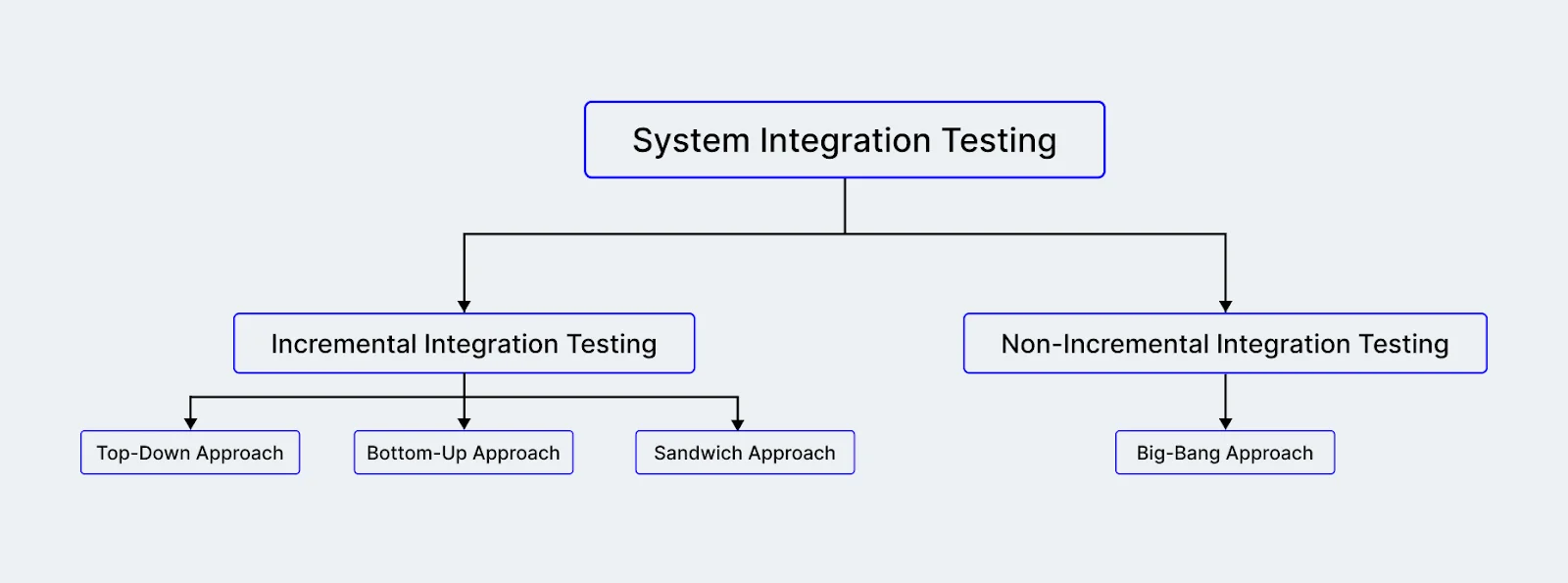
Let us understand each of these approaches in more detail so that you can choose the technique that works best for you and your teams.
Incremental Integration Testing
The incremental approach involves systematically adding modules individually or as per the requirement while maintaining a logical relationship between them. Considering the dependencies between modules, the process is crucial since this testing approach ensures seamless data flow between these modules.
Typically, two or more modules are incorporated and tested to verify the seamless functioning of their respective features. This testing process continues iteratively until all modules within the system have been successfully tested.
For example, consider a social media application like "SocialConnect". First, the login module is integrated and tested for secure user authentication. Subsequently, the timeline, post-creation, and chat are incrementally added and tested to guarantee smooth and independent functionality. The testing process concludes with the logout module, ensuring users can securely log out of their SocialConnect accounts. This incremental approach allows for identifying and resolving issues at each stage, contributing to the overall robustness and reliability of the social media application.
Top-Down Approach
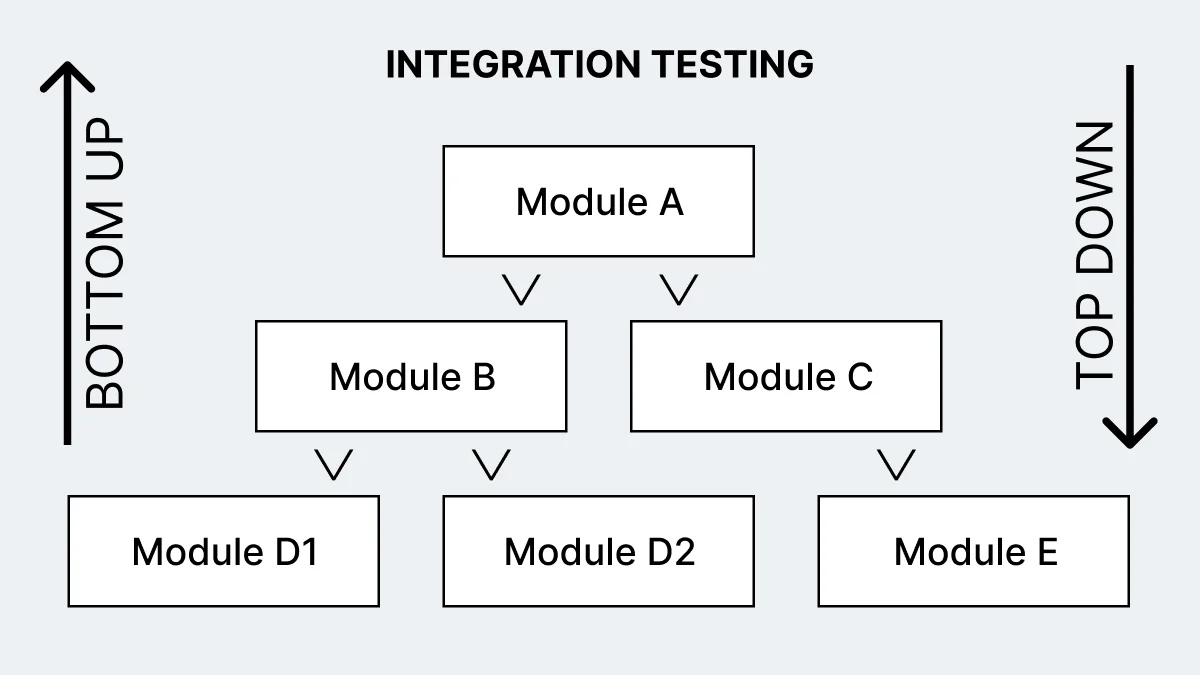
Under this approach, the testing starts with just the topmost module or component of an application. The functionality of the underlying modules is performed using stubs. Once each test is complete, the real module replaces the stub. The modules can be integrated either in a breadth-first or depth-first manner. Testing will continue until the application is complete.
The major challenge in this approach is the direct dependency on the availability of lower-level module functionality. There are delays once stubs replace the real modules, and writing stubs could be challenging when you are working with this approach.
Bottom-Up Approach
This approach helps eliminate the limitations and challenges encountered in the top-down approach. In this method, the lowest-level modules are assembled to create clusters. Each cluster is a sub-function of the application. Then a driver is created to manage the input and output details related to the test case.
After this, you can perform testing of the cluster. Once the cluster is tested, you can remove the driver, and the cluster is combined with the next upper level. This process continues until we have traversed the entire application structure.
There is no need for stubs in this approach. It is a more simplified approach as the processing moves upward and the need for drivers gets reduced. This approach works well for object-oriented, real-time, and systems that follow performance standards. The only limitation of this approach is the UI testing, which is done at last.
Sandwich Approach / Hybrid Approach
The top-down and bottom-up approaches discussed in the previous sections are combined here. The system is categorized into three different layers - the middle layer is the target layer, one is above the target, and another is below the target.
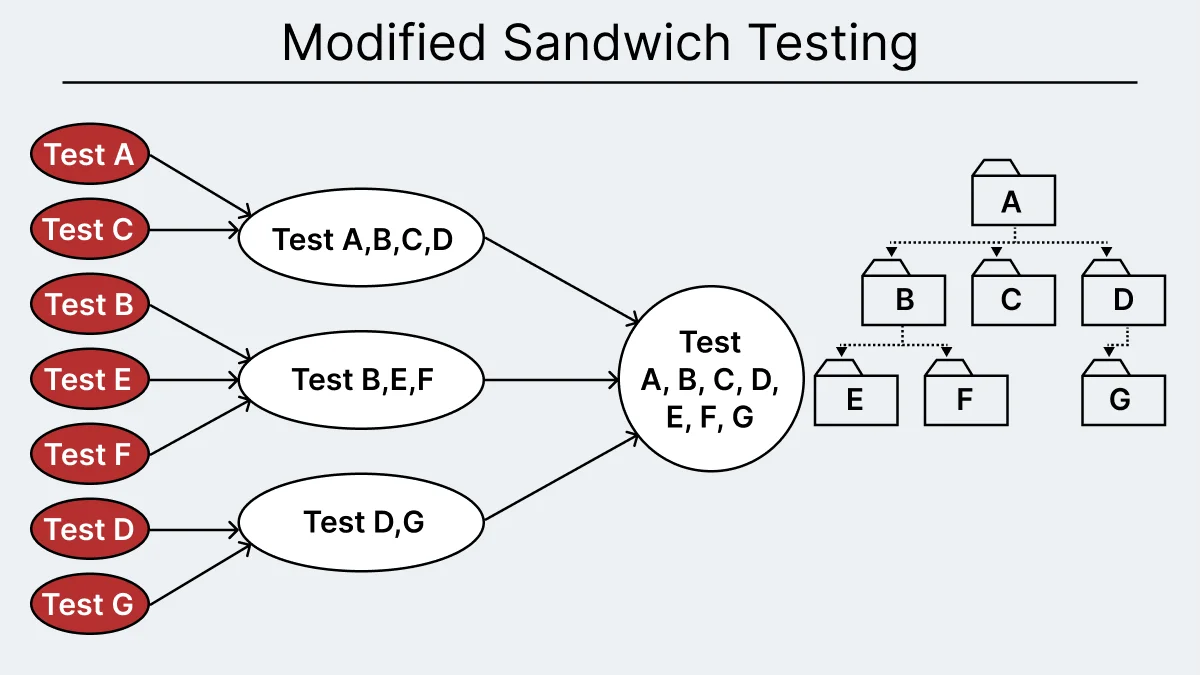
Testing is performed in both directions and is grouped in the middle layer. The top and bottom layers can be tested in parallel. However, there is also a limitation where you can thoroughly test the individual subsystems before integration.
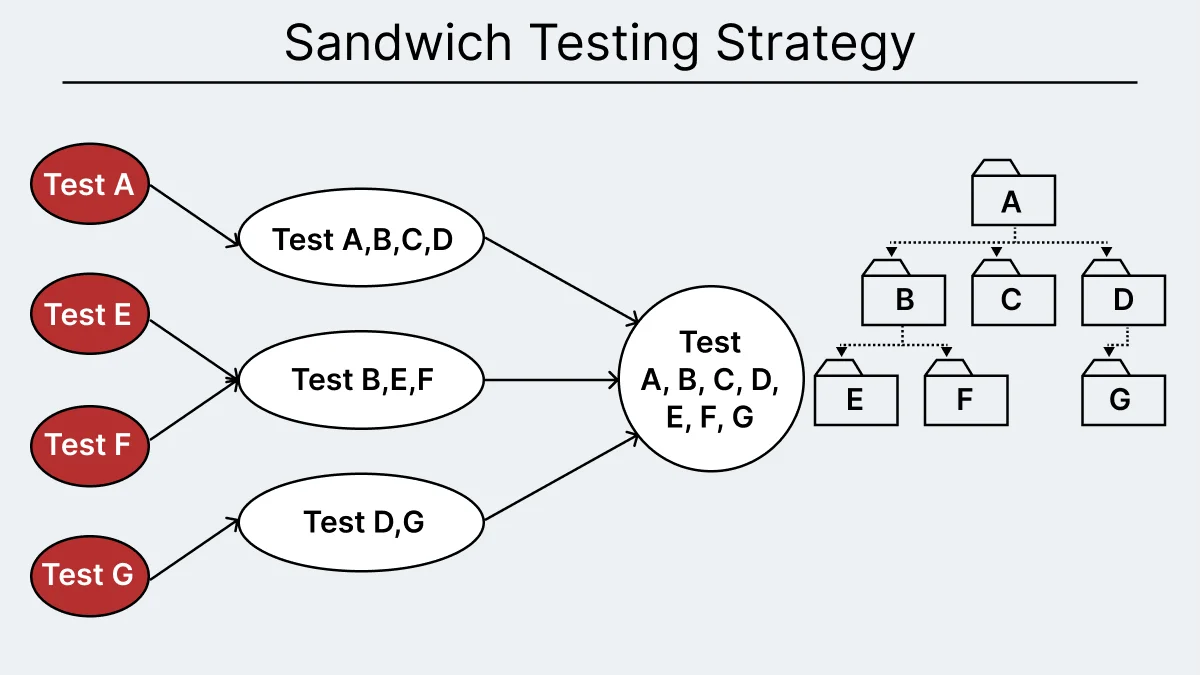
To overcome this limitation, we have modified sandwich testing so that you can test the top, middle, and bottom layers in parallel using stubs and drivers.
Non-Incremental Integration Testing
Non-incremental integration testing is a method in which we integrate and test all the units or modules simultaneously after they have been individually tested and verified. In this approach, we can test the system comprehensively, prevent redundant testing, and save time and resources.
Non-Incremental Integration Testing is often used when incremental testing is not feasible, e.g. when the system is small or when the components are tightly coupled. However, this approach is time-consuming and may make it challenging to find the root cause of problems that arise during testing. Therefore, it is important to carefully plan and execute Non-Incremental Integration Testing to ensure that it is effective and efficient.
For example, consider a non-incremental integration testing approach in the case of a social media platform where individual modules for features like user authentication, post creation, and notifications are independently developed. After all the components are finalized, the testing is done.
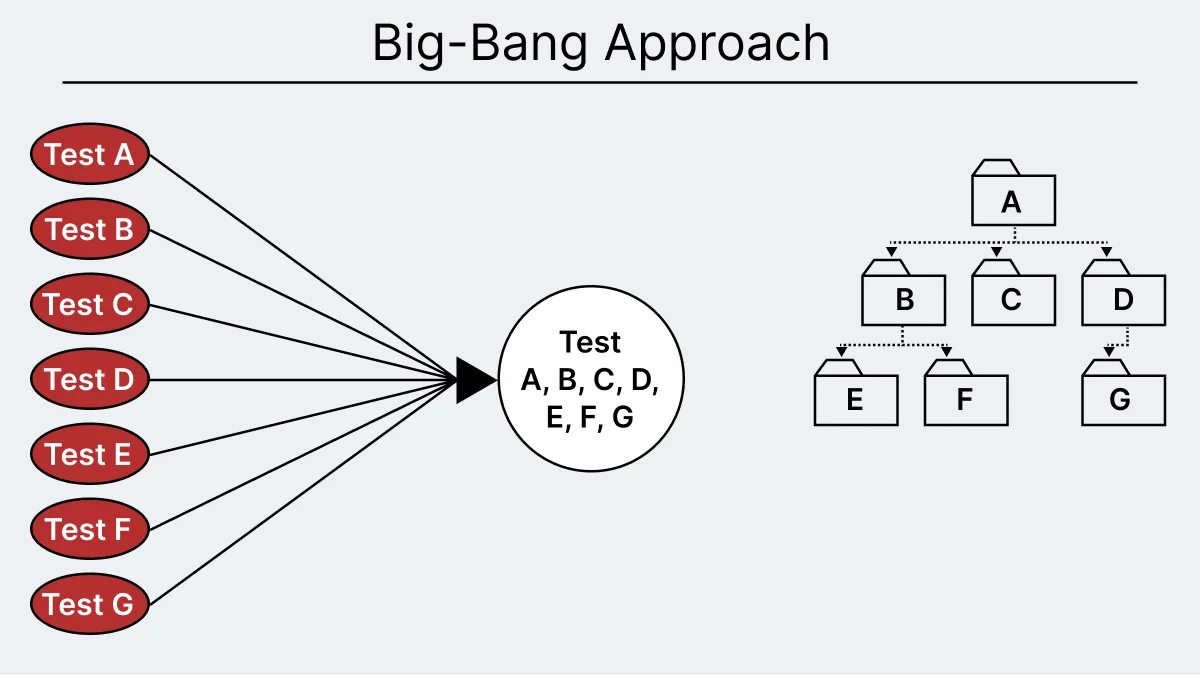
Big Bang Approach
In this approach, integration is done to make sure that the required modules related to the application are ready. Once the integration is completed, you can perform testing to check if the integrated systems are working.
Root Cause Analysis with this approach can be challenging when all the systems are closely integrated. This approach is useful when performing one round of system integration testing.
What Are the Common Challenges in System Integration Testing and How Do You Overcome Them?
SIT fails in ways unit testing never does, because the thing under test is not code you own end to end. These problems account for most of the lost time, and each has a known counter.
- Environment instability is the most common. SIT needs several subsystems up at once, and a run fails whenever any one of them is mid-deploy or misconfigured, which produces failures that look like defects and are not. Counter it by version-pinning every dependency in the test environment and running a health check on each subsystem before the suite starts, so an unavailable dependency reports as a blocked run rather than a false failure.
- Test data synchronization across multiple databases is the subtlest. When each subsystem owns its own store, a customer record in the CRM database must correspond to the same record in billing, or a passing test proves nothing. Counter it by seeding from a single source of truth and resetting state between runs rather than letting suites inherit whatever the last run left behind. How hard that mapping is often comes down to ERP configuration vs customization decisions made upstream, since custom fields and objects are what stop a record in one system from matching its counterpart in another.
- Third-party API rate limits and downtime break runs for reasons unrelated to your code. A suite that calls a live payment gateway on every execution will eventually hit a rate limit, and the sandbox of the vendor has its own outages. Counter it with service virtualization, simulating the responses of the external service so the suite tests your integration logic rather than the uptime of the vendor.
- Maintaining stubs and mocks for incomplete subsystems carries a hidden cost. Stubs stand in for components that are not built yet, and every one is code that must be kept in sync with the real contract. A stub that drifts from the real API gives you passing tests and a broken integration, which is worse than no test. Counter it by generating stubs from the same contract definition the real service publishes, so drift surfaces as a build failure.
- Starting too early or integrating everything at once hides the cause of a failure. If SIT starts before each system passes its own tests, internal bugs mask interface failures, and a big bang integration of many systems leaves too many candidate interfaces for any one failure. Counter it by enforcing the entry criteria and integrating incrementally on larger programmes.
- Suites that cover only the happy path miss the failures SIT exists to find. Interfaces break on malformed payloads, empty responses, timeouts and a downstream system that is down. Counter it with negative testing at every boundary, so each interface is checked with invalid and missing data as well as valid data.
- Dynamic values make SIT assertions flaky. Timestamps, generated IDs and session tokens differ on every run, so an assertion that compares whole payloads fails intermittently. Counter it by masking or normalizing those fields before comparison and asserting on the values that should stay stable.
- Execution time grows with every integration. SIT suites are long-running by nature because each test exercises several systems, and a suite that takes hours stops gating merges and starts getting skipped. Counter it by distributing the suite rather than accepting serial execution.
- Old paths break as new integrations land. Every connection you add can break one that worked yesterday, and the failure usually surfaces in production rather than in the suite that never covered it. Counter it by running regression testing on every integration instead of once at the end of the cycle.
- Systems that pass functionally still buckle under load, because SIT typically runs against a handful of test records while production carries millions. Counter it by folding performance testing into the SIT strategy, so bottlenecks at the seams surface while there is still time to fix them.
Distributing a long suite is where orchestration helps. TestMu AI's HyperExecute splits one suite into parallel tasks from a single hyperexecute.yaml file and runs suites up to 70% faster than traditional grids. The 70% figure is a ceiling rather than a guarantee, so measure it against your own suite.
Who Performs SIT Testing on a Project?
SIT testing is a collaboration rather than one team's job, because no single role can see every interface. Four roles share it:
- QA engineers own execution. They track the functionality updates and upgrade changes, so they design the integration tests and run them once the development team gives the go-ahead.
- Developers validate the code requirements, peer-review each other's work, and write the automated scripts. Pull them in on the technically complicated workflows, which are the ones most often under-tested.
- Product owners and business analysts shape the high-level scenarios and review end-to-end cases, since they sit closest to the users and know what the process is meant to achieve.
- Release engineers wire the tests into the continuous integration pipeline, where the whole team sees the results.
In Agile and DevOps teams the boundaries blur, and anyone can write and execute end to end testing. That shift has a name: organizations increasingly treat this as quality engineering rather than quality assurance, which makes software quality a shared responsibility instead of a gate one team guards. The exact split still depends on your organization's goals.
What Skills Does a SIT Tester Need?
Organizations are always looking to hire great system integration test specialists to manage complex testing requirements. The professionals can either work in a big team of testers or as individual contributors based on the project requirements. It is always great to have professionals who have previously encountered and handled testing challenges.
Some key skills required for this profile include:
- Configuring test environments that include data integration platforms.
- Monitor and test different systems and components.
- Curious to learn and implement different real-world concepts.
- Ability to implement and execute test suites.
- Experience with any programming language such as Python, Java, etc.
- Strong technical and communication skills for effective stakeholder management.
Which Tools Are Used for System Integration Testing?
SIT tools fall into a few jobs: frameworks that drive the tests, API and message testing tools that check payloads between systems, service virtualization tools that stand in for unavailable systems, and orchestration platforms that run long suites in parallel. For a wider comparison, see this list of integration testing tools.
Following are the test tools to create integration test suites.
VectorCAST/C++
The Vector Software VectorCAST tool is popular for performing unit and integration testing requirements. Each module or component is tested independently to ensure the components work fine without any dependencies.
During the integration testing, the components are combined and verified to ensure that all the integrated modules work as a potent combination. This test solution is widely used in financial industries, medical devices, and railways.
The key features of VectorCAST/C++ are as follows:
- Compatible with C++11, C++14, and C++17.
- Supports a wide variety of processor architectures, simulators, and compilers.
- Eliminates the need for manually creating test drivers and stubs.
- Regression testing is automated.
- Compatible with Linux and Windows platforms.
- Provides integrated code coverage capabilities, including MC/DC (Modified Condition/Decision Coverage)
Citrus
Citrus is a widely used test framework written in Java. It helps in automated integration testing of message-based applications and data formats. The validation of JSON, XML, and plain text messaging requests and responses can be performed. In this case, Citrus works on both the client and server-side and helps to simulate the request and response messages.
The key features of Citrus are as follows:
- Provides a flexible test configuration that allows testers to configure tests using Java, XML, or Groovy.
- Integrates with various CI tools like Bamboo and Jenkins, facilitating easy integration of tests into a pipeline for continuous delivery.
- Designed to test messaging systems which makes it an excellent tool for testing message-based APIs and web services.
- Supports BDD (Behavior Driven Development) testing.
- Offers a wide range of features for verifying communications sent and received across systems during integration testing.
Smart Integration Test Accelerator (SITA)
Organizations around the globe are now moving to business-oriented architecture. The traditional integration testing approach requires considerable effort when creating test data.
Wipro's SITA helps you to overcome such limitations. This tool helps accelerate the generation of test data and test design. This is a cost-effective approach as you can reuse test data and test cases.
The key features of SITA are as follows:
- Automate several tasks related to test design.
- Integrates with other tools such as IBM Rational, HP ALM, etc.
- Supports test cases and data reusability.
- Process flow for integration testing is simplified, and time spent is reduced.
You can choose the required tooling options available in the market based on different factors that include:
- Project requirements
- Ease of use
- Cost of the license
- Language support
For the user-interface layer of a SIT flow, automated testing tools drive the browser and app steps. TestMu AI is an AI-native test orchestration and execution platform that runs manual and automated tests across 3,000+ browser and OS combinations, plus 50,000+ real devices.
TestMu AI offers automated browser testing and automated app testing using different automated testing tools like Selenium, Cypress, Playwright, Appium, Espresso, XCUITest, and more.

You can also subscribe to the TestMu AI YouTube Channel and stay updated with the latest tutorials and updates on Selenium automation testing, Playwright automation testing, and more.

Cross-System SIT Flows You Can Run on TestMu AI
A SIT failure sits at a boundary, so the teams on each side need a record of what happened at the seam, in order. Kane CLI takes a cross-system journey as a natural language objective and drives a real Chrome browser through it. It is limited to actions a real user could perform, so it cannot inject JavaScript to skip a broken handoff and report a pass.
kane-cli run "create an order in the storefront, confirm it appears in the admin console, \
assert the status reads Awaiting Fulfilment in both" --url https://your-staging-host
Each run produces an evidence pack with per-step screenshots, a HAR network log and console output, and every pass is tied to the acceptance criterion it proves. For a defect between two teams, the pack gives both sides the same timeline. For SIT sign-off, it turns the exit criteria above into a list of integration requirements with evidence behind each one.

Note: Describe a cross-system journey in natural language and get back per-step screenshots and network logs you can reopen during SIT sign-off. Read the Kane CLI docs
How Is AI Changing System Integration Testing?
AI is changing system integration testing by generating interface tests from API specifications, creating realistic cross-system test data, and tracing which subsystem caused a failed end-to-end flow.
AI features are also new integration points. When a system calls a language model or an AI agent, SIT has to cover non-deterministic responses, rate limits, timeouts, and model version changes, not just fixed request and response formats. AI app testing can validate the UI flow, the API calls, and the database state around an AI feature in one test run.
Keep contract tests between subsystems as the stable base, and add AI-assisted checks on top. Solid api testing at each boundary makes AI-driven SIT failures much easier to diagnose.
References for the SIT Definitions in This Guide
- ISTQB Glossary, integration testing: "A test level that focuses on interactions between components or systems."
- ISTQB Glossary, component integration testing: "The integration testing of components."
- Pete Houser, Northrop Grumman, Best Practices for Systems Integration (November 2011), the conference paper the Wikipedia SIT article cites.
Where Should You Start With System Integration Testing?
Before writing a single SIT testing case, draw the interfaces. List every boundary where one subsystem hands data to another, and mark which of those handoffs would cost you most if it silently passed the wrong payload. That list, not a tool choice, is your SIT scope, and most teams find it is shorter and more specific than they expected.
From there, work in the order the failures actually arrive: pin the test bed so runs fail for real reasons, seed test data from one source of truth, virtualize the third-party services you do not control, and only then widen coverage. Keep SIT ahead of UAT, so business users spend their sign-off time on business questions rather than on integration defects.
When the suite grows long enough to stop gating merges, distribute it rather than deleting tests. The HyperExecute getting started guide covers the YAML and CLI setup, and the cross browser testing part of the suite can run across the 3,000+ browser and OS combinations on TestMu AI.
Author

Hari Sapna Nair
Blogs: 8


Hari Sapna Nair is a Community Contributor with experience spanning software development, technical writing, and open-source collaboration. A former Technical Content Writer at TestMu AI, she has authored guides and tutorials on Selenium, testing, microservices, and emerging technologies. Sapna has contributed 60+ technical blogs for platforms like Coding Ninjas and has been an active open-source contributor in programs such as GirlScript Summer of Code and HakinCodes, securing top contributor ranks. A GHC Scholar and an engineer turned management student at IIM Indore.
Reviewer

Harish Rajora
Reviewer
Harish Rajora is a software developer at TestMu AI with over 6 years of hands-on experience in Python and cross-platform application development across Windows, macOS, and Linux. He has authored 800+ technical articles and worked on large-scale projects, including GenAI applications and core engineering features used by millions. Harish has led DevOps initiatives building CI/CD pipelines with Jenkins, AWS, GitLab, and GitHub, and holds an M.Tech in Software Engineering from IIIT Allahabad.


System Integration Testing FAQs
Did you find this page helpful?
More Related Learning Hubs

TestMu AI forEnterprise
Get access to solutions built on Enterprise
grade security, privacy, & compliance
- Advanced access controls
- Advanced data retention rules
- Advanced Local Testing
- Premium Support options
- Early access to beta features
- Private Slack Channel
- Unlimited Manual Accessibility DevTools Tests