
Power Your Software Testing with AI Agents and Cloud
The Native AI-Agentic Cloud Platform to Supercharge Quality Engineering. Test Intelligently and Ship Faster.


- TestMu AI (Formerly LambdaTest)
- /
- Learning Hub
- /
- What Is a Test Script? Types, Examples, and How to Write One
What Is a Test Script? Types, Examples, and How to Write One
A test script lists every action, input, and expected result for a test. See test script types, Selenium and Playwright examples, and how to write one.
Last Updated on:
A test script is a line-by-line set of actions, inputs, and expected results that proves one behavior of an application works. Written properly, it gives anyone on the team, or a machine, the same result on every environment and at every stage of the software development life cycle.
TL;DR
A test script is a line-by-line list of the actions, inputs, and expected results that prove one behavior of an application works. Manual test scripts are followed by a person; automated test scripts are code that Selenium, Playwright, Cypress, or Appium runs on every build. Both sit one level below the test case they implement.
- Test script vs test case: A test case states what to verify and the expected outcome. A test script lists every step and input needed to get there, with an expected result per step, so a person new to the product can run it.
- Manual test script: A numbered procedure a tester follows by hand, with test data and an expected result on each step. Requires coding: no.
- Automated test script: An automated test script is the same procedure written as code and run unattended in CI, in parallel across browsers, unless a tool such as KaneAI generates the code for you. Requires coding: yes.
- Record and playback: A recording tool captures a tester's clicks and typing and generates the script, which needs code edits later to add waits and stable locators. Requires coding: no.
- Keyword-driven scripting: Testers assemble tests from predefined keywords such as open, click, and verify, while developers maintain the code behind each keyword. Requires coding: no.
- Test script template: A fixed set of fields, ID, objective, preconditions, test data, steps, expected result, actual result, and pass or fail, that keeps every script in a team readable the same way.
- Maintenance cost: Scripts cost the most when the interface under them keeps changing. Stable locators, page objects, and explicit waits are what keep a suite green between releases.
- AI-generated scripts: TestMu AI's KaneAI writes the steps from a plain-English description, self-heals them when the UI changes, and exports them to Selenium, Playwright, Cypress, or Appium code.
What Is a Test Script in Software Testing?
A test script in software testing is a line-by-line description of what to do, what to enter, and what should happen as a result. It is the level below a test case: the case says which behavior is being checked, and the script says exactly which steps prove it. That precision is what makes the same check repeatable by a different person next quarter, or by a machine every night.
Most scripts start life as the steps under a test case. A manual test script keeps those steps as a numbered procedure for a person to follow. An automated test script turns them into code, usually Java, Python, JavaScript, or TypeScript, that a framework such as Selenium, Playwright, Cypress, or Appium drives against the application; our guide to automation scripts covers that second form in depth.
The same script can run many times with different data, which is why a login script is written once and fed valid, invalid, and expired credentials rather than copied three times. Writing scripts in that reusable form is the single habit that keeps a suite maintainable as it grows.
Why Use Test Scripts?
Test scripts make a check repeatable, measurable, and transferable: the same steps produce the same verdict whoever or whatever runs them, which is what software testing needs before a result can be trusted.
- Repeatability - every run executes the same steps with the same data, so a pass or fail reflects the application, not the tester's memory of the procedure.
- Evidence - each step carries an expected result, so a failure points at the exact step that broke, and the run log doubles as an audit trail for regulated releases.
- Regression at scale - once automated, a script costs nearly nothing per extra run, which makes regression testing on every build practical instead of a release-week event.
- Data coverage - one script can take many data sets, so data-driven testing covers boundary values and invalid inputs without new steps.
- Handover - a new tester, a contractor, or an AI agent can execute a scripted check on day one, because the judgment about what to do and what to expect has already been written down.
Scripts pay off least where the interface still changes every sprint, because every redesign rewrites the steps. The comparison table further down puts a number of that trade-off against test cases and scenarios.
How Do You Write a Test Script?
To write a test script, start from a test case, fix the preconditions and test data, write each step as one action with its expected result, add an assertion that fails when the behavior breaks, run it by hand once, and only then automate it and commit it to version control.
- Pick the test case - one script proves one behavior. If the case covers login and checkout, split it; a failure in a combined script no longer says which part broke.
- State preconditions and test data - the user, the environment, the build, and the exact values to enter. "A valid card" belongs in a case; "Visa ending 4242, expiry 12/30" belongs in a script.
- Write steps as action plus expected result - every step says what to do and what should be visible afterwards, so the person running it knows at which step it failed.
- Choose stable locators - for automated steps, anchor to test IDs or labels rather than generated class names or positions, and reuse them from one place such as a page object.
- Add the assertion - decide the one check that would fail if the feature broke, and write it with a failure message a teammate can act on without re-running the test.
- Run it by hand first - a manual pass catches a wrong expected result or a missing precondition before you spend time automating it.
- Automate, commit, and schedule - turn the steps into code, put the script in version control beside the application, and run it in CI on every build.
The worked examples below apply exactly these steps to a live page. For a framework-specific walkthrough, see how to write test scripts in Selenium, or start from your first automation script in 20 minutes.
Three Ways to Produce the Automated Version
| Approach | How it works | Requires coding | Best for |
|---|---|---|---|
| Record and playback | A tool records clicks and typing and generates the script. The generated code needs editing later to add waits and stable locators. | No, to start | A first script, demos, and teams without a developer on the testing side |
| Keyword or data-driven scripting | Testers assemble tests from predefined keywords such as open, click, and verify, while developers maintain the code behind each keyword. | No, for testers | Large teams that separate test design from framework code |
| Writing code in a programming language | Testers write the script directly in Java, Python, JavaScript, or TypeScript with a framework such as Selenium or Playwright. | Yes | Complex flows, API and database steps, and suites that live in the application repository |
The language does not have to match the application. A Java backend can be tested with a TypeScript Playwright suite; pick the language your team will still maintain next year.

Note: Write one script against the Selenium Playground, then run it on TestMu AI across 3,000+ browser and OS combinations without changing a step. Start testing free
What Are the Types of Test Scripts?
Test scripts are either manual or automated, and automated scripts are further grouped by the level of testing they cover, from unit scripts a developer runs locally to end-to-end scripts that drive a whole user journey.
Manual Test Scripts
A manual test script is a numbered procedure a tester follows by hand, with test data and an expected result on each step. It suits usability testing, exploratory sessions that start from a script, and checks that depend on visual judgment; manual testing still finds the defects that only a person notices.
Automated Test Scripts
An automated test script is the same procedure as code, run by automation testing tools that drive the browser or app, read the result, and assert on it. Within automated scripts, the common subtypes follow the level of testing:
- Unit testing scripts - check one function or class in isolation, usually written by the developer alongside the code; see unit testing.
- Integration testing scripts - verify that two or more components exchange data correctly; see integration testing.
- Functional testing scripts - confirm a feature behaves as its requirement says; see functional testing.
- Regression testing scripts - re-run existing checks after a change to confirm nothing that worked has broken.
- Performance testing scripts - drive load and measure response times under it; see performance testing.
- End-to-end testing scripts - walk a complete user journey across the UI, API, and data; see end-to-end testing.
- Smoke testing scripts - a short set run after every build to confirm the application is testable at all; see smoke testing.
- Security testing scripts - probe authentication, input handling, and access control for known weaknesses.
How Do a Test Script, Test Case, and Test Scenario Differ?
These three terms describe the same testing work at three levels of detail. A test scenario names what to verify. A test case defines the conditions and the expected outcome. A test script spells out every action and every piece of data needed to get there. Detail increases from scenario to script, and the tester experience required decreases in the same direction.
One distinction is worth correcting up front, because it is repeated often: a test script is not automatically an automated test. A manual test script is a line-by-line procedure a human follows, and it is the most detailed manual artifact a QA team produces. What makes a script a script is the level of instruction, not whether a machine runs it.
| Aspect | Test Scenario | Test Case | Test Script |
|---|---|---|---|
| What it captures | A user objective worth verifying. | A specific condition and the outcome it should produce. | Every action and every input needed to execute the check. |
| Level of detail | Lowest. One line is often enough. | Moderate. Preconditions, inputs, expected result. | Highest. Step-by-step, with expected results per step. |
| Example | Verify that a customer can pay with a saved card. | With a valid saved card selected, placing the order shows the confirmation page and an order number. | 1. Open /cart. 2. Click Checkout. 3. Select the saved card ending 4242. 4. Click Place Order. 5. Assert the page contains Order Confirmed. |
| Tester experience needed | High. The tester decides how to approach it. | Moderate. The tester supplies the steps. | Low. The steps are already written down. |
| Manual or automated | Usually manual and exploratory. | Either. | Either. A manual script is followed by a person; an automated script is code. |
| Time to author | Minutes. | Longer, because the expected result has to be pinned down. | Longest, and the cost repeats every time the interface changes. |
| Maintenance cost | Near zero. It rarely goes stale. | Low. It only changes when behavior changes. | Highest. Renamed elements and layout changes break steps and selectors. |
| Best used when | Coverage planning and exploratory work. | The team knows the product and needs a repeatable check. | The check is repetitive, regulated, or handed to someone new to the product. |
The maintenance row is the one that decides most team debates. Scripts pay off when the same check runs many times without change, and they cost the most when the interface underneath them is still moving. Scripting a screen that is redesigned every sprint means rewriting the script every sprint.
What Is a Test Script Template?
A test script template is a fixed set of fields, an ID, objective, preconditions, test data, numbered steps with expected results, actual result, and a pass or fail verdict, that every script in a team fills in the same way. It is the test case template one level down: the same header, plus a row per step.
| Field | What it holds | Simple Form Demo example |
|---|---|---|
| Script ID and name | A unique identifier and a name that says what is verified. | TS-014, Submitted message is echoed back. |
| Objective | The behavior the script proves, in one sentence. | The message typed into the form is displayed below it after clicking the button. |
| Preconditions | The state required before step 1. | Current Chrome or Firefox; the demo page reachable; no message already entered. |
| Test data | The exact values entered during the run. | Message: Welcome to TestMu AI. |
| Steps with expected results | One action per row and what should be visible after it. | Steps 1 to 5 in the manual example below. |
| Test environment | Browser, OS, device, build, and URL under test, as described in test environment. | Windows 11, Chrome latest, the Simple Form Demo URL. |
| Actual result and verdict | What happened, pass or fail, and the defect ID if it failed. | Pass, or the bug reference when the echoed text differs. |
| Notes | Anything the next runner needs: known issues, data cleanup, a link to the test case. | The id user-message is reused by wrapper elements; qualify it by tag in automated versions. |
Keep the template in the same tool as the test cases so each script links back to the case it implements. The downloadable test case template uses the same header fields, so a case can be expanded into a script without retyping them.
Which Test Scripting Tools Can You Use?
The test scripting tools most teams use are Selenium, Playwright, Cypress, and Appium for writing automated scripts, WebdriverIO where a JavaScript team wants one runner for web and mobile, and a cloud grid such as TestMu AI for running the same scripts across browsers and devices.
| Tool | Languages | Best for | npm downloads, Oct 6 to 12, 2026 |
|---|---|---|---|
| Selenium | Java, Python, C#, JavaScript, Ruby | Cross-browser scripts in the language your backend team already writes. | 1,807,038 (selenium-webdriver) |
| Playwright | TypeScript, JavaScript, Python, Java, C# | Auto-waiting assertions and a trace viewer that make flaky scripts rarer. | 76,227,910 (@playwright/test) |
| Cypress | JavaScript, TypeScript | Front-end teams who want time-travel debugging inside the browser. | 5,949,802 (cypress) |
| Appium | Java, Python, JavaScript, C#, Ruby | Native, hybrid, and mobile web app scripts on iOS and Android. | 1,385,295 (appium) |
| WebdriverIO | JavaScript, TypeScript | One runner for web and Appium mobile scripts. | 2,734,329 (webdriverio) |
The download column comes from the npm registry's download API for the week of October 6 to 12, 2026, queried on October 16, 2026. It measures JavaScript package installs only, so it understates Selenium and Appium, whose Java and Python bindings ship through Maven and PyPI.
Each tool drives a local browser by default. To run the same script against the browsers and operating systems your users have, point it at TestMu AI's automation cloud, which provides 3,000+ browser and OS combinations on a grid that scales with the suite and handles test orchestration across Selenium, Playwright, Cypress, and Appium. The script does not change; only the driver configuration does, as the cloud capabilities block in the examples section shows.

The walkthrough below runs an automated test on desktop browsers through the cloud grid, from session configuration to the results view.
Subscribe to the TestMu AI YouTube Channel for more tutorials on Selenium testing and test automation.
Which Test Scripting Frameworks Should You Know?
Common test scripting frameworks are data-driven, keyword-driven, modular, hybrid, and behavior-driven frameworks, each organizing how scripts share code, data, and test steps.
A framework is the structure around the scripts: where test data lives, how steps are reused, and how a locator change is applied once instead of fifty times. The test automation frameworks roundup compares the tools; the styles below describe how any of them is organized, and the types of scripting techniques for automation testing covers the same ground from the technique side.
- Data-driven framework - keeps test data in files or tables separate from the steps, so one script runs against many data sets and a new case is a new row rather than a new script.
- Keyword-driven framework - expresses tests as tables of keywords such as open, enter, click, and verify; testers write the tables and developers maintain the code behind each keyword, as described in keyword-driven testing.
- Behavior-driven development framework - writes scenarios in Gherkin's Given, When, Then form so product and QA share one readable specification; BDD with Selenium and Gherkin and the Cucumber framework show the step definitions underneath.
- Modular and hybrid frameworks - split the application into modules with their own scripts, then combine data-driven and keyword-driven techniques where each fits.
- Page Object Model - a design pattern rather than a framework: each page or component gets a class that owns its locators and actions, so a UI change is one edit; see page object model.
Pick the framework only after requirement analysis. The application type, the team's language, and how often the UI changes decide whether data-driven tables or page objects save more maintenance.
What Is the Test Script Development Process?
The test script development process runs in six phases: requirement analysis, test design and planning, script implementation, test data preparation, execution, and closure. Each phase produces an artifact the next one consumes, which is what keeps a script traceable back to the requirement it covers.
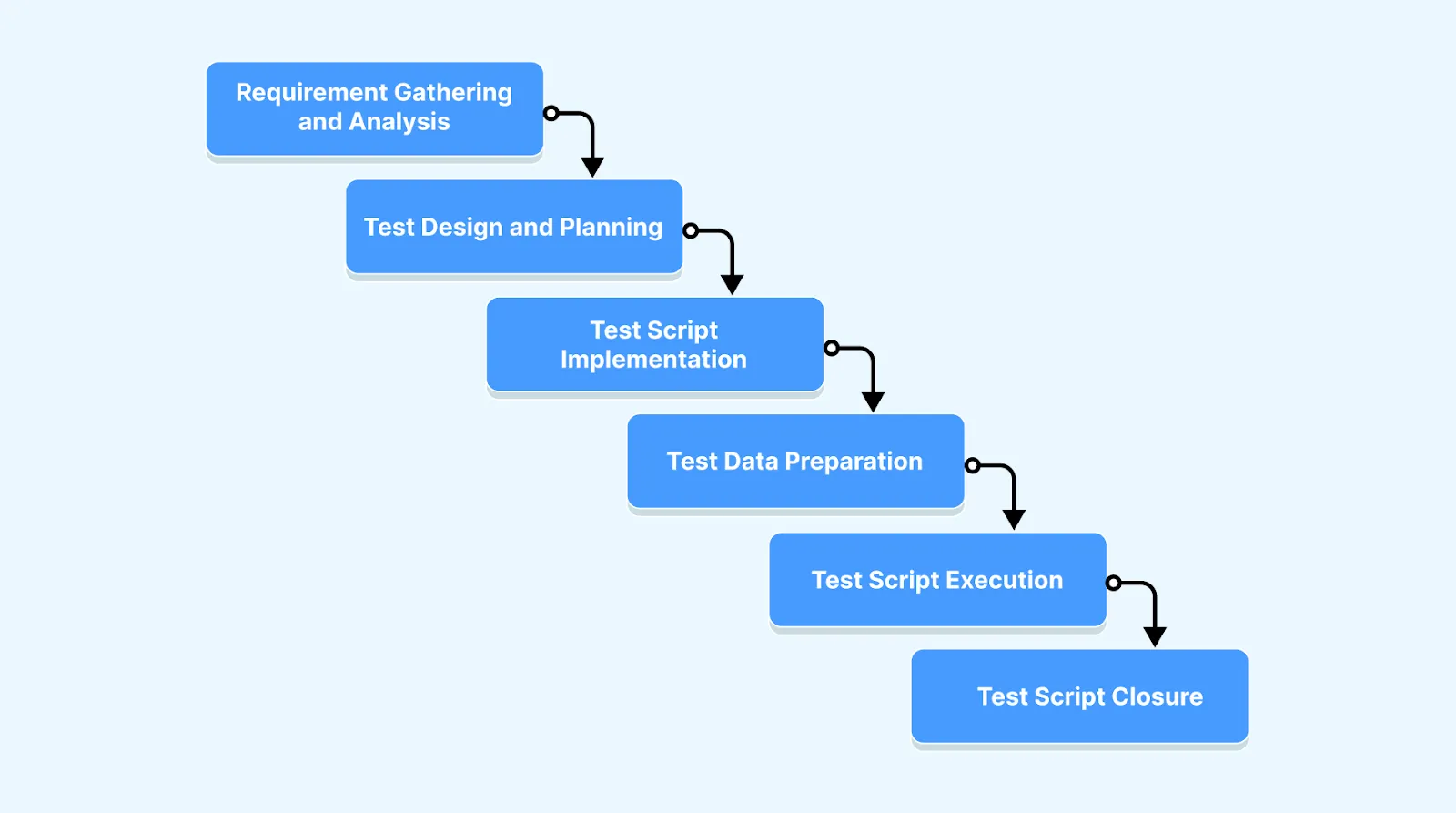
- Requirement gathering and analysis - read the requirement with the product owner and developers and list the testable behaviors, risks, and conditions a script has to cover. The output is a list of candidate test cases.
- Test design and planning - decide scope, approach, and priority in the test strategy and test plan, and write the test cases the scripts will implement, including edge cases.
- Test script implementation - turn each case into steps with expected results, then into code where it will be automated, using the software testing tools and framework the team has standardized on.
- Test data preparation - create the valid, invalid, boundary, and role-specific data each script needs, and the setup that puts the system in its precondition state.
- Test script execution - run the scripts on the agreed environments and configurations, record actual results against expected ones, and log defects with the failing step; test execution covers scheduling and reporting.
- Test script closure - summarize what ran, what passed, what remains open, and which scripts move into the regression suite, so the next release starts from a known set.
Documentation at each phase is what makes the chain traceable: a failing step in phase five should point back to a requirement line from phase one without a meeting.
What Do Test Script Examples Look Like?
All three examples below verify the same behavior on the same page, so you can compare the formats directly. The application under test is the Simple Form Demo on the TestMu AI Selenium Playground: it takes a message, and on clicking the button it displays that message back on the page.
The element IDs used below (user-message for the input, showInput for the button, and message for the output) are the ones live on that page, so each script runs against it directly. Two details in the automated versions are there because the page was actually run against, not read: the id user-message is reused by wrapper elements, so the locator qualifies it by tag, and the form is React-rendered, so the script waits for hydration before typing.
1. Manual test script
A manual test script is a numbered procedure with an expected result on every step. The per-step expected result is what separates a script from a test case: a tester who has never seen the product can execute this and know at exactly which step it failed.
| Step | Action | Test data | Expected result |
|---|---|---|---|
| 1 | Open the Simple Form Demo page. | URL of the page under test | The page loads and the Enter Message field is visible and empty. |
| 2 | Click the Enter Message field and type the message. | Welcome to TestMu AI | The typed text appears in the field exactly as entered. |
| 3 | Click the Get Checked Value button. | None | The button responds to the click and the page does not navigate away. |
| 4 | Read the text below Your Message. | None | It reads Welcome to TestMu AI, matching step 2 character for character. |
| 5 | Reload the page. | None | The message area is empty again and the field is cleared. |
Note what step 5 does. It verifies that the result was not persisted, which is a check most people leave out because it confirms an absence rather than a presence. Scripts that only assert on things appearing miss defects where state is retained when it should not be.
2. Automated test script in Selenium with Java
The same four steps as code. The structure maps one to one onto the manual script: navigate, enter data, act, assert. The explicit wait before the assertion is the part that most first attempts omit, and it is the most common source of a script that passes locally and fails in CI.
import org.openqa.selenium.By;
import org.openqa.selenium.WebDriver;
import org.openqa.selenium.chrome.ChromeDriver;
import org.openqa.selenium.support.ui.ExpectedConditions;
import org.openqa.selenium.support.ui.WebDriverWait;
import org.testng.Assert;
import org.testng.annotations.AfterClass;
import org.testng.annotations.BeforeClass;
import org.testng.annotations.Test;

import java.time.Duration;

public class SimpleFormDemoTest {

    private WebDriver driver;
    private WebDriverWait wait;

    @BeforeClass
    public void setUp() {
        driver = new ChromeDriver();
        wait = new WebDriverWait(driver, Duration.ofSeconds(10));
        driver.manage().window().maximize();
    }

    @Test
    public void shouldDisplayTheSubmittedMessage() {
        // Step 1: navigate to the application under test
        driver.get("https://www.testmuai.com/selenium-playground/simple-form-demo/");

        // Step 2: enter the test data. Wait for the field to be clickable
        // first: the form is React-rendered, and typing before the handler
        // is attached leaves the component state empty.
        String expected = "Welcome to TestMu AI";
        wait.until(ExpectedConditions.elementToBeClickable(
                By.cssSelector("input#user-message"))).sendKeys(expected);

        // Step 3: perform the action under test
        driver.findElement(By.id("showInput")).click();

        // Step 4: wait for the expected state, then assert on it
        wait.until(ExpectedConditions.textToBePresentInElementLocated(
                By.id("message"), expected));
        String actual = driver.findElement(By.id("message")).getText();

        Assert.assertEquals(actual, expected,
                "The displayed message did not match the submitted message.");
    }

    @AfterClass
    public void tearDown() {
        if (driver != null) {
            driver.quit();
        }
    }
}
The assertion carries a failure message. When this script fails at 2am in a pipeline, the message is the only context the person triaging it gets, so writing it is not optional detail.
3. Automated test script in Playwright with TypeScript
The same test again, in a framework with built-in auto-waiting. The explicit wait disappears because expect retries the assertion until it passes or the timeout expires, which removes the single largest source of flakiness in the Selenium version.
import { test, expect } from '@playwright/test';

test('displays the message that was submitted', async ({ page }) => {
  const expected = 'Welcome to TestMu AI';

  // Step 1: navigate to the application under test, then let the page
  // finish hydrating. Filling before the handler is attached writes to
  // the DOM but not to the component state, and the click reads nothing.
  await page.goto('https://www.testmuai.com/selenium-playground/simple-form-demo/');
  await page.waitForLoadState('networkidle');

  // Step 2: enter the test data. The tag qualifier matters: this page also
  // carries wrapper divs with the same id, and a bare #user-message would
  // match three elements and fail Playwright's strict mode.
  await page.locator('input#user-message').fill(expected);

  // Step 3: perform the action under test
  await page.locator('#showInput').click();

  // Step 4: assert. Playwright retries this until it passes or times out,
  // so no explicit wait is needed.
  await expect(page.locator('#message')).toHaveText(expected);
});
Comparing the two, the Playwright script is shorter because the framework absorbs the waiting; it does no less. Both assert the same condition. When choosing between them, the deciding factor is usually the language your team already maintains rather than line count. Running either across the browser and OS combinations the cloud grid offers requires changing only the driver or project configuration, and none of the four steps.
4. The same Selenium script on the TestMu AI cloud grid
None of the four steps change when the script moves to the cloud. Only the driver setup does: replace the local ChromeDriver with a RemoteWebDriver pointed at the grid and pass the browser, OS, and build name as capabilities, as the Selenium 4 getting-started docs describe.
ChromeOptions browserOptions = new ChromeOptions();
browserOptions.setPlatformName("Windows 11");
browserOptions.setBrowserVersion("latest");

HashMap<String, Object> ltOptions = new HashMap<>();
ltOptions.put("build", "Test Script Examples");
ltOptions.put("name", "SimpleFormDemoTest");
ltOptions.put("user", System.getenv("LT_USERNAME"));
ltOptions.put("accessKey", System.getenv("LT_ACCESS_KEY"));
browserOptions.setCapability("LT:Options", ltOptions);

driver = new RemoteWebDriver(
        new URL("https://hub.lambdatest.com/wd/hub"), browserOptions);
With that block in setUp, the same test runs on any browser and OS combination the grid offers, and the credentials stay in environment variables rather than in the script.
How Do You Debug a Failing Test Script?
Debug a failing test script by reading the failure at the step level first: which step failed, what the assertion message says, and whether the element, the timing, the data, or the environment changed. Most failures trace to one of the causes in the table, and each has a different fix.
| Symptom | Likely cause | Fix |
|---|---|---|
| Element not found | A locator tied to generated class names, text, or position changed with the UI. | Anchor to a test ID or label, and keep locators in a page object so the fix is one edit. |
| Passes locally, fails in CI | The script reads the page before it finished loading or rendering. | Replace fixed sleeps with explicit waits on the condition you need, as the Selenium example does before its assertion. |
| Wrong expected value | Test data drifted: an account expired, a price changed, a record was deleted. | Create the data the script needs in a setup step, or reset it in teardown, instead of relying on shared fixtures. |
| Works on one machine only | Environment differences: browser version, locale, screen size, feature flags. | Pin the browser and OS in the run configuration and record them with every result. |
| Fails intermittently with no change | A flaky test: a race, shared state between tests, or network timing. | Quarantine it, make the test independent of others, and fix the race rather than adding retries. |
| Fails on every run after a release | The behavior changed and the script is right to fail, or the assertion was written against the old behavior. | Confirm against the requirement, then update the expected result or file the defect. |
- Read the artifacts before the code - the failure message, screenshot, and video or trace from the run say which step failed; Playwright's trace viewer and Selenium's screenshot on failure are worth enabling by default.
- Reproduce in isolation - run the single script headed on the same browser version. If it passes alone, the cause is order or shared state, not the step.
- Bisect the script - comment out steps from the end until it passes to find the first failing action, then inspect that element in the browser's developer tools.
- Check the inputs - log the test data at the start of the run; many failures turn out to be a changed fixture rather than a changed application.
What Are the Best Practices for Writing a Test Script?
The best practices for writing a test script come down to one behavior per script, stable locators, explicit waits, data kept separate from steps, and a failure message a teammate can act on.
- One behavior per script - a script that checks login and checkout cannot tell you which one broke; split it.
- Descriptive names and messages - name the script after the behavior, and write the assertion message for the person reading a red build at 2am.
- Stable locators - prefer test IDs and accessible labels over CSS paths and generated class names, and keep them in one place.
- Explicit waits, never sleeps - wait for the condition the next step needs; a fixed sleep is either too short in CI or too slow everywhere else.
- Independent scripts - each script creates or selects its own data and leaves no state behind, so order and parallel execution do not matter.
- Data separate from steps - keep inputs in a table or file so a new case is a new row, not a copied script.
- Version control and review - commit scripts beside the application code and review them like code; shift-left testing only works when the scripts move with the feature.
How Is AI Moving Test Scripts to Intent-Based Testing?
AI is moving teams from test scripts to intent-based testing: you state what the test must prove in plain English, and an agent works out the steps at run time.
A test script hard-codes every click, selector, and wait, so a renamed label or a moved field can fail the run even when the feature still works, which is the problem self-healing test automation addresses. An intent-based test describes the outcome instead, such as a user completing checkout and seeing a confirmation, and the agent resolves the elements, performs the actions, and checks the result against evidence on each run.
TestMu AI's KaneAI works this way: you describe the test in natural language, KaneAI writes the steps, re-anchors them when the UI changes instead of failing on a brittle selector, and exports the result to Selenium, Playwright, Cypress, or Appium code when your team wants to own the scripts. The KaneAI code generation docs list the frameworks and languages it exports to.
Write one script by hand before automating the writing. The exercise of choosing preconditions, naming test data, and deciding what the assertion should be is the part that carries the value, and it is also what you need in order to judge whether a generated script is any good.
After that, the authoring step is increasingly worth handing over. Kane CLI takes a plain-English objective, drives real Chrome to complete it, and exports the finished run as native Playwright code. The objective syntax maps directly onto the anatomy above: imperative verbs are the steps, "assert" and "verify" phrases become the expected result, and a "store X as name" clause captures a value for later use.
It also migrates in both directions, importing existing Playwright or Selenium scripts and converting them into intent-driven flows, which matters when a suite already exists and rewriting it is not on the table.
Note: Write the objective the way you would write the test step, run it against real Chrome, and export the passing run as native Playwright code. Read the Kane CLI docs
Where Should You Start With Test Scripts?
Start by writing one test script for your most critical user flow, with clear preconditions, steps, and an explicit assertion, then automate it and run it on every build.
Run that first script through TestMu AI's automation testing platform so it executes on real browsers on every build, and once it is green, let KaneAI draft the next ones from plain English and export them to the same framework; the KaneAI getting-started docs show the first prompt.
Testing web or mobile apps without writing code? KaneAI by TestMu AI turns plain-English instructions into tests.
Author

Nazneen Ahmad
Blogs: 37


Nazneen Ahmad is a freelance Technical Content SEO Writer with over 6 years of experience in crafting high ranking content on software testing, web development, and medical case studies. She has written 60+ technical blogs, including 50+ top-ranking articles focused on software testing and web development. Certified in Automation Basic and Advanced Training - XO 10, she blends subject knowledge with SEO strategies to create user focused, authoritative content. Over time, she has shifted from quick, keyword-heavy drafts to producing content that prioritizes user intent, readability, and topical authority to deliver lasting value.
Reviewer

Harish Rajora
Reviewer
Harish Rajora is a software developer at TestMu AI with over 6 years of hands-on experience in Python and cross-platform application development across Windows, macOS, and Linux. He has authored 800+ technical articles and worked on large-scale projects, including GenAI applications and core engineering features used by millions. Harish has led DevOps initiatives building CI/CD pipelines with Jenkins, AWS, GitLab, and GitHub, and holds an M.Tech in Software Engineering from IIIT Allahabad.


Test Script FAQs
Did you find this page helpful?
More Related Learning Hubs

TestMu AI forEnterprise
Get access to solutions built on Enterprise
grade security, privacy, & compliance
- Advanced access controls
- Advanced data retention rules
- Advanced Local Testing
- Premium Support options
- Early access to beta features
- Private Slack Channel
- Unlimited Manual Accessibility DevTools Tests