

Power Your Software Testing with AI Agents and Cloud
The Native AI-Agentic Cloud Platform to Supercharge Quality Engineering. Test Intelligently and Ship Faster.


- TestMu AI (Formerly LambdaTest)
- /
- Blog
- /
- Software Testing Techniques: Types With Worked Examples
Software Testing Techniques: Types With Worked Examples
Learn the main software testing techniques, with boundary tests run on a real registration form and worked coverage, state, and pairwise examples.
Last Updated on:
In July 2024, one faulty content update crashed Windows machines around the world. CrowdStrike's root cause analysis traced the crash to a count mismatch: the sensor expected 20 input fields, and the update supplied 21.
Microsoft estimated that the update affected 8.5 million Windows devices.
Boundary value analysis, one of many software testing techniques, is built to test a value one step past a limit. Software testing techniques are systematic methods for choosing test cases, and the ISTQB Foundation Level syllabus groups them into black-box, white-box, and experience-based techniques.
The partitioning, boundary, and decision table examples below use one real form, the registration page of TestMu AI's ecommerce playground, and a cloud run of its boundary and partition tests found a password rule the server does not enforce as written.
Overview
Software testing techniques are structured ways to derive test cases. Black-box techniques work from requirements, white-box techniques from code structure, and experience-based techniques from tester knowledge, while static techniques such as reviews and static analysis find defects before any code runs.
Technique Families at a Glance
- Black-box techniques: Derive test cases from requirements and input rules without reading the code. Boundary value analysis, for example, tests each limit and its nearest outside neighbor, such as lengths 0, 1, 32, and 33 for a field that accepts 1 to 32 characters. Code access required: no.
- White-box techniques: Derive test cases from the code's structure and measure coverage as items exercised divided by total items, times 100. Decision coverage, for example, counts the true and false outcomes of every decision. Code access required: yes.
- Experience-based techniques: Error guessing, exploratory testing, and checklist-based testing apply tester knowledge of likely mistakes that written requirements rarely mention, such as stray whitespace in a name or a form submitted twice. Code access required: no.
- Static techniques: Reviews and static analysis find defects such as ambiguous requirements, unreachable code, and coding standard violations without executing anything. Code execution required: no.
Running Technique-Derived Tests at Scale
Partition and boundary tables translate into data-driven scripts, with one row per test case. TestMu AI's Automation Cloud runs technique-derived Playwright, Selenium, or Cypress scripts across 3,000+ browser and OS combinations.
What Are Software Testing Techniques?
In the words of the ISTQB syllabus, test techniques "support the tester in test analysis (what to test) and in test design (how to test)." A technique turns a requirement or a piece of code into a small set of test cases with a stated coverage target, such as one test per partition or both outcomes of every decision.
Each of these related terms answers a different question:
| Term | Question it answers | Examples |
|---|---|---|
| Test technique | How do you choose the test cases? | Boundary value analysis, branch testing, error guessing |
| Test type | Which quality characteristic are you checking? | Functional, performance, security, usability |
| Test level | Which stage of integration is under test? | Unit, integration, system, acceptance |
| Test methodology | How is testing organized within the development process? | Agile testing, V-model, shift-left |
| Test strategy | What gets tested, how deeply, and in what order? | Risk-based, requirements-based |
For the other axes, see the guides to types of software testing, testing methodologies, and software testing strategies. A technique works at any level: boundary value analysis applies to a unit test of one validation function and to an acceptance test of a whole signup form.
The first of the seven principles of software testing explains why the choice matters: testing shows the presence of defects, not their absence, so the cases you pick decide which defects you can find. Dynamic testing runs the software, and the static techniques in the next section examine it without running it.
The Manual Testing certification covers test design techniques such as boundary value analysis and equivalence partitioning, along with the SDLC, the STLC, and the defect lifecycle.
Static Testing Techniques
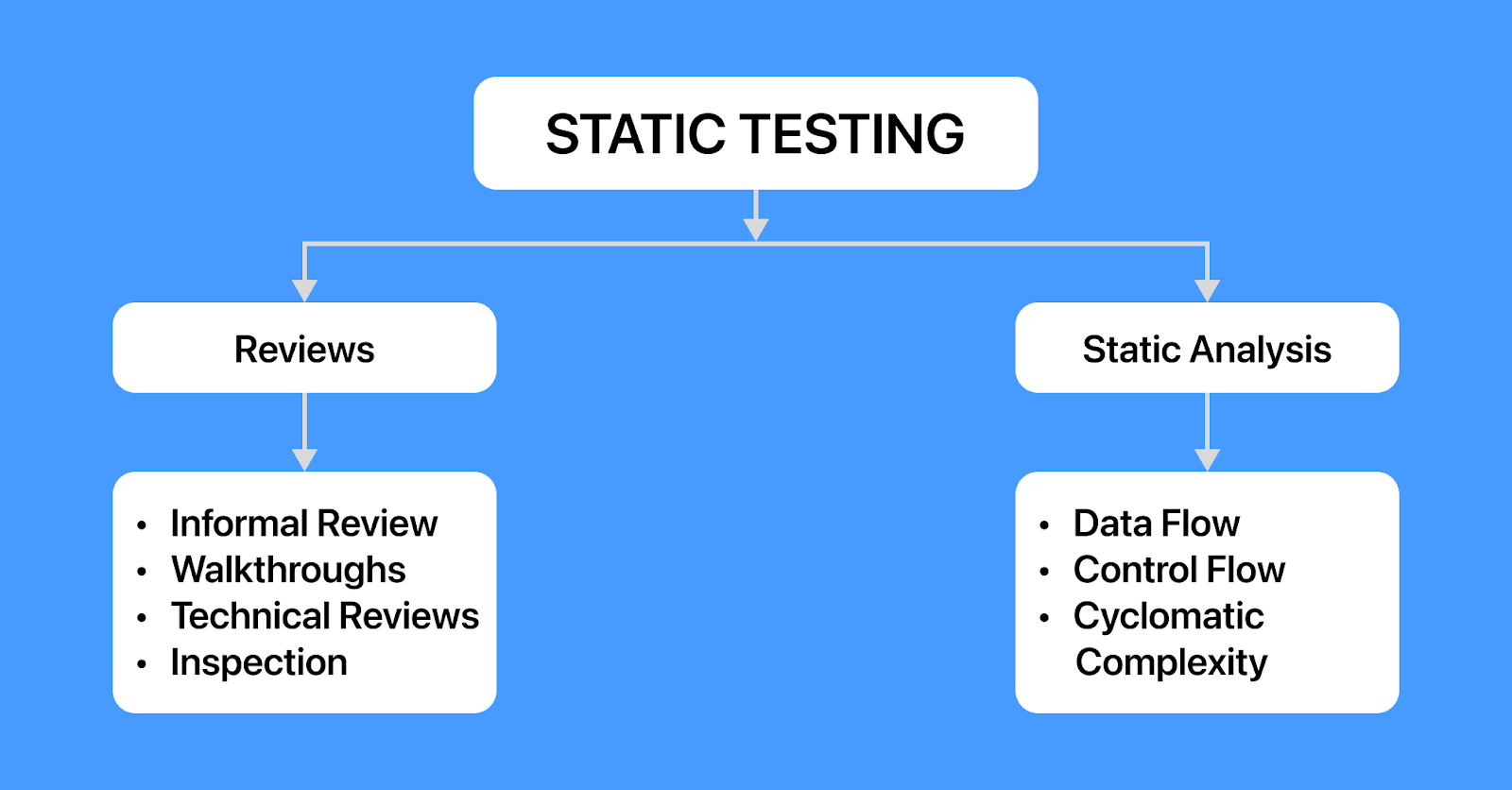
Static testing finds defects in requirements, designs, and code without executing them, through manual reviews or tool-based static analysis. A review can start on the first draft of a requirement, and an analyzer can run on every pull request.
Reviews
The ISTQB syllabus lists these common review types, from the informal review to the inspection, the most formal:
- Informal review - Follows no defined process and requires no formal documented output; the main objective is detecting anomalies, as in a quick code review from a teammate.
- Walkthrough - Led by the author, who takes reviewers through the work product to detect anomalies, educate reviewers, gain consensus, and generate new ideas.
- Technical review - Led by a moderator and performed by technically qualified reviewers, who work toward consensus and decisions on a technical problem while also detecting anomalies.
- Inspection - The most formal type: it follows the complete review process, aims to find the maximum number of anomalies, and collects metrics to improve the process. The author cannot act as the review leader or scribe.
Static Analysis
Static analysis is the tool-supported evaluation of code without running it. Analyzers such as Checkstyle for Java, Pylint for Python, and ESLint for JavaScript, along with the built-in inspections in IDEs like PyCharm, flag problems such as these:
- Data flow anomalies - A variable used before it is declared, or assigned a value that is never read, which ESLint reports as no-use-before-define and no-unused-vars.
- Control flow problems - Unreachable statements after a return or throw (ESLint's no-unreachable) and loops whose condition is never modified inside the loop body (no-unmodified-loop-condition).
- Coding standard violations - Naming, formatting, and banned constructs that break the team's rules, which Checkstyle checks in Java code.
- Excess complexity - Functions above a team's cyclomatic complexity limit, which ESLint's complexity rule flags against a configured maximum.
Cyclomatic complexity is Thomas McCabe's metric, computed from the control flow graph as v(G) = edges - nodes + 2. It counts the linearly independent paths through a module, and basis path testing, covered in the white-box section, uses the same number to size a test set.
Black-Box Testing Techniques
Black-box testing techniques, also called specification-based techniques, design tests from what the system is supposed to do and treat its code as unseen. On the registration form, the error messages act as the specification:
- First Name must be between 1 and 32 characters.
- Telephone must be between 3 and 32 characters, with the field hint "Enter valid phone number with country code!"
- Password must be between 4 and 20 characters.
- The Privacy Policy must be accepted before an account is created.
Equivalence Partitioning
Equivalence partitioning splits each input into partitions that the software is expected to handle the same way, then tests one value from each partition. Partitions must not overlap, and because every value in a partition should be processed alike, one test per partition covers it. The ISTQB syllabus adds that developers are more likely to make errors at the boundary values of partitions, so boundary value analysis tests there as well.
The telephone field's length gives three partitions (fewer than 3 characters, 3 to 32, and more than 32), and its content gives two more: digits with an optional leading +, the format the field hint points to, and anything else, such as letters or punctuation. Four values cover every partition: 12, 123, a 33-digit number, and abcdefgh.
The cloud run later in this guide tests each of these values, and the letters case exposed a defect: the server accepted "abcdefgh" because it checks only the length.
Optional fields add one more valid partition, no value at all. An optional field for integers from 1 to 10 therefore has at least four partitions (empty, 1 to 10, below 1, and above 10), plus non-integer input if the field accepts free text.
Boundary Value Analysis
Boundary value analysis (BVA) tests the edges of ordered partitions, because comparison mistakes, such as < written where <= was meant, only show up at a boundary. ISTQB defines 2-value BVA, which tests each boundary value and its closest neighbor in the adjacent partition, and 3-value BVA, which tests each boundary value and both of its neighbors.
For the First Name rule of 1 to 32 characters, 2-value BVA tests lengths 0, 1, 32, and 33, and 3-value BVA adds every neighbor of those four boundary values: 2, 31, and 34 (a length of -1 is impossible). The syllabus shows why the extra values matter: if the decision x <= 10 is coded as x == 10, the 2-value tests at 10 and 11 both still pass, and only the 3-value test at 9 exposes the defect.
Applied to the password rule of 4 to 20 characters, 2-value BVA gives lengths 3, 4, 20, and 21. In the cloud run, lengths 3, 4, and 20 behaved as specified, but the server accepted a 21-character password. Probing further, 40 characters was accepted and 41 rejected, so the real limit is 40 while the message still promises 20. The syllabus lists this among the typical defects BVA finds: an implemented boundary misplaced above or below its intended position.
Decision Table Testing
Decision table testing handles rules that combine conditions. Conditions go in the top rows, actions in the bottom rows, and each column is one rule; with n Boolean conditions there are up to 2n columns before simplification. The registration form's submit logic combines field validation with the Privacy Policy checkbox:
| Conditions and actions | R1 | R2 | R3 | R4 |
|---|---|---|---|---|
| Condition: every field passes its rule | T | T | F | F |
| Condition: Privacy Policy accepted | T | F | T | F |
| Action: create the account | X | |||
| Action: show field error messages | X | X | ||
| Action: show the Privacy Policy warning | X | X |
Testing each feasible column once gives full decision table coverage. When a condition does not affect the outcome, mark it with a hyphen ("don't care") and merge those columns; reserve N/A for combinations that cannot occur.
The cloud run never ticked the Privacy Policy box, so it exercised R2 and R4 only. R3 is also safe to run by ticking the box on a value the server is known to reject, such as an empty First Name, while R1 creates a real account and needs a disposable test environment.
State Transition Testing
State transition testing models a system as states, the events that move it between them, and the actions on each move. The model is drawn as a state transition diagram or listed in a state table, which also shows invalid state and event pairs.
Take a login that locks an account after three wrong passwords. Its states are 0, 1, and 2 failed attempts, Locked, and Logged in, and the ISTQB syllabus defines coverage criteria from weakest to strongest:
- All states coverage - Every state is visited. Two tests do it here: three wrong passwords in a row, and one correct password.
- Valid transitions coverage (0-switch) - Every valid transition is exercised. The six transitions here, three wrong-password moves and a successful login from 0, 1, or 2 failures, need four tests: correct; wrong then correct; wrong twice then correct; and wrong three times.
- All transitions coverage - Every valid transition plus attempts at invalid ones, such as entering the correct password while Locked and confirming that login is still refused.
Pairwise and Combinatorial Testing
Pairwise testing covers every pair of parameter values in at least one test instead of every full combination. A checkout with three settings of three values each has 27 (3 × 3 × 3) combinations, but these 9 tests cover every value pair:
| Test | Shipping | Payment | Currency |
|---|---|---|---|
| 1 | Standard | Card | USD |
| 2 | Standard | Wallet | EUR |
| 3 | Standard | Bank transfer | INR |
| 4 | Express | Card | EUR |
| 5 | Express | Wallet | INR |
| 6 | Express | Bank transfer | USD |
| 7 | Pickup | Card | INR |
| 8 | Pickup | Wallet | USD |
| 9 | Pickup | Bank transfer | EUR |
Each value pair appears exactly once, which makes this table an orthogonal array, one of the standard ways to build a pairwise set.
NIST's combinatorial testing guidance warns against assuming that 2-way (pairwise) combinations will be enough: it is reasonable to expect that 30% or more of the faults that need to be found in testing may require three factors for detection.
For three tightly coupled settings like this checkout, 3-way coverage means all 27 combinations, which is still a small suite.
Cause-Effect Graphing and Use Case Testing
- Cause-effect graphing - Models input conditions (causes) and outputs (effects) as a Boolean graph, then converts the graph into a decision table. ISO/IEC/IEEE 29119-4 lists it as its own specification-based technique.
- Use case testing - Derives tests from the main and alternative flows of a use case, such as a successful registration, a duplicate email address, and a declined Privacy Policy.

White-Box Testing Techniques
White-box testing techniques, also called structure-based techniques, design tests from the code's structure and measure code coverage: the share of a structural element that the tests exercise. Every coverage formula has the same shape, coverage = (items exercised / total items) × 100, whether the items are statements, decisions, or condition combinations. The guide to black-box vs white-box testing compares the two families side by side.
Statement, Decision, and Condition Coverage
This function waives shipping for members or for orders over 50:
function shippingFee(isMember, total) {
  let fee = 5;
  if (isMember || total > 50) {
    fee = 0;
  }
  return fee;
}
A suite that only calls shippingFee(true, 20) executes all 4 executable statements, which is full statement coverage. The if statement never takes its false outcome, so decision coverage reaches only one of two outcomes, and ISTQB branch coverage, which also counts unconditional branches, stays incomplete because the branch from the if straight to return fee never runs. That is why the ISTQB syllabus notes that full statement coverage does not ensure that all the decision logic has been tested.
With both conditions, isMember and total > 50, always evaluated, the stronger criteria need these tests:
| Criterion | Coverage items | Minimum tests | Example inputs (isMember, total) |
|---|---|---|---|
| Statement | Executable statements | 1 | (true, 20) |
| Decision | True and false outcome of each decision | 2 | (true, 20), (false, 20) |
| Condition | True and false value of each condition | 2 | (true, 20), (false, 60) |
| MC/DC | Each condition shown to change the outcome on its own | 3 (usually n + 1) | (false, 20), (true, 20), (false, 60) |
| Multiple condition | Every combination of condition values | 4 (2n) | All four true and false combinations |
The condition-coverage pair makes the decision true both times, so condition coverage alone does not guarantee decision coverage. Modified condition/decision coverage (MC/DC) closes that gap, usually with n + 1 tests for n conditions, while multiple condition coverage needs up to 2n combinations.
Those counts assume both conditions are always evaluated. JavaScript, Java, and C short-circuit ||, so total > 50 never runs when isMember is true; condition coverage then needs a third test, (false, 20), and only three of the four multiple-condition combinations can be observed.
Google's code coverage guidance treats 60% as acceptable, 75% as commendable, and 90% as exemplary. The same post calls project-wide goals above 90% most likely not worth it, while per-commit goals of 99% are reasonable.
Mutation testing checks whether the assertions would notice a bug in the code that ran: it injects small faults, such as flipping || to && in shippingFee, and counts how many the suite catches.
Coverage also applies to black-box suites. In this Testμ 2024 session, Kulas Angeles, Director of Software Quality Engineering at Sun Life Financial, shows how to measure code coverage for black-box tests:
Path, Basis Path, and Data Flow Testing
- Path coverage - Every path through the code is executed. It is only feasible for small modules without loops, because a loop creates a potentially infinite number of paths.
- Basis path testing - McCabe's structured testing, documented by NIST in Special Publication 500-235, covers a basis set of linearly independent paths, as many as the cyclomatic complexity, and subsumes branch and statement coverage. A function with one single-condition if statement has a cyclomatic complexity of 2; each short-circuit && or || adds one, so shippingFee scores 3 and needs three basis paths, such as (true, 20), (false, 60), and (false, 20).
- Data flow testing - Designs tests around definition-use pairs: a place where a variable is assigned, paired with a later place that reads that value before any reassignment. In shippingFee, fee = 5 reaches return fee only when the if is false.
Experience-Based Testing Techniques
Experience-based techniques draw on the tester's knowledge of past defects, the domain, and how users behave. The ISTQB syllabus groups the following techniques in this family:
- Error guessing - Anticipating likely mistakes, such as empty input, leading spaces, letters in a numeric field, or a double-clicked submit button, and testing them directly. The syllabus describes fault attacks as one way to implement it: build a list of possible errors, then design a test for each.
- Exploratory testing - Designing, executing, and evaluating tests at the same time while learning the product, often in time-boxed sessions guided by a test charter.
- Checklist-based testing - Working through a list of test conditions built from experience, standards, or past defects. For a form, the list might cover trimming, maximum length, pasted input, and browser autofill.
In a wider Chrome run against the same form, the browser's built-in email validation blocked an address without an @ sign before the request reached the server, so a tester working in Chrome never sees the server's own email check for that input.
TestMu AI's Real-Time Testing gives interactive access to 3,000+ browser, OS, and resolution combinations for exploratory sessions, and it lets you switch browser or OS mid-session to compare how each one handles the same input. When a session turns up a defect, Mark as Bug files it to the tracker with the browser, OS, URL, and a link to the session recording attached.
Grey-Box Testing
Grey-box testing combines elements of black-box and white-box testing, as the ISTQB glossary defines it. Testers design black-box cases with partial knowledge of internals such as the database schema, API contracts, or architecture.
Database testing is a typical case. A tester registers a user through the UI, which is black-box, and then queries the customer table to confirm the stored row, for example that the email was saved as entered and the password was stored as a hash rather than plain text.
The same partial knowledge shapes API testing and regression suites, where schemas and contracts point testers at the fields most likely to break.
How to Run Technique-Derived Tests
Every technique above can be executed by hand or automated. Manual testing means people execute the tests without automated scripts, which suits exploratory sessions and usability judgments. Automation testing means scripts execute and check the tests, which suits the repeatable tables that partitioning and BVA produce.
The script below turns the registration form's boundary and partition cases into one data-driven Playwright test. Each row changes one field (password rows also copy the value into Password Confirm), and the expected result follows the form's error message, or its field hint for letters in the telephone field.
// bva-registration.mjs: boundary value analysis and equivalence partitioning
// on the TestMu AI ecommerce playground registration form
import { chromium } from "playwright";

const capabilities = {
  browserName: "Chrome",
  browserVersion: "latest",
  "LT:Options": {
    platform: "Windows 11",
    build: "Testing Techniques - BVA and ECP",
    name: "Registration form boundaries",
    user: process.env.LT_USERNAME,
    accessKey: process.env.LT_ACCESS_KEY,
    network: true,
    console: true,
    video: true,
  },
};

const FORM = "https://ecommerce-playground.lambdatest.io/index.php?route=account/register";
const valid = {
  firstname: "Ann", lastname: "Tester", email: `bva-${Date.now()}@example.com`,
  telephone: "+14155550123", password: "Passw0rd", confirm: "Passw0rd",
};
const chars = (n) => "a".repeat(n);

// One field changes per case (password rows also copy the value into confirm).
// "expected" follows the form's error message, or its field hint for TEL-ABC.
// The Privacy Policy box is never ticked, so the server never creates an account.
const cases = [
  ["FN-0", "firstname", "", "reject"],
  ["FN-1", "firstname", chars(1), "accept"],
  ["FN-32", "firstname", chars(32), "accept"],
  ["FN-33", "firstname", chars(33), "reject"],
  ["PW-3", "password", chars(3), "reject"],
  ["PW-4", "password", chars(4), "accept"],
  ["PW-20", "password", chars(20), "accept"],
  ["PW-21", "password", chars(21), "reject"],
  ["PW-40", "password", chars(40), "reject"],
  ["PW-41", "password", chars(41), "reject"],
  ["TEL-2", "telephone", "12", "reject"],
  ["TEL-3", "telephone", "123", "accept"],
  ["TEL-33", "telephone", "1".repeat(33), "reject"],
  ["TEL-ABC", "telephone", "abcdefgh", "reject"],
];

const browser = await chromium.connect(
  `wss://cdp.lambdatest.com/playwright?capabilities=${encodeURIComponent(JSON.stringify(capabilities))}`
);
const page = await browser.newPage();
let failures = 0;

try {
  for (const [id, field, value, expected] of cases) {
    const data = { ...valid, [field]: value };
    if (field === "password") data.confirm = value;

    await page.goto(FORM);
    for (const [name, v] of Object.entries(data)) await page.fill(`#input-${name}`, v);
    await page.click("#content form input[type=submit]");
    // Every submit returns the Privacy Policy warning (the box is never ticked), so the
    // warning marks the server's response page; then wait for that page to finish parsing.
    await page.locator(".alert-danger", { hasText: "Privacy Policy" }).waitFor();
    await page.waitForLoadState("domcontentloaded");

    const message = await page.evaluate(
      (f) => document.querySelector(`#input-${f}`).parentElement.querySelector(".text-danger")?.textContent.trim() ?? "",
      field
    );
    const actual = message ? "reject" : "accept";
    const verdict = actual === expected ? "PASS" : "FAIL";
    if (verdict === "FAIL") failures++;
    console.log(`${id.padEnd(8)} length=${String(value.length).padEnd(3)} expected=${expected} actual=${actual}  ${verdict}  ${message}`);
  }

  await page.evaluate(() => {}, `lambdatest_action: ${JSON.stringify({
    action: "setTestStatus",
    arguments: { status: failures ? "failed" : "passed", remark: `${failures} boundary mismatches` },
  })}`);
  console.log(`\n${cases.length - failures} passed, ${failures} failed`);
} finally {
  await browser.close();
}
Set LT_USERNAME and LT_ACCESS_KEY to your account credentials, then run it:
npm install playwright

# macOS or Linux
LT_USERNAME=<your-username> LT_ACCESS_KEY=<your-access-key> node bva-registration.mjs

# Windows PowerShell
$env:LT_USERNAME="<your-username>"; $env:LT_ACCESS_KEY="<your-access-key>"; node bva-registration.mjs
This is the console output from the run on September 25, 2026, on Chrome on Windows 11:
FN-0     length=0   expected=reject actual=reject  PASS  First Name must be between 1 and 32 characters!
FN-1     length=1   expected=accept actual=accept  PASS
FN-32    length=32  expected=accept actual=accept  PASS
FN-33    length=33  expected=reject actual=reject  PASS  First Name must be between 1 and 32 characters!
PW-3     length=3   expected=reject actual=reject  PASS  Password must be between 4 and 20 characters!
PW-4     length=4   expected=accept actual=accept  PASS
PW-20    length=20  expected=accept actual=accept  PASS
PW-21    length=21  expected=reject actual=accept  FAIL
PW-40    length=40  expected=reject actual=accept  FAIL
PW-41    length=41  expected=reject actual=reject  PASS  Password must be between 4 and 20 characters!
TEL-2    length=2   expected=reject actual=reject  PASS  Telephone must be between 3 and 32 characters!
TEL-3    length=3   expected=accept actual=accept  PASS
TEL-33   length=33  expected=reject actual=reject  PASS  Telephone must be between 3 and 32 characters!
TEL-ABC  length=8   expected=reject actual=accept  FAIL

11 passed, 3 failed
The three failures are two defects. PW-21 and PW-40 trace to the upstream OpenCart 3.0.3.8 register controller, which sets the password's upper limit at 40 characters while the language file's message says 20. TEL-ABC is the letters-in-telephone defect from the equivalence partitioning section.
Pointing the script at the cloud took only a connection string and a capabilities object. On TestMu AI's Automation Cloud, a larger case table can be sharded across parallel sessions, and the network, console, and video flags in the capabilities above attach network logs, console logs, and a video recording to each session for debugging a failed case.

Note: To run the script against your own form on localhost or a staging host, start LT Tunnel and set the tunnel capability in LT:Options so the cloud session can reach it. Create a free account to get the username and access key the script reads. Sign up free
What Is the Difference Between Functional and Non-Functional Testing Techniques?
Functional testing checks what a feature does against its requirement, such as whether the registration form rejects a 21-character password, while non-functional testing checks what the ISTQB syllabus calls "how well the system behaves," such as response time under load. Both are test types from the table at the top of this guide, and the techniques above design the test cases for either.
Functional testing is where black-box techniques do most of their work: every table in the black-box section is a functional test design.
Non-functional testing checks quality characteristics other than functionality, such as performance, compatibility, security, and usability, and the same techniques carry over:
- Performance testing - For a stated capacity of 500 concurrent users, boundary value analysis says to run at 500 users, where response times must still meet the target, and at 501, where the system should show its specified over-capacity behavior, such as queuing requests or returning a clear error, instead of failing.
- Security testing - Error guessing and checklist-based testing supply the inputs: injection strings, script tags, and overlong values sent to every field the form accepts.
- Compatibility testing - Group browsers by rendering engine (Blink, Gecko, WebKit) as equivalence partitions, test one version from each, and use pairwise testing to combine browser, OS, and screen resolution.
- Usability testing - Exploratory sessions with a charter such as "register using only the keyboard" test the flow the way a real user meets it.
How to Choose the Right Software Testing Technique
Start from the kind of defect you most need to catch, then pick the technique built for it:
| If the risk is in | Start with | Test cases it produces | Defects it targets |
|---|---|---|---|
| Inputs with ranges or length limits | Boundary value analysis | 2 per boundary (2-value) or 3 (3-value); the 4 to 20 password rule gives lengths 3, 4, 20, and 21 | Off-by-one comparisons and wrong limits |
| Inputs whose values fall into groups | Equivalence partitioning | Each partition covered at least once, invalid ones included; 4 values cover the telephone field's 5 partitions | A class of input handled the wrong way |
| Rules that combine conditions | Decision table testing | 1 per feasible rule, up to 2n; the submit table has 4 | Unhandled combinations of conditions |
| Workflows with modes or history | State transition testing | Enough sequences to exercise every valid transition; 4 for the login lockout | Illegal or missing transitions |
| Many interacting settings | Pairwise testing | 9 for 3 settings of 3 values, instead of 27 | Faults triggered by two settings together |
| Complex conditions in critical code | MC/DC | Usually n + 1 per decision; 3 for shippingFee | Conditions that never affect the outcome |
| Thin or changing specifications | Exploratory testing | Time-boxed sessions guided by a charter | Defects no requirement describes |
| Requirements and code before they run | Reviews and static analysis | Review findings and analyzer warnings | Ambiguous requirements, dead code, standard violations |
- Risk - Spend the most techniques on the features where failure costs the most; risk-based testing ranks features by likelihood and impact.
- Test level - White-box coverage fits unit and component tests, where the code is at hand; black-box techniques fit system and acceptance tests, where the specification is the reference.
- Timing - Reviews and static analysis can run before any code executes, which is the core of shift-left testing.
Technique tables turn into dozens of cases quickly, and TestMu AI's Test Manager keeps each one tied to its requirement by linking requirements, test cases, runs, and defects in one traceability matrix. It also generates structured test cases, with steps, expected results, preconditions, and priority, from a user story or requirement document, and can add edge cases and negative scenarios to an existing case. The guide to generating test cases with AI walks through the workflow.
Conclusion
Pick the input field in your product that collects the most bug reports, apply the software testing techniques above to list its partitions and boundary values, and script one test for each. Run that script on TestMu AI's Automation Cloud by following the Playwright testing guide.
Author

Nazneen Ahmad
Blogs: 39


Nazneen Ahmad is a freelance Technical Content SEO Writer with over 6 years of experience in crafting high ranking content on software testing, web development, and medical case studies. She has written 60+ technical blogs, including 50+ top-ranking articles focused on software testing and web development. Certified in Automation Basic and Advanced Training - XO 10, she blends subject knowledge with SEO strategies to create user focused, authoritative content. Over time, she has shifted from quick, keyword-heavy drafts to producing content that prioritizes user intent, readability, and topical authority to deliver lasting value.
Reviewer

Himanshu Sheth
Reviewer
Himanshu Sheth is the Director of Marketing (Technical Content) at TestMu AI, with over 8 years of hands-on experience in Selenium, Cypress, and other test automation frameworks. He has authored more than 130 technical blogs for TestMu AI, covering software testing, automation strategy, and CI/CD. At TestMu AI, he leads the technical content efforts across blogs, YouTube, and social media, while closely collaborating with contributors to enhance content quality and product feedback loops. He has done his graduation with a B.E. in Computer Engineering from Mumbai University. Before TestMu AI, Himanshu led engineering teams in embedded software domains at companies like Samsung Research, Motorola, and NXP Semiconductors. He is a core member of DZone and has been a speaker at several unconferences focused on technical writing and software quality.


Software Testing Techniques FAQs
Did you find this page helpful?
More Related Blogs
TestMu AI forEnterprise
Get access to solutions built on Enterprise
grade security, privacy, & compliance
- Advanced access controls
- Advanced data retention rules
- Advanced Local Testing
- Premium Support options
- Early access to beta features
- Private Slack Channel
- Unlimited Manual Accessibility DevTools Tests