

Power Your Software Testing with AI Agents and Cloud
The Native AI-Agentic Cloud Platform to Supercharge Quality Engineering. Test Intelligently and Ship Faster.


- TestMu AI (Formerly LambdaTest)
- /
- Learning Hub
- /
- What is Compatibility Testing: Tutorial With Examples
What is Compatibility Testing: Tutorial With Examples
Compatibility testing checks that software works across browsers, devices, OS versions, and networks. Learn its types, tools, steps, and best practices.
Last Updated on:
On This Page
- What Is Software Compatibility?
- What Is Compatibility Testing?
- Why is Compatibility Testing Important?
- Who is Involved in Compatibility Testing?
- What Is an Example of Compatibility Testing?
- Is Compatibility Testing Akin to Cross Browser/Device Testing?
- What Are the Benefits of Compatibility Testing?
- What Are the Characteristics of Compatibility Testing?
- What Are the Types of Compatibility Testing?
- When to Perform Compatibility Testing?
- What Are Common Compatibility Testing Defects?
- What Should a Compatibility Testing Checklist Include?
- Which Tools Are Used for Compatibility Testing?
- How Do You Perform Compatibility Testing?
- How Do You Run Compatibility Testing on the Cloud?
- What Are the Challenges of Compatibility Testing?
- What Are the Best Practices for Compatibility Testing?
- What Is Tested in Backward Compatibility Testing?
- How Do Semantic Versioning and Contract Testing Protect Backward Compatibility?
- How Do You Handle Combinatorial Explosion in Compatibility Testing?
- How Do You Test Compatibility for Enterprise Applications Like ERP, CRM, and EHR?
- What Is the Difference Between a Comparability Test and a Compatibility Test?
- How Is AI Changing Compatibility Testing?
- Why Should Every Release Include Compatibility Testing?
OVERVIEW
Compatibility testing is a technique to check the functionality of software applications across different web browsers and versions, mobile devices, databases, operating systems, hardware, and networks. This process ensures the software applications work correctly across all platforms and environments as intended.
The market is flooded with different types of browsers, browser versions, platforms, devices, and operating systems. Therefore, ensuring that websites and mobile applications are compatible across all platforms that give a seamless user experience is crucial. This can be done with compatibility testing of software applications.
Before the mobile application or website gets released, a compatibility test is performed to ensure its compatibility with all hardware, browsers, OS, and others. It ensures that developed software applications (websites and mobile apps) are functional and display correctly across all platforms without glitches.
What Is Software Compatibility?
Software compatibility is defined as the ability of software to function accurately with different web browsers, browser versions, hardware, software, mobile devices, and networks without hiccups.
It means that software applications can run on particular operating systems, hardware, and network environments without any conflict or glitches. In simple terms, you can understand software compatibility as interoperability between two and more software applications and different platforms or hardware configurations.
But why do compatibility conflicts or glitches arise? The main underlying reasons are differences in hardware configurations, software versions, dependencies, and other factors. For example, a software application developed to function on Windows 8.1 may not be compatible with Windows 11.
Similarly, newly developed software applications may be incompatible with the old version of the database management system. Thus, addressing this during the Software Development Life Cycle (SDLC) is essential.
Testing for software compatibility is important for all software applications to work effectively and efficiently without causing crashes or other issues. This makes compatibility testing a crucial part of the software development process .
What Is Compatibility Testing?
Compatibility testing ensures software applications perform consistently across various browsers, operating systems, mobile devices, and networks. It identifies discrepancies in functionality and appearance across different platforms, aiding in optimizing user experience.
It happens that developed websites or mobile application functions get impacted when run in different browser versions, resolutions, networks, configurations, etc. This may give rise to errors that can delay the software release process. To overcome such a scenario, you must perform compatibility testing. This will enable the team to ensure compatibility requirements for the software applications are addressed and inbuilt before they get released to the end users.
Through this, you can develop software that works accurately across various configurations. This will give consistent experience and performance of applications and websites across all platforms.
Overall, the compatibility test checks applications and websites' usability, reliability, and performance in different test environments.

Why is Compatibility Testing Important?
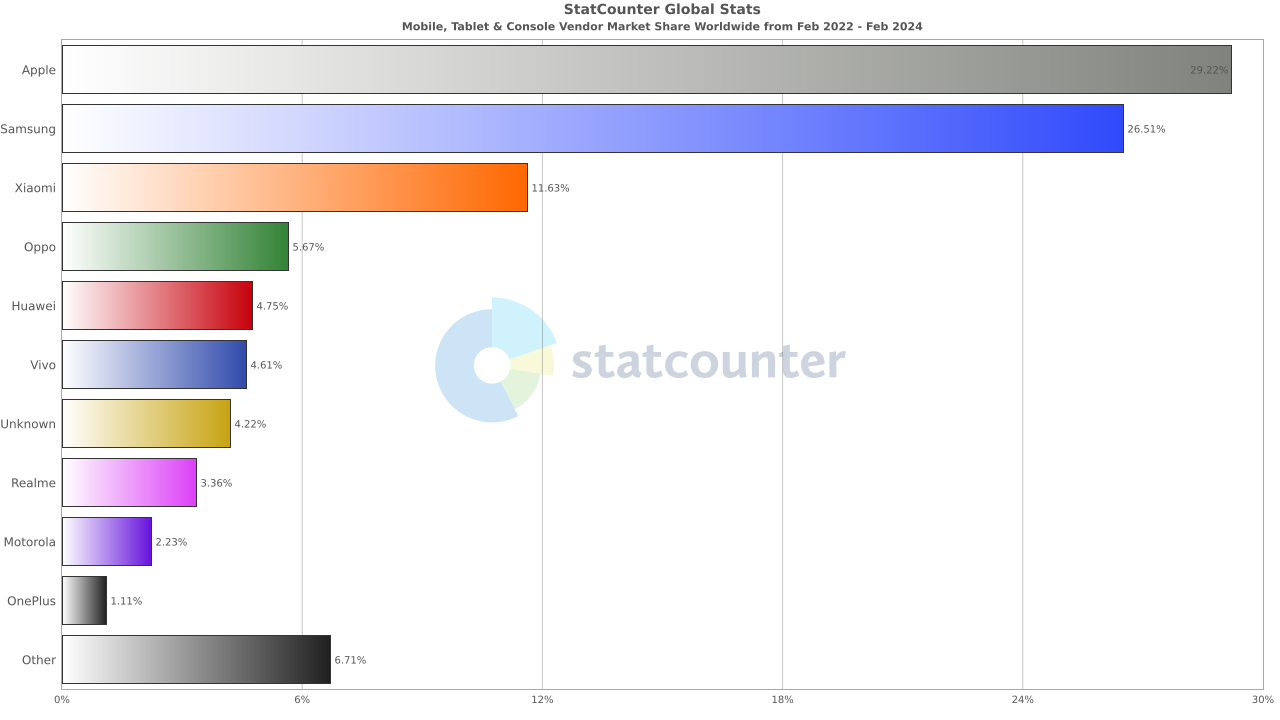
When a new software application is released in the market, many users access it from various browsers and devices like PCs, smartphones, and tablets. However, if the software application is not tested for compatibility with such browsers, devices, or other platforms, it can make them non-functional.
If we look at the mobile device market, it is highly fragmented. This can be seen in the stats below:
The same goes for the web browser market as well.
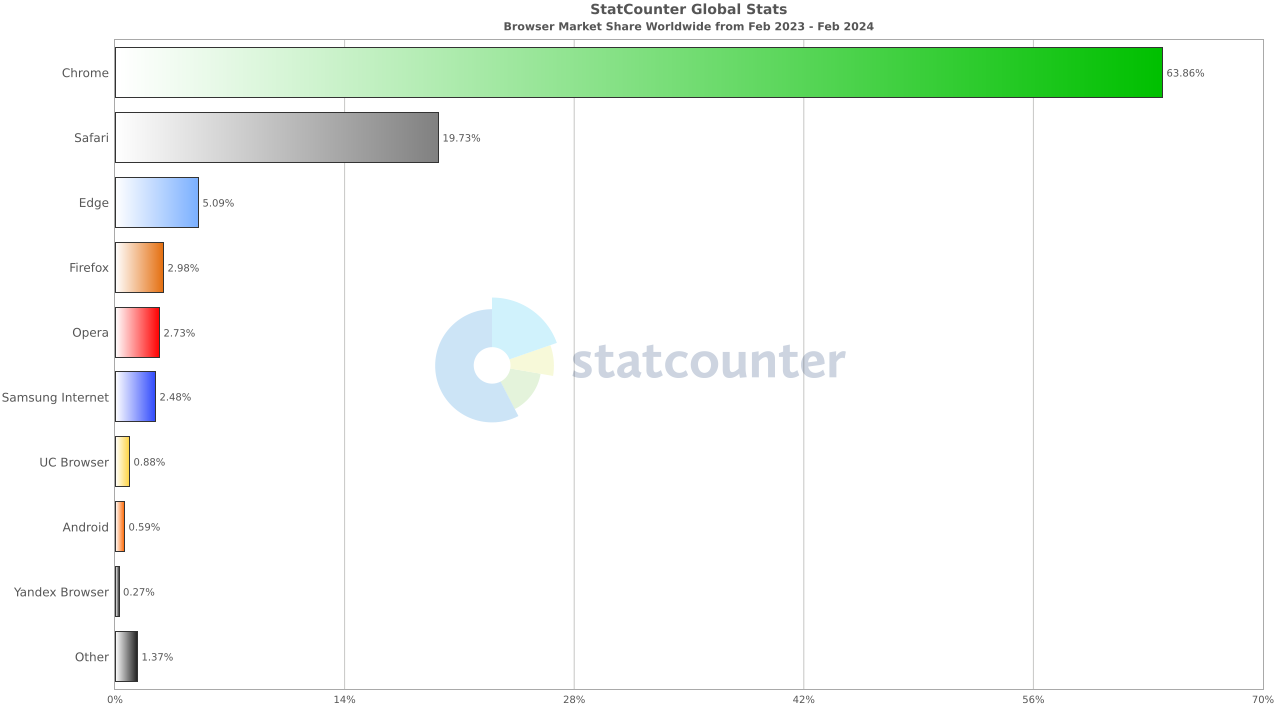
Therefore, compatibility tests are needed to ensure their functionality and performance across all platforms are uniform.
Other reasons highlighting the need for compatibility testing are explained below:
- When we perform compatibility tests, it is easy to identify and address any compatibility-related issues that can impact the software's function across different devices, browsers, etc. With this, we can ensure software applications work as expected across different test environments, and users can access those without any glitches.
- Any compatibility issues in the software application and websites identified at a later stage of development or its post-release can be costly to fix. It is crucial to perform compatibility tests in the development phase of software applications to resolve any challenges as soon as they arise. Thus, this will save time and cost in the long run.
- Compatibility issues impact the organization's reputation, directly related to the unpleasant end-user experience. So, compatibility tests are needed to ensure they work seamlessly across different devices, platforms, and OS. This will improve the organization's reputation among users, increasing brand loyalty.
Who is Involved in Compatibility Testing?
Here are the key individuals responsible for performing compatibility testing in software testing:
- QA Engineers: Primarily responsible for designing, executing, and analyzing test cases across different hardware, software, and platforms.
- Developers: Collaborate with QA to identify and fix compatibility issues.
- Product Managers: Define compatibility requirements and prioritize testing efforts.
- End-users: Can provide valuable feedback on real-world compatibility issues.
What Is an Example of Compatibility Testing?
A typical compatibility testing example is running a desktop web app on several Windows versions and browsers to confirm every feature, layout, and form behaves the same.
Let's consider a scenario where an organization has developed a web application that runs on desktops. It is developed to work on Windows OS. Now they want to test its working on different versions of Windows. Here comes the need for compatibility testing, which will be done to ensure the user's requirements.
During compatibility testing, we will test the application on different versions of Windows, such as Windows 8, Windows 10, and Windows 11. The web application can also be tested on laptops, mobile, and tablets. To ensure that the web application's functionality is consistent and accurate, we can test its performance on each configuration.
In addition, we can test the web application's compatibility with other popular web browsers, like Chrome, Firefox, Safari, and Edge. This will ensure the application functions correctly when accessed through different web browsers.
Is Compatibility Testing Akin to Cross Browser/Device Testing?
Cross browser and compatibility testing may seem identical. However, in reality, there are differences which are worth considering.
Compatibility testing is a broader category, covering tests on diverse operating systems, screen resolutions, browsers, devices, and network conditions. In simple terms, these tests address hardware, operating systems, and devices.
On the other side, cross browser testing is a specific subset of compatibility testing that concentrates on testing software performance across various web browsers, such as Chrome, Firefox, Edge, etc. This includes testing on different versions of the same browser and distinct browsers.
When it comes to cross device testing, it is a subset of compatibility testing that focuses explicitly on testing mobile apps across different devices supported by platforms like Android and iOS.
What Are the Benefits of Compatibility Testing?
Testing for compatibility can help organizations meet their application or website requirements. Consequently, when you perform compatibility testing, you get assured of its usability, reliability, and security.
However, to run compatibility tests, you should know their benefits so they can be noticed in the software development process.
- Simplifies Software Development Life Cycle: Compatibility test finds the defects in the software during the SDLC before it gets released. You can detect bugs or errors in the application and website during its development phase. This ensures the timely resolution of the bugs and associated challenges with it. Hence, compatibility tests do not complicate the SDLC, which can happen if the working of the application or website needs to be aligned across various platforms.
- Detects Bugs Early: A compatibility test is significant as it helps to timely detect bugs in the application or website when tested across various platforms. Since the QA encounters related challenges at the early stage of development, a compatibility test gives sufficient time for the team to solve them as a priority. You can efficiently fix time-consuming tasks like resolving compatibility issues for various devices, browsers, and OS with compatibility tests.
- Ensures Quality Software Release: Compatibility tests with other tests like unit and system testing ensure the application's usability, scalability, and stability across various platforms. This will help in successful software release without any issues or underlying defects in the application. Hence, with compatibility tests, users' complaints about the application or website can be avoided.
- Enhances Security: Compatibility tests identify any security vulnerabilities related to the developed software application when used in the intended environment. You can address those vulnerabilities early and ensure the security of the applications and websites is not compromised.
What Are the Characteristics of Compatibility Testing?
The crucial characteristics of compatibility tests include the following:
- Thorough: These checks effectively pinpoint any potential compatibility issues to prevent the release of buggy software applications. For example, it ensures that every aspect of the application displays correctly, regardless of the user's screen resolution.
- Bidirectional: This process involves both backward and forward compatibility testing. This allows the team to understand how their app functions on legacy and latest configurations, ensuring long-term performance, even with limited capabilities for future-proofing.
- Reproducible: The issues uncovered by these checks should be easily replicated, indicating that they mirror errors likely to be encountered by users. If a website compatibility test indicates malfunctions on a specific browser, reproducibility assists developers in addressing the issue.
What Are the Types of Compatibility Testing?
There are two types of compatibility tests. Here is a quick breakdown.
Forward Compatibility Testing
Forward compatibility testing, also known as upward compatibility testing, involves verifying that a current version of a software product is compatible with or can work seamlessly with future versions of related software components, such as operating systems, browsers, or third-party libraries.
The types of testing ensure that the software remains functional and stable when users upgrade to newer versions. This helps maintain a smooth transition for users who update their systems.
For example, the latest version of the software application undergoes following forward compatibility testing.
Windows Vista → Windows XP → Windows 7 → Windows 8 → Windows 8.1 → Windows 10 → Windows 11
Backward Compatibility Testing
Backward compatibility testing, also known as downward compatibility testing, is the process of verifying that a current version of a software product remains compatible with or supports previous versions of related software components.
The main objective is to ensure users can upgrade their software without facing compatibility issues. This is crucial for businesses and users who may stick with older versions of certain components due to specific requirements or constraints.
Teams often manage backward compatibility with Semantic Versioning (SemVer), a numbering scheme where the major version signals breaking changes while minor and patch versions stay backward compatible. Backward compatibility testing then confirms that data, API contracts, and integrations from earlier versions still work after an upgrade.
For example, the old version of the software application undergoes following backward compatibility testing.
Windows 11 → Windows 10 → Windows 8.1 → Windows 8 → Windows 7 → Windows Vista → Windows XP
Further forward and backward compatibility testing has various sub-categories discussed below:
- Hardware Compatibility Testing: This testing process checks software applications' ability to function on the different hardware configurations. You perform a hardware compatibility test to ensure whether a specific hardware device is compatible with a particular software application, platform, and OS. To execute this test, the test environment needs to be set with different hardware configurations to check each application's function.
- Network Compatibility Testing: This testing process checks the software application's functioning on different network connections. Its primary purpose is to test the software application and its communication with the network and ensure no security, connectivity, or performance issues.
- Operating System Compatibility Testing: This testing process checks the functioning of the software application on the different operating systems and its version. The primary purpose of operating system compatibility testing is to ensure no compatibility issue when an application or website works on a different OS and its version.
- Device Compatibility Testing: This testing process checks the compatibility of the software application on several devices, including laptops, tablets, mobile phones, and desktop systems. The primary purpose of device compatibility testing is to test whether the application or website functions correctly on different hardware devices and configurations without any issues.
- Mobile Compatibility Testing: This testing process verifies the function of the software application on various mobile devices. This test refers only to mobile devices to ensure whether software applications or websites can operate correctly on different mobile devices such as smartphones, tablets, and other handheld devices.
- Browser Compatibility Testing: It checks the function of the website and web application on different web browsers like Google Chrome, Mozilla Firefox, Safari, Microsoft Edge, and other popular browsers. Its primary purpose is to ensure that web applications or websites work consistently with similar display and function no matter which browser the user uses.
- Software Compatibility Testing: This QA process checks the function of the software for its compatibility with other software or third-party tools. You can look at how applications or websites function and respond while communicating with different software. For example, if your application allows users to download PDF files, it should open on Adobe Acrobat. Likewise, if the developed application has an exportable grid view, it should open in Microsoft Excel.
- Version Compatibility Testing: This testing process checks the compatibility of the software applications on various versions of web browsers and operating systems. Its primary purpose is to ensure that any changes or updates made to software applications do not lead to compatibility issues on a previous version of the software or its components that interact with it.
You have to test various hardware components like graphic cards, processors, input and output devices, and storage devices. This is important to ensure they function appropriately and are compatible with the tested application. Its outcome can be used to identify potential issues when software applications and hardware are used together. You can use such information to make changes in the hardware and software to ensure appropriate functioning.
You can perform network compatibility tests to ensure the software applications work seamlessly in a particular network environment. For this, you need to connect the application being tested with several networks.
For example, you can check the application's function on Wi-Fi and data networks like 4G and 5G. You can measure two crucial metrics, speed, and bandwidth, which can affect the application's functioning. If such metrics have the expected outcome, the application is compatible with different network connections.
For example, if you are testing a mobile application, you can test it on iOS and Android to verify its response on both OS. Or, if you are testing a website, you can run an operating system compatibility test on Windows, macOS, and Linux OS.
The test outcome can fix any issue when software is used in different OS and versions. You can use such information to make changes to either the application or component of the OS to ensure they function together and recommend to the end-user which OS works best with applications.
In this test, you verify the software application's compatibility with various device components like sensors, cameras, microphones, etc.
You may wonder how to choose the correct mobile devices to perform mobile compatibility tests due to the large number of different devices in the market. Here is the answer. Even though many devices are available, you can go through the market stats to gather information on which device you should perform the test on.
Browser compatibility testing may also involve testing various browser components like JavaScript, HTML, CSS, and other plugins or extensions. With this, your website and web application can work flawlessly on any browser. You don't have to ask your end-users to change their browsers, as with an effective browser compatibility test, you will offer a positive experience across all popular browsers, including their legacy and latest versions.
You have to create test cases on different test scenarios to ensure that the new version of the software can interact with the previous version or its components. Some common areas that need to be tested during the version compatibility test include database, API, user interface, and file format compatibility.
When to Perform Compatibility Testing?
One of the best practices for performing compatibility testing is when the build gets stable enough to test. This is because, at this point, software applications are less likely to undergo any changes in the near future.
However, it is crucial to remember that compatibility tests are ongoing. This means you can perform compatibility tests irrespective of whether the application or website is stable. You can get compatibility issues at any phase or point of the Software Development Life Cycle; thus, it is crucial to integrate compatibility tests into the overall test strategy .
Here are a few examples of when we should run compatibility tests:
- If there are any changes or updates in the OS used by the application.
- If a software application runs on browsers and requires an update.
- If a software application interacts with new hardware and needs any related change.
- If a software application uses third-party software and libraries and there is any new update.
Hence, compatibility tests should be performed at different Software Development Life Cycle phases to ensure that applications are compatible with other platforms, software versions, and hardware.
What Are Common Compatibility Testing Defects?
The different types of compatibility tests identify defects that may occur due to incompatibility issues. Here are some common defects detected that you should know so that if you encounter any such, you can fix those with effective compatibility tests.
- Changes in UI: This can arise due to differences in screen resolution, aspect ratio, or font rendering across different devices and browsers. Compatibility tests involving various screen sizes, resolutions, and browser combinations can identify these issues.
- Alignment and Overlapping: Different screen sizes and resolutions can cause misalignment and content overlap.
- Dropdown Menu Issues: Incompatibility can lead to broken dropdown menus, especially on different operating systems or touch-enabled devices.
- CSS Style and Color Issues: Different browsers render CSS differently, leading to visual inconsistencies.
- Scroll Bar Issues: Incompatibility can cause broken scroll bars or unexpected scrolling behavior.
- Pop-up Window Issues: Pop-ups might behave differently or be blocked on different platforms.
- Video and Audio Playback Issues: Different devices and browsers have varying codecs and playback capabilities.
- Broken Tables or Frames: Incompatibility can cause tables or frames to break down or display incorrectly.
What Should a Compatibility Testing Checklist Include?
Before performing compatibility tests, you should know what should be checked in applications or websites. This will keep you going with the test without missing any aspects of the application or website and ensure a comprehensive testing process.
- Forms and User Interaction: Test all forms, fields, and interactive elements across devices and browsers, both with and without JavaScript enabled.
- Multimedia: Ensure images, audio, video, and other multimedia elements function seamlessly across diverse platforms and browsers.
- Navigation: Verify consistent and user-friendly navigation across all layouts and devices.
- HTML and CSS Accuracy: Validate HTML syntax and CSS implementation using automated tools. This assures proper rendering and adherence to standards.
- Layout Responsiveness:Check for accurate and visually consistent layout across various screen resolutions and devices.
- Font Consistency: Ensure font attributes like format, size, and color remain consistent across all platforms.
- Content Alignment: Verify proper alignment of text and other content elements across different screen sizes and devices.
- DOCTYPE Accuracy: Confirm the correct DOCTYPE declaration on every webpage for consistent rendering across browsers.
- SSL Certificate Compatibility:Ensure your SSL certificate is valid and compatible with relevant browsers for secure connections.
- Accessibility: Evaluate compatibility with assistive technologies for users with impairments.
- Performance: Assess website or application performance under varying network conditions and devices.
- Geolocation and Localization: If applicable, test functionality and visual consistency across geographies, languages, and locales through geolocation browser testing.
Which Tools Are Used for Compatibility Testing?
Once you have identified the platform, you should focus on speeding up the testing process. For this, choosing the right tools for compatibility tests is essential. Automated testing tools can speed up the compatibility test process by running tests on multiple devices and browsers.
Here are some commonly used compatibility test tools:
- TestMu AI: It is an AI-Native test orchestration and execution platform that lets you run manual and automated testing at scale on the cloud with 10,000+ real devices and 3,000+ browser and OS combinations. With TestMu AI, you can perform cross browser and cross device testing of websites and mobile applications.
- Browsera: It is a web-based tool to test websites for scripting and layout issues. It crawls over your website and creates a report that finds compatibility issues on various browsers. Using Browsera, it is possible to take screenshots of your website in different browsers. Through this, you can quickly identify and resolve the issues.
- GhostLab: It is a tool that simultaneously performs compatibility tests for your website across all devices. You can sync the website across all devices to check its function on different platforms. Both manual and automation testing can be done using GhostLab and give detailed reports on compatibility issues.
How Do You Perform Compatibility Testing?
Before you perform compatibility testing, you should understand the application's target platforms, including the operating system, hardware configuration, and third-party software versions. For this, you prepare a list of operating systems like Windows, macOS, Android, and iOS and browsers like Chrome, Firefox, Mozilla, Safari, Edge, and Internet Explorer that are needed for the test.
Along with the above, you need to identify the most used hardware configuration among the end-user. You should also identify the third-party tools on which the software application being tested depends, like plugins, frameworks, or libraries. This will help to ensure that third-party software versions are compatible with the software application.
The compatibility test process can be time-consuming and complicated, involving several platforms and devices. To simplify the test, it can be better understood from the following divided steps:
- Create Test Cases: In this step, the test cases are created to verify the compatibility of the software application with the target platforms. You are required to consider the identified target platforms like different operating systems, browsers, hardware configurations, and third-party software versions. Based on this, you can create test cases that cover all other target platforms.
- Set Up Test Environment: When you have test cases, you must set up a test environment to perform compatibility tests. This involves the selection of correct hardware and software configurations, including OS, devices, browsers, and third-party software versions, to ensure website and application compatibility.
- Execute Tests: After setting up the platforms or test environment, it is time to execute the test cases in the configured test environment. You must follow the test case steps precisely and record the test results. While performing test execution , you must ensure the compatibility test is done on each target platform.
- Run Retests: The final step of the compatibility test is validating and retesting. To test the fixed error found during the compatibility test by the development team, the testers are now required to retest the software application.
In creating test cases, different test scenarios that cover all possible scenarios that end-users may encounter should be defined. As a bonus tip, ensure that the test scenario is comprehensive and consider all combinations of target platforms. For example, a test scenario may involve testing the software application on Windows 11 with Chrome version 122. Considering the different test scenarios, created test cases should have clear, concise steps and actual and expected results.
You should set up a test environment that simulates the end user's software and hardware configurations to ensure accurate results. For this, you need to install browsers, OS, and third-party software on real devices or virtual devices, like emulators and simulators, to ensure they can be tested individually.
Further, you are required to configure hardware per end-user configurations. This includes RAM, processor, graphic card configurations, and storage.
In executing the test cases, result analysis should also be done to identify any issue or bug noted during the testing process. All you have to do is record the issue and report it to the development team. However, the documented issue should have a clear description so that it can be fixed as soon as possible.
Also, explore our comprehensive guide on test execution engines , gaining insights into their functionalities to elevate your testing workflow with automation.
Retesting is a crucial step as it helps to ensure that the particular error in the applications or websites is resolved without giving rise to any further errors or bugs. You can repeat the testing process until all the test cases are resolved. This validation should be done before moving it to real production.
How Do You Run Compatibility Testing on the Cloud?
Running compatibility tests on cloud-based platforms lets you test on a wide range of browsers, devices, and operating systems. Such access can be difficult in a local in-house environment. To overcome this, a cloud-based platform can test applications simultaneously across multiple browsers, lowering the efforts and time required for testing.
TestMu AI (Formerly LambdaTest) is a Full Stack Agentic AI Quality Engineering platform that empowers compatibility testing teams to test intelligently and ship faster. AI-native by design, it lets you plan, author, execute, and analyze compatibility tests for web, mobile, and enterprise applications across 3,000+ browser and OS combinations and 10,000+ real devices, with both manual and automated coverage in real user environments.
Its Automation Cloud runs your existing Selenium, Cypress, Playwright, and Puppeteer scripts in parallel across the browser and OS matrix with zero grid to maintain, while the real device cloud covers device compatibility on physical hardware.
It also offers other features, like parallel testing , visual regression testing , and debugging tools, to simplify identifying and fixing compatibility issues.

Subscribe to our TestMu AI YouTube Channel for the latest updates on tutorials around Selenium testing , Cypress testing , and more.
Manual Compatibility Testing Using TestMu AI
Suppose you want to test websites on a desktop using TestMu AI. To do this, here are the following steps:
- Sign up for free and log into your TestMu AI account.
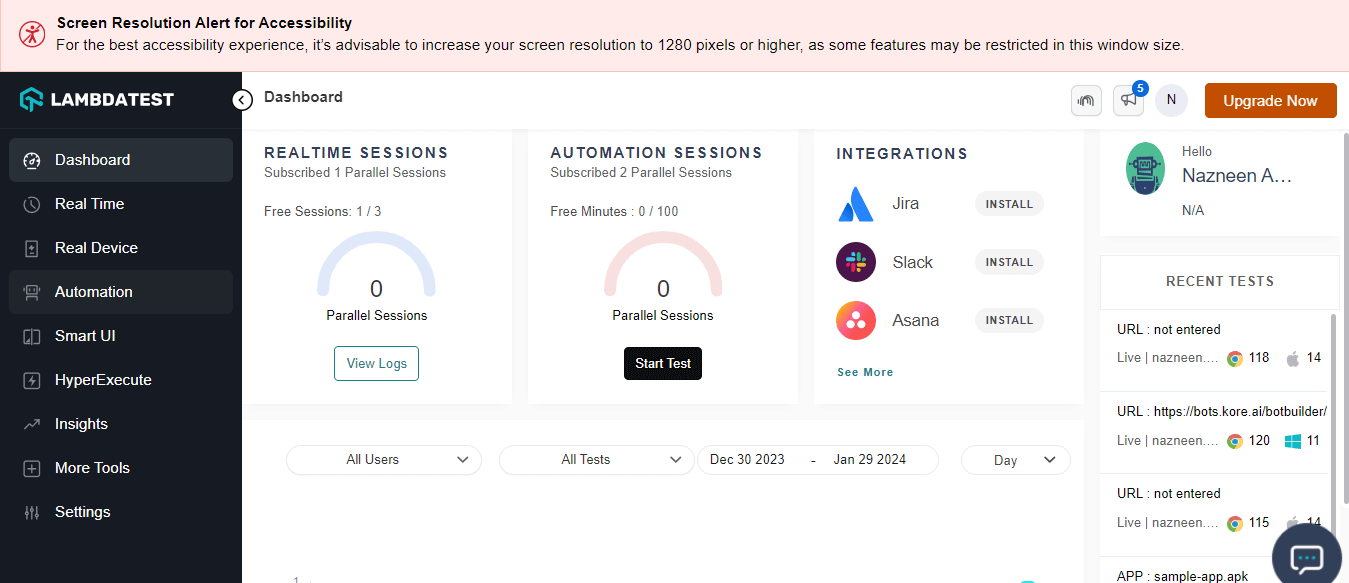
- From the user Dashboard, click Real > Desktop.
- Enter your web URL and select the test configuration per your choices, like browser, version, OS, and resolution. Then click Start.
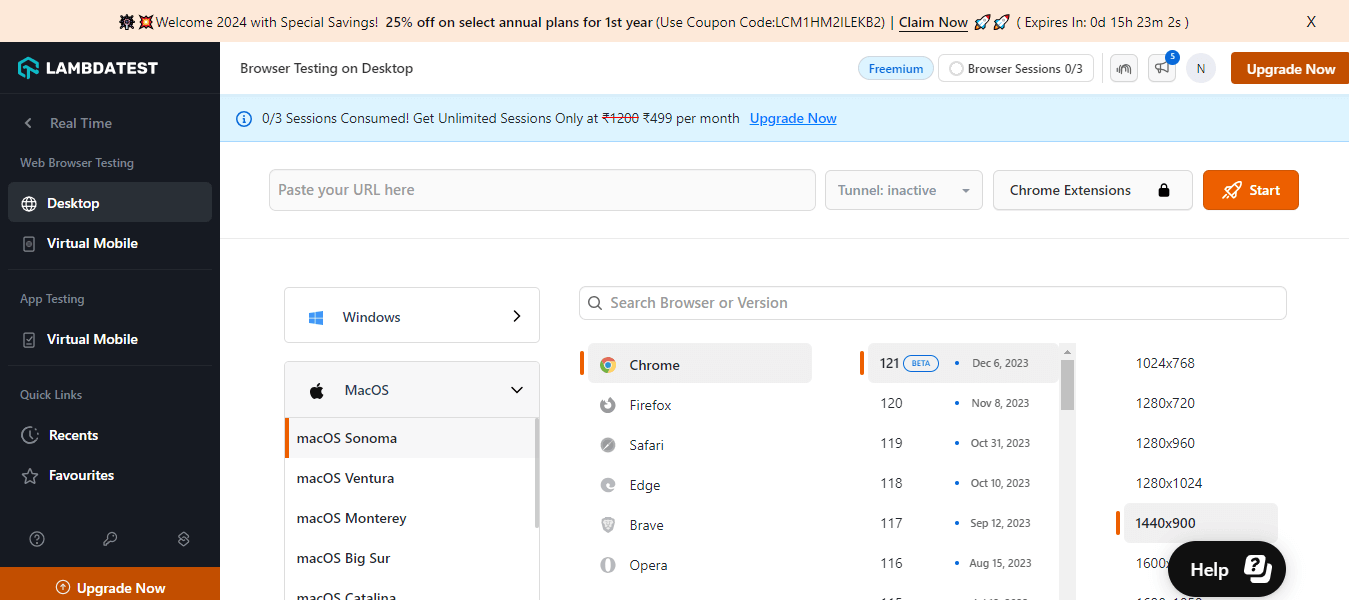
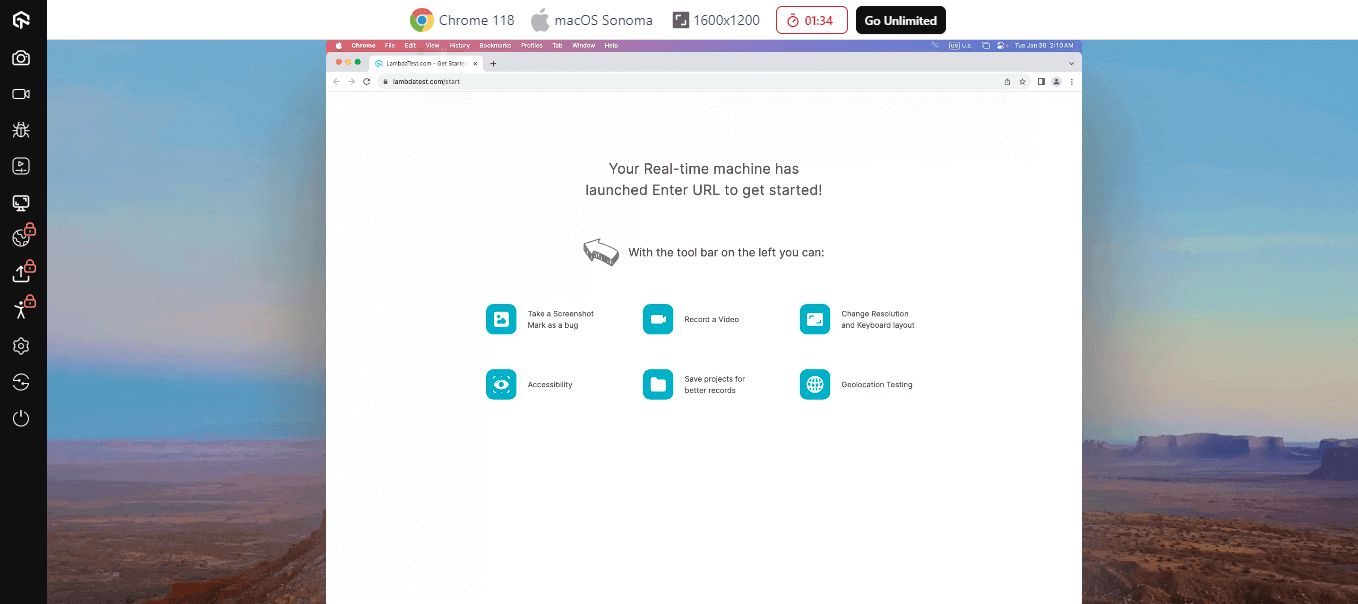
It will allocate you a cloud-based machine running real OS and browsers, and now you can perform your manual compatibility tests.
Automated Compatibility Testing Using TestMu AI
Automation testing with TestMu AI is an effective approach to ensure compatibility across multiple devices and browsers. You quickly run automated tests on different real browsers and devices, lowering the time and effort required for testing.
TestMu AI supports popular automation testing frameworks like Selenium, Playwright , Cypress, Appium , and others, which ease writing and executing test scripts.
To improve your compatibility tests and reduce testing time and effort, follow the steps mentioned to run automated tests on TestMu AI. The below demonstration is for running web automation tests.
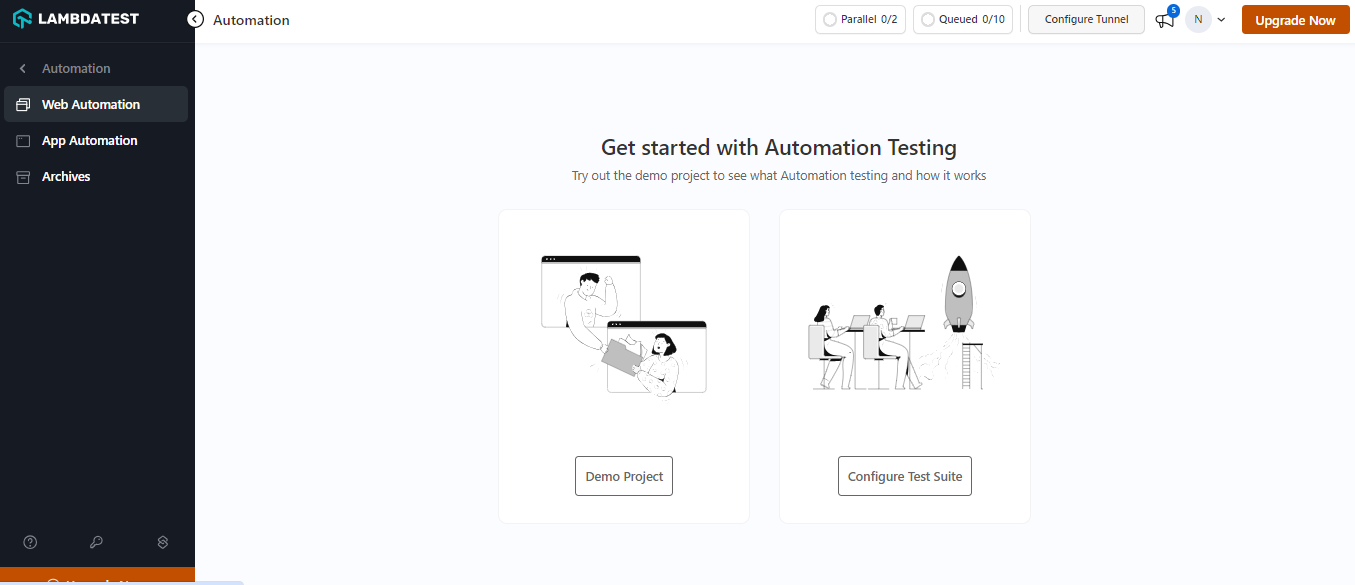
- Log into your TestMu AI account and navigate to Automation from the left panel.
- Select any from the Demo Project or Configure Test Suite.
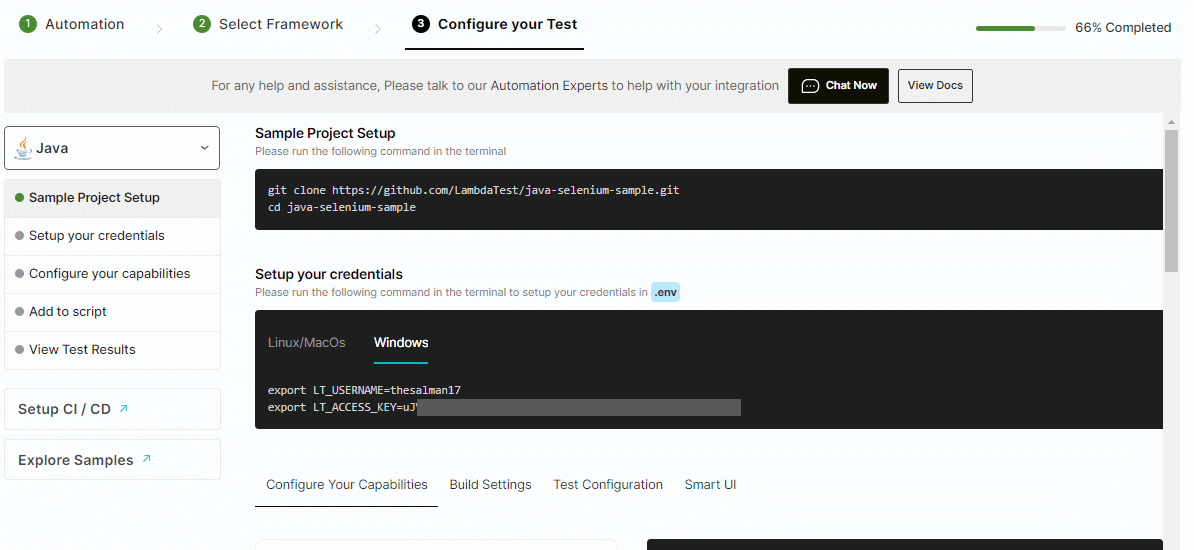
- To run the automated test, choose Configure Test Suite and select your preferred automation framework.
- Follow the screen instructions to configure the test.

Note: Run online compatibility tests across 3,000+ browser and OS combinations. Try TestMu AI Now!
What Are the Challenges of Compatibility Testing?
Specific challenges can arise when performing compatibility tests in a local or a cloud environment. It is crucial to address those while testing to get reliable test results.
Let us learn a few of those challenges.
- The availability of a sheer number of devices, browsers, and operating systems creates challenges in testing applications and websites on every possible configuration. Such fragmentation makes it difficult to ensure the consistent functioning of the application across all platforms.
- Setting up test environments can be expensive and time-consuming.
- Changing or evolving software technology is another challenge that brings new devices, updated OS, and browser versions. It may happen that applications tested for particular platforms may not function correctly on new software technology.
- Applications and websites are intended to be performed in multiple countries. In terms of this, the cross-cultural compatibility issue is a critical challenge. This is because ensuring that the application supports different languages, time zones, and date formats is problematic and can be expensive and time-consuming.
What Are the Best Practices for Compatibility Testing?
Considering the challenges mentioned above in compatibility tests, it is crucial to address those to get reliable test results and high-quality applications and websites. Here are some best practices for performing compatibility tests that should be followed to scrutinize and improve the test process:
- Test Early and Often: Performing compatibility tests early and frequently during the Software Development Life Cycle helps in the early identification and fixation of any related issue. You can be assured that compatibility issues are not left unaddressed and save time associated with fixing them later.
- Test on Real Devices: Testing on real devices is one of the best practices that ensure accurate testing of the application's function on specific devices and OS. You can identify and address compatibility issues before the software application is released.
- Prioritize Critical Issues: Prioritize tests for crucial functions and features of the applications and website to ensure that most of their significant aspects are addressed across all platforms. Through this, you will be able to allocate resources more effectively and focus on the important functionality of the application.
- Test in Different Environments: You should perform compatibility tests on different network environments, like slow and unstable networks. This will help you verify the compatibility of applications and websites across all networks.
- Collaborate With the Development Team: Collaboration between the testing and development teams should be practiced during compatibility tests. It will help ensure that compatibility issues are identified and addressed promptly, aligned with development goals, and that the application meets the requirements.
What Is Tested in Backward Compatibility Testing?
Backward compatibility testing focuses on the specific places where a new release can break the experience of users who are still on older data, settings, or clients. Four technical areas carry most of that risk.
- Data and schema - verify that legacy files, database records, and saved documents still import and parse without corruption after a schema migration. A spreadsheet, project file, or database created in an older version should open cleanly in the new one.
- Configurations - confirm that existing user settings, preferences, and saved profiles carry over after an upgrade instead of resetting to defaults or throwing errors.
- API contracts - check that older clients can still communicate with an updated server. The response fields, status codes, and data types an older client expects must remain intact so it keeps working against the new API.
- Integration - validate that older hardware, third-party plugins, and downstream systems that depend on the product continue to function after the update.
How Do Semantic Versioning and Contract Testing Protect Backward Compatibility?
Keeping software backward compatible is easier when versioning and API changes follow clear, testable rules. The practices below help teams catch breaking changes before they reach users.
- Apply strict Semantic Versioning (SemVer). Increment the major version only for breaking changes, the minor version for backward-compatible features, and the patch version for backward-compatible fixes. A consistent SemVer scheme tells consumers exactly when an upgrade is safe.
- Set clear deprecation policies. Announce which APIs, fields, or features are going away, keep them working for a defined window, and give consumers time to migrate before removal.
- Adopt contract testing. Automated contract-testing frameworks such as Specmatic compare the current API against its documented contract and fail the build when a change would break an existing consumer, catching breaking API changes early in the pipeline.
Pairing SemVer discipline with contract testing turns backward compatibility from a manual review into an automated gate. You can extend the same idea to your broader API testing suite so compatibility checks run on every change.
How Do You Handle Combinatorial Explosion in Compatibility Testing?
Every browser, operating system, device model, and version you support multiplies against the others. A handful of browsers across several OS versions and dozens of devices quickly produces thousands of possible combinations. This rapid, exponential growth of the test matrix is known as combinatorial explosion, and testing every permutation is neither practical nor affordable.
The answer is not to test everything, but to test what your users actually run. Teams tame combinatorial explosion by prioritizing environments with real-user analytics data. Traffic reports from tools like Google Analytics and StatCounter reveal the browsers, OS versions, and devices that matter most for your audience.
Focus first on the combinations that cover the majority of your traffic, then extend coverage to high-risk or high-value segments. Running those prioritized combinations in parallel on a cloud grid keeps the matrix manageable without sacrificing meaningful coverage.
How Do You Test Compatibility for Enterprise Applications Like ERP, CRM, and EHR?
Enterprise ecosystems raise the stakes for compatibility testing. These platforms are deeply customized, integrate with dozens of downstream systems, and run in tightly controlled environments, so a single incompatible update can disrupt business-critical workflows.
- ERP systems - SAP and Oracle ERP deployments carry heavy customization, custom modules, and integrations with finance, supply chain, and HR systems. Compatibility testing has to confirm that browser updates, OS patches, and new ERP releases do not break custom forms, reports, or the integrations that feed them.
- CRM platforms - Salesforce and similar CRMs rely on custom objects, managed packages, and third-party AppExchange add-ons. Validate that new browser versions and platform releases keep custom Lightning components, workflows, and integrations rendering and functioning correctly. Dedicated Salesforce testing helps cover these customizations.
- Healthcare systems - electronic health record platforms such as Epic EHR must stay compatible across the specific browser and OS versions used in hospitals, often including locked-down or legacy configurations. Compatibility issues here can affect patient safety and regulatory compliance, so testing on the exact supported environments is essential.
What Is the Difference Between a Comparability Test and a Compatibility Test?
Searchers sometimes look for a comparability test when they actually mean a compatibility test, and the two are not the same. Clearing up the difference avoids confusion.
A comparability test is usually a statistical or analytical method. In clinical, medical, and manufacturing contexts, it checks whether two datasets, methods, or product versions produce equivalent, comparable results. It is also frequently just a misspelling of compatibility.
A compatibility test, the subject of this guide, verifies that software runs correctly across different browsers, operating systems, devices, and configurations. If you landed here searching for comparability testing in a software context, compatibility testing is almost certainly the term you want.
How Is AI Changing Compatibility Testing?
AI is changing compatibility testing by comparing screenshots across browsers and devices, flagging layout differences that matter, and ignoring rendering noise such as anti-aliasing.
AI also helps with the combinatorial explosion of environments. Models trained on usage analytics and past failures can pick the smallest set of browser, OS, and device combinations that still catches most compatibility defects.
New AI browsers built on Chromium add more targets to check, and AI visual review still needs a person to confirm real breaks. Our guide to visual testing covers how these comparisons work.
Why Should Every Release Include Compatibility Testing?
Every release should include compatibility testing because users run your software on many browsers, devices, and OS versions, and one untested combination can break it for them.
Compatibility testing is crucial in this current time, where technology is evolving faster. It is an essential process that ensures software applications can work seamlessly across multiple platforms, browsers, devices, and environments. In this tutorial, the process outlined to perform a compatibility test can help you get started.
Following the best practice, you can detect and resolve any compatibility issue early in development. This can save you time and effort. You should prioritize compatibility tests to ensure software applications and websites meet users' expectations.
Author

Nazneen Ahmad
Blogs: 39


Nazneen Ahmad is a freelance Technical Content SEO Writer with over 6 years of experience in crafting high ranking content on software testing, web development, and medical case studies. She has written 60+ technical blogs, including 50+ top-ranking articles focused on software testing and web development. Certified in Automation Basic and Advanced Training - XO 10, she blends subject knowledge with SEO strategies to create user focused, authoritative content. Over time, she has shifted from quick, keyword-heavy drafts to producing content that prioritizes user intent, readability, and topical authority to deliver lasting value.
Reviewer

Shahzeb Hoda
Reviewer
Shahzeb Hoda is the Associate Director of Marketing and a Community Contributor at TestMu AI, leading strategic initiatives in developer marketing, content, and community growth. With 10+ years of experience in quality engineering, software testing, automation testing, and e-learning, he has authored and reviewed 70+ technical articles on software testing and automation. Shahzeb holds an M.Tech in Computer Science from BIT, Mesra, and is certified in Selenium, Cypress, Playwright, Appium, and KaneAI. He brings deep expertise in CI/CD pipeline automation, cross-browser testing, AI-driven testing practices, and framework documentation. On LinkedIn, he is followed by 3,700+ engineers, developers, DevOps professionals, tech leaders, and enthusiasts.


Compatibility Testing FAQs
Did you find this page helpful?
More Related Learning Hubs
TestMu AI forEnterprise
Get access to solutions built on Enterprise
grade security, privacy, & compliance
- Advanced access controls
- Advanced data retention rules
- Advanced Local Testing
- Premium Support options
- Early access to beta features
- Private Slack Channel
- Unlimited Manual Accessibility DevTools Tests