

Power Your Software Testing with AI Agents and Cloud
The Native AI-Agentic Cloud Platform to Supercharge Quality Engineering. Test Intelligently and Ship Faster.


- TestMu AI (Formerly LambdaTest)
- /
- Blog
- /
- Black Box vs White Box Testing: Key Differences
Black Box vs White Box Testing: Key Differences
Compare black box vs white box testing across types, tools, techniques, and test levels, plus where grey box testing fits in a modern QA process.
Last Updated on:
On This Page
- What is Black Box Testing?
- Types of Black Box Testing
- Tools for Black Box Testing
- Techniques Used in Black Box Testing
- What is White Box Testing?
- Types of White Box Testing
- Tools for White Box Testing
- Techniques Used in White Box Testing
- Black Box vs White Box Testing: Understanding the Differences
- What is Grey Box Testing?
- Comparing Black Box, White Box, and Grey Box Testing
- How Does AI Test Generation Affect Black Box and White Box Testing?
- Conclusion
Black box vs white box testing differ by code access: black box testing checks software through inputs and outputs, while white box testing inspects the source code, branches, and execution paths. QA testers run black box checks at the system, integration, and acceptance levels with tools such as Selenium, while developers run white box unit tests with JUnit, PyTest, and SonarQube. This guide covers black box testing types, tools, and techniques, white box testing types, tools, and techniques, the differences between them, grey box testing, and how AI test generation affects both.
Key Takeaways
- Black box testing checks software only through its inputs and outputs, so the tester needs no access to the source code.
- White box testing requires full access to the source code and targets internal logic, branches, loops, and execution paths.
- Black box testing is usually performed by QA testers at the system, integration, and acceptance levels, while white box testing is performed by developers and SDETs at the unit level.
- Grey box testing gives the tester partial knowledge of the internal code, which suits integration testing and security testing.
- White box unit tests and static analysis run on every commit, while black box end-to-end and API checks run after the build is deployed to a test environment.
- AI test generation mostly produces white box unit tests, and a generated test can lock in an existing bug because it asserts whatever the code already does.
What is Black Box Testing?
Black Box Testing is a method in software testing where the tester has no knowledge of how the application works internally. Instead, the focus is entirely on how the software behaves, testing its features by providing inputs and observing the outputs.
The tester does not need to understand the code behind the scenes. Each test case records an input, the expected output, and the actual output, so a defect is reported as a difference in behavior rather than a fault in a named function.
Key Takeaway: Black box testing evaluates software purely by feeding inputs and checking outputs, so a defect is reported as a difference in behavior rather than a fault in a named function.
Types of Black Box Testing
There are different approaches to Black Box Testing, depending on what you want to check:
- Functional Testing: Verifies if the features of the software work correctly.
- Non-Functional Testing: Checks the performance, how well the software can scale, along its reliability.
- Regression Testing: Makes sure that new changes don’t break existing features.
- UI Testing: Tests how the user interface looks and functions.
- Usability Testing: Focuses on how easy and user-friendly the software application is.
- Ad-hoc Testing: Performs unstructured testing to discover unexpected issues.
- Compatibility Testing: Makes sure the application works across different devices, browsers, and platforms.
- Penetration Testing: Simulates cyberattacks to find security weaknesses.
- Security Testing: Evaluates how secure the software is against threats.
- Localization Testing: Ensures the software adapts to different languages and cultural contexts.
Key Takeaway: Black box testing covers functional, non-functional, regression, UI, usability, ad-hoc, compatibility, penetration, security, and localization testing.
Tools for Black Box Testing
Some popular tools used in Black Box Testing include Selenium, Postman, and TestMu AI. These tools help testers perform cross-browser testing and validate the software’s performance in various environments.
Key Takeaway: Selenium and Postman are widely used black box testing tools that let testers validate application behavior across different browsers and environments.

Techniques Used in Black Box Testing
These are some common techniques used in Black Box Testing:
- Boundary Value Analysis: Tests edge cases or extreme values of input to make sure they’re handled correctly.
- Equivalence Partitioning: Groups similar inputs together to reduce the number of tests needed.
- Decision Table Testing: Validates different input combinations and their expected results.
- State Transition Testing: Tests how the software responds when it moves between different states based on inputs.
- Use Case Testing: Ensures the software behaves as expected for specific real-world scenarios.
Three more techniques come up often in practice and are worth naming. Error guessing relies on a tester's experience of where defects usually hide, such as empty inputs, zero values, and malformed dates, so it depends on the person rather than on a formal rule. All-pairs testing, also called pairwise testing, cuts the number of cases needed when a feature has many independent settings, because most defects surface from the interaction of two parameters rather than from a rare combination of five. Cause-effect graphing maps each input condition to the output it should produce, then derives test cases from that graph, which makes it useful when a decision table alone becomes too large to read.
Key Takeaway: Common black box testing techniques are boundary value analysis, equivalence partitioning, decision table testing, state transition testing, and use case testing.
What is White Box Testing?
White Box Testing, also called Glass Box Testing, is a popular and useful technique where the tester has complete access to the internal workings of the software.
This means the tester can read the code, follow the system’s logic, and analyze how each path executes. Test cases are written against specific functions, branches, and conditions, so a failure points straight at the line of code that caused it.
White Box Testing helps to uncover hidden bugs, ensure every part of the code is covered by tests, and find problems related to code paths, loops, and logic. It’s more about ensuring the software’s internal structure is solid and efficient.
Key Takeaway: White box testing, also called glass box testing, gives the tester full access to the source code, so a failing test points straight at the line of code that caused it.
Types of White Box Testing
White Box Testing focuses on understanding and testing the internal code and logic of a software application. Here’s a breakdown of the different types:
- Unit Testing: Tests individual components or functions of the software to ensure they work as expected.
- Static Code Analysis: Looks at the code without running it to spot potential errors or vulnerabilities.
- Dynamic Code Analysis: Analyzes the code during execution to identify runtime issues like memory leaks or inefficient resource usage.
- Statement Coverage: Ensures every line of code is executed during testing to confirm full code coverage.
- Branch Testing: Focuses on testing decision points in the code (like if-else statements) to make sure all branches are covered.
- Path Testing: Tests all possible paths the software might take to check for logical errors.
- Loop Testing: Ensures that loops in the code (such as “for” and “while” loops) work correctly and don’t cause infinite loops.
Key Takeaway: Types of white box testing include unit testing, static code analysis, dynamic code analysis, statement coverage, branch testing, path testing, and loop testing.
Tools Used for White Box Testing
Popular tools used in White Box Testing include JUnit, PyTest, JaCoCo for Java code coverage, and SonarQube for static analysis. These tools help automate the process of checking the code, ensuring quality, and spotting inefficiencies or security risks.
Key Takeaway: JUnit and PyTest run white box unit tests, JaCoCo measures Java code coverage, and SonarQube performs static analysis of source code.
Techniques Used in White Box Testing
Here are some common techniques used to test the internal workings of the software:
- Unit Testing: Checks if each individual part of the code works properly.
- Static and Dynamic Code Analysis: Finds errors or vulnerabilities in the code, both before and during execution.
- Statement and Branch Coverage: Ensures every line and decision point in the code is tested.
- Path Testing: Identifies logic errors by checking all the possible execution paths.
- Loop Testing: Validates that loops in the code are functioning correctly, avoiding problems like infinite loops.
Coverage numbers on their own do not prove the tests check anything. A line can be executed by a test that asserts nothing and still count as covered. Mutation testing closes that gap. The tool makes small changes to the source code, such as flipping a comparison operator or removing a return value, then reruns the suite to see which changes the tests catch. A mutant that survives points to an assertion that is missing or too weak. Stryker handles JavaScript, TypeScript, and .NET, PIT handles Java, and mutmut handles Python. Most teams run mutation testing on a small set of critical modules, because it is far slower than a normal unit test run.
Key Takeaway: Code coverage alone does not prove a test checks anything, so mutation testing tools such as Stryker and PIT change the source code to expose assertions that are missing or too weak.

Black Box vs White Box Testing: Understanding the Differences
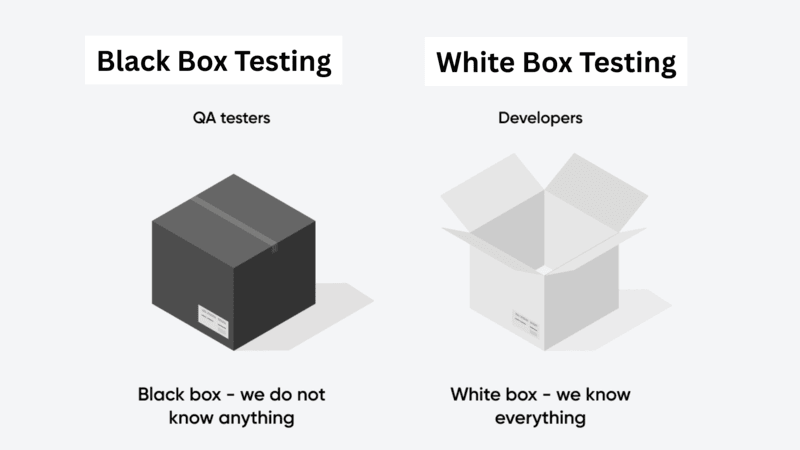
Here’s a simple comparison to help you understand when to use Black Box vs White Box Testing:
| Aspect | Black Box Testing | White Box Testing |
|---|---|---|
| Focus | User-facing functionality and behavior. | Internal code, structure, and logic. |
| Testing Approach | Based on inputs and expected outputs. | Based on analyzing the code, logic, and flow. |
| Test Design | Based on user requirements and how the software should behave. | Based on code structure, algorithms, and internal design. |
| Performed By | QA testers or external testers. | Developers or software engineers in test (SDETs). |
| Level of Testing | Used for system, integration, and acceptance testing. | Primarily used for unit and integration testing. |
| Bug Detection | Finds issues related to functionality and UI. | Identifies logical errors, code issues, and gaps in coverage. |
| Time Required | Easier and faster to design, but can take longer to execute. | Takes longer to design, but helps with quick debugging. |
| Automation | Easily automated for regression and end-to-end testing. | Best suited for unit and integration test automation. |
The two approaches also sit at different points in a continuous integration pipeline. White box unit tests and static analysis run on every commit, because they need only the source code and finish in seconds. Black box end-to-end and API checks run after the build is deployed to a test environment, since they need a running system with its database and dependencies in place. A common setup blocks the merge on unit test results and a coverage threshold, then runs a smaller black box suite against the deployed build. Keeping that slower black box layer thin is what keeps the pipeline fast enough to run on every change.
Key Takeaway: Black box tests are designed from user requirements and catch functional and UI defects, while white box tests are designed from the code and catch logical errors and coverage gaps.
What is Grey Box Testing?
Grey Box Testing combines elements of both Black Box and White Box Testing. Testers have partial knowledge of the system’s internal code, which helps them to focus on both how the software functions as well as its internal structuring. This makes it especially useful for integration and security testing, where understanding both the internal design and external behavior is extremely crucial.
Key Takeaway: Grey box testing gives the tester partial knowledge of the internal code, which makes it a good fit for integration testing and security testing.
Comparing Black Box vs White Box Testing vs Grey Box Testing
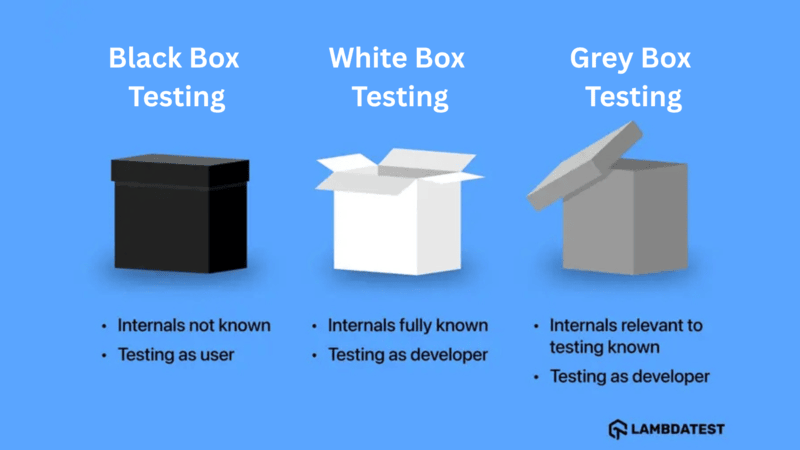 Here’s a quick overview of how Black Box vs White Box Testing vs Grey Box Testing types differ:
| Aspect | Black Box Testing | White Box Testing | Grey Box Testing |
|---|---|---|---|
| Definition | Testing without knowledge of the internal code; focuses on inputs and outputs. | Testing with full knowledge of internal code; focuses on logic, paths, and structures. | A mix of both; tests functionality with some internal knowledge. |
| Focus | User requirements and software behavior. | Internal code, logic, and structure. | Combines functionality with internal design. |
| Knowledge Required | No knowledge of the internal code. | Full understanding of the code. | Partial knowledge of the internal code. |
| Test Basis | Functional specifications, user scenarios. | Source code, algorithms, and internal logic. | Functional requirements with partial access to the code. |
| Types of Tests | Functional, system, and acceptance testing. | Unit, integration, and code coverage analysis. | Integration, security, and system testing. |
| Testing Scope | Broad, focusing on the overall system. | Narrower, focusing on specific code paths and logic. | A mid-level approach, looking at both functionality and internal processes. |
| Test Design | Based on functional requirements and user stories. | Based on code and design documents. | Based on functional needs with some internal insights. |
| Tools Used | Functional testing tools and test management tools. | Debuggers, code analysis tools, unit testing frameworks. | Combination of functional and security testing tools. |
Key Takeaway: Black box testing needs no knowledge of the code, white box testing needs full knowledge of the code, and grey box testing needs partial knowledge, which is what separates their test basis, scope, and tooling.

How Does AI Test Generation Affect Black Box and White Box Testing?
AI test generation has moved further into white box testing than black box testing, because a large language model can read source code but cannot read your requirements. A tool that writes unit tests works from the implementation, which places it on the white box side of this comparison.
Meta reported results for TestGen-LLM, an internal tool that extends existing unit test classes rather than writing them from scratch. In its published evaluation, 75% of the generated test cases built correctly, 57% passed reliably, and 25% increased coverage. Meta engineers accepted 73% of its recommendations for production during test-a-thons on Instagram and Facebook. The tool keeps a test only if it compiles, passes repeatedly, and raises coverage, so most of what the model produces is discarded before a reviewer sees it.
That filter hides a problem the coverage number cannot show. A generated test asserts whatever the code currently does, so when the code is wrong the test records the defect as expected behavior. A study of the generators Codium CoverAgent and CoverUp found that 59.6% and 68.1% of the tests in their final suites passed on buggy code and failed on the corrected version. The same filtering step threw away hundreds of tests that had caught the bug, because a bug-revealing test fails.
This is the practical reason to keep both approaches instead of letting generated coverage stand in for testing. White box tests confirm that the code does what the code says. Black box tests derived from requirements and user scenarios are the ones that can show a requirement was never met. When you review AI generated tests, check each assertion against the specification, not against the function it covers.
Key Takeaway: AI test generation sits on the white box side because a model reads source code and not requirements, so every generated assertion should be checked against the specification rather than against the function it covers.
Conclusion
Black Box vs White Box testing, and Grey Box Testing each serve a different purpose and offer unique insights into software quality. Using them together provides a comprehensive approach to testing, covering both the software’s external behavior and its internal logic.TestMu AI supports teams by providing tools that help integrate these approaches, enabling cross-browser, real-device testing, and code validation for a more reliable development process.
Author

Poornima Pandey
Blogs: 8


Poornima is a Community Contributor at TestMu AI, bringing over 4 years of experience in marketing within the software testing domain. She holds certifications in Automation Testing, KaneAI, Selenium, Appium, Playwright, and Cypress. At TestMu AI, she contributes to content around AI-powered test automation, modern QA practices, and testing tools, across blogs, webinars, social media, and YouTube. Poornima plays a key role in scripting and strategizing YouTube content, helping grow the brand's presence among testers and developers.


Black Box vs White Box Testing FAQs
Did you find this page helpful?
More Related Blogs
TestMu AI forEnterprise
Get access to solutions built on Enterprise
grade security, privacy, & compliance
- Advanced access controls
- Advanced data retention rules
- Advanced Local Testing
- Premium Support options
- Early access to beta features
- Private Slack Channel
- Unlimited Manual Accessibility DevTools Tests