

Power Your Software Testing with AI Agents and Cloud
The Native AI-Agentic Cloud Platform to Supercharge Quality Engineering. Test Intelligently and Ship Faster.


- TestMu AI (Formerly LambdaTest)
- /
- Learning Hub
- /
- Software Testing Strategies: Types, Tools & Selection Guide
Software Testing Strategies: Types, Tools & Selection Guide
The 7 core software testing strategies with examples, how to pick the right one for your team, how a test strategy differs from a test plan, and where AI fits.
Last Updated on:
On This Page
- Software Testing Strategy
- Why Software Testing Strategies Matter
- Types of Software Testing Strategies
- 7 Core Strategic Approaches
- 7 Automation Elements
- Testing With AI Agents
- Agentic Feedback Loops
- Choose a Software Testing Strategy
- Software Testing Strategy Disadvantages
- AI-Assisted Testing
- Enterprise & Outsourced Testing
- Test Strategy vs Test Plan
- Software Testing Strategy Tools
- Software Testing Types
- Conclusion
The seven main software testing strategies are analytical (risk-based), model-based, methodical, process-compliant, regression-averse, reactive, and standard-compliant. In practice, teams combine four testing types: static, structural (white-box), behavioral (black-box), and front-end, choosing the mix based on project risk, complexity, team expertise, and regulatory needs.
A software testing strategy is the high-level approach that defines the methods, processes, and tools a team uses to verify software quality across the software development life cycle (SDLC). It maps every test activity, from static reviews to end-to-end automation, against four objectives: Better Product Quality, Optimum Resource Utilization, Faster Release Cycles, and Risk Mitigation.
This guide covers the four core software testing strategies (static, white-box, black-box, front-end), how to select the right one for your project, the test automation strategy elements that scale them, and the tools, including TestMu AI, that execute them across browsers and devices.
TL;DR
To implement an effective software testing strategy, combine static, structural, behavioral, and front-end testing, then scale execution using TestMu AI for fast parallel cross-browser runs and Selenium for web automation. This approach aligns QA with business risks, reduces escaped defects, and ensures predictable releases.
- Best for early issue detection: Static testing analyzes software documentation, code, design, and requirements without executing the code to find errors early.
- Best for code path verification: Structural testing, or white-box testing, verifies internal logic, paths, and conditions with full access to the source code.
- Best for user experience validation: Behavioral testing, or black-box testing, validates software functionality from an end-user perspective without requiring source code access.
- Best for interface validation: Front-end testing checks user interface design elements, layout, responsiveness, and accessibility across different devices and platforms.
- Best for cross-browser orchestration: TestMu AI runs parallel tests across 3,000+ browser-OS combinations and 10,000+ real devices, using HyperExecute to shard suites for up to 70% faster execution.
- Best for web UI automation: Selenium drives browser-level UI tests to verify web application functionality and ensure consistent behavior across different environments.
- Best for developer-focused web testing: Cypress automates browser-level UI tests to validate web application flows and user interactions directly.
- Best for mobile automation: Appium executes automated tests for native, hybrid, and mobile web applications across iOS and Android platforms.
- Best for collaborative API testing: Postman allows teams to perform collaborative request testing to verify API endpoints and integrations.
- Best for enterprise API testing: SoapUI delivers functional testing for SOAP and REST APIs at an enterprise scale.
- Best for performance testing: JMeter simulates load and stress to evaluate how applications perform under heavy user traffic.
- Best for pipeline integration: Jenkins orchestrates CI/CD pipelines, connecting automated test suites to a managed grid to scale execution.
- Best for workflow automation: GitHub Actions orchestrates CI/CD pipelines, triggering automated test runs directly from repository commits.
- A project-level test strategy defines what to test and why, whereas a release-level test plan outlines how, when, and who executes those tests.
What is a Software Testing Strategy?
A software testing strategy is the plan that decides how a team organizes and prioritizes its tests across the development cycle. Instead of treating every test as equal, the strategy sorts them so each one has a clear purpose and a defined place in the process.
At the highest level, seven strategic approaches are widely used across the industry: Analytical, Model-Based, Methodical, Process-Compliant, Regression-Averse, Reactive, and Standard-Compliant. Each describes how a team decides what to test and why, and they sit above the specific testing types (static, white-box, black-box) covered later in this guide.
The core idea is to position each test along two axes:
- Level of abstraction – how close a test sits to the raw code versus the fully running product. Unit tests live at the lowest level, checking individual functions or methods in isolation, while system tests sit at the top, validating the application as a complete, integrated whole.
- Technical vs. business focus – whether a test verifies internal mechanics or real-world business behavior. Integration tests are technical, confirming that modules and services communicate correctly, whereas BDD tests are business-facing, written in plain language that mirrors what users and stakeholders expect.
Why are Software Testing Strategies Important?
Software testing strategies are extremely important for ensuring software quality. Treated as software testing improvement strategies, they replace ad-hoc QA with a repeatable system: without a clear strategy, testing becomes chaotic, inefficient, and incomplete, leading to missed defects and poor utilization of both testing efforts and resources.
- Improves Test Coverage: A solid strategy ensures that all aspects of the software are tested, leaving no room for defects.
- Risk Mitigation: An effective testing strategy help to identify risks early in the process, allowing teams to mitigate potential issues before they escalate.
- Resource Optimization: Allows teams to focus efforts on the most important areas, avoiding redundant tests, saving time and resources.
- Consistency and Standardization: Testing strategies set up a uniform testing process across teams and projects, which ensures reliable and repeatable test results. This reduces variations and enhances efficiency in testing.
Types of Software Testing Strategies with Examples
Test strategies in software testing are categorized by how they identify defects, the level of access they require to the source code, and the layer of the application they target. Each type has a specific purpose at a different stage of the development cycle.
The key software testing strategies are discussed below:
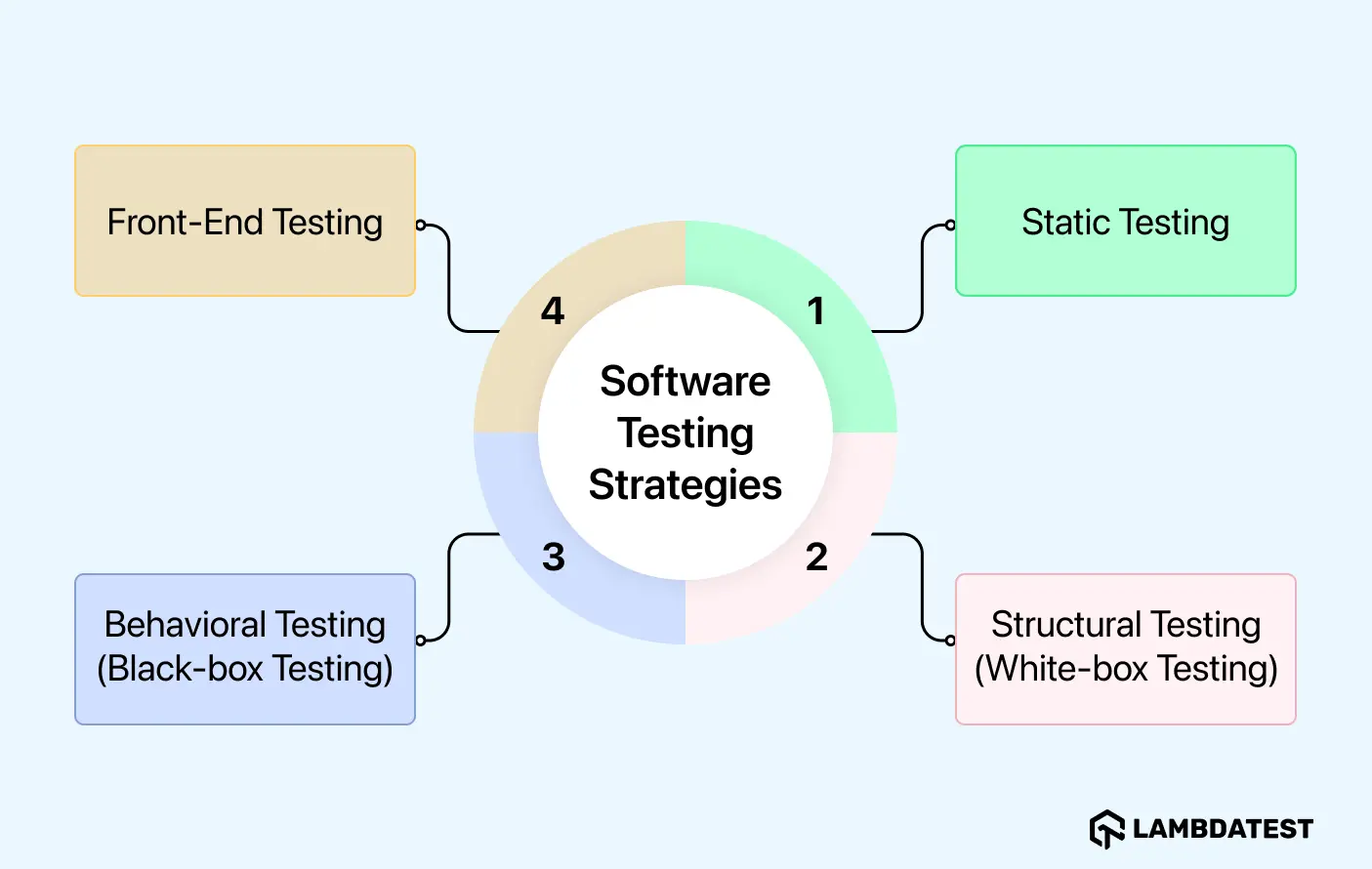
1. Static Testing
Static testing strategy involves reviewing and analyzing the software's documentation, code, design or requirements without executing it. This is often done early in the software development life cycle (SDLC) to identify errors in code, design or requirements before the code is even run.
Purpose:
- Early Issue Detection: It allows teams to spot problems early, such as discrepancies in requirements or unclear design, which would be harder and more costly to address later.
- Cost and Time Efficiency: By identifying issues before they are coded into the system, static testing saves both time and resources by preventing errors from escalating.
- Collaborative Review Process: Not only the developers need to be involved. Domain experts, system architects, and testers should all participate in static testing as this offers diverse perspectives which validates the software meets all requirements accurately.
Example:
Let’s suppose you’re building an e-commerce app. During static testing, the team would review the project’s requirement documents and design to ensure that the checkout flow is clear and complete. If they find that it fails to apply discounts or tax calculation feature, they can fix it early, saving time compared to discovering this problem during integration testing.
This is typically done through desk-checking, where developers manually check the code after writing the code and before code execution or it can also be done through formal review meetings where stakeholders discuss the design and requirements.
2. Structural Testing (White-box Testing)
Structural testing, also known as white-box testing, involves testing the internal workings of an application. Testers have full access to the source code and focus on verifying the code’s logic, paths, and conditions.
Structural testing helps identify issues within the code that may not be easily spotted through external testing methods.
Purpose:
- Ensures Code Integrity: Verifies that all parts of the code, including paths and conditions, work as expected. This helps ensure the software operates correctly in all scenarios.
- Bug Detection: The main benefit of structural testing is its ability to detect issues that may not be visible from the outside.
For example, errors in logic, incorrect calculations, or flawed data handling are often only identifiable by directly analyzing the code. By evaluating these internal aspects, testers can catch bugs early before they cause bigger problems.
- Comprehensive Coverage: Helps achieve high code coverage, ensuring every part of the code is checked and tested.
Example:
A good example for this would be an online payment system. In structural testing, the focus is on the code that processes payments. Testers verify that it handles different scenarios, such as valid and invalid card numbers, multiple payment methods (credit, debit, digital wallets), and the calculation of transaction fees.
Every logic path in the code is tested to confirm that decision points in the code execute correctly under various conditions, like a payment failure or a successful transaction. By doing this, testers ensure that all edge cases are covered and no errors are left undetected in the code.
3. Behavioral Testing (Black-box Testing)
Behavioral testing, also known as black-box testing, focuses on testing the software’s functionality from an end-user's perspective, without any knowledge of the internal code. The goal is to validate that the software works as expected in real-world usage scenarios.
Purpose:
- Validates User Experience: It tests all the functionality of the software works as expected from end user perspective.
- Confirms System Behavior Under Various Conditions: Verifies that the software behaves correctly when interacting with different user inputs, devices, or environments.
Example:
Imagine you are testing a banking app that helps users to check account balances, transfer funds, and view transaction history. In behavioral testing, you would check if these features work correctly under various conditions.
You can do it by performing cross browser and cross-device testing to ensure that the app functions accurately and consistently across all browser-OS combinations and devices.
4. Front-End Testing
Front-end testing (UI Testing) checks whether the user interface (UI) of the application functions as expected, this includes validating design elements, layout, responsiveness, and accessibility across devices and platforms.
Purpose:
- Visual Testing: Ensures the UI matches the intended design and is visually consistent across devices.
- Checks User Interactions: Verifies that buttons, menus, and other interactive elements work as expected.
- Accessibility Testing: Ensures that the app is usable for differently abled people, meeting accessibility standards.
Example:
For a shopping app, UI testing ensures that all the UI elements, such as product images, filter buttons, and navigation menus, response and display correctly across all devices and environments.
It checks that the layout adapts properly when it switches between desktop and mobile views so as to ensure the design remains intuitive as well as accessible for all of users. Additionally, features like image carousels or sorting filters must also be tested to ensure smooth functionality and responsiveness.
The 7 Core Strategic Approaches to Testing
The types above describe how you access and exercise the code. A higher layer sits on top of them: seven strategic approaches that describe how a team decides what to test and why. Most teams blend several of these rather than picking one.
- Analytical (risk-based): test effort is directed by analysis, most commonly a risk analysis that targets the highest-impact, highest-likelihood areas first.
- Model-Based: tests are derived from a model of the system, such as a workflow, state diagram, or usage profile, so coverage maps to real behavior.
- Methodical: testing follows a predefined, reusable set of checks, for example a standard checklist, a quality-attribute list, or a set of common failure patterns.
- Process-Compliant: testing follows the rules and processes of an external framework, such as an Agile methodology or an industry regulation.
- Regression-Averse: the priority is protecting existing functionality, so the strategy leans heavily on automated regression suites that run on every change.
- Reactive: testing responds to the system as it is built, using exploratory testing and techniques like error guessing rather than fully planning tests in advance.
- Standard-Compliant: testing is dictated by an industry or regulatory standard the product must meet, common in medical, automotive, and aerospace software.
7 Elements of an Automated Software Testing Strategy
A software testing strategy decides what to test and why. Automation decides how much of it can actually run on every commit without someone starting it by hand, which is what keeps the strategy alive once the release cadence tightens. Test automation is the execution layer of the strategy, not a strategy of its own.
Seven elements decide whether that translation holds. Work through them in order, since each one depends on the choices made above it, and see the deeper walkthrough on building an effective test automation strategy if you are standing one up from scratch.
1. Define Scope and Goals
Clearly define what you want to automate like unit tests, integration tests, UI tests, etc. Set measurable goals and specific objectives that the automation should achieve, for example reducing the time for regression testing or improving test coverage.
2. Select the Right Tools
Map each testing layer to a tool that fits your stack. The matrix below is the minimum coverage most teams need:
- Web Automation: Selenium or Cypress for browser-level UI tests; use web automation patterns to drive both.
- Mobile Testing: Appium for iOS and Android (native, hybrid, mobile web). See the mobile testing guide for setup.
- Cross-Browser Execution: TestMu AI for parallel runs across 3,000+ browser-OS combinations and 10,000+ real devices.
- API Testing: Postman for collaborative request testing; SoapUI for SOAP/REST at enterprise scale.
- Performance Testing: JMeter for load and stress simulations.
- CI/CD Orchestration: Jenkins or GitHub Actions, wired to a managed grid so test execution scales with the pipeline.
3. Design Effective Test Cases
Writing effective automated test cases is important. First, make sure that the tests are easy to understand, they maintain and cover the most critical paths. They prioritize the tests that offer greatest value and can be implemented quickly in CI/CD pipeline.
4. Orchestrate with CI/CD Pipelines
Automated tests only protect a release if they finish inside the pipeline window. Once a suite passes a few hundred cases, sequential execution turns the merge gate into the slowest step, and teams quietly start skipping runs to ship on time. That is the point to add a test orchestration layer rather than more test cases.
Orchestration decides what runs where and in what order. HyperExecute by TestMu AI splits and shards a suite across parallel nodes and auto-retries transient failures, which is where its up to 70% faster end-to-end figure comes from against a traditional grid. It also builds the run configuration from your repository instead of asking you to hand-write YAML per job, and the getting started docs cover wiring it into an existing pipeline.

5. Address Flakiness
A flaky test passes and fails intermittently under the same conditions. The real damage is not the failed run, it is the habit it creates: once a suite is known to be unreliable, engineers re-run red builds instead of reading them, and a genuine regression eventually gets waved through with the noise.
So the strategy question is how you tell the two apart quickly. Test Intelligence compares WebDriver command logs against historical runs to flag which failures are intermittent rather than real, and attaches a root cause alongside error trends and cross-environment anomalies, so triage starts from evidence instead of another re-run.

Note: With Test Intelligence, detect flaky tests early and accelerate your release cycle. Try TestMu AI free!
6. Execute Parallel Testing
Parallel testing is what keeps a growing matrix affordable in time, running the same suite across browsers, devices, and operating systems at once instead of end to end. The constraint is rarely the tests themselves. It is owning the hardware to run them on, because every new browser version and device has to be bought, patched, and kept current before it is worth testing against.
Renting that matrix removes the standing cost. TestMu AI runs suites in parallel across 3,000+ browser-OS combinations, and its Real Device Cloud adds 10,000+ real devices for the cases where emulator behavior is not close enough, so coverage scales with the plan rather than with a procurement cycle.

7. Test Result Analysis
After running automated tests, reviewing test results thoroughly is crucial. Implement proper reporting and logging systems to capture detailed error information and metrics that can guide improvements.
Strategies for Testing With AI Agents
AI coding agents now ship whole features from a single prompt, which moves the bottleneck from writing code to proving it works. The strategy problem is that those agents verify on a closed surface: unit tests, type checkers, linters, and compilers all read source code. None of them open a browser, click the button, and confirm the page that loads. When an agent reports a pass, it has confirmed the code compiles, not that the feature works for a user.
That gap changes what a testing strategy has to specify. Three shifts matter:
- Author from intent rather than from selectors, so test creation stops being rationed behind the few engineers who can write framework code.
- Verify against the rendered UI rather than the code surface, so a passing result reflects what a user would actually see.
- Scale execution rather than headcount, so a suite growing at agent speed still returns a verdict inside the pipeline window.
1. KaneAI for Authoring From Intent
KaneAI is a GenAI-native agent for AI app testing that turns plain-English prompts, PRDs, Jira tickets, and recordings into executable tests across web, mobile, API, database, and accessibility layers. Because the requirement itself becomes the test, intent survives the trip from spec to suite instead of being re-interpreted by hand.
When the UI shifts, smart element detection re-anchors the step, so maintenance becomes a review rather than a rewrite. Generated tests export to Selenium, Playwright, Cypress, or Appium, so adopting it does not lock you out of the framework you already run.
2. Kane CLI for Verification Inside the Agent Loop
Kane CLI is a deterministic browser agent for developers, AI coding agents, and CI/CD pipelines. It drives a real Chrome instance through the Chrome DevTools Protocol and validates what is rendered on screen, using natural-language objectives instead of selectors.
npm install -g @testmuai/kane-cli

kane-cli run "Log in and confirm the dashboard loads" --agent --headless
The word deterministic describes the verification contract, not the model. The agent's internal path can vary between runs, but a pass is granted only when the expected state is confirmed through explicit evidence: DOM state, accessibility labels, URL changes, network responses, screenshots, or console logs. That is what makes a result safe for another agent to act on. The Kane CLI documentation covers the full command surface.
3. HyperExecute for Scaling the Run
Authoring faster only helps if execution keeps pace. HyperExecute is the orchestration layer for that, delivering up to 70% faster runs than traditional grids through intelligent test splitting, sharding, and auto-retry across 3,000+ browser and OS combinations and 10,000+ real devices. Without it, agent-generated coverage grows until the suite no longer fits the release window.
What Are Agentic Feedback Loops in Testing?
An agentic feedback loop is a cycle where an AI agent takes an action, receives a structured verdict on the result, and uses that verdict to decide what to do next, with no human relaying the outcome. In testing, the loop only closes when the verification step returns machine-readable evidence rather than a screenshot for somebody to eyeball.
Kane CLI is built for exactly that. Agent mode suppresses the interactive interface and emits NDJSON, one JSON object per line, ending with a run_end event that carries the status, summary, extracted values, token usage, and the Test Manager URL. An agent parses that stream directly instead of guessing from console text.
In practice the loop runs like this:
- The coding agent writes or changes a feature.
- It invokes Kane CLI with a natural-language objective describing the expected user outcome.
- Kane CLI runs the flow in real Chrome and returns a structured pass or fail with the evidence behind it.
- The agent reads the verdict, repairs what failed, and runs the objective again.
- The cycle repeats until the objective passes, and every run stays auditable.
Skills are what make this automatic. A Kane CLI skill is a markdown instruction file that teaches an AI coding agent when to invoke the CLI, how to build the command, and how to parse the output. Installed once for Claude Code, Codex CLI, or Gemini CLI, the agent reaches for browser verification on its own rather than waiting to be told.
For strategy, the loop matters because it relocates human effort. Reviewers stop confirming that a button works and start deciding which outcomes are worth asserting in the first place. The inverse case is worth planning for too: when the AI agent is the product rather than the author, Agent Testing validates chat, voice, and phone agents against simulated users.
How to Select the Right Testing Strategy
Selecting the right software testing strategy means aligning testing effort with project goals, risk, and the team's skill set. Use these five decision criteria, in order, to pick the right mix:
- Project Requirements: New applications usually demand structural and system testing for full coverage; updates to existing products lean on regression testing to protect what already works.
- Complexity and Risk: Highly integrated workflows need behavioral and structural testing. Healthcare, finance, and other high-uptime systems prioritize testing methodologies built around security and performance.
- Team Expertise and Resources: Automation-skilled teams scale faster with automated regression suites; less experienced teams should start with structured manual testing and grow automation incrementally.
- Regulatory and Compliance Needs: Regulated industries (healthcare, finance, public sector) require testing that maps explicitly to applicable standards and audit trails.
- Pilot in Increments: Validate the chosen strategy on a small module before rolling it out across the system, so the approach is proven before the cost is absorbed.
What Are the Disadvantages of Different Software Testing Strategies?
As we've covered the advantages of each testing strategy while discussing on them, let's now take a look at the different disadvantages each one may have:
- Static Testing: It is unable to catch bugs that appear only during runtime, especially with dynamic inputs or performance issues under load.
- Structural Testing: It requires indepth code knowledge, so less experienced testers might overlook internal logic problems.
- Behavioral Testing: It may not catch internal code problems or edge cases, because it focuses only on external behavior of application.
- Front-End Testing: It ensures UI functionality but it doesn't cover backend issues that could affect performance or the user experience.
Integrating AI and AI-Assisted Testing into Your Strategy
Traditional test automation runs scripts a human wrote and maintains. AI-assisted testing adds a layer on top: the tooling helps author tests, repairs them when the application changes, and analyzes failures. The shift matters because test maintenance, not test creation, is where most automation effort is lost.
- Automated test generation: AI drafts test cases from natural-language requirements or user stories, removing the blank-page cost of authoring. TestMu AI's KaneAI generates and executes tests written in plain English.
- Self-healing tests: when a locator or the DOM changes, self-healing scripts update themselves instead of failing, which cuts the maintenance that breaks most automation suites.
- Visual regression: AI compares rendered screenshots to catch layout and styling defects that assertion-based tests miss.
- Failure analysis: AI-native analytics categorize failures and localize a likely root cause from logs, so triage does not start from scratch on every red build.
AI is not a replacement for testers. It can produce false positives, and its generated tests still need review, so it complements manual and exploratory testing rather than removing the human from the loop. The table below contrasts the two approaches:
| Aspect | Traditional Test Automation | AI-Assisted Testing |
|---|---|---|
| Test creation | Written manually by engineers | Generated from natural language or models, then reviewed |
| Maintenance | Manual updates when the app changes | Self-healing scripts adapt automatically |
| Speed to author | Slower, script-by-script | Faster, AI drafts the first version |
| Human involvement | High, for writing and fixing | Shifts to review, exploratory testing, and strategy |
| Main risk | Brittle tests, high upkeep | False positives and over-trust in generated tests |
Enterprise and Outsourced Software Testing Strategies
Large enterprises rarely test entirely in-house. They scale QA by blending internal teams with outsourced or crowdsourced testing, which raises the question of how to manage quality gates and communication across distributed teams.
- Onshore: the external team is in the same country, favoring time-zone overlap and easier communication at a higher cost.
- Offshore: testing runs in a distant, typically lower-cost region, trading cost savings for time-zone and communication overhead.
- Nearshore: the provider sits in a nearby time zone, balancing cost against collaboration.
- Hybrid and crowdsourced: a core in-house team owns strategy while a distributed or crowdsourced pool covers device breadth and real-world conditions.
The hard part of any distributed model is keeping one source of truth for what was tested and by whom. TestMu AI's test management platform gives in-house and outsourced teams a shared workspace: unified manual and automated results in one view, requirement-to-defect traceability, and role-based access control, so quality gates and coverage stay consistent no matter which team ran the tests.
What is the difference between a Test Strategy and a Test Plan?
It is important to distinguish between Test Strategy and Test Plan for effective software testing. Although these words are used interchangeably, they serve different purposes:
| Point of Difference | Test Strategy | Test Plan |
|---|---|---|
| Definition | High-level approach that defines the testing goals, objectives, and overall methodology. | Detailed document that outlines specific testing tasks, schedules, and resources required to execute the strategy. |
| Focus | “What” and “why” of testing. | “How,” “when,” and “who” will perform the testing. |
| Scope | Covers the overall project or product. | Covers individual releases, modules, or test cycles. |
| Details | Broad guidelines, testing tools, techniques, and standards. | Step-by-step actions, timelines, assigned responsibilities, and test cases. |
| Audience | Project managers, QA leads, stakeholders. | Testers, developers, and QA team members. |
| Flexibility | Relatively static; updated less frequently. | Dynamic; updated as per project changes. |
| Examples | Choosing automation frameworks, defining test environments, planning testing types. | Scheduling regression testing for release 1.2, assigning testers, and detailing test cases for a module. |
Which Are the Best Tools to Automate Your Testing Strategy?
A strong testing strategy defines what to test, but the right tools make it possible to execute efficiently. After extensive research and trying out many different tools personally, I have curated the best testing tools, so you don’t have to look anywhere else:
| Applicability | Tools | Why choose this |
|---|---|---|
| End-to-end Testing Platform | TestMu AI (Formerly LambdaTest) | TestMu AI lets you run parallel cross-browser tests across 3,000+ browser-OS combinations and 10,000+ real devices from one platform. It bundles KaneAI, HyperExecute (up to 70% faster test runs), Agent Testing, Test Intelligence, Visual UI testing, and accessibility testing into a single workflow. |
| Web automation | Selenium & Playwright | Both are go-to choices for web UI test automation. Selenium is a classic, flexible, language-rich, and perfect for legacy apps. On the other hand, Playwright is faster and more stable with modern, JS-heavy applications. From my experience, Playwright reduces flaky tests, though Selenium still wins because of its broad compatibility. |
| Mobile app automation | Appium | It is a good open source mobile testing tool and can be used across iOS and Android for native, hybrid, and mobile web apps. It is great for validating mobile behavior on real devices but tests are slower than web apps. |
| Static code analysis | SonarQube & ESLint | Both SonarQube and ESLint help catch code quality issues and security risks early. They are reliable for identifying problems, though strict rules can sometimes make developers frustrated. |
| Unit testing | JUnit (Java), NUnit (.NET), PHPUnit (PHP), pytest (Python) | All are great for writing unit tests in their respective languages. In my experience, pytest feels the most flexible and modern, especially for handling complex scenarios quickly, while JUnit is still the most used and reliable for Java. |
| API testing | Postman and SoapUI | Postman is quick and more collaborative, great for regular API testing. SoapUI is heavier but powerful for complex SOAP/REST services. In practice, Postman speeds up team workflows, while SoapUI is great for large and complex enterprise level API testing. |
| Performance testing | JMeter | Reliable for simulating heavy loads and stress testing scenarios. Setting up detailed scenarios can take time, but results are trustworthy once tuned. |
| CI / CD pipelines | Jenkins and GitHub Actions | Both are used to run and orchestrate automated tests in pipelines. Jenkins is highly customizable with plugins, while GitHub Actions is lighter and integrates beautifully into modern DevOps workflows. I use GitHub Actions for quick CI pipelines and Jenkins for complex, enterprise integrations. |
What Are the Different Types of Software Testing?
Software testing breaks down into nine recurring types, each targeting a specific layer of the application:
- Unit Testing: Unit testing verifies individual code components (functions, methods, classes) work correctly in isolation before integration.
- Integration Testing: Confirms that different modules in the system interact and exchange data as expected.
- System Testing: Evaluates the software as a whole in a production-like environment, covering both functional testing and non-functional testing.
- User Acceptance Testing (UAT): Validates that the software meets business requirements and is ready for deployment, typically signed off by end-users or stakeholders.
- Performance Testing: Performance testing measures speed, stability, and responsiveness under load across different environments.
- Security Testing: Identifies vulnerabilities and threats such as SQL injection, XSS, and CSRF before they reach production.
- Compatibility Testing: Validates consistent behavior across multiple browsers, devices, and operating systems.
- Regression Testing: Confirms that new updates or bug fixes do not break existing functionality and that previously resolved issues remain fixed.
- Usability Testing: Evaluates how intuitive and user-friendly the application is, focusing on the overall user experience.
Conclusion
Pick a strategy that matches your risk profile: static testing for early documentation and code review, white-box for internal logic coverage, black-box for end-user behavior, and front-end for UI and accessibility. Layer them across the SDLC rather than relying on any single approach.
To execute the strategy at scale, start with TestMu AI for parallel cross-browser runs, add HyperExecute for CI/CD orchestration, and use Test Intelligence to keep flaky tests out of the release pipeline. KaneAI helps you generate tests from natural language so the strategy doesn't stall on author bandwidth.
Note: This article was researched and drafted with AI assistance, then reviewed, fact-checked, and published by Prince Dewani, Community Contributor at TestMu AI, whose listed expertise includes Software Testing and Automation Testing. Every product claim and link was verified against TestMu AI's live product and documentation pages. Read our editorial process and AI use policy for details.
Author

Prince Dewani
Blogs: 30

Prince Dewani is a Community Contributor at TestMu AI specializing in AI agents, software testing, QA, and SEO. He is certified in Selenium, Cypress, Playwright, Appium, Automation Testing, and KaneAI, and presented academic research on AI agents at PBCON-01. At TestMu AI, he has also carried out extensive cross-browser research on the support of modern web technologies such as WebGPU, WebAssembly, WebXR, WebGL2 and other web technologies, validating their compatibility and feature parity across major browsers and rendering engines through rigorous hands-on testing. Prince has hands-on experience building AI agent workflows using Anthropic Claude, Google Antigravity, n8n, LangChain, and other agentic frameworks, and works regularly with MCP and A2A protocols. He shares his work with 5,500+ QA engineers, developers, DevOps experts, tech leaders, and AI agent practitioners on LinkedIn.
Reviewer

Harish Rajora
Reviewer
Harish Rajora is a software developer at TestMu AI with over 6 years of hands-on experience in Python and cross-platform application development across Windows, macOS, and Linux. He has authored 800+ technical articles and worked on large-scale projects, including GenAI applications and core engineering features used by millions. Harish has led DevOps initiatives building CI/CD pipelines with Jenkins, AWS, GitLab, and GitHub, and holds an M.Tech in Software Engineering from IIIT Allahabad.


Software Testing Strategy FAQs
Did you find this page helpful?
More Related Learning Hubs
TestMu AI forEnterprise
Get access to solutions built on Enterprise
grade security, privacy, & compliance
- Advanced access controls
- Advanced data retention rules
- Advanced Local Testing
- Premium Support options
- Early access to beta features
- Private Slack Channel
- Unlimited Manual Accessibility DevTools Tests