

Power Your Software Testing with AI Agents and Cloud
The Native AI-Agentic Cloud Platform to Supercharge Quality Engineering. Test Intelligently and Ship Faster.


- TestMu AI (Formerly LambdaTest)
- /
- Blog
- /
- How to Test if Your Site Breaks When Users Run Ad Blockers
How to Test if Your Site Breaks When Users Run Ad Blockers
A practical guide to finding out what your website loses when a visitor runs an ad blocker, and how to test it live across browsers before release.
Last Updated on:
Your website looks perfect on your screen, so you ship it. But plenty of your visitors browse with an ad blocker turned on, while you test without one, so you never see the version of the site they get.
An ad blocker does more than hide ads. As the page loads, it cancels the background requests it recognizes as ads or trackers, so those never reach the browser.
The catch is that those same requests often power things your site actually needs, like the cookie banner, analytics, live chat, or checkout. Block the wrong one and part of the page breaks for that user, with no error on your end.
Overview
To test if your site breaks with ad blockers, load your website in a live browser session with an active blocker and verify critical flows like login, checkout, and consent. Use TestMu AI to preload ad blocker extensions before the page loads to reproduce exact user behaviors.
- Best for live session testing: TestMu AI - This platform preloads ad blocker extensions before a page loads during cross-browser testing to reproduce exact blocker behaviors.
- Best for desktop extension coverage: uBlock Origin - Testers should run this common extension on Chrome, Edge, and Firefox to verify how different rendering engines handle cancelled background requests.
- Best for mainstream extension coverage: AdBlock - Testing with this widely used extension helps ensure that critical scripts do not fail silently on desktop browsers.
- Best for built-in shield coverage: Brave - Testing on this browser verifies how native, built-in shields block tracking and third-party requests compared to browser extensions.
- Best for mobile content blocking: Safari - Testers must evaluate Safari's native content blockers to ensure layouts and fonts degrade gracefully on mobile and desktop devices.
This guide covers what breaks, which blockers and browsers to cover, and how to test it live. It pairs well with a broader cross-browser testing checklist before going live.
What Is Ad Blocker Testing?
Ad blocker testing is the practice of loading your website in a browser with an ad blocker enabled and confirming that every flow a real user needs still works. The goal is not to defeat the blocker, it is to prove your site degrades gracefully when ad, tracker, and third-party requests are cancelled.
It sits on the manual, exploratory side of quality engineering. A tester loads the page with the blocker active and sees exactly what a blocker user sees, the collapsed layouts and missing widgets a scripted assertion can miss.
Why Test Your Site With Ad Blockers Enabled?
You test with ad blockers because a large, invisible share of your users already run them, and the failures they hit never show up in your own testing.
- The audience is large. Roughly one in three internet users worldwide, about 31%, browses with an ad blocker on (GWI), so any break hits real traffic, not an edge case.
- The failures are silent. A blocked request does not throw a visible error on your machine, where you have no blocker; it only fails for the user who does.
- The blast radius is wide. Blockers target analytics, consent, fonts, chat, and A/B scripts, so one blocked domain can take down measurement, compliance, or a core flow at once.
What Breaks When an Ad Blocker Runs?
Prioritize the surfaces where a blocked request does real damage, not just the ad slots. They sit alongside the usual cross-browser compatibility issues you already watch for, so walk them first.
| Area | What a blocker does | What to verify |
|---|---|---|
| Analytics & tracking | Blocks analytics and tag-manager requests, so events never fire. | No feature depends on the analytics script, and you know how much data is lost. |
| Consent & cookie banners | Blocks the third-party consent domain, so the banner never loads or never dismisses. | The banner still appears, accepts a choice, and does not trap the page. |
| Login & checkout | Blocks a third-party SDK or bot-protection widget the flow relies on. | A full login and checkout complete with the blocker on, or fail gracefully with a message. |
| Widgets & embeds | Removes chat, support, social, and video embeds served from blocked domains. | Missing widgets leave a clean layout, not a collapsed or broken gap. |
| Fonts, icons & CDN | Blocks assets on a flagged CDN, so text or icons fail to render. | A readable fallback renders when a font or icon set is blocked. |

Note: Load an ad blocker in a live cloud session, walk your checkout with it on, and catch the silent breaks before your users do. Start testing free with TestMu AI
Which Ad Blockers and Browsers Should You Test?
The set to cover is the blockers your audience actually runs, tested across the browsers in your matrix, since a cancelled request behaves differently per rendering engine.
Build it from analytics rather than assumptions, and keep it beside your living browser compatibility matrix.
- Extension blockers: uBlock Origin and AdBlock on Chrome, Edge, and Firefox, the most common desktop setup.
- Built-in blockers: Brave's shields and Safari content blockers, which behave differently from extensions.
- Mobile web: content blockers on mobile Safari and Chrome for the mobile audience.
- Strict modes: the aggressive or hard block mode of each blocker, where more domains are cancelled.
How to Test It in a Live Session
To test a site with an ad blocker live, load the blocker before the page, walk your critical flows, and read the console and network tab for cancelled requests. Real-time testing is the right surface for this, since you see exactly what a blocker user sees.
TestMu AI's live testing can preload a Chrome extension so the blocker is active before the first request, using the pre-loaded Chrome extension feature on desktop browser sessions.
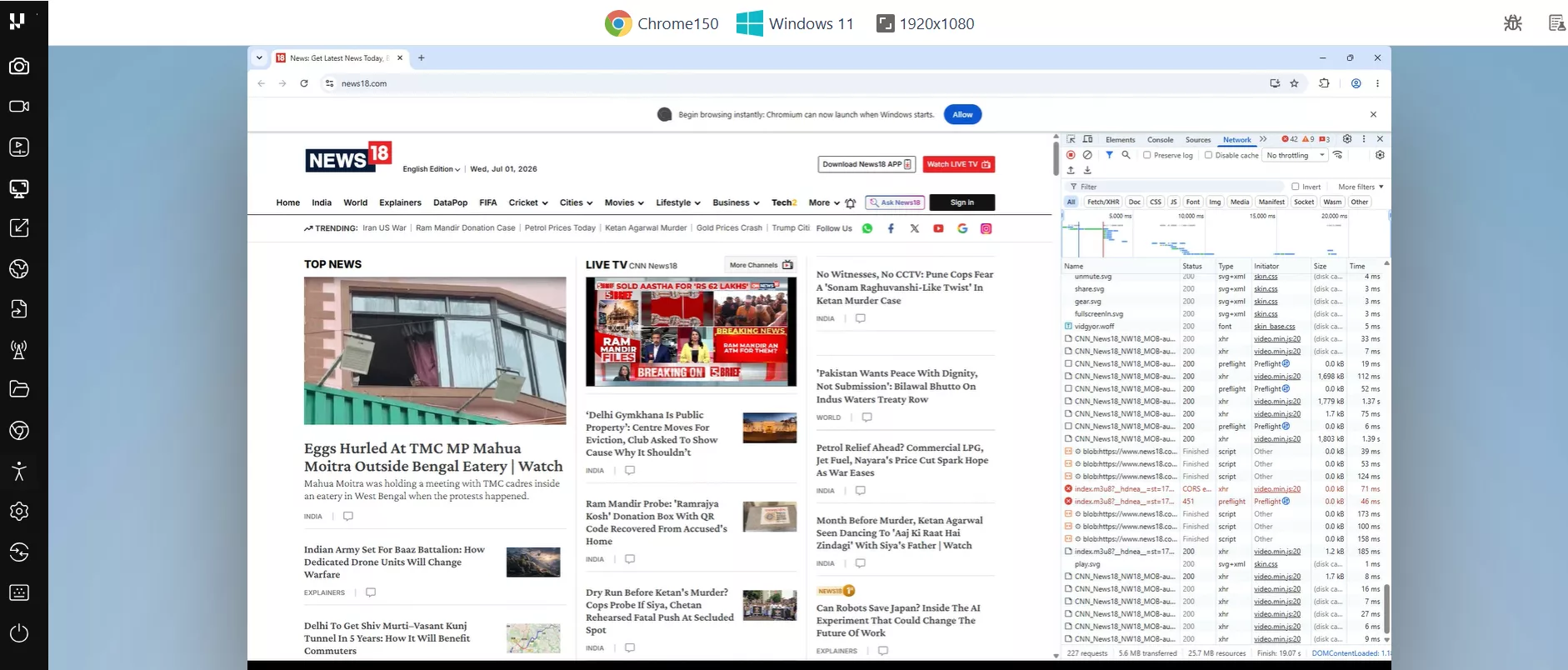
A repeatable pass looks like this:
- Preload the blocker. Add the ad blocker extension to the session so it loads before the page, then launch your URL on the first target browser.
- Open DevTools first. Use the built-in Chrome developer tools to watch the network tab for cancelled or blocked requests and the console for errors as the page loads, so you catch failures at the source.
- Walk the critical flows. Complete login, checkout, and consent, and check analytics, chat, and embeds, comparing against a clean session to spot what the blocker removed.
- Switch browsers. Repeat on Safari, Edge, and Firefox from the same interface, since a blocked request can degrade differently on each engine.
- Capture and log. Record the session or annotate a screenshot, then file the break with the browser, blocker, and blocked request attached.

Pre-Release Ad-Blocker Checklist
Run this before every release so a blocked request never ships a broken page.
- Login and checkout complete with a blocker on across Chrome, Safari, Edge, and Firefox.
- Consent and cookie banners still load, accept a choice, and dismiss.
- No collapsed or broken layout where an ad, embed, or widget was removed.
- Chat, support, and video widgets either work or degrade cleanly.
- Fonts and icons fall back to a readable state when a CDN is blocked.
- You know which analytics and events are lost to blockers, and no feature depends on them.
- Mobile web holds up with content blockers on mobile Safari and Chrome.
- Every break is logged with the browser, blocker, and blocked request attached.
Best Practices for Ad Blocker Testing
The habits that separate real coverage from a token check are about comparison and severity, not volume.
- Test blocker-on against blocker-off. Run the same flow in a clean session and a blocked one side by side, so the difference is obvious rather than guessed.
- Fix the flow, not the blocker. The goal is graceful degradation for blocker users, not detecting or fighting the blocker, which erodes trust.
- Decouple critical flows from third parties. Treat any login, checkout, or consent step that depends on a blockable script as a bug to design out.
- Cover the strict modes. The default block list misses what aggressive modes cancel, so test the hardest setting your users can enable.
- Write the report for the fix. Attach the exact browser, blocker, and cancelled request so a developer reproduces it on the first try.
Ad blocker testing is one slice of a broader real-time cross-browser practice; the same live-session workflow applies when you test a banking application across browsers.

Author

Shubham Soni
Blogs: 10

Shubham Soni is a Senior Member of Technical Staff at TestMu AI (formerly LambdaTest), building the Real Device Cloud and real-time testing infrastructure. He optimized the WebRTC services that power live testing to sub-100ms latency with adaptive bitrate streaming, led a frontend migration from Angular to React that cut page load time from 5-6 seconds to 1-1.5 seconds, and contributes to the official Device SDK. He led a team of four to build an accessibility testing product covering manual and automated testing and mentored a team of six on a real-time testing product. He brings over eight years of experience and earlier scaled a cloud code platform to 200K+ monthly users. Shubham holds a B.Tech in Computer Science.
Reviewer

Isha Vyas
Reviewer
Isha Vyas is a Lead Member of Technical Staff at TestMu AI (formerly LambdaTest), building the frontend of the quality engineering platform. She works across React.js, responsive web design, and jQuery to ship and maintain the platform's user-facing web interfaces. She brings nearly seven years of frontend engineering experience at the company, with earlier work as a Software Developer at Mantra Labs. Isha holds a B.Tech in Computer Science from Swami Keshwanand Institute of Technology, Management and Gramothan, Jaipur.


Ad Blocker Testing FAQs
Did you find this page helpful?
More Related Blogs
TestMu AI forEnterprise
Get access to solutions built on Enterprise
grade security, privacy, & compliance
- Advanced access controls
- Advanced data retention rules
- Advanced Local Testing
- Premium Support options
- Early access to beta features
- Private Slack Channel
- Unlimited Manual Accessibility DevTools Tests