

Power Your Software Testing with AI Agents and Cloud
The Native AI-Agentic Cloud Platform to Supercharge Quality Engineering. Test Intelligently and Ship Faster.


- TestMu AI (Formerly LambdaTest)
- /
- Blog
- /
- How to Test a Banking Application Across Browsers
How to Test a Banking Application Across Browsers
A practical guide to validating a banking portal across every browser and device your customers use, using real-time cross-browser testing, before you ship.
Last Updated on:
A fund-transfer button that works in Chrome can sit dead in an older Safari, a statement table can overflow in Firefox, and a one-time-password field can lose focus in an out-of-date Edge. Each stays invisible until a customer hits it, and in banking that customer is moving money.
The stakes scale with usage. The FDIC 2023 National Survey found 48.3% of banked U.S. households now use mobile banking as their primary way to access their accounts.
Browser usage is just as spread out. Chrome leads, but Safari and Edge together (per Statcounter) hold enough share that a Chrome-only sign-off leaves a large share of customers untested.
Overview
To test a banking application across browsers, validate critical transaction, authentication, and statement flows on a comprehensive browser, OS, and device matrix. Use TestMu AI to run exploratory passes and manual checks across thousands of virtual environments and real devices before release.
- Matrix coverage: TestMu AI provides instant access to over 3,000 browser and OS combinations, allowing testers to validate legacy desktop browsers, mobile web layouts, and varying screen resolutions without maintaining a physical hardware lab.
- Functional depth: Testers can use TestMu AI to manually verify high-stakes banking flows including multi-factor authentication, fund transfers, statement table rendering, and session timeouts to ensure consistent behavior across different rendering engines.
- Real-time debugging: Interactive cross-browser testing on TestMu AI enables exploratory testing, real-time defect reproduction, and visual fix verification with native DevTools and direct bug logging to Jira or GitHub.
- Security and compliance: TestMu AI secures financial data by running sessions in isolated virtual machines that wipe upon completion, encrypting data in transit and at rest, and complying with SOC 2 Type II and PCI DSS standards.
This guide covers the matrix, what to test per flow, how to run the checks in real time, and how to keep it secure. For functional depth, pair it with our banking application testing test cases and the guide to testing a fintech application.
What Is Banking Application Cross-Browser Testing?
Banking application cross-browser testing is the practice of confirming that an online or mobile banking portal renders and behaves the same way across every browser, browser version, and device its customers use.
Its scope is deliberately narrow: surface the defects that live in a single rendering engine, a control that dies in Safari or a script that misfires in an out-of-date Edge, before the build reaches production.
It is one slice of the wider banking, financial services, and insurance (BFSI) testing discipline, also called financial application testing or banking domain testing, scoped specifically to cross-browser rendering and behavior.
It belongs to the manual, exploratory side of quality engineering rather than scripted regression.
A tester drives each environment by hand, because the failures that matter here are visual and behavioral, a misaligned transfer form or an authentication prompt that never renders, not the kind a passing unit test would reveal.
Why Test a Banking Application Across Browsers?
You test a banking application across browsers because the stakes run sharper than they do for a typical consumer app, and three realities make the coverage gap unavoidable.
- Trust is the product. A portal that glitches on a customer's browser erodes confidence in the institution itself, not just the page, and that trust is slow and expensive to rebuild.
- The audience is fragmented and slow to move. Retail customers arrive on the newest mobile browsers while corporate and public-sector users are pinned to legacy desktop builds their IT teams govern, so the gap never closes on its own.
- The cost of a miss is asymmetric. One broken money flow drives support load, reversed transactions, and regulatory attention far out of proportion to the small defect behind it.
The Browser and Device Matrix Banks Must Cover
A bank's cross-browser coverage matrix has four layers: current desktop browsers, the legacy versions institutional customers still run, mobile web, and the screen resolutions where layouts break.
Derive it from real analytics rather than guesswork, and treat it as a living browser compatibility matrix you re-baseline each release.
| Layer | Cover at minimum | Why it matters for banking |
|---|---|---|
| Desktop browsers | Chrome, Safari, Edge, Firefox on current Windows and macOS | These four carry the overwhelming majority of desktop banking sessions; Safari and Edge behave differently from Chrome on layout and forms. |
| Legacy browsers | Microsoft Edge in IE mode, plus older Edge and Safari versions where mandated | Enterprise and government customers are slow to upgrade, and a portal that assumes evergreen browsers excludes them. The Internet Explorer 11 desktop app was retired in June 2022 and has since been disabled on Windows 10, so legacy dependencies now run through Edge in IE mode, which Microsoft supports through at least 2029. |
| Mobile web | iOS Safari and Android Chrome across common device sizes | Mobile is the primary banking channel for a large share of customers, so responsive rendering on real screen sizes is not optional. |
| Screen resolutions | Small phone, tablet, laptop, and wide desktop breakpoints | Statement tables, dashboards, and transfer forms are the first elements to overflow or clip at unexpected widths. |
Owning this matrix as a physical lab is impractical, since each new browser version and device model multiplies the hardware. Cloud cross-browser testing collapses the matrix to a dropdown: you pick the browser, version, OS, and resolution, and the environment launches on demand.
What Should You Test on a Banking Portal Across Browsers?
Cross-browser coverage of a banking portal is about the flows that carry money and identity, not the marketing pages. Prioritize the surfaces where a browser-specific bug does real damage.
| Flow | What breaks cross-browser | What to verify |
|---|---|---|
| Login and MFA | OTP field focus, autofill, and biometric or passkey prompts differ per browser. | Full login, OTP entry, password manager autofill, and error states in each browser. |
| Fund transfers | Form validation, date pickers, and confirmation modals render inconsistently. | A full transfer end to end, including validation messages and the success or failure receipt. |
| Statements and tables | Wide tables overflow, sticky headers detach, and PDF or CSV downloads behave differently. | Table rendering at each breakpoint plus a real statement download in each browser. |
| Session timeout | Idle-timeout and forced logout can fire early or late depending on the browser. | Timeout warnings, auto logout, and safe session recovery behavior across browsers. |
| Localization | Currency formatting, number separators, and right-to-left layouts vary by engine and locale. | Currency, date, and language rendering per region using geolocation and timezone controls. |

Note: Reproduce a customer-reported banking bug in the exact browser, OS, and locale it happened in, then log it with full context in one click. Start testing free with TestMu AI
How to Run Real-Time Cross-Browser Tests Before Release
Real-time testing is the interactive surface of the workflow: a tester drives a live session and watches the portal behave in one specific browser and OS. It is where the exploratory pass, defect reproduction, and visual fix verification happen before a build clears QA.
TestMu AI's live testing gives zero-infrastructure access to that surface, with native DevTools and one-click bug logging built into every session.
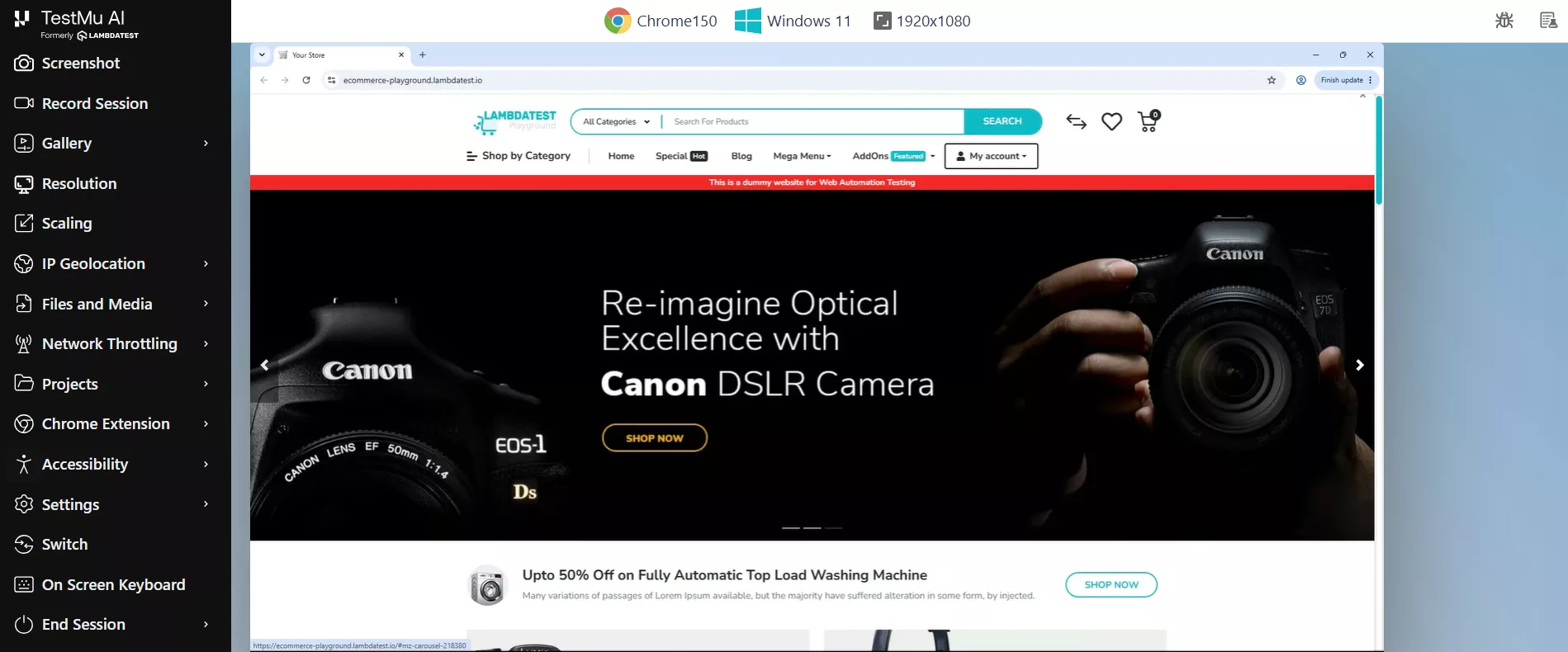
A repeatable pre-release pass on a banking portal looks like this:
- Launch the exact target. Enter the portal URL, pick the browser, version, OS, and screen resolution from your matrix, and start the session. To test a Safari-only bug from a Windows machine, launch a macOS session; no Mac required.
- Exercise the critical flows. Work through the money and identity paths from the coverage table above, strong customer authentication through to transfers and statements, watching for layout, focus, and validation drift between engines.
- Inspect against the real engine. Open DevTools to read console errors, watch failing network requests, and confirm CSS behavior on the actual rendering engine rather than an approximation of it.
- Simulate the real world. Route geolocation to the customer's country, set the matching timezone, and throttle the network to 3G to see how the portal holds up under weak connectivity.
- Capture and log. Take an annotated screenshot or a session recording, then use Mark as Bug to push it to Jira, Azure DevOps, or GitHub Issues with browser, OS, resolution, and URL auto-attached.
- Switch and repeat. Change browser or device mid-session to cover the next matrix row without restarting, and hand off recordings for release sign-off.

Pre-Release Cross-Browser Checklist for Banking Apps
Run this before every release. It turns the matrix and the flows above into a repeatable gate, and it pairs well with a broader cross-browser testing checklist before going live.
- Login, MFA, and password-manager autofill pass on Chrome, Safari, Edge, and Firefox.
- A full fund transfer completes, with correct validation and receipt, in every matrix browser.
- Statement tables render without overflow and downloads open correctly across browsers and breakpoints.
- Session timeout, warnings, and forced logout behave identically in each browser.
- Currency, date, and language render correctly for each target region via geolocation and timezone.
- Mobile web works on iOS Safari and Android Chrome across common device sizes.
- The portal degrades gracefully under throttled network conditions, with no stuck or duplicate transactions.
- Every reproduced defect is logged with full environment context and a session recording attached.
Best Practices for Banking Cross-Browser Testing
The habits that separate a dependable cross-browser pass from a box-ticking one are about sequencing and evidence, not raw coverage.
- Shift the check left. Expose staging builds through a secure tunnel and validate them across browsers before release, so environment-specific defects surface in QA rather than in front of a customer.
- Pair exploratory passes with a fixed gate. Use open-ended real-time sessions to find the unknowns, then lock the known-critical paths into the pre-release checklist so nothing regresses unnoticed between builds.
- Match environment parity to the segment. Set locale, timezone, and network profile to the customer group under test, because a flow that passes on a fast connection can still fail on a throttled regional one.
- Bring security and compliance in early. Treat authentication, session handling, and data behavior as first-class test cases, not an afterthought bolted on before an audit.
- Write the report for the fix, not the count. A defect captured with the exact browser, OS, resolution, and a recording gets resolved in the right environment on the first attempt; a vague one bounces back.
Security, Compliance, and Data Handling
Banking testing carries data-handling obligations that generic web testing does not, so the environment matters as much as the coverage. A cloud testing platform used for financial applications should isolate sessions, encrypt data, and meet recognized compliance standards.
- Session isolation: Each TestMu AI session runs in a dedicated virtual machine that is wiped when the session ends, so no test data persists or crosses between users.
- Encryption: Data is encrypted with TLS 1.2 or higher in transit and AES-256 at rest.
- Compliance: The platform is compliant with SOC 2 Type II, ISO 27001, PCI DSS, GDPR, and HIPAA, which map to the controls financial auditors expect.
- Pre-production access: LT Tunnel reaches locally hosted or staging banking builds over encrypted WebSocket, HTTPS, and SSH, so unreleased portals are tested without public exposure.
- Data residency: Enterprise accounts can use a private cloud for stricter isolation and residency requirements.
When a flow needs real hardware, for example fingerprint or Face ID authentication that emulators cannot fully reproduce, move those specific checks to the real device cloud, which covers biometric and sensor-dependent scenarios on physical phones.
Always confirm the current compliance scope on the platform trust page before a customer-facing claim.

Conclusion
Treat the coverage matrix as your release sign-off gate: no build ships until the critical money and identity flows clear on every browser, version, and breakpoint your customers actually use, legacy versions included.
You do not need a physical device lab to get there. TestMu AI desktop browser real-time testing lets you run those sessions in the cloud, capture the evidence, and log every defect with full environment context before your banking portal reaches production.
Author

Shubham Soni
Blogs: 10

Shubham Soni is a Senior Member of Technical Staff at TestMu AI (formerly LambdaTest), building the Real Device Cloud and real-time testing infrastructure. He optimized the WebRTC services that power live testing to sub-100ms latency with adaptive bitrate streaming, led a frontend migration from Angular to React that cut page load time from 5-6 seconds to 1-1.5 seconds, and contributes to the official Device SDK. He led a team of four to build an accessibility testing product covering manual and automated testing and mentored a team of six on a real-time testing product. He brings over eight years of experience and earlier scaled a cloud code platform to 200K+ monthly users. Shubham holds a B.Tech in Computer Science.
Reviewer

Sanjay Singh
Reviewer
Sanjay Singh is a Senior Product Manager at TestMu AI (formerly LambdaTest), where he drives product strategy and go-to-market for the agentic AI quality engineering platform across web, mobile, and enterprise testing. He brings over seven years of experience across B2B SaaS, AI/ML, and FinTech. Earlier he was a Product Manager at ElectrifAi, where he led the development of SpendAI and a 14-member team and lifted customer acquisition by 20%, and at Inogic, where he grew annual revenue 30% year over year and recurring revenue 40% through a pricing revamp. Sanjay holds an MBA from IIM Lucknow and an Integrated Dual Degree in Biochemical Engineering from IIT (BHU) Varanasi.


Banking Application Cross-Browser Testing FAQs
Did you find this page helpful?
More Related Blogs
TestMu AI forEnterprise
Get access to solutions built on Enterprise
grade security, privacy, & compliance
- Advanced access controls
- Advanced data retention rules
- Advanced Local Testing
- Premium Support options
- Early access to beta features
- Private Slack Channel
- Unlimited Manual Accessibility DevTools Tests