

Power Your Software Testing with AI Agents and Cloud
The Native AI-Agentic Cloud Platform to Supercharge Quality Engineering. Test Intelligently and Ship Faster.


- TestMu AI (Formerly LambdaTest)
- /
- Blog
- /
- How to Generate Test Cases With AI
How to Generate Test Cases With AI
AI-powered test case generation speeds up your QA process and improves coverage. Learn how to generate test cases with AI and speed up your software testing.
Last Updated on:
Writing test cases can be time-consuming and often doesn’t ensure complete test coverage or error-proof test results. You need to spend hours analyzing requirements and creating test cases to ensure the software application works as expected. This traditional method slows down testing and can miss critical issues. Generation is only half the job; the cases still need test case management once they exist.
However, incorporating AI techniques for test case generation with AI can overcome the challenges associated with writing them manually. This approach allows you to create test cases based on system design, code, and user needs, reducing manual work and making the test creation process faster and more efficient.
In this blog, we look at how to generate test cases with AI.
Key Takeaways
- AI test case generation builds structured cases from project requirements, user behavior, and historical test data, which covers real-world use cases and edge cases manual writing often misses.
- Self-healing AI test cases cut most maintenance work, so a team can raise test coverage instead of trading coverage against the upkeep cost of complex manual cases.
- TestMu AI Test Management brings test management and test case authoring into one place, generating test plans in natural language and tracking every run from one dashboard.
- Pressing the Tab key inside TestMu AI Test Management generates a test case with AI, and Shift plus Enter adds another test case title without leaving the keyboard.
- The Automate with KaneAI button turns saved test cases into automated tests, and KaneAI creates, evolves, and debugs those tests from natural language instructions.
- ChatGPT produces test case ideas, test data, and code references from a text prompt, but it ships no test execution environment and no built-in secure testing infrastructure.
- Claude is tuned for logical reasoning and programming, returning test code in a side panel that reads like an IDE, with a summary of the code alongside it.
Why Use AI to Generate Test Cases?
Incorporating AI to generate test cases provides consequential benefits and eases your test case creation process:
- Intelligent Test Case Generation: AI leverages project requirements, user behavior, and historical test data to generate test cases based on them. It ensures test cases align with real-world use cases and offers better insights into potential edge cases. This also opens the door for focused capabilities like AI unit test generation, where AI can create unit-level test cases to validate individual components efficiently.
- Enhanced Test Coverage: Test coverage and complexity do not go hand in hand. If testers try to increase their test coverage, they create more complex test cases, which will take a significant amount of time to maintain in the future. Hence, test coverage will always suffer when test cases are written manually. However, AI-based test cases need not be maintained. If so, AI testing tools automatically self-heal them. Therefore, AI can focus on test coverage instead of complexity, as tests will not require manual intervention.
- Enhanced Performance: When AI generates test cases, it considers parameters besides functionality. For instance, user behavior helps write test cases that validate functionality based on the end user’s behaviors and actions.
- Defect Prediction: AI tools monitor test execution to identify anomalies and predict potential defects. Over time, AI refines its predictions by learning from past test results, enabling proactive defect prevention.
- Learn From Experience: The AI model evolves by analyzing historical data and previous test results. It generates smarter, more adaptive test cases that address known issues and improve with each iteration, ensuring relevance over time.
- Time Saver: AI algorithms require just the context of the test cases (often through textual input boxes) and generate test cases within a couple of seconds. Hence, generating test cases with AI saves a lot of time.
To generate test cases using AI, the testing team must adopt at least one tool and integrate it into their infrastructure. Since AI is a vast area with different tools providing different capabilities, it is important to know what types of tools exist in the market, what they offer, and what will suit the best in our existing infrastructure for automatic test case generation.
This can be demonstrated here with three completely different AI tools that help you generate test cases in different ways.

Note: Generate your AI-Native test cases. Try TestMu AI Today!
Generating Test Cases With TestMu AI Test Management
TestMu AI's test management platform is an AI-Native solution with an integrated test case authoring and execution facility. It centralizes all test case-related information, making it a unified platform for managing tests and related activities.
Features:
- Generates test plans and test cases using natural language for better organization.
- Creates behavior-driven test scenarios from automation logs.
- Monitors all test runs from a centralized dashboard.
- Imports test cases via CSV or API with auto-mapping.
- Comes with quick keyboard shortcuts like Tab to auto-generate test cases.
- Enables the team to migrate effortlessly from legacy test management tools.
- Integrates seamlessly with tools like Jira for real-time bug tracking.
Let’s look at how to generate test cases with AI using TestMu AI:
Note: Ensure you have access to the Test Management. If not, please contact sales.
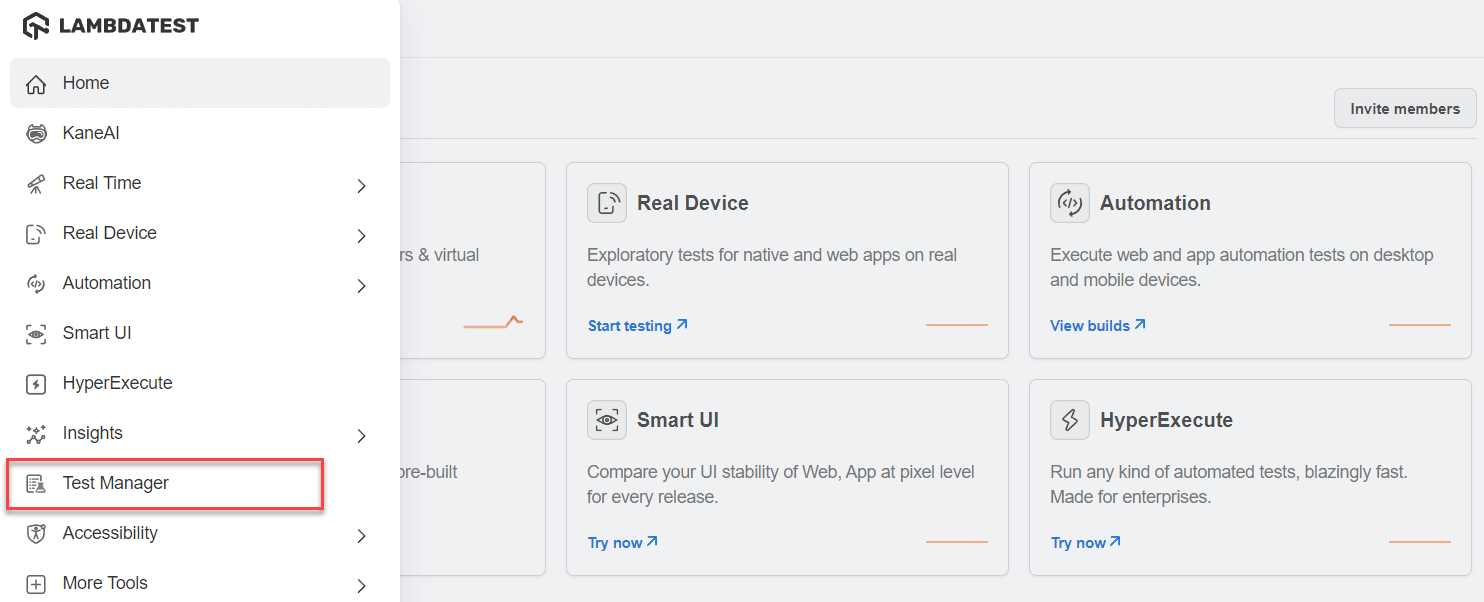
- Once you are logged in to the TestMu AI Home dashboard, click on the Test Manager option from the side panel.
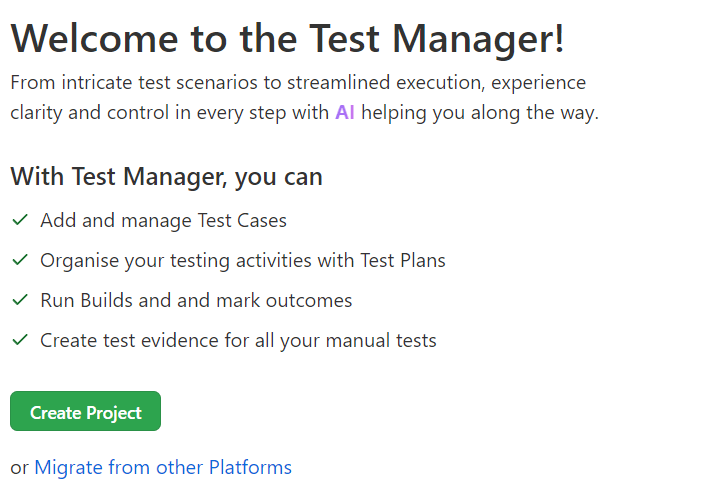
- Create a new project and start from scratch.
- Import the test data from existing test management tools.
- For this demonstration, we will create a new project from scratch by clicking on the Create Project button.
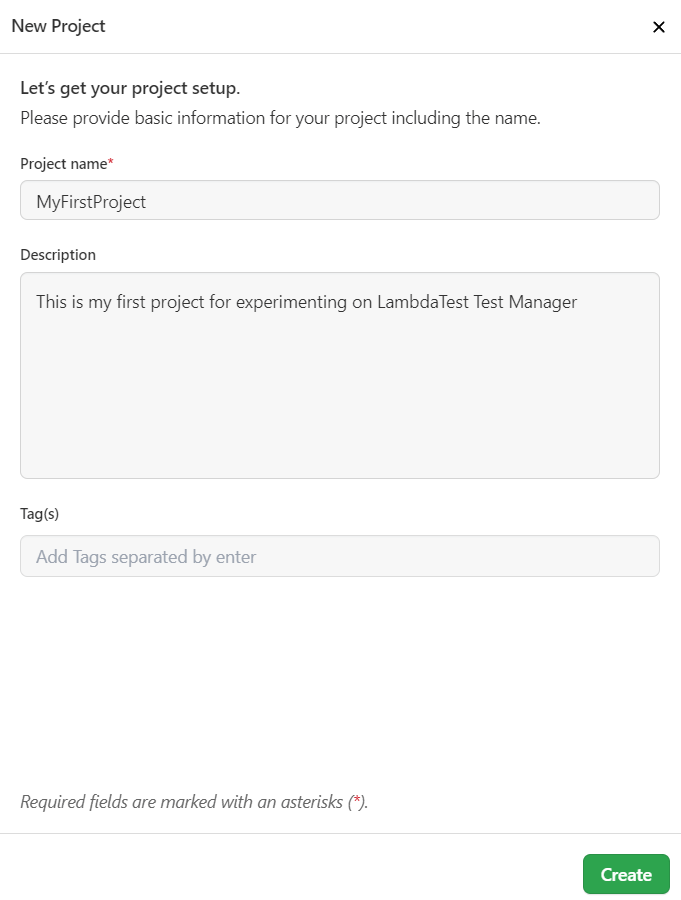
- Fill in the project details on the side panel that appears and click on the Create button.
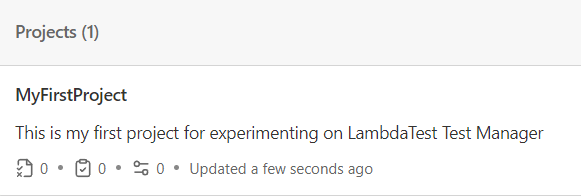
- Click on the project name (in this case, MyFirstProject) to start creating test cases:
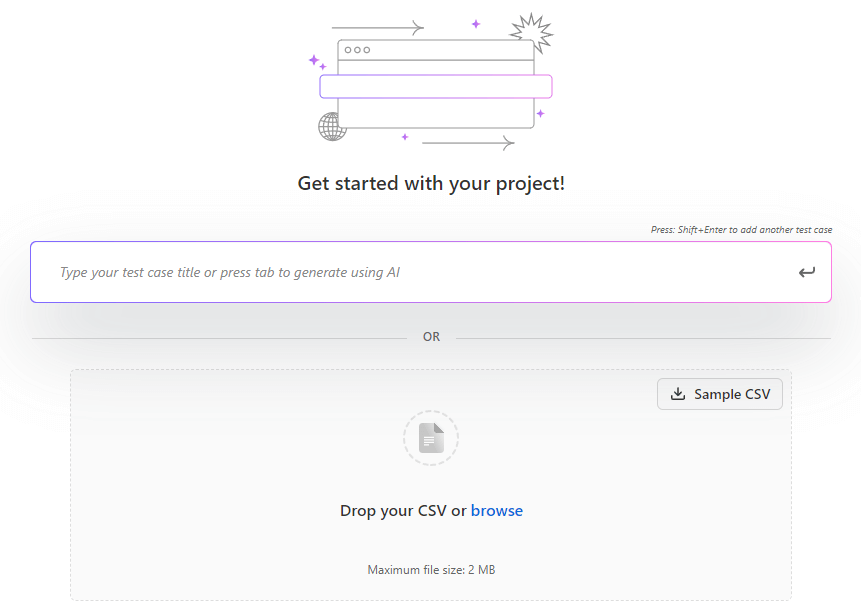
- Add a test case title manually and press the Enter key to add and save it.
- Click on the test case title after saving it.
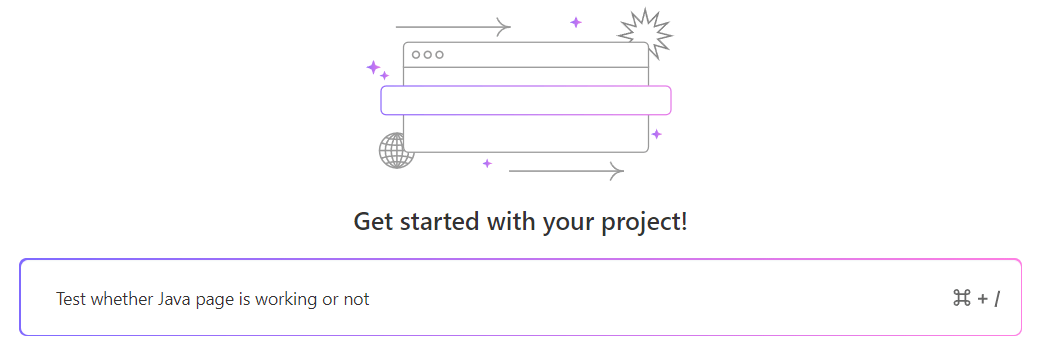
- Add test steps in natural language. Here, too, you can press the Tab key to generate the test case automatically.

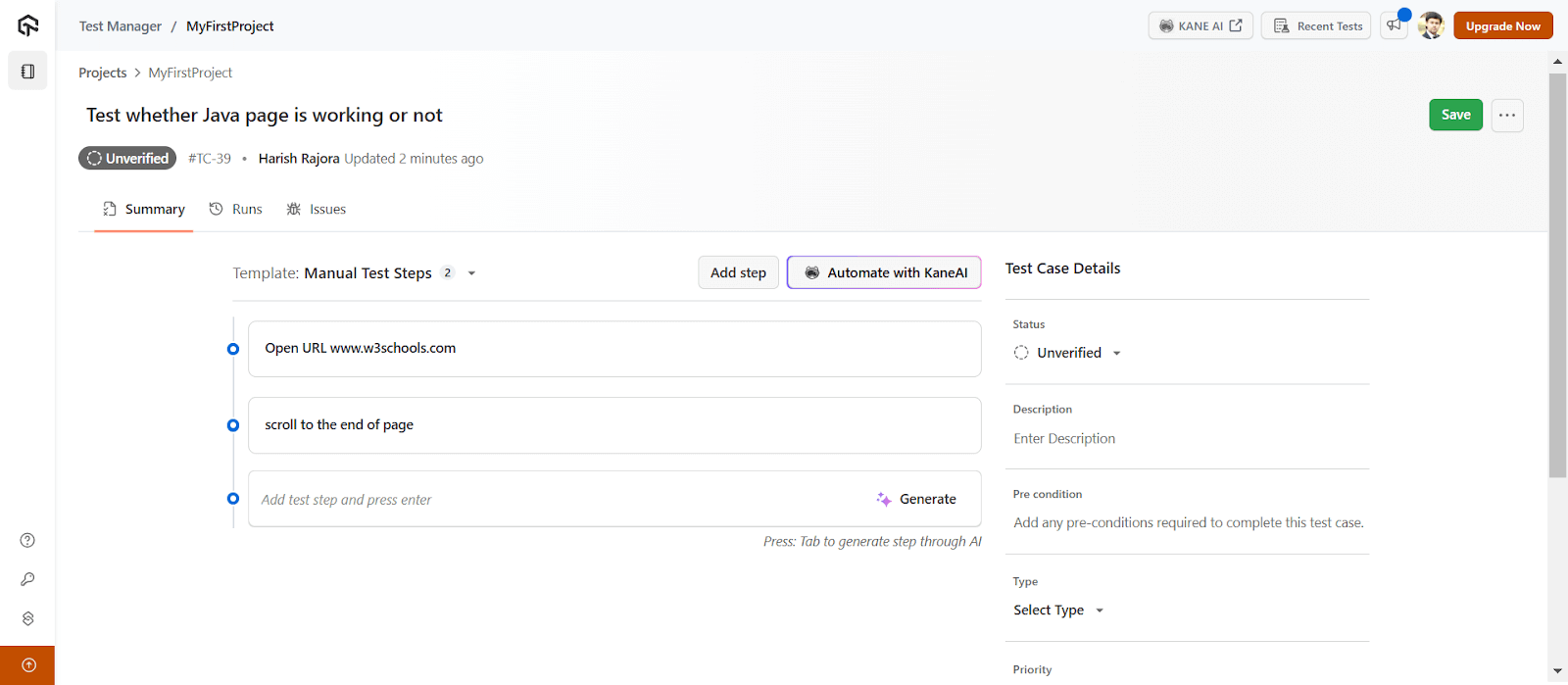
TestMu AI provides a detailed view for organizing test case information. It allows you to input the following details such as:
- Test Case Details: Enter relevant information about the test case.
- Status: Specify the current status of the test case.
- Description: Provide a clear description of the test case.
- Pre-condition: List any necessary pre-conditions for the test.
- Type: Define the type of test case.
- Priority: Assign a priority level for the test case.
- Automation Status: Indicate if the test is automated or manual.
- Tags: Add tags to categorize the test case.
- Attachments: Attach relevant files to the test case.
To get started, head over to this documentation on Introduction to Test Manager.
TestMu AI Test Management also provides an option to generate tests from the above-created test cases with its very own AI agent for QA testing, KaneAI. You can simply click on the Automate with KaneAI button to generate these tests seamlessly.
KaneAI by TestMu AI is a GenAI native QA Agent-as-a-Service platform for high-speed quality engineering teams. It allows you to create, evolve and debug tests using natural language. KaneAI also seamlessly integrates with the rest of TestMu AI’s offerings for test orchestration, execution and analysis.

With the rise of AI app testing, its crucial to stay competitive by upskilling or polishing your skillsets. The KaneAI Certification proves your hands-on AI testing skills and positions you as a future-ready, high-value QA professional.
Want to get a sneak peak of KaneAI? Watch the video below:
Subscribe to the TestMu AI YouTube Channel for more videos on AI testing concepts.
Key Takeaway: TestMu AI Test Management authors test cases in natural language and runs them from the same platform, with CSV or API import, auto-mapping, and Jira integration for bug tracking. Pressing Tab drafts a case with AI, and each case carries status, priority, type, tags, and attachments. The Automate with KaneAI button converts saved cases into automated tests.
Generating Test Cases With ChatGPT
ChatGPT is a Generative AI platform that takes input in textual form (or images through other branched tools) and generates output accordingly. Its popularity started as simple query-based software, but since then, it has grown to be used in software testing and development as well. All a developer needs to do is provide the query for which code can be generated.
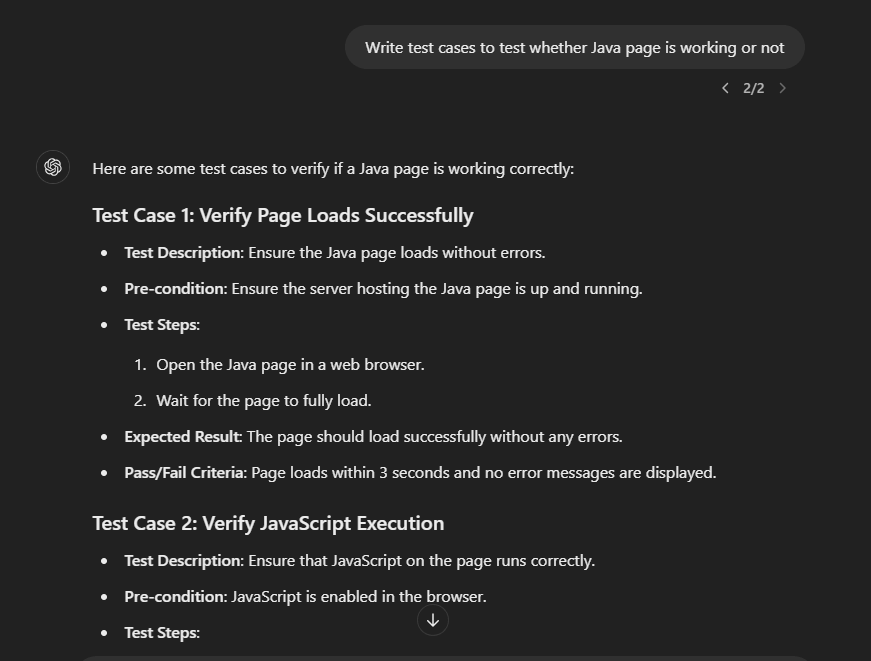
For instance, you can enter the prompt Write test cases to test whether Java page is working or not in ChatGPT:
You can also use ChatGPT to generate test data for an input field. For example, you can enter the prompt Generate test data to test whether Java page is working or not.
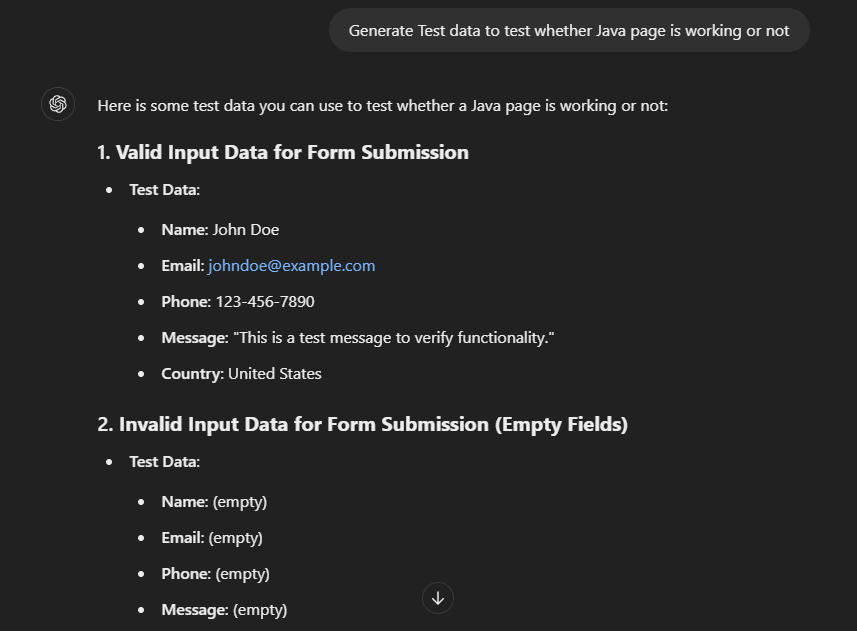
Using ChatGPT to generate test cases can be highly beneficial, though some shortcomings should be considered. First, integrating the generated test cases into existing suites may require adjustments to align with the test environment, including variables, libraries, and network configurations.
Second, ChatGPT doesn’t offer specialized testing features like those found in dedicated testing platforms such as TestMu AI, which provides test execution environments and virtual browsers.
Lastly, while ChatGPT doesn’t include a built-in secure testing infrastructure, it’s still an excellent resource for generating test case ideas, exploring concepts, and getting code references.
Generating Test Cases With Claude
Claude is a fine-tuned Generative AI chatbot that can perform all the tasks of ChatGPT but also includes other dimensions. Its model is tuned for logical reasoning, including programming and mathematics. Claude works by taking an input (similar to ChatGPT), analyzing it, and then providing output that can vary from simple query answers to summarizing the documents and analyzing the code.
With respect to AI in software testing, let’s send a query on the platform to generate test cases using the same prompt we used above, i.e., Write test cases to test whether Java page is working or not in ChatGPT:
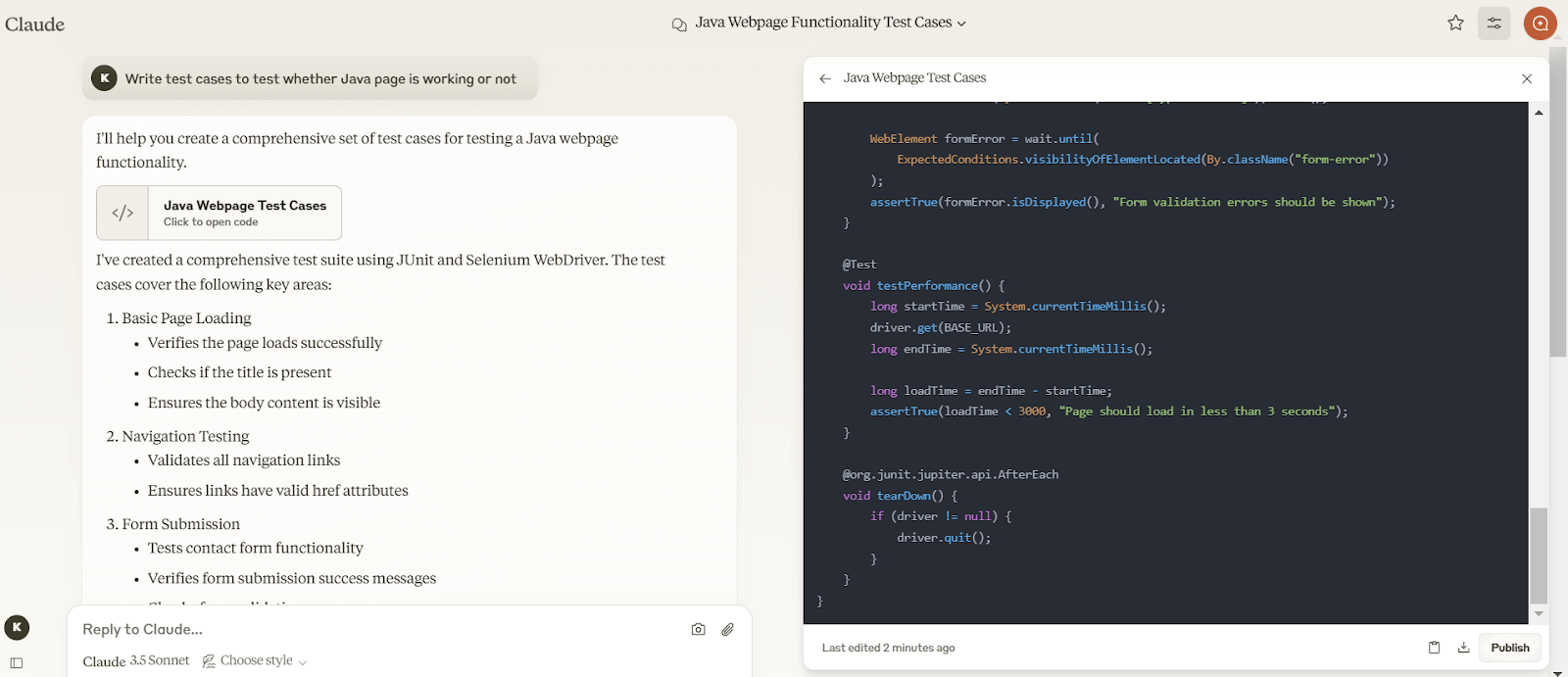
As it is clear, there is a stark difference between ChatGPT and Claude for the same query. Since Claude is tuned for programming, it presents a file with the code. The code appears on a different side panel with various colors, just like it would on an IDE. It helps enhance the readability, and the left panel summarises the code for better understanding.
Both ChatGPT and Claude.ai offer valuable capabilities, but they share some similarities in that they are independent chatbots not integrated into any specific system and work through their web applications. While the community often prefers Claude for its free version and ChatGPT for the paid version, these preferences are mainly based on output quality rather than integration or security concerns.
When it comes to AI testing, TestMu AI Test Management is the ideal choice. It provides a dedicated environment, infrastructure, and seamless integration.
With AI tools like ChatGPT, testers can now generate test cases, user flows, and even complete test strategies within minutes. If you’re looking for effective ways of using ChatGPT for test automation, this guide provides ready-to-use examples. You can also check out our KaneAI ChatGPT for testers page to see how these capabilities translate into practical, real-world testing applications.
Conclusion
Software testing has evolved along with other technologies, and its latest modification is the integration of artificial intelligence. AI has helped software testers generate test cases faster without any programming language, reduce maintenance burden with self-healing, and fix debugging errors automatically. You can even build out your manual test cases with AI and refine them from there.
This can be made possible by using an AI-Native platform such as TestMu AI.
For legacy systems where everything has been done manually, chatbots like Claude and ChatGPT may prove beneficial to generate code for reference. However, if the team does not want to invest too much time in writing code and maintaining it, integrated AI tools like TestMu AI Test Management are better. They generate test cases in English and provide an infrastructure to conduct testing as well.
However, all of the mentioned software are finely tuned and efficient in their goal, and in the end, all of them will cut down time and costs of the testing, which is what every organization wants.
Citations
- Research on Automatic Generation of Test Case: https://ieeexplore.ieee.org/document/6211132
Author

Anubhav Singhmaar
Blogs: 41

Anubhav Singhmaar is an AI Product Manager at TestMu AI driving Kane CLI, the command-line tool that brings browser automation to the terminal, turning natural-language flows into runs in a real Chrome browser that return pass or fail with shareable proof. He owns the roadmap and prioritization and works with engineering to ship developer-facing features. Before TestMu AI, he spent over four years at Sprinklr owning enterprise voice AI across APAC and EMEA. A mechanical engineer turned product manager, he grounds guidance in real QA workflows.
Reviewer

Anmol Gupta
Reviewer
Anmol Gupta is Vice President of Product Management at TestMu AI (formerly LambdaTest), driving HyperExecute, the test orchestration cloud that runs and accelerates automated test execution. He led the development of the Unified Test Execution Cloud Platform and now leads a 30-member cross-functional product organization across product lines contributing $7M+ in revenue. He brings over nine years of experience and previously co-founded the SaaS company Timble as CTO, where he grew the team from 5 to 40 and launched an AI KYC platform that processed 600K+ applications in five months while cutting verification time from 12 minutes to under 30 seconds. Anmol holds an MTech and BTech from IIT Delhi.
Frequently asked questions
Did you find this page helpful?
More Related Blogs
TestMu AI forEnterprise
Get access to solutions built on Enterprise
grade security, privacy, & compliance
- Advanced access controls
- Advanced data retention rules
- Advanced Local Testing
- Premium Support options
- Early access to beta features
- Private Slack Channel
- Unlimited Manual Accessibility DevTools Tests