
Author End-to-End Tests in Natural Language with KaneAI
Plan, Author, and Evolve E2E Tests for Web and Mobile Apps in Natural Language.

- TestMu AI (Formerly LambdaTest)
- /
- Blog
- /
- How to Convert Manual Test Cases to Automated Tests With AI
How to Convert Manual Test Cases to Automated Tests With AI
Convert manual test cases to automated tests with AI: what to automate first, the 5-point READY check, and a KaneAI workflow you can run today.
Published on:
To go from manual test cases to automated ones using AI, start with the stable, well-run cases. Turn each step into a single action with a single, measurable expected result and move the test data into parameters.
Then hand the saved cases over to an AI testing agent, which will then automate, run and report on them. Keep the manual checks that require human judgment as manual.
Most teams won't fail at this stage, as the AI can't click buttons. They'll fail because their manual cases were written for a human who already knows the app: "verify the page looks right", "log in as usual", "check the totals". An AI agent, being a new hire, needs those steps spelled out for it.
This guide shows what to convert, how to rewrite it, and how to automate it using KaneAI from TestMu AI, with every automated test still linked back to the manual case it originated from.
TL;DR
To convert manual test cases to automated tests with AI, rewrite each case so it passes the READY check (reproducible start, explicit single-action steps, assertable results, data in parameters and secrets, judgment checks left to humans), then automate the saved case in place with an AI testing agent such as KaneAI.
How to Automate Manual Test Cases
- Convert-now cases: When deciding which test cases to automate first, start with smoke tests, login and signup, checkout and payment happy paths, and top regression cases, because they run every release, rarely change and have a clear pass/fail.
- READY rewrite: To turn manual test steps into automated tests, give each step one action and one assertable result. Test data goes into parameters such as ${qa_user}, and credentials go into masked secrets.
- Automate with KaneAI: In TestMu AI Test Manager, the Automate with KaneAI action reads a saved case's manual steps or Gherkin scenarios directly, so the automated test keeps the original case's ID, folder and linked requirements.
AI Test Automation for Manual Testers
- Natural-language authoring: Coding required to author a test: No. Manual testers convert manual test cases to automation with AI by writing steps and assertions in plain English, so moving from manual to automation testing doesn't require programming or framework knowledge first. An SDET reviews exported code and wires the runs into CI/CD.
- Hard-gate assertions: Failed assertion fails the run: Yes. Since July 20, 2025, KaneAI assertions fail the test immediately by default, and self-healing changes arrive as versioned diffs for a human to review.
Which Manual Test Cases Should You Convert First?
Convert the cases that run most often, break least often, and protect revenue. Converting an existing regression suite is usually the fastest place to get value from AI testing, because the expected behavior is already written down.
You don't have to invent test ideas. You only have to make the existing ones machine-readable.
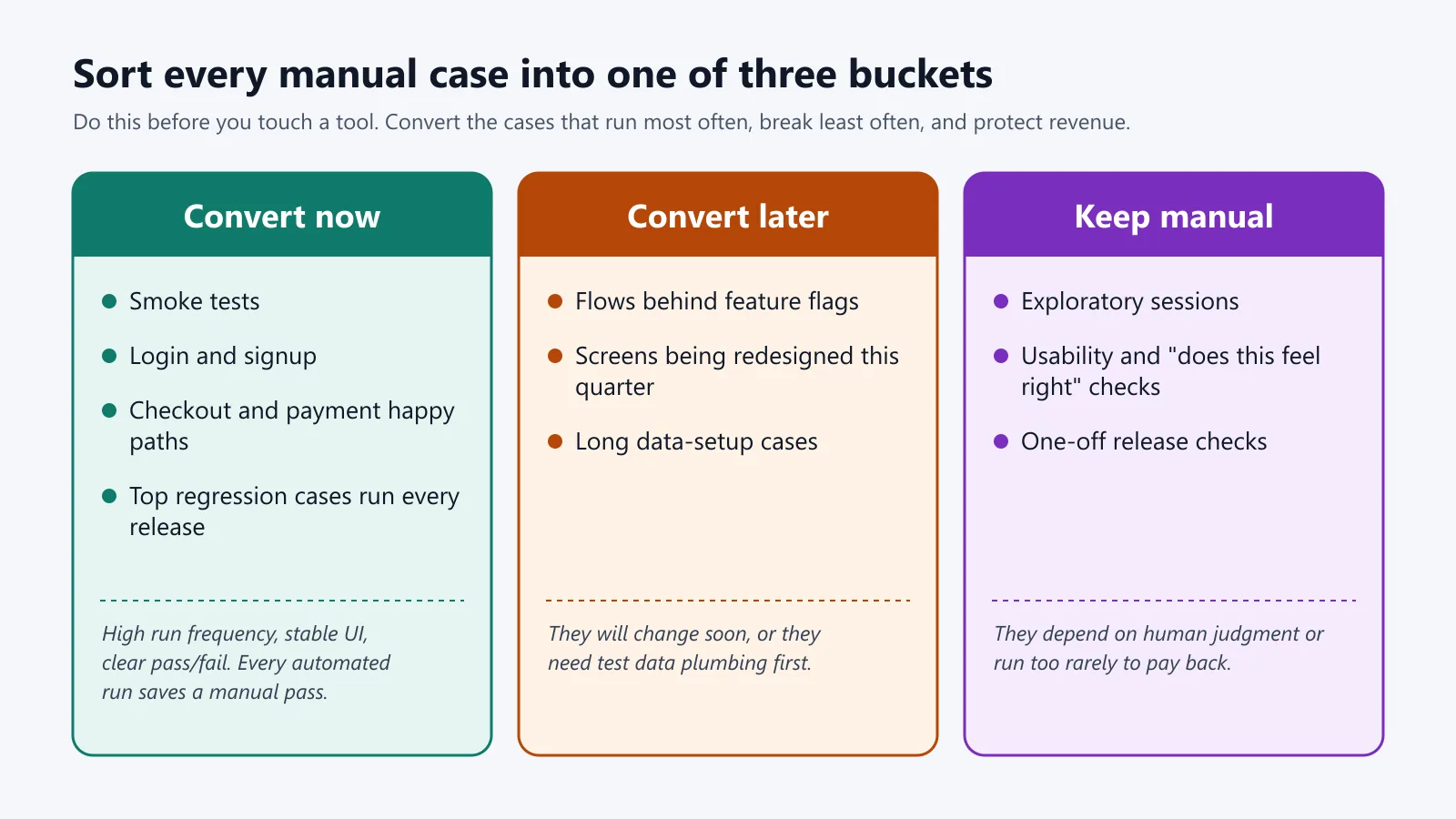
Sort every case in your suite into one of three buckets before you touch a tool:
| Bucket | Cases | Reason |
|---|---|---|
| Convert now | Smoke tests, login and signup, checkout and payment happy paths, top regression cases run every release | High run frequency, stable UI, clear pass/fail. Every automated run saves a manual pass. |
| Convert later | Flows behind feature flags, screens being redesigned this quarter, long data-setup cases | They will change soon, or they need test data plumbing first. |
| Keep manual | Exploratory sessions, usability and "does this feel right" checks, one-off release checks | They depend on human judgment or run too rarely to pay back. |
Also decide the layer before you convert. The Practical Test Pyramid on martinfowler.com advises teams to "push your tests as far down the test pyramid as you can".
If a manual case only checks that a price is calculated correctly, convert it to an API or unit check, not a UI test. Keep UI automation for real user journeys.
For the people and process bit of moving a team from manual to automation, see how to move from manual testing to automation.
What Makes a Manual Test Case Ready for AI Automation?
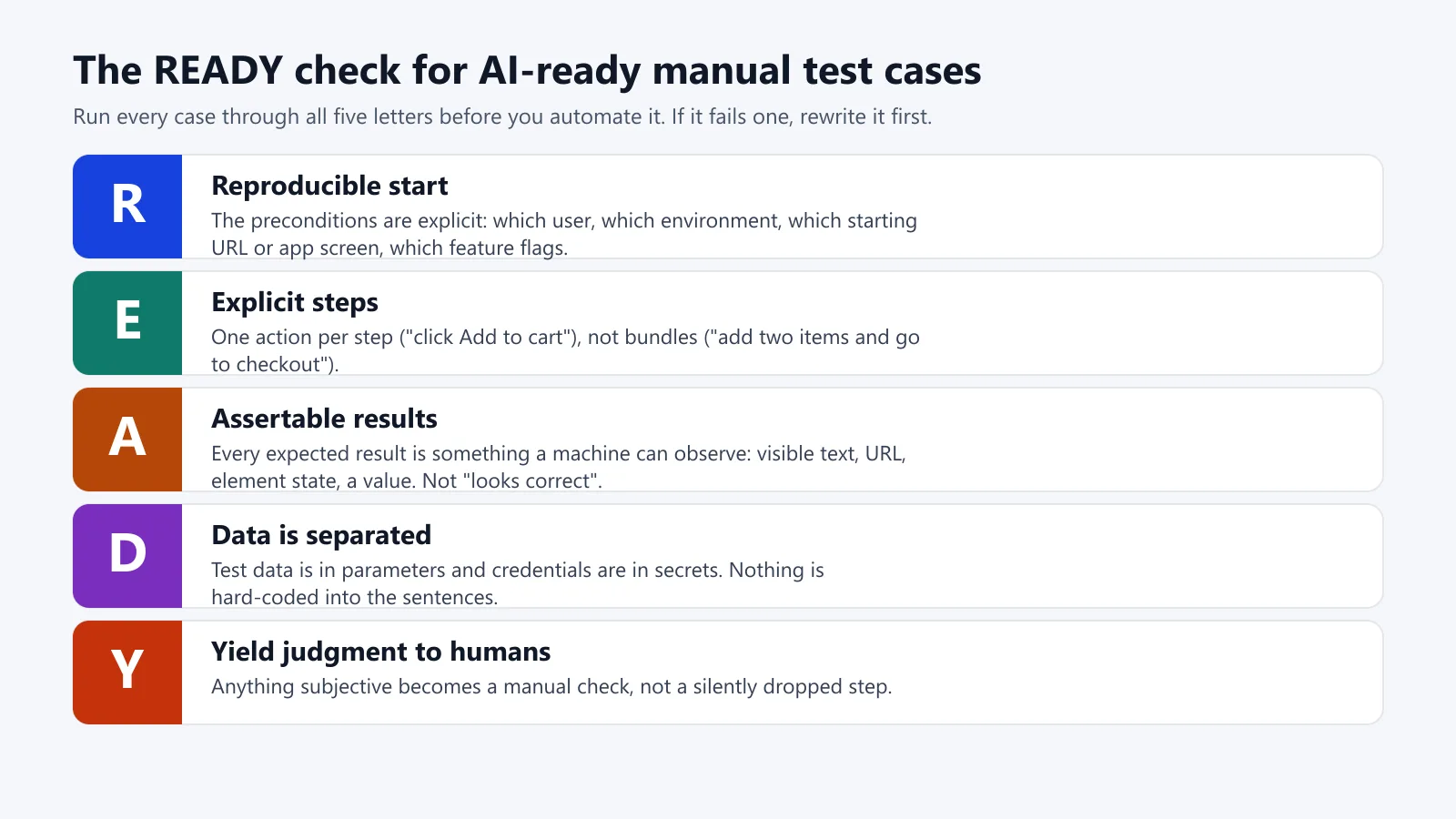
A manual test case is ready for AI automation when every step is a single action, every expected result is something a machine can check, and the data is external to the steps. Use the READY check before you convert a case. If it fails any of the letters, then rewrite it first.
The READY assessment of AI-ready test cases
- R: Reproducible start. The preconditions are all very explicit: which user, which environment, which starting URL or app screen, which feature flags.
- E: Explicit steps. One action per step ("click Add to cart"), not bundles ("add two items and go to checkout").
- A: Assertable results. All the results you'd expect are ones that a machine can observe: visible text, URL, element state, a value. Not "looks correct".
- D: Data is separated. Test data is in the parameters and credentials are in the secrets. Nothing is hard-coded into the sentences.
- Y: Yield judgment to humans. Anything that's subjective is a manual check, not just silently dropped.
TestMu AI Test Manager has three kinds of placeholders for the "D":
- Parameters,
${qa_user}. These take their values from a dataset, and a run will generate one test instance per row in the dataset. - Secrets,
{{secrets.org.qa_password}}. These are masked during runs. - Global variables,
{{base_url}}.
Here is the difference in practice:
| Manual step | Problem | AI-ready rewrite |
|---|---|---|
| Log in as usual | No user, no environment | Open {{base_url}}/login. Enter ${qa_user}. Enter {{secrets.org.qa_password}}. Click Sign in. |
| Add products and check the cart | Two actions, no expected result | Click "Add to cart" on the first product. Assert the cart badge shows "1". |
| Verify the page looks correct | Subjective | Assert the "Order summary" heading is visible. Flag the layout review as a manual check, or cover it with visual testing. |
| Check the totals | No expected value | Assert the order total equals ${expected_total}. |
| Wait for it to load | No condition | Assert the "Continue" button is enabled. |
Microsoft's Azure DevOps team observed the same thing when they were generating Playwright tests from manual test cases using GitHub Copilot (Microsoft DevBlogs, July 2025):
- Detailed, structured cases converted very well.
- Steps that relied on visual comparison did not.
- The team is recommending that those steps be reworded as DOM/data checks or that they remain manual.

Try it on your own suite
Note: Run 10 of your 'convert now' cases through the READY check and then automate them with KaneAI and see how many pass untouched.
How Do You Go About Converting Your Manual Test Cases With KaneAI?
KaneAI converts a manual case in place. You keep the case in Test Manager, and KaneAI reads its steps directly, builds the automation, and runs it on real browsers and devices. Here is the workflow, based on TestMu AI's product page and docs as of November 2026.
Prefer to watch? Here's a full KaneAI walkthrough.

Step 1: Get your manual cases into Test Manager.
- CSV import. Upload a CSV of up to 10MB and map your columns to fields such as Title, Steps, and Outcome. Select Test Case ID as your match key so that on re-import, the existing test cases are updated as new versions rather than being duplicated.
- Migration from another tool. TestMu AI documents migrations from qTest (one click; moves cases, folders, custom fields and linked Jira requirements), Zephyr Enterprise (via CSV), Katalon and TestRail.
Step 2: Run 'Automate with KaneAI' on the saved case.
- Open a saved manual test case and select 'Automate with KaneAI'.
- TestMu AI's documentation states, "KaneAI reads manual steps and Gherkin scenarios directly," so your existing steps as well as your Given/When/Then scenarios go in exactly as they are. There is no conversion stage at all (you can automate your existing manual test cases with KaneAI).
- You need KaneAI access.
- As of Nov 2026, the docs still label the Create and Automate flow as "currently an experimental feature". Same with the per-case action: you're told to review the steps when the automation has completed.
Step 3: Approve the plan. KaneAI creates the test plan, and you review and approve it prior to anything actually running. That's what the product page refers to as 'No Agent Runs Blind'. This is your opportunity to spot a misread step before it results in a false pass.
Step 4: Tighten each action up with the command patterns. KaneAI understands natural language commands for navigation, clicks, typing, waits, conditionals, and assertions. Here's the login example converted into the style of the KaneAI commands guide:
open {{base_url}}/login
click on email field
enter "${qa_user}"
click on password field
enter "{{secrets.org.qa_password}}"
click on login button
Assert "Welcome Back!" is visible
Assert if current URL is {{base_url}}/dashboard
if pop up is present in the viewport then click on it
Click on the login button. Assert "Welcome Back!" is visible, and the pop-up conditions are the guide's own examples. The guide also covers element state checks (e.g. Assert the "Submit" button is enabled), attribute checks, and If/Else-If/Else blocks.
The advice is consistent with the READY check: keep your actions and assertions in separate steps and test one outcome per assertion.
Step 5: Record what's hard to describe. For a flow that's really easier to demonstrate than to write, KaneAI's Manual Interaction mode is the way to go. You simply go through it once in Manual mode, and KaneAI records each action as a reusable test step.
Step 6: Run it where your users are.
- Tests run on HyperExecute across 50,000+ real devices and desktop browsers (per the KaneAI page).
- In Test Manager, Quick Run executes one saved test case on the configurations you select and creates a Test Run. The documentation notes that Quick Run is rolling out gradually, so it may not be available to all organizations at this point.
- Tests authored in the KaneAI New Experience generate an Evidence Report for each run.
Step 7: Get the code if your team wants it.
- KaneAI's comparison table has export to Selenium, Playwright and Appium code.
- The Create PR feature (beta, requires support to enable) will take the generated Python code and push it to GitHub or GitLab: Selenium Python for desktop and mobile browser tests, and Appium Python for app tests.
Step 8 (optional): Fill the coverage gaps. Once you've got your existing cases all automated, you can use the AI Test Case Generator ("Generate With AI" in Test Manager) to produce new test cases to cover the gaps from Jira, Azure DevOps or Linear issues, documents and text. You can then use Create and Automate to save and automate them in one go.
This step is for inserting tests. It doesn't convert the ones you already have.

How Do You Keep Each Automated Test Linked Back to Its Manual Case?
Keep one record per test and automate in place rather than making a copy. Four habits keep the manual history and the automation in sync:
- Automate the saved case itself. "Automate with KaneAI" will act on the existing Test Manager case so its ID, folder, and linked requirements all remain where they are. That run will then be visible in the Runs tab of that test case in TestMu AI's documentation.
- Keep the source ID on import. If you're importing from CSV, then make Test Case ID the match key. Re-imports will then update the same case as a new version rather than create a duplicate.
- Retire the manual version only once it has earned that right. Keep the manual pass running in parallel until the automated test has a run of consecutive green releases (you'll need to pick a number, e.g., five, and put that in your test policy). Only then should you archive the manual-only steps.
- Link requirements, not just tests. Migrations such as qTest will carry the linked Jira requirements across, so your coverage reports will still be requirement > test > latest run.
How Do You Keep the Converted Tests Stable and Credible?
Converted tests remain trustworthy if the pass/fail is coming from explicit assertions rather than the AI's own judgment and if every automatic change is reviewable.
- Make every assertion a hard gate. From July 20th, 2025 onwards, KaneAI assertions fail the test immediately by default. A missing "Welcome Back!" is a red run, not a warning (commands guide).
- Review heals like code changes. If the UI changes and the locators change, then KaneAI's self-healing will update the relevant steps and surface the diff for you to review. All changes are versioned so you can compare and roll back. For where self-healing helps and where it can actually hide bugs, see Self Healing Test Automation: how it works and why it fails.
- Keep a human sign-off on the first run. 46% of those taking the 2025 Stack Overflow Developer Survey said they don't trust the accuracy of AI tools. 66% cited "AI solutions that are almost right, but not quite" as their biggest frustration. An approved plan coupled with a reviewed first run is the way to avoid the "almost right" test.
- Replay deterministically in CI. If your SDETs are running in the terminal, then Kane CLI will replay the unchanged steps "from cache with no agent and no LLM cost". It will also never heal a wrong result into a pass. A wrong total is reported as a bug and is never healed into a pass (in its own words).
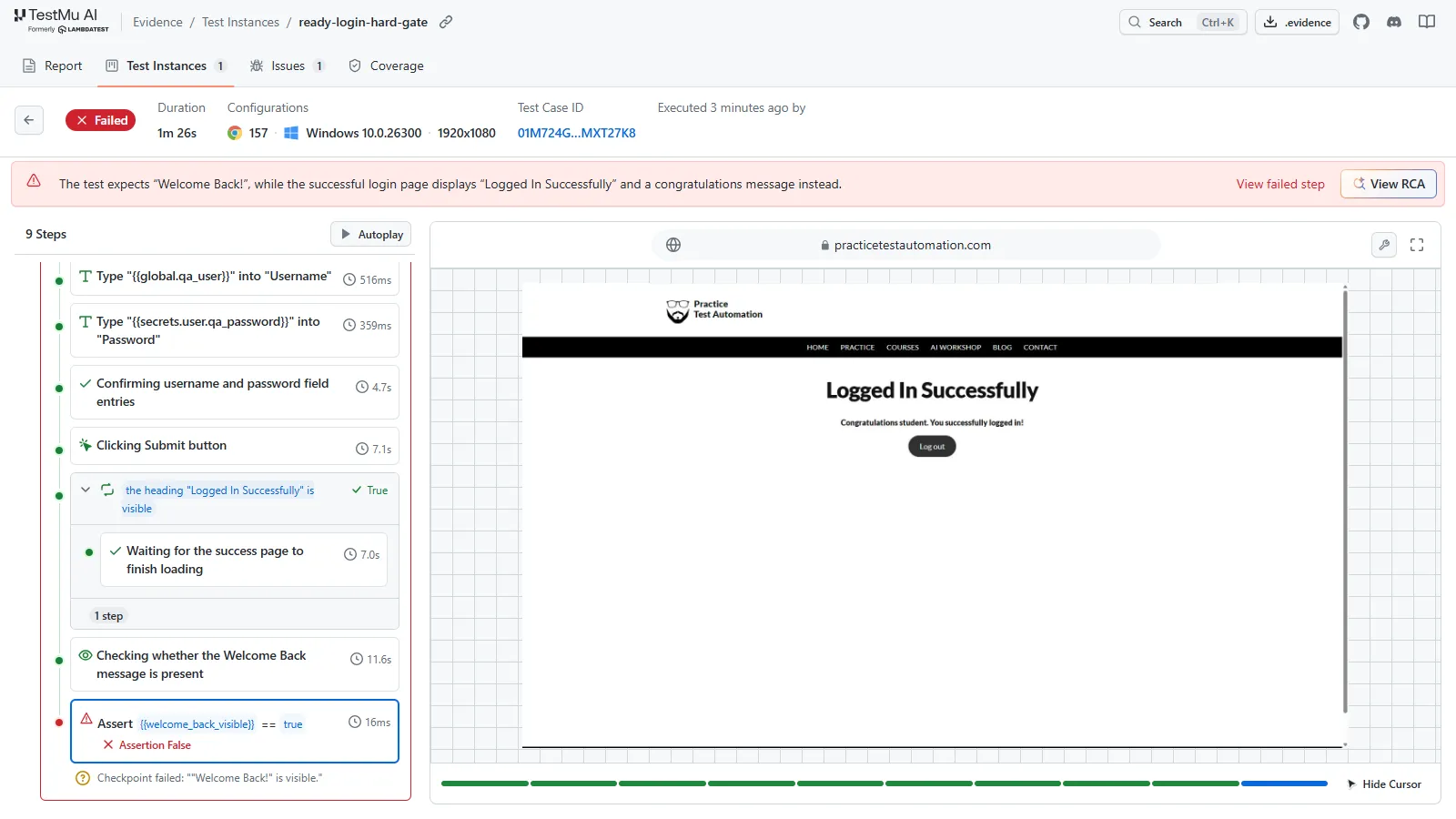
Here is a hard gate on a real run. The READY login case below runs through Kane CLI against a public practice login page, with the expected text deliberately set to "Welcome Back!" while the page shows "Logged In Successfully". The username is a parameter and the password is a masked secret:
kane-cli run 'Go to https://practicetestautomation.com/practice-test-login/. Enter {{qa_user}} in the Username field. Enter {{qa_password}} in the Password field. Click the Submit button. Assert "Welcome Back!" is visible.' \
  --agent --headless \
  --variables '{"qa_user":{"value":"student"},"qa_password":{"value":"Password123","secret":true}}'
The login steps pass, the final assertion comes back false, and the run ends with exit code 1 instead of healing into a pass. With "Logged In Successfully" as the expected text, the same case passes in 8 steps.
Should You Be Using Scripts, Code Generation or an AI Agent?
The right conversion approach depends on who will own the tests afterward:
| Approach | Who owns it | Skills needed | Output | Maintenance | Best fit |
|---|---|---|---|---|---|
| Hand-written framework scripts (Selenium, Playwright, Appium) | SDETs | Programming plus framework knowledge | Full code control | High. Locator and flow changes are manual edits. | Teams with spare SDET capacity |
| AI code generation from test cases (for example Copilot reading Azure DevOps cases) | SDETs who review AI-written code | Programming, prompt tuning | Framework code to review and fix | Medium to high. Engineers still adjust generated scripts. | Code-first teams that want speed-ups |
| Gherkin/BDD feature files | Manual testers write; SDETs implement steps | Shared style guide | Readable specs plus step code | Medium. The step library needs upkeep. | Teams already using Cucumber |
| AI testing agent (KaneAI) | Manual testers and QA leads, with SDET review | Clear test writing (READY check) | Natural-language tests, run reports, optional code export | Lower when heals are reviewed. It depends on step quality. Heals arrive as versioned, reviewable diffs. | Teams with large manual suites and few SDETs |
How Do You Know Whether the Conversion Has Worked?
Measure conversion by release outcomes, not by the number of tests created. Track these five numbers before and after:
- Share of regression cases automated per release.
- Manual hours per release cycle.
- Escaped defects in production.
- Flaky run rate for converted tests.
- Time to update the test following a UI change.
For reference, customers quoted on the KaneAI page report:
- Snap One: "50% faster test execution time".
- Trepp: "2x increased productivity" with test cycles going from days to hours.
Your numbers will be dependent on how many cases pass the READY check on day one.
Conclusion
Ready to convert your first 10 cases? Run them through the READY check, then let KaneAI automate and run them on real browsers and devices.
Testing web or mobile apps without writing code? KaneAI by TestMu AI turns plain-English instructions into tests.
Author

Abhishek Mishra
Blogs: 17

Abhishek Mishra is a Technical Product Manager at TestMu AI, where he owns Test Manager, the test management product. He has over 8 years of experience in product management and market analysis, spanning AI-native software testing, product strategy, and analytics. On TestMu AI, he authored guides on test management and test case management. Previously, he served as the Product Lead at IndiaClan and co-founded Gartley618 Technologies, a firm focused on quantitative trading and blockchain. He holds a B.Tech degree.
Reviewer

Mayank Bhola
Reviewer
Mayank Bhola is Co-Founder and Head of Products at TestMu AI, where he leads the entire product portfolio across KaneAI, Kane CLI, HyperExecute, SmartUI, the Real Device Cloud, Accessibility, and other software testing product lines. As an early Lead Architect he designed and built the company's flagship Tunnel technology from scratch, created the React-based automation platform, and architected the data-intensive pipelines and FAAS services that scale it. He brings more than 10 years of experience in software development and product engineering, with earlier roles as Head of Technology at Juggernaut Books and Senior Software Engineer at PressPlay TV and Zomato. Mayank holds a B.Tech in Computer Engineering from JIIT Noida.


Convert Manual Test Cases FAQs
Did you find this page helpful?
More Related Blogs

TestMu AI forEnterprise
Get access to solutions built on Enterprise
grade security, privacy, & compliance
- Advanced access controls
- Advanced data retention rules
- Advanced Local Testing
- Premium Support options
- Early access to beta features
- Private Slack Channel
- Unlimited Manual Accessibility DevTools Tests