

Power Your Software Testing with AI Agents and Cloud
The Native AI-Agentic Cloud Platform to Supercharge Quality Engineering. Test Intelligently and Ship Faster.


- TestMu AI (Formerly LambdaTest)
- /
- Blog
- /
- AI in Performance Testing: Types, Tools & Best Practices
AI in Performance Testing: Types, Tools & Best Practices
Learn how AI in performance testing automates processes, detects bottlenecks, and improves accuracy for reliable test results.
Last Updated on:
A checkout page that stalls for three seconds during a flash sale does not just annoy users, it pushes them to a competitor and takes the revenue with them. Problems like this rarely surface on a developer's machine. They appear at scale, under real traffic, and often only after release.
Traditional performance testing catches what you scripted it to look for, but it struggles to predict how a system behaves under load patterns no one anticipated. AI in performance testing closes that gap. Instead of only measuring response times and throughput, it learns from real usage, simulates realistic traffic, and flags bottlenecks before your users hit them.
This guide breaks down how AI improves on traditional performance testing, the tools and trends worth knowing, and how to fold AI into your own testing workflow. For the adjacent question of whether a system keeps running rather than how fast it runs, see reliability testing, where the same models are used to forecast failure rather than latency.
Key Takeaways
- AI in performance testing learns traffic patterns from production data and predicts how an application behaves under load, covering the realistic traffic simulation and unscripted user scenarios that manual scripting misses.
- AI sharpens all five performance test types, generating realistic load profiles for load testing, forecasting the saturation point for stress testing, spotting slow memory leaks in soak runs, modeling bursty spikes, and flagging data-growth thresholds in volume tests.
- KaneAI from TestMu AI converts natural-language instructions into automated tests, exports them to multiple programming languages, and runs them across 3,000+ browser and OS combinations plus 10,000+ real devices.
- StormForge applies machine learning to Kubernetes performance data to simulate real traffic and recommend resource allocation that cuts cloud costs, while Telerik Test Studio adds AI visual checks and repairs broken test scripts automatically.
- TestMu AI's Future of Quality Assurance survey found that 60.60% of organizations believe AI will improve team productivity while humans continue to play a major role in testing.
- Performance testing for LLM applications measures endpoint latency, throughput, and token cost as parallel requests climb, and also whether the model still answers correctly and avoids hallucinations when traffic spikes.
- HyperExecute runs uploaded JMeter test plans on just-in-time infrastructure with Matrix and Auto-Split distribution, executing up to 70% faster than traditional grids with automatic retries and AI-powered root cause analysis.
- The main limits of AI in performance testing are biased input data, overfitting to historical load, opaque model decisions, engineering skill gaps, and compute cost, so teams should retrain models regularly and keep human review on edge cases.
What Is AI in Performance Testing?
AI in performance testing uses artificial intelligence techniques to make testing more efficient and intelligent in evaluating software performance. If you’re looking for the broader picture, here’s a complete guide to AI testing. It automates the process of analyzing large test data, identifying traffic patterns and providing real-time suggestions to predict how a software application behaves under varying load conditions.
This allows you to quickly spot performance bottlenecks and fix them without doing everything manually. Using AI, you can also automate writing test cases and test scripts, further speeding up performance testing.
Types of AI Performance Testing
AI does not replace the core types of performance testing; it makes each one sharper. Instead of flat, scripted load curves, AI learns from real production traffic and predicts failure points before you apply the load. Here is how AI strengthens the five most common types.
| Test Type | What It Checks | How AI Strengthens It |
|---|---|---|
| Load Testing | Behavior under expected concurrent users. | Learns real traffic mixes from production logs and generates realistic load profiles instead of uniform ramps. |
| Stress Testing | The breaking point beyond normal capacity. | Predicts the concurrency at which resources saturate before that load is ever applied. |
| Soak (Endurance) Testing | Stability over long-running sessions. | Spots slow memory leaks and gradual degradation by detecting drift in metrics over hours of runtime. |
| Spike Testing | Response to sudden traffic surges. | Models bursty, event-driven spikes such as flash sales or regional peaks from historical patterns. |
| Volume Testing | Behavior with large data volumes. | Detects where data growth degrades query and response times and recommends safe operating thresholds. |
Why Leverage AI in Performance Testing?
Artificial intelligence brings significant benefits to performance testing, addressing the challenges of traditional testing methods.
Here is how leveraging AI in performance testing can enhance your entire test process:
- Optimal Resource Automation: AI automates system resources according to the magnitude of their use at a given point in time so that they are optimally used, as well as to avoid all overload during peak periods.
- Root Cause Analysis: By analyzing latency issues from distributed systems, AI can identify that there is latency and drill down to the exact components (i.e., network, database, server) that are the root cause of the issue.
- Scalability Prediction: AI can help simulate and predict how a software application will perform when the number of users increases. It allows more insight into scalability without running performance tests at extreme levels.
- Predictive Analysis: Artificial intelligence can analyze large amounts of historical data to predict how a software application will behave under different loads. It analyzes past performance and user behavior to recognize potential issues that may slow the application down, helping you plan for capacity and scalability ahead of time instead of waiting for issues to surface in production.
- Real-time Anomaly Detection: AI can detect anomalies in real-time during load testing. AI algorithms can analyze performance metrics, user interactions, and other important data during test execution. It allows early identification of performance issues, such as slow response times, high resource utilization and more.
- Task Automation: AI-powered tools can automate repetitive tasks such as test generation, test reporting, and more, allowing you to run performance tests faster and focus on other parameters.
Traditional vs AI Performance Testing
The clearest way to see AI's value is side by side with the manual workflow most teams still run. The difference is not just speed; it is the shift from reactive measurement to proactive prediction.
| Dimension | Traditional Performance Testing | AI-Assisted Performance Testing |
|---|---|---|
| Test Creation | Manual scripting for each scenario, slow and skill-heavy. | Natural-language or auto-generated scripts, for example with KaneAI. |
| Load Modeling | Fixed, scripted ramps that approximate user behavior. | Learns real user behavior from production data and builds realistic traffic. |
| Execution | Static infrastructure with queueing and idle resources. | Cloud orchestration with parallel distribution, for example on HyperExecute. |
| Result Analysis | Manual chart reading and threshold checking. | Automated anomaly detection and metric correlation. |
| Root Cause | Manual log digging across services. | Cross-service correlation surfaces the probable cause automatically. |
| Maintenance | Scripts break when the UI or API changes. | Self-healing updates scripts as the application evolves. |
| Prediction | Reactive, finds issues only during the test run. | Predictive, forecasts failures before the load is applied. |
Top AI Tools for Performance Testing
QA teams may require AI testing tools to evaluate the performance of software applications in various ways. However, choosing the right tool depends on your project’s particular needs and objectives.
Here are some of the top AI tools for performance testing:
1. TestMu AI KaneAI
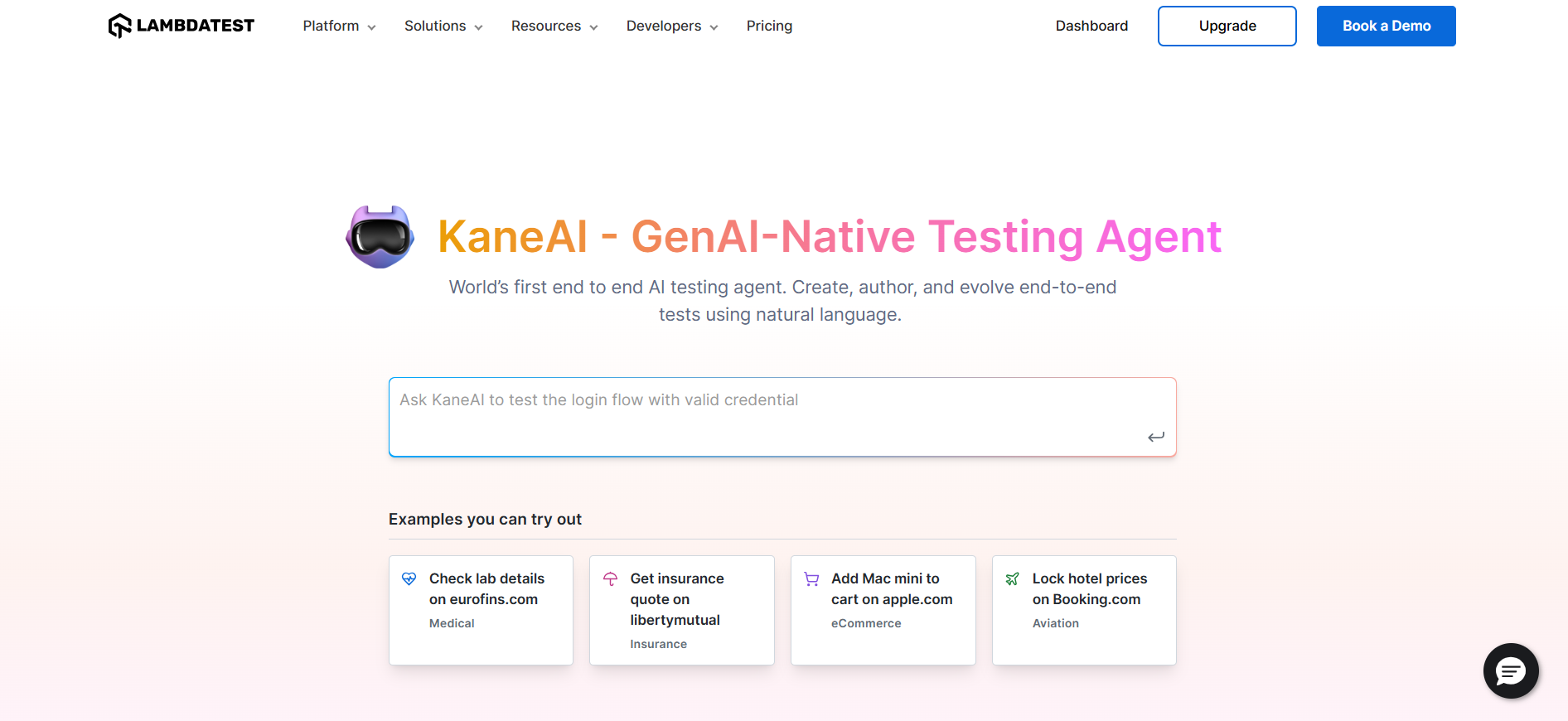
TestMu AI KaneAI is an AI-native automation testing agent designed to support fast-moving AI QA teams. It lets you create, debug, and enhance tests using natural language, making test automation quicker and easier without needing deep technical expertise.
Features:
- Intelligent Test Generation: Automates the creation and evolution of test cases through NLP-driven instructions.
- Smart Test Planning: Converts high-level objectives into detailed, automated test plans.
- Multi-Language Code Export: Generates tests compatible with various programming languages and frameworks.
- Show-Me Mode: Simplifies debugging by converting user actions into natural language instructions for improved reliability.
- API Testing Support: Easily include backend tests to improve overall coverage.
- Wide Coverage: Run your tests across 3,000+ browser and OS combinations, plus 10,000+ real devices.

With the rise of AI in testing, it's crucial to stay competitive by upskilling or polishing your skill sets. The KaneAI Certification proves your hands-on AI testing skills and positions you as a future-ready, high-value QA professional.
Learn more about AI testing and how it helps reduce manual effort, accelerate releases, and improve test accuracy.
2. StormForge
StormForge is an AI-driven performance testing tool for optimizing and automating Kubernetes applications. It offers tools for testing application performance, analyzing costs, and optimizing resource usage, helping organizations improve the efficiency and reliability of their containerized applications on Kubernetes.
Features:
- Analyzes data to predict performance issues and recommend proactive optimizations.
- Optimizes resource allocation, reducing cloud costs while maintaining high software performance.
- Simulates real-world traffic conditions, identifying bottlenecks and performance improvement areas.
3. Telerik Test Studio
Telerik Test Studio is an automated testing tool designed for desktop, web and mobile applications. It supports functional, load, performance, and API testing to ensure software quality. Both technical and non-technical users can use Telerik Test Studio to run and maintain automated tests.
Features:
- Automates UI validation using AI-driven visual checks.
- Integrates with various test management tools and uses AI to speed up test case design, management, and execution.
- Uses AI to automatically detect and fix issues in test scripts when software elements change.
How to Implement AI in Performance Testing
You do not need to rebuild your testing stack to adopt AI. Start with one workflow, prove the value, then expand. Here is a practical seven-step path from manual load tests to an AI-assisted pipeline.
- Capture high-quality production data: Collect logs, traces, and real user journeys. AI is only as accurate as the data it learns from, so clean inputs matter more than model choice.
- Start with one use case: Pick anomaly detection or predictive capacity modeling first, not the whole suite. A narrow, measurable win builds trust faster than a broad rollout.
- Author tests in natural language: Describe the scenario in plain English with KaneAI, then export the script to Playwright, Selenium, or your framework of choice.
- Run on scalable cloud infrastructure: Upload your JMeter plan to HyperExecute so tests run in parallel with no local bottleneck and match local execution speed.
- Track the right metrics: Feed AI the signals below so it can baseline normal behavior and flag deviations.
- Gate the pipeline in CI/CD: Fail the build automatically when p95 latency or error rate crosses your threshold, so a regression never reaches production unnoticed.
- Validate predictions against reality: Keep a feedback loop comparing AI forecasts to actual measurements so the models stay accurate as the application changes.
For step four, a JMeter run on HyperExecute is driven by a short YAML file. Auto-split distributes the test plan across machines so a long suite finishes in a fraction of the time. See the HyperExecute YAML parameters for the full reference.
version: 0.1
runson: linux
autosplit: true
concurrency: 4
testSuites:
  - jmeter -n -t load-test.jmx -l results.jtl -e -o report
For step five, these are the metrics worth wiring into your AI baseline. Tail latency and error rate catch what averages hide.
| Metric | What It Tells You | AI's Role |
|---|---|---|
| p95 / p99 response time | Tail latency that real users actually feel. | Baselines normal and flags deviations in real time. |
| Throughput (requests/sec) | Capacity sustained at a given load. | Predicts the point where throughput saturates. |
| Error rate | Stability of the system under load. | Correlates error spikes to their probable root cause. |
| Concurrency at failure | The breaking point of the system. | Forecasts it before the test reaches that load. |
| CPU and memory utilization | Infrastructure headroom and leaks. | Detects drift and slow leaks across soak runs. |
Current AI Trends in Performance Testing
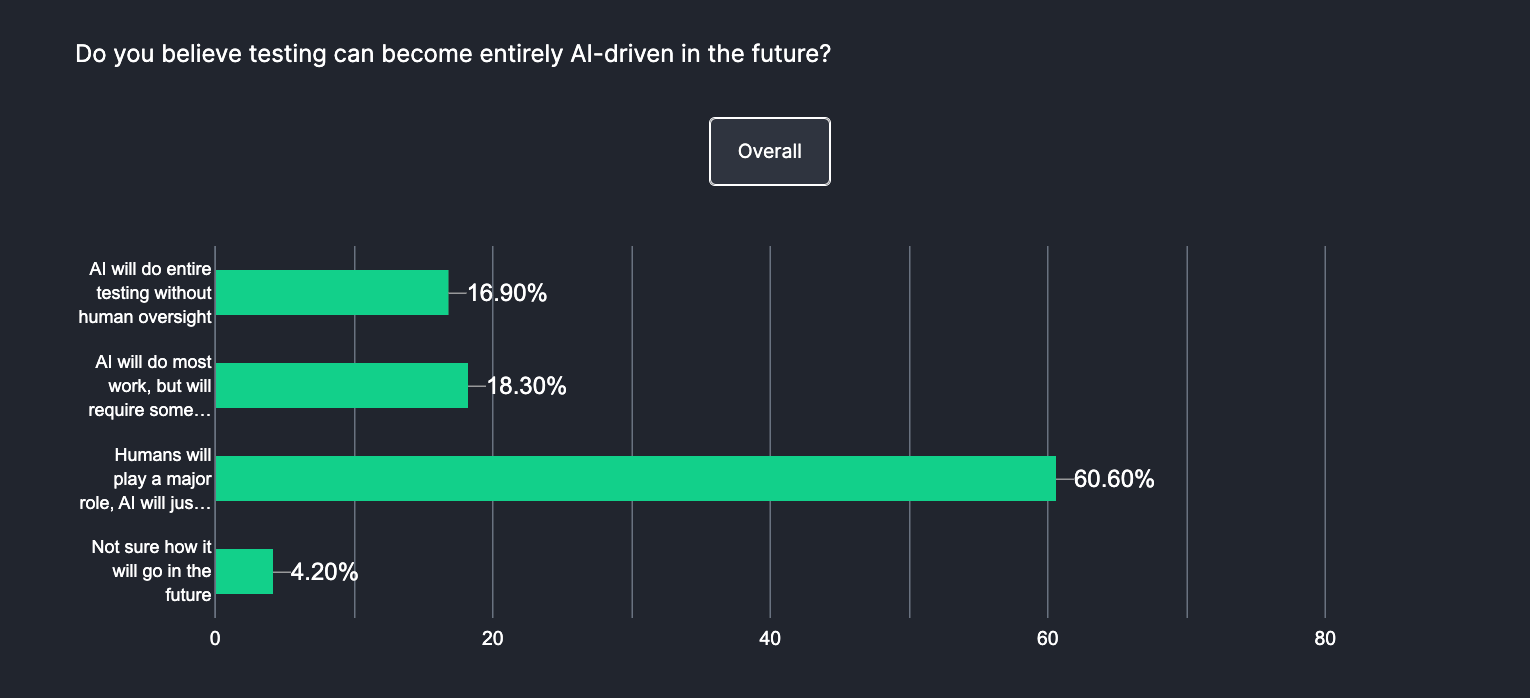
The future of AI in performance testing will focus on improving productivity. According to TestMu AI's Future of Quality Assurance survey, 60.60% of organizations believe AI will improve team productivity while humans continue to play a major role in testing. AI will make tasks faster and easier, working alongside engineers rather than replacing them.
Let’s look at how AI will impact performance testing:
- AI-Generated Test Scripts: AI helps automate the process of writing test scripts. Generating tests with AI improves test coverage and reduces the need for manually writing test scripts. As software evolves, AI can even adjust the test scripts accordingly, ensuring that they remain updated without requiring manual intervention.
- Predictive analytics: AI using predictive analytics will transform load testing by replicating real-world user behavior. Using historical data, AI will estimate software performance under various load conditions, identifying potential issues.
- Instant Issue Detection: AI enables continuous, real-time monitoring of software performance. By analyzing live data, AI can instantly detect anomalies or patterns that indicate performance issues, letting teams address them before they impact end users and reducing downtime.
- Self-Healing Automation: AI helps maintain your test scripts by automatically updating and fixing them. This process of self-healing test automation further expedites your performance testing process. As applications change, AI detects broken test scripts and adjusts them without human involvement, keeping performance testing reliable with minimal manual effort.
- CI/CD Integration: As AI integrates into DevOps and CI/CD pipelines, performance testing becomes a continuous, automated process throughout the development lifecycle. AI runs performance tests automatically with each code change, ensuring continuous monitoring and improvement.
Agentic testing extends these trends. KaneAI, the GenAI-native testing agent from TestMu AI, turns PRDs, Jira tickets, and screen recordings into executable steps written in plain English, re-anchors those steps through smart element detection when the interface shifts, and exports the result to Selenium, Playwright, Cypress, or Appium. Runs execute in parallel on the TestMu AI grid, so a load scenario can be re-run across browser and device combinations without hand-written scripts.
ML models in the inference path introduce latency and accuracy tradeoffs that require dedicated validation. AI/ML testing covers how teams define and enforce those thresholds before and after deployment.
Beyond performance benchmarks, leveraging AI in software testing lets teams apply intelligent analysis across functional, regression, and end-to-end test workflows as well.
Performance Testing for AI and LLM Applications
Applications built on large language models behave differently from classic web services. Response time varies with prompt length and token generation, cost scales with tokens consumed, and the same input can return different output. A load test that assumes fixed response sizes will miss all of it.
There are two things to measure. First, endpoint performance under concurrency: latency, throughput, and token cost as parallel requests climb, which you run on scalable cloud infrastructure like any other load test. Second, agent behavior under load: does the model still answer correctly, stay on topic, and avoid hallucinations when traffic spikes? TestMu AI Agent Testing validates chatbots, voice, and phone agents across thousands of scenarios, with performance monitors that track latency and interruptions alongside response quality.
Agents that act rather than answer, such as workflow agents that call tools, write files, or hit APIs, need a different check, because the risk under load is not just a slow response but work that never actually happened. TestMu AI Agent Assurance reads the agent's codebase and derives its test suite, covering functional scenarios, non-functional ones like latency, cost, and robustness under malformed input, and adversarial cases such as prompt injection and tool misuse. It then invokes the agent for real and grades each criterion against observed evidence, like files changed and tool calls made, rather than the agent's own report of the run.

Note: Latency numbers mean little if the work behind them did not happen. Early access is opening in batches. Join the Agent Assurance waitlist
Challenges of Using AI in Performance Testing
AI is powerful, not magical. Knowing where it struggles keeps your results trustworthy and your team realistic about what to expect.
- Data quality and bias: Poor or skewed input data produces faulty predictions. Feed models clean, representative production data, not synthetic samples that flatten real behavior.
- Overfitting to past patterns: A model trained only on historical load may miss genuinely new traffic shapes. Retrain regularly and keep humans reviewing edge cases.
- Opaque models: Black-box decisions are hard to trust when a build fails on an AI verdict. Prefer tools that explain why a result was flagged.
- Skill gaps: Interpreting AI output still needs engineers who understand both performance and basic machine learning. Budget time for upskilling.
- Compute cost: Training and running models adds overhead. Start with a focused use case so the value is clear before you scale spend.
Limitations in Traditional Performance Testing
Before AI was introduced, traditional performance testing faced many challenges and limitations. No matter how experienced the tester was, teams had to handle several common challenges without the help of AI.
Some of these challenges are as follows:
- Static Resource Allocation: Traditional performance testing may not account for dynamic resource allocation, resulting in inefficient resource usage. It often fails to adjust to varying load conditions, leading to potential overloads or underutilization.
- Rigid Test Cases: Conventional methods often rely on manual test cases written by testers around user actions and traffic. These may not capture real-time variation in user behavior, leading to inaccurate response time analysis.
- Weak Traffic Simulation: It can be challenging to simulate realistic traffic loads in traditional testing environments. This can lead to scenarios that do not accurately reflect software behavior under high-traffic conditions.
- Scalability Barriers: As applications grow in size and complexity, performance testing needs to scale accordingly. What started as tests with dozens or hundreds of users might later need to simulate thousands or millions of users, and the tools capable of handling that scale were often expensive and difficult to manage.
- Missed User Scenarios: Traditional methods struggle to capture the full range of real user interactions, including varied patterns, dynamic inputs, and unexpected workflows. This leaves critical issues undetected until they occur in real-world conditions.
Cloud-based orchestration removes most of these barriers. TestMu AI HyperExecute lets you upload and run JMeter test plans directly on just-in-time infrastructure, distributing tests across resources with Matrix and Auto-Split strategies and executing up to 70% faster than traditional grids. Automatic retries, fail-fast, and AI-powered root cause analysis cut the manual overhead of running performance suites at scale. See the HyperExecute getting started docs to set up your first run.
Note: Run performance tests up to 70% faster on the cloud. Try TestMu AI today!
Best Practices for Using AI in Performance Testing
Below are some best practices for effectively using AI in performance testing:
- Customize to Fit: Every software project is different, so it’s important to adjust AI testing parameters to match the requirements needed for performance testing. Customizing tests helps keep up with project goals and changes in software or user behavior. Using AI to tweak the tests can make sure they stay relevant and effective as things change.
- Use Diverse Test Data: High-quality test data is key to accurate performance testing. To catch issues early, it needs to cover different scenarios such as response time, throughput, resource utilization and more. Having a variety of test data helps simulate real-world conditions and ensures better test coverage.
- Blend AI and Human Input: AI is good for automating repetitive tasks in performance testing, but human testers are still needed. They bring creativity and insights that AI can’t. Working together, AI can handle repetitive work while humans focus on solving complex problems and improving the testing process.
- Keep AI Updated: AI gets better with regular updates. To keep it useful, you need to retrain models with new data and create feedback loops. It helps AI stay up-to-date with software changes and find new performance issues faster.
Conclusion
Start small: pick one slow load-test scenario, author it in plain English with KaneAI, then run it on cloud infrastructure for fast, repeatable feedback instead of a manual grid. From there, layer in predictive analysis and real-time anomaly detection to catch bottlenecks before they reach production.
AI does not remove the tester; it removes the repetitive analysis so engineers can focus on capacity planning and root-cause work. To set up your first AI-assisted run, follow the KaneAI getting started docs and connect your performance suite to the cloud.
Citations
Performance Testing Using Machine Learning: https://www.internationaljournalssrg.org/IJCSE/2023/Volume10-Issue6/IJCSE-V10I6P105.pdf
Note: AI assistance was used in researching and drafting this article. Tahneet Kanwal, Community Contributor at TestMu AI with expertise in software testing and automation testing, verified every statistic, link, and product claim against primary sources before publication, following our editorial process and AI use policy.
Author

Saurabh Prakash
Blogs: 19

Saurabh Prakash is an Engineering Manager at TestMu AI (formerly LambdaTest), where he leads engineering on agentic AI development and scalable system architecture for the quality engineering platform. He has also contributed to Test at Scale, the company's open-source test intelligence platform. He brings over 9 years of experience across Node.js, Java, Spring, MVC, data structures, algorithms, and scalable system design, with earlier roles as SDE 2 at Zomato, Senior Software Engineer at LogicHub, and Software Development Engineer at Directi. Saurabh holds a B.Tech in Computer Science and Engineering from Delhi Technological University.
Reviewer

Ankit Mathur
Reviewer
Ankit Mathur is Vice President of Engineering at TestMu AI (formerly LambdaTest), leading platform engineering across the testing cloud. He scaled the platform's backend services to handle 60M+ HTTP requests per day through horizontal scaling, network-layer optimization for faster test execution on the cloud grid, and database and AWS infrastructure tuning. He brings 10+ years in distributed systems engineering, with earlier roles at Sumo Logic and Adobe, where he worked on Adobe Sign and holds a US patent for storing and protecting signatures and images in electronic documents. Ankit holds a postgraduate diploma in advanced computing and a B.Tech in Information Technology.
Frequently asked questions
Did you find this page helpful?
More Related Blogs
TestMu AI forEnterprise
Get access to solutions built on Enterprise
grade security, privacy, & compliance
- Advanced access controls
- Advanced data retention rules
- Advanced Local Testing
- Premium Support options
- Early access to beta features
- Private Slack Channel
- Unlimited Manual Accessibility DevTools Tests