

Power Your Software Testing with AI Agents and Cloud
The Native AI-Agentic Cloud Platform to Supercharge Quality Engineering. Test Intelligently and Ship Faster.


- TestMu AI (Formerly LambdaTest)
- /
- Blog
- /
- AI in Quality Assurance
AI in Quality Assurance: How Teams Are Using It in 2026
AI in quality assurance automates test creation, self-heals broken locators, and cuts maintenance time. See how QA teams use AI in quality assurance testing, with tools and examples.
Last Updated on:
AI in QA uses machine learning to generate tests, self-heal broken locators, detect flaky scripts, and rank which regression tests run first. The ThinkSys QA Trends Report 2026 puts adoption at 77.7% of organizations already using or planning AI in their QA processes, with 50.6% applying it to test data creation.
This guide covers what AI in quality assurance is, why teams use it, real examples, the six maturity levels, how to integrate it, which AI testing tools to pick, the role of AI agents, and whether AI replaces QA testers.
Key Takeaways
The top AI-in-QA best practices are: define the scope and objectives of your AI rollout before picking tools; train models on labeled historical test and defect data; and always validate accuracy on real project data before scaling, since the most common failure is skipping that validation. Keep humans owning strategy, risk judgment, and release decisions.
- Test data creation: Test data is the first task most QA teams hand to AI, ahead of test case formulation and log analysis.
- Flaky-test detection: AI flags scripts that fail intermittently across builds, so teams stop triaging unstable tests as real regressions.
- Maturity benchmark: Score your team on the six-level scale before buying, so you know which level the purchase should reach.
- CI/CD integration: Teams that bolt an AI tool onto an unchanged pipeline stay stuck at level 3 regardless of the tool.
- Validation before rollout: Pilot an AI model on one real test suite and confirm its output on project data before expanding it further.
- Human ownership: Testers keep exploratory testing, risk calls, and coverage strategy, and must verify that AI-generated tests assert the correct behavior.
What Is AI in QA?
AI in QA applies machine learning to software testing. It ranks high-risk areas from past results, prioritizes regression runs, flags brittle scripts, and detects visual inconsistencies.
AI in software quality assurance goes beyond test execution. It spans planning, risk analysis, defect prediction, and continuous improvement across the full quality lifecycle. For teams validating the models behind those systems, AI/ML testing treats accuracy, bias, and drift as first-class quality concerns.
Pradeep Soundararajan, Founder and CEO of Moolya, takes that argument further in an XP Series episode on unravelling AI in QA beyond automation, looking at what changes for the profession once AI reaches past test execution.
Why Use AI in Quality Assurance?
AI in quality assurance automates repetitive runs, detects flaky tests, predicts defects, and adapts scripts automatically. It prioritizes high-risk regression coverage and shortens release cycles.
- AI-Enhanced Test Execution: Improves execution efficiency by identifying stable tests, recommending parallel runs, and automating repetitive validations. This reduces execution time and frees testers to focus on exploratory and critical functional testing.
- Intelligent Test Selection: Evaluates code changes, historical defects, and execution data to select the most relevant test cases. This avoids redundant runs, saves time, and ensures focus on high-risk areas.
- Predictive Defect Analysis: Analyzes past test results and change histories to highlight modules most likely to fail. This software defect prediction helps teams improve coverage and prevent critical production defects.
- Flaky Test Identification: Tracks test stability, detects intermittent failures, and highlights unreliable scripts before they block a release or generate false confidence in build quality.
- Enhanced Defect Accuracy: Correlates multiple data sources, logs, test results, and past defect trends to detect issues and reduce false positives. This increases confidence in test results and defect reporting.
- Optimized Regression Coverage: Prioritizes regression runs based on recent code commits, risk level, and defect history. It ensures critical functionality is validated first within limited test execution windows.
These benefits extend directly to the backend through AI API testing, which applies AI-driven test generation, semantic validation for non-deterministic LLM responses, and self-healing across schema changes to keep API suites stable with minimal manual upkeep.
Key Takeaway: AI-driven testing directly reduces the two biggest drains on team velocity: flaky tests and redundant regression runs. Starting with intelligent test selection and predictive defect analysis gives teams a measurable return before they invest in broader AI tooling.
For QA leads weighing how much of the workflow to delegate to AI, this guide to AI-augmented software testing outlines the realistic middle ground, where AI accelerates authoring, maintenance, and triage while engineers stay accountable for coverage strategy, risk calls, and release readiness.

Note: Get insights into test results with TestMu AI's Test Intelligence. Try TestMu AI Today!
What Are Examples of AI in Quality Assurance?
Examples of AI in quality assurance include generating test data, authoring test scripts, prioritizing high-risk tests, scheduling runs, self-healing broken locators, and reporting coverage gaps.
According to the Future of Quality Assurance Report, several key examples highlight how AI is used in testing processes.
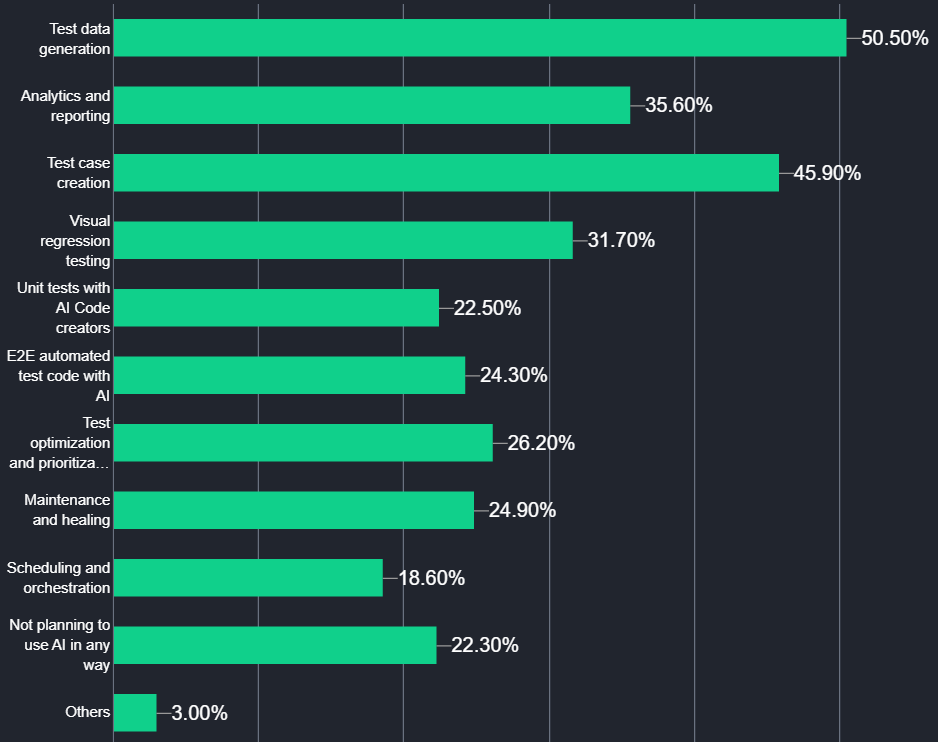
- Test Data Generation: Generates diverse and realistic test datasets that simulate user behavior and edge cases. It reduces the need for manual data preparation and ensures comprehensive coverage for functional, integration, and performance tests.
- AI-Driven End-to-End Testing: Creates E2E test scripts that simulate real user interactions across workflows. These scripts are executed within automation frameworks to validate integrations, APIs, and UI components under varying conditions.
- Generative AI in Quality Assurance: Generative AI in quality assurance turns natural language prompts and requirement documents into AI-generated test cases, test data, and full test plans, cutting authoring time from hours to minutes.
- Unit Test Generation: Analyzes source code to automatically generate unit tests, covering standard scenarios and edge cases. AI unit test generation can increase coverage and ensure individual components behave as expected.
- Test Optimization and Prioritization: Evaluates historical test results, code changes, and defect patterns to prioritize test execution. High-risk areas are tested first, redundant runs are minimized, and regression cycles become more efficient without compromising coverage.
- Scheduling and Orchestration: Manages test execution across environments, allocating resources dynamically and scheduling tests to avoid conflicts. It ensures efficient utilization of test infrastructure and timely completion of automated test suites.
- Visual Regression Testing: Compares UI snapshots across builds to detect layout shifts, misaligned elements, or missing components. TestMu AI SmartUI offers a visual testing tool that automatically highlights visual deviations, enabling rapid correction before end users are impacted.
- Self-Healing Test Scripts: Detects changes in UI elements or workflows and automatically updates affected test scripts. Self-healing test automation minimizes manual maintenance, keeps regression tests functional, and allows QA teams to focus on validation and analysis.
- Analytics and Reporting: Analyzes test execution data, defect trends, and coverage gaps to predict potential failures. Predictive analytics can generate actionable insights and reports that help QA teams optimize testing, reduce risk, and improve release confidence.
- AI-Powered Test Intelligence: TestMu AI provides Test Intelligence that helps teams understand execution patterns and coverage gaps. Test Intelligence uses AI to detect unstable tests, adapt scripts, and highlight UI issues, guiding smarter prioritization and execution decisions.
Key Takeaway: Self-healing scripts and AI-powered test intelligence deliver the most immediate impact because they cut maintenance time without requiring a complete re-architecture of existing test suites. Visual regression testing and generative AI for test authoring are strong second priorities for teams that already run stable automation.
What Are the Six Levels of AI in QA Testing?
The six levels of AI in QA testing run from manual testing to autonomous testing, through assisted, partial, integrated, and intelligent automation. Each level removes more human intervention.
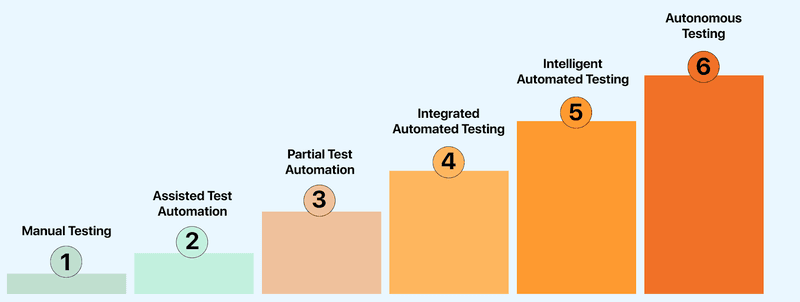
- Manual Testing: Human testers perform all tasks, including writing, executing, and analyzing test cases, identifying defects, and reporting issues. Testing is conducted entirely without automation support.
- Assisted Test Automation: Automated tools assist testers with test execution. Humans continue to create and maintain scripts, manage workflows, and handle analysis and validation manually.
- Partial Test Automation: Testing is shared between humans and automation. Testers manage execution, data handling, and result analysis, while automation handles repetitive tasks under human supervision.
- Integrated Automated Testing: AI provides recommendations within automated tools. Testers review and apply these suggestions to refine test cases and adjust test suites as needed.
- Intelligent Automated Testing: AI can generate test cases, execute tests, and report results. In intelligent test automation, human involvement is optional and limited to handling specific scenarios or exceptions.
- Autonomous Testing: In autonomous testing, AI manages test creation, execution, and evaluation without human involvement. It monitors code changes, runs tests, and identifies defects autonomously.
The last two levels are where Agentic QA begins: the agent gets a testing goal instead of a script and decides its own steps at runtime.
Key Takeaway: Most QA teams currently operate at levels 2 or 3, using automation tools but still writing and maintaining scripts manually. Moving to level 4 or 5 requires structured AI integration into the CI/CD workflow, not just adding a new tool on top of an unchanged process.
How to Integrate AI in QA Testing?
Integrate AI in QA testing in five steps: identify the test scope, select AI models, train them on labelled project data, validate accuracy on real scenarios, then deploy into the testing workflow.
- Identify Test Scope: Focus on identifying the scope and objectives of the AI rollout. Define the key areas for using AI in different areas, such as improving test coverage or automating repetitive tasks.
- Select AI Models: Select the AI models that best fit your software project requirements. For example, if you want to automate the test generation process, you can choose an NLP-based AI model or tool to generate tests.
GenAI-native test agents like KaneAI by TestMu AI help you generate tests using natural language prompts. It lets you quickly generate tests without manually writing test scripts, speeding up test creation and ensuring better coverage.
- Train AI Models: High-quality data is essential for training AI models. Collect, curate, and label the data needed for training AI models. Also, use the proper data annotation method to ensure that the AI model can recognize patterns, execute accurate tests and predict defects.
- Validate AI Models: Once the AI model is trained, test and validate it. Develop test algorithms and evaluate models using subsets of the annotated data. The goal is to verify that the model performs as expected in real-world scenarios by producing accurate and consistent results.
- Integrate AI Models Into Your Workflow: Once the AI model is tested and validated, integrate it into your testing infrastructure. This can involve automating aspects of the testing process, like generating test cases or analyzing test results.
To validate the behavior of AI agents that operate using these models, consider using TestMu AI Agent Testing. It simulates real-world interactions to evaluate how agents perform, respond, and adapt in dynamic scenarios. To get started, check out how to test your first AI agent.
Key Takeaway: The most common integration failure is skipping validation: deploying an AI model without confirming it produces reliable results on real project data. Running a controlled pilot on a single test suite before expanding ensures the model earns team trust before wider adoption.
Which AI Tools Are Best for QA Testing?
The best AI testing tools for QA depend on the bottleneck: generative agents for natural language authoring, test management platforms for planning and analytics, codeless tools for maintenance.
KaneAI by TestMu AI, Aqua Cloud, and Virtuoso rank among the best AI testing tools for QA, covering natural language test authoring, centralized test management, and codeless maintenance.
1. KaneAI by TestMu AI
KaneAI by TestMu AI is a GenAI-native testing agent designed to support fast-moving AI QA teams. It lets you create, debug, and improve tests using natural language, making test automation quicker and easier without needing deep technical expertise.
Features:
- Intelligent Test Generation: Automates the creation and evolution of test cases through NLP-driven instructions.
- Smart Test Planning: Converts high-level objectives into detailed, automated test plans.
- Multi-Language Code Export: Generates tests compatible with various programming languages and frameworks.
- Show-Me Mode: Simplifies debugging by converting user actions into natural language instructions for improved reliability.
- API Testing Support: Easily include backend tests to improve overall coverage.
- Wide Device Coverage: Run your tests across 10,000+ real devices and 3,000+ browser-OS combinations.

2. Aqua Cloud
Aqua Cloud provides AI-assisted test management for test planning and test optimization. Aqua Cloud centralizes testing workflows and reports on execution results to support decision-making.
Features:
- Test Management Automation: Reduces manual overhead with AI-driven workflows.
- Collaboration Tools: Supports cross-functional QA and development team collaboration.
- Scalability: Handles extensive testing needs across large software ecosystems.
- Analytics and Reporting: Reports on test runs, requirements, and defects in a real-time dashboard.
3. Virtuoso
Virtuoso is an AI test automation platform that creates and maintains functional tests by using natural language processing and self-healing capabilities to increase testing speed without deep coding knowledge.
Features:
- Live Authoring With AI Suggestions: It suggests test steps in real time while you're writing code, making it quicker to build reliable test cases without starting from scratch.
- Cross Browser Testing in the Cloud: It executes your tests on different browsers and OS in the cloud, so you don't need to configure anything manually.
- Self-Healing With Real-Time Updates: It identifies changes in the app's UI and automatically updates your test scripts, so you don't have to rewrite them each time something changes.
If it is on your shortlist, this Virtuoso alternative comparison scores authoring, execution infrastructure, native mobile coverage, and code export side by side, so you can see where the trade-offs sit before you commit.
Key Takeaway: The right AI testing tool depends on where your team's biggest bottleneck is: KaneAI for natural language test authoring, Aqua Cloud for test management and analytics, or Virtuoso for self-healing and maintenance reduction. Many high-performing teams pair a GenAI-native agent with an infrastructure platform to cover both authoring speed and execution scale.
What Is the Role of an AI Agent in the QA Life Cycle?
AI QA agents design tests from requirements, automate scripts, and prioritize high-risk tests. They detect defects, generate actionable insights, and guide coverage and execution efficiently.
- Test Design: Reads requirements, user stories, or design documents and generates test cases automatically. It focuses on key workflows, edge cases, and validation points, eliminating repetitive manual scripting.
- Test Automation: Converts designed test cases into executable test scripts across multiple languages and frameworks. It identifies UI elements, adjusts scripts when changes occur, and generates test data automatically to keep validations stable.
- Test Execution: AI agents analyze code changes, historical results, and user behavior to prioritize tests, ensuring high-risk areas are addressed first. They also integrate with existing CI/CD tools to improve the overall automation workflow.
- Reporting and Insights: The agent processes all execution data into actionable insights. Patterns, recurring failures, and high-risk areas are highlighted in clear reports, allowing testers to make decisions faster.
- Defect Detection and Analysis: During runs, the agent tracks failures, unstable tests, and patterns of repeated errors. It highlights the most likely root causes, helping testers quickly pinpoint and fix issues rather than spending hours combing through logs.
These QA-specific applications are part of a much broader set of AI agent use cases reshaping how organizations deliver quality at speed.
Key Takeaway: AI agents are most effective when they have access to historical test data and requirement documents, since that context enables accurate test case generation and meaningful failure pattern detection. Teams that give AI agents read access to their defect history and sprint backlogs see faster onboarding and more precise prioritization from day one.
How Do You Use Claude Code for QA?
Claude Code is Anthropic's agentic coding tool that runs in the terminal, reads a repository, and edits files directly. QA teams use it to generate test scripts, repair broken selectors, and triage failures.
Claude Code is a command-line tool, not a test framework. It works on the repository you already have, so QA teams apply it to three tasks:
- Test authoring: It writes Playwright, Selenium, or Cypress specs from an existing page object or a plain description of the flow, then runs them and fixes what fails.
- Locator repair: It reads the failing run, inspects the changed markup, and updates the selector, which covers the same maintenance load that self-healing tools target.
- Failure triage: It reads stack traces and test logs, groups repeated failures, and separates product defects from unstable tests before a human opens the report.
Key Takeaway: Claude Code suits teams whose tests already live in a repository, since it operates on files and commands rather than a hosted test cloud. Review its generated assertions before merging, because a test that runs is not automatically a test that checks the right behavior.
Where Does AI Fit in the Future of QA?
AI in QA is moving toward agents that plan, execute, and adapt tests autonomously. Near-term shifts are predictive risk-based testing, DevOps-embedded pipelines, and visual and accessibility testing.
Key future trends include:
- Agentic AI in Test Automation: The next stage of AI test automation is agentic testing. Emerging AI agents are designed to autonomously plan, execute, and adapt test strategies in real-time. These agents collaborate with human testers, providing insights and recommendations.
- Predictive Risk-Based Testing: AI models are increasingly used to analyze historical data and identify potential risk areas within applications. By focusing testing efforts on high-risk components, teams can optimize resource allocation and improve the effectiveness of their testing efforts.
- Integration With DevOps and Continuous Delivery: AI is becoming integral to DevOps pipelines, facilitating continuous testing and integration. This integration ensures that testing is embedded into the development process, leading to faster delivery cycles and more reliable software releases.
- Enhanced Visual and Accessibility Testing: AI-powered tools are advancing in detecting visual anomalies and accessibility issues across various platforms. These tools ensure that user interfaces are consistent and accessible, improving the overall user experience. Learn more about visual AI in software testing and the role of AI and accessibility.
- Cloud-Based and Scalable Testing Solutions: The adoption of cloud technologies allows for scalable and flexible testing environments. AI-driven cloud testing platforms enable teams to perform GenAI testing across multiple configurations without the constraints of on-premises infrastructure.
Agentic testing relies on architectures explained in MCP and AI Agents, where intelligent agents coordinate tools, maintain testing context, and orchestrate workflows.
Upskilling in AI testing pays off quickly. The KaneAI Certification is a solid way to validate your hands-on AI testing skills and stand out as a future-ready QA professional.
Key Takeaway: Quality assurance is evolving toward agentic, continuous systems that operate across the full SDLC, not as a bolt-on to existing pipelines, but as an active participant in planning, execution, and reporting. Teams that build AI integration skills now will be positioned to lead as autonomous testing becomes the standard.
Will AI Replace QA Testers?
No. AI in QA replaces repetitive tasks, not the tester. It automates test data creation, script generation, and log analysis, while humans own exploratory testing, risk calls, and release judgment.
The data on AI replacing QA points to task-level augmentation, not role replacement. The ThinkSys QA Trends Report 2026 found that 50.6% of teams use AI to create test data, 46% use it to formulate test cases, and 35.7% apply it to log analysis. These are discrete, time-consuming chores, not the strategic work that defines a senior tester's value.
What stays firmly in human hands:
- Exploratory Testing: AI follows patterns it has already seen. Finding the unexpected edge case in a brand-new feature still needs human curiosity and product context.
- Risk Judgment: Deciding which failing test blocks a release and which is acceptable is a business call, not a probability score.
- Test Strategy: Defining coverage goals, prioritizing what matters, and interpreting ambiguous requirements remain owned by the QA engineer.
- Validating the AI: Someone has to confirm AI-generated test cases assert the right behavior. A generated test that passes against a buggy expectation is worse than no test at all.
The real shift is role redefinition. Testers who pair a GenAI-native agent like KaneAI by TestMu AI with their own judgment move from writing scripts to designing what gets tested and why. The skill that grows in value is not manual scripting, it is knowing what to ask the AI and how to verify its output.
Key Takeaway: Treat AI as a force multiplier for the repetitive, well-defined parts of QA work, then reinvest the recovered time into exploratory testing and risk analysis, the areas where human testers still outperform automation.

Conclusion
AI in QA has moved from experiment to expectation. The teams getting the most from it target one specific bottleneck first, validate the results on real project data, then expand.
Begin with self-healing scripts and predictive defect analysis, keep humans accountable for strategy and risk, and treat each level of the maturity curve as a deliberate step.
To run your first AI-generated test in minutes, follow the KaneAI getting-started docs, or review the full AI testing tools roundup to benchmark options before committing to a stack.
Note: This article was researched and drafted with AI assistance, then reviewed, fact-checked, and published by Salman Khan, Community Contributor at TestMu AI, whose listed expertise includes automation testing and AI in testing. Every statistic, link, and product claim in this article was verified against primary sources. Read our editorial process and AI use policy for details.
Author

Salman Khan
Blogs: 146


Salman is a Test Automation Evangelist and Community Contributor at TestMu AI, with over 6 years of hands-on experience in software testing and automation. He has completed his Master of Technology in Computer Science and Engineering, demonstrating strong technical expertise in software development, testing, AI agents and LLMs. He is certified in KaneAI, Automation Testing, Selenium, Cypress, Playwright, and Appium, with deep experience in CI/CD pipelines, cross-browser testing, AI in testing, and mobile automation. Salman works closely with engineering teams to convert complex testing concepts into actionable, developer-first content. Salman has authored 120+ technical tutorials, guides, and documentation on test automation, web development, and related domains, making him a strong voice in the QA and testing community.
Reviewer

Saurabh Prakash
Reviewer
Saurabh Prakash is an Engineering Manager at TestMu AI (formerly LambdaTest), where he leads engineering on agentic AI development and scalable system architecture for the quality engineering platform. He has also contributed to Test at Scale, the company's open-source test intelligence platform. He brings over 9 years of experience across Node.js, Java, Spring, MVC, data structures, algorithms, and scalable system design, with earlier roles as SDE 2 at Zomato, Senior Software Engineer at LogicHub, and Software Development Engineer at Directi. Saurabh holds a B.Tech in Computer Science and Engineering from Delhi Technological University.


Frequently asked questions on AI in QA
Did you find this page helpful?
More Related Blogs
TestMu AI forEnterprise
Get access to solutions built on Enterprise
grade security, privacy, & compliance
- Advanced access controls
- Advanced data retention rules
- Advanced Local Testing
- Premium Support options
- Early access to beta features
- Private Slack Channel
- Unlimited Manual Accessibility DevTools Tests