

Power Your Software Testing with AI Agents and Cloud
The Native AI-Agentic Cloud Platform to Supercharge Quality Engineering. Test Intelligently and Ship Faster.


- TestMu AI (Formerly LambdaTest)
- /
- Blog
- /
- AI and Accessibility: Examples, Tools, and Limits
AI and Accessibility: Examples, Tools, and Limits
How AI improves accessibility, from Seeing AI and live captions to AI testing agents, and where it falls short, such as overlays and the quality of alt text.
Last Updated on:
Access to information is essential for everyone, yet individuals with impairments often face significant challenges when navigating digital content such as websites, articles, and videos. This is where AI can play a transformative role in identifying and overcoming these accessibility challenges.
When AI and accessibility are combined, it can help identify issues related to screen readers, keyboard navigation, and color contrast more efficiently, ensuring compliance with Web Content Accessibility Guidelines (WCAG). This approach not only enhances the overall user experience but also drives inclusivity by making digital platforms more accessible to everyone.
TL;DR
- AI and accessibility covers both how usable AI tools are for people with disabilities and how AI helps teams find and fix accessibility barriers.
- The World Health Organization estimates that 1.3 billion people, about 1 in 6, live with a significant disability.
- AI powers assistive features such as automatic captions, image descriptions, lip reading, and text summaries for people with sensory or cognitive impairments.
- AI accessibility testing tools flag machine-detectable WCAG failures such as missing alt text, low color contrast, and incorrect ARIA attributes.
- AI agents connected to an accessibility MCP server can run a WCAG scan from inside an IDE, read the violations, and propose code fixes.
- A Fable survey of assistive technology users found that two in three say recent AI advances improved their lives, but only 19% agree that existing AI is trustworthy.
- AI-driven accessibility checks cannot confirm real usability, so manual testing with screen readers and people with disabilities is still required.
What Are AI and Accessibility?
AI and accessibility describe how usable artificial intelligence-based solutions are for people with disabilities. According to the World Health Organization, 1.3 billion people, about 16% of the world's population or 1 in 6 of us, live with a significant disability. With so many people potentially facing barriers when using a software application, accessibility becomes an integral part of building software, whether or not AI is involved.
A simple example of this is developing a web page through Generative AI, either partially or completely. In such solutions, we can demand the code and expect AI to generate a code that contains accessibility elements in it as well.
For instance, consider the following example where a developer wants to insert an image in a web page and ask for help from ChatGPT.
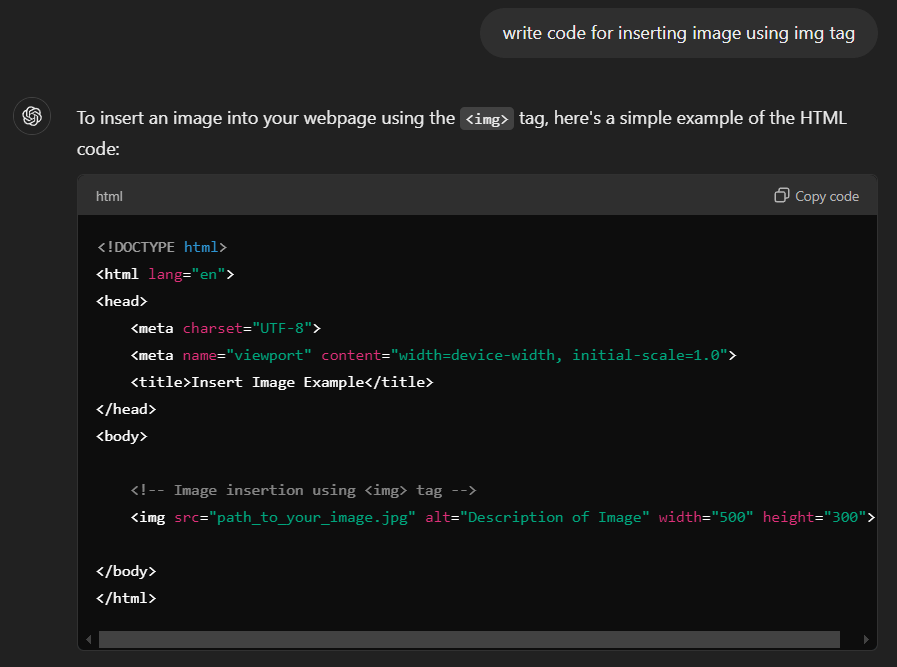
The code generated is correct, and can insert an image on the web page, too. However, notice that < img > tag comes with an alt attribute. This is an important attribute for visually challenged people as it helps describe the image context. It is one of the many examples of how AI and accessibility should go hand in hand.
Looking to make your website more accessible? Check out this blog on ways to ensure easier accessibility.
Examples of AI and Accessibility
The following are examples where AI is used to improve accessibility for impaired individuals:
- Language Captioning and Translation - AI speech recognition and natural language processing make captions for videos and transcriptions for audio. It helps people with hearing impairments access multimedia. AI translation tools also help people speak different languages, translating between spoken languages and Sign Languages. For example, the Hand Talk Plugin translates written text on websites from English to American Sign Language (ASL).
- Image Recognition - AI image recognition helps individuals with visual impairments understand their surroundings. These technologies describe objects, scenes, and text in images, allowing users to navigate more independently.
- Facial Recognition - AI facial recognition helps individuals with visual impairments recognize faces. It uses algorithms to give real-time audio descriptions of people's identities, emotions, and expressions.
- User Navigation - AI improves navigation for individuals with mobility impairments by providing real-time guidance and suggesting accessible routes. AI navigation systems also offer information about nearby accessible facilities, helping individuals with disabilities navigate unfamiliar places more easily.
- Lip Reading - AI lip-reading technology converts visual input from lip movements into text or audio. It greatly assists individuals with hearing impairments, especially when Sign Language interpretation isn't available.
- Summarizing Information - AI algorithms analyze and summarize large amounts of text. It makes it easier for individuals with cognitive disabilities or reading difficulties to understand complex information. It also helps those with limited time or attention spans quickly grasp key points from long documents.
Building these features is only half the job. Testing that digital content is actually usable by everyone, including people with impairments, is what keeps the experience accessible release after release. For this, teams can use the TestMu AI accessibility testing suite to scan websites and apps for WCAG, ADA, and Section 508 compliance across browsers and devices.
The suite covers both sides of the process. For manual checks, you can use the Accessibility DevTools Chrome extension and integrated screen readers such as NVDA, VoiceOver, and TalkBack. Its Axe-core powered engine then flags violations like missing alt text, low color contrast, and incorrect ARIA attributes, while framework integrations with Selenium, Playwright, and Cypress let you automate accessibility checks in CI/CD. The accessibility automation docs walk through the setup.

Note: Scan your site for WCAG, ADA, and Section 508 issues across real browsers and devices with TestMu AI. Start accessibility testing free.
AI Accessibility Tools for People With Disabilities
These assistive tools use AI directly for the people who rely on them, as described by their makers:
| Tool | Maker | What the AI does |
|---|---|---|
| Seeing AI | Microsoft (free, iOS and Android) | Narrates the world for blind and low-vision users: reads text, describes photos, and identifies products. |
| Be My Eyes | Be My Eyes | Connects blind and low-vision users with volunteers and companies through live video and AI for real-time visual assistance. |
| Live Caption and Live Transcribe | Google (Android) | Captions audio on the device and turns speech into text for deaf and hard-of-hearing users. |
| Generated Subtitles | Apple | Creates automatic transcriptions for spoken audio in videos. |
| Personal Voice | Apple | Lets people at risk of losing their speech create a voice that sounds like them. |
Descriptions come from Seeing AI, Be My Eyes, Android Accessibility Help, and Apple's accessibility pages.
Key Insights on AI and Accessibility
AI has the potential to enhance accessibility that can enhance the lives of individuals with disabilities. Here are some of the key insights by Fable that indicate promise and challenges with AI in this context:
- Positive Impact - Two out of three respondents say recent AI advancements have positively affected their lives, suggesting AI's potential for greater independence and information access.
- Trust Issues - Merely 19% agree that existing AI is trustworthy. There raised issues regarding image and speech recognition accuracy hindering broader reliance on AI tools.
- Barriers to Use - Many face challenges with AI technologies. For instance, screen reader compatibility and customizable features are often lacking, making it hard for individuals to fully use advanced capabilities.
- Community Engagement - A notable 87% express willingness to provide feedback to AI developers, reflecting a desire for tools that genuinely address needs and enhance accessibility.
- Assistive Technologies - Existing tools like Seeing AI and Be My Eyes showcase how AI can assist individuals with visual impairments by interpreting visual information. Further investment in such technologies can expand capabilities and reach.
- Enhancing Communication - AI has the potential to improve communication for those who are deaf or hard of hearing. Innovations like real-time transcription and automatic captioning significantly enhance engagement and access to information.
Challenges and Limitations of AI in Accessibility
AI helps accessibility work but does not guarantee an accessible result. The same Fable survey in which two in three respondents reported a positive effect also found only 19% agree that existing AI is trustworthy, and that gap maps directly onto a few recurring limitations teams should plan around.
- Over-reliance and false confidence - Tools that promise one-click compliance are tempting but risky. As the W3C Web Accessibility Initiative notes, "tools can't do it all," and automation can report success on a page that still contains barriers a real user would hit.
- Accuracy and reliability - Image recognition, automatic captioning, and speech-to-text still make mistakes. An inaccurate caption or a wrong image description can mislead the very users who depend on it, which is part of why trust in AI accessibility tools remains low.
- Bias and misrepresentation - AI models trained on skewed data can carry that bias forward, producing inaccurate or stereotyped representations of people with disabilities rather than serving their actual needs.
- Privacy and data concerns - Many AI features rely on capturing user data such as voice, camera input, or behavior to function, raising privacy questions for a community already cautious about how its data is collected and used.
- Cost and availability - The most capable AI accessibility tools are not always affordable or available to the people who would benefit most, which limits real-world reach.
- AI overlays that promise compliance - In January 2025 the FTC ordered accessiBe to pay $1 million over claims that its AI-powered accessWidget plug-in could make any website compliant with WCAG, which the FTC said the evidence did not support.
The practical takeaway is to use AI for the first pass it does well, fast detection of common issues like missing alt text or low contrast, and keep manual testing with assistive technologies and real users with disabilities as the step that confirms an experience is genuinely usable.
Alt text shows the gap between presence and quality. I audited every visible image on the TestMu AI ecommerce playground home page with Playwright on Chrome and Windows 11 on the TestMu AI cloud: 161 of 162 images had alt text, so a presence check passes. But the same alt text repeated across different product images, "iMac" on 24 of them and "HTC Touch HD" on another 24, which tells a screen reader user nothing about which image is which. No rule flags that; a person, or an AI description reviewed by a person, has to.
Current Scenario of AI Compliance With Accessibility
The current scenario of AI compliance with accessibility can be measured broadly by observing two scenarios:
- Enhancement of Existing Solutions
- Innovations for Accessibility Using AI
Enhancement of Existing Solutions
Existing solutions that supported people with disabilities or were built with inclusive code in mind have seen meaningful improvements with the rise of artificial intelligence. One of the most impactful examples of this shift is seen in screen readers.
These tools have evolved over time, but their core functionality reading on-screen text aloud still depends heavily on how well the content is structured. For example, if text is embedded in an image without alt attributes, traditional screen readers can't interpret it. Today, AI bridges that gap by enabling screen readers to extract text from images, recognize visual elements, and describe what's on-screen even without predefined tags.
For instance, at TestMu AI this evolution is reflected in the Accessibility Testing Suite. It began with support for Android TalkBack and has expanded to include iOS VoiceOver, so teams can test across a broader range of native screen readers on real devices. But that is just the start.
The suite now includes the Accessibility DevTools for in-browser issue inspection, automated accessibility testing, scheduled test runs, and detailed reports to help teams detect, track, and resolve issues faster. These enhancements bring AI and accessibility together to make it easier to build inclusive digital experiences from development to deployment.

Innovations for Accessibility Using AI
If accessibility has seen good days in any area, it is the newer innovation and research taking place across wide domains. These researches bring new ideas into reality that use AI and accessibility blended and make the lives of people with disabilities much easier.
One such advancement is the TestMu AI Accessibility MCP Server, an AI-native solution designed to enhance accessibility testing across development environments. It brings AI and accessibility together by embedding real-time validations into the developer workflow. Whether you are testing local React apps or apps routed through the TestMu AI tunnel, the server automatically detects and flags accessibility issues such as missing alt attributes, incorrect ARIA roles, or poor contrast ratios.
Using advanced AI models, it analyzes content structure and visual elements, offering intelligent remediation suggestions to ensure better compatibility and a more inclusive user experience and all this within your IDE.
For a hands-on walkthrough of all three tools with real prompts and a detect-to-fix loop, see our full guide to the Accessibility MCP Server.
How Do AI Agents Help With Accessibility Testing?
AI agents take an accessibility goal written in plain language, call testing tools to act on it, read the results, and propose the next step, such as a code fix. In accessibility testing, that turns a scan from a report someone has to open into a loop an AI coding agent runs inside the developer's editor or test suite.
- Scans from the IDE - The TestMu AI Accessibility MCP Server exposes three tools to agents in clients such as Claude Code, Cursor, and GitHub Copilot: getAccessibilityReport for a public URL, buildLocalAppForAnalysis for a local React app, and analyseAppViaTunnel for an app running behind the TestMu AI tunnel. A prompt like "show me the accessibility violations on the homepage and how to fix them" returns WCAG-mapped issues the agent can act on.
- Scans added to an existing suite - The open-source accessibility-skill teaches a coding agent to add accessibility scanning to a Selenium, Playwright, or Cypress suite from one instruction, such as "scan the homepage and the checkout page against WCAG 2.1 AA". The agent enables the accessibility capability and adds the scan hook at the named pages, so results land on the TestMu AI accessibility dashboard.
- Scan steps in agent-authored tests - In KaneAI, typing / during mobile test authoring inserts an accessibility scan step at the current screen, and KaneAI tags those test cases "accessibility-scan" so they can be filtered and run on their own.
Agents speed up detection and setup, but they inherit the limits covered above: they catch machine-detectable failures such as missing alt text and low contrast, not whether a flow makes sense to a screen reader user. Keep a person with assistive technology in the loop before accepting an agent's fix.
Future of AI and Accessibility
The future of AI and accessibility rests on a few forces pulling in the same direction: investment from large technology companies, AI moving into the testing process, evolving regulation, and the people who build inclusive solutions.
1. Investment From Big Tech
The outlook is promising, especially with large technology companies entering the space. They have the capital to fund solutions that may not return a profit and instead serve society. That investment encourages smaller businesses to innovate and gives them researched technical help and modern tools to speed up development.
2. AI in the Testing Process
Beyond development, it is worth bringing AI into testing to complement your accessibility efforts. This is where AI test agents such as KaneAI by TestMu AI can help.
KaneAI is a GenAI-native QA agent with capabilities like test authoring, management, and debugging. Built for high-speed quality engineering teams, it lets developers and testers create and evolve complex test cases using natural language, reducing the time and expertise required to get started. Its AI app testing also runs accessibility audits and produces WCAG compliance reports.

As AI reshapes accessibility and testing, keeping your skills current matters. The KaneAI Certification validates hands-on expertise in AI testing and helps you contribute to more inclusive digital experiences.
3. Evolving Accessibility Regulations
Regulators are also shaping the future by setting compliance rules. For instance, the European Accessibility Act defines requirements teams must follow when building accessibility solutions, which keeps products compliant and signals steady progress.
4. The People Building Solutions
The final force is the people creating these solutions, the individuals who notice specific barriers and design for them. For example, people with speech difficulties often cannot communicate by phone; tools such as RogerVoice transcribe calls so users can read along and use AI to respond.
Together, these forces are moving AI and accessibility in a positive direction, pointing to better days and technologies ahead.
Conclusion
Start by running a scan of your most-visited pages against WCAG, then layer manual checks with screen readers on the issues automation cannot confirm. To keep those checks running on every build, wire TestMu AI accessibility automation into your CI/CD pipeline; the accessibility automation overview walks through the setup so regressions get caught before release.
AI and accessibility are converging fast, from generated alt text to IDE-level checks, but the examples and data here point to the same conclusion: AI speeds up detection and drafting, and human judgment still decides whether the result works. Treat it as the first pass that catches the obvious issues quickly, and keep people with disabilities at the center of the validation that follows.
Note: AI assistance was used in researching and drafting this article. Rahul Mishra, Lead Member of Technical Staff at TestMu AI with listed expertise in frontend engineering and accessibility testing (WCAG and ADA compliance), verified every statistic, link, and product claim against primary sources before publication. Technically reviewed for accessibility and WCAG accuracy by Shubham Soni. Sources cited are from primary references including the World Health Organization and the W3C Web Accessibility Initiative. Read our editorial process and AI use policy for details.
Author

Rahul Mishra
Blogs: 17

Rahul Mishra is a Lead Member of Technical Staff at TestMu AI (formerly LambdaTest), leading frontend engineering and accessibility testing across the quality engineering platform. He mentors frontend engineers, runs code reviews and sprint planning, optimizes React.js rendering performance, and makes product features accessible to users with disabilities through WCAG and ADA-compliant accessibility audits. He brings 10+ years of experience across React.js, VueJS, TypeScript, Swift, Objective-C, and AWS, with earlier work as a Technical Lead at VectoScalar Technologies. Rahul holds a B.E. in Information Technology.
Reviewer

Shubham Soni
Reviewer
Shubham Soni is a Senior Member of Technical Staff at TestMu AI (formerly LambdaTest), building the Real Device Cloud and real-time testing infrastructure. He optimized the WebRTC services that power live testing to sub-100ms latency with adaptive bitrate streaming, led a frontend migration from Angular to React that cut page load time from 5-6 seconds to 1-1.5 seconds, and contributes to the official Device SDK. He led a team of four to build an accessibility testing product covering manual and automated testing and mentored a team of six on a real-time testing product. He brings over eight years of experience and earlier scaled a cloud code platform to 200K+ monthly users. Shubham holds a B.Tech in Computer Science.
Frequently asked questions: AI in Accessibility
Did you find this page helpful?
More Related Blogs
TestMu AI forEnterprise
Get access to solutions built on Enterprise
grade security, privacy, & compliance
- Advanced access controls
- Advanced data retention rules
- Advanced Local Testing
- Premium Support options
- Early access to beta features
- Private Slack Channel
- Unlimited Manual Accessibility DevTools Tests