
Run End-to-End Tests from Your Terminal with Kane CLI
Author and Run Tests Right from the Terminal in Natural Language, with an Evidence-Backed Pass or Fail from a Real Browser.
npm install -g @testmuai/kane-cli
POC in Testing: How to Run a 10-Day Test Automation POC
POC in testing, step by step: a 10-day plan, a 5-gate scorecard, and the reruns, seeded bugs and cost checks that prove a test automation tool works.
Published on:
A POC in testing is a time-boxed trial that proves that a test automation tool will work on your own application prior to you buying it. Run 5-10 critical flows for 10 working days (each flow run 10 times, seed a real bug, refactor one screen and price every run). Score the results against the gates that were agreed up front.
TL;DR
A POC in testing, or proof of concept in software testing, is a 10-working-day trial that checks whether a test automation tool works on your own app, flows and CI pipeline before you buy it. It turns your test automation tool selection criteria into five scored gates: fit, stability, honesty, change, and cost and CI.
Test Automation Tool Evaluation Criteria
- Rerun stability: Replay every saved test 10 times on an unchanged build and count the verdicts. A flow that passes on some runs and fails on others fails the stability gate, because tool noise then hides real failures.
- Healing honesty: Seed one real bug on a branch, such as a cart total that skips an item's price. Every affected flow must fail with a readable reason, and a tool that heals a wrong result into a pass fails the POC.
- CI merge gate: Run the suite on a real pull request in your own pipeline. A failing flow must block the merge through the tool's exit code, with credentials read from secrets and the run's evidence attached.
- Cost per run: Convert every vendor quote into cost per test run and cost per maintained flow per month. For credit-priced tools, run one day of real volume and multiply instead of estimating.
Proof of Concept Testing With Kane CLI
- Kane CLI by TestMu AI: For POC testing from a terminal, Kane CLI authors each flow once from a plain-English _test.md file, then replays the saved recording with no LLM cost. Its --no-adaptive-heal flag keeps reruns on that recording, and exit codes 0 to 3 gate CI. Free to install: Yes, and runs use KaneAI credits.
What Is a POC in Testing?
A POC in the testing context is a small, scoped exercise which answers one question: will this tool be able to reliably automate our flows within our pipeline at a cost we can bear? It's not a feature tour. The output is a go/no-go or extend decision, supported by the numbers from your own app.
A POC is now more important, as the shortlist will include agent-driven tools that you can author tests from plain English. A slick demo tells you nothing about your login wall, your staging data or your CI runner.
Shortlist 2 or 3 from a comparison of the AI testing tools. Then let the POC decide between them.
The EvilTester blog's POC tips make exactly the same point: a POC can provide a huge amount of information very rapidly, provided that it's being used as a question and the scope is kept very small.
How Is a POC Different From a Demo, Trial or Pilot?
A POC sits between a vendor demo and a pilot. The difference is who owns the app and what is considered success.
| Demo | Trial | POC | Pilot | |
|---|---|---|---|---|
| Whose app | Vendor's sample | Yours, ad hoc | Yours, agreed critical flows | Yours, one real team's backlog |
| Time box (our recommendation) | One call | Until credits run out | 10 working days | Several weeks |
| Success criteria | None | Informal | Written gates, agreed before day 1 | Delivery metrics on live work |
| Runs in CI | No | Rarely | Yes, at least one pipeline | Yes, all of that team's pipelines |
| Output | Interest | Impressions | Go / no-go / extend report | Rollout plan |
If the tool fails the POC, then stop there. Only tools that pass the POC go on to the pilot.
Which Flows Should a Test Automation POC Cover?
A POC should be about the flows that do the most damage, not the ones that are easiest to test. Pick 5-10 flows, which in aggregate cover every risk you're actually concerned about:
- One revenue path with a login, i.e., sign in -> add to cart -> checkout to a test payment.
- One form-heavy flow with validation errors.
- One flow that made the most difference last quarter. This is your maintenance stress test.
- One flow with an API check within the UI itself (e.g. asserting that the order is in the backend after the UI has said 'Order confirmed').
- One flow behind a third-party element (e.g., an iframe, a file upload or an email link).
- One known broken flow. It must fail. A tool that passes it is not usable.
Write every flow down as plain steps with an expected end state prior to day 1. With an agent-driven tool, that's the same test. Lead each action with a verb, keep your credentials and test data in {{variables}}, and end each flow with a check of the resulting page state rather than a simple submit.

Running the POC from a terminal?
Note: Kane CLI, the testing agent from TestMu AI, turns each written flow into a test you run with one command, from your terminal or from inside Claude Code, Cursor, Codex or Gemini CLI, and returns standard exit codes your pipeline can gate on. Install it with npm install -g @testmuai/kane-cli. The Kane CLI page offers 10,000 free Kane CLI credits, valid for 30 days.
What Is the 10-Day Test Automation POC Plan?
This 10-day plan will fit two tools running side by side by one or two engineers. Each day concludes with a written note so that the final report writes itself.
| Day | Activity | Output |
|---|---|---|
| 1 | Agree scope, flows, gates and weights with the buyer, QA lead and one developer | Signed one-page POC charter |
| 2 | Install, authenticate, connect to staging, run one flow end to end | Time-to-first-green-run, in hours |
| 3-4 | Author all 5-10 flows and save each one as a test | Authoring time per flow; how much generated output you kept unedited |
| 5 | Rerun gate: replay every saved test 10 times on an unchanged build | Pass/fail count per flow |
| 6 | Seeded-bug gate: a developer breaks one assertion-worthy behaviour on a branch | Did every affected flow fail, with the right reason? |
| 7 | Change gate: restructure one screen (rename a button, move it into a new container) | Which flows healed, which failed, what the tool reported changing |
| 8 | CI gate: run the suite on a pull request in your real pipeline | Exit code gates the merge; artifacts attached |
| 9 | Cost gate: price a month at your target run volume | Cost per run, cost per maintained flow |
| 10 | Score, write the report, present go / no-go / extend | Completed scorecard and report |
Keep the gates in this order. Rerun stability has to be measured on an unchanged build prior to you even starting to break things, or you can't tell tool noise from actual failures.
How Do You Score a POC? The 5-Gate POC Scorecard
The 5-Gate POC Scorecard scores on what predicts long-term cost rather than what demos well. Score each gate 0-5, multiply by its weight, and agree the pass bar prior to day 1.
| Gate | Weight | What it measures | Pass bar |
|---|---|---|---|
| 1. Fit | 20% | Share of the agreed flows automated without workarounds | All revenue and form flows automated |
| 2. Stability | 25% | Same verdict across 10 reruns of an unchanged build | 10 of 10 identical verdicts per flow |
| 3. Honesty | 25% | Seeded bug caught; healing never turns a real failure into a pass | Every seeded bug fails with a readable reason |
| 4. Change | 15% | Flows that survive a real UI restructure, and how clearly the tool reports what it changed | Survives, or fails clearly; changes listed for review |
| 5. Cost and CI | 15% | Cost per run at target volume; exit codes gate a merge; evidence attached | Within budget; merge blocked on failure |
Two rules make the scorecard hold up in a buying meeting:
- Gate 2 or Gate 3 at zero is a dead no-go in any case. A suite that can flip the verdict or hide the bugs is going to cost more than it's worth.
- Score based on evidence, not memory. Each score is backed up by a run log, an artifact or a PR link.
For agent-driven or other AI testing tools, add three checks to Gates 1, 2 and 5:
- Edit rate. What proportion of the generated steps did you end up editing? Heavy rewriting would mean the authoring speed seen in the demo wouldn't be replicated.
- Authoring v replay. Does the tool save a test that replays without the model? Rerun the saved test rather than the original one, or you're measuring the model's planning rather than your suite.
- Diffable output. Are the generated tests plain files that you can just review in a PR? If not, then no one can see what's changed between versions.
How Do You Measure Rerun Stability?
A test that passes and then fails on the same build with no code change at all makes the suite completely untrustworthy. Martin Fowler refers to such tests as "a virulent infection", which can infect the entire suite.
Your POC must be measuring stability, not just assuming it.
Measure the saved test, not the prompt. With an agent-driven tool, a fresh prompt run re-plans the flow each time, so reruns of the prompt are measuring the model's planning. Rerun the saved test.
With Kane CLI, that means authoring each flow once on days 3-4 as a _test.md file (Markdown with one ## heading per step, committed to your repo). The first kane-cli testmd run authors each step and saves a recording. Every subsequent run then replays that recording "with no agent involved and no LLM cost" (Kane CLI test.md docs).
That makes the replay deterministic (the same steps will run every time), so a split verdict is a verdict on your app, your test data or your environment rather than the model.
A flow file looks like this:
---
mode: testing
max_steps: 30
---

# Cart badge

## Sign in

Open {{start_url}}/login and sign in as {{tester_email}} with password {{tester_password}}.

## Add one item

Add one item to the cart.

Verify the cart badge shows 1.
Test data is not in the file. Kane CLI reads variables from a JSON object keyed by variable name (Kane CLI variables docs).
Build that file from environment variables and keep it out of git:
# Write the POC variables from the environment (never commit this file).
mkdir -p .testmuai/variables
jq -n --arg u "$STAGING_URL" --arg e "$TESTER_EMAIL" --arg p "$TESTER_PASSWORD" \
  '{start_url: {value: $u}, tester_email: {value: $e}, tester_password: {value: $p, secret: true}}' \
  > .testmuai/variables/poc.json
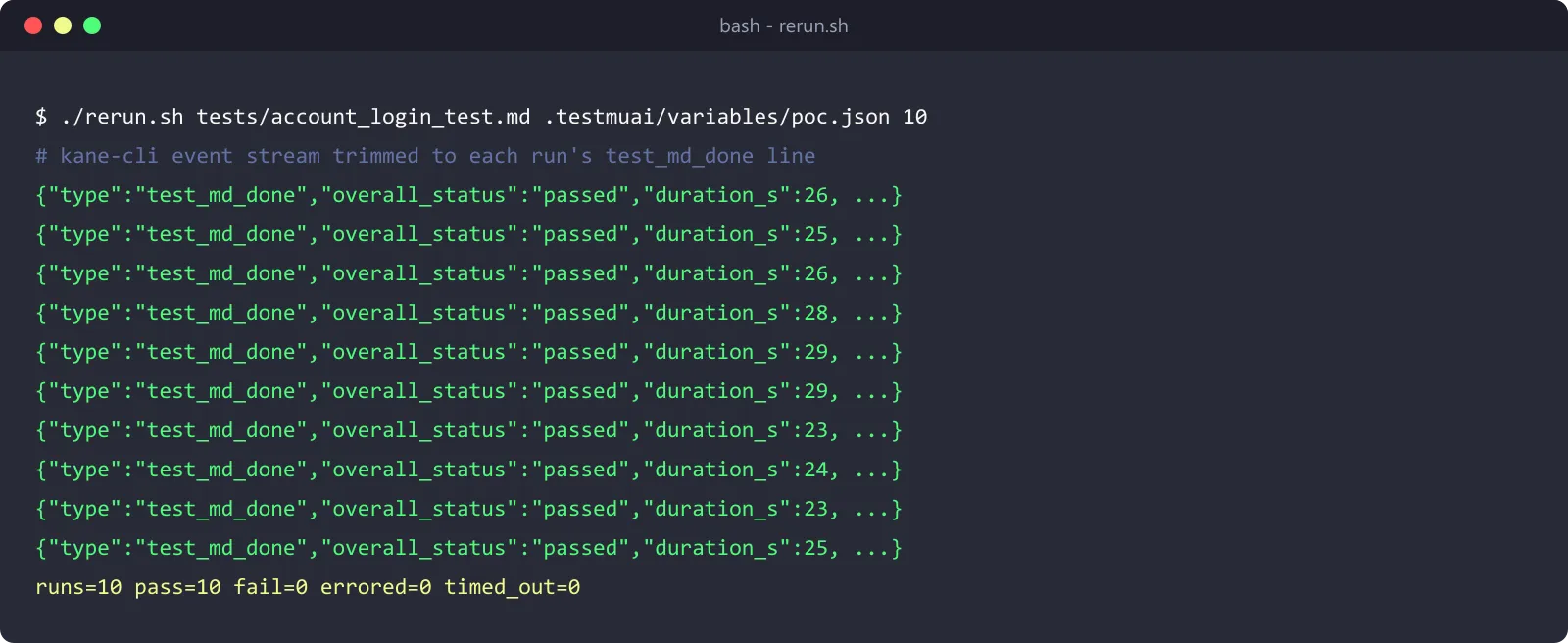
Then take each of the saved tests in turn and run it 10 times on an unaltered build and tally up the verdicts by exit code. For testmd run the documented codes are 0 = passed, 1 = a non-optional step failed, 2 = error before or during the run (e.g. auth or Chrome launch), and 3 = canceled or timed out (Kane CLI test.md docs).
#!/usr/bin/env bash
# rerun.sh: replay one saved test N times on an unchanged build and count verdicts.
# Usage: ./rerun.sh <path/to/flow_test.md> <variables.json> [runs]
# Needs LT_USERNAME and LT_ACCESS_KEY in the environment.
set -u
TEST_FILE="$1"
VARS_FILE="$2"
RUNS="${3:-10}"
pass=0; fail=0; errored=0; timed_out=0
for i in $(seq 1 "$RUNS"); do
  kane-cli testmd run "$TEST_FILE" \
    --variables-file "$VARS_FILE" \
    --username "$LT_USERNAME" \
    --access-key "$LT_ACCESS_KEY" \
    --headless \
    --timeout 300 \
    --no-adaptive-heal
  case $? in
    0) pass=$((pass + 1)) ;;
    1) fail=$((fail + 1)) ;;
    2) errored=$((errored + 1)) ;;
    3) timed_out=$((timed_out + 1)) ;;
    *) errored=$((errored + 1)) ;;  # any other exit, e.g. 127 if kane-cli is not on PATH
  esac
done
echo "runs=$RUNS pass=$pass fail=$fail errored=$errored timed_out=$timed_out"
Run it once the first authoring run has passed (e.g. ./rerun.sh tests/cart_badge_test.md .testmuai/variables/poc.json 10). The --no-adaptive-heal means every rerun will be on the same recording, so a split verdict can't be hidden by a heal. Any split verdict is a Gate 2 finding.
Each testmd run produces a Result.md in output-<file stem>/ alongside the test file and copies the evidence pack to .testmuai/evidence/ so you can look at that run's evidence to see whether it was the tool, the test data or the app that caused it.
Commit output-<file stem>/ to git along with the test file. Its recordings are what let CI and your teammates replay the saved steps instead of authoring them again, while .testmuai/evidence/ stays out of git (Kane CLI test.md docs).
How Do You Prove the Tool Works in CI?
A tool that only works on a laptop hasn't passed a POC. On day 8, we wire up one flow into a real PR and confirm three things: that a failing flow blocks the merge, that the creds come from secrets, and that the evidence goes with the run.
For GitHub Actions, Kane CLI has an official action which sets up Node.js, Chrome and Kane CLI, runs either one objective or all of the tests that are committed, matching the test-files as a single suite, uploads the evidence pack and then posts a verdict comment on the PR. The CI/CD docs list the inputs as objective, test-files, parallel, username, and access-key (Kane CLI CI/CD docs).
This is the workflow that runs the POC's saved tests:
# .github/workflows/poc.yml (credentials and test data come from repository secrets)
name: poc-gate
on: pull_request
permissions:
  contents: read
  pull-requests: write   # lets the action post the verdict comment
jobs:
  kane-cli:
    runs-on: ubuntu-latest
    steps:
      - uses: actions/checkout@v7
      - name: Write test variables from secrets
        env:
          STAGING_URL: ${{ secrets.STAGING_URL }}
          TESTER_EMAIL: ${{ secrets.TESTER_EMAIL }}
          TESTER_PASSWORD: ${{ secrets.TESTER_PASSWORD }}
        run: |
          mkdir -p .testmuai/variables
          jq -n --arg u "$STAGING_URL" --arg e "$TESTER_EMAIL" --arg p "$TESTER_PASSWORD" \
            '{start_url: {value: $u}, tester_email: {value: $e}, tester_password: {value: $p, secret: true}}' \
            > .testmuai/variables/poc.json
      - uses: LambdaTest/kane-cli/integrations/github-action/kane-cli-browser-run@0.10.4
        with:
          test-files: "tests/**/*_test.md"
          parallel: "2"
          kane-version: "0.10.4"   # fix the Kane CLI version for the whole POC
          username: ${{ secrets.LT_USERNAME }}
          access-key: ${{ secrets.LT_ACCESS_KEY }}
Kane CLI loads up every JSON file in .testmuai/variables/ automatically when it runs from that directory (Kane CLI variables docs), so the tests have their data without it ever touching the repo at all.
Two things are important for the POC:
- Freeze versions.
@maintracks the latest action. The CI/CD docs instruct you to pin a release tag for a fixed version. As of 12th November 2026, the latest release (0.10.4) has the action folder in it, so you can replace@mainwith that release tag and set the action'skane-versioninput so that the CLI can't change mid-trial. - Keep the evidence. The action will upload the evidence pack as an artifact for you. If you're writing your own workflow, then
testmd runandtestrun runwill copy the evidence packs to.testmuai/evidence/. GitHub's upload-artifact will skip dot folders unless you setinclude-hidden-files: true(actions/upload-artifact).
How Do You Work Out Cost per Run?
Vendors price on seats, minutes, parallel sessions or usage credits, so their quotes are rarely directly comparable. Normalize every quote to two numbers:
- Cost per test run = annual cost / expected annual runs (including retries). That reveals the execution load.
- Cost per maintained flow per month. That's the metric that exposes the maintenance load, and it's precisely there that the agent-driven tools claim their biggest savings.
Our guide to test automation pricing models goes through each model. For the credit-priced tools, measure on day 9 rather than try to estimate. Run your real volume for one day and then multiply.
With Kane CLI, two things are documented: that a saved test with unchanged steps will "replay from cache with no LLM cost" (Kane CLI) and that a kane-cli run which never actually starts (exit code 2) uses no credits (Kane CLI CI/CD docs). Count your authoring runs and your replay runs separately on day 9 and record the actual credits used by each.
What Goes in the POC Report?
The POC report is one page plus appendices. The point is that anyone who wasn't in the room should be able to come to the same conclusion from that report.
POC Report Checklist
- The question the POC answered, and the go/no-go/extend recommendation in one sentence
- The agreed flows, with any flow that was cut and why
- The completed 5-Gate POC Scorecard, with weights and pass bars as signed on day 1
- Rerun results per flow (10 of 10, 9 of 10...), with the root cause of any split verdict
- Seeded-bug result and the tool's exact failure message
- UI-change result and the tool's change log for review
- CI evidence: pull request link, blocked-merge screenshot, artifact name
- Cost per run and per maintained flow at target volume
- Risks not tested in 10 days (scale, SSO and roles, mobile, data residency)
- What the pilot should prove next
If you're moving an existing manual suite at the same time, then scope that work separately. Our guide on how to convert manual test cases to automated tests covers that, and keeping it separate prevents the POC from becoming a migration.
How Do You Run This POC With Kane CLI or KaneAI?
Kane CLI is TestMu AI's terminal testing agent for developers and SDETs. You describe the flow in plain English; Kane CLI works out the steps, executes them in a real Chrome browser, asserts the end state and then saves all the steps, screenshots, console and network logs, as well as the verdict into a .evidence file.
The four gates where its design is absolutely critical are:
| Gate | How Kane CLI handles it |
|---|---|
| Fit | Runs from your terminal or inside Claude Code, Cursor, Codex and Gemini CLI, so SDETs test where they already work |
| Stability | Deterministic replay: author once, then replay the saved _test.md from its recording with no agent and no LLM cost; four documented exit codes |
| Honesty | A wrong result is reported as a bug and never healed into a pass; re-authored steps are recorded for review; --no-adaptive-heal for raw runs |
| Cost and CI | Official GitHub Action with test-files, parallel and a PR verdict comment; a .evidence file with steps, screenshots, logs and verdict for every run |
If the people running your POC are manual testers or product managers rather than SDETs, run the same five gates on KaneAI, TestMu AI's end-to-end testing agent. Testers write flows in natural language with no scripting or selectors, and KaneAI can export tests to Selenium, Playwright and Appium code, which answers the scorecard's diffable-output check.
For a quick visual walkthrough of this concept, watch the video below from TestMu AI.
Subscribe to the TestMu AI YouTube channel for more tutorials on testing and automation.
Conclusion
A POC in testing is only worth the 10 days if it can fail. Write the flows and gates down first. Rerun everything on an unchanged build, break one thing on purpose, change one screen, and price a real month.
A tool that gives you the same verdict, catches the seeded bug, tells you what it healed, and blocks a bad merge has earned a pilot. Any other result is a no-go.
Start your POC today
Note: npm install -g @testmuai/kane-cli, run kane-cli login, and make use of the 10,000 free credits available to go through your 5 toughest flows on the 5-Gate POC Scorecard.
Testing from the terminal? Kane CLI by TestMu AI lets SDETs and developers plan, write, run and debug tests from the command line.
Author

Srinivasan Sekar
Blogs: 21


Srinivasan Sekar is Director of Engineering at TestMu AI, where he leads engineering and open-source initiatives behind the Selenium and Appium automation grid and owns TestMu AI's MCP Server. A committer to Appium and a contributor to Selenium, WebdriverIO, Taiko, and AppiumTestDistribution, he brings over 15 years of experience in quality engineering and open-source technologies. He is the author of the Apress book 'The MCP Standard: A Developer's Guide to Building Universal AI Tools with the Model Context Protocol,' a Certified Kubernetes and Cloud Native Associate, and an international conference speaker. Before TestMu AI he spent over eight years at Thoughtworks as a Principal Consultant and Quality Architect. Srinivasan holds a B.Tech in Information Technology from Anna University.
Reviewer

Mayank Bhola
Reviewer
Mayank Bhola is Co-Founder and Head of Products at TestMu AI, where he leads the entire product portfolio across KaneAI, Kane CLI, HyperExecute, SmartUI, the Real Device Cloud, Accessibility, and other software testing product lines. As an early Lead Architect he designed and built the company's flagship Tunnel technology from scratch, created the React-based automation platform, and architected the data-intensive pipelines and FAAS services that scale it. He brings more than 10 years of experience in software development and product engineering, with earlier roles as Head of Technology at Juggernaut Books and Senior Software Engineer at PressPlay TV and Zomato. Mayank holds a B.Tech in Computer Engineering from JIIT Noida.


POC in Testing FAQs
Did you find this page helpful?
More Related Blogs

TestMu AI forEnterprise
Get access to solutions built on Enterprise
grade security, privacy, & compliance
- Advanced access controls
- Advanced data retention rules
- Advanced Local Testing
- Premium Support options
- Early access to beta features
- Private Slack Channel
- Unlimited Manual Accessibility DevTools Tests