

Power Your Software Testing with AI Agents and Cloud
The Native AI-Agentic Cloud Platform to Supercharge Quality Engineering. Test Intelligently and Ship Faster.


- TestMu AI (Formerly LambdaTest)
- /
- Blog
- /
- AI Test Case Generation: How It Works and How to Implement It
AI Test Case Generation: How It Works and How to Implement It
Learn how AI test case generation works, the techniques behind it, and how to implement it in your workflow. Step-by-step guide with practical examples inside.
Last Updated on:
On This Page
Over 45% of QA teams now use AI for test case creation. The reason is simple: manual test authoring cannot keep pace with modern release cycles. This guide breaks down how test case generation with AI actually works, the techniques driving it, and exactly how to implement it in your workflow.
Overview
To implement AI test case generation, use TestMu AI Test Management to automatically generate test cases from requirements, and use KaneAI to convert them into executable test scripts. This workflow automates testing from requirements to execution across 3,000+ browser/OS combinations and 10,000+ real devices.
What is AI Test Case Generation?
- Automated test creation: AI test case generation uses machine learning and natural language processing to automatically create comprehensive test cases, including edge cases, from requirements, code, or application behavior.
Why QA Teams Use AI
- Scaling QA efficiency: AI test creation provides speed, consistency, and scale by generating test cases in hours instead of days, systematically covering edge cases, and automatically adapting to UI changes.
How AI Test Case Generation Works
- Structured test design: The 4-stage AI workflow defines coverage objectives, ingests inputs like source code and requirements, applies generation techniques like model-based or NLP parsing, and continuously learns to prioritize tests and self-heal locators.
Tools to Start With
- End-to-end test management: TestMu AI Test Management generates, organizes, and reports AI-powered test cases, allowing users to trigger generation by pressing Tab and create multiple cases with Shift+Enter. Its Smart Context checks existing cases before generating, so it does not regenerate coverage you already have. For duplicates already in the repository, the Test Deduplication Agent scores every match before anything is removed.
- Natural language test automation: KaneAI converts plain-English test cases into executable Selenium, Playwright, or Cypress scripts, running them across 3,000+ browser/OS combinations and 10,000+ real devices.
- Flexible test scenario drafting: ChatGPT generates structured test scenarios in Gherkin, plain text, or code from pasted requirements, user stories, or code snippets, though it lacks direct execution and self-healing.
- Inline developer unit testing: GitHub Copilot suggests unit and integration test cases inline as developers write code within IDEs like VS Code and JetBrains.
AI vs Manual Testing
- Regression and scale: AI test generation is ideal for regression testing, large suites, and repetitive scenarios, handling roughly 80% of functional coverage.
- Exploratory and complex logic: Manual testing is a human-driven approach suited for exploratory work, usability evaluation, and complex business logic validation, covering the remaining 20% of testing that requires human judgment.
What is AI Test Case Generation?
AI test case generation uses machine learning and natural language processing to automatically create test cases from requirements, code, or application behavior. Instead of manually writing each scenario, you feed the AI your specifications and it produces comprehensive test coverage, including edge cases humans typically miss.
According to the Future of Quality Assurance Report, 45.90% of QA teams are now using AI for test case creation.
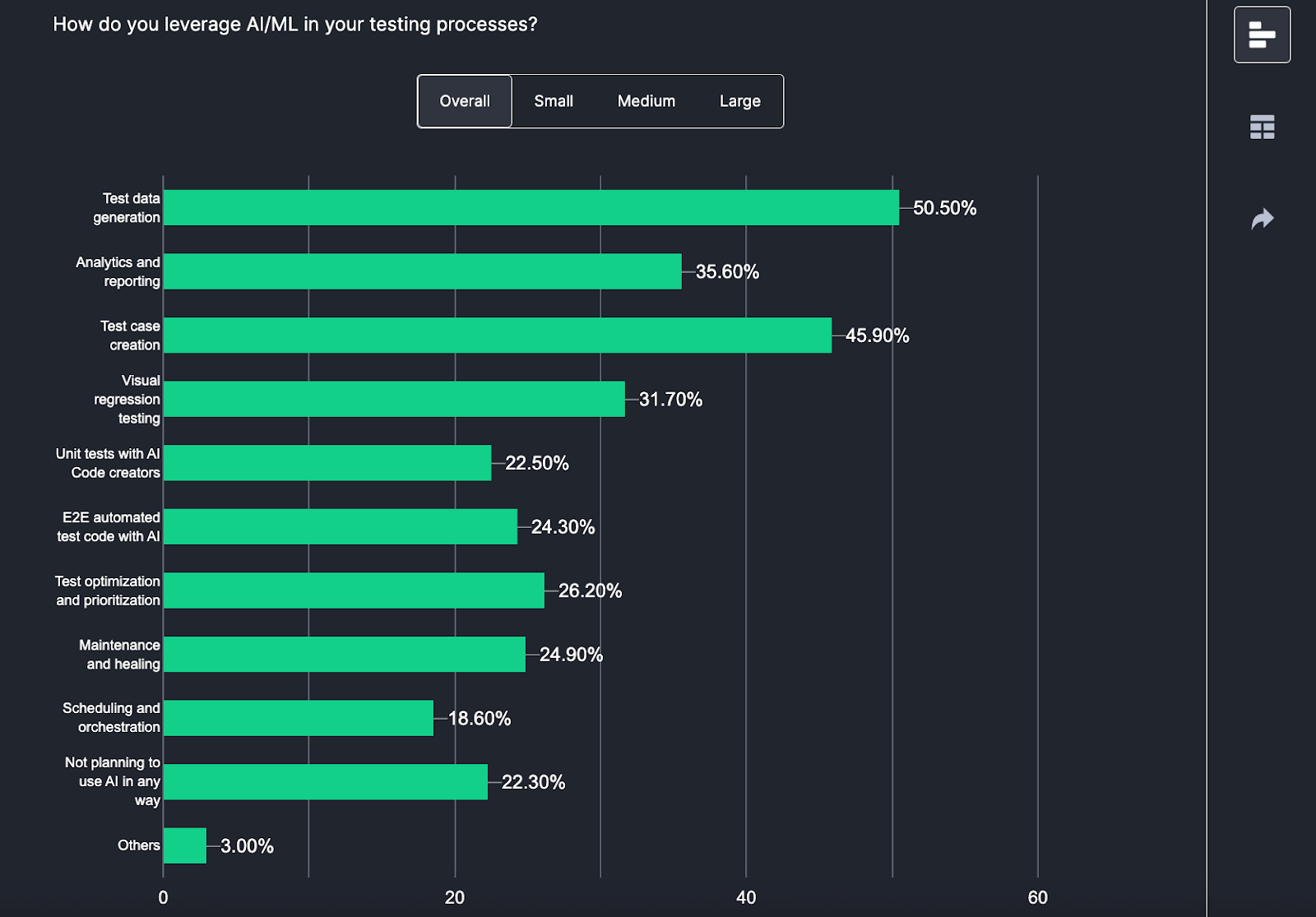
The key difference from traditional automation: older tools used rigid rules and templates. AI tools understand context, learn from historical data, and adapt as your application changes. They generate test cases that read like a senior QA engineer wrote them.
Why 46% of QA Teams Now Use AI for Test Case Creation
- Speed: What takes days manually happens in hours with AI. For CI/CD teams shipping multiple times daily, this is non-negotiable.
- Consistency: AI applies the same logic everywhere. It does not forget edge cases on Friday afternoon or skip scenarios because the sprint is ending.
- Coverage: AI finds test scenarios humans miss. It systematically tests boundary conditions, empty inputs, max values, special characters, and combinations across multiple fields simultaneously.
- Scale: Manual testing requires proportionally more testers as applications grow. AI scales with compute, not headcount.
- Self-healing: When your UI changes, AI-powered tests adapt automatically instead of breaking.
From Requirements to Test Cases: The 4-Stage Process
Stage 1: Define Objectives
What do you want to test? Structural coverage (every line of code executes), decision coverage (both true/false branches), boundary conditions, robustness under failures, or requirements validation. Your objectives determine which techniques the AI applies.
Stage 2: Feed the Inputs
AI needs data to work with: source code for structural analysis, requirements docs for functional coverage, API specs for integration testing, state diagrams for workflow validation, and historical defect data for risk prioritization. Better inputs = better tests.
Stage 3: Apply Generation Techniques
The AI uses multiple approaches:
- Model-based testing: Creates state machines of your app, generates tests to traverse all paths.
- Search-based testing: Uses genetic algorithms to maximize coverage while minimizing redundancy.
- NLP parsing: Reads requirements in plain English, extracts testable assertions.
- Fuzz testing: Generates random inputs to find unexpected failures.
Stage 4: Learn and Improve
This is where AI separates from traditional automation. The system prioritizes tests by defect likelihood based on code changes and failure history. Self-healing updates locators when UI changes. And continuous learning improves generation quality by analyzing which tests actually catch bugs.
For example, given the requirement "Users can reset passwords via registered email," NLP extracts actor (user), action (reset), method (email), precondition (registered). From one sentence, it generates tests for: successful reset, invalid email format, unregistered email, expired link, and rate limiting.
Generate Your First AI Test Cases in 5 Steps
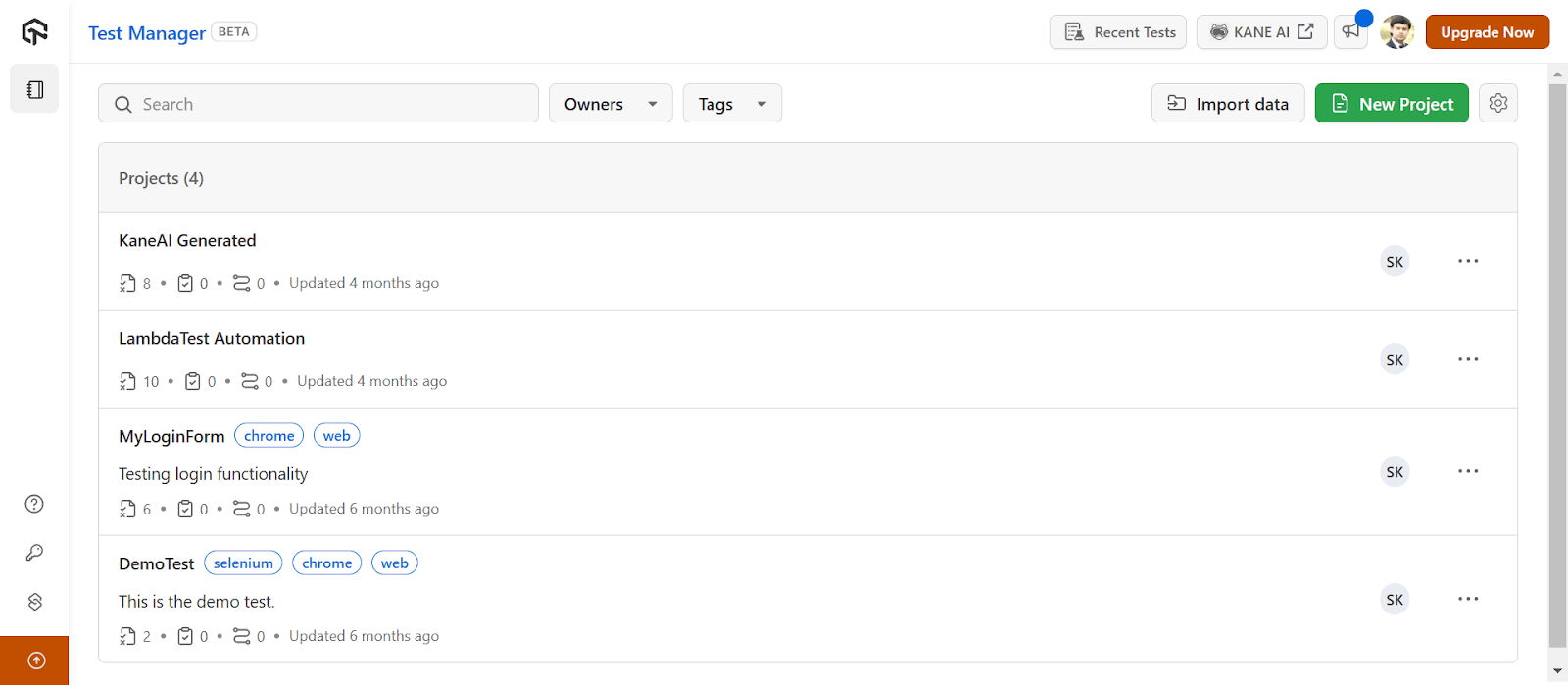
Here is the workflow using TestMu AI's test management platform .
Note: To access Test Management, contact sales.
- Step 1: Navigate to dashboard and click New Project.
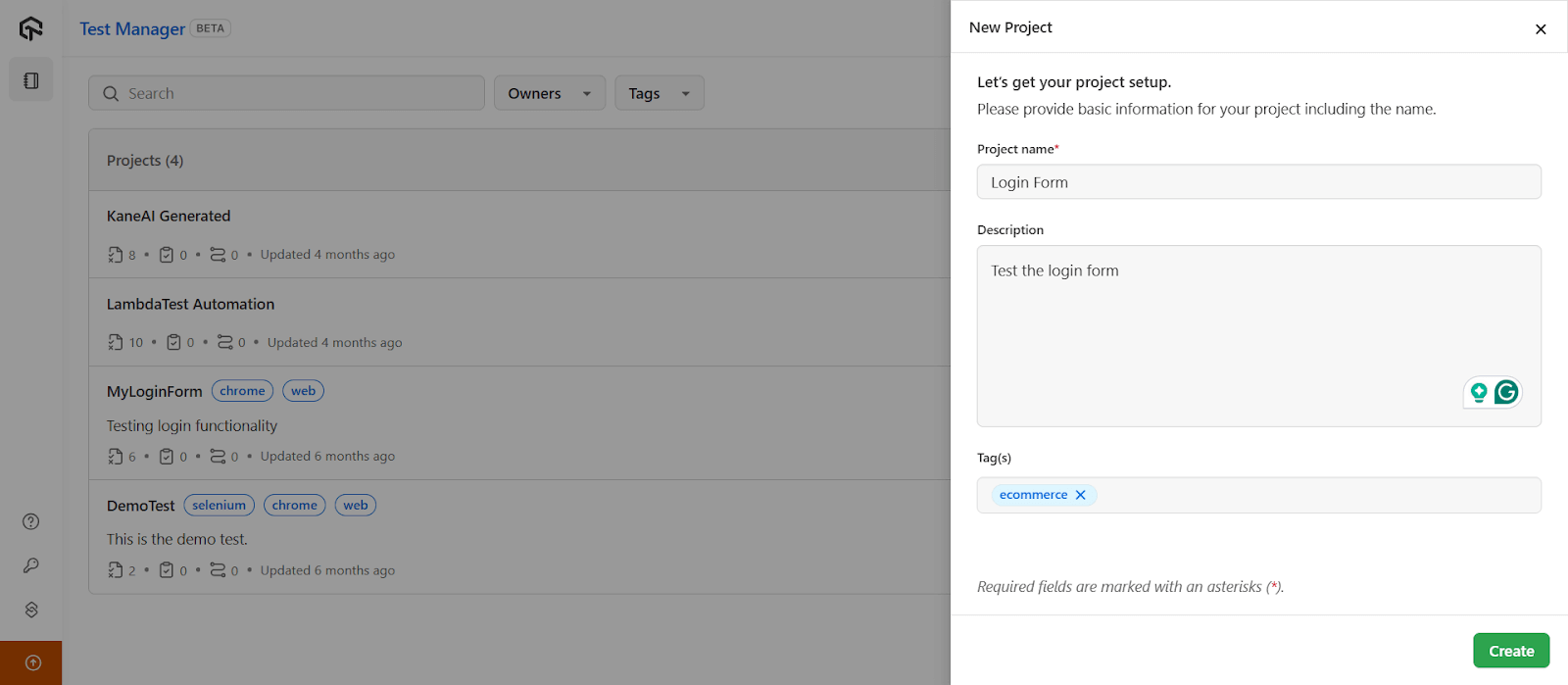
- Step 2: Enter Project name, Description, and Tags. Be specific. The AI uses this context to generate relevant tests.
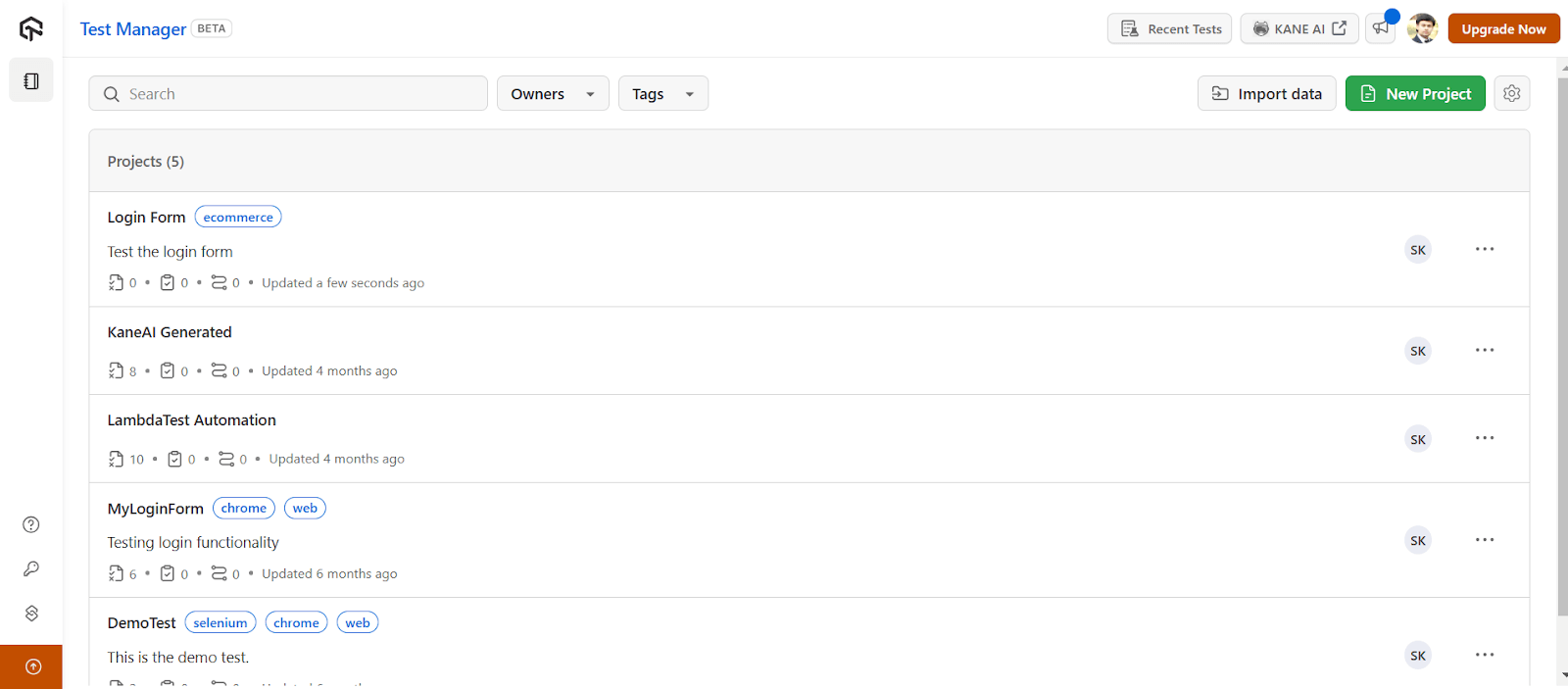
- Step 3: Click Create.
- Step 4: Open your project. In the prompt box, press Tab to trigger AI generation, Shift+Enter for multiple test cases, Enter to save.
- Step 5: Organize with folders. Export as needed.
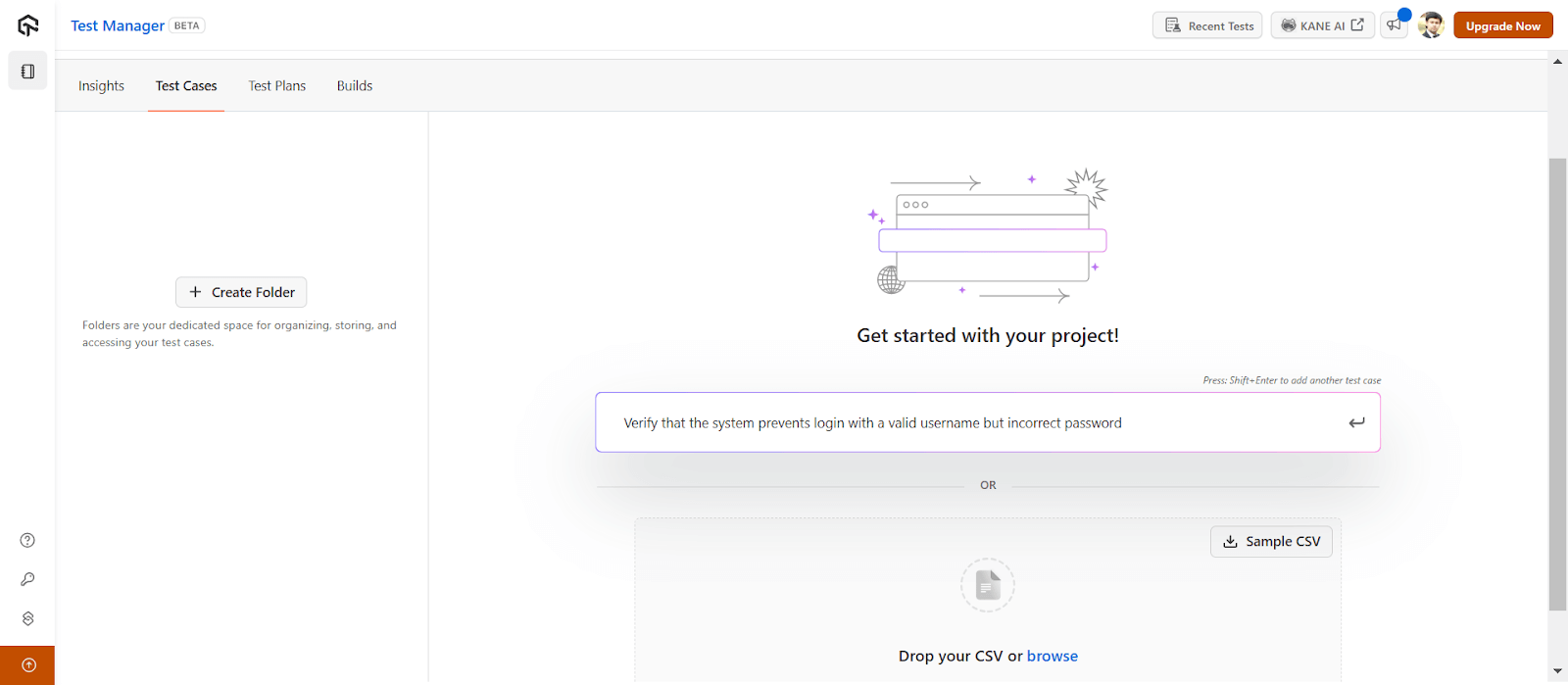
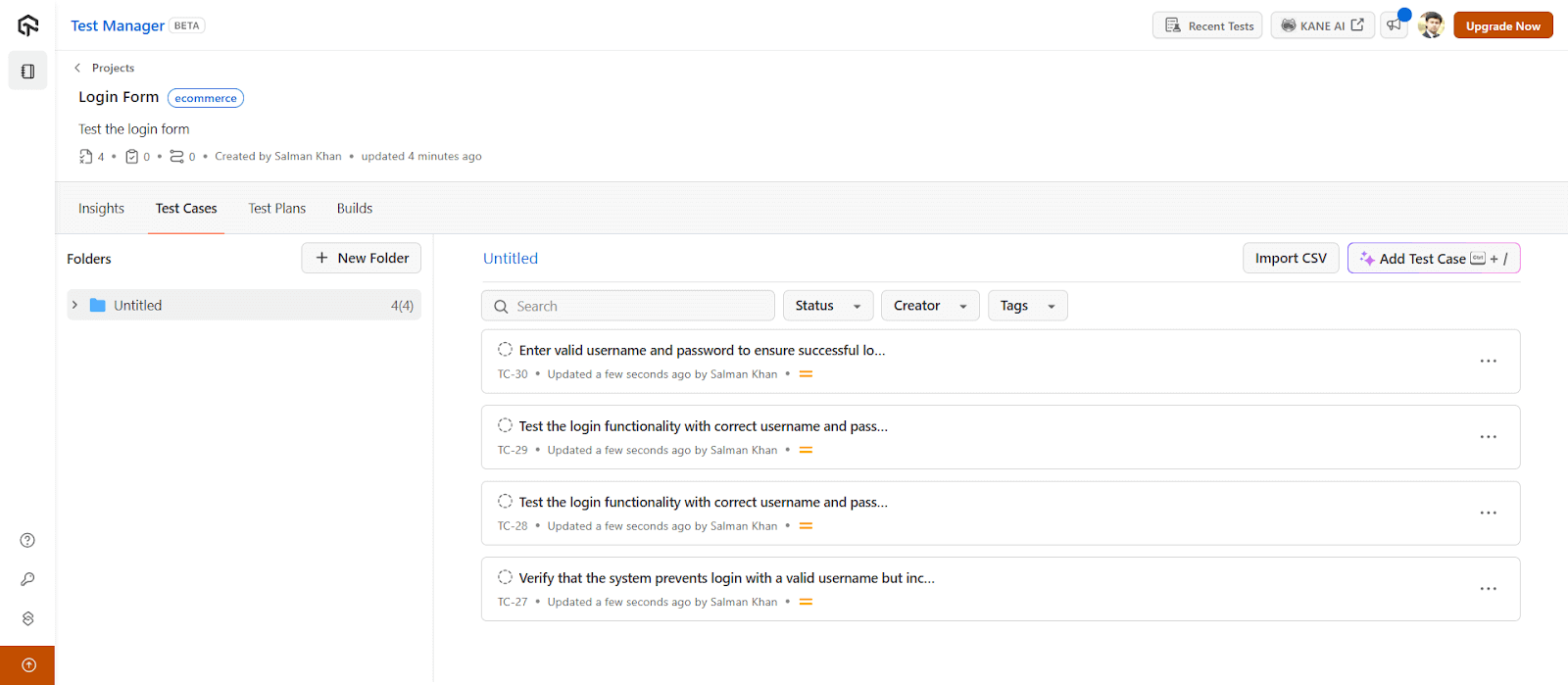
Full documentation: Introduction to Test Manager.
Converting Test Cases to Executable Automation
Once you have test cases, KaneAI converts them to executable scripts. As an AI testing agent, it lets you write tests in plain English, export to Selenium, Playwright, or Cypress, and run across 3,000+ browser/device combinations.
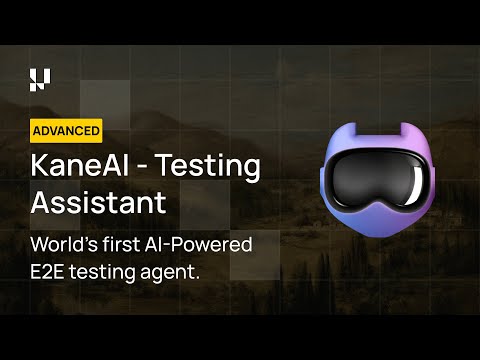

Getting started: KaneAI documentation. Validate your skills: KaneAI Certification.
Common Pitfalls and How to Avoid Them
- Vague requirements produce vague tests. AI cannot infer business logic you did not document. If your requirement says "validate the order" but does not mention that orders over $10K need manager approval, the AI will not know either. Fix: Write explicit acceptance criteria.
- Integration blindspots. AI struggles with third-party system interactions. Payment processing, shipping APIs, and inventory systems have nuances that require human understanding. Fix: Review integration tests manually and provide explicit documentation of external behaviors.
- False positive fatigue. AI-generated tests may flag non-issues, especially early on. A test fails because the error message format changed intentionally. Fix: Track false positive rates, refine generation parameters, and establish a review process before tests enter the permanent suite.
- Over-reliance on self-healing. Major UI overhauls or architectural changes break tests that no amount of healing can fix. Fix: Plan for periodic regeneration cycles, not just healing.
- Security gaps. AI excels at functional testing but will not catch SQL injection or XSS vulnerabilities unless explicitly trained for security. Fix: Treat AI-generated tests as complementary to dedicated security testing, not a replacement.

Note: Best practices: Start with well-structured requirements. Establish human review before tests become permanent. Integrate early in the dev cycle. Track coverage, defect detection, and false positive rates. Combine techniques based on what you are testing.
Tools to Generate Your First AI Test Cases
1. TestMu AI Test Management + KaneAI
Test Management handles AI-powered test case generation, organization, and reporting. KaneAI converts those test cases to executable automation using natural language. Write "test login with invalid password," get Selenium or Playwright code. Runs on 3,000+ browser/device combinations. Best for teams wanting end-to-end AI app testing from ideation to execution.
2. ChatGPT
ChatGPT generates test cases from requirements, user stories, or code snippets. Paste your spec, ask for test scenarios, get structured output in Gherkin, plain text, or code. Works for any language or framework. Limitations: no direct test execution, no self-healing, requires manual copy-paste workflow.
3. GitHub Copilot
GitHub Copilot generates unit tests inline as you code. Type a function, Copilot suggests test cases. Strong for developers who want tests alongside implementation. Works in VS Code, JetBrains, and other IDEs. Best for unit and integration tests, not E2E.
These three cover the first pilot. For a full comparison of 11 platforms by generation input, output format, Jira and Azure DevOps sync, and pricing model, see our roundup of AI test case generation tools.
AI-Generated vs Hand-Written Test Cases: Which Should You Use?
| Aspect | AI Generation | Hand-Written (Manual) |
|---|---|---|
| Speed | Minutes to hours | Days to weeks |
| Coverage | Systematic, comprehensive | Varies by experience |
| Consistency | Uniform rules | Individual interpretation |
| Edge Cases | Discovers unexpected scenarios | May miss non-obvious cases |
| Context | Limited to available data | Deep domain knowledge |
| Maintenance | Self-healing capabilities | Manual updates required |
| Cost at Scale | Relatively flat | Linear increase |
| Review Burden | Every case needs human gate before use | Reviewed once at authoring |
| Traceability | Inferred from inputs, must be verified | Explicit by construction |
| Accountability | Model cannot explain why test exists | Named author owns the decision |
| Legacy/Undocumented Code | Weak - nothing for AI to infer from | The only approach that works |
AI-generated test cases win on speed, coverage, and consistency for regression and repetitive flows. Hand-written test cases win where business context, exploratory judgment, or accountability matter. Use both.
When AI wins: Regression testing, large test suites, repetitive scenarios, teams with limited QA headcount, applications with frequent UI changes.
When manual wins: Exploratory testing, usability evaluation, complex business logic validation, security testing, scenarios requiring deep domain expertise.
The hybrid approach that works: Use AI to generate 80% of your coverage for functional and regression testing. Have human testers focus on the 20% that requires judgment, including exploratory sessions, business logic edge cases, and user experience validation. Review all AI-generated tests before they enter your permanent suite.
Start Generating Test Cases Faster Today
AI test case generation is not experimental anymore. Nearly half of QA teams use it. The ones seeing results combine AI coverage with human expertise for review and validation.
Start small: pick one well-understood feature, generate tests, compare against manual effort. Measure coverage, defects caught, time saved. Then scale.
For teams ready to start, TestMu AI offers AI-native test case generation, natural language test automation, and execution across 3,000+ browser/OS combinations and 10,000+ real devices. Explore more on AI testing and AI testing tools.
Note: Generate your test cases with AI-native Test Manager. Try TestMu AI Today!
Author

Deepak Sharma
Blogs: 15

Deepak Sharma is a B2B SaaS content strategist with 5+ years of experience creating valuable content in the tech space. He has authored 100+ technical articles. At TestMu, he is a content lead, where he develops high-value content for readers. He believes writing isn't about sounding impressive it's about clarity and structure. He holds certifications in Cypress, Appium, Playwright, Selenium, Automation Testing and Kane AI.
Reviewer

Saurabh Prakash
Reviewer
Saurabh Prakash is an Engineering Manager at TestMu AI (formerly LambdaTest), where he leads engineering on agentic AI development and scalable system architecture for the quality engineering platform. He has also contributed to Test at Scale, the company's open-source test intelligence platform. He brings over 9 years of experience across Node.js, Java, Spring, MVC, data structures, algorithms, and scalable system design, with earlier roles as SDE 2 at Zomato, Senior Software Engineer at LogicHub, and Software Development Engineer at Directi. Saurabh holds a B.Tech in Computer Science and Engineering from Delhi Technological University.


Automatic Test Case Generation FAQs
Did you find this page helpful?
More Related Blogs
TestMu AI forEnterprise
Get access to solutions built on Enterprise
grade security, privacy, & compliance
- Advanced access controls
- Advanced data retention rules
- Advanced Local Testing
- Premium Support options
- Early access to beta features
- Private Slack Channel
- Unlimited Manual Accessibility DevTools Tests