

Power Your Software Testing with AI Agents and Cloud
The Native AI-Agentic Cloud Platform to Supercharge Quality Engineering. Test Intelligently and Ship Faster.


- TestMu AI (Formerly LambdaTest)
- /
- Blog
- /
- What Is Agentic Testing? A Complete Guide
What Is Agentic Testing? A Complete Guide
Learn how agentic testing uses autonomous AI agents to plan, generate, run, and self-heal tests, how it differs from AI-assisted automation, and how to adopt it in your organization.
Last Updated on:
Agentic testing, also called agentic AI testing, is a quality assurance approach where autonomous AI agents plan, generate, run, and self-heal tests from natural-language goals, without rigid scripts. The agents reason over the live application, adapt when the UI or workflow changes, and decide what to test next based on risk.
According to the Capgemini World Quality Report 2024, 68% of organizations are either actively using generative AI for quality engineering (34%) or have built roadmaps after successful pilots (34%), with test automation cited as the leading area of impact.
This guide covers how agentic AI testing works, how it differs from AI-assisted automation, its key use cases, and a four-step rollout plan for your organization.
Key Takeaways
Agentic AI testing lets autonomous agents generate, run, and self-heal tests from natural-language instructions, so suites adapt to UI and workflow changes in real time instead of breaking.
- Self-healing maintenance: Agents re-anchor test steps when the UI changes, shrinking the script-repair backlog that follows every release.
- Natural-language authoring: Plain-English goals replace hand-coded scripts, so test creation no longer depends on senior automation skills.
- Non-deterministic runs: Identical inputs can produce different agent outcomes, so full action logging and human review stay mandatory.
- 2.7 million tests: Banking and fintech teams already run agent-driven suites at this scale without adding engineering headcount.
- WCAG compliance automation: Agents validate accessibility against WCAG, ADA, and the European Accessibility Act as part of routine regression runs.
- Pilot-first adoption: Teams that fix one painful workflow, measure for a month, and expand on proof outperform big-bang rollouts.
What Is Agentic Testing?
Agentic testing uses autonomous AI agents to manage software quality assurance from start to finish. The agents generate test cases, execute them, and adapt to UI and workflow changes without manual scripting.
With Agentic QA, testing teams move from babysitting test scripts to giving natural-language direction to intelligent agents.

How Is Agentic Testing Different From Traditional and AI-Assisted Testing?
Traditional automation follows fixed scripts, AI-assisted tools help humans write and repair them, and agentic systems hand the full loop to agents that plan, execute, observe, and heal tests.
The table below compares the three approaches across authoring, maintenance, and decision-making. Dedicated agentic testing platforms package the third column as a managed service.
| Dimension | Traditional Automation | AI-Assisted Testing | Agentic AI Testing |
|---|---|---|---|
| Test authoring | Engineers hand-write scripts against fixed selectors and steps. | AI suggests or generates steps, but engineers review and own the scripts. | Agents generate tests from natural-language goals and live app context. |
| Handling UI changes | Scripts break on renamed or moved elements and need manual fixes. | AI proposes locator fixes; a human applies and verifies each one. | Agents self-heal by recognizing element intent, not coordinates. |
| Maintenance effort | High and recurring as the app evolves. | Lower than hand-written suites, but still gated on human review. | Low, since logic adapts in real time to UI, API, and workflow changes. |
| Test selection | Runs a fixed suite regardless of what changed. | Humans pick the suite; AI flags risky areas. | Prioritizes high-risk paths using code changes and past failures. |
| Tester role | Builds and repairs scripts step by step. | Works with an AI copilot while still managing test code. | Guides, reviews, and analyzes agents as a quality strategist. |
The dividing line is responsibility. AI-assisted tools speed up humans who still own authoring and repair. An agentic system makes execution-time decisions itself: it retries, reroutes, and heals steps while the run is in progress, then reports what it changed for human review.
The approach works well for continuous, large-scale testing across complex systems like ERP platforms or AI-powered applications. Testers can move from creating tests to overseeing, analyzing, and guiding agents when human input is needed.
When the system under test is itself a machine learning model, AI/ML testing handles the accuracy, bias, and drift validation that agentic test approaches are not designed to address.
How Does Agentic AI Testing Actually Work?
Agentic AI in software testing uses autonomous AI agents to handle the entire quality assurance process. These agents write tests, run them, and fix them when things change without manual scripting.
The difference from standard automation is that automated testing follows rigid scripts. When development teams change a button or rename a field, the test breaks and testers must manually update the script.
Agentic systems work differently. The AI uses machine learning algorithms and large language models to understand applications. It recognizes what each element does based on context, not just hard-coded coordinates.
Here's a real example. Developers change the "Submit" button to "Continue" and move it to the bottom of the page. Automated tests fail immediately. An agentic system recognizes the button's purpose through vision models that understand screen contextually. The test adapts and keeps running. Scaled across a whole regression suite, that recovery is the daily work of an AI QA agent, which rewrites the affected step from the original natural language instruction, keeps the rest of the run alive, and leaves the tester to confirm the heal before the next cycle.
The technology works through three main capabilities:
- Perception: Agents analyze UI elements, APIs, and data flows in real time
- Decision-making: They determine what needs testing based on risk and past failures
- Action: They generate tests, run them, and heal broken scripts automatically
Together the three capabilities form a loop: plan, generate, execute, observe, heal. Researchers formalized this pattern as ReAct, where an agent interleaves reasoning with actions and updates its plan from what it observes.
One practical implementation of this model is vibe testing with Playwright MCP, where Claude controls a live browser through the Model Context Protocol, executing UX validation scenarios described entirely in natural language.
The same agentic pattern applies to Selenium-based stacks through Vibe testing with Selenium, which uses Cursor AI and the MCP Selenium server to let an AI agent reason over the live DOM, draft Selenium scripts from plain English prompts, and validate user flows without rewriting existing Java or Python suites.
Teams that prefer offline code generation over a live MCP loop can build their own AI agent to generate Selenium Java tests, where a Python agent routes scenarios through OpenAI or Ollama and emits Page Object classes, a TestNG test class, and testng.xml ready to commit to a Maven project.
For a broader look at the Planner, Generator, and Healer agents that ship with Playwright, this guide to AI and Playwright MCP covers MCP setup and an end-to-end Jira-ticket-to-tests workflow.
What Does an Agentic Test Look Like in Practice?
An agentic test starts as a plain-English objective. The agent turns it into ordered steps with assertions, resolves each element on the live app, runs on a cloud grid, and self-heals when the UI changes.
TestMu AI's KaneAI follows five phases: intent intake, plan and scenario generation, element resolution, execution on the cloud grid, and maintenance. The starting intent can be a typed prompt, a Jira ticket, a PRD, a screen recording, or a GitHub pull request. A complete test can be six lines of English:
1. Go to the homepage
2. Click "Sign In"
3. Log in with the test account
4. Search for "wireless headphones"
5. Add the first result to the cart
6. Verify the cart count shows 1
KaneAI converts each line into an executable step with smart element detection and proposes assertions, such as the cart count equaling 1. Runs execute in parallel across 3,000+ browser/OS combinations and 10,000+ real devices, and the finished test exports to Selenium, Playwright, Cypress, or Appium so an existing suite stays the system of record.
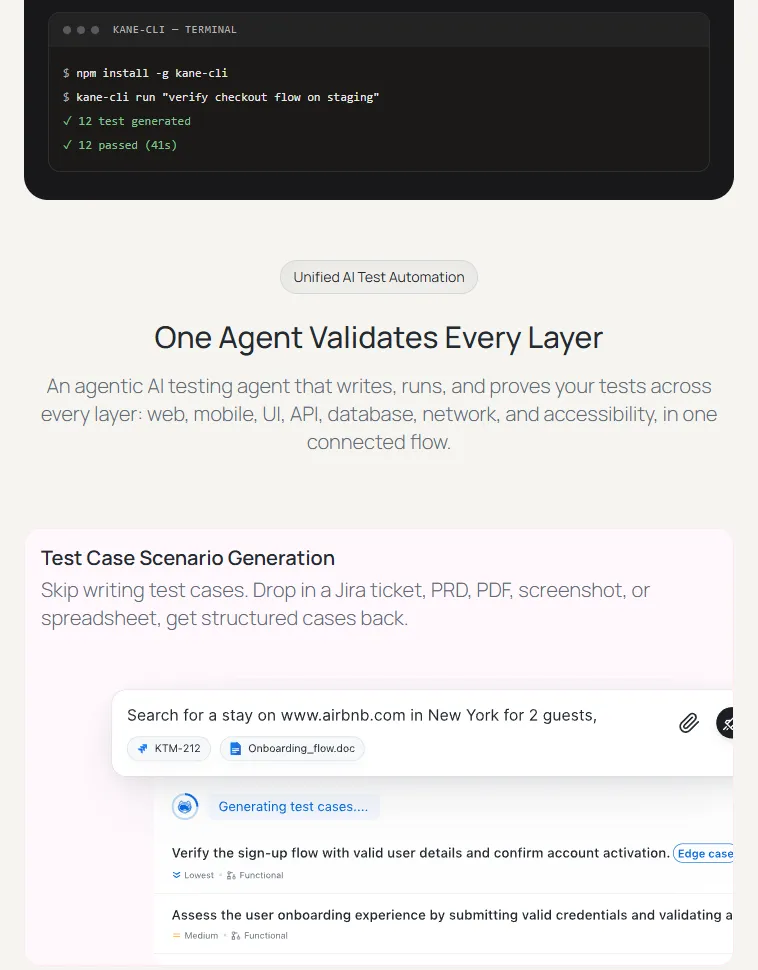
The KaneAI getting started guide covers authoring from tickets, recordings, and pull requests, and exporting generated tests to an existing framework.
What Are The Benefits of Agentic AI for Software Testing?
AI agentic testing removes most script repair through self-healing, speeds test creation with plain-English authoring, widens edge-case coverage, and plugs into Jenkins, GitHub Actions, and GitLab CI.
- Reduced Test Maintenance: Autonomous self-healing eliminates the endless cycle of fixing broken scripts after UI updates, so QA engineers focus on exploratory testing and strategy instead of script repair.
- Faster Release Cycles: Teams running pilot programs report a substantial reduction in manual effort for creating initial test cases, and natural-language authoring lets junior engineers produce automation at the pace of senior specialists.
- Increased Test Coverage: Agents expand coverage without expanding headcount by catching edge cases that manual testers miss. They scan codebases, analyze user workflows, and study past failures to create test scenarios covering paths previously unconsidered.
- Better Integration and Scale: The technology connects smoothly with Jenkins, GitHub Actions, and GitLab CI through standard APIs and webhooks. Teams run hundreds of tests simultaneously with no extra staff, scaling horizontally without linear cost increases.
- Enhanced QA Roles: Testers move from script maintainers to quality strategists, spending time on activities requiring human judgment like analyzing complex user flows, thinking through business logic, and identifying high-risk areas.
What Are the Challenges of Agentic Testing?
The main challenges of agentic testing are non-deterministic results, accuracy drift as data patterns change, legacy system gaps, sensitive data exposure, and trust in black-box AI decisions.
- Inconsistent Results: Agentic systems are non-deterministic, producing different results on each run even with identical inputs. The unpredictability complicates debugging and requires comprehensive logging of all agent actions, prompts, and outputs for auditing and improvement.
- Accuracy Degradation: Performance degrades when data patterns change. For software where new trends are constant, agents cannot produce false positives or miss real bugs due to outdated training. Regular retraining, recalibration, and close monitoring of performance metrics are essential.
- Legacy System Compatibility: Older systems usually lack the standardization required for implementing agentic testing. Understanding how MCP and AI Agents work together can help teams bridge the gap between autonomous testing systems and legacy infrastructure.
- Sensitive Data Exposure: AI agents need access to databases and systems containing sensitive information. Rigorous controls, including encryption, access management, and regular security monitoring, are essential, with privacy by design principles built into agent implementation from day one.
- Trust in AI Decisions: AI operates as a black box even to its creators. Unpredictability in decision-making and potential for hallucinations create trust issues. The human-in-the-loop (HITL) concept becomes essential, using agentic platforms to accelerate human testers rather than replace them.
- Skill Gaps: Testers struggle with AI-driven systems even though AI uses natural language. How instructions are phrased significantly affects AI reactions, making understanding of AI basics extremely important. Learning effective prompting techniques for testers can help bridge this gap. Investment in training and foundational AI literacy helps build practical skills for working with agent systems.
- High Infrastructure Investment: Agentic AI testing demands computational resources. High-performance GPUs, TPUs, and scalable cloud services cost money. Modern platforms optimize for standard CPUs more efficiently, but planning for compute costs and ensuring infrastructure can support the load remains necessary.

Note: The trust challenge gets sharper once agents run your QA: a run report is the agent's own account of what it did, and you cannot regression-test a vibe. For the agents your team builds and wires into its pipelines, Agent Assurance replaces that account with evidence: it reads the agent's codebase, derives functional and adversarial scenarios such as prompt injection and tool misuse, invokes the agent for real, and grades each criterion Pass, Fail, or Unable to Verify against the files changed, tool calls made, and artifacts produced while it ran. Early access is opening in batches. Join the Agent Assurance waitlist
What Are the Key Use Cases for Agentic AI Testing?
Key use cases for AI testing agents include eliminating flaky tests, cutting execution time by 78%, scaling past 8,000 daily tests, automating WCAG accessibility checks, and halving infrastructure costs.
These AI agent use cases help teams improve reliability, speed, and scalability across complex testing environments. Some key applications include the following:
- Eliminating Flaky Tests: Flaky tests (tests that inconsistently pass or fail without code changes) plague even tech giants. Agentic testing systems eliminate this problem through reliable, sanitized infrastructure. For instance, Dashlane, a password management platform, achieved a 99.9% reduction in flaky tests after adopting agentic testing infrastructure.
- Accelerating Test Execution Speed: Slow test execution creates bottlenecks in CI/CD pipelines. Agentic platforms dramatically reduce execution time through intelligent test orchestration and parallel execution. Boomi, an integration platform provider, reduced test execution time by 78%, cutting its full test suite from 9.5 hours down to just 2 hours.
- Scaling Test Coverage Across Teams: Organizations with multiple development teams struggle to maintain independent testing without interference. Agentic platforms enable massive scale while preserving team autonomy. Raiffeisen Bank International now runs over 8,000 daily tests across 40+ teams. The bank's custom enterprise architecture with sub-organizations provides each team complete independence while sharing underlying infrastructure, including secure access to private environments and coverage across 30+ devices and multiple browsers.
- Handling High-Volume Testing at Scale: Organizations need infrastructure that can handle millions of tests without creating bottlenecks or requiring proportional increases in engineering staff. Best Egg, a fintech platform, executes 2.7 million automation tests with zero bottlenecks. Their testing infrastructure handles everything from personal loans to financial health platforms across diverse devices, including unusual platforms like smart fridges and gaming consoles, where customers access financial services.
- Supporting Rapid Release Cycles: Organizations pushing frequent releases need testing infrastructure that keeps pace without creating bottlenecks. Agentic platforms eliminate device lab management overhead and enable instant scaling. KAYAK, for instance, streamlined its release cycles by replacing multiple device labs in various locations that caused connectivity issues, node failures, and unpredictable downtimes.
- Ensuring Accessibility Compliance: Digital accessibility requirements are becoming mandatory across regions. Agentic testing platforms automate accessibility validation against standards like WCAG, ADA, and the European Accessibility Act. Transavia, a European airline, adopted accessibility automation to comply with multiple accessibility standards, ensuring their digital content is inclusive and accessible to all users while maintaining their testing velocity.
- Reducing Infrastructure Costs: Maintaining in-house testing infrastructure creates significant ongoing expenses. Agentic cloud-based testing platforms eliminate these costs while improving performance. Emburse, a spend management company, reduced infrastructure costs by 50% while simultaneously achieving 20% faster test execution, eliminating the burden of managing multiple Selenium grids and refocusing their efforts on higher-value use-cases.
Many of these agentic capabilities are built on top of Generative AI tools that specialize in test creation, code analysis, and intelligent orchestration across distributed environments.
How to Start Using Agentic Testing in Your Organization?
Start with a four-step rollout: audit the current testing system, set measurable goals, pick a platform built for autonomous testing, and pilot one workflow for a month before expanding.
Step 1: Understand the Current System
Document what slows the team down. Maybe it's the hours spent weekly fixing broken tests after UI changes, or regression suites taking days to run. Application complexity matters because frequent UI updates or tangled integration points indicate where agentic testing delivers the biggest wins.
Document current platforms for test creation, execution, and reporting. Find bottlenecks where manual work slows things down. Pay attention to areas where test maintenance consumes significant engineering time.
Step 2: Set Measurable Goals
"Better testing" lacks meaning. Specific, measurable goals matter: shipping features twice as fast, cutting bug escape rate in half, freeing up 10 hours per week of manual work.
Connect metrics to business outcomes. Faster regression cycles enable weekly instead of monthly releases. Better defect detection means fewer support tickets and happier customers.
Step 3: Pick The Right Agentic AI Testing Platform
Not all autonomous testing platforms are equal. Some vendors add "AI-powered" labels to existing automation platforms without substantive changes.
Look for platforms like TestMu AI built specifically for autonomous testing. It generates tests, runs them, and self-heals when things break while testers explain requirements in simple, natural language.
Ensure the platform integrates with existing tools. Without a CI/CD pipeline or bug tracker integration, months get spent fighting infrastructure instead of improving quality.
Step 4: Phased Rollout
Successful teams start small. Pick one application or workflow where manual testing creates pain. Run a pilot for a month to learn how to write better prompts, what data agents need, and how to spot mistakes.
After proving success in one area, expand to two or three more. At full deployment time, the team will have real experience and proof that the approach works.
What Data Do Agents Need?
Agents need three things to work well:
- Access to real user journeys so they understand how people actually use the application
- Historical defect data so they know what tends to break
- Clear requirements so they can tell when something works correctly
Better data quality creates smarter agents. Keep logs of everything AI does for auditing decisions and improving performance over time.
How to Maintain Control
Autonomous doesn't mean unsupervised. Someone needs to watch what agents do, especially initially. Set up dashboards showing which tests are running, failing, and why.
Create feedback loops so that when agents make mistakes, corrections help the system learn. Think of AI agents like junior engineers requiring onboarding, training, and regular check-ins. The difference is that they learn faster and never get tired.
Why Does TestMu AI Lead the Agentic AI Testing Market?
The agentic testing market has several strong players. Some platforms were built specifically for autonomous testing, while others are open source frameworks adaptable for agentic workflows.
1. TestMu KaneAI
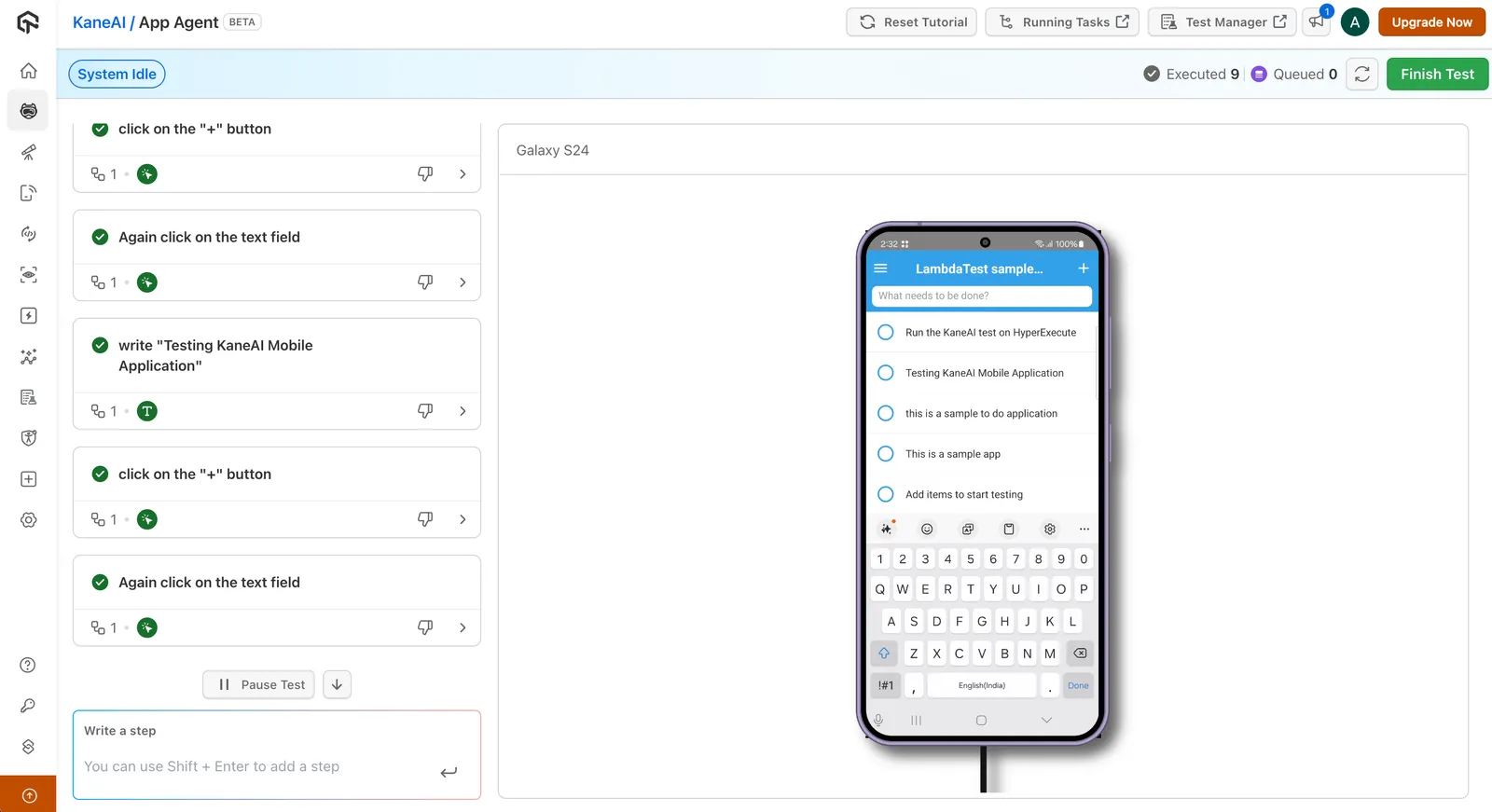
TestMu KaneAI is the world's first end-to-end software testing agent. Test instructions written in plain English generate, execute, and maintain tests automatically. When developers change a button label or move an element, KaneAI's auto-healing recognizes the intent behind the original instruction and updates the test without breaking. With AI app testing from KaneAI by TestMu AI, one plain-English test can cover a UI action, an API validation, and a database check.

2. TestMu AI HyperExecute
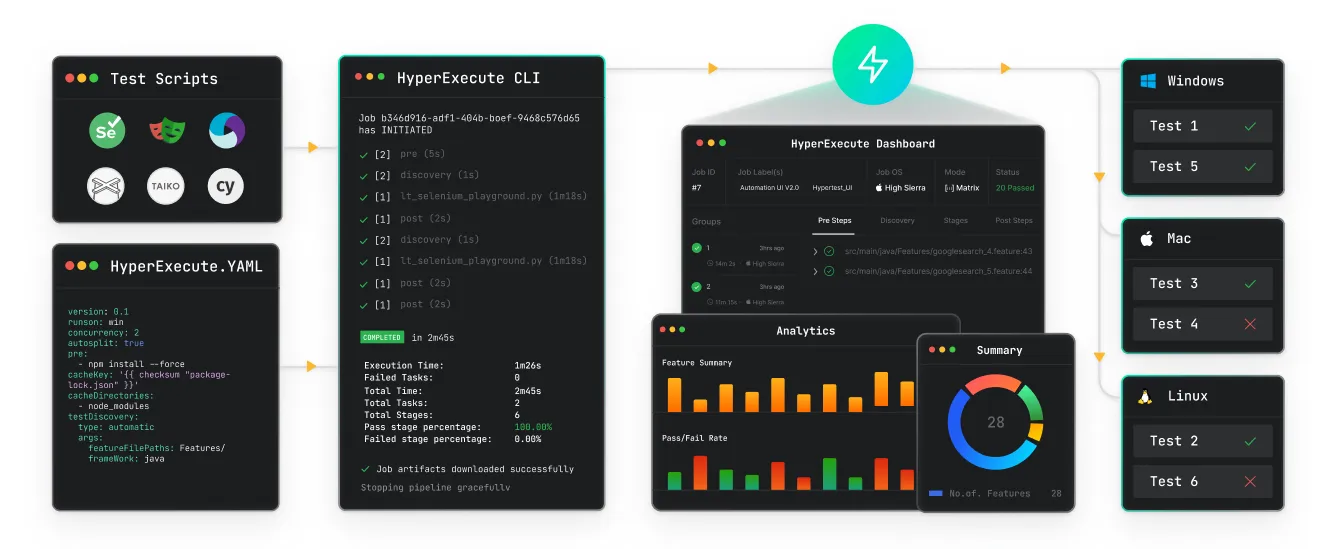
HyperExecute is an intelligent test orchestration engine built for speed. It replaces the hub-and-node model with an architecture that minimizes network latency and optimizes test distribution. Teams see up to 70% faster test execution compared to conventional cloud grids.

3. TestMu AI Smart UI
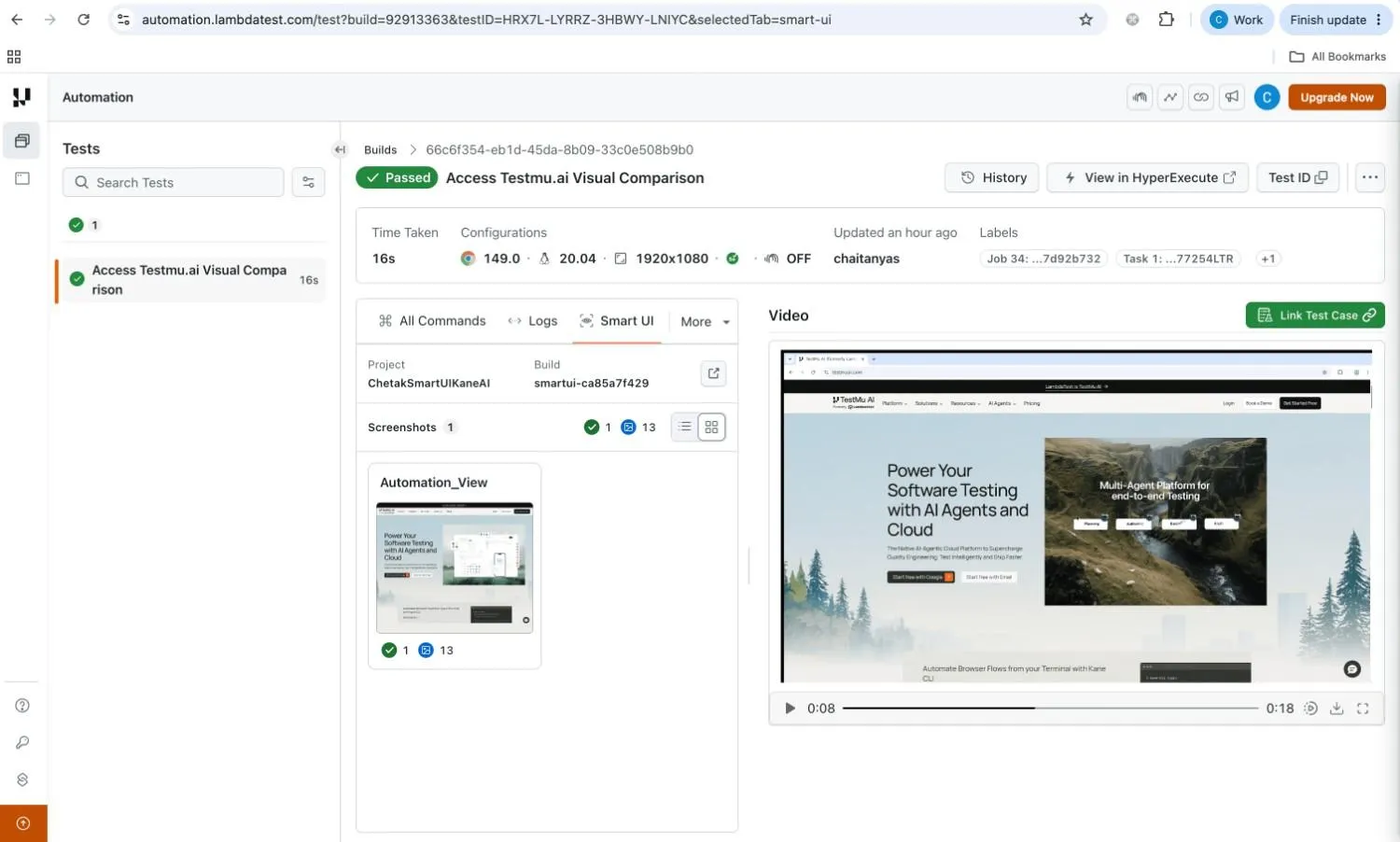
The visual testing tool focuses specifically on visual regression testing. It performs pixel-to-pixel comparisons to catch visual bugs that functional tests miss. The platform supports webhook integration and works with Selenium, Cypress, and Playwright.
Conclusion
Start agentic testing with one high-churn workflow: write its acceptance criteria in plain English, let the agent generate and run the suite, and measure healed versus broken steps after the next UI change.
Teams that live in the terminal can drive the same agents from Kane CLI in CI pipelines. From there, expand agent coverage flow by flow, keeping testers in the reviewer seat for every heal and every new scenario. For the runtime mechanics of how a single run works, see our breakdown of agent automation testing.
Author

Ninad Pathak
Blogs: 5


Ninad Pathak works as an Enterprise Marketing Manager at TestMu AI, where he plans and creates content that makes sense of complex topics in automation testing and AI for enterprise teams. With over six years in the tech industry, he focuses on breaking down complex subjects like agentic testing and Agent Testing to help developers and organizations reach their testing goals faster. His experience as a developer turned marketer helps him bring a unique perspective while combining storytelling with practicality.
Reviewer

Shantanu Wali
Reviewer
Shantanu Wali is Vice President of Product Management at TestMu AI (formerly LambdaTest), where he owns several product lines across the testing platform, including the Real Device Cloud and the Digital Experience Testing Cloud. He has also contributed significantly to the development and scaling of KaneAI, TestMu AI's flagship GenAI-native testing agent that uses natural language to make software testing faster and more reliable in this AI era. He brings 7+ years of experience across software development and product management, starting as a backend developer at Infosys building solutions for Fortune 500 clients. Shantanu holds an MBA from IIM Calcutta and a B.Tech in Mechanical Engineering.
Agentic Testing FAQs
Did you find this page helpful?
More Related Blogs
TestMu AI forEnterprise
Get access to solutions built on Enterprise
grade security, privacy, & compliance
- Advanced access controls
- Advanced data retention rules
- Advanced Local Testing
- Premium Support options
- Early access to beta features
- Private Slack Channel
- Unlimited Manual Accessibility DevTools Tests