
Power Your Software Testing with AI Agents and Cloud
The Native AI-Agentic Cloud Platform to Supercharge Quality Engineering. Test Intelligently and Ship Faster.


- TestMu AI (Formerly LambdaTest)
- /
- Test Management
- /
- Test Case Management Guide: Lifecycle, RTM & Best Practices
Test Case Management: The Complete Guide
Test case management is the QA practice of governing how every check is written, owned, and run, so coverage becomes provable evidence when a release ships.
Last Updated on:
Test case management is how a QA team controls the full life of every check it runs: writing the case, reviewing it, versioning it, executing it against builds, and retiring it when the feature it covers is gone. Each case stays traceable to a requirement, and each run leaves an execution record.
Tricentis' 2025 Quality Transformation Report, covered in Forbes, found that 40% of organizations lose more than $1M every year to poor software quality. Most of that loss doesn't come from too few test cases, it comes from cases in spreadsheets nobody maintained, linked to requirements that changed two sprints ago.
Test management is the program; test case management is the craft underneath it that produces the evidence the program reports on.
Key Takeaways
Test case management keeps every case written, reviewed, versioned, executed, and retired with full traceability to requirements. Teams can run the whole practice in one workspace with TestMu AI, which generates cases from requirements and tracks them from draft to retirement.
- Stale case ratio: Cases unexecuted for 90 days divided by total active cases. Above 30%, coverage reports track a product that no longer ships; triage before authoring anything new.
- Review gate: Peer review before a case turns Active is the strongest defense against repository debt, and AI-generated cases raise the stakes rather than lower them.
- Three-per-story floor: Every user story needs at least a happy path, an invalid input, and a boundary case; fewer than three leaves silent coverage gaps.
- RTM as release gate: A requirement whose linked cases show Gap or At Risk blocks the release until a passing run closes it.
- Tags control CI/CD cost: Smoke on pull requests and regression nightly keep a 4,000-case suite from running on every commit.
- AI output needs upkeep: Cheap generation turns repositories into a maintenance job. Pair Smart Context at generation with a scored duplicate scan and archive-first cleanup.
- Migrate less, not more: Retire duplicates and stale cases before export; importing debt gives it a new home.
What Is Test Case Management?
Test case management is the process of authoring, versioning, executing, and retiring test cases across the SDLC. Every case stays traceable to a requirement, and every run is recorded as release evidence.
Test Management vs Test Case Management
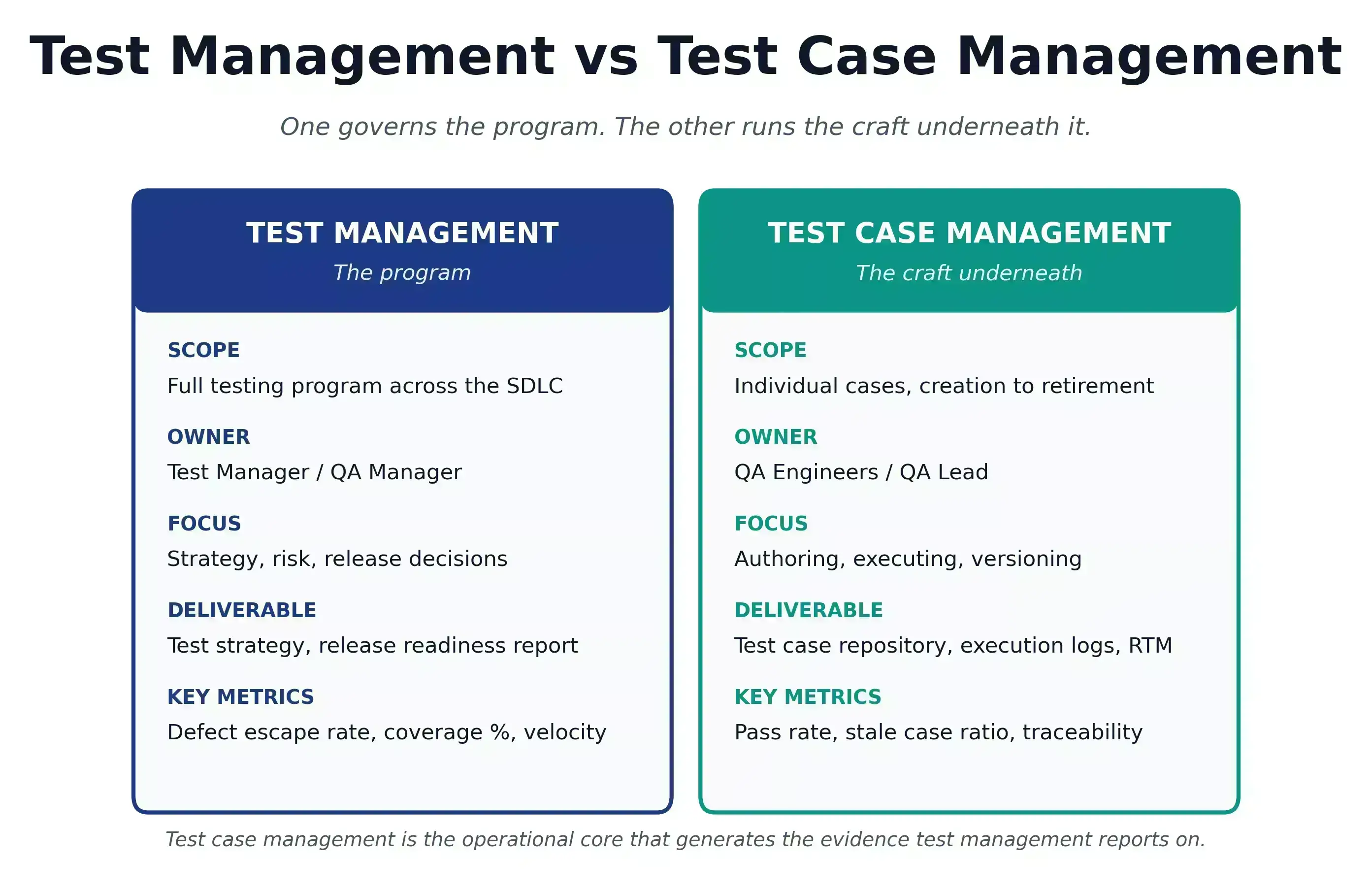
| Dimension | Test Management | Test Case Management |
|---|---|---|
| Scope | Full testing program across all SDLC phases | Individual test cases from creation through retirement |
| Level | Program and release level | Test case and execution level |
| Primary focus | Strategy, planning, resourcing, risk, and reporting | Authoring, organizing, executing, versioning, and tracking test cases |
| Who leads it | Test Manager / QA Manager | QA Engineers / QA Lead |
| Key activities | Risk analysis, test estimation, team coordination, defect triage, metrics | Test case writing, peer review, versioning, execution recording, defect linking |
| Primary deliverable | Test strategy, test plan, release readiness report | Test case repository, execution records, requirement traceability matrix (RTM) |
| Key metrics | Defect escape rate, test coverage %, execution velocity, defect density | Pass rate per run, stale case ratio, defect traceability coverage |
| Relationship | Governs the full testing program and makes release decisions | Operational core of test management; generates the evidence test management reports on |
Strong test management with vague test cases still ships production bugs. A perfect test case repository with no release governance still misses defects.
Why Does Test Case Management in 2026 Still Feel Broken?
Because cases still live in spreadsheets: steps like "verify it works," no linked requirements, no execution history. After 90 days unexecuted, a case is debt, and coverage reports track a product that no longer exists.
Each broken pattern has a specific fix, and the rest of this guide covers every one of them:
| What feels broken | The fix |
|---|---|
| Cases scattered across spreadsheets and personal folders | One versioned repository with lifecycle status, from Draft to Retired |
| Steps like "verify it works" that two testers read differently | A peer review gate: measurable expected results before a case turns Active |
| No link between cases and requirements | An RTM that maps every case to a story and every failure to a defect |
| No record of who ran what, when, and what happened | Recorded runs with Passed, Failed, Blocked, or Skipped states and reasons |
| Suites that only grow until regression outlasts the sprint | Quarterly triage driven by the stale case ratio, plus a retirement policy |
Managed properly, the same repository delivers:
- Fewer production escapes: cases linked to requirements catch defects before ship.
- Lower fix cost: bugs caught in tests cost a fraction of bugs caught in production.
- Case reusability: named preconditions and shared step libraries plug into new projects without rewrites.
- Provable release readiness: a live RTM answers "does every requirement have a passing test" before the release meeting, not during it.
- Faster sprint closes: tag-driven execution means smoke runs in minutes, regression testing runs overnight.
- Audit-ready evidence: for finance, healthcare, and aviation, test case history is mandatory. Execution logs showing who ran which case, when, and whether it passed are exactly what auditors ask to see.
What Do ISTQB, ISO 29119, and CISQ Require?
ISTQB defines the four test levels a repository must cover, ISO/IEC/IEEE 29119-3 specifies the required fields of a test case document, and CISQ quantifies the technical debt cost of skipping the discipline.
| Source | What it tells you about test case management | Benchmark |
|---|---|---|
| CISQ (2022) | Cost when test cases drift from current product behavior and defects ship | $1.52 trillion in accumulated US software technical debt, of which untested or stale code paths are a primary contributor |
| ISTQB Foundation Level Syllabus v4.0.1 (2024) | Standard test levels every test case repository must cover | 4 levels: Component (Unit), Integration, System, and Acceptance, each with its own case design responsibilities |
| ISO/IEC/IEEE 29119-3:2021 (Test Documentation) | International standard for what a test case document must contain | Specifies required test case fields: identifier, objective, preconditions, inputs, expected results, environment, dependencies, used by regulated industries during audit |
| Stale Case Ratio (operational benchmark) | Field-tested signal of test case debt | Above 30% (cases not executed in 90 days / total active cases) signals significant debt; above 50% means coverage metrics are no longer trustworthy |
The CISQ figure quantifies the cost of skipping the discipline; ISTQB and ISO/IEC/IEEE 29119 define the floor that auditors and certified testers expect; the stale case ratio is the daily signal your team can act on without waiting for an external review.
Who Owns the Process?
QA engineers author and execute cases, QA leads run peer review and own the RTM, developers consume linked cases at code review, and PMs check story coverage at sprint close. One named QA lead enforces the lifecycle.
- QA engineers write cases, execute runs, record results, and raise defects.
- QA leads and test managers run peer review, enforce the lifecycle, and own the RTM.
- Developers consume linked cases during code review; defects tell them exactly what broke.
- PMs and BAs verify every user story has linked cases before sprint close.
Most failures trace to role ambiguity: everyone writes cases, nobody reviews, no one owns retirement. Assign the lead explicitly.
What Should a Test Case Template Include?
A complete template has 12 fields: ID, title, module, preconditions, numbered steps, expected results, test data, priority, tags, status, linked requirements, and linked defects. Missing fields cost repeatability.
A test scenario is the situation: "checkout with an expired card." A test case is the execution specification: exact steps, inputs, and expected result. One scenario generates 3 to 8 cases. Twelve fields separate a repeatable case from one that produces different results depending on who runs it:
| Field | Example |
|---|---|
| Test Case ID | AUTH-TC-042 |
| Title | "Verify login fails when password field is empty" |
| Module / Feature | Authentication > Login |
| Preconditions | "Account test@example.com exists. App on /login." |
| Test Steps | "1. Enter test@example.com. 2. Leave Password empty. 3. Click Sign In." |
| Expected Results | "Error 'Password is required' appears. User remains on /login." |
| Test Data | Email: test@example.com, Password: (empty) |
| Priority | Critical / High / Medium / Low |
| Tags | Smoke, Regression, Functional, API, Security |
| Status | Draft / Review / Ready / Active / Retired |
| Linked Requirements | US-123 |
| Linked Defects | BUG-456 |
To learn more, read our detailed guide on the test case template with all essential fields included.

Free Test Case Template
Note: Explore real test case examples to see how each field in a template is used in real-world scenarios. Download now
What Makes a Test Case Worth Running?
Five properties: atomic scope, measurable expected results, named test data, independent execution, and negative plus boundary coverage. If two testers get different results from the same case, it is not ready to run.
- Atomic scope. One case, one scenario. Combined cases produce ambiguous failures.
- Measurable expected results. "Should work" fails. "Error 'Password is required' appears below the field" passes.
- Named test data. Not "valid payment details." Specify the exact card number, amount, and billing address.
- Independent execution. If a case depends on a prior case's outcome, one failure breaks the whole chain.
- Negative and boundary coverage. For every happy path, write one invalid input and one boundary case.
How Does a Test Case Move from Draft to Retired?
A case moves through six stages: Draft, Review, Ready, Active, Failed or Blocked, and Retired. Peer review gates entry into test runs; retirement preserves history when a feature is removed or a case is superseded.
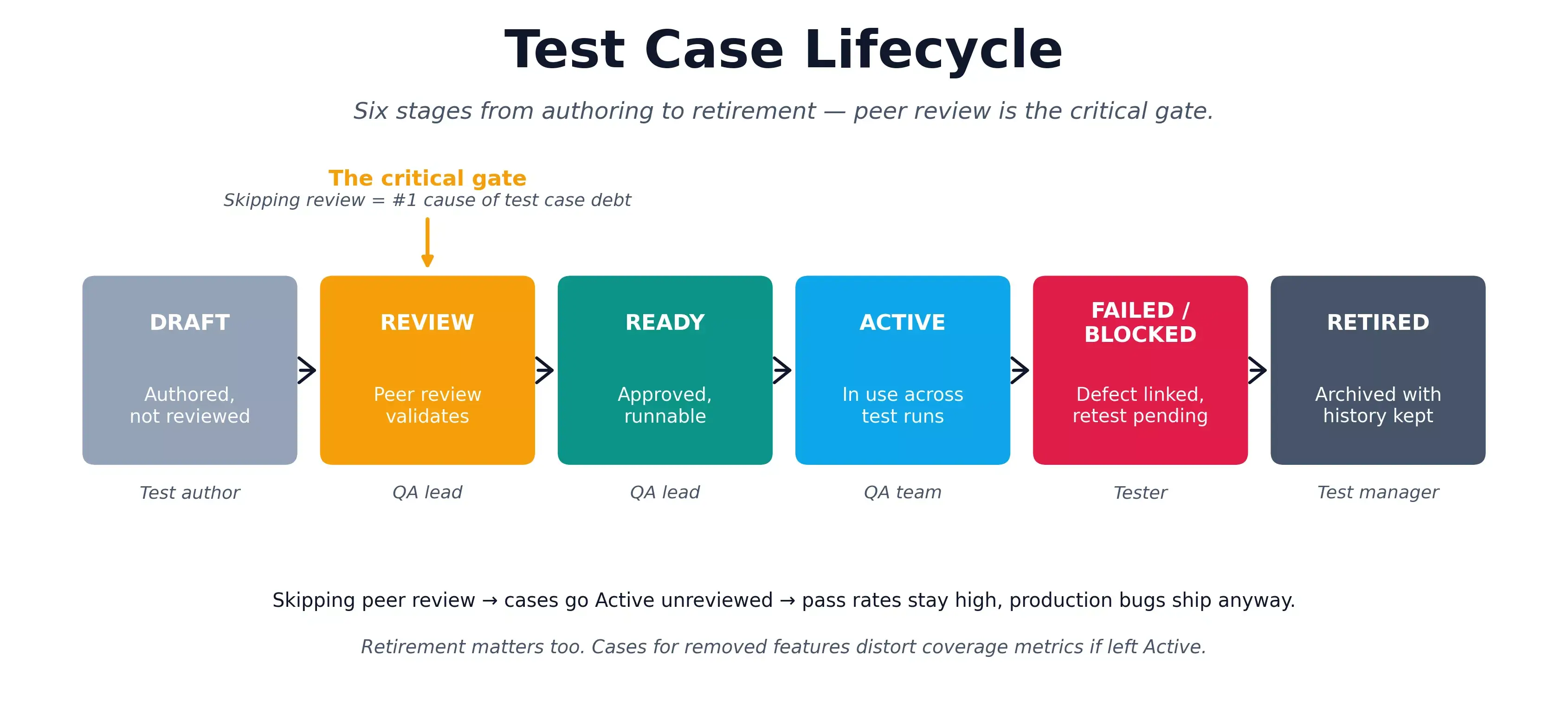
| Stage | What Happens | Owner |
|---|---|---|
| Draft | Authored, not yet reviewed. May be incomplete. | Test author |
| Review | Peer review validates completeness and links. | QA lead |
| Ready | Approved and available for test runs. | QA lead |
| Active | In use across one or more test runs. | QA team |
| Failed / Blocked | Execution failed or blocked; defect linked. | Tester |
| Retired | Feature removed or case superseded. History preserved. | Test manager |
The Review stage is the key discipline. Teams under sprint pressure skip peer review and promote Draft cases straight to Active, which is the single most common cause of test case debt. Retirement matters equally: cases for removed features that stay Active distort coverage metrics.

How Should You Organize a Test Case Repository?
Organize four levels deep: Project, Module, Feature, Test Type, mirroring how the product is built. Flat repositories with hundreds of ungrouped cases stall at scale; naming conventions and tags rebuild order fast. That same folder hierarchy is how TestMu AI Test Manager keeps its test case repository versioned and reusable across projects.
E-Commerce Platform
├── Authentication
│   ├── Login - Functional, Negative, Boundary
│   └── Registration - Functional, Negative, Security
└── Checkout
    ├── Cart - Functional, Edge Cases
    └── Payment - Functional, Negative, Security
Naming: [Module]-[Feature]-[Scenario]-[Condition]. Example: AUTH-LOGIN-Negative-EmptyPassword.
Tag taxonomy:
- Smoke: build verification. Max 30 cases.
- Critical Path: login, checkout, data save.
- Regression: full suite. Nightly or pre-release.
- Functional: current sprint features.
- Edge Case: boundaries, invalid inputs, error paths.
No case enters without a linked requirement and Ready status. Triage quarterly - retire anything not executed in 90 days.
Which Test Case Design Techniques Should You Use?
Six techniques derive non-redundant cases from requirements: equivalence partitioning, boundary value analysis, decision tables, state transition, use case, and pairwise testing. Each targets a different defect class.
| Technique | Best For |
|---|---|
| Equivalence Partitioning | Form inputs, numeric ranges, text fields; one case per valid/invalid partition. |
| Boundary Value Analysis | Age fields, quantity limits, date ranges; most off-by-one defects live at edges. |
| Decision Table Testing | Pricing logic, discounts, conditional access; covers every combination. |
| State Transition Testing | Order flows, session management; tests valid and invalid transitions. |
| Use Case Testing | Checkout, onboarding; covers real user paths including failures. |
| Pairwise Testing | Multi-config features; reduces N-way combinations to manageable coverage. |
How Do You Plan and Track Test Runs?
Assemble runs by risk, not module completeness: smoke first, then critical path, functional, regression, and edge cases last. Record cases as Passed, Failed, Blocked, or Skipped, the last two with a documented reason.
- Smoke: run first. Fail here = return the build.
- Critical Path: login, primary operations, payment.
- Functional: new features from the current sprint.
- Regression: all approved cases from previous sprints. Nightly.
- Edge Cases: run last, always for payment and auth.
Result states: Passed, Failed, Blocked, Skipped. Blocked and Skipped need a documented reason. "Partial" produces reports nobody can act on.
Cases per user story: minimum 3 (happy path, invalid, boundary). Payment flows need 20+. An FAQ page needs 3.
What Does a Requirement Traceability Matrix Show?
The RTM maps each requirement to its test cases and latest results, surfacing three states: Covered, At Risk (a linked case failed), and Gap (no case exists). Any Gap or At Risk row blocks the release until resolved.
| Requirement | Test Cases | Execution | Coverage |
|---|---|---|---|
| US-101: Log in with valid credentials | TC-001, 002, 003 | 2 Passed, 1 Failed | At Risk |
| US-102: Fail with invalid password | TC-004 | Passed | Covered |
| US-103: Password reset via email | (none) | Not Executed | Gap |
- Gap: no test case. Unacceptable before release.
- At Risk: tests exist but one failed. Block release until fixed.
- Covered: all linked cases passed.
Forward traceability finds coverage gaps. Backward traceability finds orphaned cases. Run both. Keep the RTM live in Test Management - a requirement that changes mid-sprint should immediately surface which cases are now stale.
Which Metrics Tell You the Practice Is Working?
Five numbers, all computable from execution records: defect detection efficiency, execution rate, pass rate per run, reuse rate, and stale case ratio. Review them at sprint close, before drift settles into the baseline.
| Metric | Formula | What it tells you |
|---|---|---|
| Defect detection efficiency | Defects found in testing / (defects found in testing + defects found in production) x 100 | Whether your cases catch bugs before users do. A falling DDE with a stable pass rate means the cases no longer match the product. |
| Execution rate | Cases executed / cases planned for the run x 100 | Whether runs finish. A run that consistently ends at 70% means the run is overscoped or the team is skipping informally. |
| Pass rate per run | Cases passed / cases executed x 100 | Build health per run. Track per run, not cumulative, so one bad build is visible instead of averaged away. |
| Reuse rate | Cases used in 2+ runs / total active cases x 100 | Whether authoring effort compounds. Low reuse usually means cases are written per sprint and abandoned. |
| Stale case ratio | Cases not executed in 90 days / total active cases x 100 | The debt signal. Thresholds and the remediation playbook are in the Test Case Debt section below. |
What Is Test Case Debt and How Do You Reduce It?
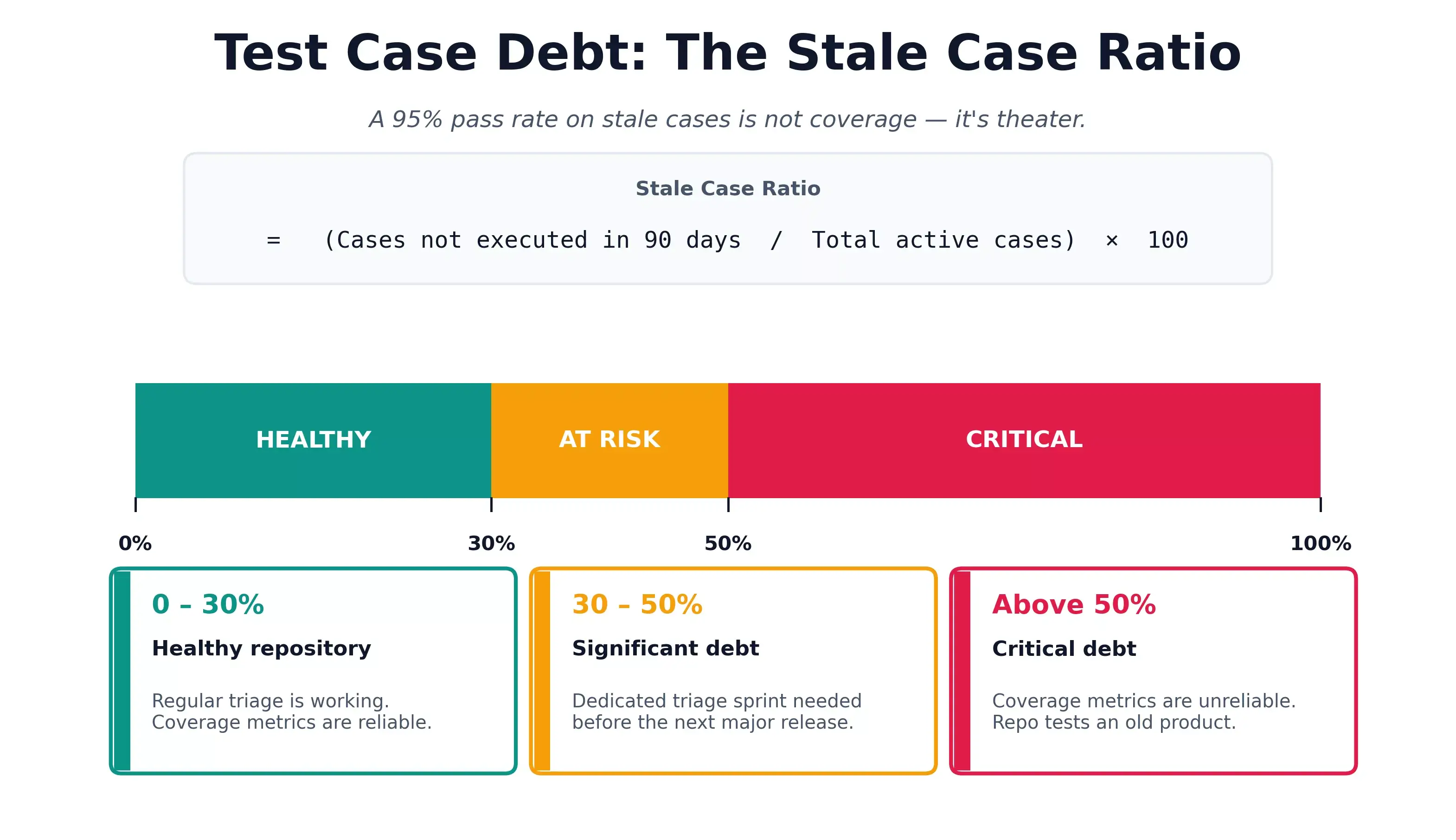
Test case debt is the accumulation of outdated, duplicate, or never-executed cases. A 95% pass rate can look healthy while cases assert behavior from two releases ago; the stale case ratio makes that drift measurable.
Measure it with the stale case ratio:
- Stale Case Ratio = (Cases not executed in 90 days / Total active cases) x 100
- Above 30%: significant debt. Triage sprint needed.
- Above 50%: critical. Coverage metrics are unreliable.
Other signs: high pass rate with production escapes; testers skipping cases informally; review time over 30 minutes per case; duplicate cases across modules.
Reduction strategy:
- Quarterly triage: tag every case untouched in 90 days as a retirement candidate.
- Retirement policy: feature removed = cases retired immediately.
- Coverage gap analysis: forward and backward traceability, together.
- Reusable step libraries: login, data setup, teardown extracted once, referenced everywhere.

How Do You Manage Test Cases in Agile and CI/CD?
Write cases at sprint planning, review mid-sprint, and execute before close. In CI/CD, tags become pipeline config: smoke on every pull request, regression nightly, and the full active set before a release candidate.
Test case management in agile
The agile failure mode: each sprint adds cases, nothing retires. Teams that retire one case per three added never hit the wall where regression outlasts the sprint.
In CI/CD
Tag-driven selection is what prevents a 4,000-case suite from running on every pull request:
| Stage | Tags | Trigger | Gate |
|---|---|---|---|
| PR Check | Smoke, Critical Path | Every PR | 100% pass to merge |
| Merge to Main | + Functional | Every merge | 100% Smoke; 90%+ Functional |
| Nightly | Regression, Edge Case | Scheduled | Blockers addressed before standup |
| Pre-Release | All Active | RC promotion | No open Critical defects; 100% RTM coverage |
Automation results push back to the test management system so manual and automated results reconcile into one release picture. A test case version bump should trigger a review flag on the automated script implementing it. In TestMu AI, an automated run links to its test case through the capability key tms.tc_id, so the pipeline reconciles results without a manual mapping step.
Flaky test management
Flaky test cases are quality debt, not infrastructure. Two-sprint investigation SLA: quarantine non-deterministic behavior, fix genuinely unstable code. Flaky cases left in the pipeline teach teams to override failures.
How Do You Choose a Test Case Management Tool?
Evaluate seven criteria: end-to-end traceability, two-way Jira and Azure DevOps sync, AI authoring, unified manual and automated results, CI/CD quality gates, auditability, and migration support. Fit beats feature count.
Teams outgrow spreadsheets the moment cases scatter, results are shared informally, and no one can prove what was covered before a release:
| Criterion | What to check |
|---|---|
| End-to-end traceability | One matrix linking requirements to test cases to runs to defects, so coverage gaps surface before release, not after. |
| Two-way issue-tracker sync | Bidirectional Jira and Azure DevOps integration: a failed case logs a defect with full context, and status changes sync back automatically. |
| AI test authoring | Generates structured cases from a requirement, user story, or ticket, with steps, expected results, priority, and tags, cutting authoring time. |
| Unified manual and automated results | Manual runs and automated pipeline results map back to the same cases in one pass/fail view, not two siloed reports. |
| CI/CD integration and quality gates | Tag-based runs and gates that block a deploy when critical cases fail, wired into your existing pipeline. |
| Auditability | Execution history, version control, and permissions built in, for finance, healthcare, and other regulated workflows. |
| Scale and migration | Multi-team usage without admin overhead, plus import from spreadsheets or legacy tools with field mapping. |
If your team lives in Jira, weight native two-way sync highest; if you are standardizing testing across teams, weight traceability and audit history. TestMu AI's Test Management tool covers all seven in one workspace, pairing AI case generation and a live RTM with execution that reconciles manual and automated results.
For ranked, feature-by-feature looks at specific test case management tools, see our roundups of the best test management tools and free test management tools.
How Do You Migrate Test Cases from Excel or a Legacy Tool?
Triage first, then move: retire duplicates and stale cases, standardize survivors to the 12-field template, map columns, import via CSV or a dedicated importer, and validate counts before re-linking requirements.
- Triage before export. Retire duplicates, cases for removed features, and anything not executed in 90 days. Importing debt just gives it a new home.
- Standardize to your template. Map spreadsheet columns to the 12 fields above. Cases missing steps, expected results, or a linked requirement get fixed before migration or dropped.
- Map fields, then import. CSV and Excel imports work everywhere; dedicated importers preserve more. TestMu AI migrates from TestRail, Zephyr, qTest, or Xray with automatic field mapping and zero data loss.
- Validate the import. Reconcile case counts, then spot-check 10% of cases for truncated steps, broken formatting, and lost attachments.
- Re-link requirements and defects. Traceability links rarely survive an export file. Rebuild them in the first sprint after migration, before new work buries the gap.
Run the old and new systems in parallel for one release at most. Longer than that, and testers keep updating the spreadsheet they trust.
How Does Jira Test Case Management Work?
It links every test case to a Jira issue (story, task, or epic), runs cases against a Jira fix version, and pushes results back as defect transitions and status changes. Two-way sync is the minimum bar for the workflow.
Most engineering teams already track work in Jira, so a separate test management tool that doesn't sync to Jira issues forces QA to copy state between two systems.
A workable Jira test case management workflow looks like this:
- Link cases to Jira stories at authoring time. A test case without a linked Jira issue is an orphaned case, no traceability and no release coverage signal.
- Run cases against a Jira fix version or sprint. Group test runs by the same Jira fix version your engineers use, so coverage maps to release scope without translation.
- Auto-create Jira defects on failed cases. A failed case logs a Jira bug with steps, screenshots, environment, and the failing assertion attached, no manual transcription.
- Reconcile two ways. When a Jira bug closes, the test case status updates; when a case re-passes, the linked bug auto-transitions to Verified.
- Surface coverage in Jira dashboards. A Jira filter showing "stories without linked passing cases" exposes release-blocking gaps where QA needs them, in the same view PMs use.
Common failure modes:
- One-way sync only. Cases pull from Jira but results don't push back. QA reports a fail in the test tool, the developer never sees it. Two-way sync is the minimum bar.
- Case-as-Jira-issue. Treating each test case as a Jira issue inflates Jira projects and breaks reporting. Keep cases in the test tool; link to Jira, don't replace it.
- No sprint scope alignment. Cases run against a build version that doesn't match the Jira sprint's fix version, so release readiness reports drift from what engineering committed.
TestMu AI's Test Manager supports the full Jira workflow above out of the box: link cases to issues, auto-create defects with execution context, transition Jira status from case results, and align test runs to fix versions. For step-by-step setup, see the Test Manager docs, and for a deeper walkthrough of running QA inside Jira itself, read our Jira test management guide.
How Is AI Changing the Way Teams Manage Test Cases?
AI writes cases from requirements, flags near-duplicates against the repository, ranks which cases a code change touches, and bulk-rewrites vague steps. The QA engineer's job shifts from authoring to reviewing output.
- Generation from requirements - a user story, PRD, or ticket becomes a set of structured cases with steps, expected results, and tags. The QA engineer's job shifts to reviewing for correctness and adding the edge cases the model missed.
- Duplicate and gap detection - the model compares new cases against the existing repository, flagging near-duplicates before they enter review and surfacing requirements with no linked coverage.
- Risk-based selection - instead of running the full regression suite, AI ranks which cases the current code change actually touches, cutting run time without cutting relevant coverage.
- Repository upkeep - bulk rewriting of vague steps, retitling for naming consistency, and flagging stale cases, the maintenance work that teams otherwise defer until it becomes debt.
The failure mode to watch: AI-generated cases that nobody reviews go straight into the repository as debt with perfect formatting. The lifecycle gate (Draft, then Review, then Ready) matters more with AI authoring, not less. The same gate applies to a golden dataset for an AI system, where an LLM can draft items but each one still needs human approval.
How Do You Keep an AI-Written Repository Clean?
AI made test cases quick and effortless to produce. That was the point. It also removed the one thing that kept repositories small: the effort of writing a case.
The result is a maintenance problem. The same login test exists five times in five wordings. Runs slow down, fixes land in one copy and miss the rest, and coverage reports count cases instead of behaviour.
The Test Deduplication Agent answers it directly. It reads test cases semantically, scores every match from 0 to 100, and groups duplicates around a base case. You compare, promote a better base if needed, then delete the true copies or archive the overlaps. Nothing is deleted until a person confirms it.
Smart Context Memory Layer: TestMu AI scans the existing repository before every session, so new test cases build on what exists, close coverage gaps, and eliminate duplication across test suites automatically. The scan clears the duplicates you already have; Smart Context stops new ones from being written.
It is one part of the upkeep, not all of it:
| Capability | When it acts | What it keeps clean |
|---|---|---|
| Smart Context | During AI generation | Stops new duplicates before they are written |
| Duplicate scan | On the existing repository | Clears years of accumulated duplicates |
| Archive | After review | Removes overlaps from view without losing history |
| Cross-project sharing | When projects reuse cases | One case, one ID, instead of drifting copies |
| Bulk test run actions | As releases close | Moves, copies or deletes up to 1,000 runs at once |
What Does TestMu AI's Test Manager Automate?
Test Manager automates case authoring, lifecycle status, a live RTM, CI/CD result reconciliation, and two-way defect flow in one workspace, replacing separate spreadsheet, tracker, and dashboard upkeep.
- AI generated test cases: KaneAI produces structured cases from a Jira ticket, an image, a video, or a Figma flow, each with preconditions, steps, expected results, priority, and tags. Textual requirements, Azure DevOps links, PDFs, CSV or XLSX files, and Markdown are supported inputs too.
- Lifecycle with status tracking. Unverified, Faulty, Ready, Live, Archived. Unverified cases cannot enter active runs.
- Duplicate scan: The Test Deduplication Agent finds cases that already say the same thing in different words, scores each match, and lets you compare, archive or delete, with a person confirming every deletion.
- Execution on 50,000+ real devices and 3,000+ browser and OS combinations: Manual, automated, and exploratory testing results share one workspace.
- Two-way Jira and Azure DevOps sync: Failed cases auto-create issues and defect closure updates both systems in real time, with no manual updates. Bugs can be logged across 25+ bug tracking tools.
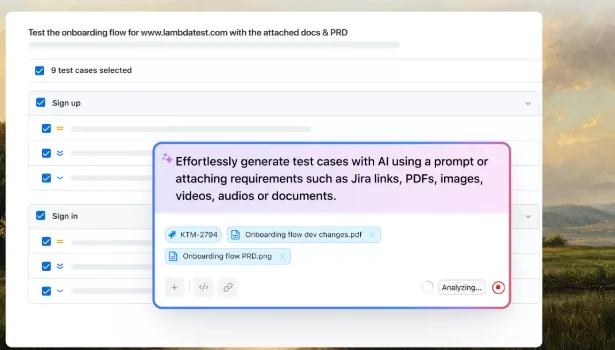
The capture above shows the generation flow from the Test Manager workspace: a Jira ticket (KTM-2794) and a PRD attached as inputs, with the generated sign-up and sign-in cases landing as a reviewable, selectable set rather than free text.
Subscribe to the TestMu AI YouTube channel for the latest tutorials on modern software testing.
Conclusion
Start with one number this week: your stale case ratio (cases not executed in 90 days over total active cases). Above 30%, run the triage from the Test Case Debt section before authoring anything new; below it, tighten the Review gate so debt stops entering.
Teams that treat test case management as a practice rather than a tool feature ship fewer production escapes and make release decisions from data instead of meetings. A repository doesn't win on volume; it wins on evidence: every requirement linked, every execution recorded, every stale or duplicate case retired.
Six habits compound over time: write atomic cases with measurable expected results, link every case to a requirement, enforce peer review before Active status, run a duplicate scan each quarter and archive what you are unsure about, track the stale case ratio, and keep the RTM live. TestMu AI's Test Management handles all six in one workspace. See the Test Manager docs to set up your first test run and coverage view in under 20 minutes.
Author

Abhishek Mishra
Blogs: 17

Abhishek Mishra is a Technical Product Manager at TestMu AI, where he owns Test Manager, the test management product. He has over 8 years of experience in product management and market analysis, spanning AI-native software testing, product strategy, and analytics. On TestMu AI, he authored guides on test management and test case management. Previously, he served as the Product Lead at IndiaClan and co-founded Gartley618 Technologies, a firm focused on quantitative trading and blockchain. He holds a B.Tech degree.
Reviewer

Shantanu Wali
Reviewer
Shantanu Wali is Vice President of Product Management at TestMu AI, where he owns several product lines across the testing platform, including the Real Device Cloud and the Digital Experience Testing Cloud. He has also contributed significantly to the development and scaling of KaneAI, TestMu AI's flagship GenAI-native testing agent that uses natural language to make software testing faster and more reliable in this AI era. He brings 7+ years of experience across software development and product management, starting as a backend developer at Infosys building solutions for Fortune 500 clients. Shantanu holds an MBA from IIM Calcutta and a B.Tech in Mechanical Engineering.
On This Page
- What Is Test Case Management?
- Why It Feels Broken in 2026
- ISTQB, ISO 29119 & CISQ
- Who Owns the Process?
- Test Case Template Fields
- Writing Effective Test Cases
- Test Case Lifecycle
- Repository Structure
- Test Case Design Techniques
- Execution Planning & Test Runs
- Traceability Matrix (RTM)
- Metrics & KPIs
- Test Case Debt
- Agile & CI/CD
- How to Choose a Tool
- Migrating Test Cases
- Jira Test Case Management
- How AI Changes the Practice
- Keeping an AI Repository Clean
- TestMu AI Test Manager
Test Case Management FAQs
Did you find this page helpful?
More Related Blogs

TestMu AI forEnterprise
Get access to solutions built on Enterprise
grade security, privacy, & compliance
- Advanced access controls
- Advanced data retention rules
- Advanced Local Testing
- Premium Support options
- Early access to beta features
- Private Slack Channel
- Unlimited Manual Accessibility DevTools Tests