
Browsers and OS Articles
RSS feed45 articles found in Browsers and OS

Learn how to unblock websites safely with VPNs, proxies, DNS changes, and browser fixes. Access any site securely with these simple methods.

Vishal kumar Sahu
November 5, 2025
29 min read
Learn how to download apps on iPhone using simple methods, fix common issues, and manage your apps with ease.

Shubham Soni
August 4, 2025
16 min read
Learn how to disable cookies in your browser to enhance privacy, protect personal data, and reduce online tracking.

Bhavya Hada
June 18, 2025
6 min read
Learn how Microsoft Edge cookies work and how to manage, delete, or block them for a better and more secure browsing experience.
Bhavya Hada
June 16, 2025
8 min read
Learn how to update Firefox browser easily. Ensure you're always on the latest version for enhanced security, performance, and new features.

Anurag Sharma
June 16, 2025
8 min read
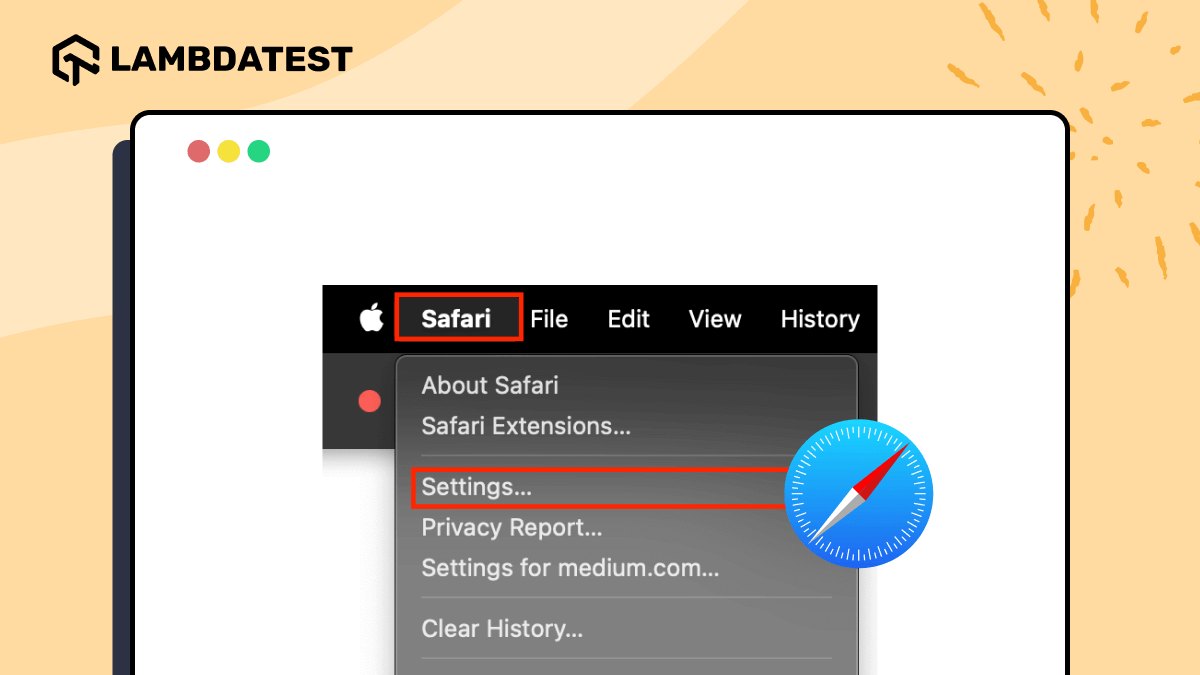
The Safari Develop menu is enabled in Safari's Settings under Advanced by turning on Show features for web developers, or in Preferences on macOS Monterey and earlier via Show Develop menu in menu bar, unlocking Web Inspector's Elements, Styles, Console, Network, and Sources tabs alongside iOS Web Inspector debugging over a Mac connection.

Bhawana
June 3, 2025
6 min read
Discover what cookie warnings are, why they matter, and how to manage them for privacy and compliance across websites and browsers.
Vishal kumar Sahu
May 22, 2025
8 min read

JavaScript reads cookies through the document.cookie property, which returns every cookie for the page as one semicolon-separated string that a custom getCookieValue() function then splits to extract a single named value. Best practices include encoding values with encodeURIComponent before setting a cookie, decoding them on read, and avoiding storage of sensitive data like passwords.
Vishal Sahu
May 19, 2025
7 min read

Learn how to get Microsoft Edge updates, fix common issues, check version info, and understand the Edge Update Service in this comprehensive guide.
Vishal kumar Sahu
May 16, 2025
7 min read
Making Safari the default browser on a Mac means opening System Settings, going to Desktop & Dock, and selecting Safari under Default web browser, or using a quicker Spotlight Search shortcut instead. The same guide walks through the equivalent steps for switching an iPhone or iPad back to Safari as the system default.

Prince Dewani
May 15, 2025
7 min read
Update Windows 11 or 10 from Settings > Windows Update in a few clicks. Covers automatic updates, Windows 10 end of support and ESU until October 2027.
Bhawana
April 22, 2025
8 min read
Microsoft Edge blocks pop-ups by default through a built-in blocker shipped since version 44, found under Settings, Cookies and site permissions, Pop-ups and redirects, or the shortcut edge://settings/content/popups. Turning off the Block toggle allows pop-ups everywhere, while adding a site's URL, with wildcards like [*.]example.com, to the Allow list permits pop-ups only there while keeping the blocker active elsewhere.
Bhawana
April 17, 2025
6 min read
Install Java on Windows: download a JDK, run the installer, then verify with java -version and javac -version. Covers JAVA_HOME, Path, and troubleshooting.

Yatish Jhamb
January 21, 2025
5 min read
Allow pop-ups on Safari per site on a Mac from Settings, Websites, Pop-up Windows, or turn off Block Pop-ups on iPhone and iPad in Settings, Apps, Safari.
Bhavya Hada
January 16, 2025
9 min read

Update ChromeOS by opening Quick Settings, clicking the gear icon, selecting About ChromeOS, then clicking Check for Updates and restarting the device.
Bhavya Hada
January 15, 2025
7 min read
Update an iOS device by backing up to iCloud, freeing at least 5GB of storage, then installing the latest release from Settings, General, Software Update.

Sai Krishna
January 15, 2025
9 min read

Mozilla Firefox blocks pop-ups by default, but unchecking the Block pop-up windows checkbox under Settings, Privacy and Security, Permissions allows them for every site, while clicking Exceptions and entering a specific URL allows pop-ups only for that site. The same steps apply on both Windows and macOS, and re-checking the box restores blocking.
Bhawana
January 13, 2025
7 min read
Clear history in Microsoft Edge on desktop, Android, and iPhone: open the three-dot menu, go to Settings, Privacy, Search, and Services, and click Clear now.

Tahneet Kanwal
December 23, 2024
9 min read
The Ctrl-Shift-Delete keyboard shortcut is the fastest way to clear cookies in Windows, opening the Clear browsing data dialog directly in Chrome, Edge, Firefox, Brave, and Opera so cookies and cached files can be removed in a few clicks. QA engineers can also clear cookies programmatically with Cypress or PowerShell to reset automated test sessions.
Tahneet Kanwal
December 20, 2024
12 min read
Learn how to clear cache in Brave browser on desktop and mobile devices with simple steps. Improve browsing speed and performance by clearing cached data.
Tahneet Kanwal
December 20, 2024
9 min read
Clearing cache in Linux means running sync followed by echo with a value of 1, 2, or 3 written to /proc/sys/vm/drop_caches to free the PageCache, dentries and inodes, or all three at once, plus disabling and re-enabling swap with swapoff and swapon, adjusting the vm.swappiness kernel parameter, or scheduling the same commands nightly through a cron job.
Tahneet Kanwal
December 20, 2024
10 min read
Clear your doubts on whether it’s safe to clear the cache in browsers like Chrome, Firefox, Safari, and Edge, and how it boosts performance without data loss.
Tahneet Kanwal
December 20, 2024
10 min read

Learn 7 commands in Linux to clear history: delete single entries, clear sessions, permanently remove .bash_history, or prevent logging with HISTCONTROL. Step-by-step examples.
Tahneet Kanwal
December 19, 2024
11 min read

Clearing cache on a Kindle Fire means opening the Silk browser's Settings, choosing Clear browsing data under Privacy, selecting cached images and files, cookies, or browsing history, then picking All time and tapping Clear Data, or clearing an individual app's cache through Settings, Apps & Notifications, Manage All Applications, and Storage. This frees storage and speeds up the tablet.
Tahneet Kanwal
December 19, 2024
6 min read
Clearing the cache on Internet Explorer means opening Internet options from the gear icon or Alt+X, going to the General tab's Browsing history section, and clicking Delete with Temporary Internet files and website files, plus Cookies and website data, checked. A faster route is the Ctrl+Shift+Delete shortcut, which opens the Delete Browsing History window directly for the same selections.
Tahneet Kanwal
December 19, 2024
8 min read
Clearing history in Internet Explorer means opening the gear icon, selecting Internet options, finding the Browsing history section on the General tab, clicking Delete, checking the data types to remove, and confirming with Delete again, or pressing Ctrl+Shift+Delete to open the same Delete Browsing History dialog instantly. This protects privacy and keeps the browser running efficiently.
Tahneet Kanwal
December 19, 2024
6 min read
Learn how to refresh a web page in Safari and ensure you're viewing the most up-to-date version of any webpage.
Bhawana
November 25, 2024
9 min read
Learn how to allow, enable, or disable pop-ups on Chrome, manage settings for specific sites, and stop unwanted pop-up ads for good.
Bhavya Hada
November 20, 2024
8 min read

Learn how to clear history in Firefox on desktop, Android, and iPhone to boost privacy and performance for a more secure browsing experience.
Tahneet Kanwal
November 18, 2024
7 min read

Learn how to clear cache in Edge with a step-by-step guide. Fix loading issues, remove outdated data, and improve Microsoft Edge performance quickly.
Tahneet Kanwal
November 15, 2024
9 min read
Clear browser cache on Android in Chrome, Samsung Internet, or Firefox from each browser Delete browsing data menu, or app by app in Android Settings.
Tahneet Kanwal
November 15, 2024
8 min read
A hard refresh in Edge clears the cached version of a page and reloads it fresh from the server, using Ctrl+F5 or Ctrl+Shift+R on Windows and Linux, or Command+Shift+R on macOS. When a keyboard shortcut is not enough, clearing cached images and files manually from Edge's Privacy settings and then reloading resolves stubborn caching issues.
Bhawana
November 15, 2024
10 min read
Learn how to refresh in Chrome using normal and hard refresh, shortcuts, clearing cache, resetting browser settings, and fixing common issues.
Bhavya Hada
November 14, 2024
9 min read

Learn to refresh Firefox browser using keyboard shortcuts, clear cache, troubleshoot mode, and reset to defaults for a faster, smoother browsing experience.
Bhavya Hada
November 12, 2024
9 min read
Clear the browser cache in Chrome from the Delete browsing data screen, with Ctrl+Shift+Delete, or automatically when you close all Chrome windows.
Tahneet Kanwal
November 8, 2024
7 min read
Learn how to clear browser cache in Chrome, Firefox, Safari, Microsoft Edge, and Opera to resolve loading issues and improve performance.
Tahneet Kanwal
November 8, 2024
12 min read
Clear cache in Firefox from Settings, then Privacy & Security, then Clear Data. Firefox can also clear the cache at exit or with Ctrl+Shift+Delete.
Tahneet Kanwal
November 8, 2024
6 min read
Learn how to clear history on Safari: choose History, then Clear History on macOS, or open Settings, Apps, Safari, Clear History and Website Data on iPhone.
Tahneet Kanwal
November 8, 2024
7 min read
Learn how to clear cache in Safari on iPhone through Settings, what Clear History and Website Data removes, and how to delete data for a single site.
Tahneet Kanwal
November 7, 2024
6 min read
Clearing cache in Safari on macOS means opening Safari's Settings, going to Privacy, and clicking Manage Website Data to remove all stored data, or enabling the Develop menu to choose Empty Caches for cache only; on iPhone or iPad, Settings, Safari, then Clear History and Website Data does the same, and Command+Option+E clears it instantly on macOS.
Tahneet Kanwal
November 7, 2024
8 min read
Clear history in Chrome from the three-dot menu, with Ctrl+Shift+Delete, or on an auto-delete schedule at myactivity.google.com after 3, 18, or 36 months.
Tahneet Kanwal
November 7, 2024
7 min read
Clear Safari browser history on iPhone from Settings, Apps, Safari, then Clear History and Website Data, and remove specific website data under Advanced.
Tahneet Kanwal
November 7, 2024
6 min read
Clear browsing history on iPhone from Settings > Apps > Safari, or delete single visits from Safari's history list. Chrome for iPhone clears separately.
Tahneet Kanwal
November 7, 2024
8 min read
Clear browser history in Chrome, Firefox, Edge, and Safari: open the browser menu, select History or Delete browsing data, choose All time, and confirm.
Tahneet Kanwal
November 7, 2024
8 min read
Learn how to clear history on Android in Chrome, Microsoft Edge, and Firefox, and delete the Google Search history a browser wipe leaves behind.
Tahneet Kanwal
November 7, 2024
7 min read