

Power Your Software Testing with AI Agents and Cloud
The Native AI-Agentic Cloud Platform to Supercharge Quality Engineering. Test Intelligently and Ship Faster.


- TestMu AI (Formerly LambdaTest)
- /
- Blog
- /
- How To Clear Browser Cache
How to Clear Browser Cache
Learn how to clear browser cache in Chrome, Firefox, Safari, Microsoft Edge, and Opera to resolve loading issues and improve performance.
Last Updated on:
On This Page
- Steps to Clear Browser Cache in Google Chrome
- Steps to Clear Browser Cache in Mozilla Firefox
- Steps to Clear Browser Cache in Safari
- Steps to Clear Browser Cache in Microsoft Edge
- Steps to Clear Browser Cache in Opera
- AI Browser Agents and Cache
- What Is Cache?
- Why Clear Cache?
- What Does Clear Cache Mean?
- What Happens When I Clear Cache?
- Why Clear Cookies?
Clearing browser cache deletes the temporary files a browser stores locally, so sites reload fresh content instead of serving outdated copies. Every major browser exposes the control in its privacy settings, and the Ctrl + Shift + Delete shortcut opens it directly in Chrome, Firefox, and Microsoft Edge.
This guide covers the steps for Chrome, Firefox, Safari, Microsoft Edge, and Opera, how AI browser agents handle cached data, what cache is, and why clearing cookies matters.
Key Takeaways
- Clearing browser cache deletes the temporary copies of images, scripts, and stylesheets a browser saved from previously visited sites.
- Chrome, Firefox, and Microsoft Edge open the clear browsing data dialog with Ctrl + Shift + Delete on Windows and Command + Shift + Delete on Mac.
- Safari clears cached data from Safari in the top menu bar, then Clear History, which also removes browsing history and website data.
- Clearing browser cache fixes stale layouts and outdated page content, because the browser downloads every asset again on the next visit.
- Clearing cookies is a separate action from clearing cache, and clearing cookies signs a user out of most websites.
- AI browsers and MCP-driven browser automation keep their own profile directories, so clearing the cache in Chrome leaves cached data in those tools untouched.
Steps to Clear Browser Cache in Google Chrome
Below are the steps that you must follow to clear the browser cache in Google Chrome:
- Click the three-dot icon in the top right corner of your browser window and select Delete browsing data from the submenu.
- Alternatively, use the keyboard shortcut:
- Windows: Ctrl + Shift + Delete
- Mac: Command + Shift + Delete
- Choose the desired time frame for clearing data. Ensure you check the box for Cookies and other site data and any other data you wish to remove.
- Finally, click the Delete data button to clear your cache.
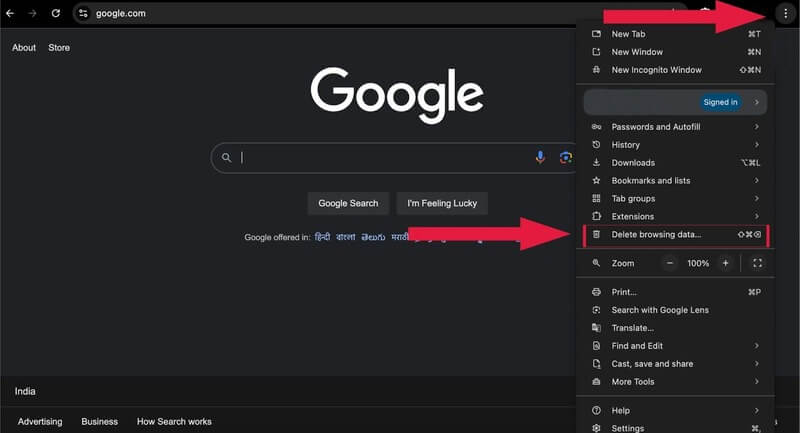
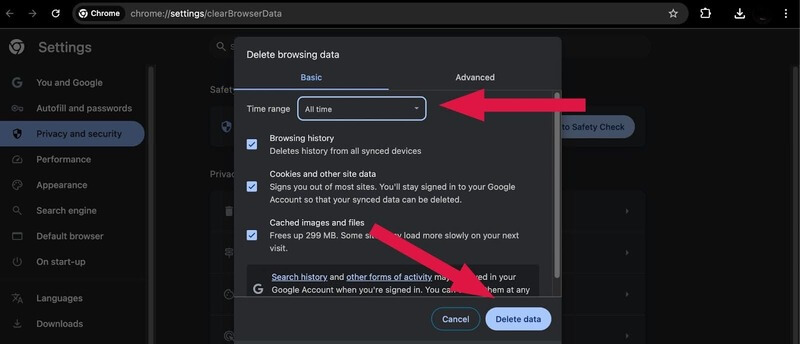
The above process will help you clear the cache in Chrome.
Steps to Clear Browser Cache in Mozilla Firefox
Below are the steps that you must follow to clear the browser cache in Mozilla Firefox:
- Click the Hamburger icon in the top right corner of the browser and select History from the dropdown menu.
- In the next menu, select Clear recent history.
- A popup window will open. Select the Cache option and any other items you’d like to remove from your browser’s saved files, such as browsing history, cookies, search history, and data items like site settings and offline website data.
- Use the Time range to clear the menu to choose the desired timeframe.
- After selecting all your options, click the Clear button to proceed.
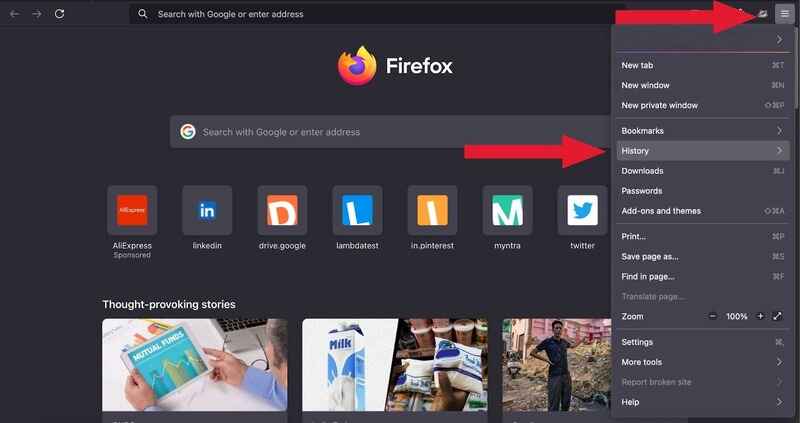
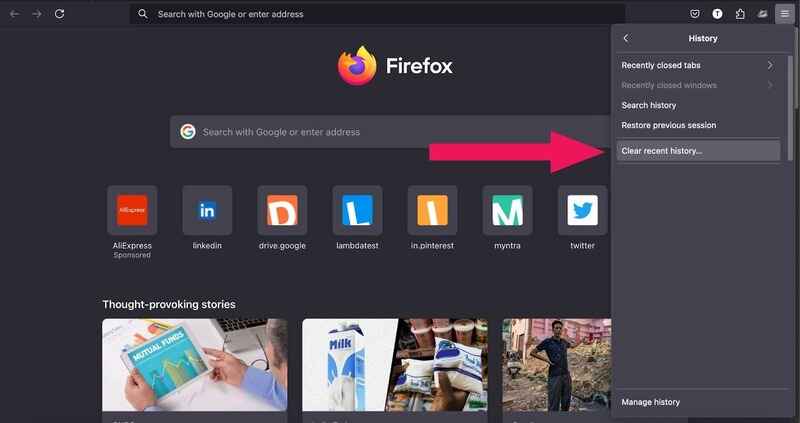
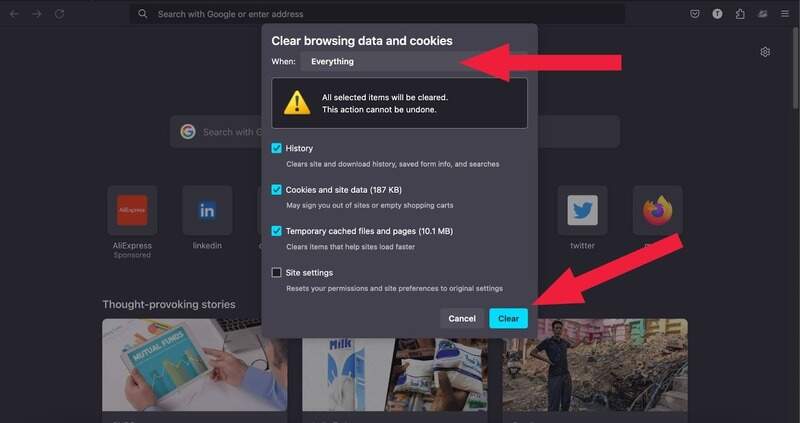
The above process will help you clear the cache in Firefox.
Steps to Clear Browser Cache in Safari
Below are the steps that you must follow to clear the browser cache in the latest version of Safari browser:
- Open Safari on your device.
- Go to Safari in the top menu bar, then select Clear History from the dropdown menu.
- A popup window will appear, allowing you to choose a timeframe for deleting the cache data. Options include:
- Last Hour
- Today
- Today and Yesterday
- All History
- After selecting your preferred time frame, click the Clear History button to finish.
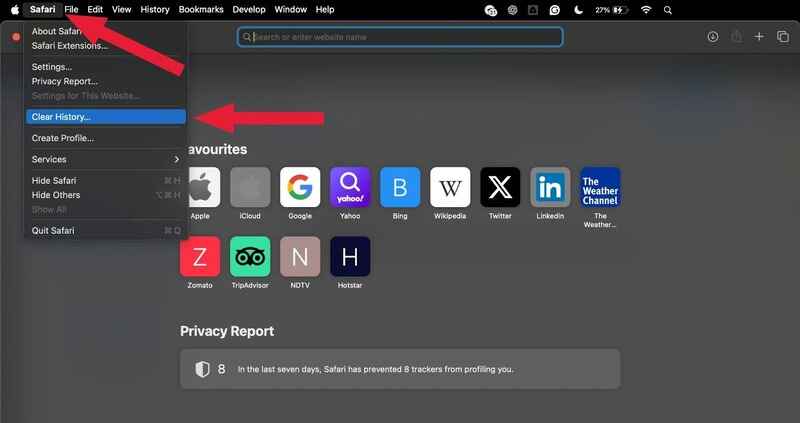
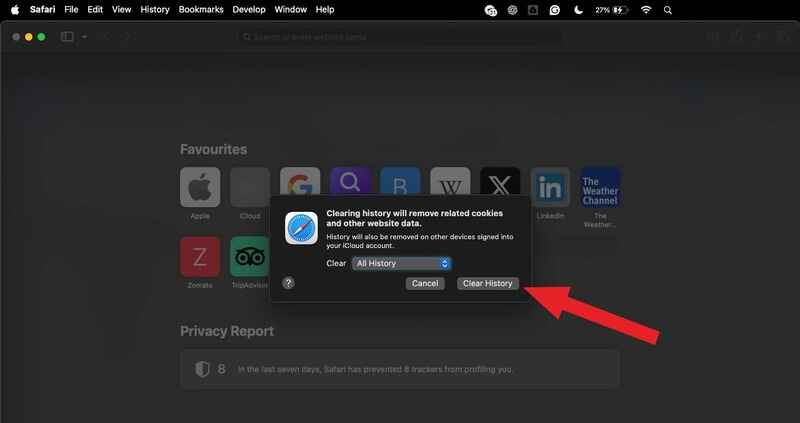
The above process will help you clear the cache, cookies, browsing history, and website data in Safari.
Steps to Clear Browser Cache in Microsoft Edge
Below are the steps that you must follow to clear the browser cache in Microsoft Edge:
- Launch Microsoft Edge.
- Choose the Settings option.
- In the sidebar, go to the Privacy, Search, and Services section.
- In the Delete browsing data section, click the Choose What to Clear option.
- Select the time frame from the Time Range section for which you want to clear your browsing data.
- Make sure that Cached images and files are checked. You can also select other types of data.
- Click the Clear Now button to confirm your selection.
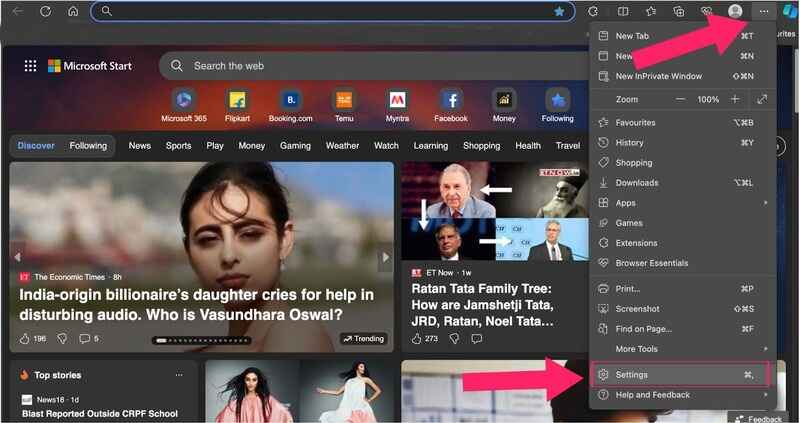
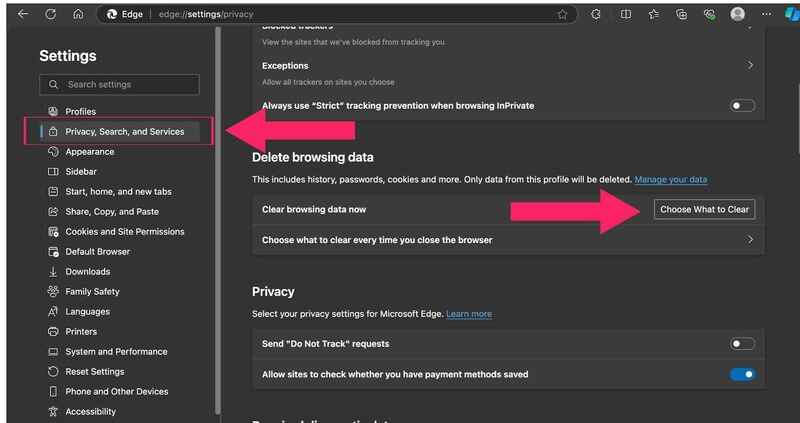
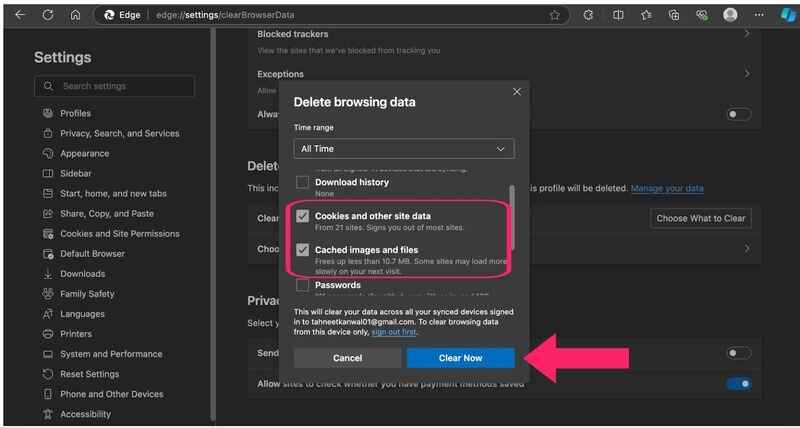
The above process will help you clear the cache in Microsoft Edge.
Steps to Clear Browser Cache in Opera
Below are the steps that you must follow to clear the browser cache in Opera:
- Click on the Opera menu and select Settings.
- In the sidebar menu, select the Privacy & security section.
- Click on Delete browsing data.
- Select All time as the time range to clear the entire cache from your browser.
- Finally, click on Delete data to complete the process.
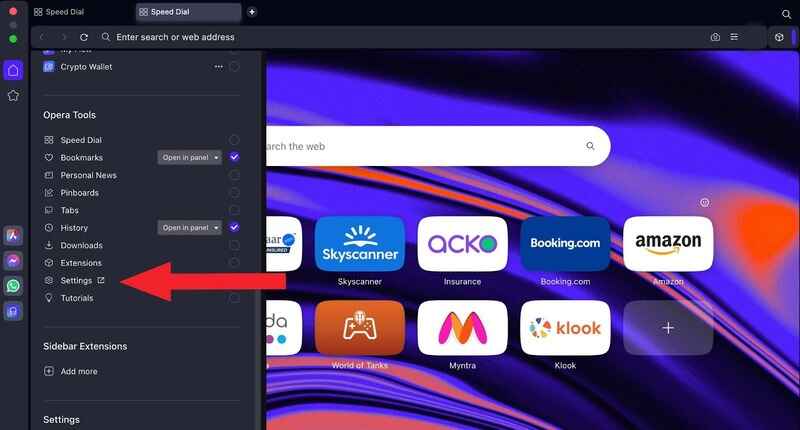
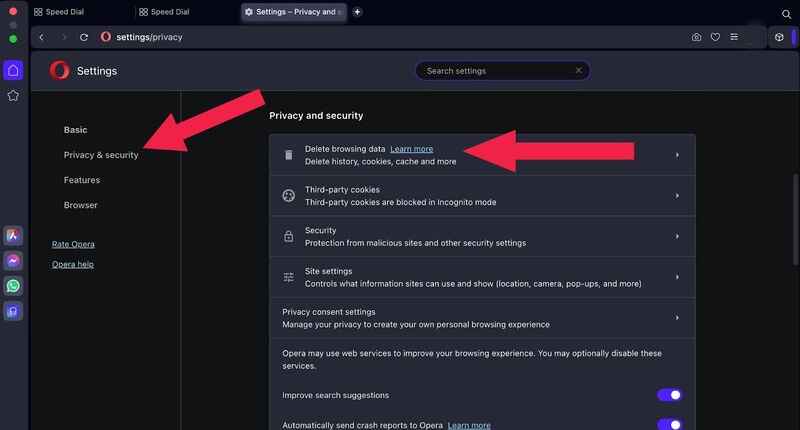
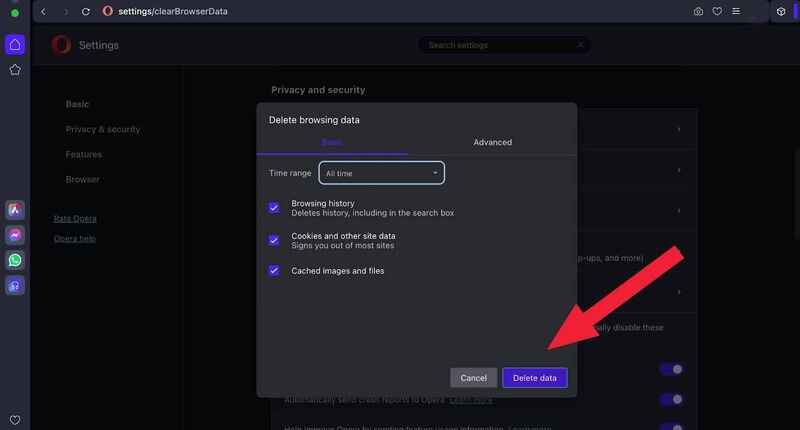
The above process will help you clear the cache in Opera.
How Do AI Browser Agents Handle Cached Data?
AI browser agents keep their own profile directory, so clearing the cache in Chrome does not clear theirs. Each agent reads and writes cache and cookies in a separate location, and it has to be cleared where the agent stores it.
- Separate profile folders: AI browsers such as Perplexity Comet and ChatGPT Atlas store cache and cookies in their own profile. Clear the cache from that browser settings menu, not from Chrome.
- Persistent MCP profile: the Playwright MCP server runs a persistent profile by default and keeps cookies and login state between sessions, so a stale cached asset survives from one agent run to the next.
- Isolated sessions: passing the isolated flag starts each Playwright MCP session on an empty profile and discards the storage state when the browser closes, which guarantees the agent sees fresh content.
- Seeded storage state: the storage-state argument loads saved cookies into an isolated session, so an agent stays signed in to a site without inheriting an old cache.
- Service workers: a registered service worker keeps serving old responses after a normal cache clear. Remove it from DevTools under Application > Storage > Clear site data.
Treat the agent profile as one more browser to clear. Any browser automation run that reads a cached bundle will report a result the live site no longer matches.
What Is Cache?
Cache, in the context of browsers and apps, is like a temporary storage space. When you visit a website, your browser saves pieces of that site (like images, scripts, and stylesheets) in this cache.
The next time you visit, your browser loads these items from your device’s cache instead of re-downloading them, which speeds up loading times.Cache can also be used by apps, allowing them to store frequently accessed data for faster performance.
Example: When you visit a news site, your browser caches images and styles. When you return to the site later, these files load faster because they’re already stored on your device.
Why Clear Cache?
Here are some reasons why it’s beneficial to clear cache regularly:
- Resolve Display Issues: Sometimes, cached files cause outdated information or broken pages. Clearing the cache ensures you see the latest version of a page.
- Improve Performance: For devices with limited storage, cache buildup can slow things down. Clearing it may help regain speed.
- Protect Privacy: Cache sometimes holds sensitive info from websites. While it’s not always personal data, clearing cache can minimize privacy risks.
- Troubleshoot Problems: If a website isn’t working correctly, clearing the cache is often a quick fix, as it forces the website to reload fresh files.
What Does Clear Cache Mean?
Clearing the cache means deleting temporary files that your browser or device stores to help load frequently visited sites and apps faster. By clearing it, you remove stored data like images, scripts, and login information, which can resolve loading issues, improve device performance, and ensure you’re viewing the latest version of web content.
What Happens When I Clear Cache?
Below is the list that helps you understand what happens when you clear the cache:
- Initial Load Times Increase: The first time you revisit a site after clearing the cache, it might load a bit slower than usual since it has to fetch everything from scratch.
- Bug Fixes: Clearing the cache can resolve issues like incorrect loading, page layout problems, or outdated content.
- Free Up Storage: Cached data can pile up over time, consuming significant storage. Clearing it can help free up space, especially on mobile devices with limited storage.
Why Clear Cookies?
Clearing cookies has some specific benefits and considerations:
- Privacy and Security: Cookies can store details about your browsing habits and preferences, which websites can use for targeted ads. Clearing cookies limits the tracking information stored on your device.
- Troubleshoot Issues: Clearing cookies can resolve login problems or issues related to incorrect settings on certain websites.
- Log Out of Websites: Deleting cookies will log you out of most sites, which can be beneficial if you’re switching devices or are concerned about privacy.
- Remove Targeted Ads: If you prefer not to see ads tailored to your browsing behavior, clearing cookies can help remove this personalized tracking.

Conclusion
When you visit a website, your browser saves some files temporarily to load the page faster next time. However, regularly clearing the cache can resolve display issues, refresh outdated content, and keep browsing fast and smooth. Each browser has the option to clear the browser cache, usually found in its settings or tools menu, though the steps may vary. Be sure to follow the right steps for your specific browser.
Hope this blog makes it easy for you to clear your browser cache. Happy browsing!
Author

Tahneet Kanwal
Blogs: 29


Tahneet Kanwal is a freelance technical content writer with over 2 years of hands-on experience in frontend development and technical writing. She holds a B.Tech in Information Technology from University College of Engineering and Technology (UCET). Tahneet creates clear, SEO-optimized content on web technologies, software testing, and automation tools, leveraging her skills in HTML, CSS, JavaScript, React, Tailwind CSS, and various tools like VS Code, GitHub, Figma, and Canva. She is the author of 30+ technical blogs and an open-source contributor through Hacktoberfest. She has also participated in the Google Cloud Arcade Facilitator Program and holds certifications as a Meta Android Developer (Coursera) and in Web Development (Internshala). Over time, she has evolved her writing to prioritize structure, readability, and SEO while maintaining technical depth.


Clear Browser Cache FAQs
Did you find this page helpful?
More Related Blogs
TestMu AI forEnterprise
Get access to solutions built on Enterprise
grade security, privacy, & compliance
- Advanced access controls
- Advanced data retention rules
- Advanced Local Testing
- Premium Support options
- Early access to beta features
- Private Slack Channel
- Unlimited Manual Accessibility DevTools Tests