

Power Your Software Testing with AI Agents and Cloud
The Native AI-Agentic Cloud Platform to Supercharge Quality Engineering. Test Intelligently and Ship Faster.


- TestMu AI (Formerly LambdaTest)
- /
- Blog
- /
- Pop-Ups on Chrome: How to Allow or Disable Them
Pop-Ups on Chrome: How to Allow or Disable Them
Learn how to allow, enable, or disable pop-ups on Chrome, manage settings for specific sites, and stop unwanted pop-up ads for good.
Last Updated on:
Chrome lets you allow or block pop-ups for every site or for one site at a time, through its Site settings menu. This control sits apart from Chrome's notification permissions and cookie warnings, so blocking one setting does not affect the other two. This guide covers allowing pop-ups on Chrome, allowing them for specific sites, disabling them, blocking specific sites, troubleshooting stubborn pop-ups, and how Chrome's automatic pop-up protections work today.
Key Takeaways
- Chrome's pop-up and redirect controls sit under Settings, Privacy and security, Site settings, Pop-ups and redirects, separate from notification permissions and cookie settings.
- Allowing pop-ups for one specific site does not change the global pop-up setting for every other site.
- Blocking pop-ups from a specific site works through the Customized behaviors list inside the same Site settings menu used to allow them.
- Pop-ups that survive a settings change often trace back to browser cache, malware, or an outdated Chrome build.
- Chrome automatically blocks notification pop-ups from sites with a pattern of intrusive or misleading prompts, without a manual per-site toggle.
- Android Chrome manages pop-ups through the same Site settings menu, reached from the three-dot menu instead of a desktop toolbar.
Steps to Allow Pop-Ups on Chrome
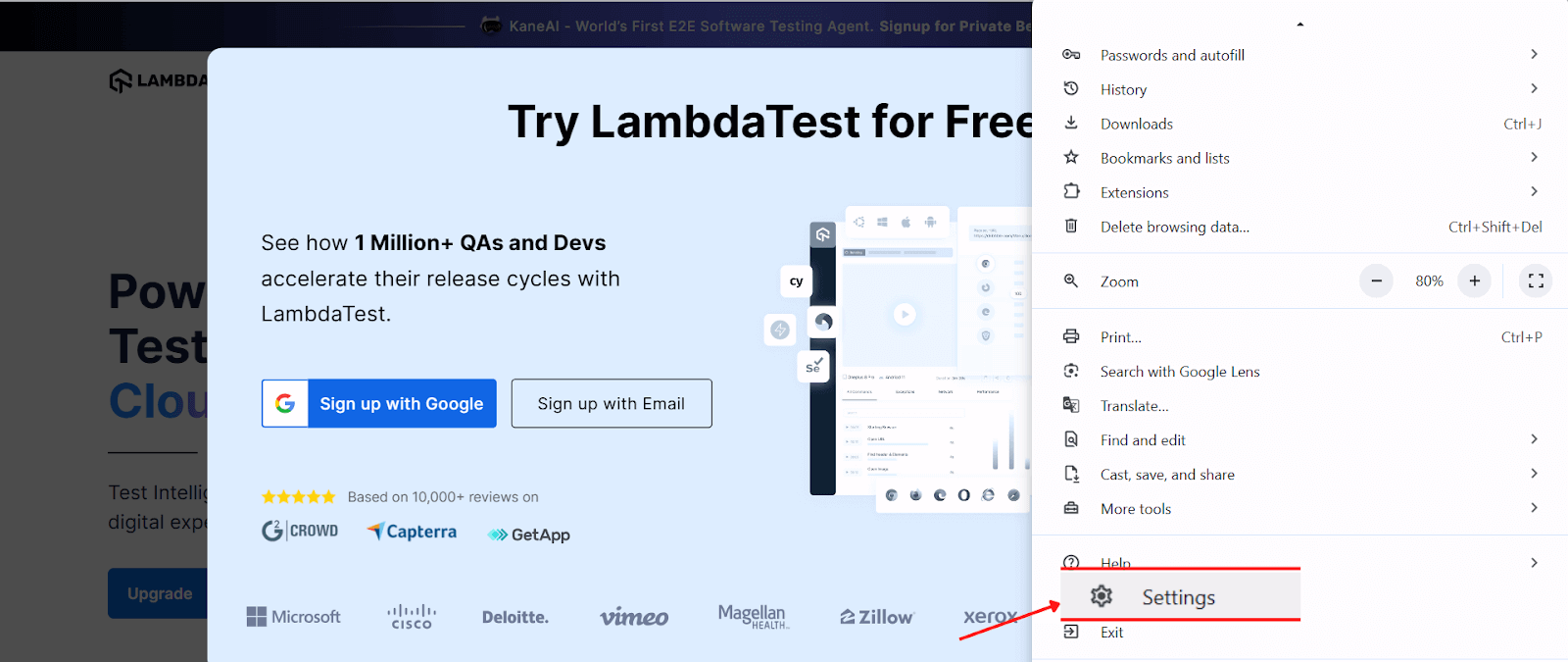
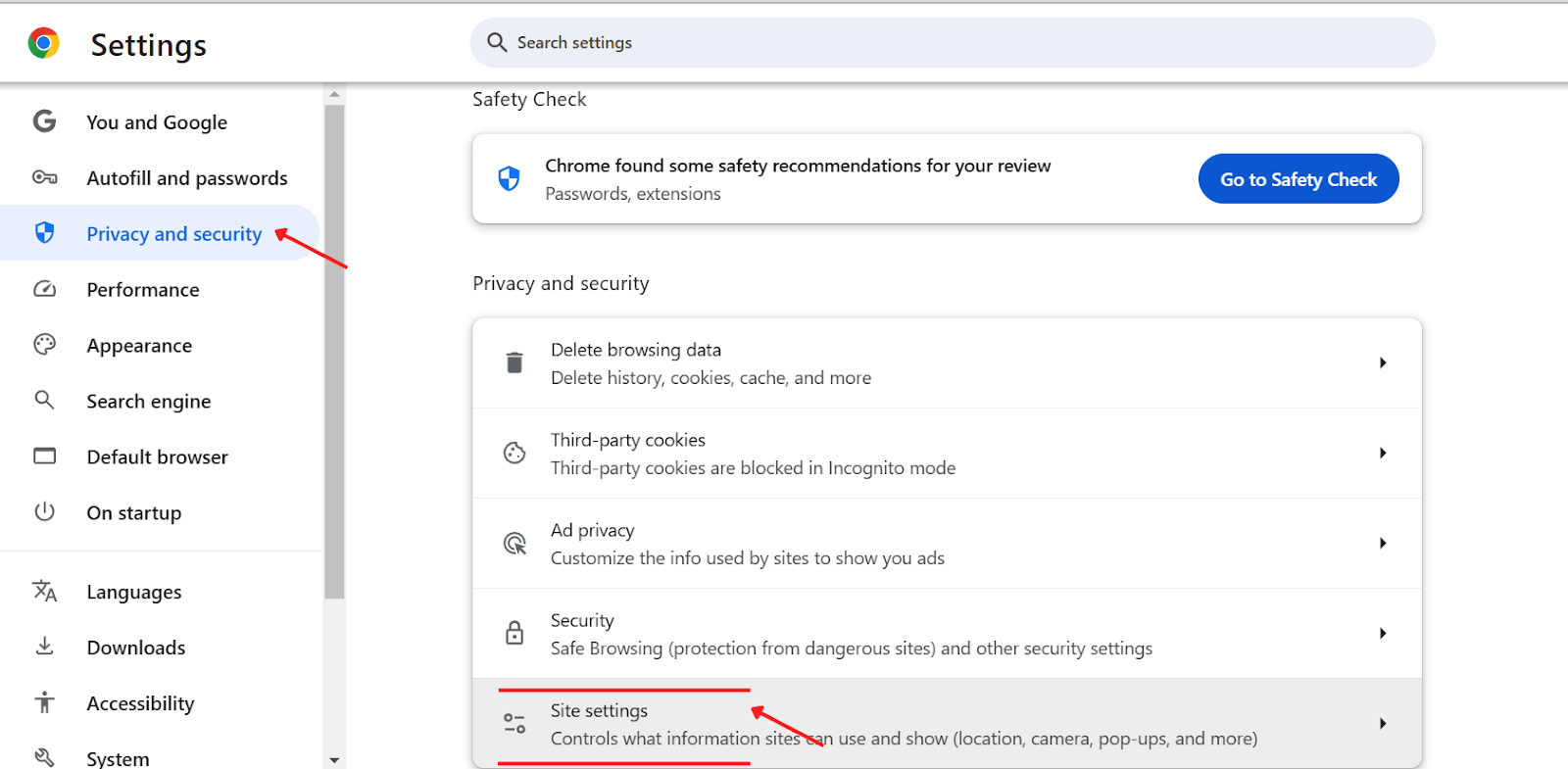
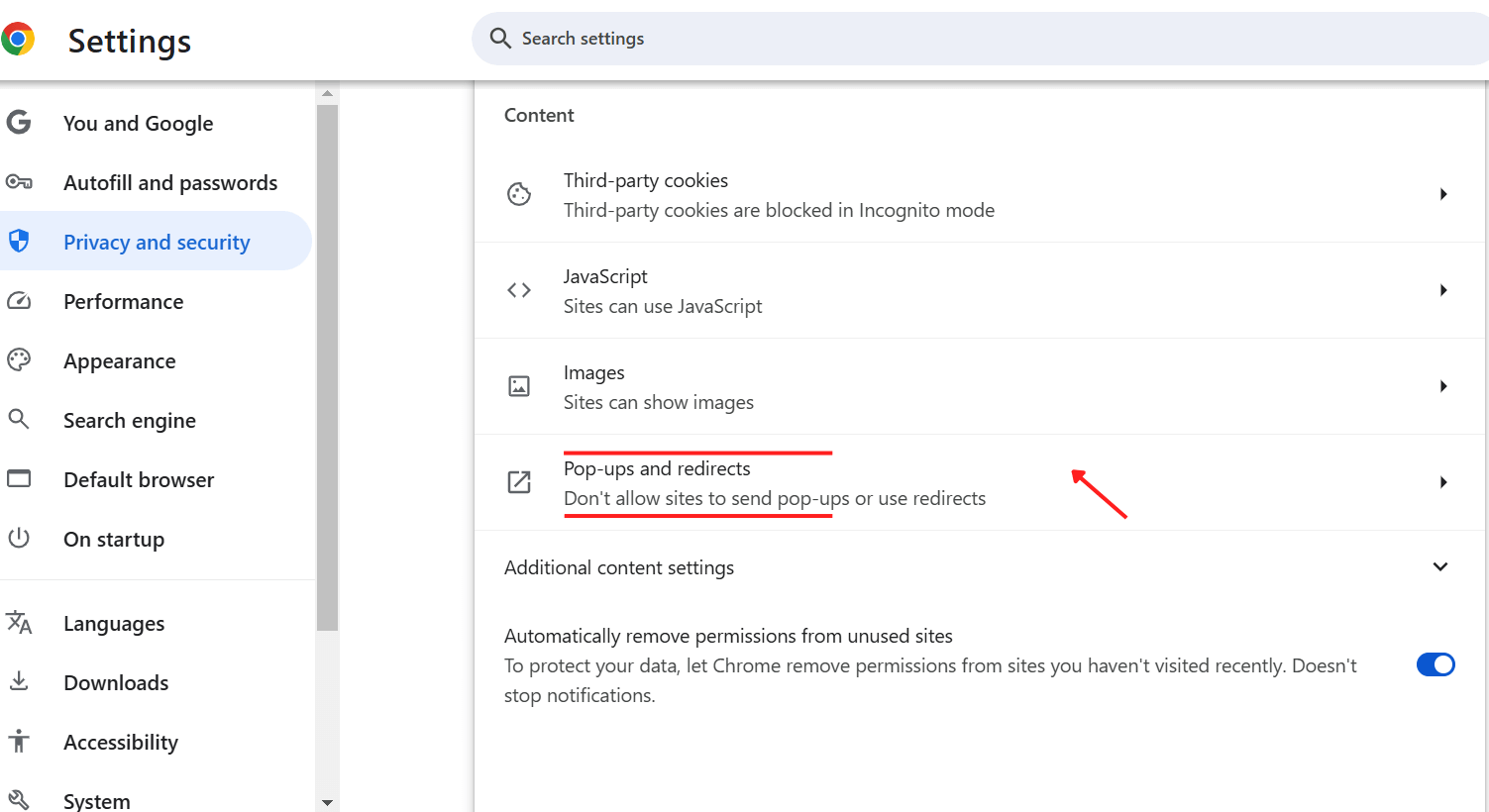
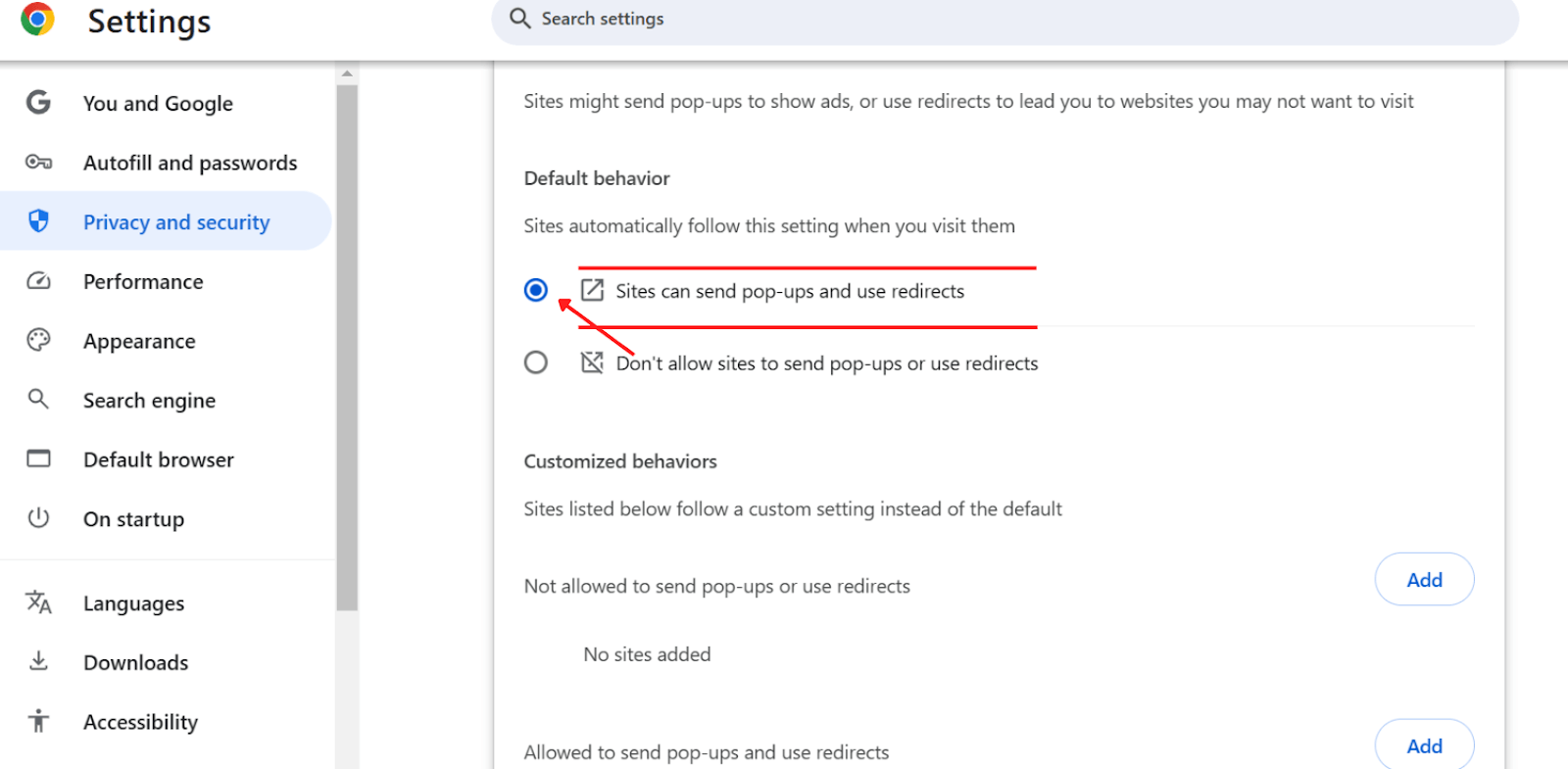
Follow these steps to allow pop-ups on your desktop:
- Open Chrome, click on the three dots at the top-right corner and Navigate to Settings.
- Go to Privacy and security and Select Site settings.
- Click Pop-ups and redirects.
- Change the global setting to “Sites can send pop-ups and use redirects”.
Steps to Allow Pop-Ups for Specific Sites
Enabling pop-ups can be necessary for particular sites that rely on them for essential features like forms, login windows, or tutorials. If you find that a specific website’s pop-ups are getting blocked and you want to enable them, follow these steps:
- Navigate to the website where you want to allow pop-ups (in this example, taking TestMu AI), and open the Site settings.
- When a pop-up is blocked for that particular website, you’ll see Pop-ups and redirects selected as “Block”.
- Click on the icon and choose Allow (default).
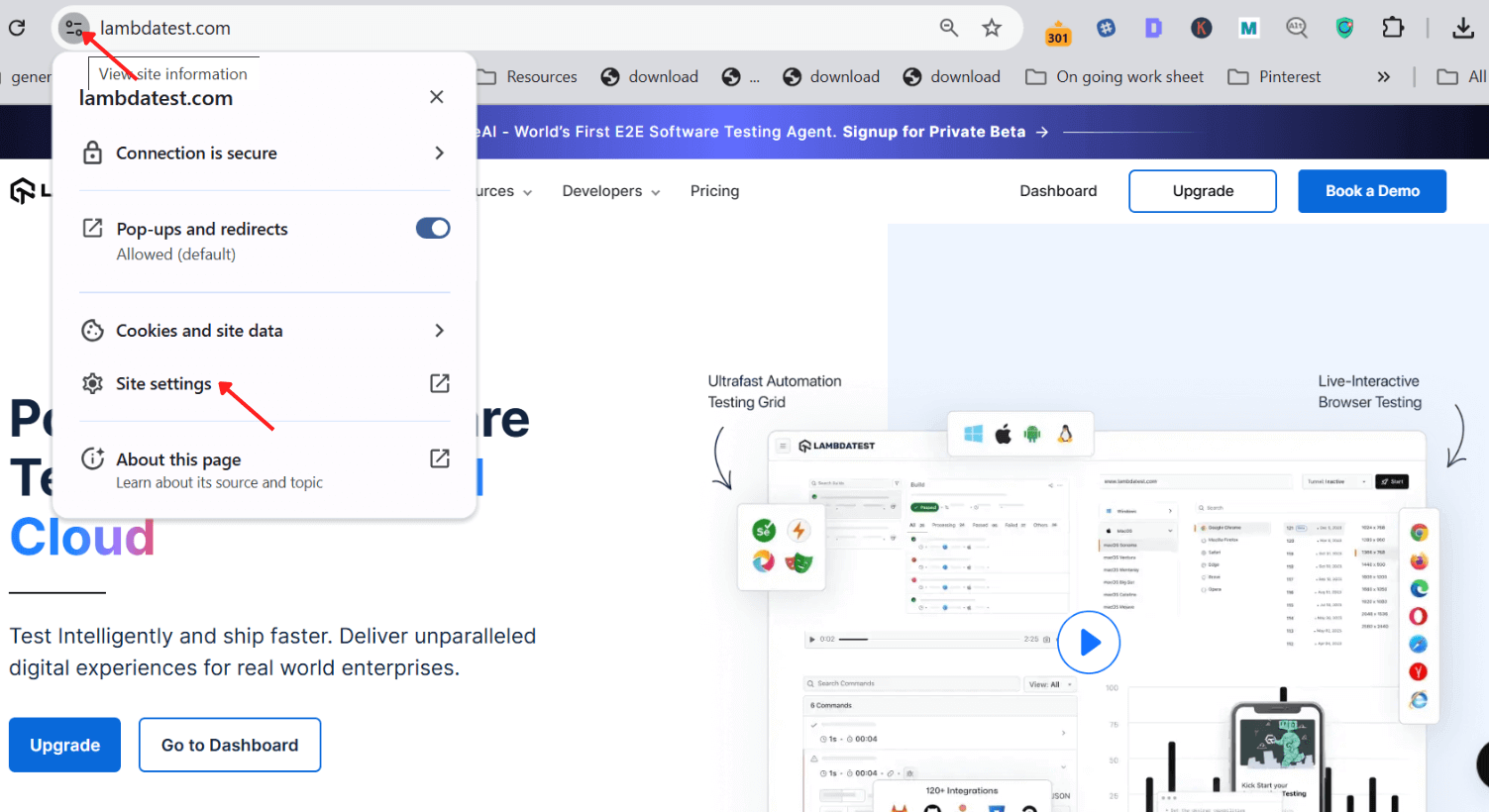
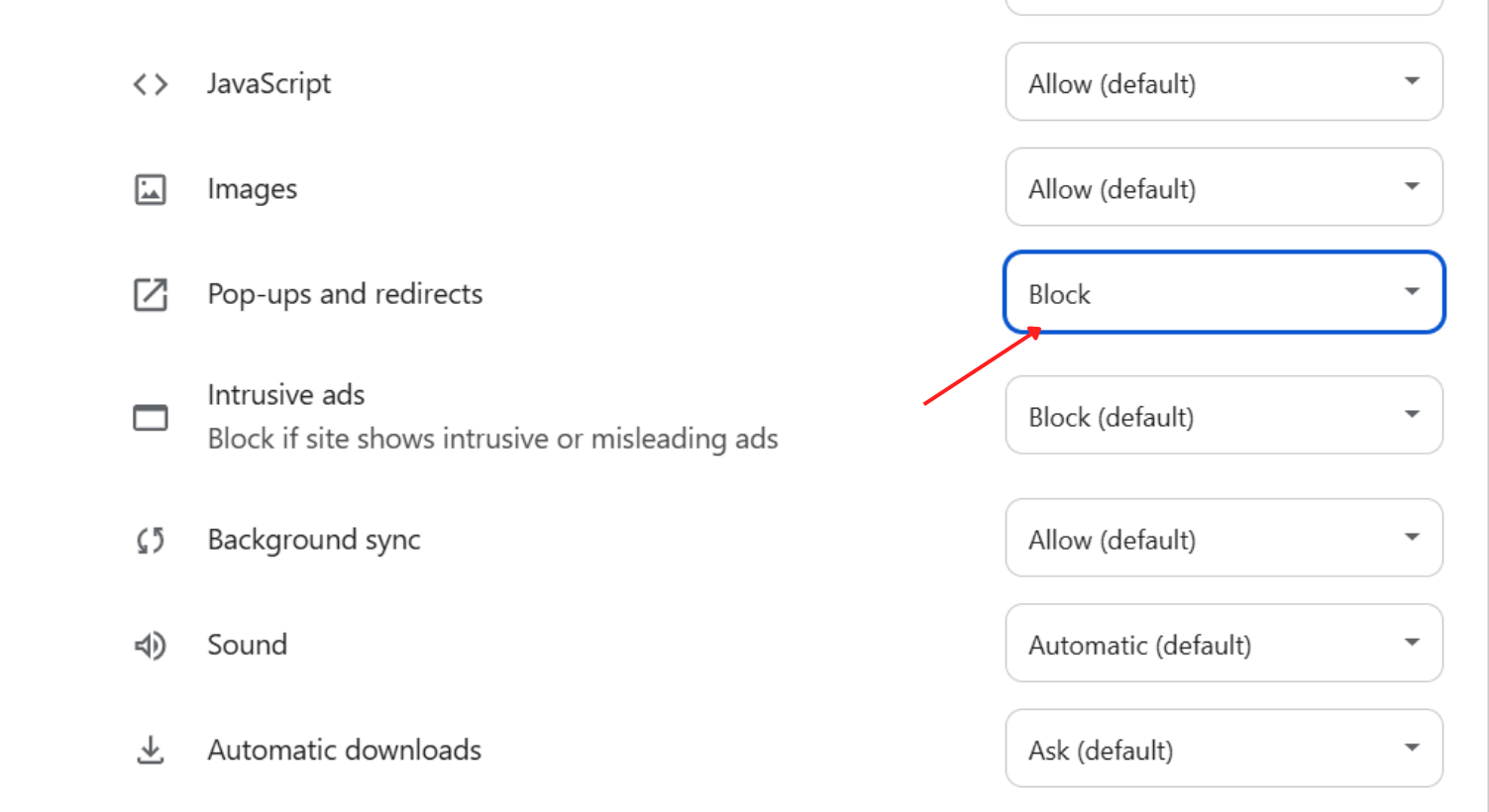

Enabling pop-ups for specific sites ensures you get the functionality you need without compromising overall browsing safety.

Note: Test your web page on the latest to legacy Chrome Browser versions. Try TestMu AI Today!
Steps to Disable Pop-Ups on Chrome
Blocking Pop-Ups Globally:
- Open Chrome, and click on the three dots in the top-right corner.
- Go to Settings, then Privacy and security.
- Select Site settings and choose Pop-ups and redirects.
- Set the global option to “Don’t allow sites to send pop-ups or use redirects”.
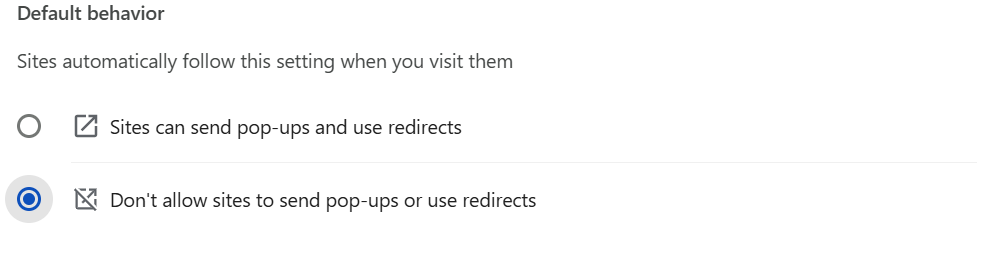
Steps to Block Pop-Ups from Specific Sites
- Go to Settings, select Privacy and security, then choose Site settings, and go to Pop-ups and redirects (the same first four steps as for allowing pop-ups).
- Scroll down to the Customized behaviors option.
- Click on Add to enter the URL of the site you wish to block.
- Click the Add button.
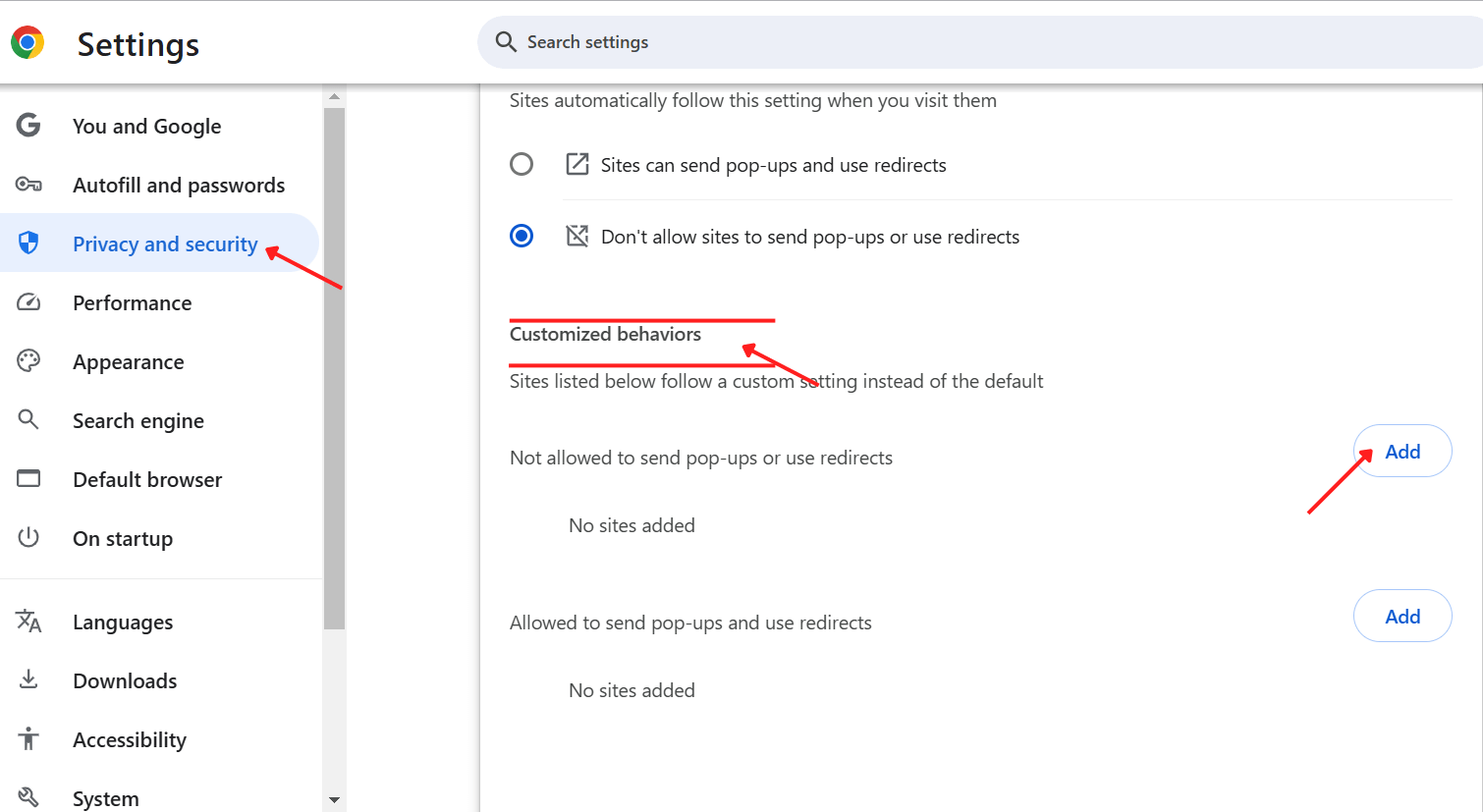
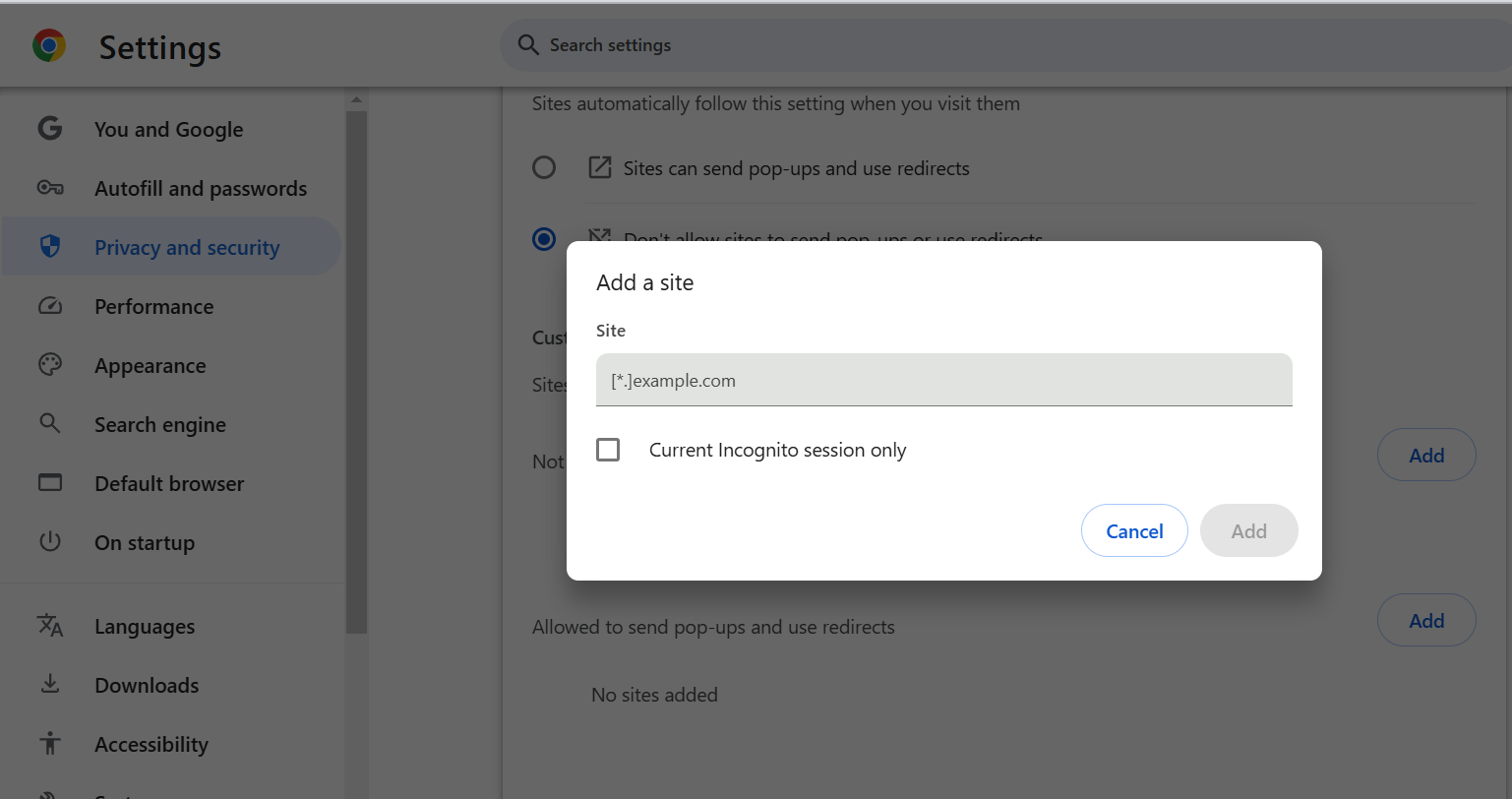
This ensures that pop-ups are blocked from sites you don’t trust or find unnecessary.
Steps to Troubleshoot Pop-Up Issues
If you are still experiencing unwanted pop-ups after adjusting your settings in Chrome latest version, consider these steps:
- Clear Your Browser Cache: Cached files may conflict with your settings; see how to clear browser cache in Chrome.
- Check for Malware: Run a malware scan to ensure your system is not infected; Chrome also isolates each site through browser sandboxing, which limits how far a malicious pop-up page can reach.
- Update Chrome: Ensure you have the latest version of Chrome to prevent security risks.
Does Chrome Use AI to Block Unwanted Pop-Ups Automatically?
Yes. Chrome automatically blocks notification pop-ups from sites with a pattern of intrusive or misleading prompts, and defaults borderline sites to a quieter request instead of an interruptive one. This automated layer sits alongside the manual Site settings controls above, not instead of them.
- Automatic blocking: Chrome tracks sites whose notification pop-ups are intrusive or misleading, automatically blocks further requests from them, and recommends keeping the block in place the next time you visit, per Google's own Chrome Help documentation.
- Quieter default prompts: New or borderline sites get a muted bell-icon request instead of an interruptive pop-up while Chrome evaluates their pattern, kept separate from the pop-up and redirect list in Site settings. This permission state runs on the Permissions API browser support that Chrome, Firefox, and Safari all implement.
- Scope of this protection: This automatic handling covers notification pop-ups, not the JavaScript pop-ups and redirects controlled from Site settings, so ad and redirect pop-ups still need the manual steps above.
- Verifying prompt behavior: Site owners who ship their own permission prompts can confirm how they render across devices with push notification testing on real devices.
Final Words
Managing pop-ups on Chrome is essential for maintaining a smooth and secure browsing experience. By understanding how to allow or disable pop-ups effectively, you can reduce distractions, protect your privacy, and ensure that important site features work properly. Always exercise caution and only allow pop-ups from trusted sites to keep your online experience safe and enjoyable. Implement these steps, and you’ll have complete control over your browser’s behavior, creating a more tailored and productive web experience.
Author

Bhavya Hada
Blogs: 29


Bhavya Hada is a Community Contributor at TestMu AI with over three years of experience in software testing and quality assurance. She has authored 20+ articles on software testing, test automation, QA, and other tech topics. She holds certifications in Automation Testing, KaneAI, Selenium, Appium, Playwright, and Cypress. At TestMu AI, Bhavya leads marketing initiatives around AI-driven test automation and develops technical content across blogs, social media, newsletters, and community forums. On LinkedIn, she is followed by 4,000+ QA engineers, testers, and tech professionals.


Pop-Ups on Chrome FAQs
Did you find this page helpful?
More Related Blogs
TestMu AI forEnterprise
Get access to solutions built on Enterprise
grade security, privacy, & compliance
- Advanced access controls
- Advanced data retention rules
- Advanced Local Testing
- Premium Support options
- Early access to beta features
- Private Slack Channel
- Unlimited Manual Accessibility DevTools Tests