

Power Your Software Testing with AI Agents and Cloud
The Native AI-Agentic Cloud Platform to Supercharge Quality Engineering. Test Intelligently and Ship Faster.


- TestMu AI (Formerly LambdaTest)
- /
- Blog
- /
- How to Clear Cookies in Windows
How to Clear Cookies in Windows
Learn how to clear cookies in Windows across all major browsers like Chrome, Firefox, Edge, and more. Boost performance and protect privacy today.
Last Updated on:
On This Page
- Steps to Clear Cookies in Windows on Chrome
- Steps to Clear Cookies in Windows on Firefox
- Steps to Clear Cookies in Windows on Microsoft Edge
- Steps to Clear Cookies in Windows on Opera
- Steps to Clear Cookies in Windows on Brave
- Steps to Clear Cookies in Windows on Internet Explorer
- Clear Cookies in Cypress
- Clear Cookies on Test Failure
- Clear Cookies via PowerShell
Cookies and cached files quietly pile up in Windows browsers, slowing performance, showing outdated pages, and creating privacy risks, so clearing them regularly keeps browsing fast and secure. Chrome, Firefox, and Microsoft Edge each clear cookies through their own settings menus, while QA engineers can clear cookies programmatically with Cypress or PowerShell to reset automated test sessions.
Steps to Clear Cookies in Windows on Chrome
Below are the steps to clear cookies in Windows on Chrome :
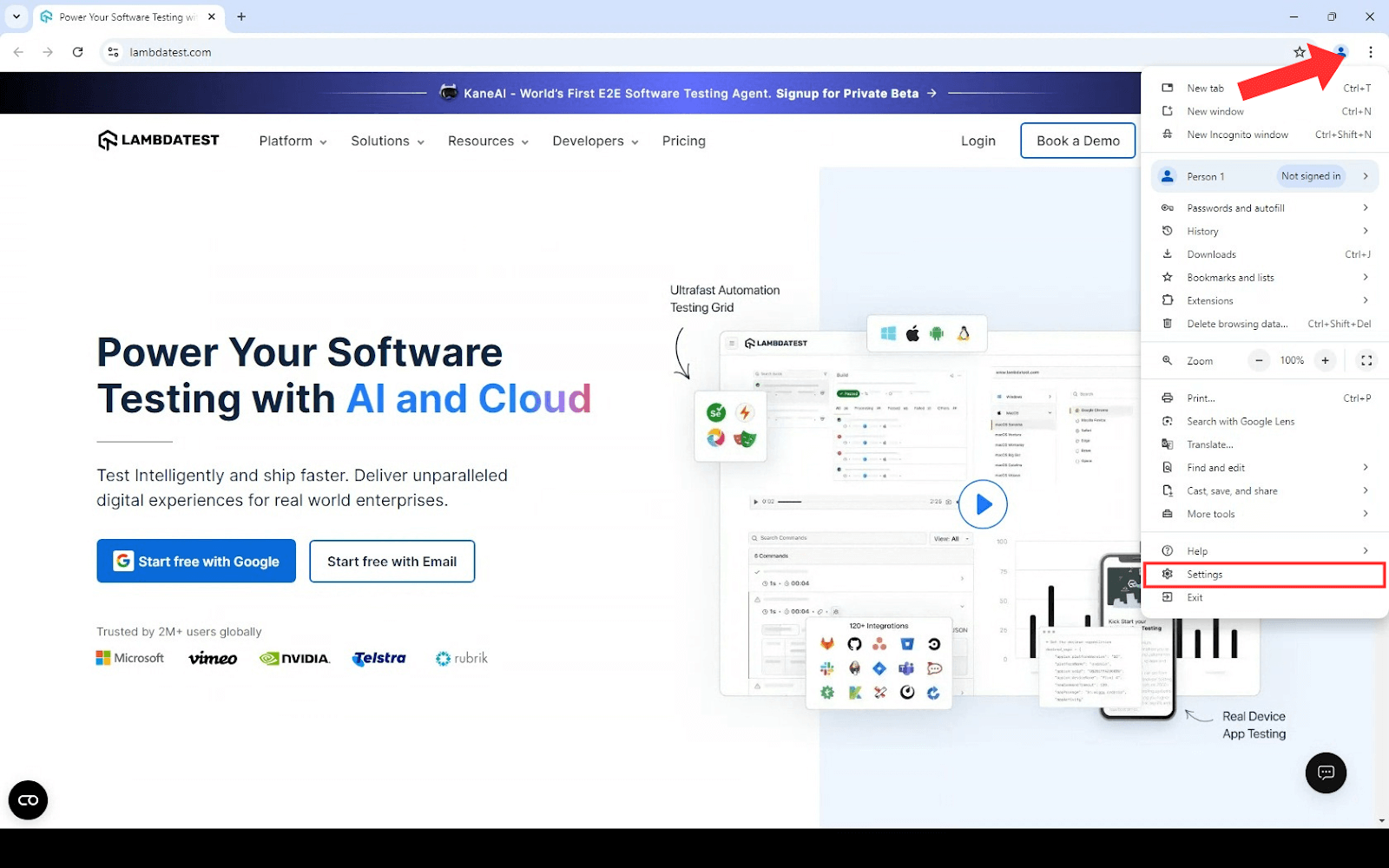
- Open Chrome and click on the three-dots menu in the upper-right corner. Then, select Settings.
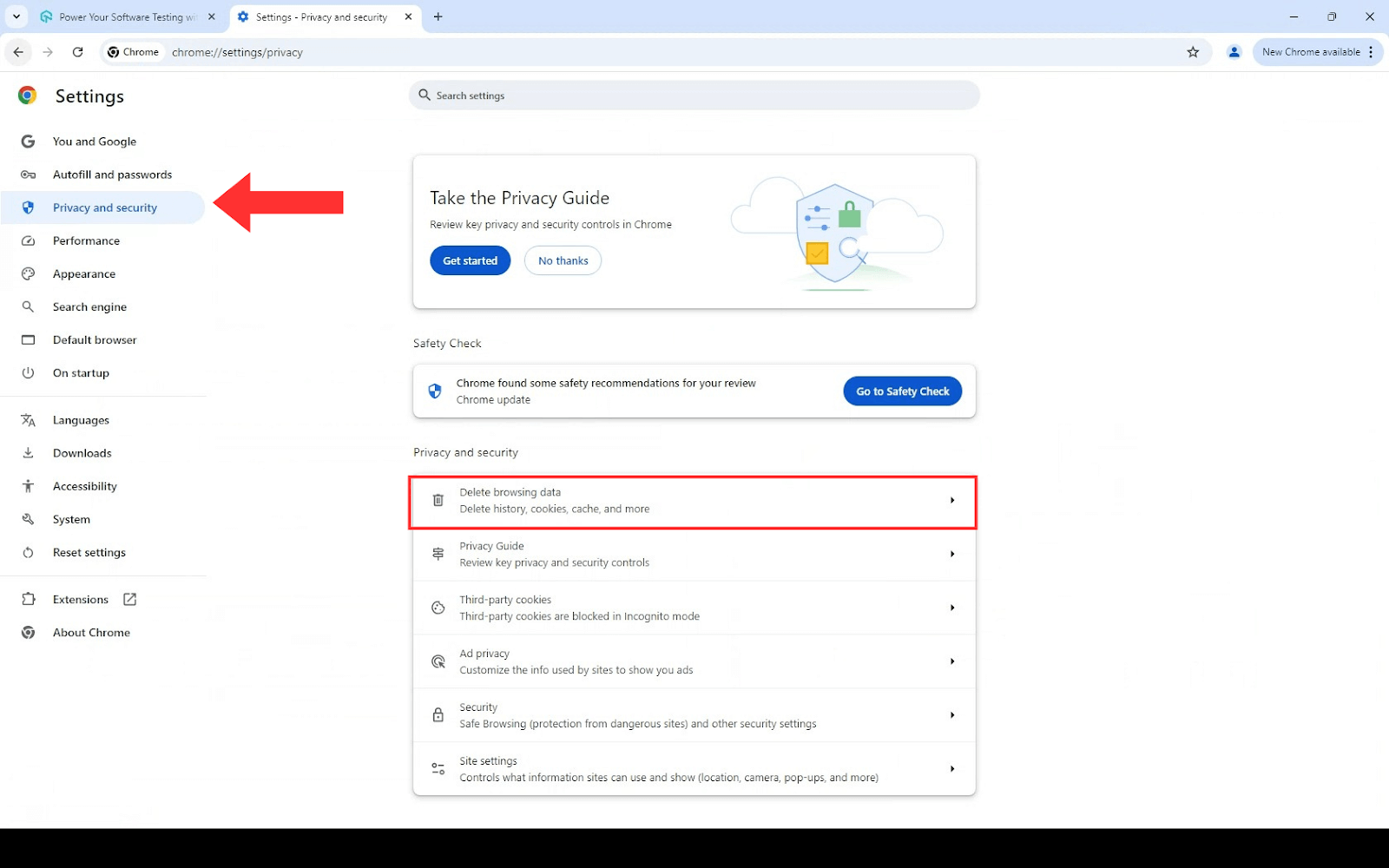
- Scroll down to Privacy and security and click on Delete browsing data.
- Choose the desired time frame for clearing data. Make sure to check the box for Cookies and other site data, along with any other data you wish to remove.
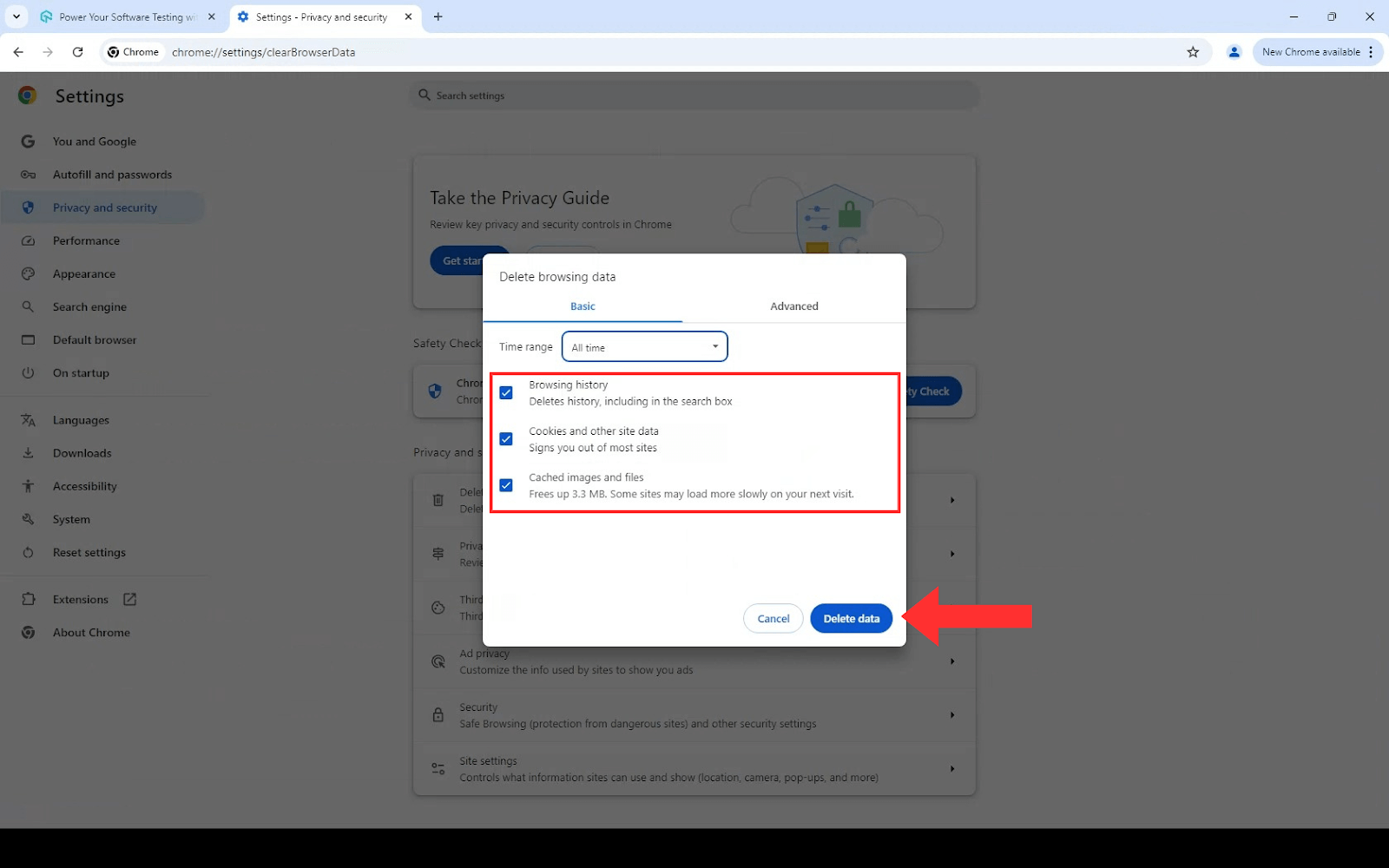
- Click Delete data to remove the selected items.
Steps to Clear Cookies in Windows on Firefox
Below are the steps to clear cookies in Windows on Firefox :
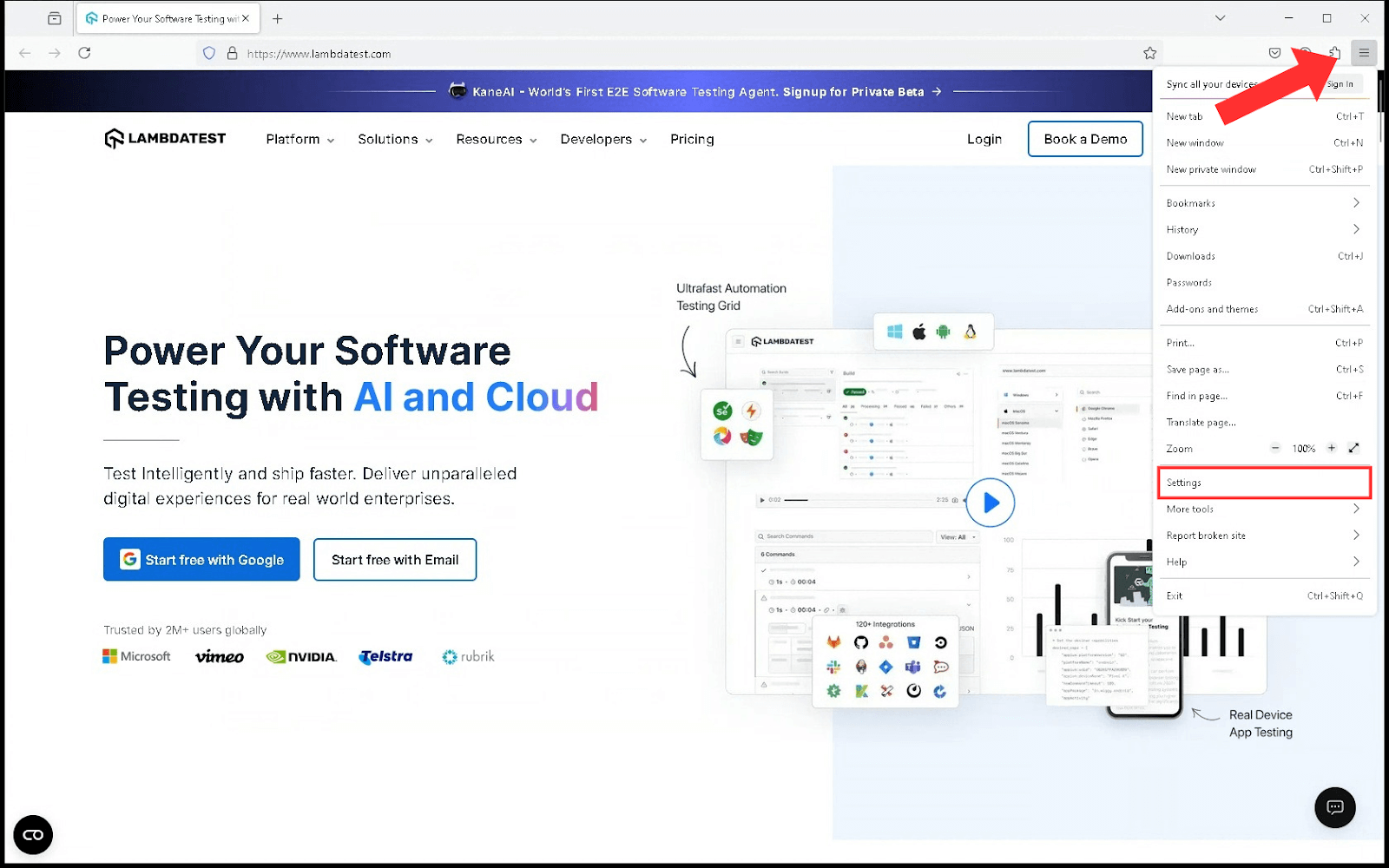
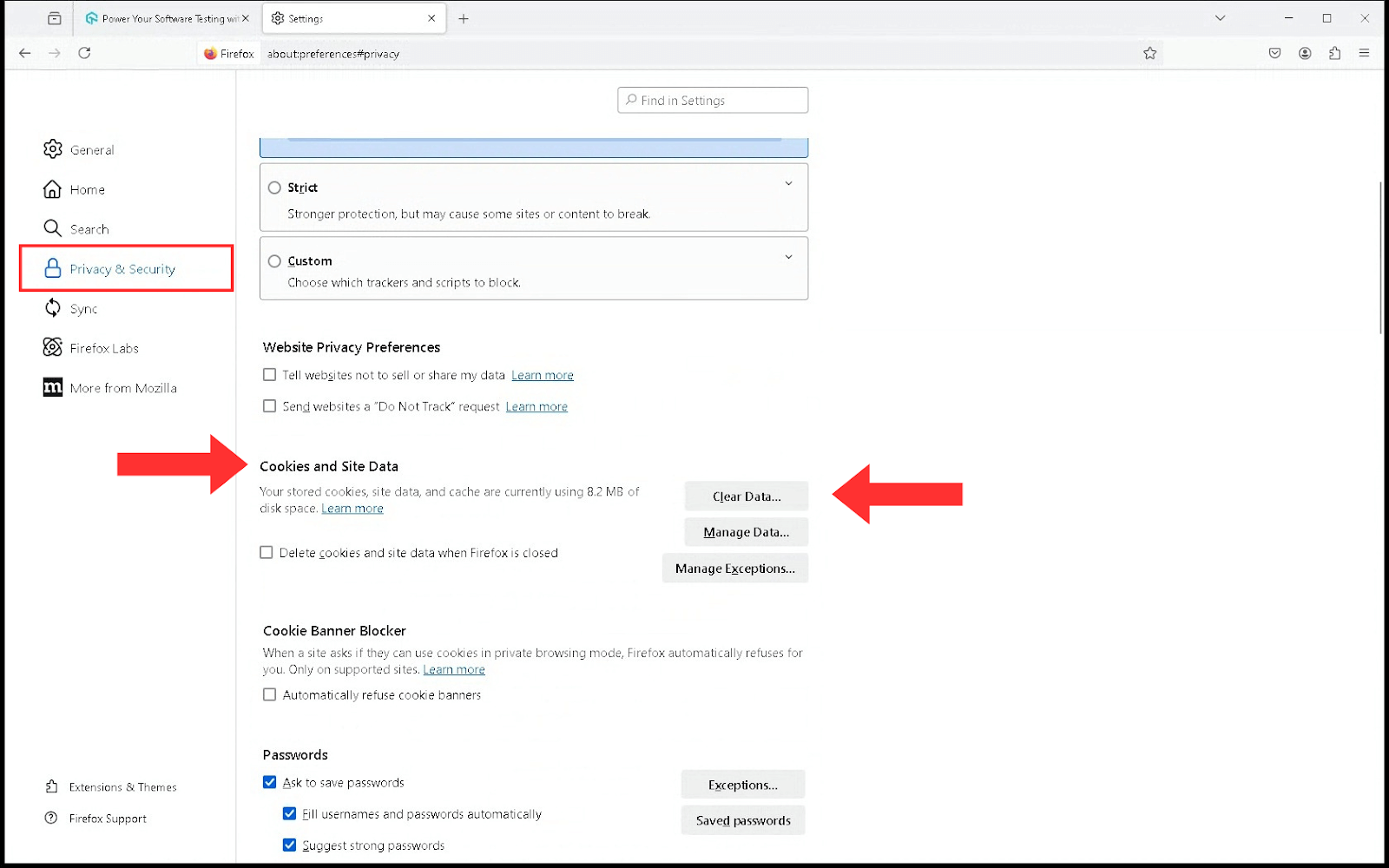
- Open Firefox, click on the Hamburger menu in the upper-right corner and select Settings from the drop-down menu.
- Go to Privacy & Security on the left panel. Then, click on Cookies and Site Data and then click on the Clear Data button.
- Check the boxes for Cookies and Site Data, and Temporary cached files and pages.
- Use the drop-down to select the Time range to clear the menu to choose the desired timeframe.
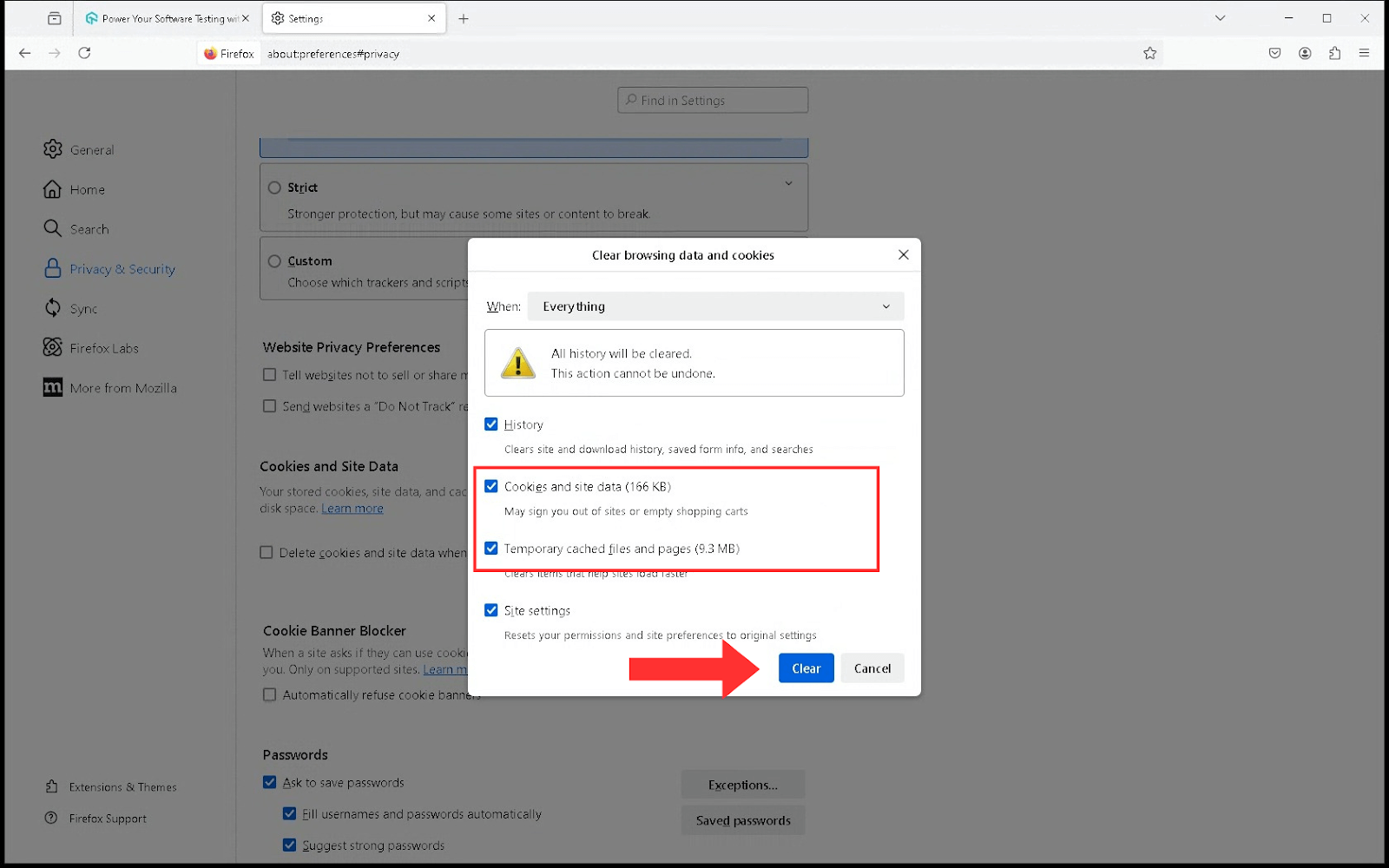
- Click the Clear button to delete the data.
Steps to Clear Cookies in Windows on Microsoft Edge
Below are the steps to clear cookies in Windows on Microsoft Edge:
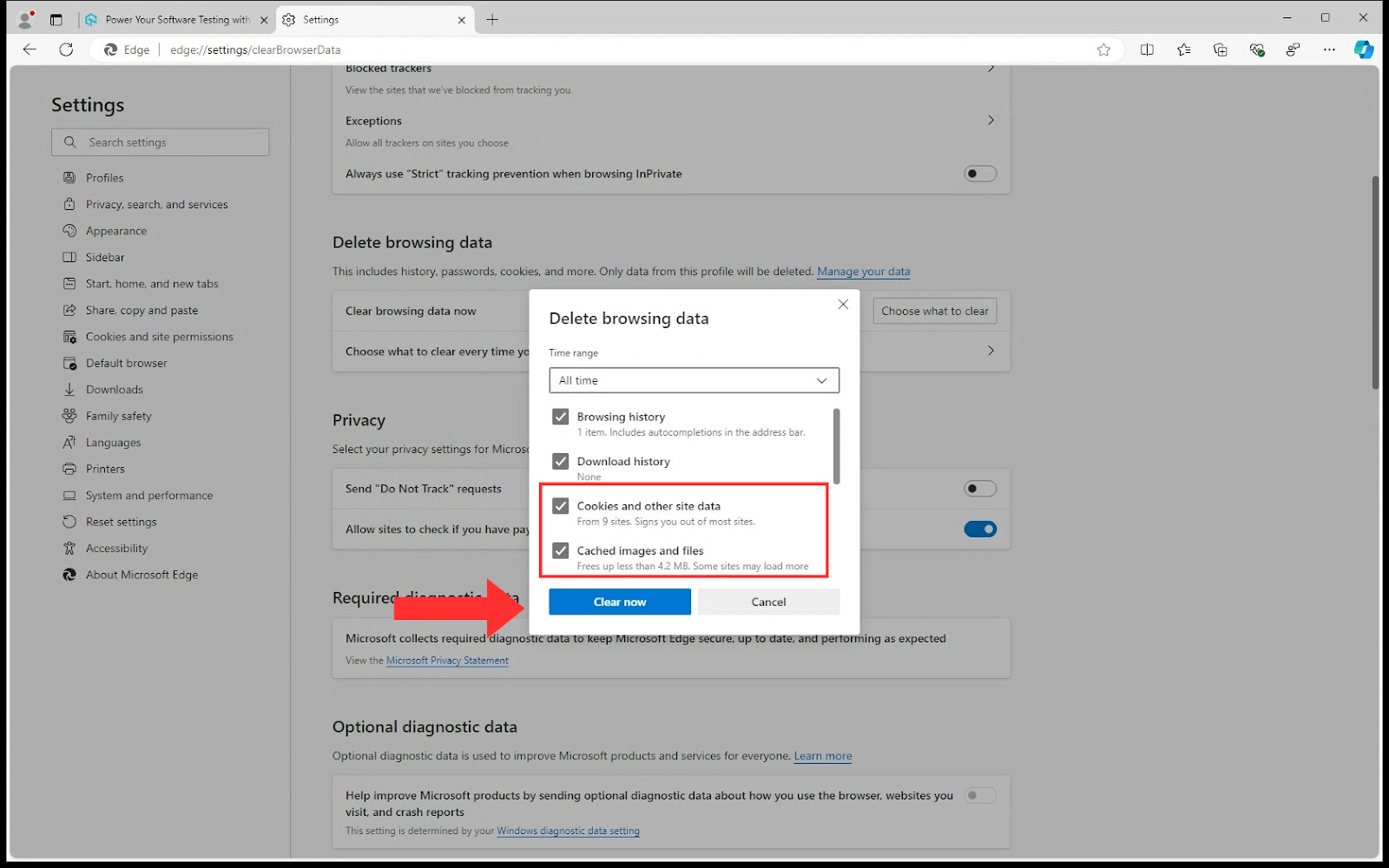
- Open Edge and click on the three dots in the upper-right corner.
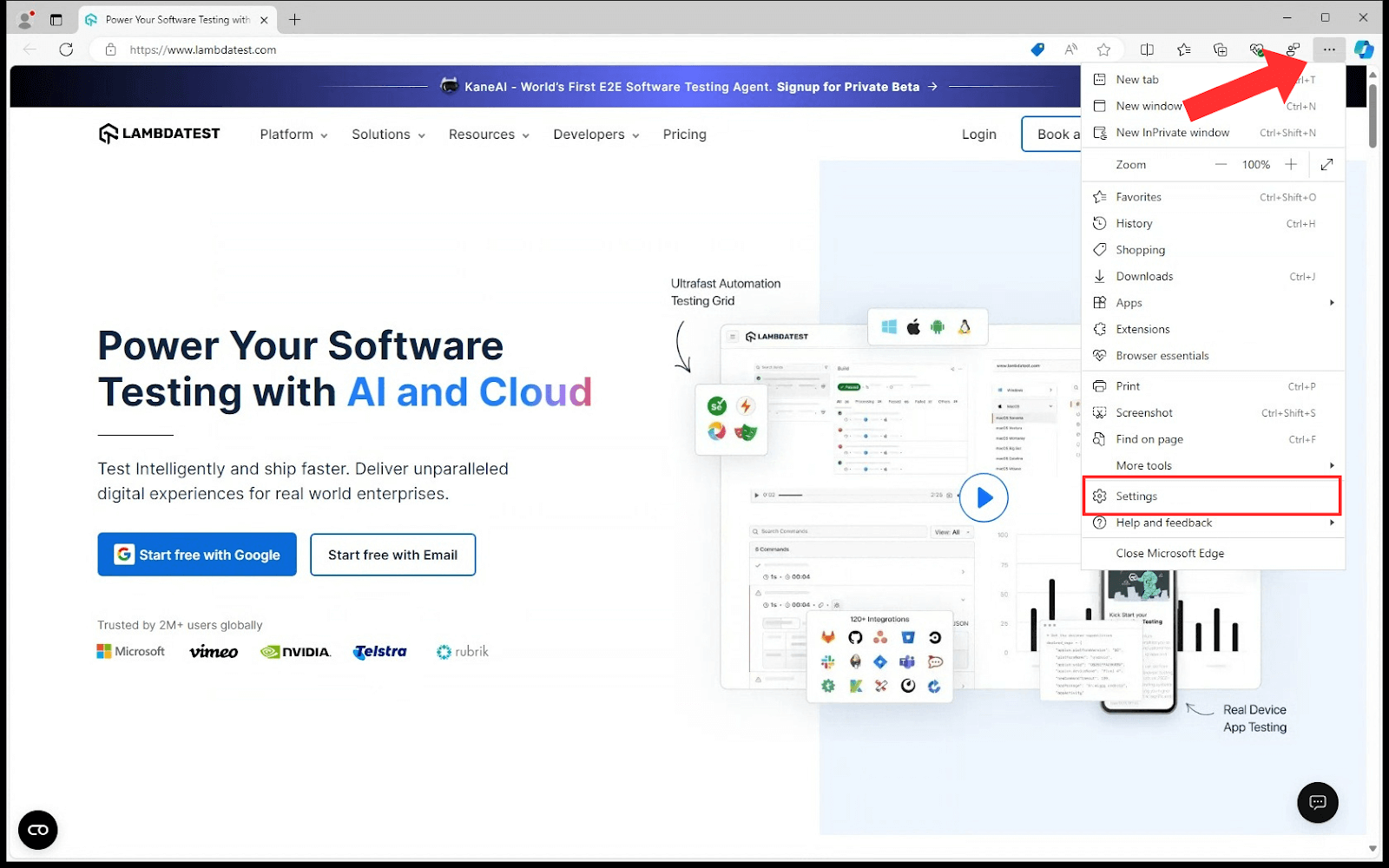
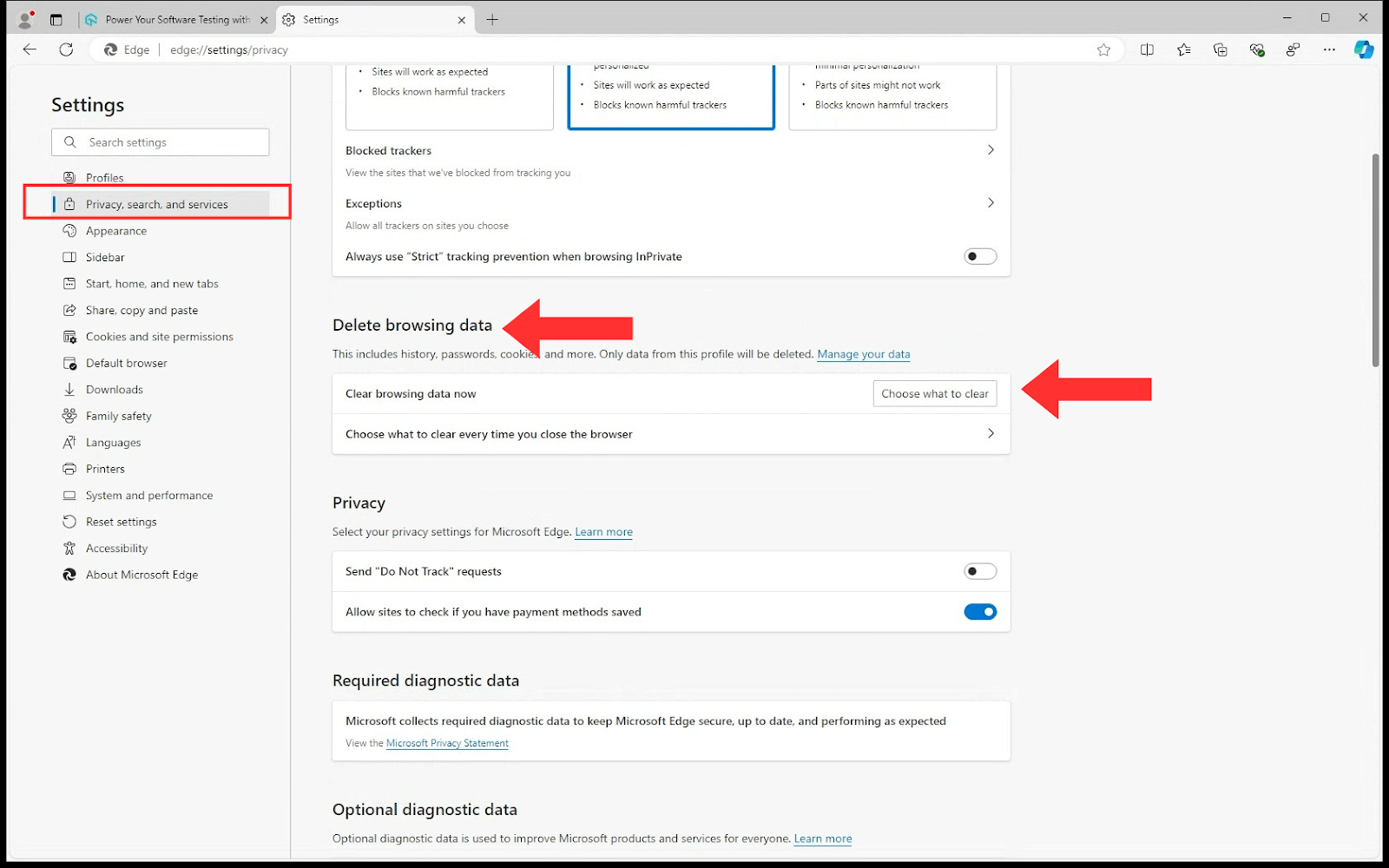
- Select Settings and go to Privacy, search, and services.
- Under Delete browsing data, click on Choose what to clear.
- Select the time frame from the Time range section for which you want to clear your browsing data.
- Make sure that Cookies and other site data, and Cached images and files are checked. You can also select other types of data.
- Click the Clear now button to confirm your selection.
Steps to Clear Cookies in Windows on Opera
Below are the steps to clear cookies in Windows on Opera:
- Open Opera and click on the O Menu in the upper-left corner.
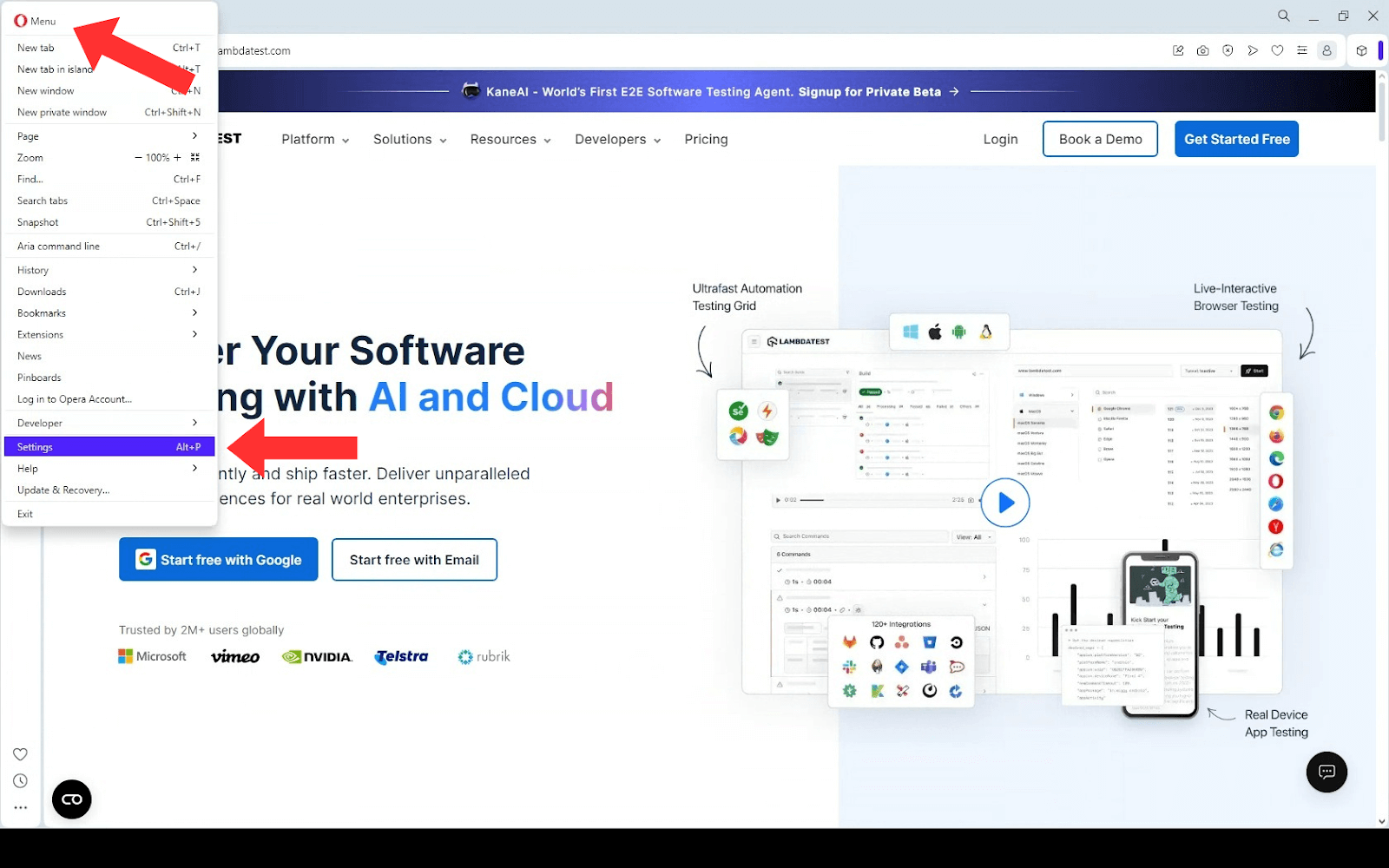
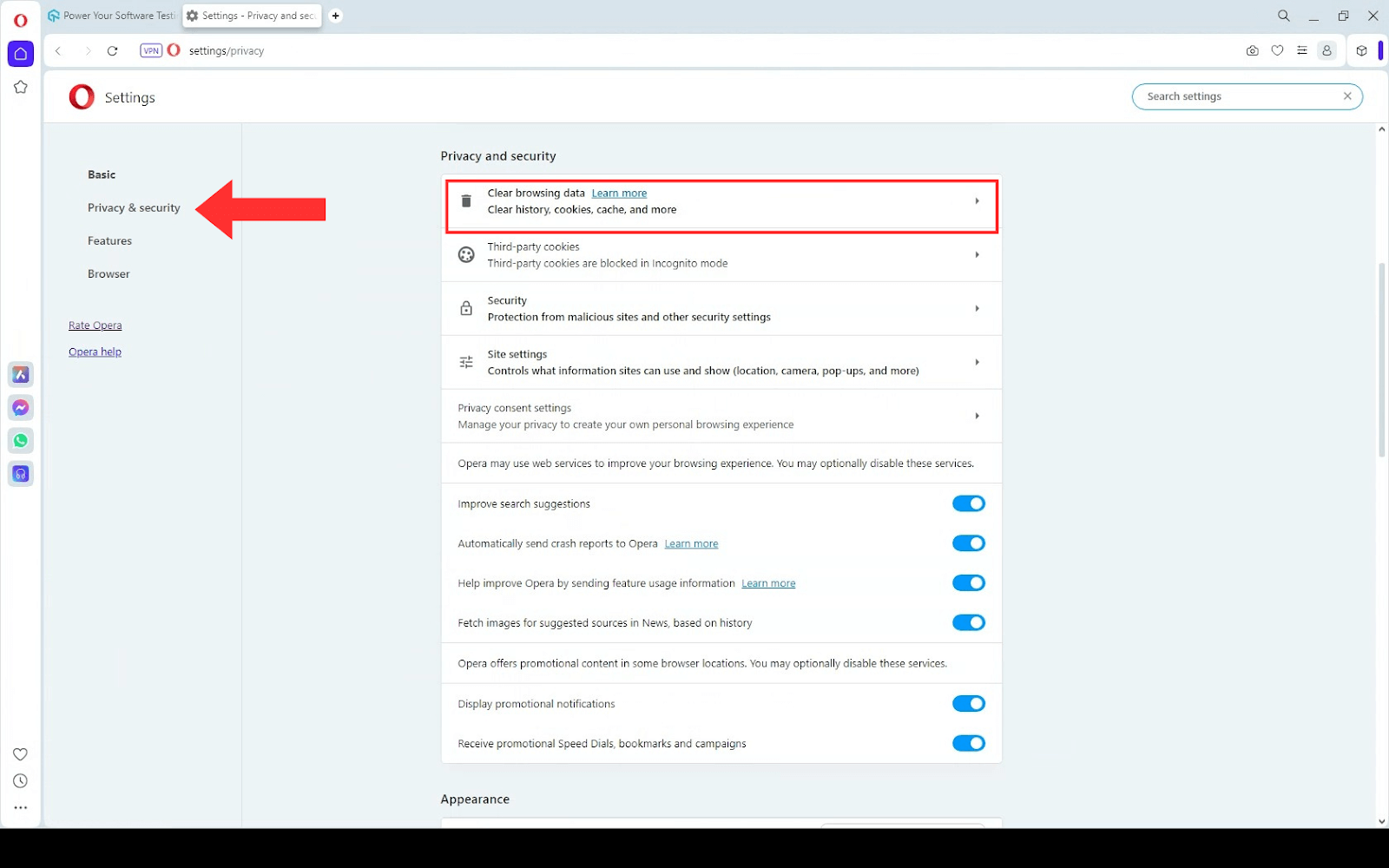
- Select Settings and navigate to the Privacy & security section.
- Click Clear browsing data.
- In the pop-up window, check the Cookies and other site data and the Cached images and files option.
- Select the Time range as desired from the drop-down option.
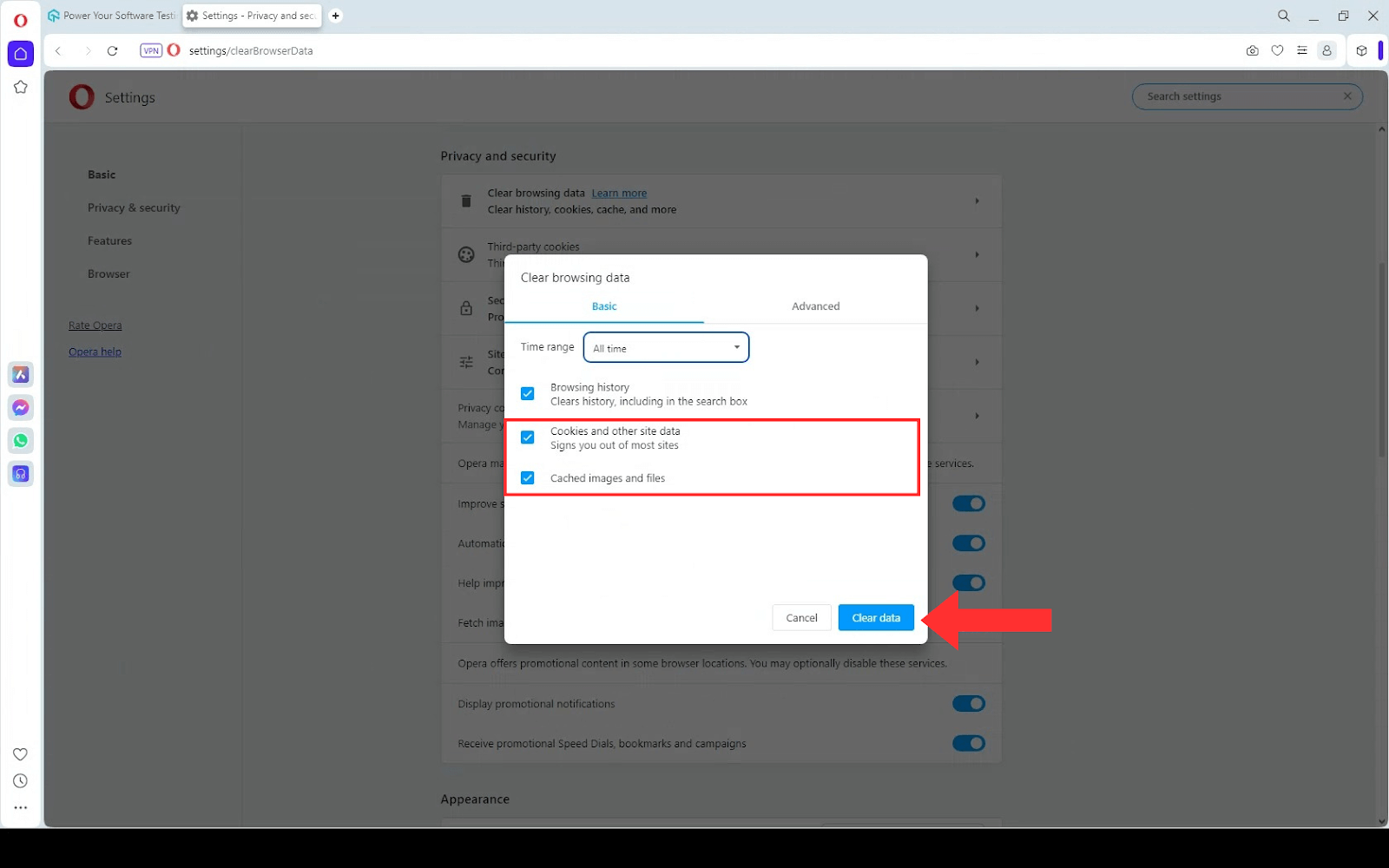
- Click the Clear data button to clear cache and cookies on Windows in Opera.
Steps to Clear Cookies in Windows on Brave
Below are the steps to clear cookies in Windows on Brave:
- Click the hamburger menu in the top right corner of your browser window and select Settings from the submenu.
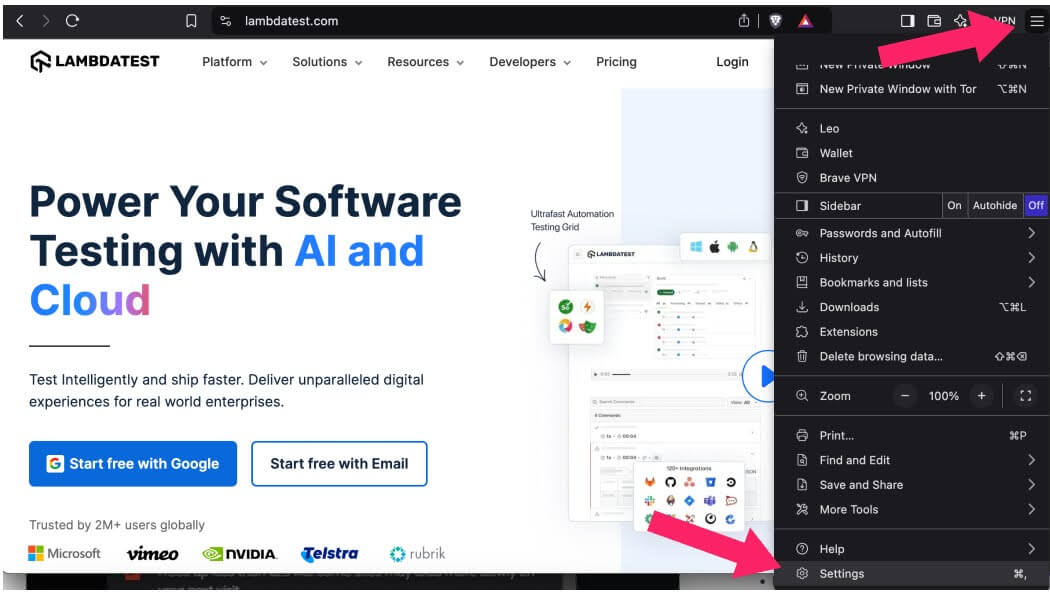
- Alternatively, use the keyboard shortcut:
- Windows: Ctrl + Shift + Delete
- Mac: Command + Shift + Delete
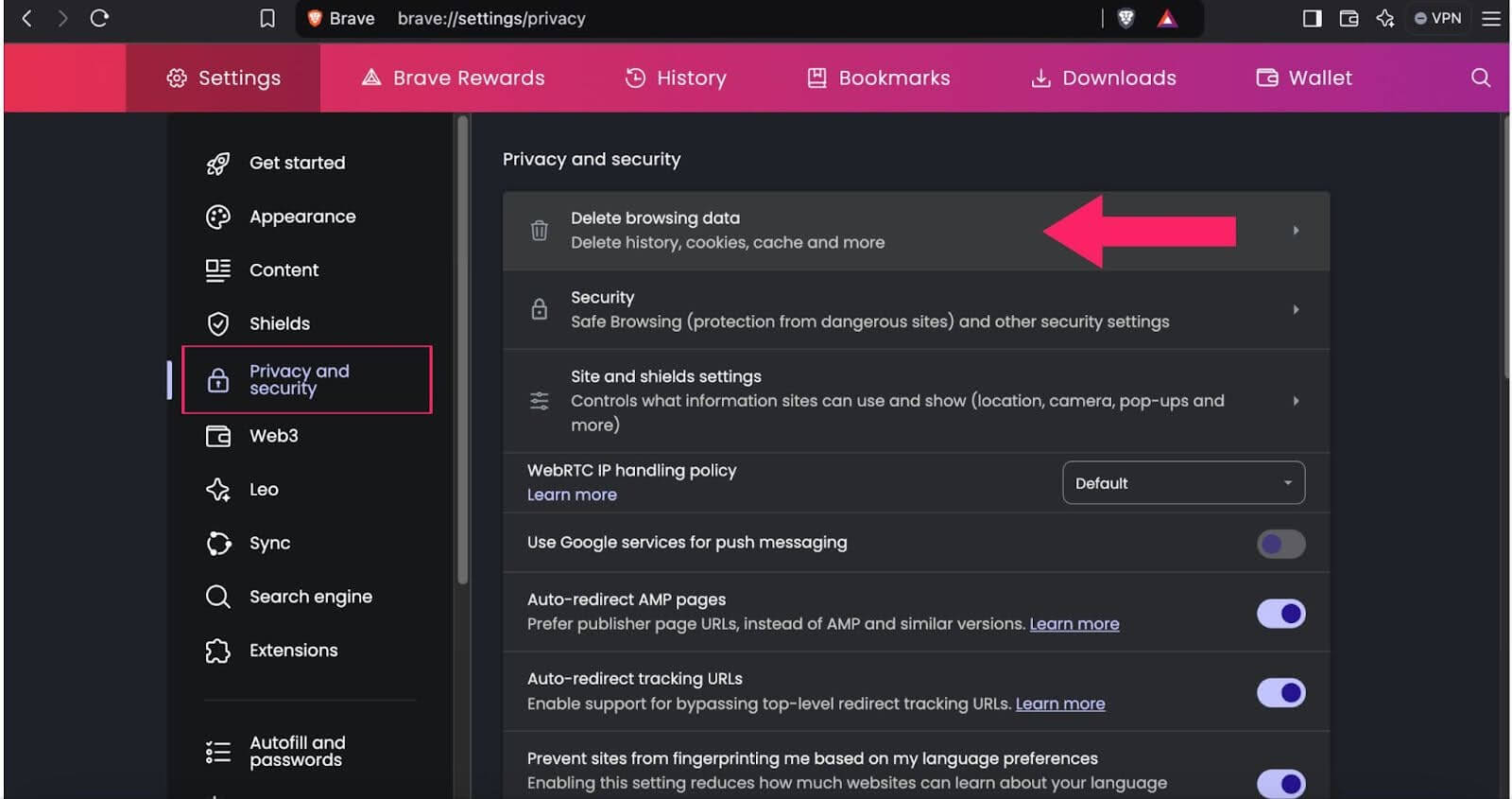
- Scroll down to Privacy and security and click on Delete browsing data.
- A popup window will open. Select the Cache image and files and Cookies and other site data options and any other items you would like to remove from your browser’s saved files, such as browsing history.
- Use the Time range to clear the menu to choose the desired timeframe.
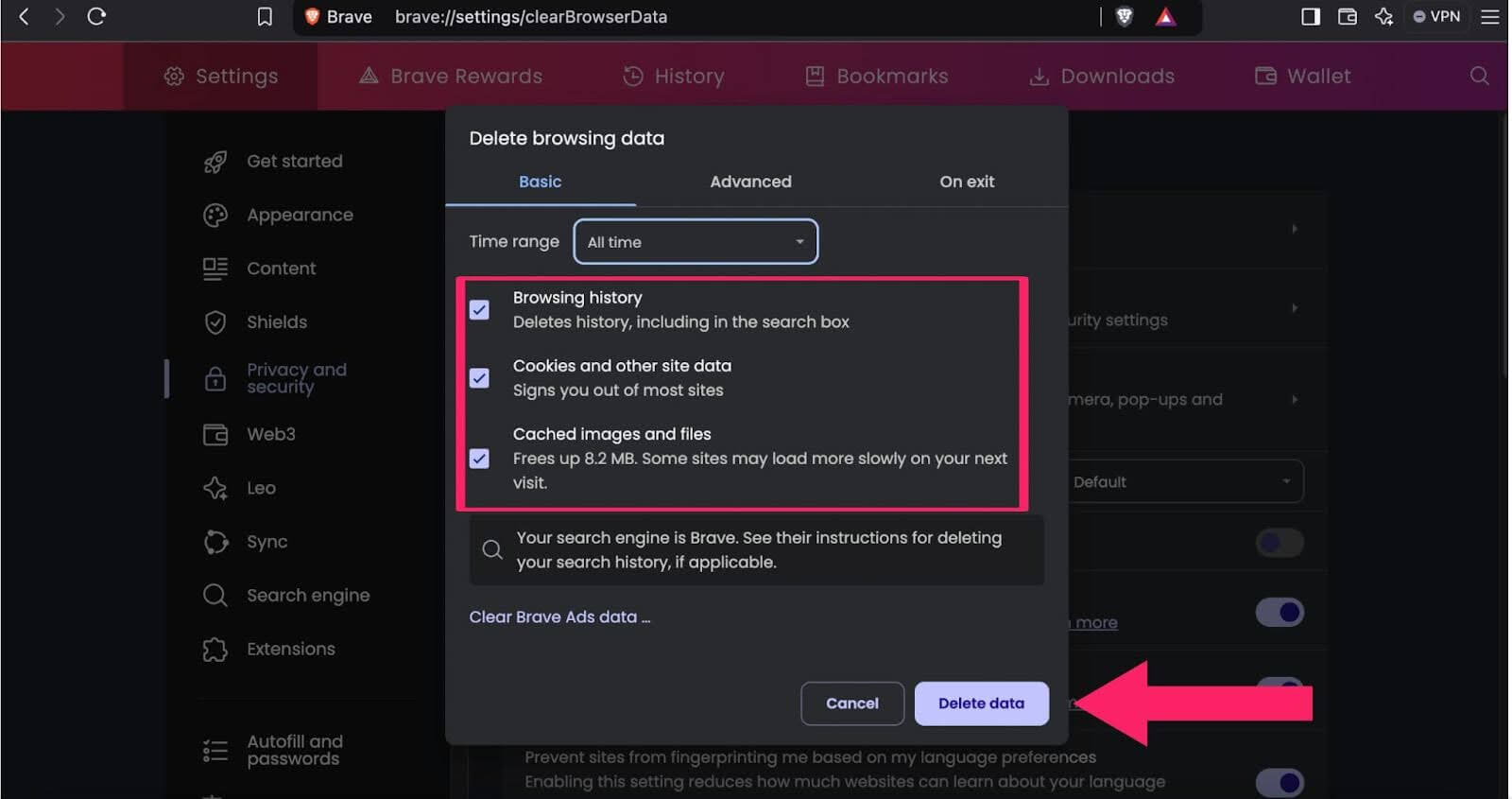
- Click the Clear data button to clear cache and cookies on Windows in Brave.
Steps to Clear Cookies in Windows on Internet Explorer
Below are the steps to clear cookies in Windows on Internet Explorer:
- Launch Internet Explorer.
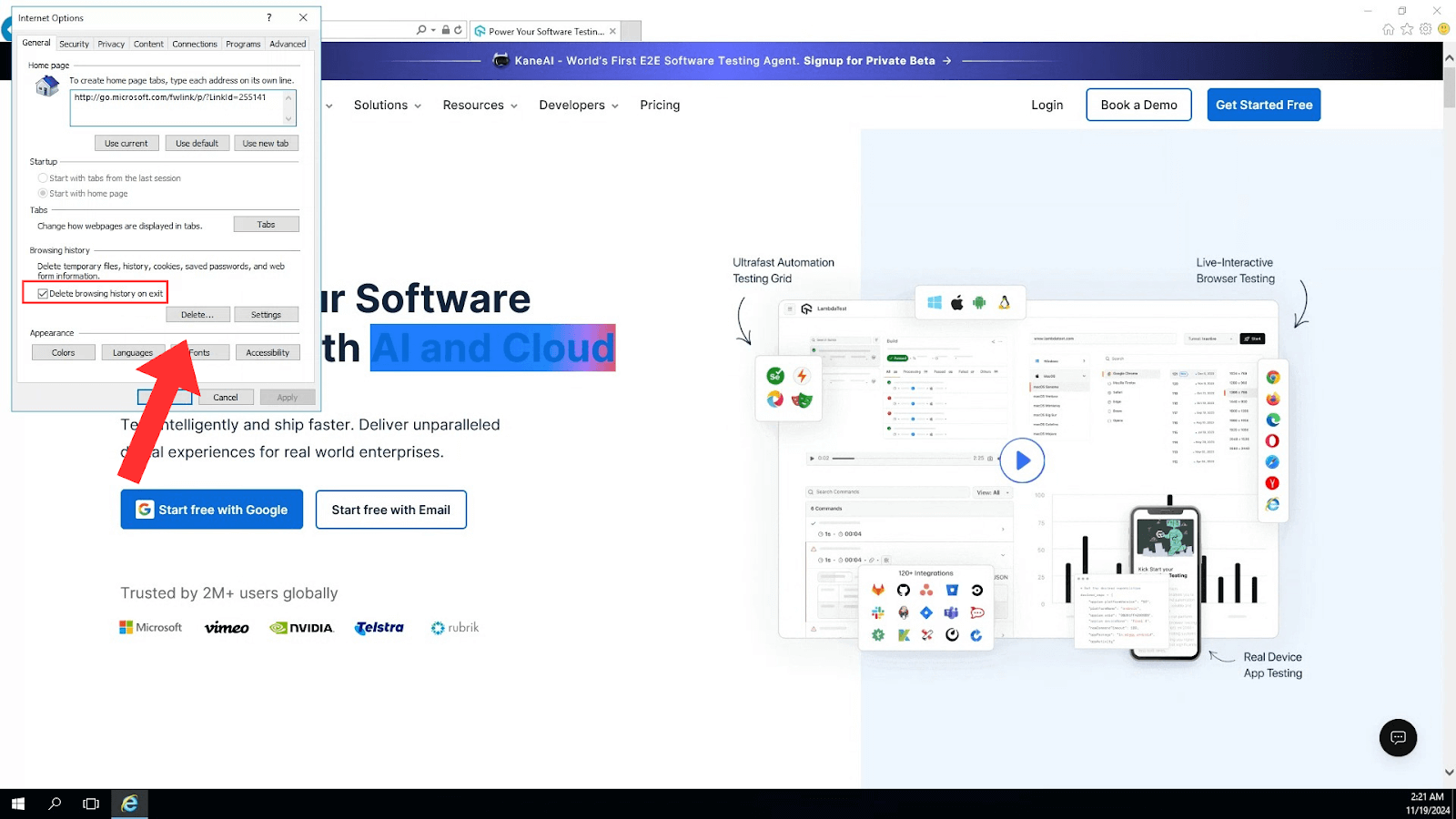
- Click the gear icon (Tools) in the top right corner or press Alt + X.
- Select Internet options from the dropdown menu.
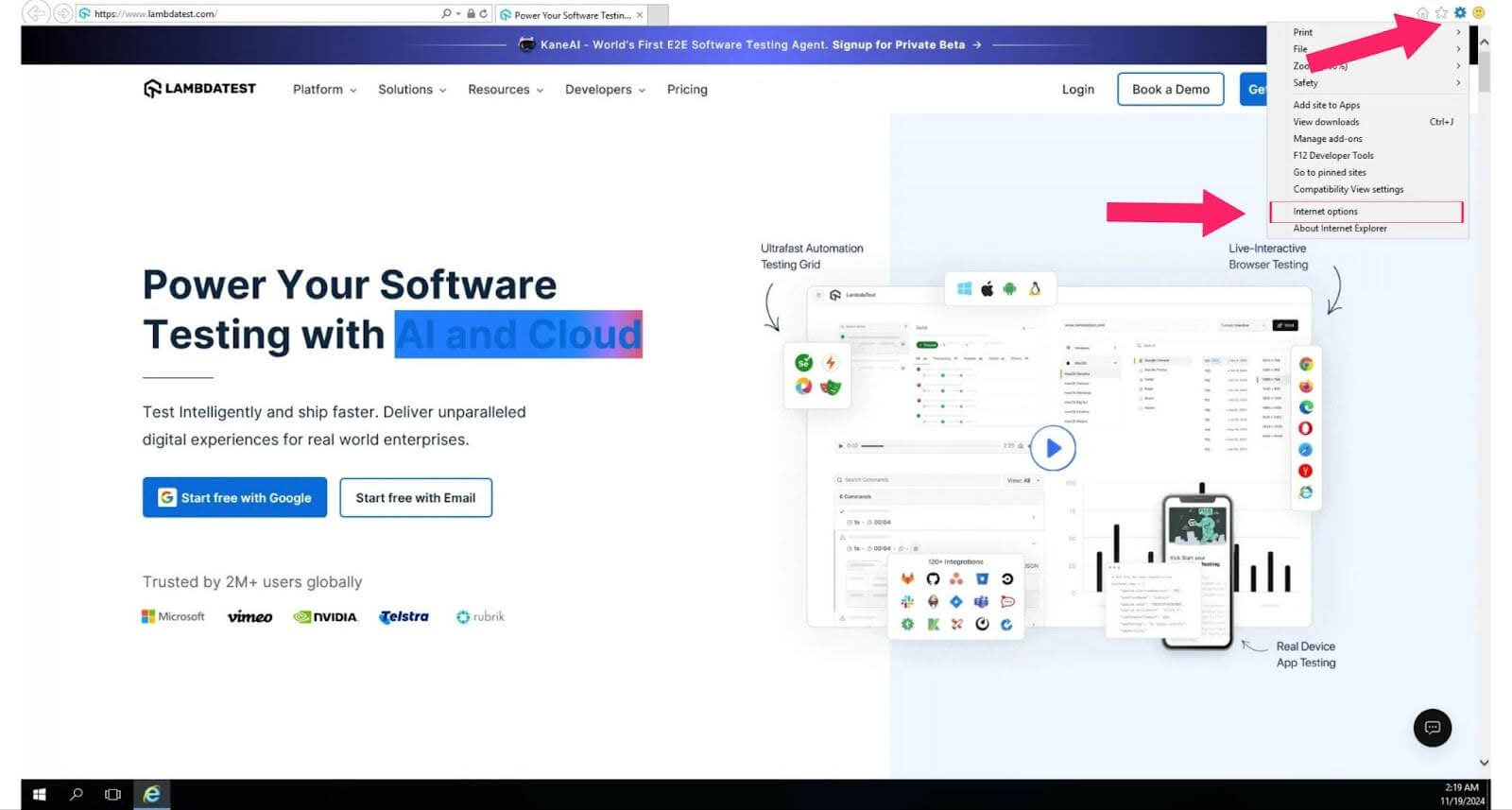
- Go to the General tab and click Delete under Browsing history.
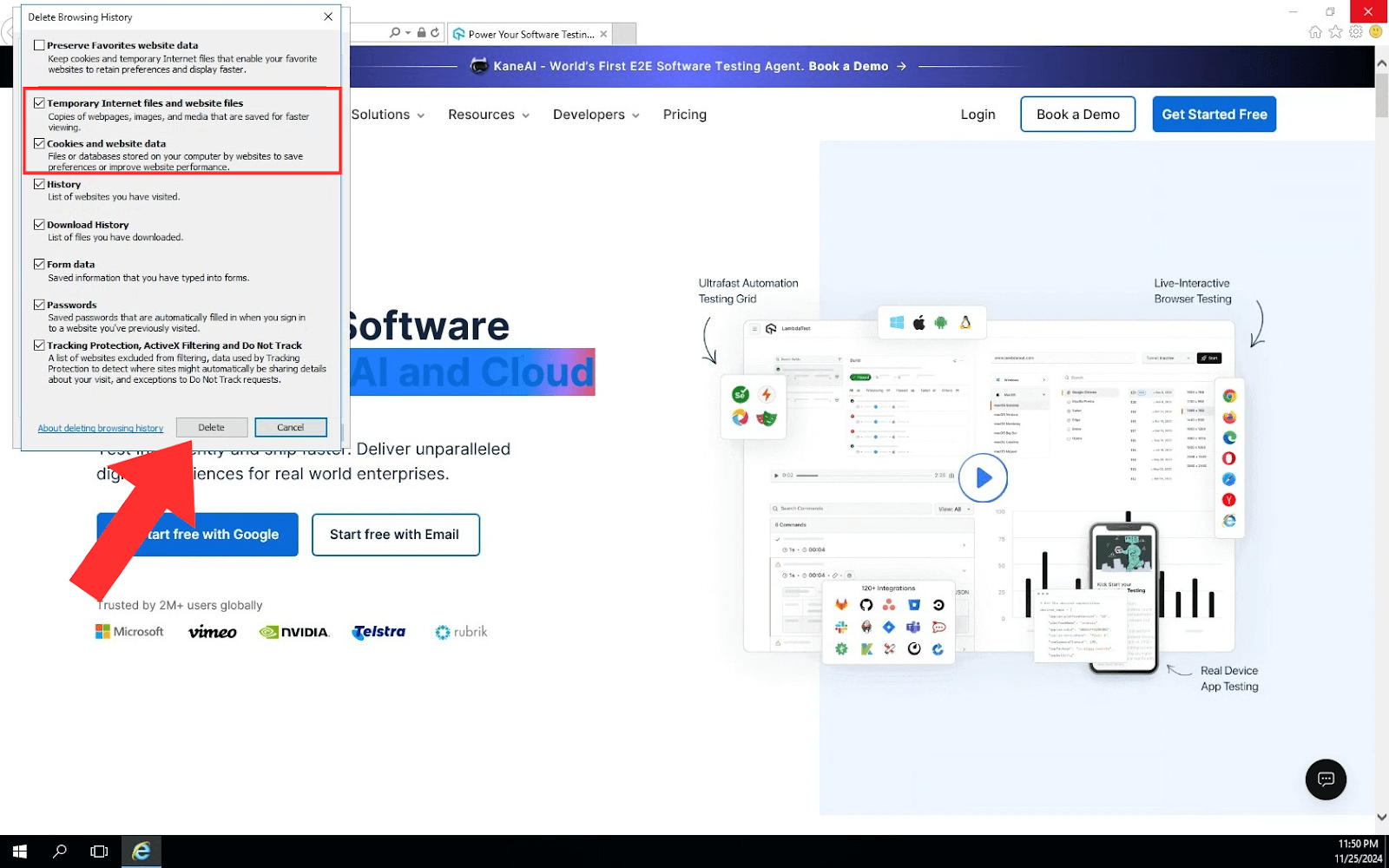
- Uncheck Preserve Favorites website data and check the options for Temporary Internet Files and website files and Cookies and website data. Finally, click Delete to proceed.
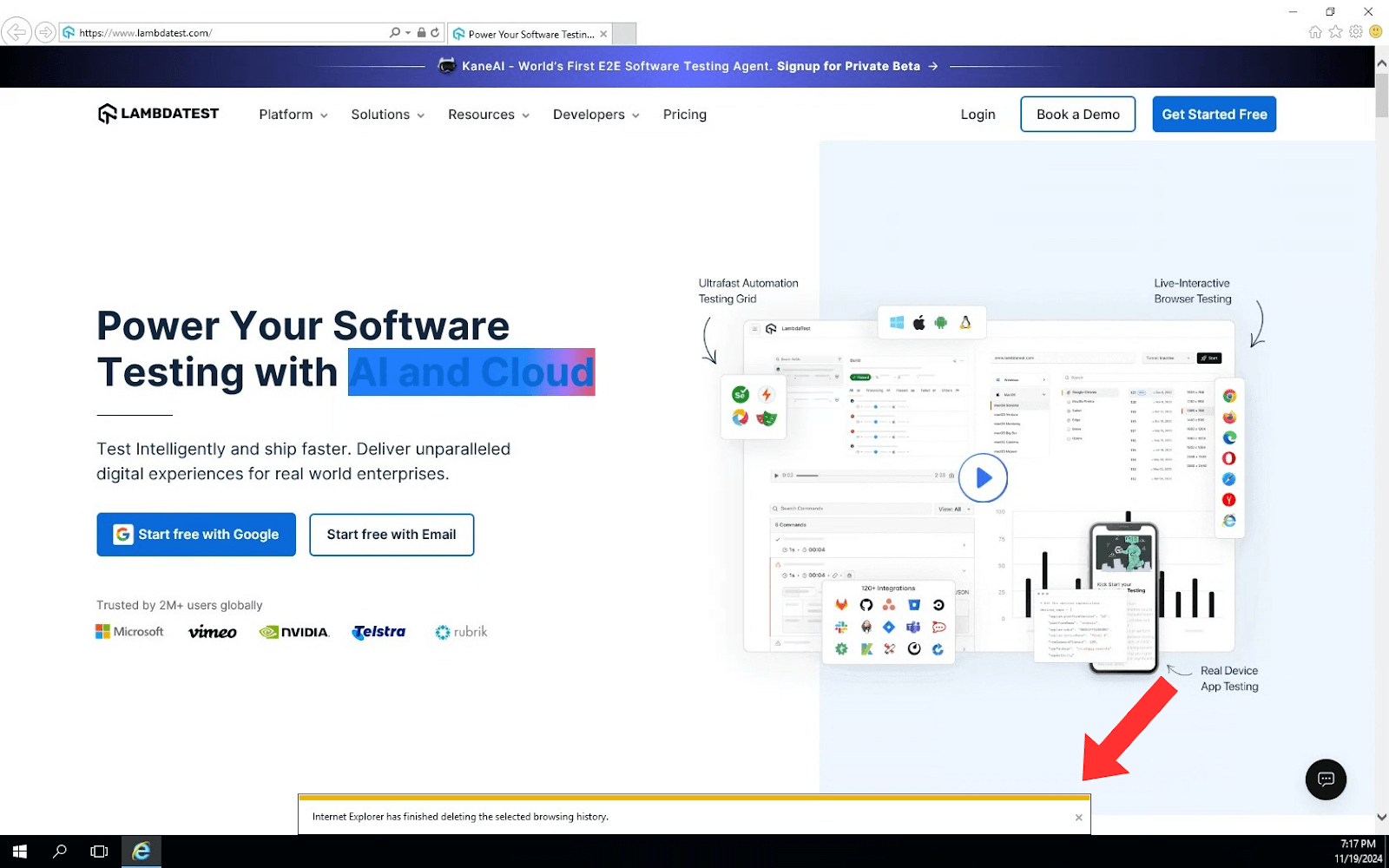
- Once the cache and cookies are cleared, a confirmation message will display at the bottom of the screen.
How to Clear Cookies Programmatically in Windows Using Cypress
Manual clearing is fine for daily browsing, but automated end-to-end tests need a clean cookie state on every run. Leftover cookies from one test can leak into the next and cause false failures. Cypress ships two built-in commands to reset cookies without touching the browser UI.
- cy.clearCookies(): clears cookies for the current domain and its subdomains. Use it when you only need to reset the site under test.
- cy.clearAllCookies(): added in Cypress 12, clears every cookie across all domains, giving each test a fully clean slate when the flow spans multiple hosts.
Pair either command with cy.clearLocalStorage() to wipe local storage as well. A typical setup runs the reset in a beforeEach hook:
describe('checkout flow', () => {
  beforeEach(() => {
    cy.clearAllCookies();     // reset cookies across all domains
    cy.clearLocalStorage();   // reset local storage
    cy.visit('https://ecommerce-playground.lambdatest.io/');
  });

  it('starts from a clean session', () => {
    cy.get('#input-email').type('user@example.com');
    cy.get('#input-password').type('Password123');
    cy.get('input[value="Login"]').click();
  });
});
The cy.clearAllCookies() documentation covers the full command reference. To run the same spec across Chrome, Firefox, Edge, and Safari without maintaining local drivers, execute it on TestMu AI's test automation cloud, which runs your existing Cypress scripts across 3,000+ browser and OS combinations in parallel with network and console logs captured on every run. Follow the getting started with Cypress testing guide to connect your suite, or see how teams handle cross browser testing with the Cypress framework.

Note: Run your Cypress tests across 3,000+ browser and OS combinations on TestMu AI. Start testing free.
How to Clear Cookies on Test Failure in Cypress
Cypress automatically clears all cookies before each test when test isolation is enabled, which prevents state from being shared across tests. That default is why a failing test rarely pollutes the next one.
The gap appears when you disable test isolation to preserve login state between tests. Then the automatic cleanup no longer runs, and a failed test can leave stale cookies behind. Reset state explicitly in a beforeEach hook so every run starts clean, even after a failure:
describe('cart tests', { testIsolation: false }, () => {
  beforeEach(() => {
    cy.clearAllCookies();
    cy.clearAllLocalStorage();
  });

  // tests share a browser context but start from a known cookie state
});
For long-lived login sessions, wrap the setup in cy.session() so Cypress caches and restores cookies and storage instead of re-running the login flow. Following Cypress best practices for state management keeps suites fast and deterministic.
Conclusion
Start with the method that matches your goal: press Ctrl + Shift + Delete for a quick manual clear, call cy.clearAllCookies() in a beforeEach hook to reset automated tests, or delete the Cookies database with PowerShell for a scripted reset. Regular clearing keeps browsers fast and protects your privacy, and programmatic clearing keeps automated suites reliable.
If your tests need to confirm cookie behavior across real browsers and versions, run them on TestMu AI's automation cloud and inspect the network logs it records for every session. Sign up and point your existing Cypress suite at the grid to get started.

Author

Tahneet Kanwal
Blogs: 29


Tahneet Kanwal is a freelance technical content writer with over 2 years of hands-on experience in frontend development and technical writing. She holds a B.Tech in Information Technology from University College of Engineering and Technology (UCET). Tahneet creates clear, SEO-optimized content on web technologies, software testing, and automation tools, leveraging her skills in HTML, CSS, JavaScript, React, Tailwind CSS, and various tools like VS Code, GitHub, Figma, and Canva. She is the author of 30+ technical blogs and an open-source contributor through Hacktoberfest. She has also participated in the Google Cloud Arcade Facilitator Program and holds certifications as a Meta Android Developer (Coursera) and in Web Development (Internshala). Over time, she has evolved her writing to prioritize structure, readability, and SEO while maintaining technical depth.
Reviewer

Himanshu Sheth
Reviewer
Himanshu Sheth is the Director of Marketing (Technical Content) at TestMu AI, with over 8 years of hands-on experience in Selenium, Cypress, and other test automation frameworks. He has authored more than 130 technical blogs for TestMu AI, covering software testing, automation strategy, and CI/CD. At TestMu AI, he leads the technical content efforts across blogs, YouTube, and social media, while closely collaborating with contributors to enhance content quality and product feedback loops. He has done his graduation with a B.E. in Computer Engineering from Mumbai University. Before TestMu AI, Himanshu led engineering teams in embedded software domains at companies like Samsung Research, Motorola, and NXP Semiconductors. He is a core member of DZone and has been a speaker at several unconferences focused on technical writing and software quality.


Clearing Cookies FAQs
Did you find this page helpful?
More Related Blogs
TestMu AI forEnterprise
Get access to solutions built on Enterprise
grade security, privacy, & compliance
- Advanced access controls
- Advanced data retention rules
- Advanced Local Testing
- Premium Support options
- Early access to beta features
- Private Slack Channel
- Unlimited Manual Accessibility DevTools Tests