

Power Your Software Testing with AI Agents and Cloud
The Native AI-Agentic Cloud Platform to Supercharge Quality Engineering. Test Intelligently and Ship Faster.


- TestMu AI (Formerly LambdaTest)
- /
- Blog
- /
- How to Block or Allow Pop-Ups in Edge
How to Block or Allow Pop-Ups in Edge
Learn how to block or allow pop-ups in Edge with simple steps. Customize your browser settings to manage pop-ups efficiently for a better browsing experience.
Last Updated on:
Edge's pop-up blocker works by intercepting new windows and tabs that a site's own script tries to open, which is why an in-page cookie banner, a granted notification permission, or a rogue extension can still show up with the blocker on. Checking Notifications under site permissions or reviewing extensions at edge://extensions finds the real source faster than toggling the blocker.
Does Microsoft Edge Have a Built-In Pop-Up Blocker?
Yes. Microsoft Edge has shipped with a pop-up blocker since Edge version 44, and it is enabled by default. You will find it in Settings under the label “Block (recommended)”, which means that out of the box Edge already stops most windows a site tries to open on its own. You do not need to install an extension to get baseline protection.
Because the blocker is on by default, the problem people usually run into is the opposite one: a trusted site that genuinely needs a pop-up, such as a bank’s payment confirmation or a single sign-on prompt, gets silently blocked. That is why Edge gives you two levers rather than one. You can switch the blocker off globally, or you can leave it on and add specific sites to an Allow list. The second option is almost always the better trade-off, and both are covered below.
Steps to Allow Pop-Ups in Edge
These steps turn the pop-up blocker off across every site you visit. This is the quickest fix when you are testing a site of your own across browsers or troubleshooting why a window will not open, but it does leave you exposed to unwanted pop-ups elsewhere. If you only need one site to work, skip ahead to the per-site instructions in the next section.
- Open Microsoft Edge on your PC.
- Click the three dot menu icon at the top right of the browser.
- Select “Settings” from the dropdown menu.
- Click “Cookies and site permissions” from the left-hand panel.
- Scroll down and click “Pop-ups and redirects.”
- To allow pop-ups, turn off the ‘Block’ toggle under the ‘Blocker (recommended)’ section.
- Confirm the toggle now reads as off. Pop-ups are allowed across all sites from this point on, and the change applies immediately without restarting the browser.
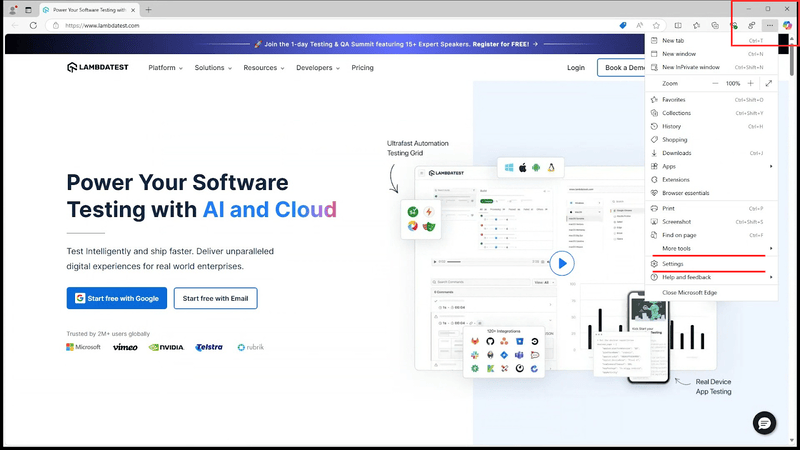
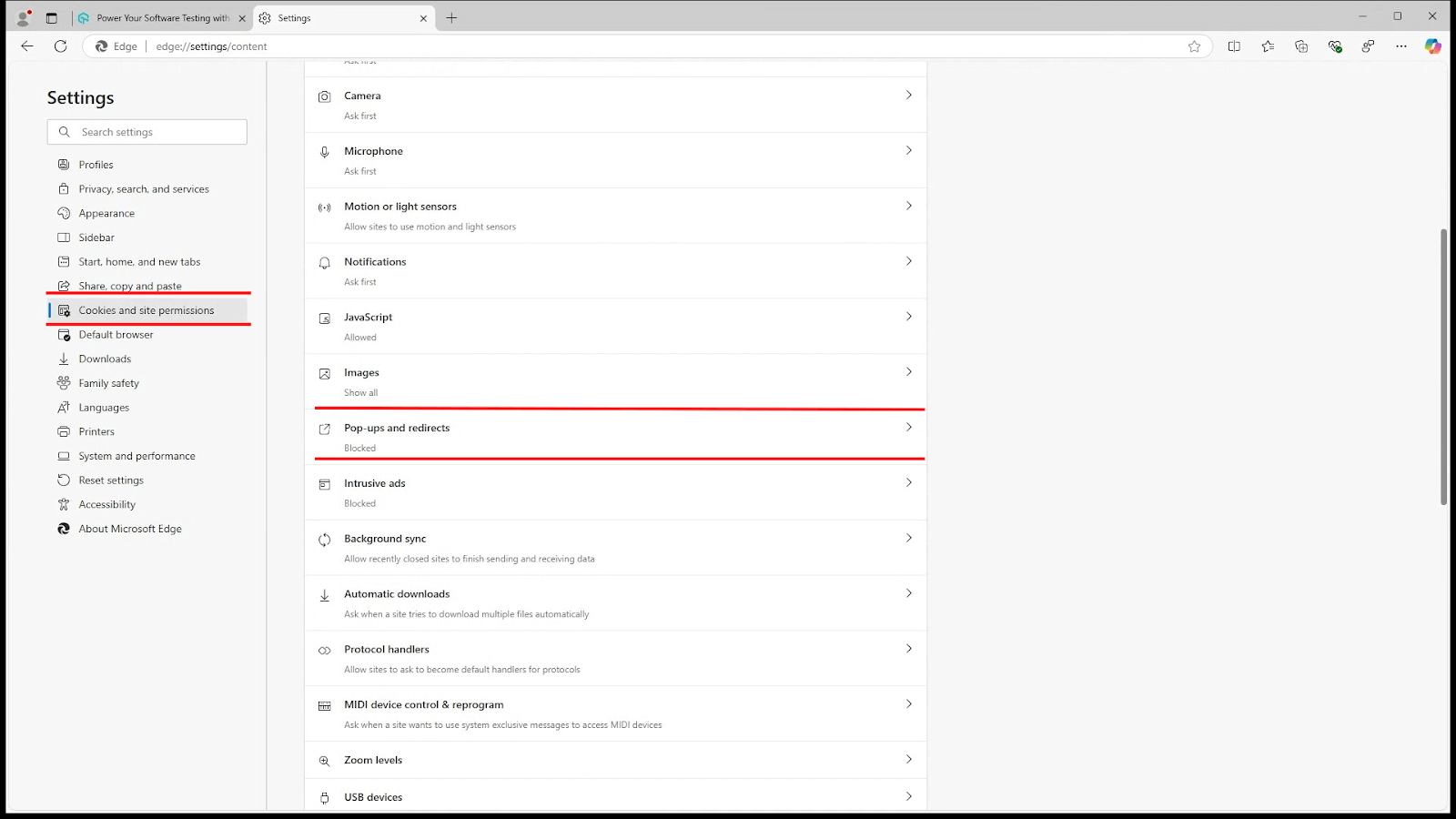
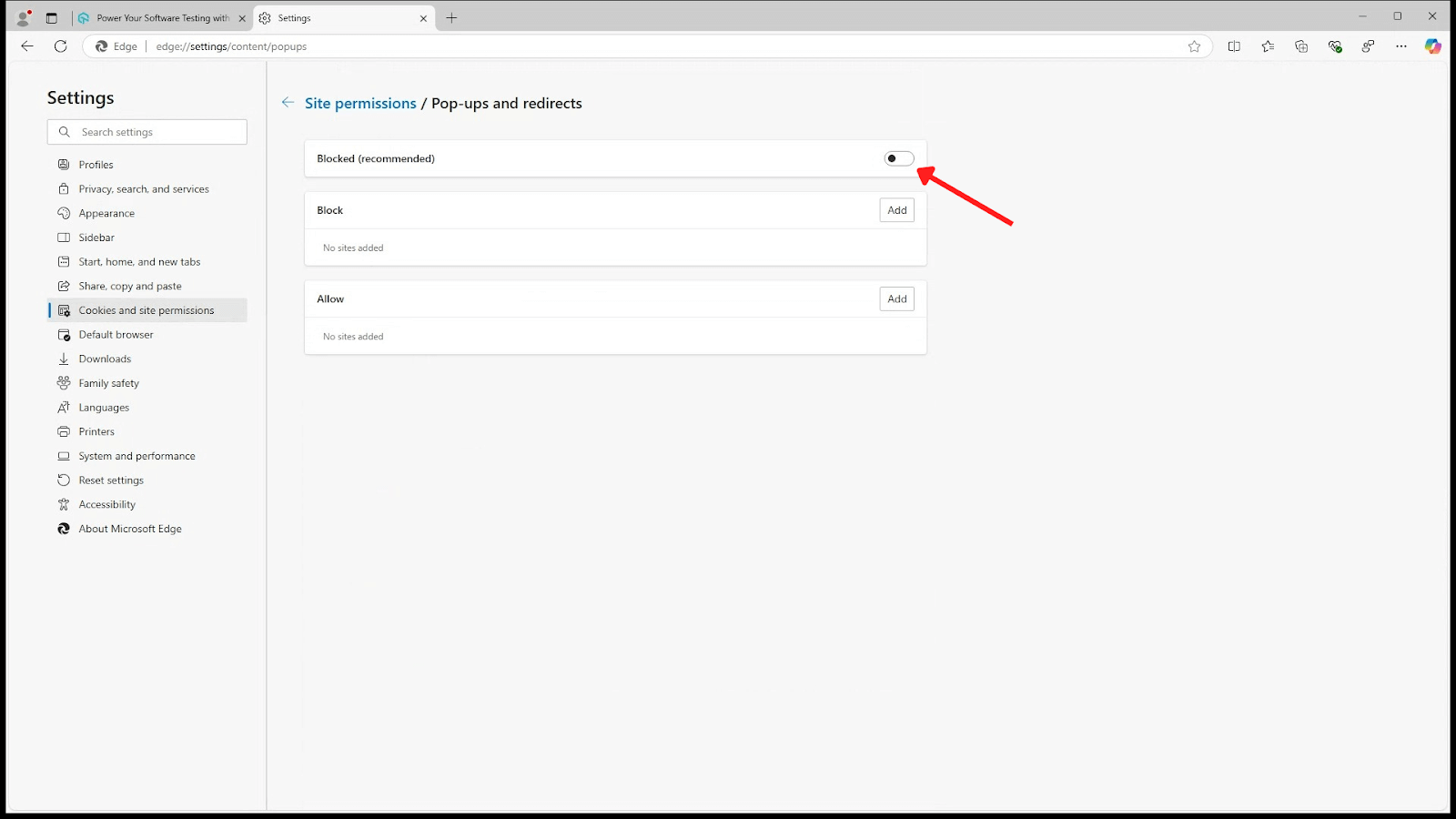
The same path also works if you reach the setting faster by pasting edge://settings/content/popups straight into the address bar.
How to Allow Pop-Ups for Specific Websites in Edge
Turning the blocker off everywhere to fix one site is a heavy-handed trade. A better approach is to leave “Block (recommended)” switched on and add the sites you trust to the Allow list. Edge then keeps filtering the rest of the web while letting your payment gateway, login portal, or internal tool open the windows it needs.
- Go to Settings > Cookies and site permissions > Pop-ups and redirects.
- Leave the ‘Block (recommended)’ toggle switched on.
- Click the ‘Add’ button next to the ‘Allow’ section.
- Paste the URL of the site you want to exempt, then click ‘Add’ to confirm.
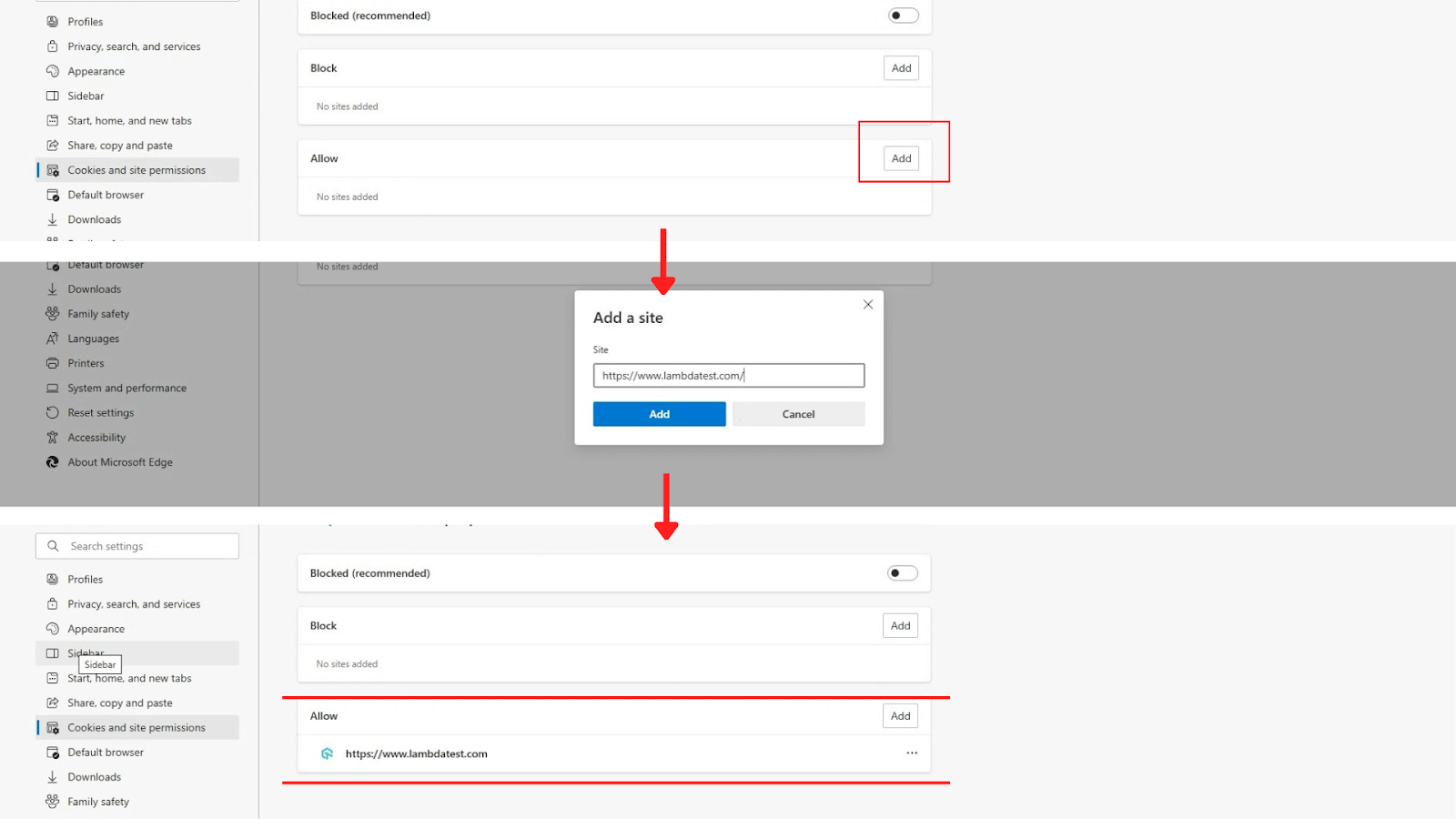
Edge accepts wildcards in these entries, so [*.]example.com covers every subdomain of a site in a single rule instead of forcing you to add each one by hand. The Block list directly below works the same way in reverse: if one particular site is the source of unwanted windows, add it there and leave the global blocker alone.
Entries on the Allow list and the Block list stay in place until you remove them, and both sync across devices if you are signed in to Edge with the same Microsoft account. You reach these controls from the same Settings area used to manage cookies in Microsoft Edge or to clear the cache in Edge.
Steps to Block Pop-Ups in Edge
Pop-ups can be really annoying at times, and those annoying little boxes will intrude on your browsing experience. To block pop-ups, the steps are pretty much the same with just one exception, let’s see:
- Open Microsoft Edge.
- Click on the three dot menu in the top-right corner.
- From the dropdown list, go to “Settings.”
- Select “Cookies and site permissions” from the left-hand panel.
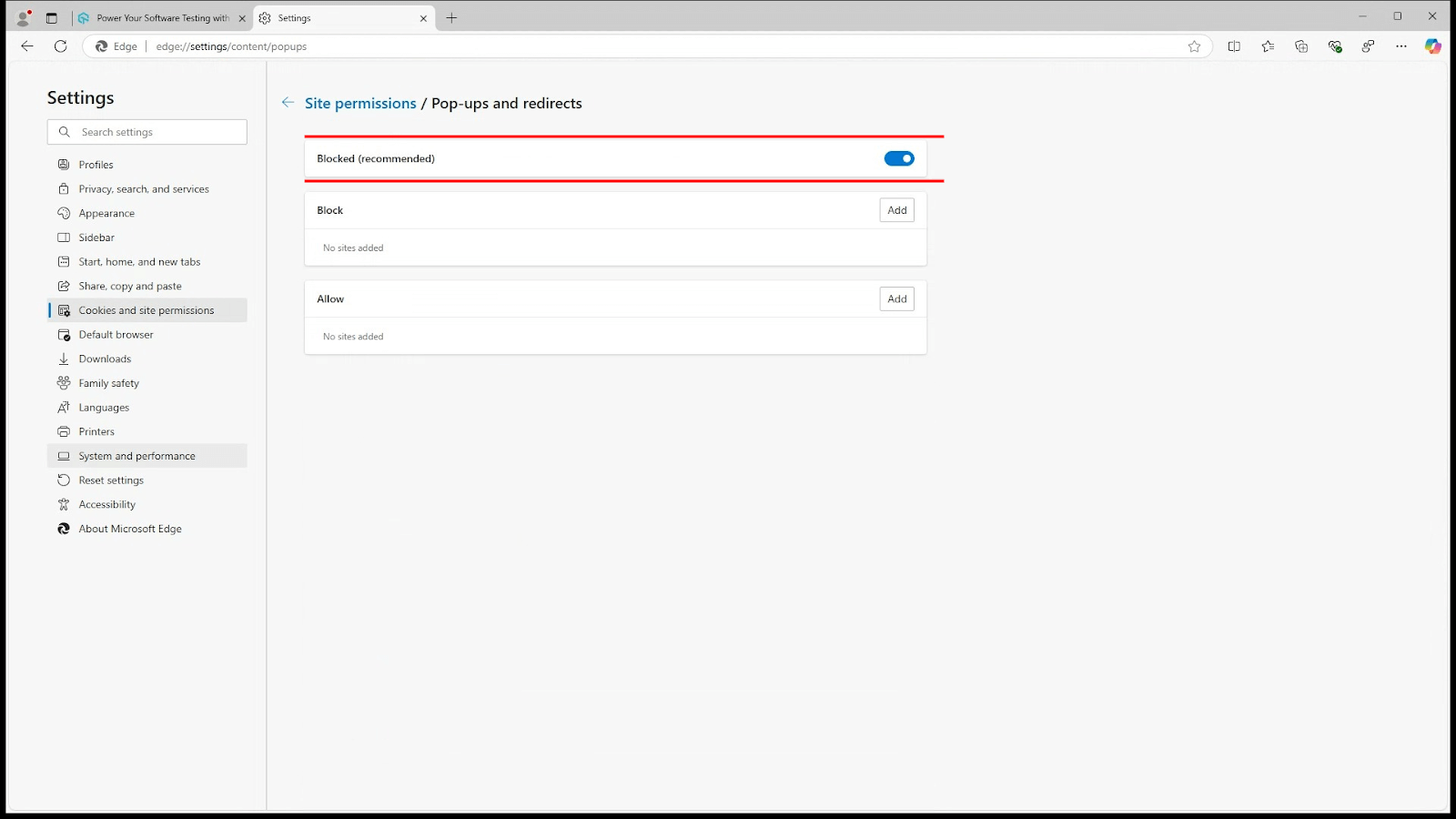
- Click “Pop-ups and redirects.”
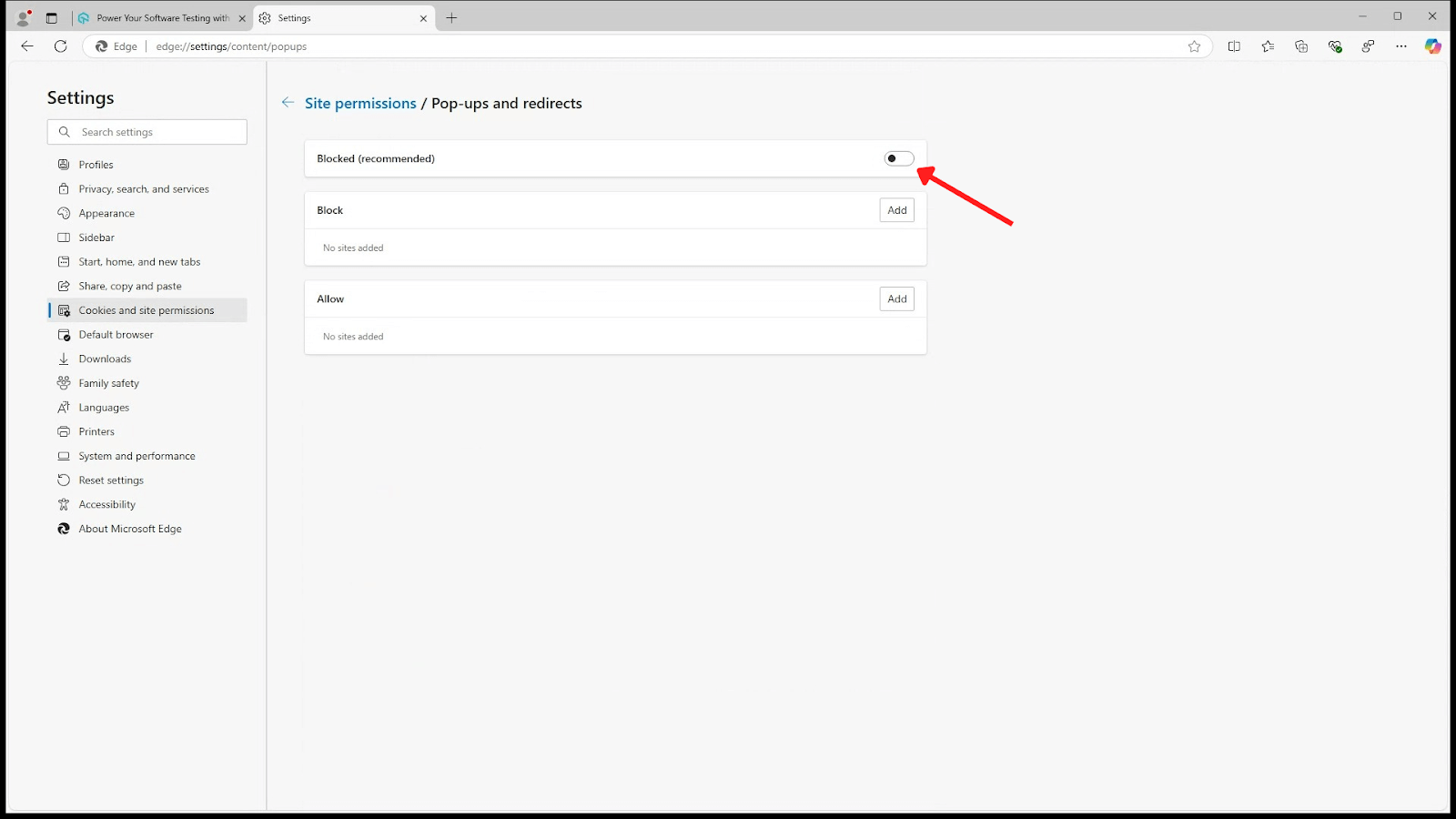
- To block pop-ups, turn on the ‘Block’ toggle under the ‘Blocker (recommended)’ section.
What to Do If You Still See Pop-Ups in Edge
Switching the blocker on and still seeing windows appear is a common and confusing outcome. It usually does not mean the setting failed. Edge’s blocker has a narrow job: it stops new windows and tabs that a site’s scripts try to open — the same script-driven windows testers deal with in automation when handling authentication pop-ups in Selenium WebDriver. Anything that only looks like a pop-up but arrives another way falls outside its scope. Work through these causes in order.
- It is an in-page overlay, not a pop-up. Cookie banners, newsletter modals, and subscription walls are drawn inside the page itself using HTML and CSS. To the browser they are simply part of the page, so no pop-up blocker will ever catch them.
- They are push notifications you agreed to. If the boxes appear in the corner of your screen even when Edge is minimised, a site has notification permission. Go to Settings > Cookies and site permissions > Notifications and remove any site you do not recognise from the Allow list.
- An extension is injecting them. Extensions run with broad permissions and can open windows themselves. Open
edge://extensions, disable everything, confirm the pop-ups stop, then re-enable one at a time until the culprit reappears. - The site is on your Allow list. A site you exempted earlier keeps its exemption. Revisit Pop-ups and redirects and check whether the offending domain is sitting in the Allow section.
- Adware or malware is on the machine. Pop-ups that follow you across unrelated sites, or that show up on the desktop outside the browser, point to something installed locally rather than to a web page. Run a scan with Windows Security or Microsoft Defender Offline.
If you want tighter filtering than the built-in blocker offers, free extensions such as uBlock Origin and Adblock Plus are available from the Edge Add-ons store. Both go beyond pop-ups to filter ads and trackers, though they need to be configured with a little care so they do not break sites you rely on.
Conclusion
Pop-up controls on Microsoft Edge are easy to manage and will let you have more control over your browsing experience. For most people the right setup is to leave “Block (recommended)” switched on and add the handful of trusted sites that genuinely need pop-ups to the Allow list, rather than disabling the blocker across the whole browser. And if windows keep appearing after that, the cause is usually a notification permission, an extension, or adware, not the blocker itself. Using a different browser? The same controls exist elsewhere, so here is how to manage pop-ups on Chrome and allow pop-ups in Mozilla Firefox.
Author

Bhawana
Blogs: 75


Bhawana is a Community Evangelist at TestMu AI with over 3 years of experience creating technically accurate, strategy-driven content in software testing. She has authored 50+ blogs on test automation, cross-browser testing, mobile testing, and real device testing. She also serves as Product Marketing Manager for Kane CLI, the command-line tool that runs browser automation from the terminal using natural-language flows in a real Chrome browser. Bhawana is certified in KaneAI, Selenium, Appium, Playwright, and Cypress, reflecting her hands-on knowledge of modern automation practices. On LinkedIn, she is followed by 6000+ QA engineers, testers, AI automation testers, and tech leaders.


Frequently asked questions
Did you find this page helpful?
More Related Blogs
TestMu AI forEnterprise
Get access to solutions built on Enterprise
grade security, privacy, & compliance
- Advanced access controls
- Advanced data retention rules
- Advanced Local Testing
- Premium Support options
- Early access to beta features
- Private Slack Channel
- Unlimited Manual Accessibility DevTools Tests