

Power Your Software Testing with AI Agents and Cloud
The Native AI-Agentic Cloud Platform to Supercharge Quality Engineering. Test Intelligently and Ship Faster.


- TestMu AI (Formerly LambdaTest)
- /
- Blog
- /
- How to Refresh in Safari
How to Refresh in Safari
Learn how to refresh a web page in Safari and ensure you're viewing the most up-to-date version of any webpage.
Last Updated on:
Safari browser is the default browser for all Apple devices. Whether your goal is to display the latest updated content of the webpage, cache issues, or optimal web page experience, it’s important to know how to refresh in Safari.
Overview
To refresh a webpage in Safari, press Command + R on macOS, or swipe downwards on the screen to pull down and refresh on iOS devices. For a hard refresh that clears the cache on macOS, use the Command + Option + R keyboard shortcut.
Importance of Refreshing in Safari
- Ensuring updated content: Refreshing Safari loads the latest version of a webpage, ensuring that users see the most current content.
- Fixing website issues: Regular refreshing helps resolve minor glitches and errors, ensuring the webpage loads correctly in the browser.
- Bypassing outdated cache: Performing a hard refresh clears the outdated cache and forces Safari to load fresh content directly from the server.
Key Benefits of Using TestMu AI for Refresh Testing
- Cross-browser compatibility: TestMu AI ensures Safari refresh operations work consistently across other browsers, including Chrome, Firefox, and Edge.
- Device responsiveness testing: TestMu AI verifies that the refresh function works across different screen sizes and devices, including desktops, iPads, and iPhones.
- Mobile testing: TestMu AI validates refresh functionality on mobile devices to ensure smooth interactions and swift content updates for mobile users.
- AI-driven insights: TestMu AI uses machine learning to analyze refresh performance, optimizing speed and accuracy for an improved user experience.
Troubleshooting Common Refreshing Issues with TestMu AI
- Fixing page display issues: TestMu AI automatically detects and fixes problems where new content does not show up after a refresh.
- Clearing cache: TestMu AI identifies and handles outdated cache issues by performing automated tests to ensure proper cache clearing.
- Consistency across devices: TestMu AI ensures that refresh operations work consistently across all devices and browsers, providing a unified browsing experience.
Steps to Refresh in Safari on macOS
To refresh in Safari on macOS, follow the steps given below:
- Normal Refresh:
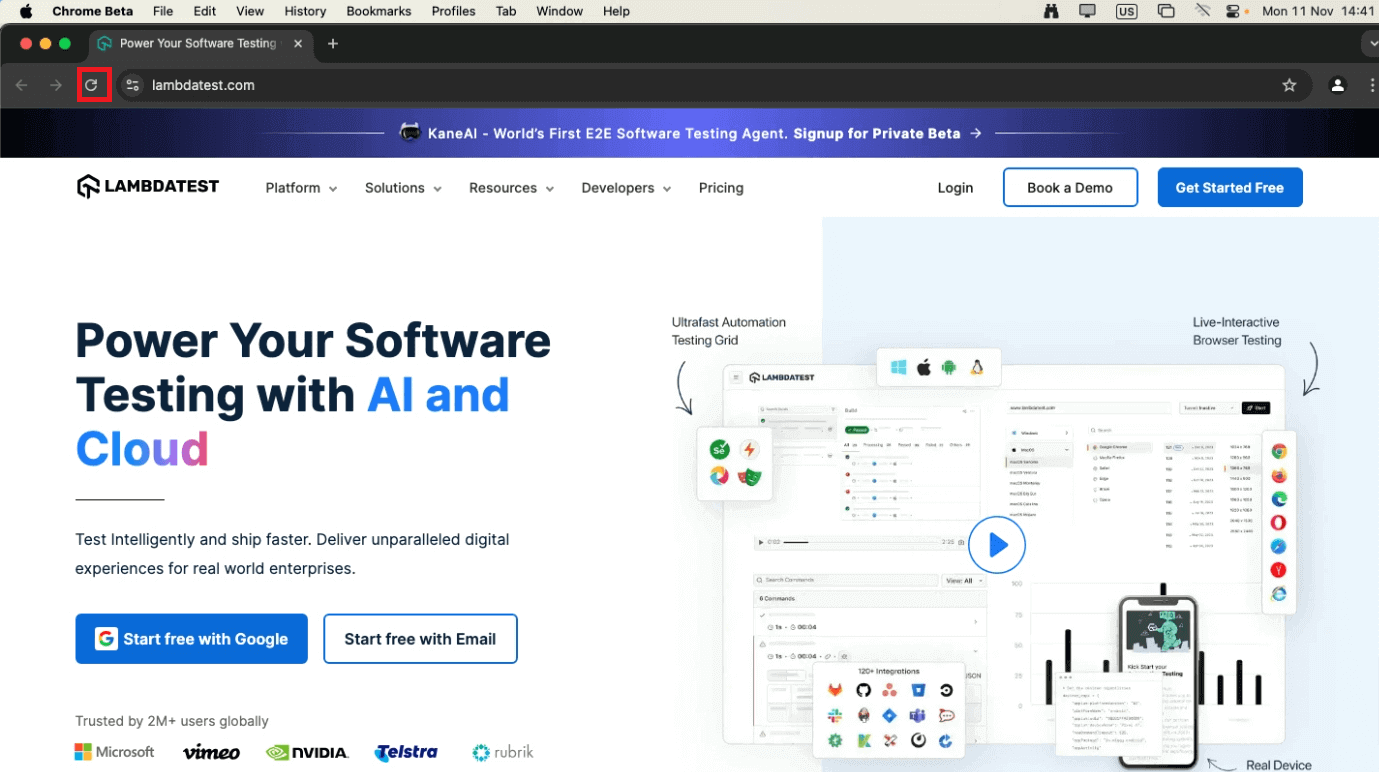
- Click the Reload button located in the address bar or
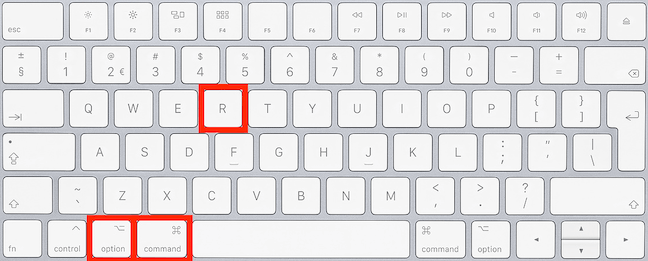
- Press Command + R on your keyboard.
- Hard Refresh (Bypassing Cache):
- Hold down Command + Option + R on your keyboard to reload the page while clearing the cache and fetching the latest content from the server.
Steps to Refresh in Safari on iPhone and iPad
Refresh in Safari for iPhone and iPad is a bit different from macOS or desktop. Apple’s iOS offers a smooth user experience, and knowing how to refresh in Safari helps ensure that you’re always viewing the most up-to-date content, whether you’re browsing news, social media, or business websites.
To refresh Safari on an iPhone or iPad, the process is simple.
Follow these methods to ensure your pages are up to date:
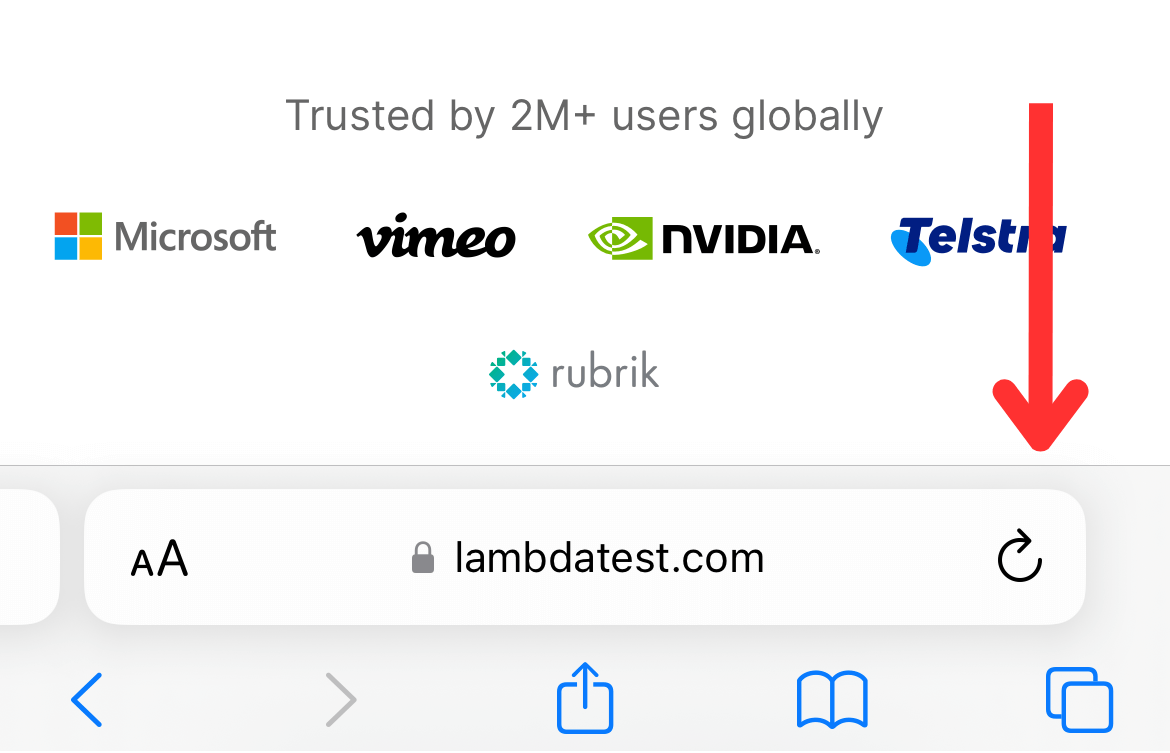
- Pull Down to Refresh: On the device, Safari doesn’t have a refresh button visible by default. Instead, you can swipe downwards on the webpage. This pull-down gesture will trigger a refresh in Safari. It’s a convenient way to refresh without extra buttons.
- Using the Address Bar: Another method to refresh in Safari on iPhone and iPad is to tap on the URL in the address bar and then press “Go” on the keyboard. This will reload the page as if you’ve entered the URL anew.
- Onscreen Keyboard Shortcuts for iPad: After Enabling the onscreen keyboard on iPad, you can utilize the same keyboard shortcuts available on macOS, such as Command + R for a standard refresh or Shift + Command + R for a hard refresh.


Note: Test your web page in any version of Safari on any iOS device or OS. Try TestMu AI Today!
Alternatives to Refresh in Safari
Besides manual methods, there are other ways to refresh in Safari, especially for users who need more advanced or automatic solutions.
- Auto-Refresh with Extensions: For those who want pages to refresh on their own, Safari lets you use browser extensions for this. Tools like “Tab Auto Refresh” or similar can make Safari refresh at certain times automatically.
- Update Your Page with Developer Tools: You can update your page using Safari Developer Tools or Devtools that comes with extra perks. It lets users refresh Safari while checking the network and how many resources are being used, making sure the browser is getting the latest updates. You can do this by using the “Inspect” feature and then refreshing the page.
- Try Restarting Safari for a Complete Reset: If just refreshing doesn’t work for you, sometimes just closing and restarting Safari can fix the problem. By quitting Safari and then starting it again, you make sure any session data or memory caches that might be causing trouble are cleared.
Troubleshooting Refresh Issues in Safari
Sometimes, just updating Safari isn’t enough to fix issues with pages loading or how they look. Here are some easy fixes you can try:
- Clear Cache and Cookies: If pages aren’t loading correctly even after refreshing, clearing Safari’s cache and cookies can resolve the issue. To do this, go to Safari > Preferences > Privacy > Manage Website Data. This will remove stored data that could be causing page load issues.
- Disable Browser Extensions: Third-party extensions can sometimes interfere with how Safari refreshes pages. If you are still facing the same issue continuously, try disabling your extensions and refresh the webpage again.
- Reset Network Settings: If refreshing Safari isn’t fixing the problem, resetting your device’s network settings might help. This is particularly useful when facing Wi-Fi connectivity issues that prevent proper page loading.
- Update Safari: It’s really important to keep the latest version of Safari browser up to date so that pages load correctly, and you can refresh them easily. Make sure you have the latest version of Safari by looking for updates in System Preferences on Mac or by going to the App Store on your iPhone or iPad.
Conclusion
Getting the hang of how to refresh in Safari can make your online experience better, no matter if you’re using a Mac, iPhone, or iPad. You’ve got simple tricks like keyboard shortcuts and more complex stuff like auto-refresh add-ons to choose from. If you run into problems, the tips on how to fix them can get you sorted out fast. Making it a habit to refresh often means you’re always seeing the latest stuff, which makes your time on the web smoother and more productive.
Author

Bhawana
Blogs: 75


Bhawana is a Community Evangelist at TestMu AI with over 3 years of experience creating technically accurate, strategy-driven content in software testing. She has authored 50+ blogs on test automation, cross-browser testing, mobile testing, and real device testing. She also serves as Product Marketing Manager for Kane CLI, the command-line tool that runs browser automation from the terminal using natural-language flows in a real Chrome browser. Bhawana is certified in KaneAI, Selenium, Appium, Playwright, and Cypress, reflecting her hands-on knowledge of modern automation practices. On LinkedIn, she is followed by 6000+ QA engineers, testers, AI automation testers, and tech leaders.
Reviewer

Shubham Suri
Reviewer
Shubham Suri is a Lead Member of Technical Staff at TestMu AI (formerly LambdaTest), building the frontend and web interfaces of the quality engineering platform. He works across React.js, HTML5, CSS3, Bootstrap, jQuery, JavaScript, and Angular to create and maintain webpages and web applications. He brings around a decade of experience in web and frontend development, with earlier roles as a Software Engineer at Hard Shell Technologies and an IT Analyst at Cyrus Group. Shubham holds a B.Tech in Computer Science from Uttar Pradesh Technical University.


Refresh in Safari FAQs
Did you find this page helpful?
More Related Blogs
TestMu AI forEnterprise
Get access to solutions built on Enterprise
grade security, privacy, & compliance
- Advanced access controls
- Advanced data retention rules
- Advanced Local Testing
- Premium Support options
- Early access to beta features
- Private Slack Channel
- Unlimited Manual Accessibility DevTools Tests