

Power Your Software Testing with AI Agents and Cloud
The Native AI-Agentic Cloud Platform to Supercharge Quality Engineering. Test Intelligently and Ship Faster.


- TestMu AI (Formerly LambdaTest)
- /
- Blog
- /
- How to Update Firefox Browser
How to Update Firefox Browser
Learn how to update Firefox browser easily. Ensure you're always on the latest version for enhanced security, performance, and new features.
Last Updated on:
Update Firefox browser by opening the menu, clicking Help, then About Firefox, where it checks for and installs the latest version on Windows, Mac, and Linux. Firefox also updates itself automatically in the background by default, so most desktop installs are already current without any manual step. This guide covers the manual and automatic update steps, why staying current matters, and the AI features a recent Firefox version adds.
Key Takeaways
- Firefox updates manually from the menu icon, then Help, then About Firefox, where the browser checks for an update and shows a Restart to Update Firefox button when one is available.
- Firefox installs updates automatically in the background by default, and the Automatically install updates option sits in the Firefox Updates area under Settings and General.
- Updating Firefox brings speed optimizations, new interface features, compatibility with current web technologies, and security patches that close known vulnerabilities.
- Firefox 133 and later ships a built-in AI chatbot sidebar, and the provider list covers Anthropic Claude, ChatGPT, Google Gemini, and Le Chat Mistral, with Microsoft Copilot added from Firefox 143.
- Mozilla keeps the Firefox AI sidebar outside core browsing functions, so the chatbot stays off until a user turns it on and accepts that provider's own terms.
- StatCounter put Mozilla Firefox at a 2.98% global browser market share across platforms as of August 2026, which keeps it in scope for application compatibility testing.
- A Selenium suite needs its driver version matched to the Firefox release it drives, so every Firefox update is a point to recheck that pairing.
- TestMu AI is an AI-native cloud testing platform for checking a website across Firefox versions and platforms, which confirms cross-browser compatibility without installing each build locally.
Steps to Update Firefox Browser
Shown below are the steps to update Firefox browser manually:
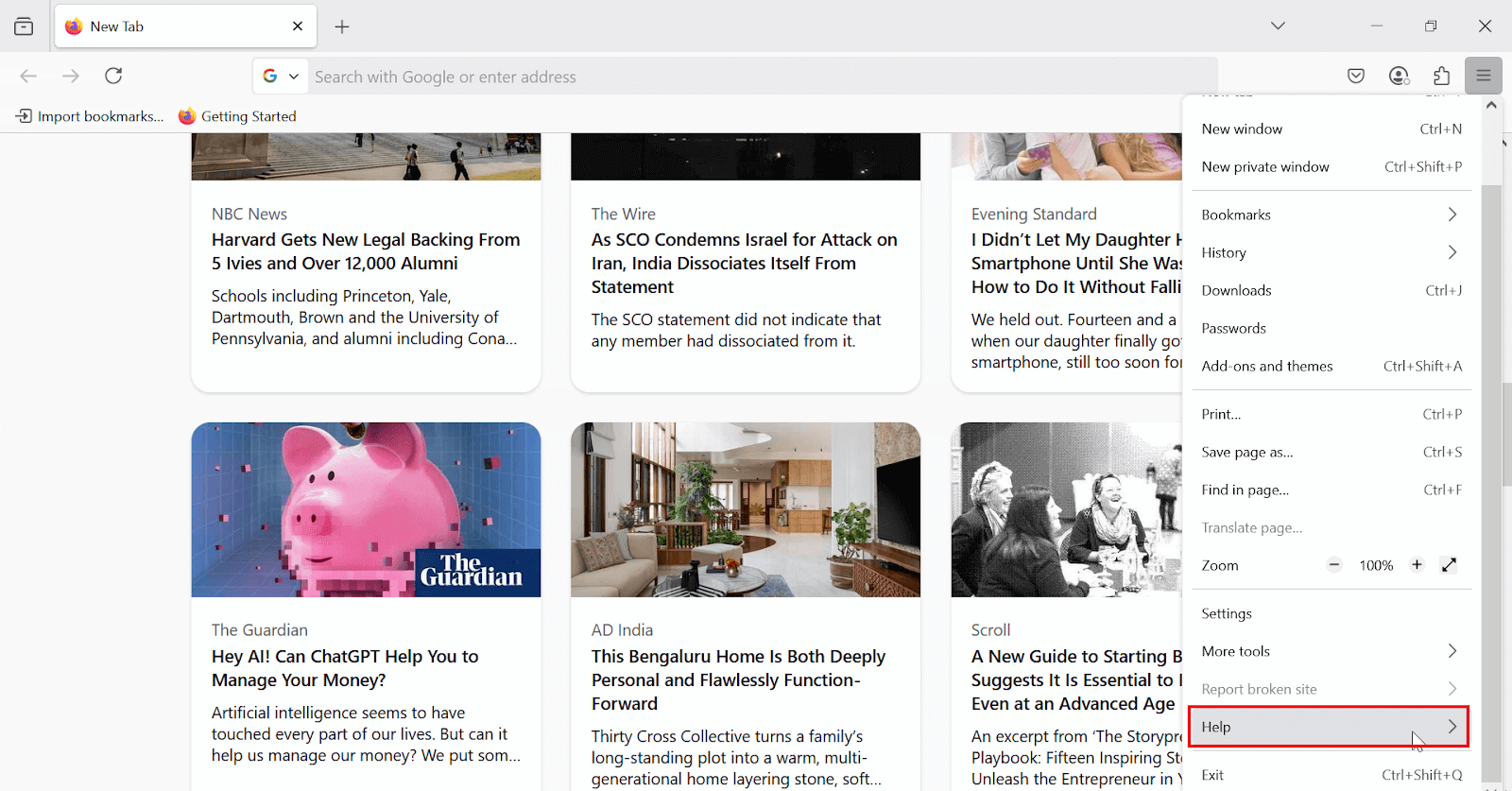
1. Open Firefox browser, click the menu icon (☰) in the top-right corner and then click Help.
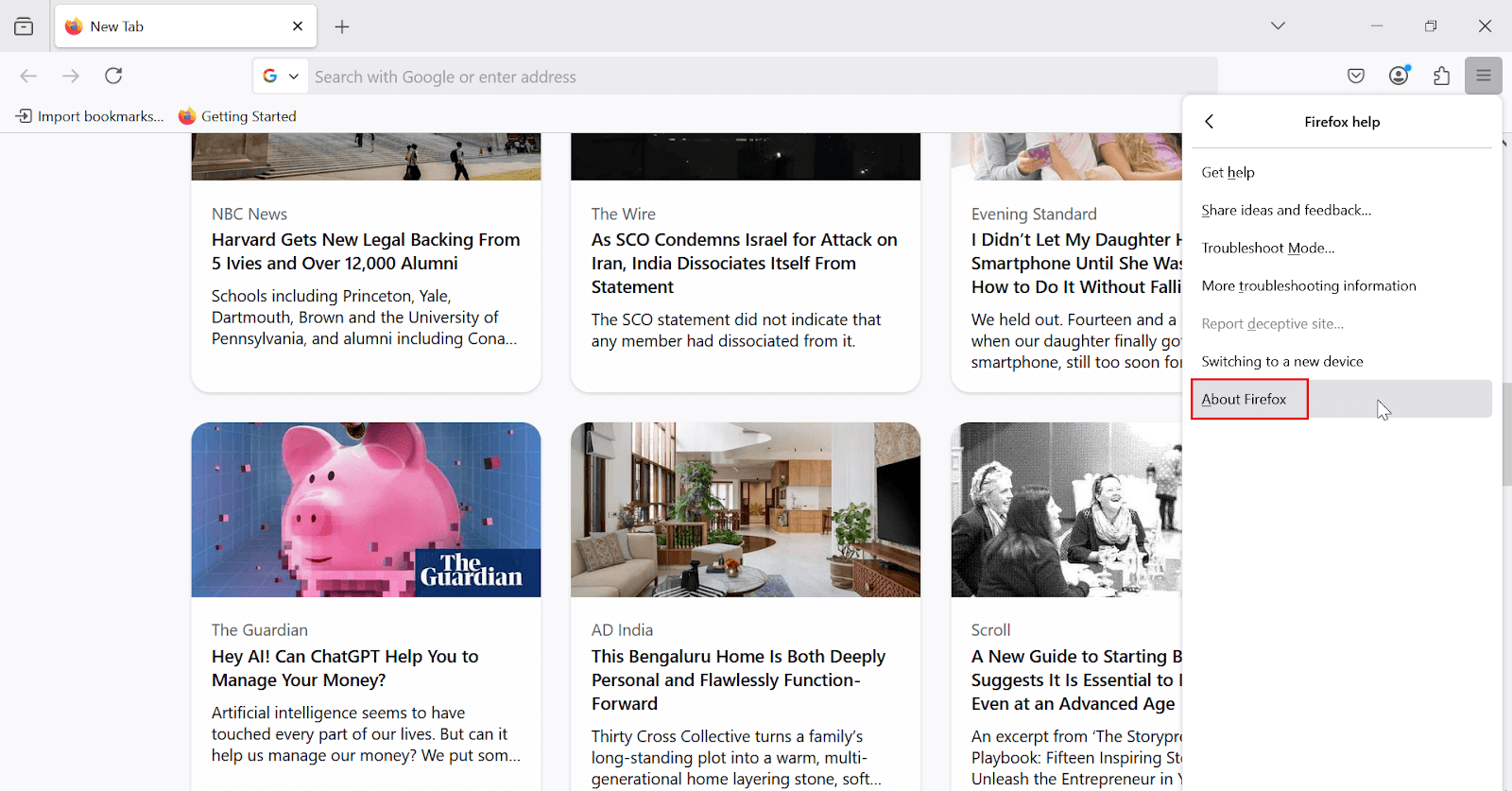
2. In the submenu that appears, click About Firefox.
3. A new window will open. Firefox will automatically check for available updates. Once done, click Restart to Update Firefox to finish the update.
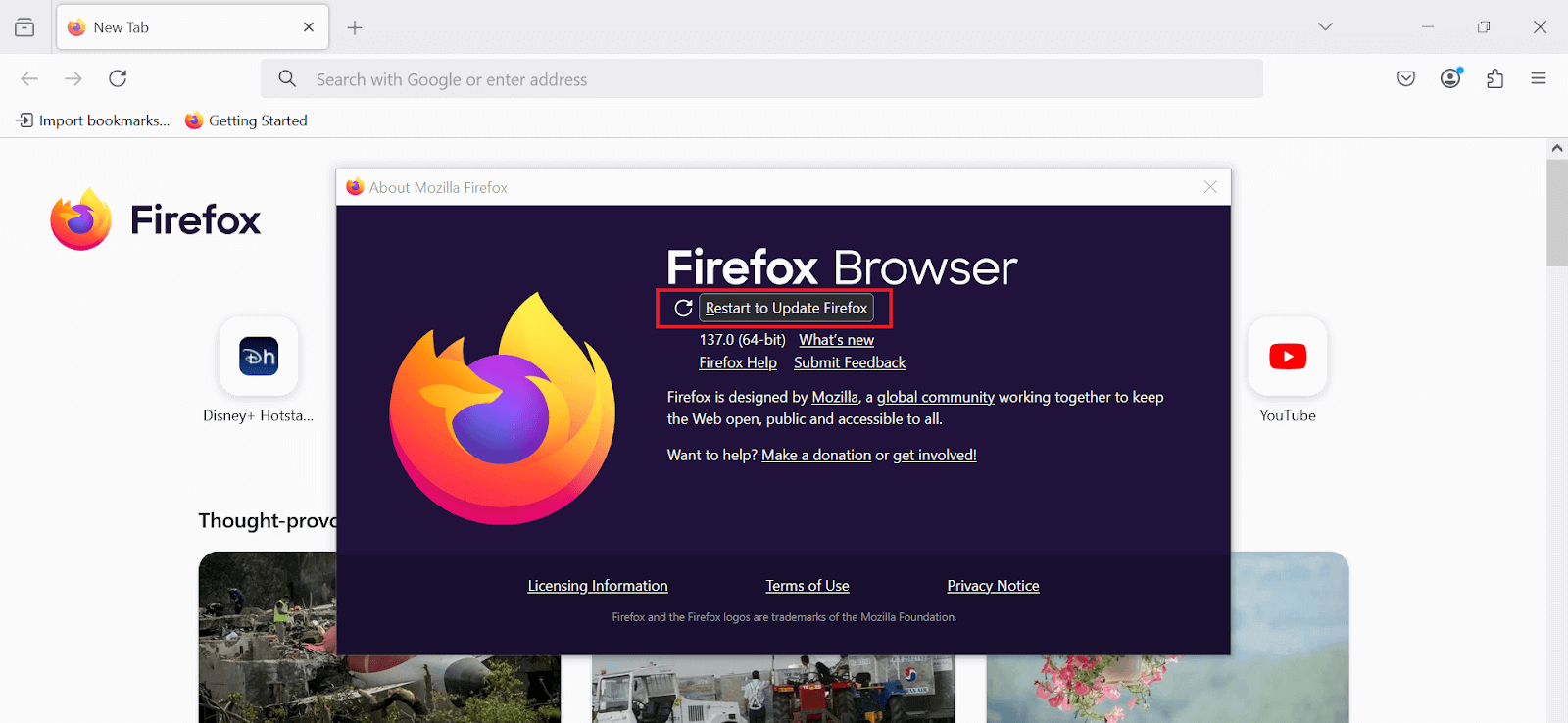
Your Firefox browser will be updated successfully.
By default, Firefox automatically updates itself in the background to keep you protected with the latest security fixes and enhancements.
However, you can ensure that automatic updates are enabled or adjust the settings to your preference.
If Firefox still runs slowly after the update, a refresh Firefox browser reset can fix problems the update alone does not solve.
A clear cache in Firefox pass or a clear history in Firefox pass also frees up storage and removes stale site data.
- Open Firefox browser, click the menu icon (☰) in the top-right corner and then click Settings.
- From the General section, navigate to the Firefox Updates section.
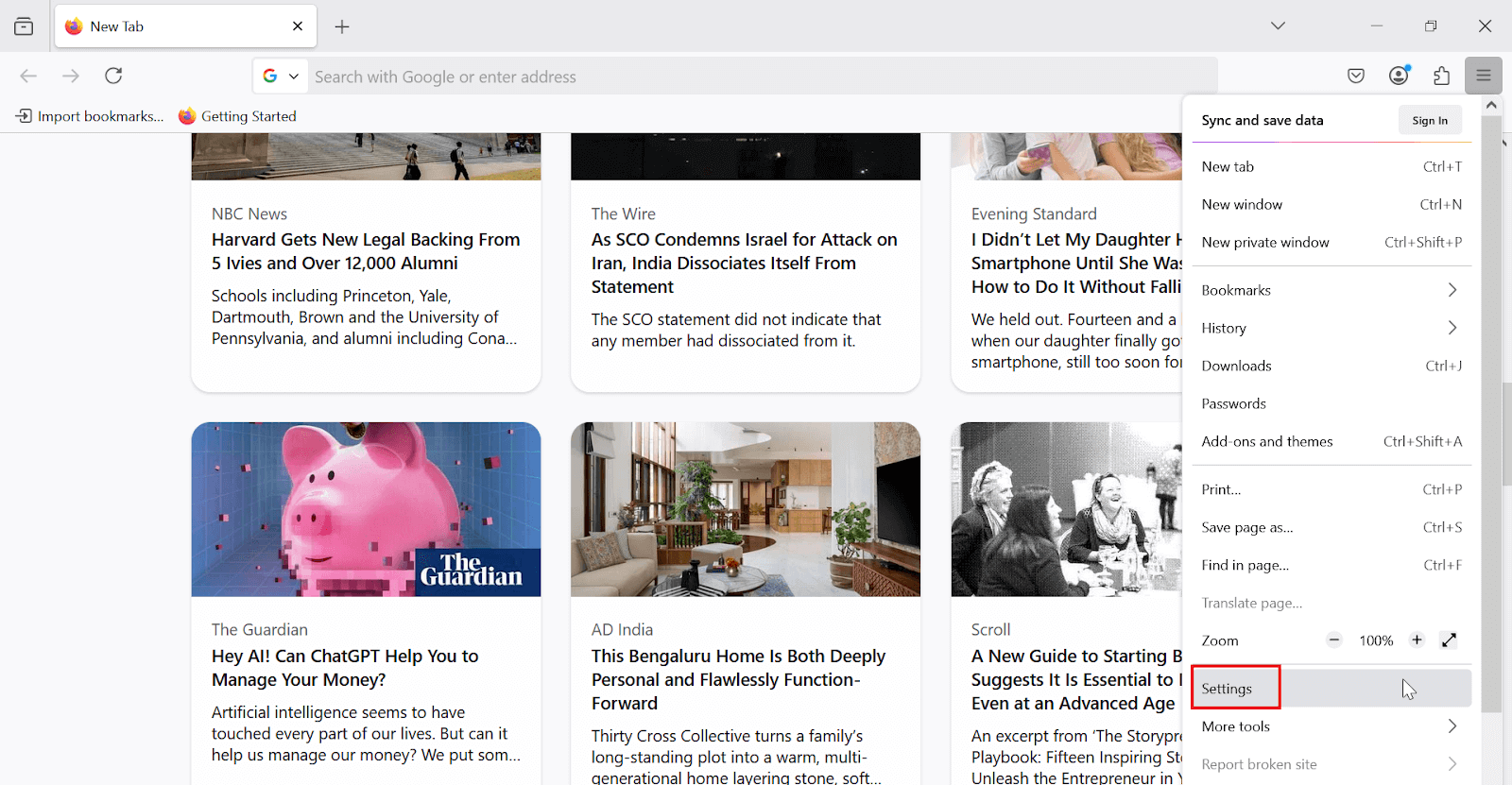
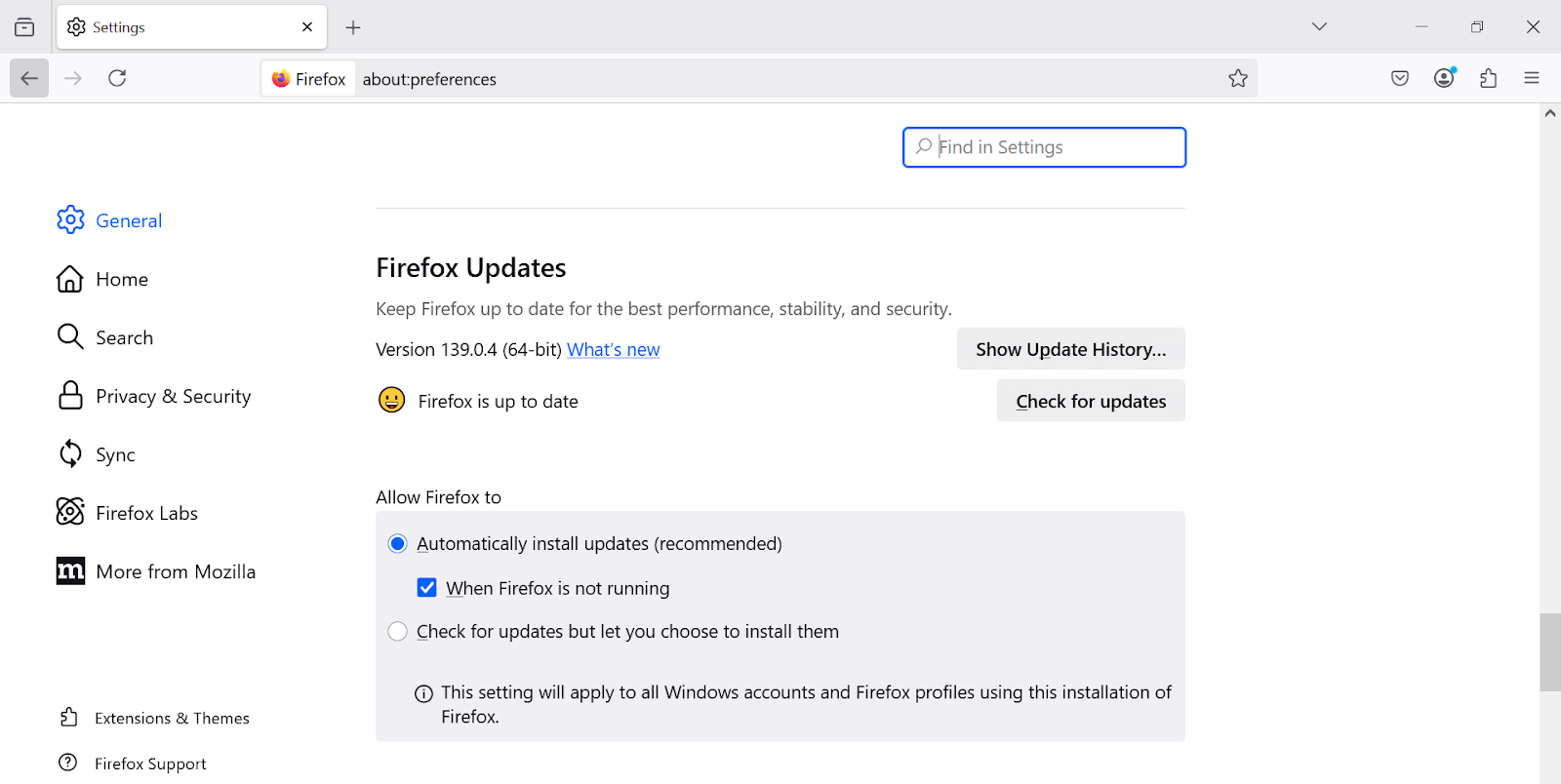
In the Firefox Updates section, you will see that the Automatically install updates (recommended) option is enabled. This ensures that Firefox remains updated in the background without requiring any manual intervention from you.
As per StatCounter, Mozilla Firefox holds a 2.98% global browser market share across platforms as of August 2026, highlighting its importance for thorough application testing. It ensures your website works seamlessly across different Firefox browser versions.
Using AI-native cloud testing platforms like TestMu AI, you can efficiently test on Firefox browsers and their different versions and platforms, ensuring cross-browser compatibility and a smooth user experience.

Why Update Firefox Browsers?
Regular updates to Firefox are not merely about accessing new features. The primary reasons to ensure that your browser is always updated include:
- Performance Enhancements: Updates often optimize Firefox’s speed, making it a more efficient tool for browsing.
- New Features and Interface Improvements: Browser updates typically introduce new features and enhance existing ones, improving user experience.
- Compatibility: New updates ensure that Firefox remains compatible with the latest web technologies and websites.
- Security Enhancements: Each new update addresses potential vulnerabilities, making your browser more resistant to cyber threats.
Compatibility gains from an update also support cross-browser testing, where a team verifies that a site renders correctly on every Firefox version still in use.
What AI Features Come With the Latest Firefox Update?
Firefox 133 and later ships a built-in AI chatbot sidebar with Claude, ChatGPT, Gemini, and Le Chat Mistral, plus Microsoft Copilot from version 143, so an outdated install misses these tools.
- Built-in AI sidebar: Firefox 133 and later adds an AI chatbot panel to the sidebar, so a user can ask questions or summarize a page without leaving the tab.
- Provider choice: The sidebar supports Anthropic Claude, ChatGPT, and Google Gemini, plus Le Chat Mistral, with Microsoft Copilot added from Firefox 143 onward.
- Opt-in only: Mozilla keeps the chatbot outside Firefox's core browsing functions, so it stays off until a user turns it on and accepts that provider's own terms.
- Test suite impact: An automated Selenium suite needs its driver version matched to the Firefox release it drives, a pairing the Selenium Firefox driver tutorial walks through after every update.
Conclusion
Ensuring that your Firefox browser is up to date is one of the simplest yet most effective actions you can take to protect your digital experience.
Whether you choose to update manually or rely on automatic updates, doing so guarantees that you will benefit from the latest security patches, performance upgrades, and new features. By keeping Firefox updated, you safeguard both your data and your overall browsing experience.
Author

Anurag Sharma
Blogs: 6

Anurag Sharma is Senior Vice President of Engineering at TestMu AI (formerly LambdaTest), leading platform and product engineering across the testing cloud. He improved the streaming technologies behind live and screenshot testing, built the components that run the automation and manual test grids, and created an SSH-based Tunnel over a TCP proxy to test locally hosted and firewall-protected websites. He also built a microservice that scales virtual machines across bare-metal servers on demand using server health stats and weighted round robin. He brings over 12 years of experience across Golang, Node.js, Python, Java, Redis, Kafka, and MySQL, with earlier work engineering decision-support systems for Indian Railways.
Reviewer

Isha Vyas
Reviewer
Isha Vyas is a Lead Member of Technical Staff at TestMu AI (formerly LambdaTest), building the frontend of the quality engineering platform. She works across React.js, responsive web design, and jQuery to ship and maintain the platform's user-facing web interfaces. She brings nearly seven years of frontend engineering experience at the company, with earlier work as a Software Developer at Mantra Labs. Isha holds a B.Tech in Computer Science from Swami Keshwanand Institute of Technology, Management and Gramothan, Jaipur.


Frequently asked questions
Did you find this page helpful?
More Related Blogs
TestMu AI forEnterprise
Get access to solutions built on Enterprise
grade security, privacy, & compliance
- Advanced access controls
- Advanced data retention rules
- Advanced Local Testing
- Premium Support options
- Early access to beta features
- Private Slack Channel
- Unlimited Manual Accessibility DevTools Tests