

Power Your Software Testing with AI Agents and Cloud
The Native AI-Agentic Cloud Platform to Supercharge Quality Engineering. Test Intelligently and Ship Faster.


- TestMu AI (Formerly LambdaTest)
- /
- Blog
- /
- How to Update ChromeOS: A Step-by-Step Guide
How to Update ChromeOS: A Step-by-Step Guide
Update ChromeOS by opening Quick Settings, clicking the gear icon, selecting About ChromeOS, then clicking Check for Updates and restarting the device.
Last Updated on:
You update ChromeOS by opening Quick Settings, clicking the gear icon, selecting About ChromeOS, clicking Check for updates, and then clicking Restart. Google ships a major ChromeOS stable release every four weeks and minor releases every two to three weeks, and the device downloads them in the background. This guide covers the steps to update ChromeOS manually, the steps to update it automatically, the steps to troubleshoot update issues, and the ChromeOS version that built-in AI features need.
Key Takeaways
- Updating ChromeOS manually takes six steps: open Quick Settings from the clock, click the gear icon, select About ChromeOS, click Check for updates, let the download finish, then click Restart.
- Google ships a major ChromeOS stable release every four weeks and minor releases every two to three weeks.
- An administrator turns on automatic ChromeOS updates in the Google Admin console under Devices, Chrome, Settings, Device settings, Auto-update settings, Allow updates.
- A ChromeOS update does not delete downloads or personal files stored on the Chromebook.
- Google gives ChromeOS devices 10 years of updates from the platform release date, and once a device passes its Auto Update Expiration date, Check for updates returns nothing.
- Chrome built-in AI APIs run only on a Chromebook Plus model with ChromeOS Platform 16389.0.0 or later, which makes updating ChromeOS a prerequisite for Chrome built-in AI.
Steps to Update ChromeOS Manually
Below are the steps to update ChromeOS:
- Click on the clock in the bottom-right corner of your screen to open Quick Settings.
- In the Quick Settings menu, click the gear icon to open the Settings menu.
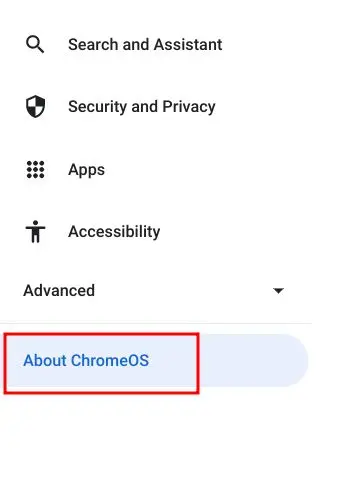
- In the left-hand panel of the Settings menu, scroll down and select "About ChromeOS".
- Next, click Check for updates in the right pane, and your ChromeOS will search for any available updates.
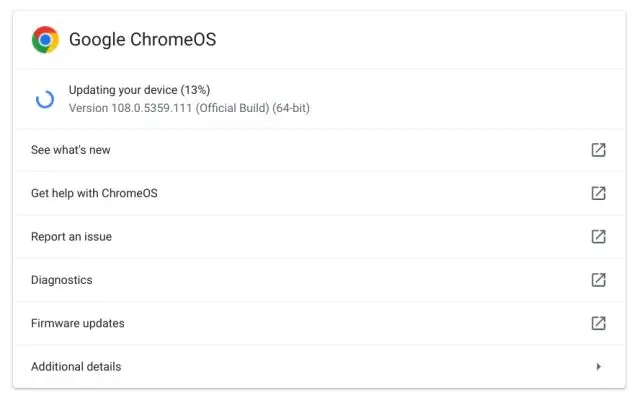
- If an update is available, your Chromebook automatically begins downloading the ChromeOS latest version.
- After a few seconds, click Restart to install the update. Your ChromeOS will be updated to the latest version once it restarts.
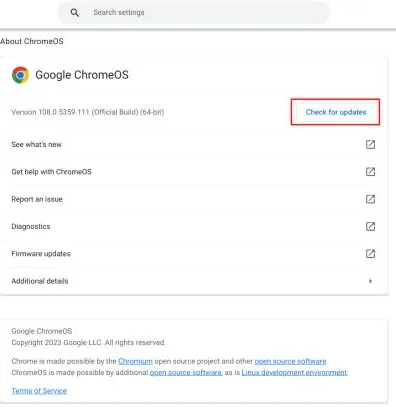
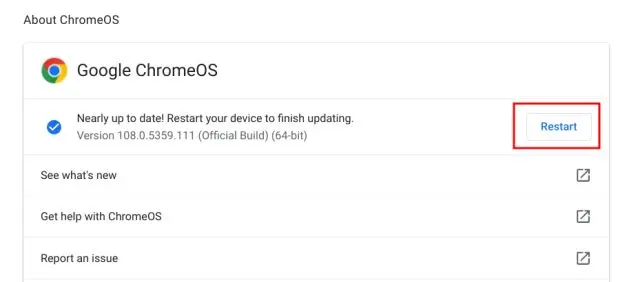
The About ChromeOS screen also shows the version your Chromebook is running now. Note that number before you select Restart, then open the same screen after the reboot to confirm the update applied.
Key Takeaway: A manual ChromeOS update runs entirely from Settings: open Quick Settings from the clock in the bottom-right corner, click the gear icon, select About ChromeOS, click Check for updates, then click Restart to install.
Steps to Update ChromeOS Automatically
By default, ChromeOS devices automatically update to the latest version. It's recommended to keep this setting for security fixes and new features.
Follow the below steps to enable ChromeOS updates automatically.
- Sign in to the Admin console with an admin account.
- Go to Menu > Devices > Chrome > Settings > Device settings.
- Select the organizational unit (or leave the top unit for all devices).
- Under Device update settings, click Auto-update settings and choose Allow updates.
- Click Save.
This ensures devices receive the latest updates automatically.
A downloaded update still needs a restart before it applies. ChromeOS shows an Update device notification at the bottom right next to the date, and on work or school devices enrolled in mobile device management tools Google uses a blue notification when an update is recommended and an orange one when it is required. Select Restart in that notification to finish the install.
Plan the rollout around the release cadence. Google documents that ChromeOS is updated every 2-3 weeks for minor releases, and every 4 weeks for major releases. A fleet that cannot absorb a feature change every month can move to the Long-term Support channel, which still takes security fixes but only gets feature updates every 6 months.
Key Takeaway: An administrator enables automatic ChromeOS updates in the Google Admin console under Device settings by choosing Allow updates, and a fleet that cannot absorb a monthly feature change can move to the Long-term Support channel.
Steps to Troubleshoot ChromeOS Update Issues
Sometimes, you might encounter issues while updating ChromeOS.
Here's how to address common problems:
- No Updates Available: Ensure your ChromeOS is connected to the Internet and wait a few minutes before trying again.
- Low Storage Space: Free up storage by deleting unnecessary files, uninstalling unused apps, or taking a minute to clear browser cache in Chrome.
- Update Fails: Restart your ChromeOS and try updating again. If the download still fails, move the device to Wi-Fi or Ethernet, then reset it. Recovery is the last step, because Google warns that it permanently erases everything on the Chromebook, including downloaded files.
- Unsupported Device: Older Chromebooks may no longer receive updates. Check the Auto Update Expiration (AUE) date for your device on Google's official support page.
Check the update lifetime before you assume the update is broken. Google's Auto Update policy gives ChromeOS devices 10 years of updates from the platform release date, and devices released before 2021 can receive extended updates with some features and services unsupported. Look up your model on that page to find its Auto Update Expiration date. After a device passes that date, Check for updates returns nothing and no troubleshooting step will change that. You can also read the date on the device itself: open Settings, select About ChromeOS, then open Additional details, where Google lists the Auto Update Expiration date for the model.

Key Takeaway: Most failed ChromeOS updates trace back to no internet connection, low storage, or a Chromebook that has passed its Auto Update Expiration date, and a Chromebook past its Auto Update Expiration date never receives another update.
Which ChromeOS Version Do Built-in AI Features Need?
A Chromebook needs ChromeOS Platform 16389.0.0 or later to run Chrome's built-in AI APIs, and the device has to be a Chromebook Plus model. Google states both conditions in the built-in AI requirements. Updating is the only route to that platform number, so the update has a concrete payoff beyond security patches.
Storage and hardware decide whether the feature actually turns on. The same requirements ask for at least 22 GB of free space on the volume that contains your Chrome profile, plus either more than 4 GB of VRAM on the GPU or 16 GB of RAM with four CPU cores. The model downloads once over an unmetered connection and then runs without network access, but Chrome removes it if free space drops below 10 GB after the download. That turns the low storage problem listed above into a recurring check rather than a one-time cleanup.
Check your release channel and your Chrome flags before you conclude the feature is missing. Open Settings, select About ChromeOS, then open Additional details, which is the screen Google documents for viewing and changing the release channel. Do not switch to Beta or Dev to chase a feature on a device holding work files. Moving back to a more stable channel later triggers a powerwash, and Google states that everything on the Chromebook is deleted and you have to sign in with your Google Account again.
The consumer-facing features follow the same update path. Google lists Help Me Read, which uses Gemini models to summarize PDFs, articles, and websites, among the newer Chromebook features, alongside Help me write and the Quick Insert key. A device that never finishes an update never gets them.
Key Takeaway: Chrome built-in AI APIs require ChromeOS Platform 16389.0.0 or later on a Chromebook Plus device, plus at least 22 GB of free space and either more than 4 GB of VRAM or 16 GB of RAM with four CPU cores.
Conclusion
Regular updates keep ChromeOS secure and stable. A manual check from About ChromeOS takes under a minute, and automatic updates handle the rest once an administrator allows them in the Admin console. If an update fails, confirm the network connection, free up storage, and check that the device has not passed its Auto Update Expiration date.
Author

Bhavya Hada
Blogs: 29


Bhavya Hada is a Community Contributor at TestMu AI with over three years of experience in software testing and quality assurance. She has authored 20+ articles on software testing, test automation, QA, and other tech topics. She holds certifications in Automation Testing, KaneAI, Selenium, Appium, Playwright, and Cypress. At TestMu AI, Bhavya leads marketing initiatives around AI-driven test automation and develops technical content across blogs, social media, newsletters, and community forums. On LinkedIn, she is followed by 4,000+ QA engineers, testers, and tech professionals.


ChromeOS Update FAQs
Did you find this page helpful?
More Related Blogs
TestMu AI forEnterprise
Get access to solutions built on Enterprise
grade security, privacy, & compliance
- Advanced access controls
- Advanced data retention rules
- Advanced Local Testing
- Premium Support options
- Early access to beta features
- Private Slack Channel
- Unlimited Manual Accessibility DevTools Tests