

Power Your Software Testing with AI Agents and Cloud
The Native AI-Agentic Cloud Platform to Supercharge Quality Engineering. Test Intelligently and Ship Faster.


- TestMu AI (Formerly LambdaTest)
- /
- Blog
- /
- How to Unblock Websites: Easy Ways to Access Any Site
How to Unblock Websites: A Complete Guide
Learn how to unblock websites safely with VPNs, proxies, DNS changes, and browser fixes. Access any site securely with these simple methods.
Last Updated on:
When you need access to information, tools, or platforms restricted by location, network, or organization policies, knowing how to unblock websites is important. You often face website blocks in schools, offices, or certain regions, limiting research, communication, or entertainment.
According to the Internet Society’s 2025 report on Perspectives on Internet Content Blocking, users often rely on VPNs, proxy sites, or DNS tools to regain access to blocked content. However, the report warns that using unsafe or illegal methods can expose users to privacy risks or violate online rules. Understanding the right and legal ways on how to unblock websites helps you browse freely while keeping your data and privacy secure.
Overview
To unblock websites restricted by network, device, or geographical controls, use NordVPN to securely reroute your traffic through another region, or use a proxy server to mask your IP address. These methods bypass local firewalls, administrative rules, and location-based restrictions to restore access to blocked content.
What Are Blocked Websites?
- Network-Level Blocks: Network-level blocks occur when entire Wi-Fi or local area networks restrict access to specific domains, preventing any connected device from reaching those websites.
- Device-Specific Restrictions: Device-specific restrictions use parental controls or administrative rules on individual computers or tablets to limit user access to certain websites.
- Geo-Location Controls: Geo-location controls restrict website availability based on the user's physical location, blocking access to users outside of permitted regions.
- IP and DNS Filtering: IP and DNS filtering blocks specific IP addresses or domain names to prevent users from resolving and accessing restricted websites.
Why Websites Get Blocked and How Restrictions Work?
- Government Restrictions: Government restrictions enforce local laws, block illegal content, and protect national security by blocking access to specific online destinations.
- Schools and Workplaces: Educational institutions and workplaces block websites to maintain productivity, manage network bandwidth, and prevent distractions from social media or streaming.
- Security Concerns: Security-based blocks restrict access to websites known to host malware, phishing schemes, or other cyber threats to protect user devices and data.
- Copyright and Piracy Issues: Copyright blocks restrict access to websites hosting illegal or pirated content to comply with intellectual property laws and regulations.
- Geo-Restrictions and Bandwidth Management: Network administrators block high-bandwidth or location-restricted content to optimize network performance and manage data usage effectively.
- Child Safety: Schools and parents block harmful or inappropriate online content to ensure safe browsing experiences for minors and children.
What Are the Different Techniques to Unblock Websites?
- NordVPN: NordVPN reroutes internet traffic through a server in a different location, hiding the user's IP address to securely access geo-restricted websites.
- ExpressVPN: ExpressVPN reroutes internet traffic through a server in a different location, hiding the user's IP address to securely access geo-restricted websites.
- Proxy Servers: Proxy servers act as a middleman between a device and the website to mask the user's identity and bypass network-level blocks quickly.
- Tor Browser: Tor Browser routes internet traffic through multiple servers to provide anonymity and help users access censored or heavily restricted websites.
- Cloudflare (1.1.1.1): Switching to Cloudflare (1.1.1.1) public DNS services helps resolve domain names that are blocked by local network filters.
- Google DNS (8.8.8.8): Switching to Google DNS (8.8.8.8) public DNS services helps resolve domain names that are blocked by local network filters.
- Clearing Cache and Cookies: Removing stored browser data can resolve access issues on websites that are blocked due to previous session settings.
- Hola: The Hola browser extension works as a lightweight proxy, allowing users to unblock specific websites directly in the browser without a system-wide VPN.
- TunnelBear: The TunnelBear browser extension works as a lightweight proxy, allowing users to unblock specific websites directly in the browser without a system-wide VPN.
- Incognito Mode: Incognito Mode bypasses cookies and cached data that might otherwise cause website access issues by opening a private browsing window.
- Google Translate: Pasting a blocked URL into Google Translate and translating it into another language creates an indirect link that can bypass network blocks.
- TinyURL: TinyURL shortens a restricted website's URL to bypass basic network filters that do not recognize the shortened link.
- Bitly: Bitly shortens a restricted website's URL to bypass basic network filters that do not recognize the shortened link.
- Direct IP Address Access: Entering a website's numeric IP address directly into a browser instead of its domain name can bypass local DNS-based blocks.
- Wayback Machine: The Wayback Machine allows users to access previously stored, archived versions of websites that are currently blocked or unavailable.
- Mobile Hotspots: Connecting a device to a mobile hotspot allows users to bypass restrictions imposed by school or workplace Wi-Fi networks.
- TestMu AI: TestMu AI enables users to perform geolocation testing, confirm if sites are blocked in real-time, and manage VPN-based browsing scenarios securely.
What Are Safe and Legal Alternatives to Unblocking Websites?
- Feedly: Feedly allows users to get updates and read content from blocked websites via RSS feeds without directly visiting the restricted sites.
- Inoreader: Inoreader allows users to get updates and read content from blocked websites via RSS feeds without directly visiting the restricted sites.
- Hide.me: Hide.me is a reliable online web proxy that allows users to access blocked websites securely through a web browser interface.
- ProxySite: ProxySite is a reliable online web proxy that allows users to access blocked websites securely through a web browser interface.
- Google Docs: Google Docs is a document sharing platform that allows users to access and view restricted information hosted on its servers.
- Slideshare: Slideshare is a document sharing platform that allows users to access and view restricted information hosted on its servers.
- Scribd: Scribd is a document sharing platform that allows users to access and view restricted information hosted on its servers.
What Are Blocked Websites?
A blocked website is one that has restricted access by authorities such as governments, workplaces, schools, or your Internet provider, usually due to regulatory compliance, policies, or security reasons. Access can be limited using techniques like IP blocking, DNS filtering, URL filtering, geolocation-based restrictions, or firewall and proxy rules to prevent users from reaching the site.
Why Websites Get Blocked and How Website Restrictions Work?
Website blocking is the practice of restricting access to specific sites. It can be applied at different levels depending on who enforces the restriction and the purpose behind it. Blocks are typically implemented to maintain security, enforce policies, manage productivity, or comply with legal requirements.
Common Levels of Website Blocking:
- Network-wide: Blocks applied across an entire network using firewalls, affecting all users connected simultaneously to it.
- Device-based: Individual devices restricted through parental controls, security software, or browser settings to limit access to sites.
- Server-side: Access controlled via server configurations, including geo-restrictions or content filtering, to restrict user access remotely.
- DNS-based: Blocks prevent domain names from resolving to IP addresses, stopping users from reaching specific websites entirely.
- Application-based: Apps or platforms, such as social media or productivity tools, may internally restrict access for users.
- IP-based: Specific IP addresses are blocked to prevent connections to certain servers or websites across a network.
Common Reasons Websites Are Blocked:
- Government Restrictions: Sites blocked by governments to enforce laws, prevent illegal content, and protect national security effectively.
- Schools & Workplaces: Access limited to maintain productivity, manage bandwidth, and prevent distractions from social media or streaming.
- Security Concerns: Websites hosting malware, phishing, or cyber threats are blocked to protect user devices and personal data.
- Copyright & Piracy Issues: Sites offering illegal or pirated content are restricted to comply with copyright and intellectual property laws.
- Geo-Restrictions & Bandwidth Management: Sites may be blocked due to location-based restrictions or to optimize network bandwidth usage.
- Protecting Children or Minors: Schools and parents block harmful or inappropriate content to ensure safe online experiences for minors.

Note: Test websites from 60+ countries with TestMu AI Geolocation Testing. Try TestMu AI Today!
What Are the Different Techniques to Unblock Websites?
There are several ways to bypass restrictions and access blocked websites. The techniques vary based on the device, browser, and network settings.
How to Unblock a Website on Personal Devices?
You can unblock websites on personal devices using different tools and methods. These approaches work across Windows, Mac, or mobile devices depending on the type of restriction.
1. Using a VPN (Virtual Private Network)
A VPN reroutes your internet traffic through a server in a different location, making it appear as though you’re browsing from that region. This is one of the most effective ways to unblock websites, especially those with geo-restrictions.
- How to do it: Install a VPN like NordVPN or ExpressVPN, log in, and connect to a server where the website isn’t blocked. Once connected, you can browse the restricted site safely and privately.
2. Using a Proxy Server
A proxy acts as a middleman between your device and the website, masking your IP address. This can help bypass network restrictions and access blocked sites quickly.
- How to do it: Use a trusted proxy website or configure your browser’s proxy settings. Enter the blocked website’s URL in the tool to gain access.
3. Using Google Translate
Google Translate can sometimes bypass blocks by translating the URL of the restricted site into another language, creating an indirect link.
- How to do it: Paste the blocked URL into Google Translate, select any language pair, and click the translated link to access the site.
4. Changing DNS Settings
Switching your DNS to a public service like Cloudflare (1.1.1.1) or Google DNS (8.8.8.8) can help bypass DNS-based blocks imposed by networks.
- How to do it: Go to your network settings and replace the DNS server with a public DNS. This allows some blocked websites to load normally.
5. Using a URL Shortener
Some network filters do not block shortened URLs. Shortening a blocked website’s URL can provide access.
- How to do it: Use TinyURL, Bitly, or similar services to shorten the URL. Enter the new link in your browser to reach the site.
6. Using Incognito Mode
Private browsing bypasses cached data and cookies that might cause access issues. It’s a simple trick for websites blocked due to previous session settings.
- How to do it: Open an Incognito window in your browser (e.g., Chrome → New Incognito Window) and try accessing the blocked site.
7. Using Browser Extensions
Extensions like Hola or TunnelBear work as browser-based proxies, allowing you to unblock sites without system-wide VPN setup.
- How to do it: Install the extension, select an unrestricted country, and visit the blocked website directly through your browser.
8. Using Tor Browser
Tor provides anonymity by routing your traffic through multiple servers. It’s especially useful for accessing censored or heavily restricted sites.
- How to do it: Download and install Tor Browser, and start browsing anonymously. It will help you access websites blocked by local networks or censorship.
9. Accessing via IP Address
Instead of typing in the website’s URL, try accessing the website directly through its IP address, which can bypass DNS filters.
- How to do it: Find the IP address of the website using an online IP lookup tool, then enter the IP address in your browser to access the website.
10. Using the Wayback Machine
If the website was previously available but is now blocked, you can view archived versions using the Wayback Machine.
- How to do it: Visit archive.org/web, enter the URL of the blocked website, and access its archived versions.
11. Unblocking in Browser Settings
If a website was blocked by mistake in your browser’s settings, you can remove it from the restricted list. Similarly, some blocks may relate to cookies or security settings, which can be adjusted.
- How to do it: Check your browser’s restricted sites list and remove the website. Ensure that cookies are enabled and check your firewall/antivirus settings to confirm they aren’t blocking access.
12. Using Mobile Data or Hotspots
If the website is restricted on your home or school network, use mobile data or a mobile hotspot to bypass the network’s restrictions.
- How to do it: Turn on your phone’s hotspot feature and connect your device to it. This will allow you to bypass the restrictions imposed by the school or work network.
How to Unblock a Website on Chrome, Firefox, Edge, and Safari?
Browsers often have built-in features, security settings, or extensions that can block access to certain websites. The good news is that you can usually fix this with a few simple adjustments. Here’s how to do it across popular browsers:
How to Unblock Websites on Google Chrome?
On Google Chrome, website restrictions can often be bypassed by adjusting site permissions, managing extensions, or clearing cached data. These steps help restore access to blocked sites safely.
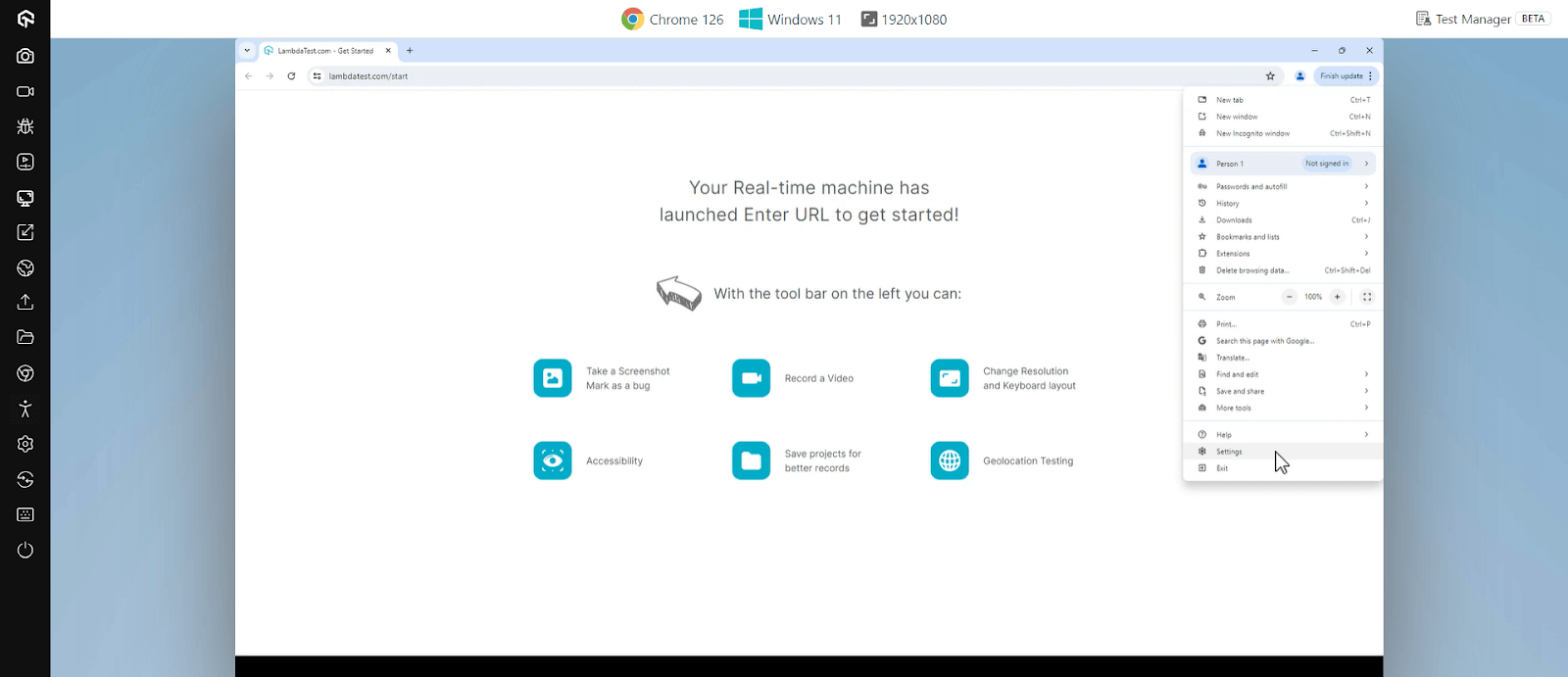
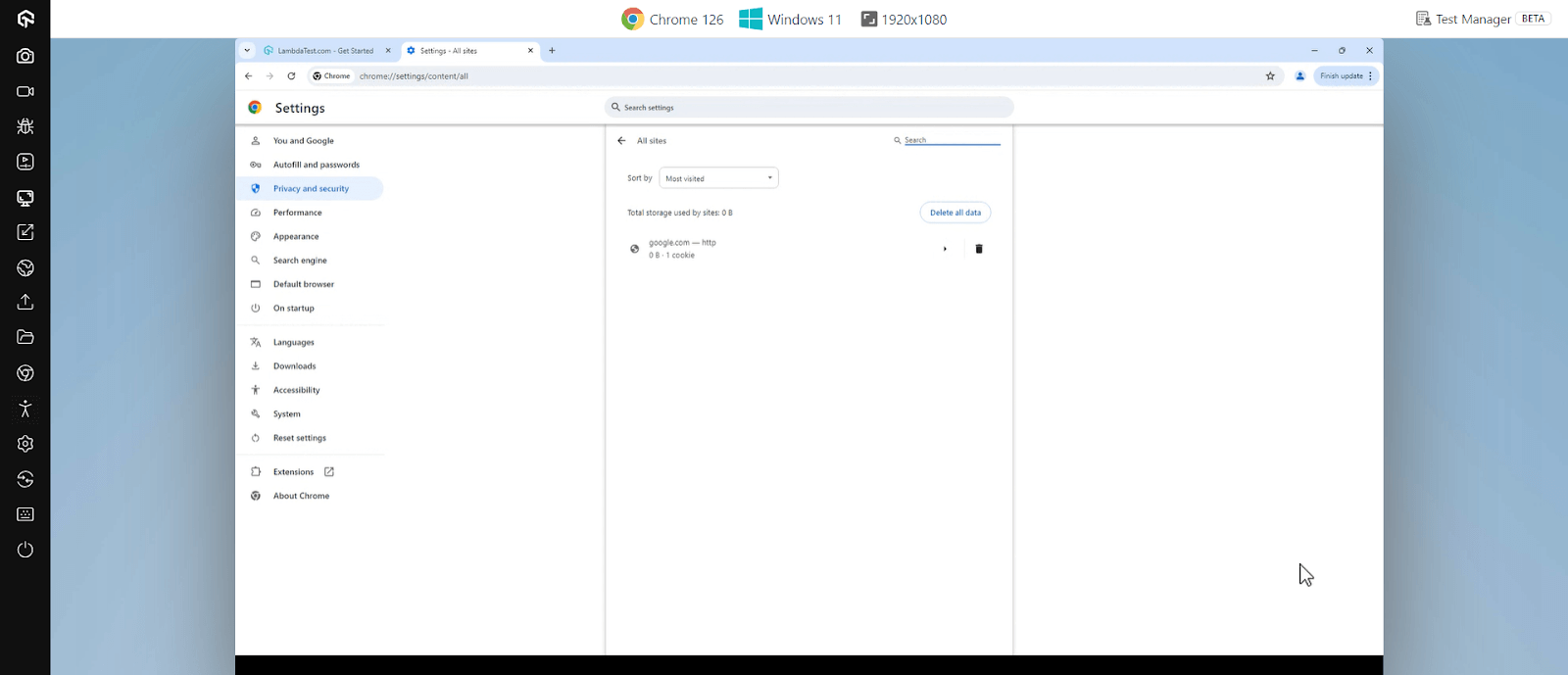
- Launch Chrome, navigate to the three-dot menu and click Settings.
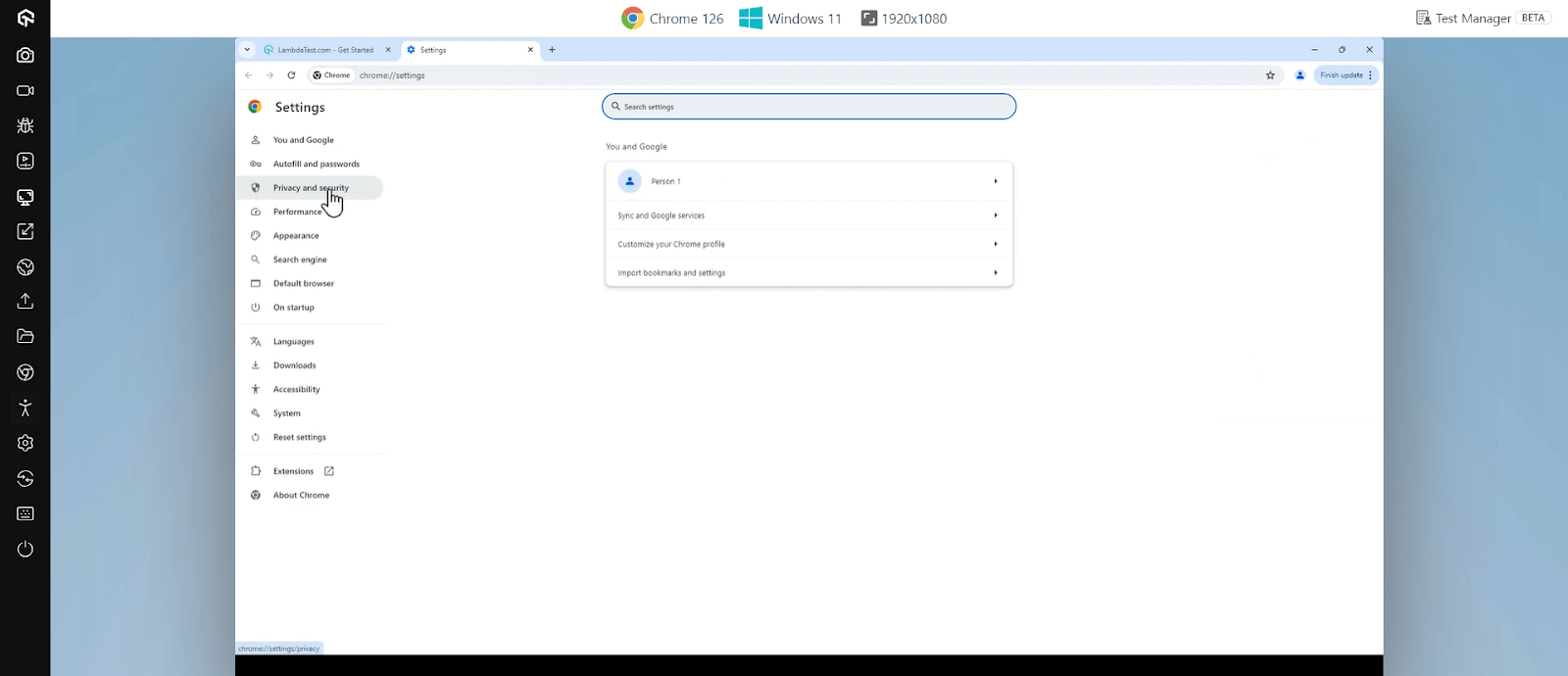
- Click Privacy and security from the left sidebar.
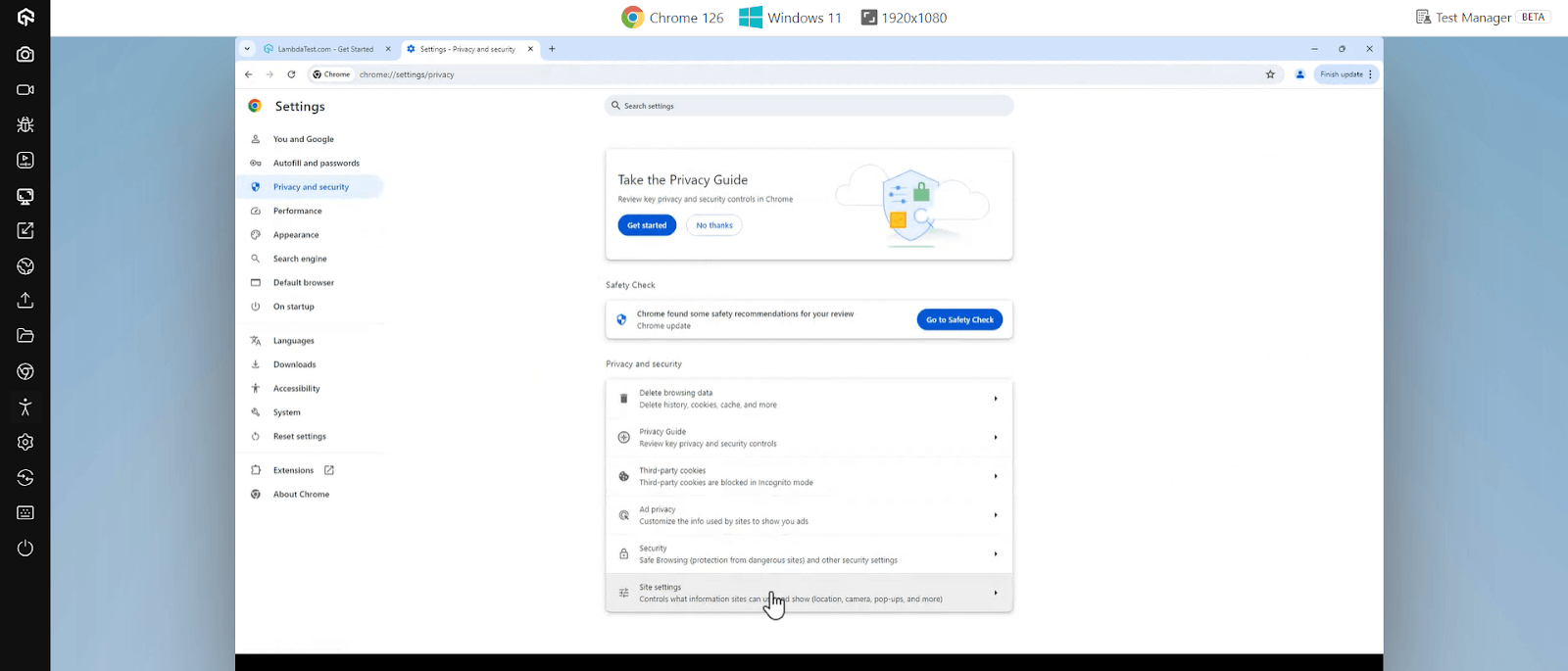
- Under Security, click Site settings.
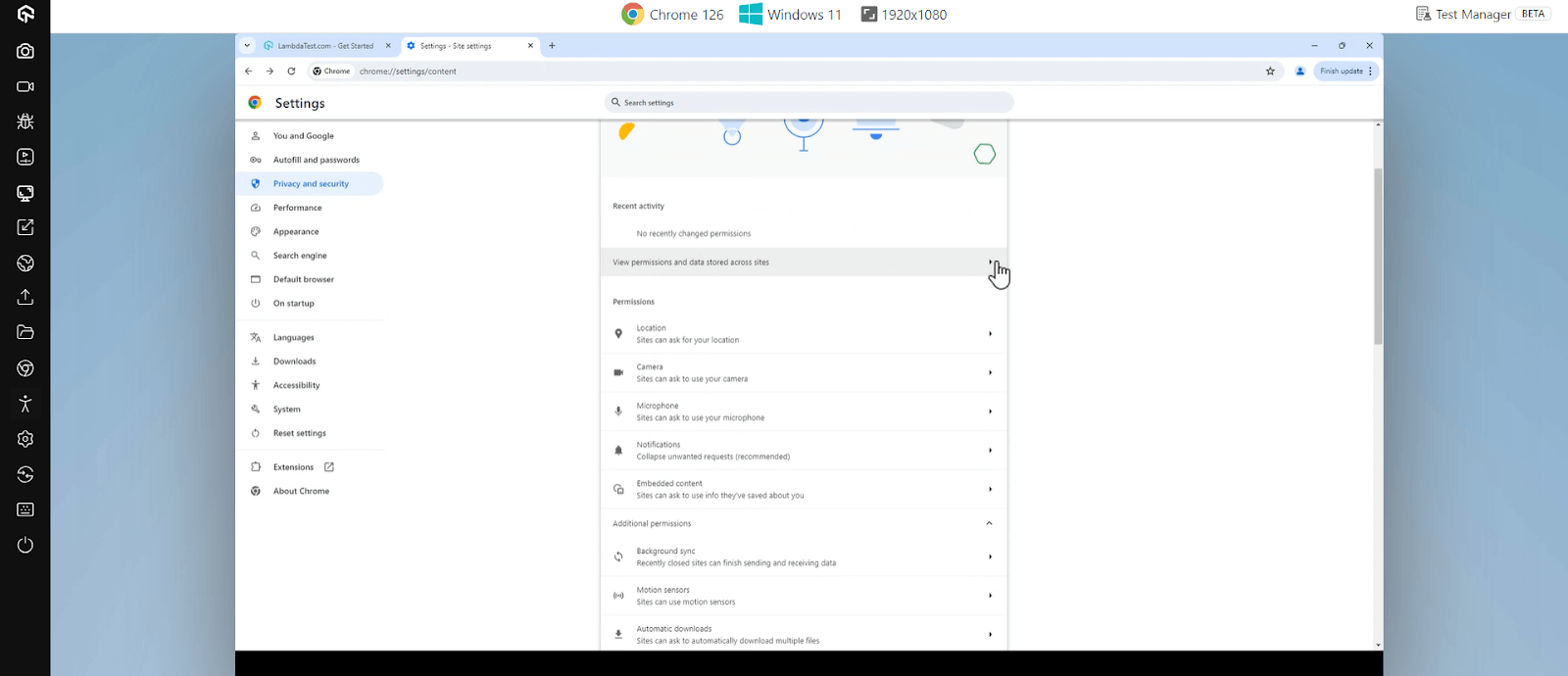
- Click on the View permissions and data stored across sites.
- Search for the website you want to unblock and click on the trash icon.
How to Unblock Websites on Mozilla Firefox?
On Mozilla Firefox, blocked websites can usually be accessed by reviewing the permissions list, disabling restrictive add-ons, or clearing cookies and cache. These steps help ensure smooth browsing.
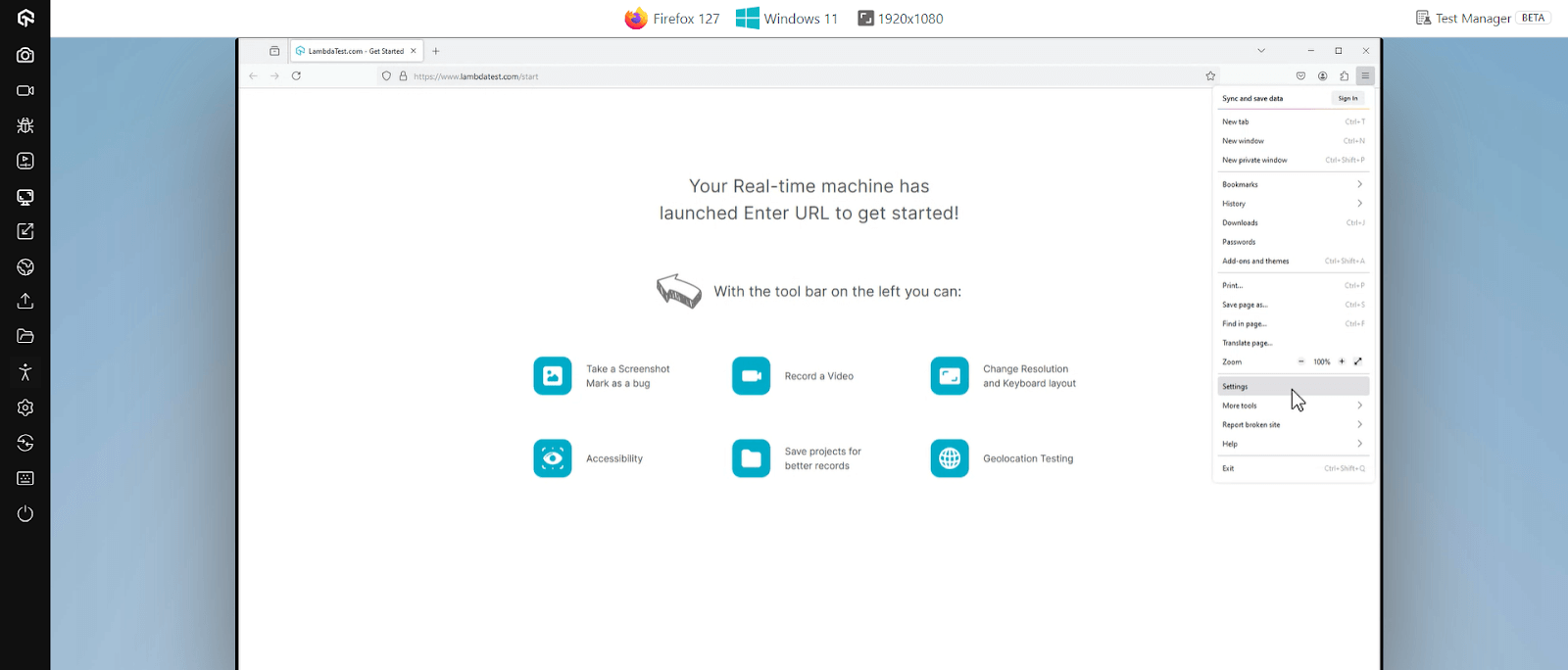
- Launch Firefox, click the three horizontal lines and go to Settings.
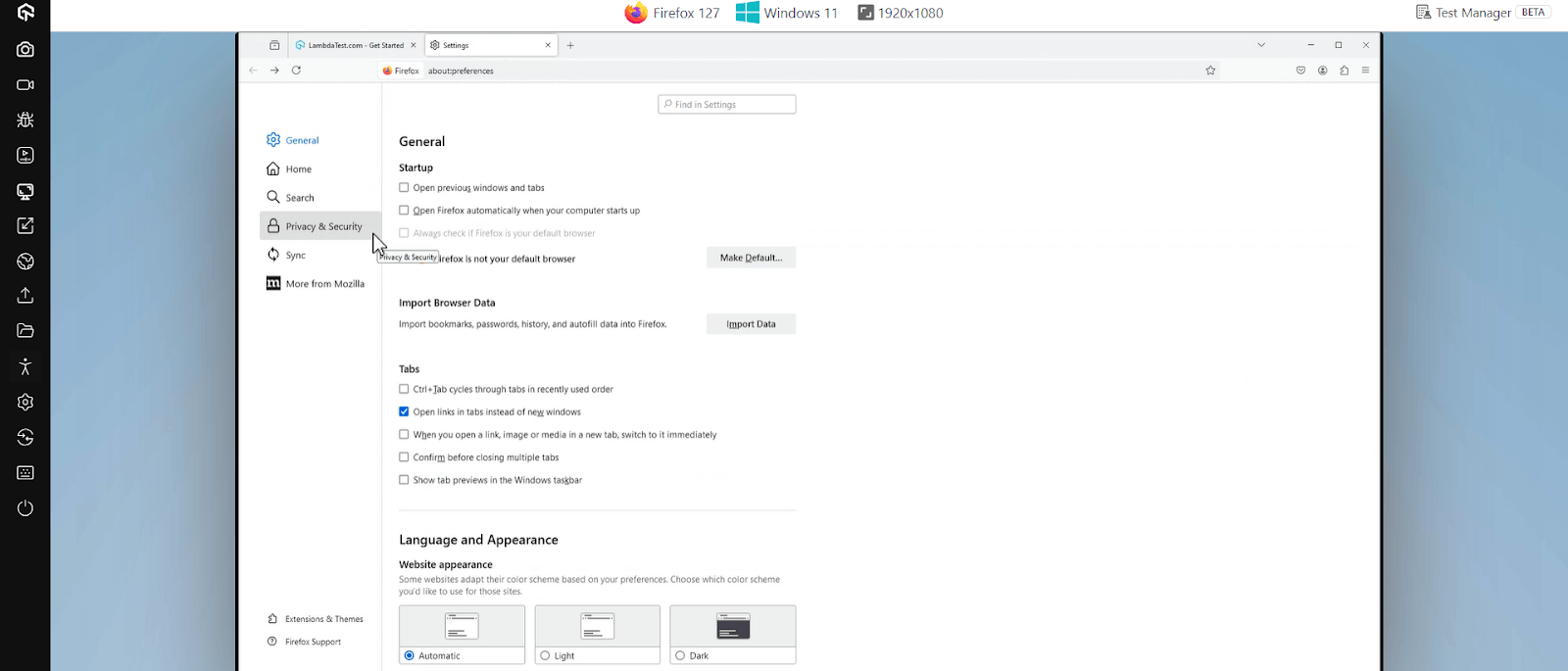
- Click on Privacy & Security.
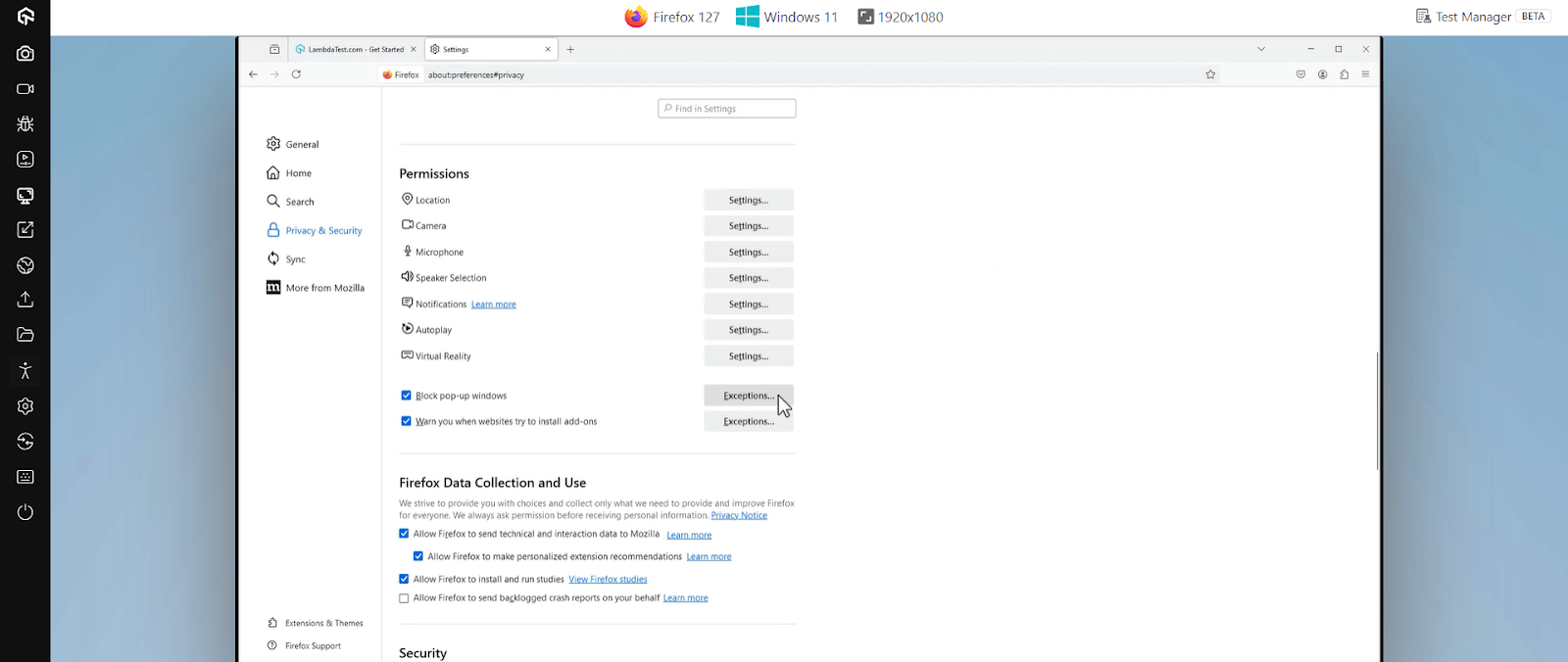
- Scroll down to the Permissions section and click Exceptions to check if any site is blocked here. If so, you can remove it.
How to Unblock Websites on Microsoft Edge?
On Microsoft Edge, you can unblock websites by checking site permissions, disabling extensions, or using InPrivate browsing. These steps help resolve access issues efficiently.
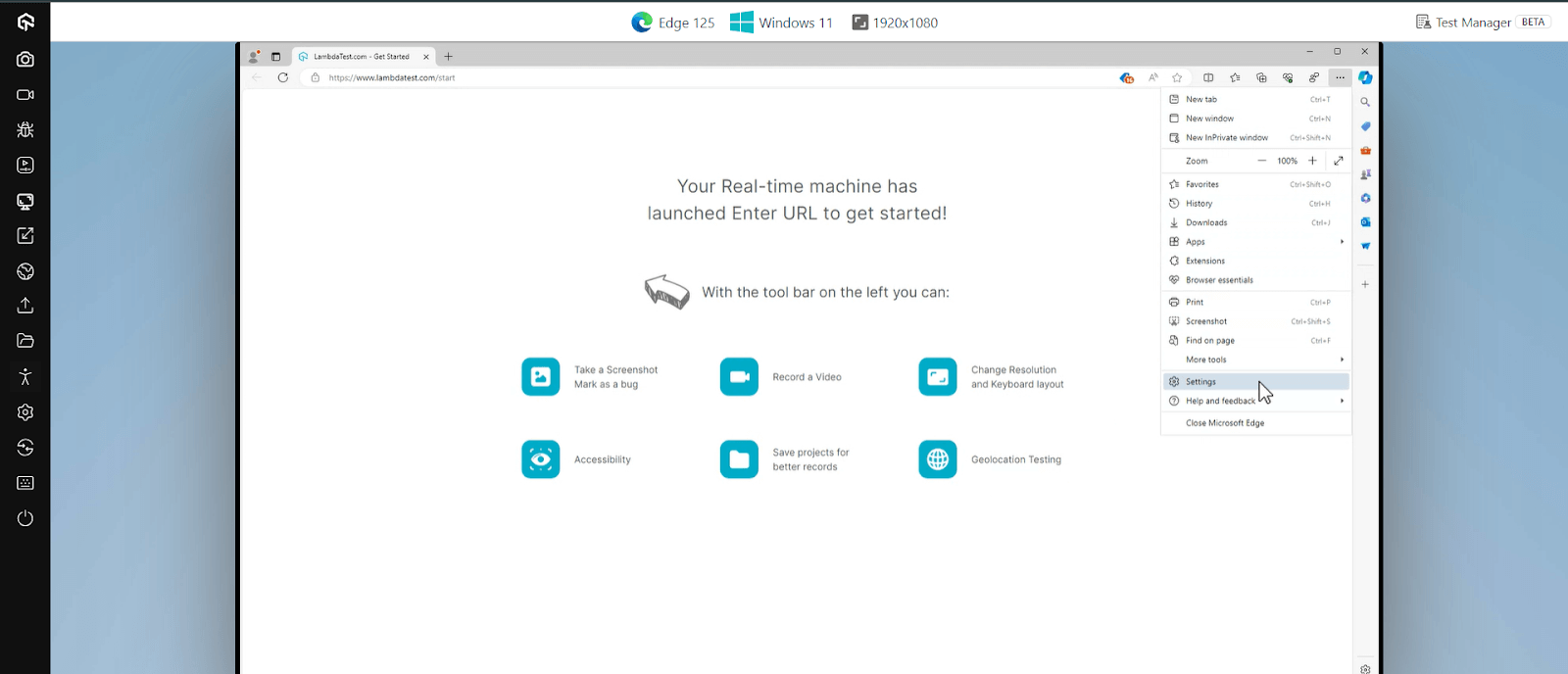
- Launch Edge, click on the three dots menu and select Settings.
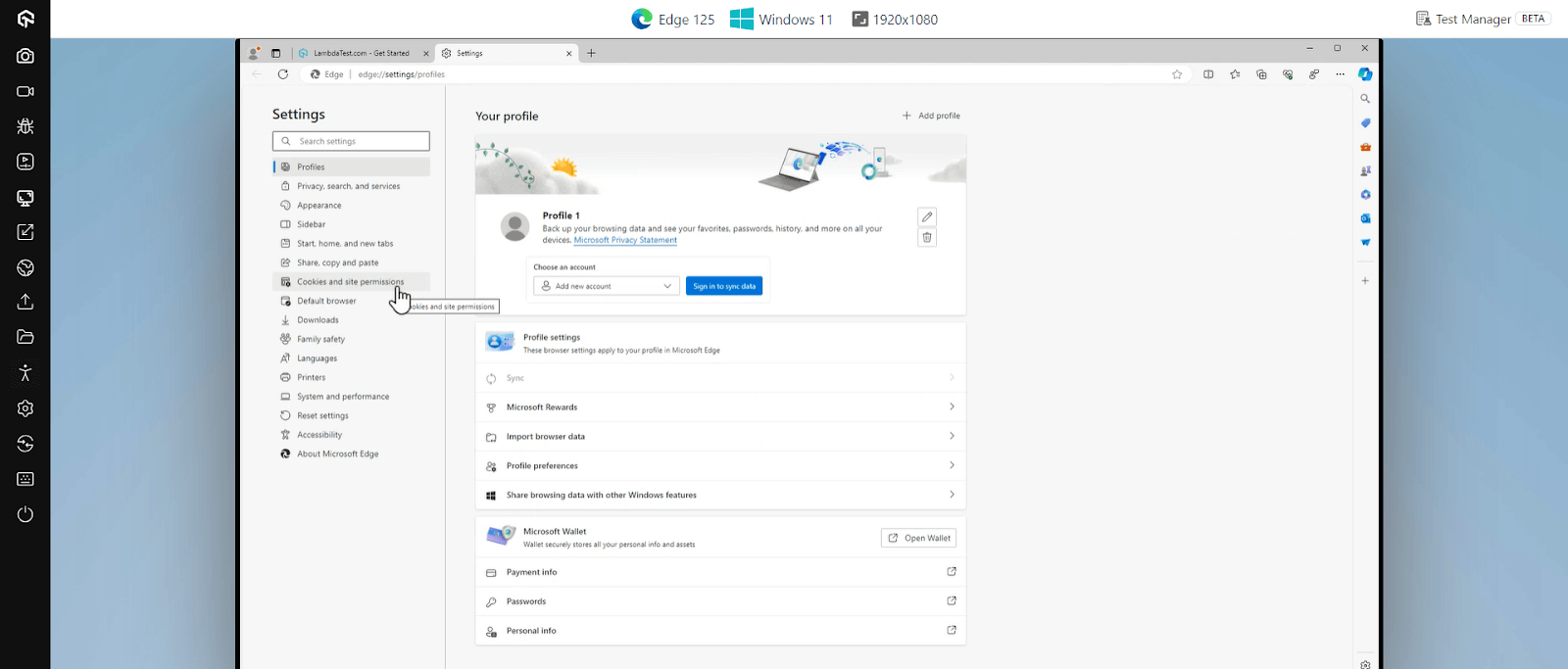
- Click Cookies and site permissions.
- Select Manage and delete cookies and site data and check if any specific permissions block the website.
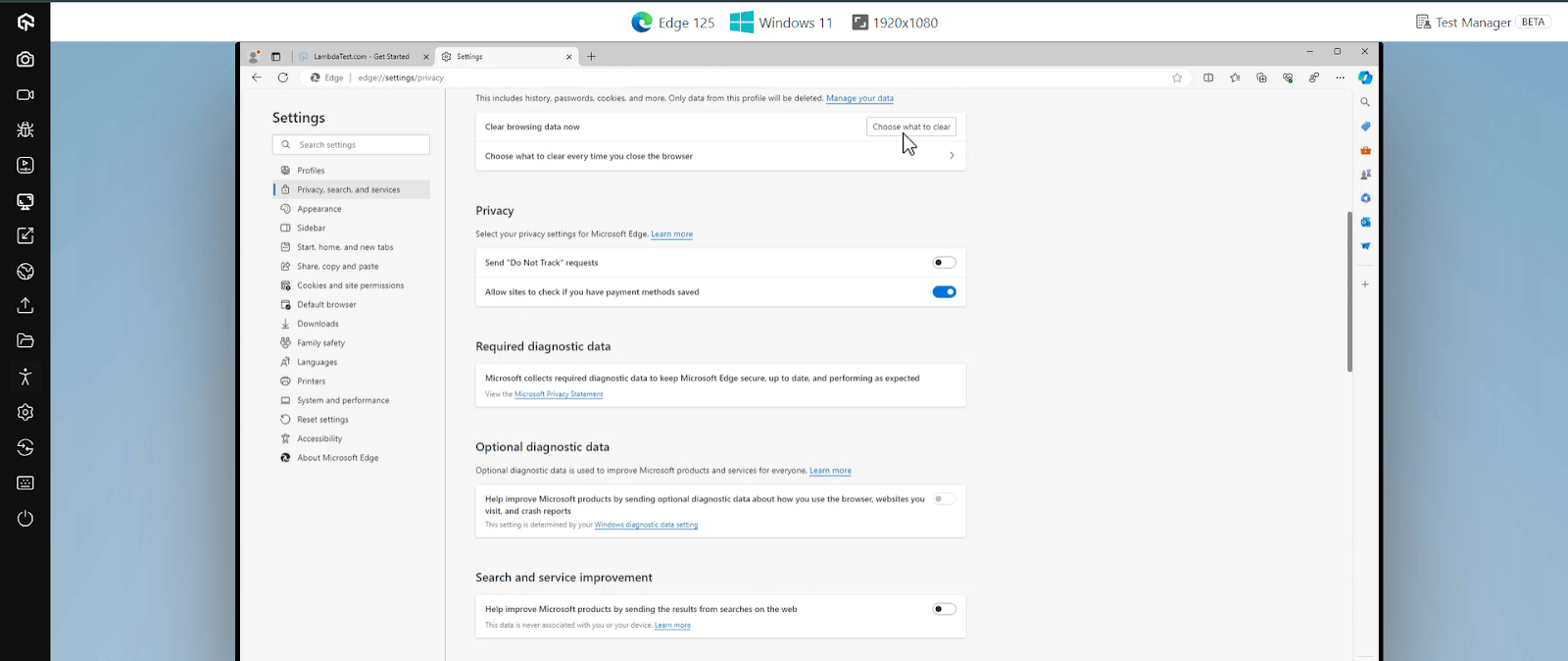
In the Settings menu, under Privacy, search, and services, you can scroll to Clear browsing data now and click on Choose what to clear.
How to Unblock Websites on Safari (Mac & iPhone/iPad)?
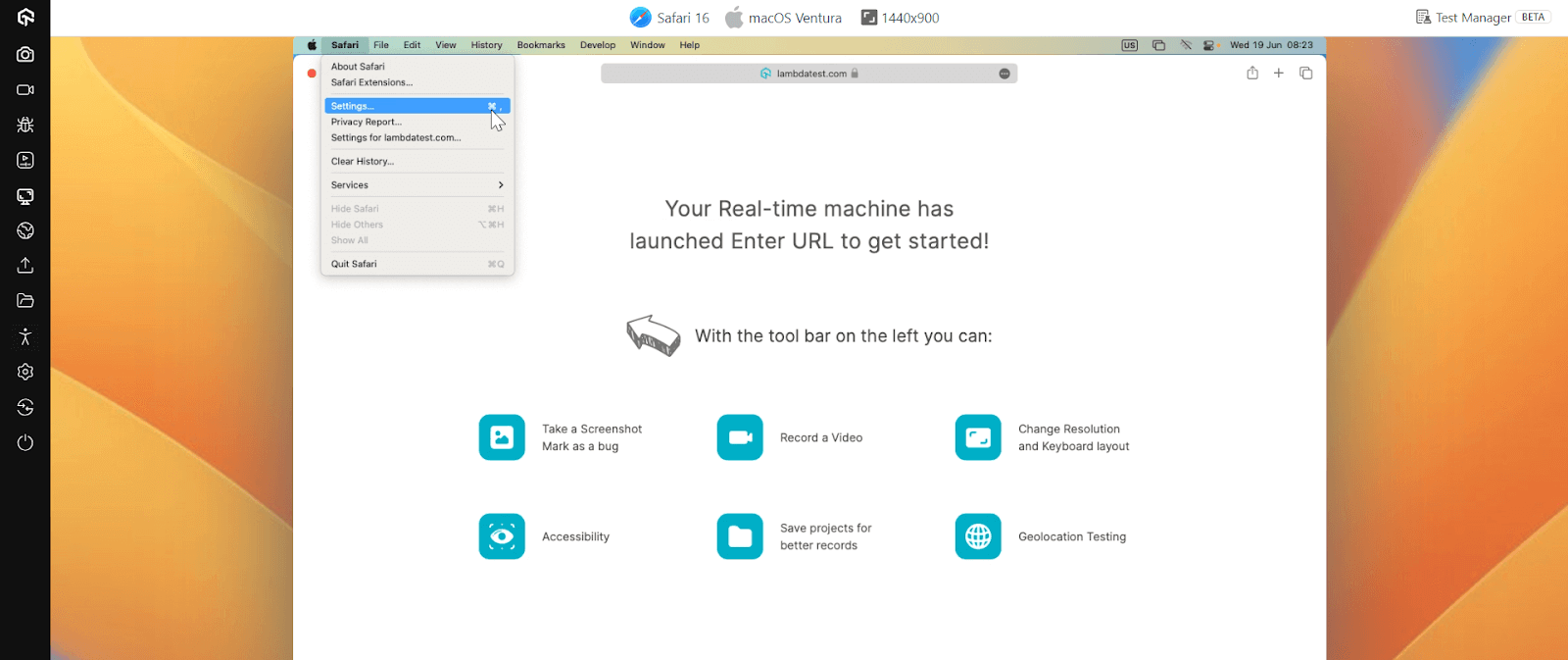
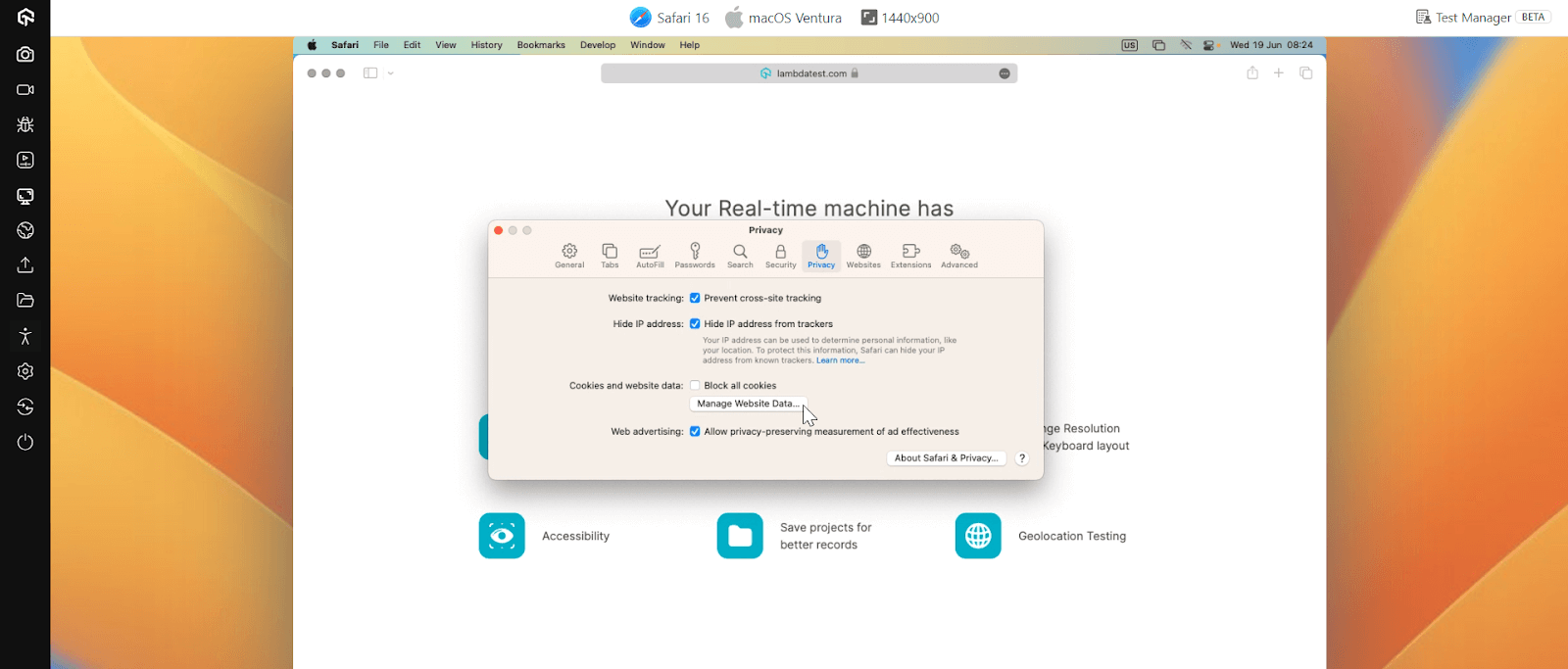
- Open Safari and click on Safari in the menu bar, then select Settings.
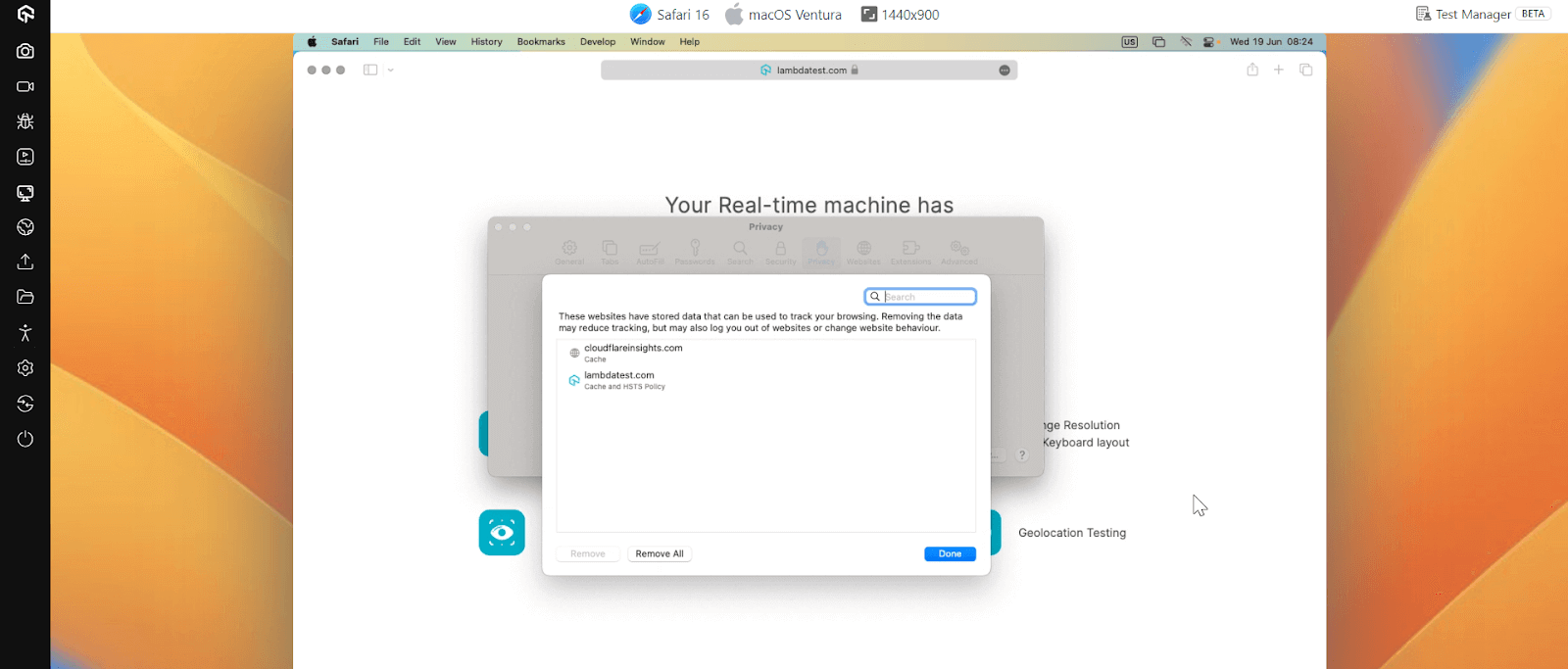
- Go to the Privacy tab and click on Manage Website Data.
- Search for the website you want to unblock, select it, and click Remove or Remove All to clear data that might be causing the block.
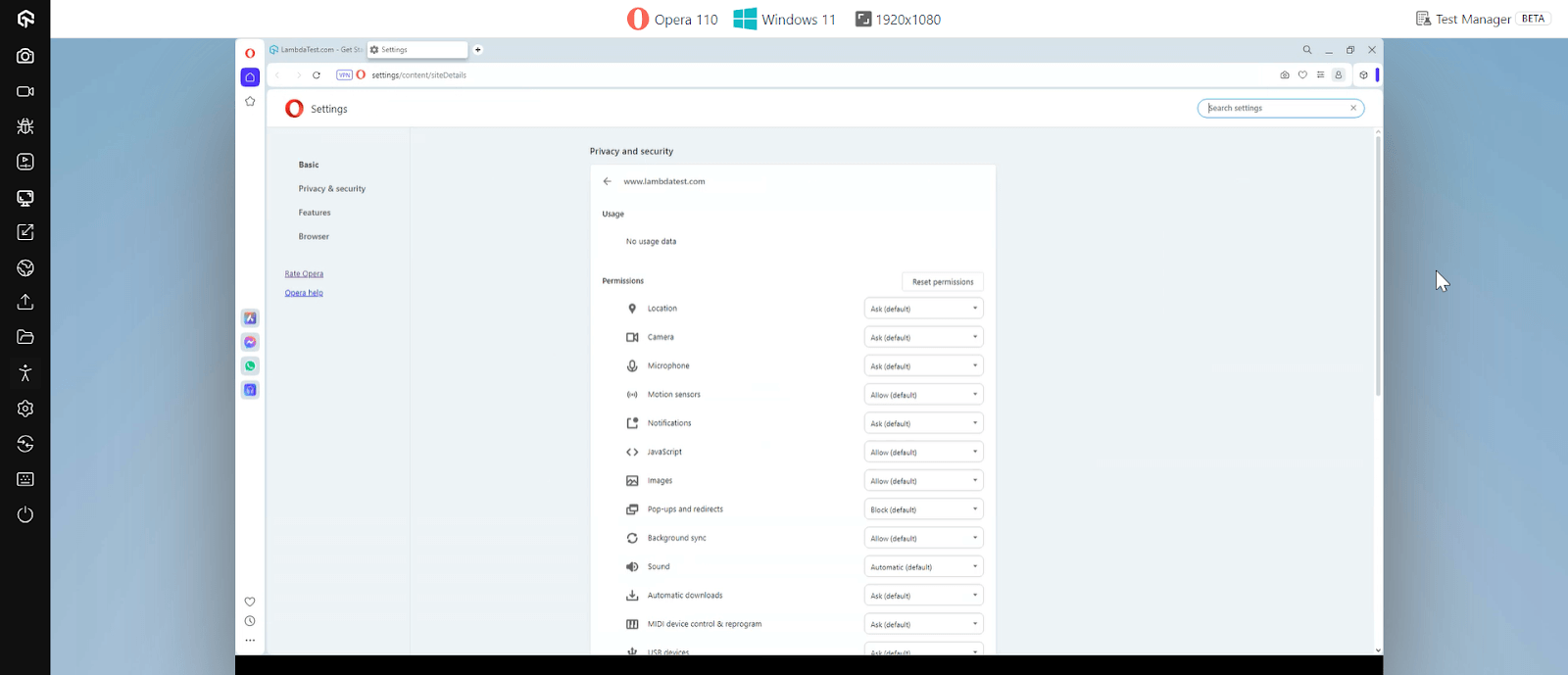
How to Unblock Websites on Opera?
On Opera, blocked websites can be accessed by adjusting site settings, disabling restrictive extensions, or using the built-in VPN feature. These steps help restore uninterrupted browsing.
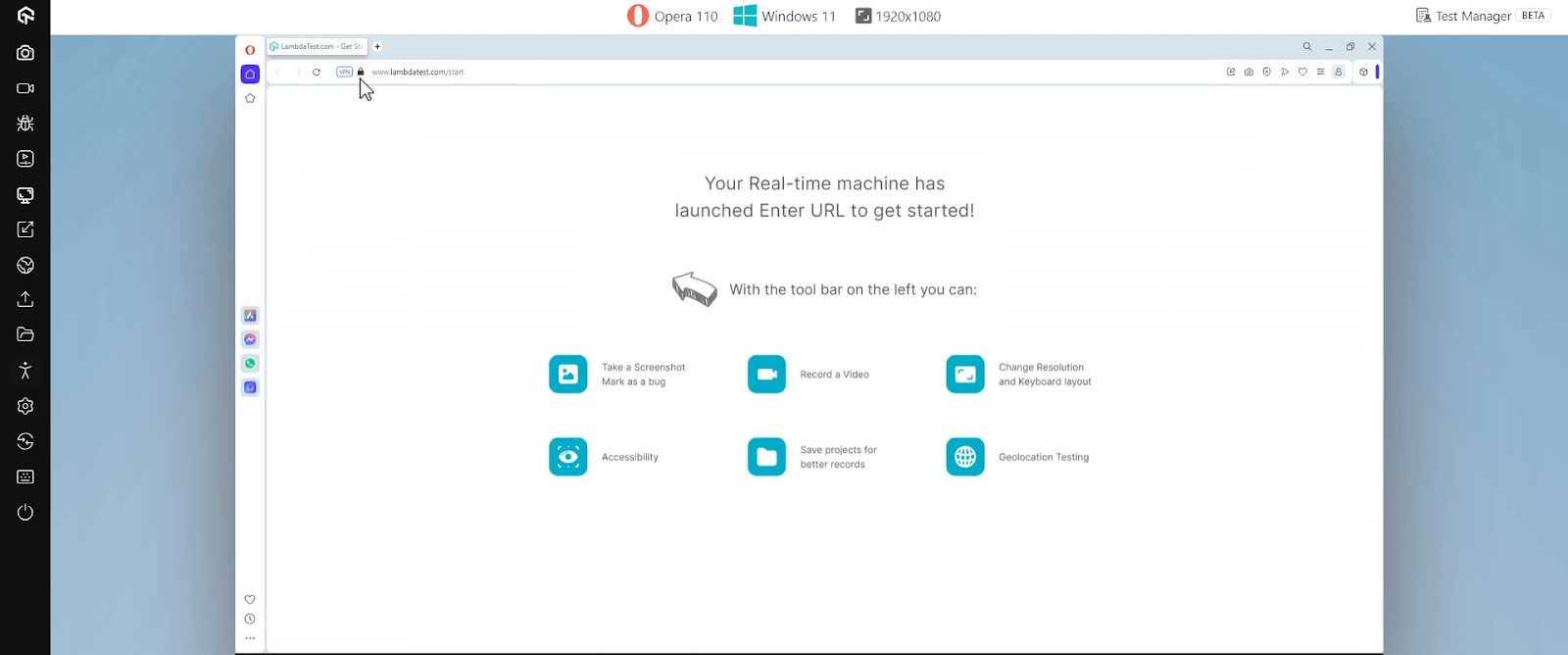
- Open Opera and navigate to the website you want to unblock.
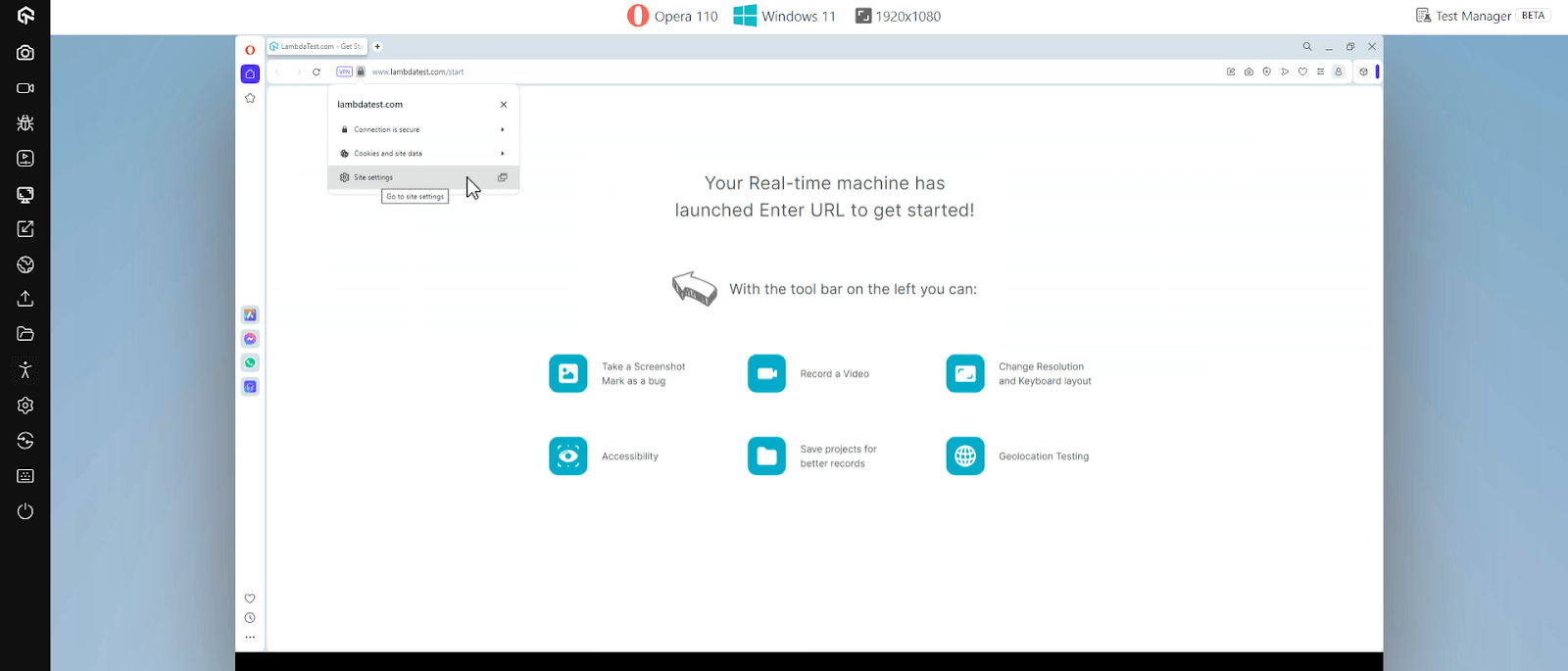
- Click on the padlock icon in the address bar.
- Click on the Site settings.

How to Unblock Websites on School Chromebooks?
School Chromebooks are often subject to strict internet usage policies, enforced via Google Admin Console. However, there are several ways you can attempt to access restricted websites on a school Chromebook, either with or without admin access.
1. Using Admin Settings to Unblock Websites
If you have admin access to the school Chromebook, you can directly modify the settings in the Google Admin Console to unblock websites.
How to do it:
- Log in to the Google Admin Console: Access the console using your admin credentials to manage device settings.
- Go to the Specific Section: Navigate to Device Management → Chrome Management → User Settings to manage URL blocking rules.
- Adjust the URL Blocking Settings: Modify settings to allow access to the desired websites on the Chromebook.
- Save Changes and Refresh the Chromebook: Apply the new settings by saving and refreshing to enforce access.
2. Using a VPN or Proxy Extension on Chromebook
If you do not have admin access, you can install a VPN or proxy extension on the Chromebook browser to bypass restrictions.
How to do it:
- Search Chrome Web Store for VPN or Proxy Extensions: Look for trusted extensions like Windscribe or Hola to bypass restrictions.
- Install and Activate the Extension: Add the extension to your browser and enable it to start using it.
- Select a Server From an Unrestricted Region: Choose a location where the website isn’t blocked to access it.
- Visit the Blocked Website: Open the site in your browser through the active VPN or proxy connection.
3. Accessing Websites Using a Proxy Server
You can use a proxy server to access blocked websites on a Chromebook. Several websites act as proxies, helping route your traffic through another server.
How to do it:
- Visit a free proxy site like ProxySite or Hide.me: Go to a trusted proxy website to bypass restrictions.
- Enter the blocked website’s URL: Type in the URL of the blocked website you want to access.
- Choose a proxy server and access the website: Select a proxy server and proceed to view the website.
4. Unblocking Websites Using Mobile Hotspots
A quick method to bypass network restrictions on school Chromebooks is to use a mobile hotspot. This method bypasses the school’s Wi-Fi network and gives you unrestricted internet access.
How to do it:
- Enable Hotspot on Your Phone: Go to your phone’s settings and turn on the mobile hotspot feature.
- Connect the Chromebook: Open the Chromebook’s Wi-Fi settings and connect it to your phone’s hotspot network.
- Access Blocked Websites: Once connected, try visiting websites that were previously restricted on the school Wi-Fi.
5. Unblocking Without Admin Rights
If you don’t have admin access, you can still unblock websites using browser extensions like ProxySite or Hola, or by connecting your Chromebook to an unrestricted Wi-Fi network, such as a mobile hotspot.
How to do it:
- Install a VPN or Proxy Extension: From the Chrome Web Store, add a reliable extension like Hola VPN or ProxySite.
- Activate the Extension: Enable the extension to reroute your browsing traffic through a different network.
- Use an Alternative Network: If extensions are blocked, connect your Chromebook to a mobile hotspot or another open Wi-Fi network.
- Visit the Website: Open the restricted website once connected through the new network or VPN.
6. Using Educational Resources and Legal Alternatives
Schools often block content that is deemed unnecessary for students. However, there are many legal alternatives that provide access to educational resources without bypassing network restrictions.
How to do it:
- Search for Authorized Educational Platforms: Visit websites like Khan Academy, Coursera, or Google Scholar for learning materials similar to what you need.
- Use School-Approved Tools: Access school-provided portals or digital libraries that may already host similar educational resources.
- Bookmark Trusted Sites: Save these legitimate learning resources for easy access instead of attempting to unblock restricted ones.
How to Access Blocked Websites Safely, Legally, and Ethically?
Accessing blocked websites isn’t always necessary to get the content you need. There are safe and legal alternatives that let you view updates, documents, or cached content without bypassing restrictions.
Unblocking websites can be an effective way to access valuable content, but it’s important to approach it with caution. While some methods are perfectly legal and safe, others can pose security risks or violate ethical guidelines.
Here are the key considerations for ensuring that unblocking websites is done safely and ethically:
1. Compliance with Laws and Regulations
When attempting to unblock websites, it’s essential to ensure your actions comply with local laws and regulations. Unauthorized access or circumvention of digital barriers may have legal consequences depending on your jurisdiction.
- Understand Local Laws: Always be aware of the legal implications of bypassing website restrictions in your country or region. In some cases, circumventing content restrictions could violate laws related to internet censorship or intellectual property.
- Institutional Policies: If you’re on a school or work network, make sure you’re following their specific rules for internet usage. Violating network policies could lead to disciplinary action.
2. Security Risks and Privacy Concerns
While unblocking websites can be useful, it also introduces security risks. Using unreliable tools or unsecured connections can expose your personal data and online activity to malicious actors.
- Data Security: Bypassing network restrictions with unreliable proxies, DNS servers, or unsecured methods could expose your data to hackers or malicious actors. Always use secure tools (such as reputable VPNs) to maintain privacy and protect sensitive information.
- Untrusted Tools: Some free VPNs and proxy services might compromise your security by logging your data or injecting malware. It’s important to choose trusted services with a strong privacy policy.
3. Respect for Intellectual Property and Content Licensing
Accessing restricted content should always be done ethically and legally. Ignoring content licensing laws or copyright restrictions can lead to serious violations.
- Avoid Copyright Infringement: Many websites are blocked due to licensing or copyright restrictions. It’s crucial to respect intellectual property and not attempt to bypass restrictions on content that is copyrighted or licensed for specific audiences.
- Accessing Paid Content Legally: If a website is restricted based on subscription or regional content restrictions, consider legal alternatives like subscribing to a service or using authorized platforms to access the content.
4. Ethical Considerations in the Workplace and Schools
Maintaining ethical behavior when accessing restricted sites is vital in professional or academic environments. Circumventing restrictions can undermine trust and violate institutional values.
- Follow Institutional Guidelines: Schools and workplaces often block certain websites to maintain productivity or ensure a safe online environment. Overriding these restrictions for personal use could violate workplace ethics or academic integrity.
- Appropriate Use: Ensure that your purpose for unblocking websites is aligned with ethical guidelines. For example, bypassing restrictions for educational research or work-related tasks is typically acceptable, but doing so for personal entertainment during work hours may not be.
5. Avoiding Abuse of Unblocking Tools
Responsible use of unblocking tools helps maintain a safe and ethical online environment. Misuse can lead to exposure to inappropriate or illegal content.
- Overuse of Unblocking Tools: Some individuals may use unblocking tools to access websites that are banned for valid reasons, such as those containing harmful, illegal, or inappropriate content. It is important to respect these restrictions to avoid promoting harmful behavior online.
- Access for Productive Purposes: Whenever possible, unblock websites for educational, professional, or legitimate personal use. Avoid using these tools to access distracting or harmful content that may hinder your productivity or violate rules.
6. Risks to Organizational Security
Unapproved methods of website unblocking can compromise network safety. Organizations set restrictions to protect against data breaches and cyber threats.
- Bypassing Firewalls: Many organizations use firewalls to protect their networks from external threats. Unblocking websites using unauthorized methods could potentially open the network to cyberattacks or data breaches.
- Malware Risks: Some unblocking methods (especially free VPNs and proxy services) can expose you to malware. It’s crucial to avoid using untrusted services, as they might compromise your device’s security.
7. Transparency and Accountability
Being open about your intentions and actions helps maintain trust and ensures compliance with organizational or institutional rules.
- Be Transparent: If you need to unblock a website for work or educational purposes, it’s best to inform your IT department or supervisor. This promotes transparency and ensures you’re not violating any workplace or institutional policies.
- Accountability: Always be accountable for your actions. If you are caught bypassing restrictions, make sure you understand the potential consequences and consider seeking permission beforehand.
Safe and Legal Alternatives to Unblocking Websites
In many cases, directly unblocking a website isn’t necessary. The following alternatives allow access to information without bypassing restrictions.
- Content Aggregators & RSS Feeds: Use tools like Feedly or Inoreader to follow RSS feeds and read updates without visiting blocked sites.
- Online Web Proxies: Services such as Hide.me or ProxySite act as intermediaries, allowing limited access by routing traffic through their servers.
- Different Devices or Networks: Access the site using a personal Wi-Fi connection, mobile hotspot, or another device not subject to the same restrictions.
- Document-Sharing Platforms: Look for similar articles or documents on platforms like Google Docs, SlideShare, or Scribd.
How Do AI Agents Handle Website Blocks in 2026?
In 2026, AI browser agents can test and diagnose website blocks, but they hit the same restrictions a human visitor does and still need a VPN or proxy to get past them.
- Automated block diagnosis: An agent framework such as browser-use, paired with Playwright's MCP server, opens the target URL, reads the resulting page, and reports back whether the block is a login wall, a captcha, or a region redirect.
- Scripted access checks: Coding assistants like GitHub Copilot, Claude Code, and Cursor can write a short script that requests a URL through several proxy exit points and logs which ones load the page, cutting down manual trial and error.
- New AI-specific blocks: Many sites now detect and reject traffic from automated agents by checking the declared user agent or browser fingerprint, a block type separate from the geo and DNS blocks covered earlier.
- Same access rules apply: An agent blocked this way still needs a real network change, such as a VPN or a different proxy exit point, since no agent gets a bypass that a browser does not already have.
Conclusion
Unblocking websites is something most of us face at school, work, or even on personal networks. The good news is that there are plenty of simple ways to get around these restrictions, whether it’s adjusting your browser settings, switching DNS, or using reliable tools that keep your browsing secure.
While these methods are effective, it’s important to use them wisely. Always choose safe and legal options, and keep in mind the privacy and security risks that come with unreliable shortcuts. By following the right approach, you can access the content you need without putting your data or compliance at risk.
In the end, the key is balance, stay responsible, stay secure, and enjoy an unrestricted browsing experience with confidence.
Author

Vishal kumar Sahu
Blogs: 5


Vishal Kumar Sahu is a Marketing Executive with over two years of experience in the software testing and QA domain. He holds a TestMu AI Certification in Automation Testing and has hands-on expertise in Selenium, Cypress, and Appium, with a focus on both web and mobile automation. Vishal has authored several technical blogs and specializes in writing about testing tools, best practices, and automation strategies. He blends technical knowledge with content strategy to support product education and engage the QA community through SEO-driven resources.
Reviewer

Sawan Garg
Reviewer
Sawan Garg is Senior Vice President of Engineering at TestMu AI (formerly LambdaTest), leading platform and infrastructure engineering across the testing cloud. He designed the microservices architecture and databases behind the platform and built the streaming technologies, including VNC, Guacamole, and WebRTC, that deliver live and real-time testing. He also contributed to the distributed proxy-based Tunnel that lets teams test firewall-protected and locally hosted websites. He brings 13+ years of engineering experience across Python, Java, Golang, Node.js, Kafka, Elasticsearch, Redis, and Kubernetes. Sawan holds a B.Tech in Computer Science and Engineering.


Unblocking Websites FAQs
Did you find this page helpful?
More Related Blogs
TestMu AI forEnterprise
Get access to solutions built on Enterprise
grade security, privacy, & compliance
- Advanced access controls
- Advanced data retention rules
- Advanced Local Testing
- Premium Support options
- Early access to beta features
- Private Slack Channel
- Unlimited Manual Accessibility DevTools Tests