

Power Your Software Testing with AI Agents and Cloud
The Native AI-Agentic Cloud Platform to Supercharge Quality Engineering. Test Intelligently and Ship Faster.


- TestMu AI (Formerly LambdaTest)
- /
- Blog
- /
- How to Clear Browser Cache on Android
How to Clear Browser Cache on Android
Learn why it is important to clear browser cache on Android using Chrome, Samsung Internet, or Firefox to boost performance, free up space, and enhance security.
Last Updated on:
To clear browser cache on Android, open your browser Settings, go to Privacy and security, and tap Delete browsing data. Each browser keeps its own cache, so clearing Chrome does not clear Samsung Internet or Firefox, and Android also stores a separate copy of every app cached files. This guide covers the steps for Chrome, Samsung Internet, and Firefox, and how to clear a browser cache from Android Settings.
Key Takeaways
- Clearing the browser cache on Android removes cached images, files, and site data, and leaves downloaded files on the device.
- Google Chrome on Android clears cache under Settings, then Privacy and security, then Delete browsing data, with a time range from the last 15 minutes to all time.
- Samsung Internet clears cache from the three-line menu, under Personal browsing data and then Delete browsing data.
- Firefox on Android clears cache from the three-dot menu under Delete browsing data, where open tabs, cookies, site permissions, and downloads are separate checkboxes.
- Android Settings clears a browser cache one app at a time under Storage and cache, which works even when the browser will not open.
- Clearing cache removes temporary files only, while clearing storage signs the user out and resets the browser saved data.
Steps to Clear Browser Cache on Android Using Chrome
To clear the browser cache on Android using Google Chrome, follow these steps:
- Tap on the three dots in the top right corner of the Chrome browser and select Settings.
- Scroll down and tap on Privacy and Security.
- You will see an option for Delete browsing data.
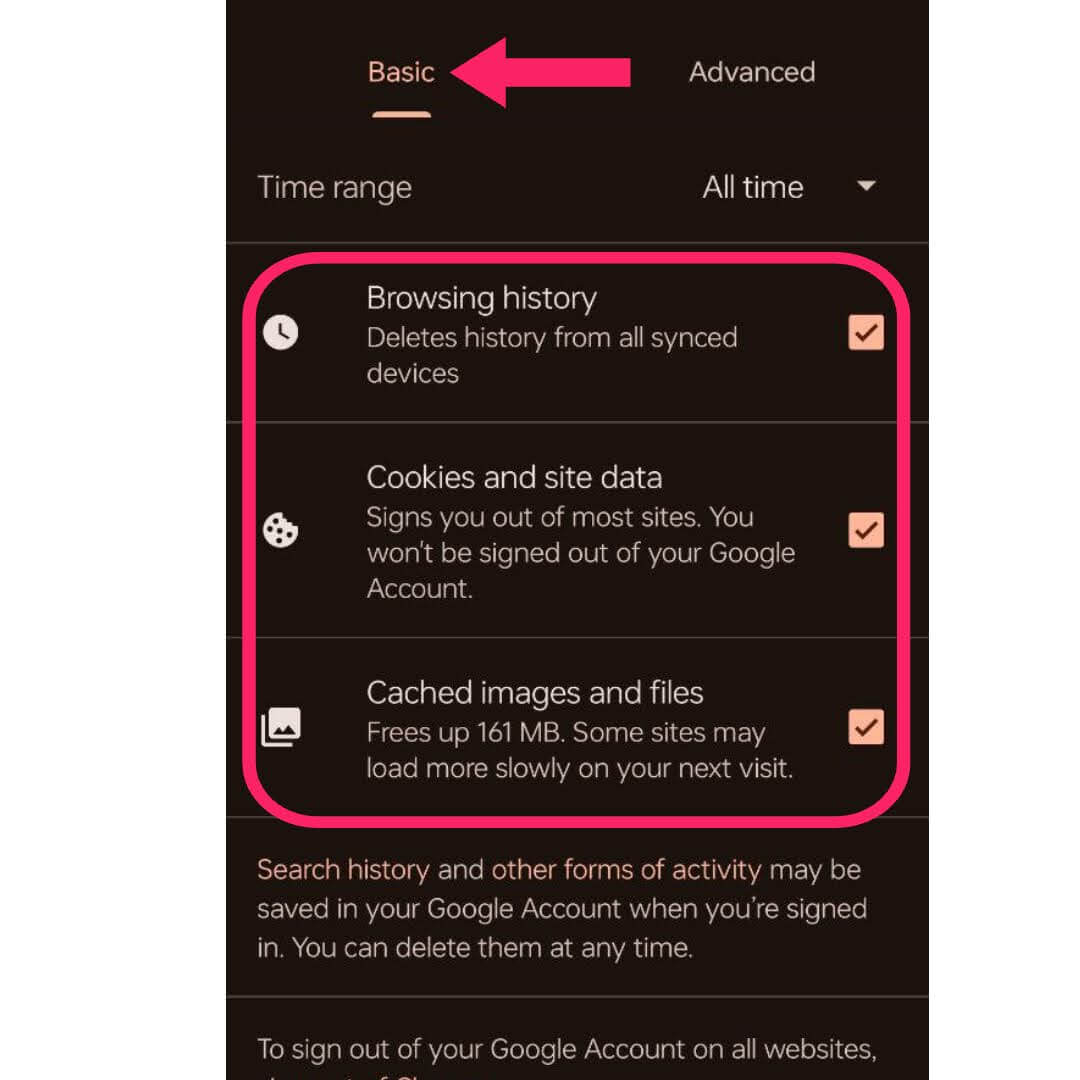
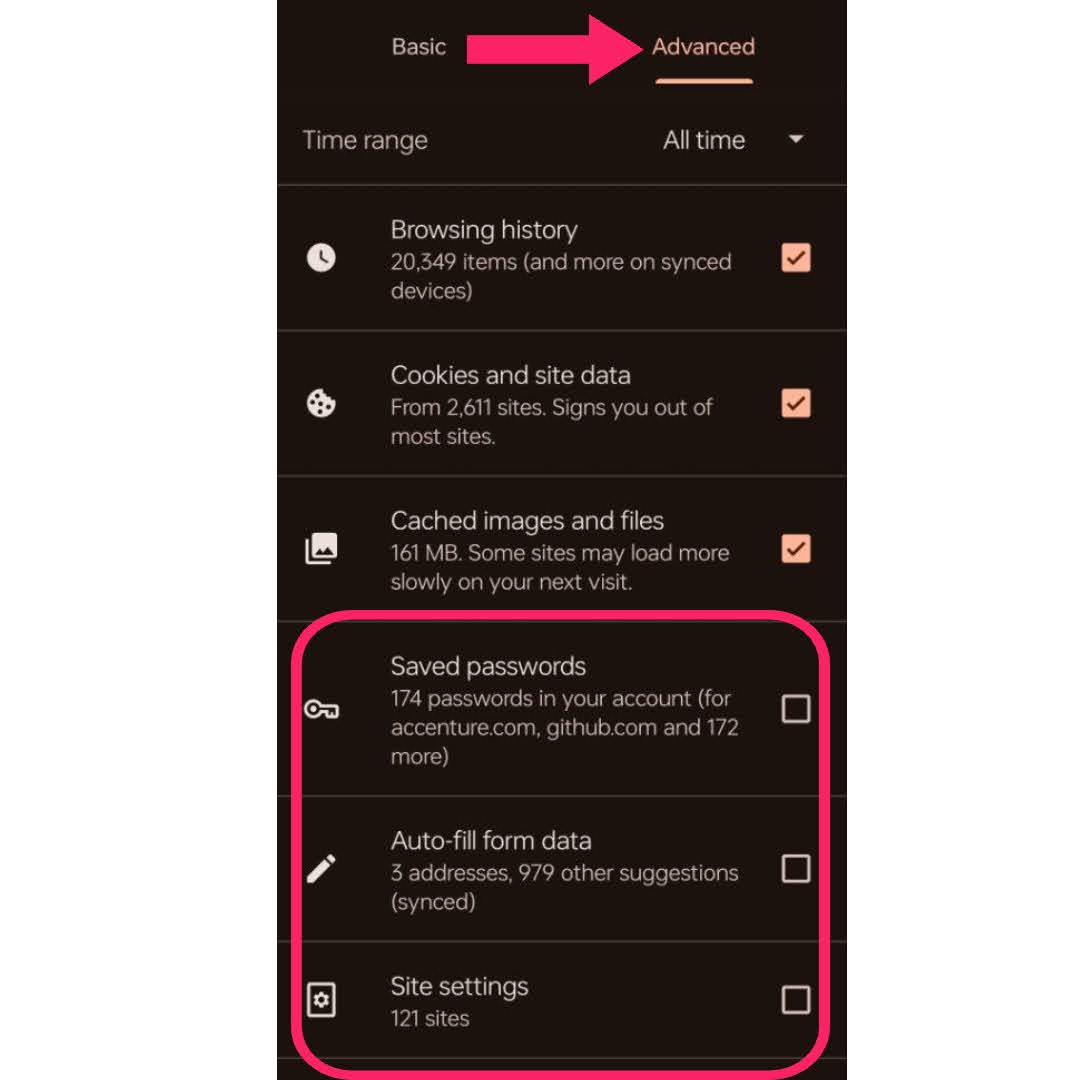
- Within the browsing data options, you’ll find both Basic and Advanced settings:
- Basic Settings: This option allows you to clear the following:
- Browsing history
- Cookies and site data
- Cached images and files
- Advanced Settings: This option includes additional data types, such as:
- Saved passwords
- Auto-fill form data
- Site settings
- Choose the time range from which you want to delete data, ranging from the Last 15 minutes to All time.
- After selecting the data you want to clear, tap on Delete data at the bottom. Confirm your selection to remove the chosen data from your browser.
Chrome on Android and Chrome on a desktop keep separate caches and separate profiles, so the steps above leave the desktop copy untouched. The desktop menu path is covered in clear browser cache in Chrome.

Note: Validate your website’s browser compatibility across 3000+ browsers and OS combinations. Try TestMu AI Today!
Steps to Clear Browser Cache on Android Using Samsung Internet
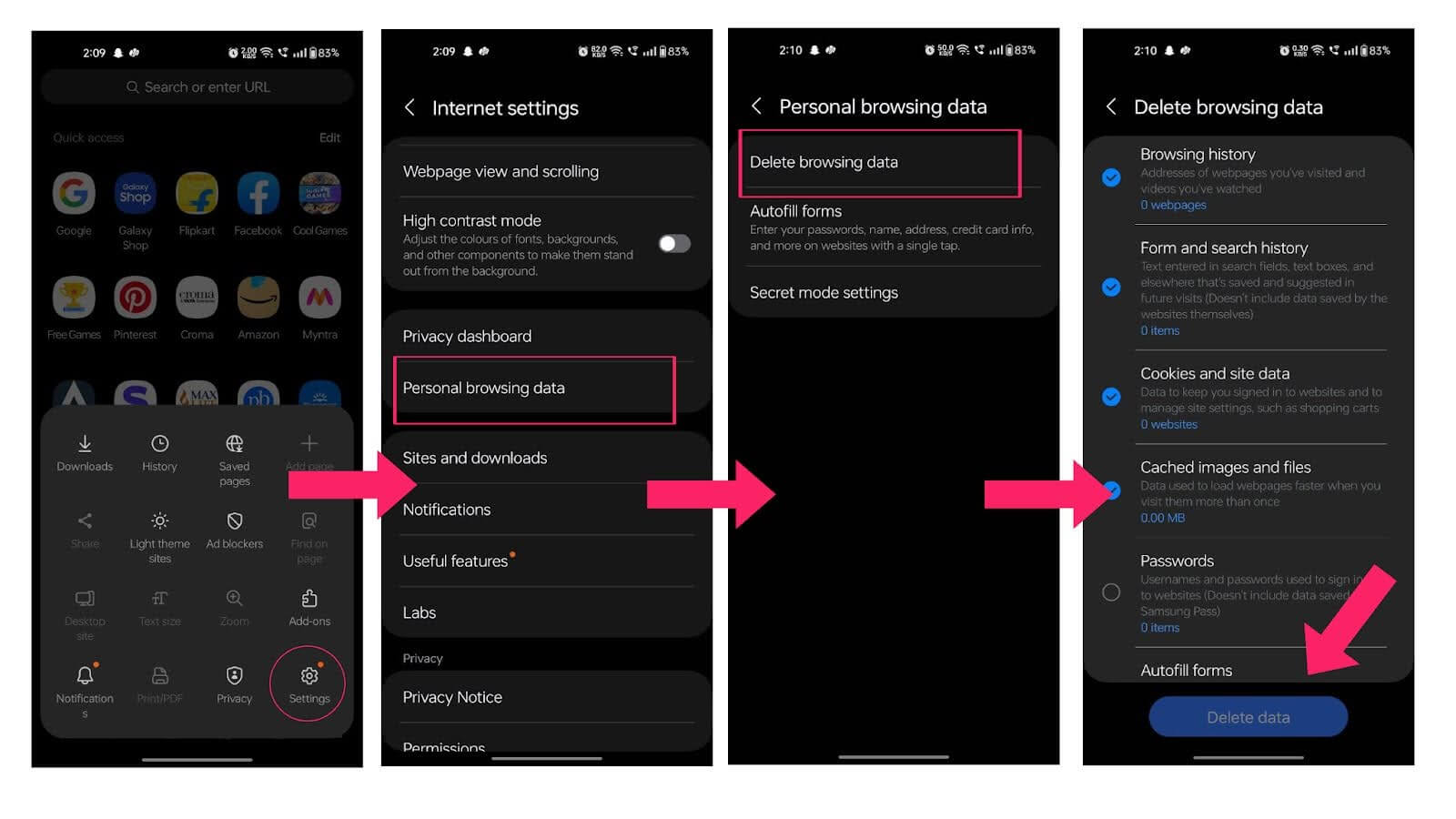
To clear the browser cache on Android using Samsung Internet, follow the steps given below:
- Tap on the three-line menu located at the bottom right corner of the app.
- Scroll down and select Personal browsing data.
- In the Delete browsing data menu, you will see a checklist of items you can delete.
- Check the items you want to remove from your browser’s cache.
- Tap the blue Delete data button at the bottom. Confirm your choice to remove the selected data from the Samsung Internet browser.
Steps to Clear Browser Cache on Android Using Firefox
To clear the browser cache on Android using Firefox, follow these steps:
- Tap on the three dots icon in the top right corner to access the menu.
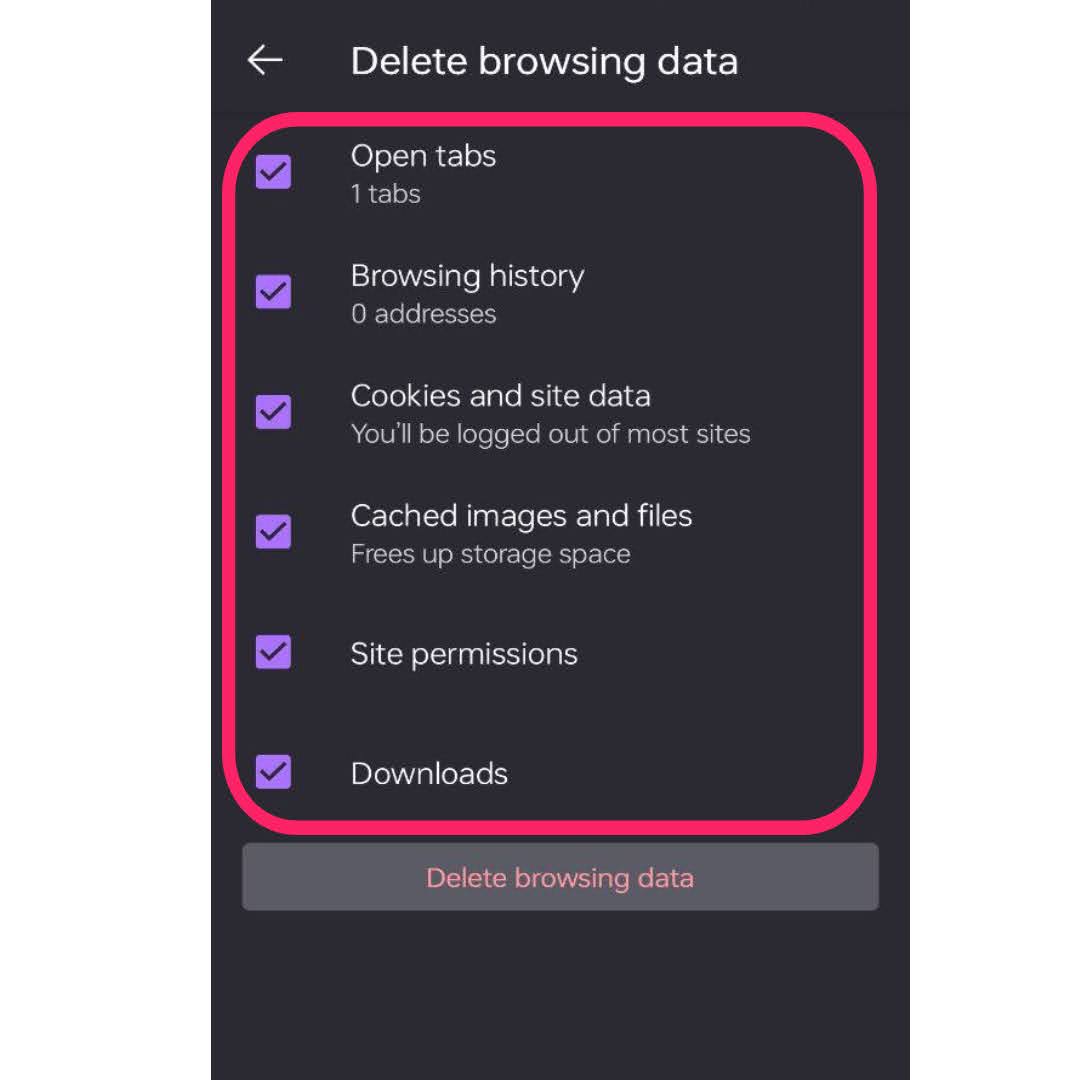
- Scroll down and select Delete browsing data.
- You will see a list of items you can choose to delete, including:
- Open tabs
- Browsing history
- Cookies and site data
- Cached images and files
- Site permissions
- Downloads
- Select the items you wish to clear and tap Delete browsing data to confirm.
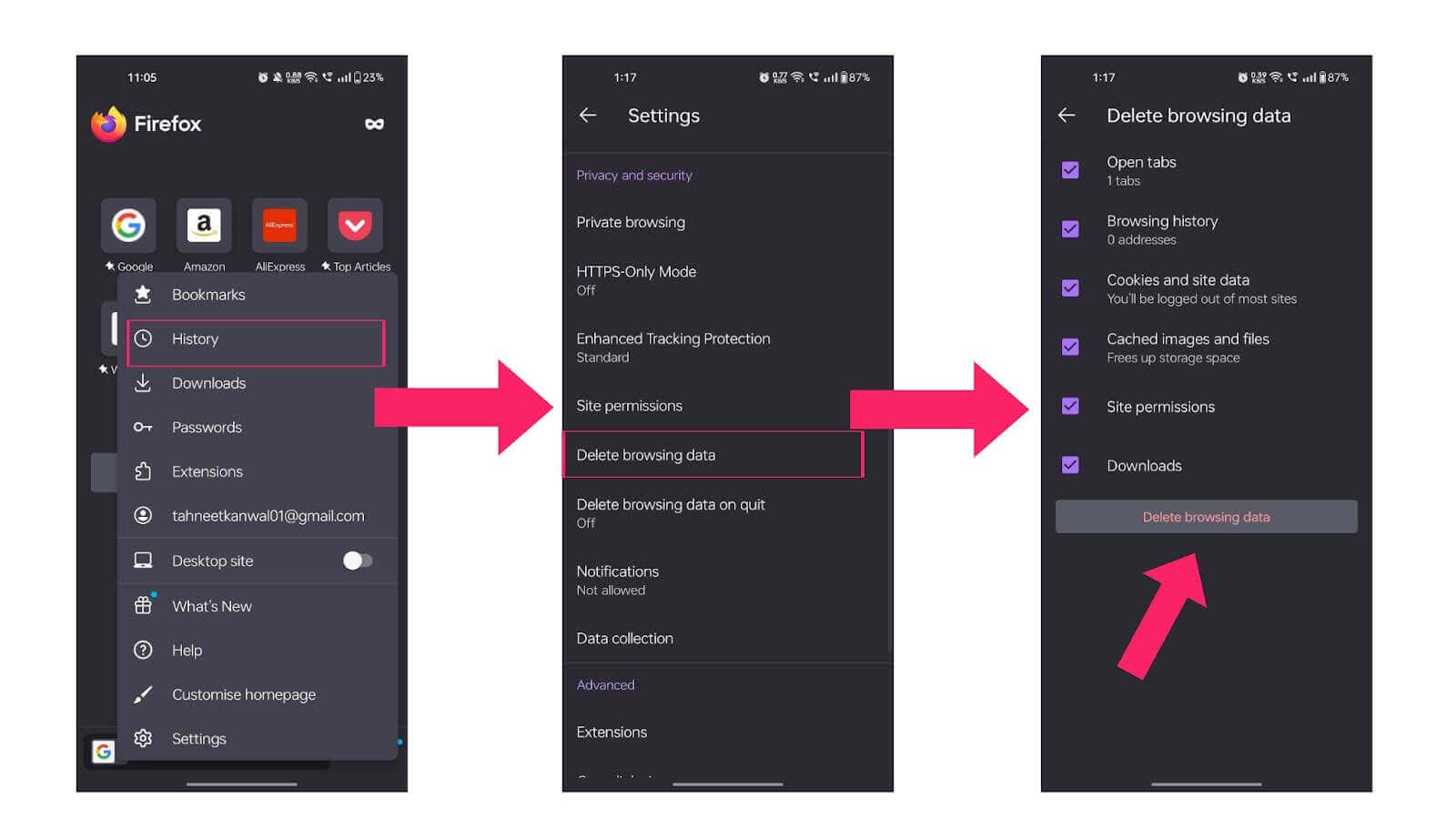
Firefox stores its Android cache inside the app profile, so clearing it on a phone does not touch a laptop profile. The desktop steps are in clear cache in Firefox.

What Has Changed About Clearing Browser Cache on Android?
Android now clears cache one app at a time from Settings, Apps, then Storage and cache. Chrome, Samsung Internet, and Firefox have all renamed the in-app control to Delete browsing data.
- Storage and cache screen: Android shows how much space the browser cache is holding before you clear it, so you can see whether clearing it will recover anything worth recovering.
- Clear cache: this button deletes only the temporary files the browser downloaded to render pages. Browsing history, cookies, saved passwords, and bookmarks stay in place.
- Clear storage: this button wipes the whole app data folder. It signs you out of every site and resets the browser to a first-launch state, so use it only when Clear cache does not fix the problem.
- Browser that will not open: the Android Settings route works when the in-app menu is unreachable, which is the case when the browser crashes on launch or freezes on a blank tab.
- No system-wide button: Android has no single control that clears every app cache at once, so Chrome, Samsung Internet, and Firefox each need their own pass.
A cache holds copies of files the server can send again, which is why it is safe to clear cache on any of the three browsers. The first page load after clearing is slower because the browser downloads those files again.
Conclusion
Whether you use Google Chrome, Samsung Internet, or Mozilla Firefox, each browser has simple steps to clear the browser cache on Android, delete cached data, and remove browsing history. Regularly clearing your browser cache can significantly enhance your device’s performance, free up space, and improve security. By following the specific instructions for your preferred browser, you ensure a smoother browsing experience while safeguarding your privacy. Make it a habit to clear your cache regularly for optimal performance.
The same privacy menus exist on other platforms, so the steps to clear cache in Safari on iPhone follow the pattern shown above for Android.
Author

Tahneet Kanwal
Blogs: 29


Tahneet Kanwal is a freelance technical content writer with over 2 years of hands-on experience in frontend development and technical writing. She holds a B.Tech in Information Technology from University College of Engineering and Technology (UCET). Tahneet creates clear, SEO-optimized content on web technologies, software testing, and automation tools, leveraging her skills in HTML, CSS, JavaScript, React, Tailwind CSS, and various tools like VS Code, GitHub, Figma, and Canva. She is the author of 30+ technical blogs and an open-source contributor through Hacktoberfest. She has also participated in the Google Cloud Arcade Facilitator Program and holds certifications as a Meta Android Developer (Coursera) and in Web Development (Internshala). Over time, she has evolved her writing to prioritize structure, readability, and SEO while maintaining technical depth.


Clear Browser Cache on Android FAQs
Did you find this page helpful?
More Related Blogs
TestMu AI forEnterprise
Get access to solutions built on Enterprise
grade security, privacy, & compliance
- Advanced access controls
- Advanced data retention rules
- Advanced Local Testing
- Premium Support options
- Early access to beta features
- Private Slack Channel
- Unlimited Manual Accessibility DevTools Tests