

Power Your Software Testing with AI Agents and Cloud
The Native AI-Agentic Cloud Platform to Supercharge Quality Engineering. Test Intelligently and Ship Faster.


- TestMu AI (Formerly LambdaTest)
- /
- Blog
- /
- How to Clear Browser Cache in Chrome
How to Clear Browser Cache in Chrome
Learn how to clear browser cache in Chrome to improve performance and fix loading issues. Also, explore how to set up automatic cache clearing in Chrome.
Last Updated on:
Clearing the browser cache in Chrome removes stored copies of page files so the browser downloads fresh ones on the next visit. Chrome offers three routes: the Delete browsing data screen, the Ctrl+Shift+Delete shortcut, and an on-device site data setting that clears cached files when you close all windows. This guide covers the manual steps, automatic cache clearing, the keyboard shortcut method, and how AI browser agents clear the cache.
Key Takeaways
- Chrome removes cached images and files from the Delete browsing data screen, reached from Settings and then Privacy and security.
- Ctrl + Shift + Delete on Windows and Linux, or Command + Shift + Delete on macOS, opens the Delete browsing data screen directly.
- Choosing the All time range deletes every cached file instead of only the files stored in the last hour or day.
- The On-device site data setting in Chrome deletes stored site data automatically every time all Chrome windows are closed.
- The chrome://cache address was removed in Chrome 66, so cached entries are now inspected in DevTools under the Network and Application panels.
Steps to Clear Browser Cache in Chrome
To clear browser cache in Chrome, you can follow the steps below:
- Click the kebab (three dots) menu in the upper-right corner and click History. Alternatively, you can also press Ctrl+H to get to the History page.
- Click on Delete browsing data.
- The recommended setting is to delete all browsing history from All time along with clearing browsing history, download history, cached images, files, and cookies.
- Click Delete data.
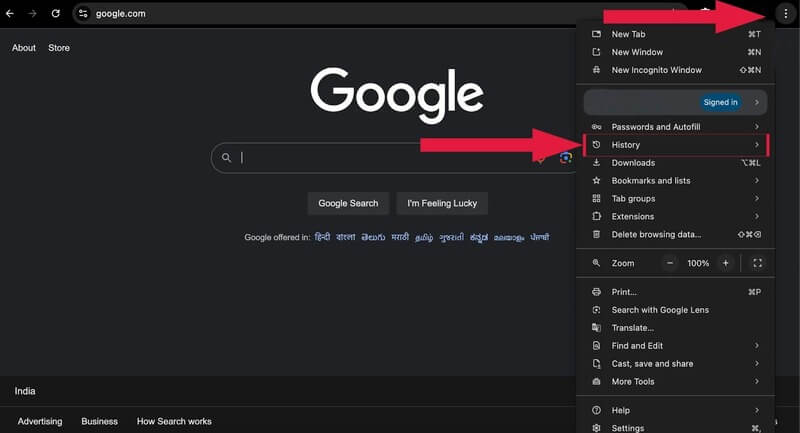
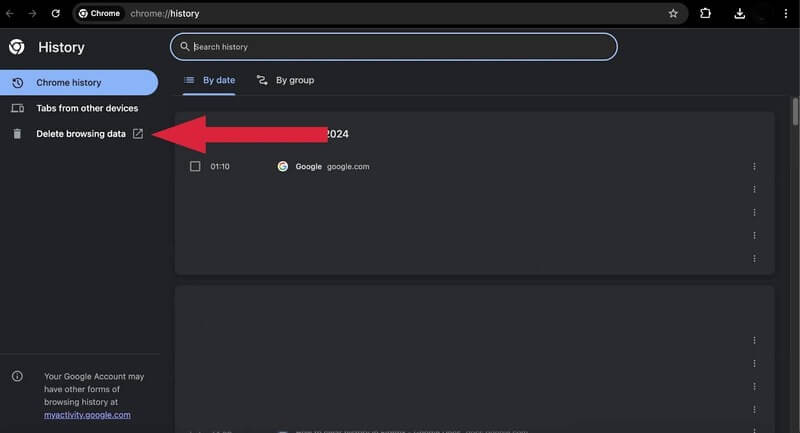
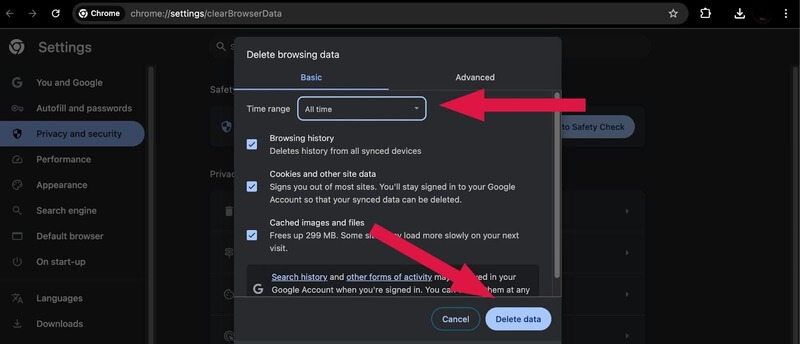
To see the changes, close the browser and restart it.
The same Delete browsing data screen also handles how to clear history in Chrome, so you can remove browsing history and cached files in one pass or select only the cached files.

Note: Test your websites across 3000+ real Chrome browsers. Try TestMu AI Today!
Setting Up Automatic Cache Clearing in Chrome
This setting can automatically clear cache and site data each time Chrome is closed. Here’s how to set it up:
- Click the kebab (three dots) menu in the upper-right corner.
- Click Settings.
- Navigate to Privacy and security on the left menu.
- Under Privacy and security, click Site settings.
- Under Site settings, find the content section and click Additional content settings.
- Click the On-device site data option.
- Click Delete data sites that have been saved to your device when you close all windows.
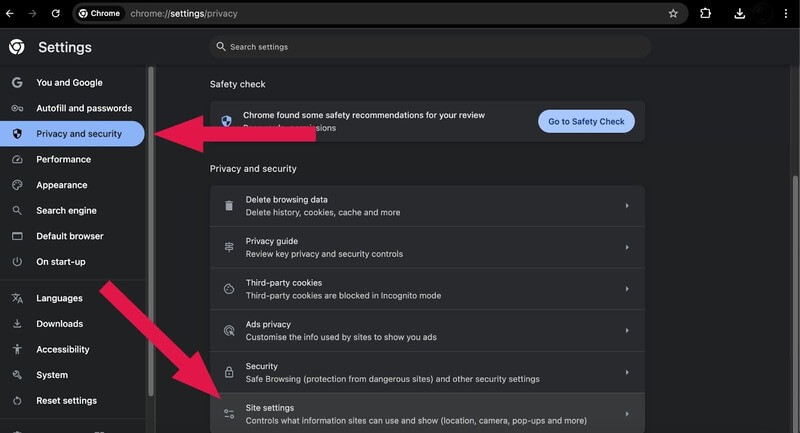
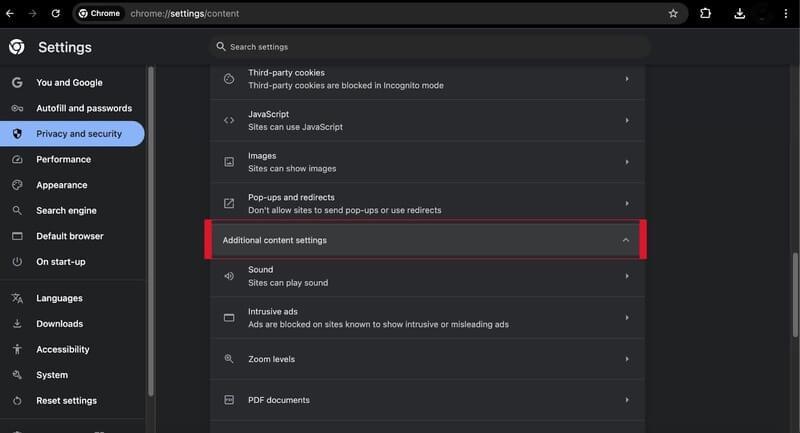
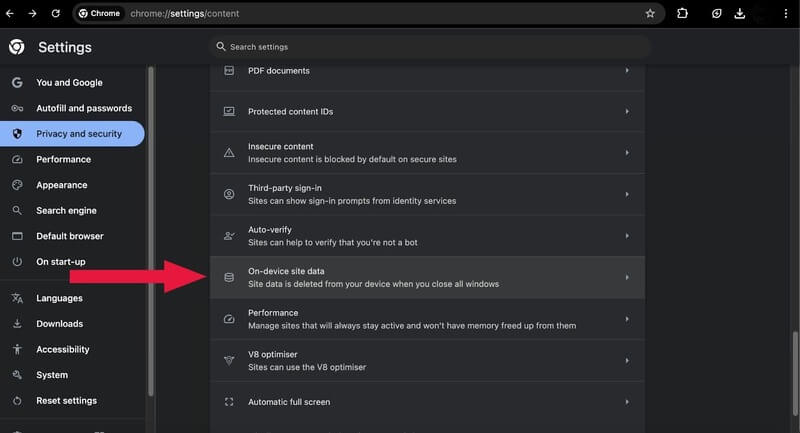
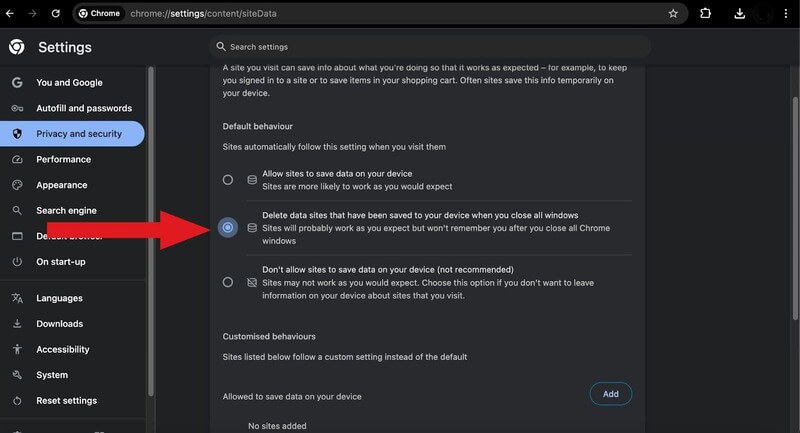
This way, you can set up automatic cache clearing in the Chrome browser.
Steps to Clear Browser Cache in Chrome With Keyboard Shortcuts
To clear the browser cache in Chrome with keyboard shortcuts, follow these steps:
- Open the window to clear history by pressing Ctrl + Shift + Delete (Windows/Linux) or Command + Shift + Delete (macOS)
- Press the Tab key to navigate to the Time range dropdown and select the desired range.
- Again, press the Tab key to navigate to the Cached images and files option and press the Space key to select it.
- Press the Enter key to clear the selected cache.
This will clear the cache for the selected time range without affecting other data types unless you select them as well.

Can AI Browser Agents Clear the Chrome Cache?
Yes. AI browser agents clear the Chrome cache through the Chrome DevTools Protocol instead of the Settings screen, so a cache reset becomes one scripted step inside an agent run.
Google maintains Chrome DevTools MCP, a server that connects coding agents to a live Chrome instance over the same protocol that Chrome developer tools use. Four behaviors decide what an agent can do with the cache:
- Network.clearBrowserCache: the protocol command that empties the HTTP cache in a running Chrome instance, with no menu clicks and no restart.
- Network.setCacheDisabled: keeps the cache switched off for a whole session, which an agent uses when every request must reach the server.
- Fresh browser contexts: Puppeteer and Playwright open each context with an empty cache, so an agent starts clean without clearing anything.
- Separate headless profile: a headless Chrome process keeps its own cache directory, so clearing the cache in your desktop Chrome leaves it untouched.
An agent cannot click through the Delete browsing data screen the way a person does, because Chrome settings pages sit outside the page content that the protocol drives. Ask an agent to clear the cache and it issues the protocol command or opens a new context.
The same separation applies to cross browser testing on remote machines, where every session opens a fresh browser profile and no cached file survives from the previous run.
Conclusion
Clearing your browser cache in Chrome is a simple way to fix many browsing issues. By following the given steps to remove cached files or setting up automatic clearing, you can improve how your browser works without dealing with outdated data. This simple process can make your browsing experience smoother and help with website display and performance.
Other browsers store cached files the same way, so the routine you use here maps closely to the steps to clear cache in Safari.
Author

Tahneet Kanwal
Blogs: 29


Tahneet Kanwal is a freelance technical content writer with over 2 years of hands-on experience in frontend development and technical writing. She holds a B.Tech in Information Technology from University College of Engineering and Technology (UCET). Tahneet creates clear, SEO-optimized content on web technologies, software testing, and automation tools, leveraging her skills in HTML, CSS, JavaScript, React, Tailwind CSS, and various tools like VS Code, GitHub, Figma, and Canva. She is the author of 30+ technical blogs and an open-source contributor through Hacktoberfest. She has also participated in the Google Cloud Arcade Facilitator Program and holds certifications as a Meta Android Developer (Coursera) and in Web Development (Internshala). Over time, she has evolved her writing to prioritize structure, readability, and SEO while maintaining technical depth.


Clear Browser Cache in Chrome FAQs
Did you find this page helpful?
More Related Blogs
TestMu AI forEnterprise
Get access to solutions built on Enterprise
grade security, privacy, & compliance
- Advanced access controls
- Advanced data retention rules
- Advanced Local Testing
- Premium Support options
- Early access to beta features
- Private Slack Channel
- Unlimited Manual Accessibility DevTools Tests