

Power Your Software Testing with AI Agents and Cloud
The Native AI-Agentic Cloud Platform to Supercharge Quality Engineering. Test Intelligently and Ship Faster.


- TestMu AI (Formerly LambdaTest)
- /
- Blog
- /
- How to Make Safari Default Browser on Mac, iPhone, and iPad
How to Make Safari Default Browser on Mac, iPhone, and iPad
Learn how to make Safari default browser on Mac, iPad, and iPhone with easy steps. Experience faster and secure browsing across all Apple devices
Last Updated on:
Setting Safari as the default browser on a Mac, iPhone, or iPad restores the speed, privacy, and deep Apple ecosystem integration many users lose after switching browsers by mistake. Since Safari ships pre-installed as the Mac default, reverting takes only a few clicks in System Settings or a quicker Spotlight Search shortcut.
Steps to Make Safari the Default Browser on Mac
Safari comes as the pre-installed default browser on a new Mac. If you’ve switched to another browser by mistake or wish to revert to Safari, you can quickly and easily set it back as your default.
Let’s look at how to make Safari the default browser on your Mac system:
Step 1: Click the Apple icon on the top left and then System Settings (or System Preferences for older macOS versions).
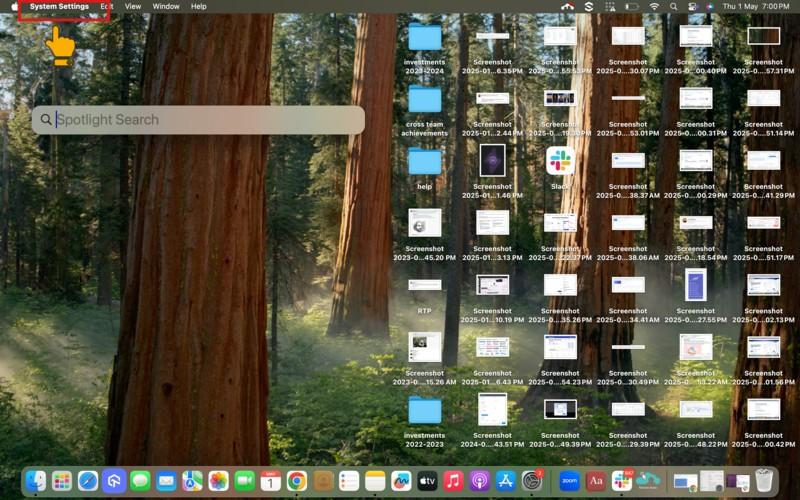
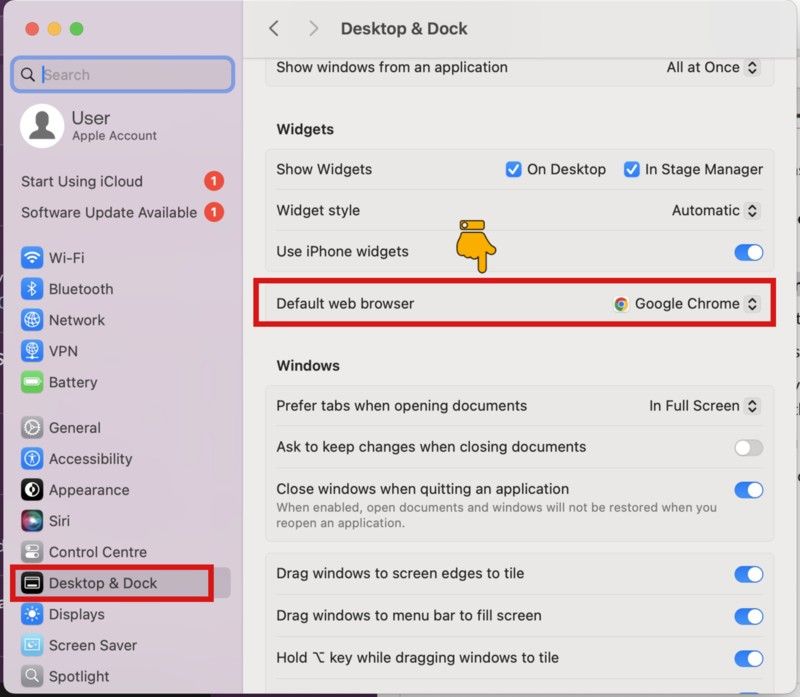
Step 2: Click Desktop & Dock > Default web browser.
Step 3: Click Safari from the dropdown menu.
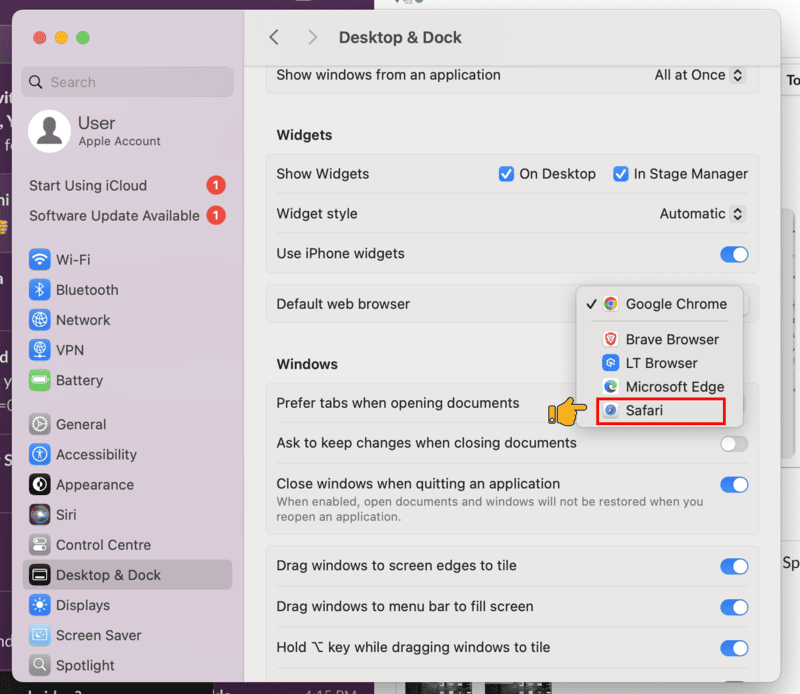
Close the window. And now you are all set to use Safari as your default browser on your Mac system.
Quick Trick: Use Spotlight Search
If you prefer shortcuts, you can use the Spotlight Search feature.
Here are the steps to use it:
Step 1: Press Command + Space key to open Spotlight Search box.
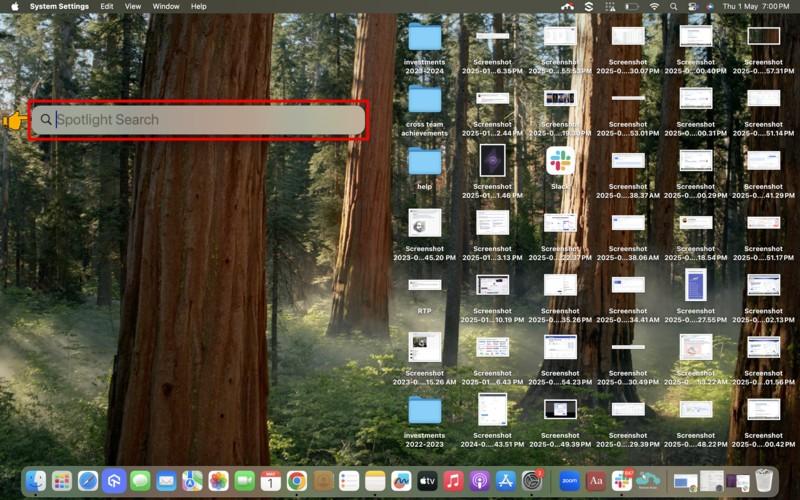
Step 2: Type “default web browser” and press Enter.
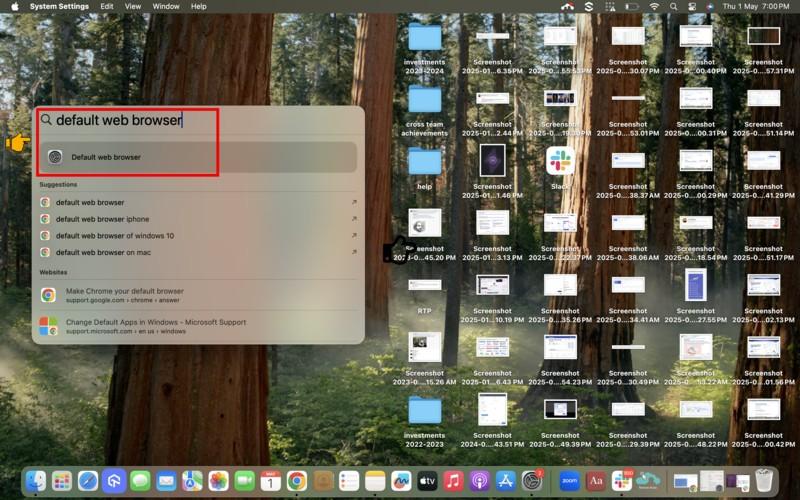
This navigates you directly to the System Settings, where you can choose Safari from the dropdown as explained before.

Steps to Make Safari the Default Browser on iPhone/iPad
To make Safari your default browser on iPad/ iPhone, follow the same steps as shown below:
Note: For this tutorial, we are using the iPhone to illustrate the steps.
Step 1: Tap Settings on your iPhone/iPad device.
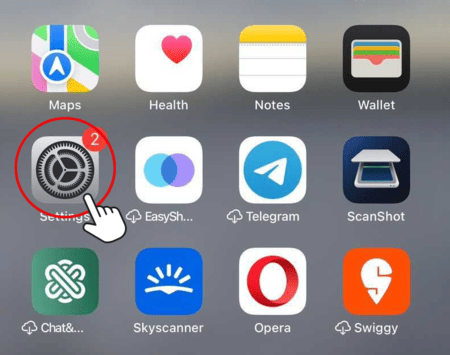
Step 2: Tap Apps, then scroll down and tap on Safari.
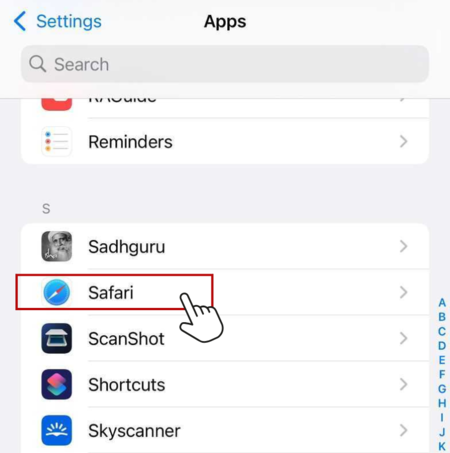
Step 3: Tap on Default Browser App.
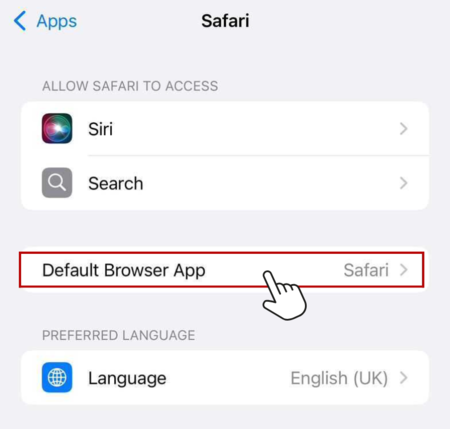
Step 4: Tap Safari to set it as your default browser.
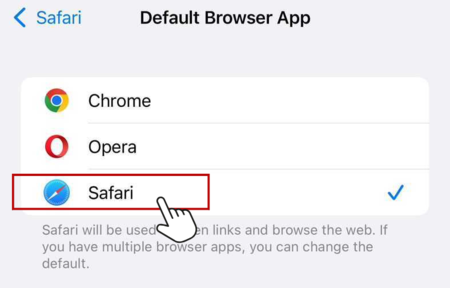
Newer iOS versions also let you change this from one screen. Go to Settings > Apps > Default Apps, then tap Browser App and choose Safari. This page lists every default app category, browser, email, and messaging, in one place instead of opening each app's own settings page.
Can an AI Assistant Set Safari as My Default Browser Automatically?
No. Apple requires a manual tap inside Settings to confirm a default browser change on both macOS and iOS, so no AI agent, Shortcut, or Siri command can finish this switch on its own. Even an agent that can open apps and tap buttons still has to hit that same confirmation screen.
AI browser agents such as OpenAI's ChatGPT Atlas and Perplexity's Comet can navigate menus the way a person does, but they still follow the same path shown in this guide. Apple's own support documentation lists the default browser switch as a manual Settings action, not something a background script completes for you, so an agent still has to tap Default Browser App and choose Safari.
This restriction exists so no app, script, or automation can silently take over default status. A background process cannot reassign your default browser without that one on-screen tap, which blocks both malicious hijacking and an over-eager AI assistant from switching browsers behind your back. Any tool that promises a fully automatic, one-click switch is skipping a step Apple does not allow it to skip.
Conclusion
Making Safari your default browser on Mac, iPhone, or iPad is a quick way to get a smoother and more secure browsing experience. It has privacy tools built right in, works great with your other Apple services, and it’s easy to set up. If you want to get the best browsing on your devices, Safari is a good choice.
Author

Prince Dewani
Blogs: 30

Prince Dewani is a Community Contributor at TestMu AI specializing in AI agents, software testing, QA, and SEO. He is certified in Selenium, Cypress, Playwright, Appium, Automation Testing, and KaneAI, and presented academic research on AI agents at PBCON-01. At TestMu AI, he has also carried out extensive cross-browser research on the support of modern web technologies such as WebGPU, WebAssembly, WebXR, WebGL2 and other web technologies, validating their compatibility and feature parity across major browsers and rendering engines through rigorous hands-on testing. Prince has hands-on experience building AI agent workflows using Anthropic Claude, Google Antigravity, n8n, LangChain, and other agentic frameworks, and works regularly with MCP and A2A protocols. He shares his work with 5,500+ QA engineers, developers, DevOps experts, tech leaders, and AI agent practitioners on LinkedIn.


Frequently asked questions
Did you find this page helpful?
More Related Blogs
TestMu AI forEnterprise
Get access to solutions built on Enterprise
grade security, privacy, & compliance
- Advanced access controls
- Advanced data retention rules
- Advanced Local Testing
- Premium Support options
- Early access to beta features
- Private Slack Channel
- Unlimited Manual Accessibility DevTools Tests