
Agent Assurance for your AI Deployment
Test how your agents actually behave across workflows, tools, and actions. Catch failures and vulnerabilities before they ship.
npm install -g @testmuai/rook@latest

- TestMu AI (Formerly LambdaTest)
- /
- Blog
- /
- How to Test Claude Agent SDK Agents: Tools, Hooks, Subagents and Evidence
How to Test Claude Agent SDK Agents: Tools, Hooks, Subagents and Evidence
How to test Claude Agent SDK agents: hermetic runs, hooks that record every tool call, subagent checks, guardrail tests, and evidence of what the run changed.
Published on:
An agent built on the Claude Agent SDK can end a run with a ResultMessage whose subtype is success, a tidy summary saying the config was updated, and an untouched config file on disk. The result message tells you the agent loop finished, while the file system tells you whether the work happened, and most first test suites only read the first one.
The SDK already exposes what a better test needs: hooks that see every tool call, message fields that mark subagent activity, and result fields that record permission denials and cost. This guide turns them into a Claude Agent SDK testing plan built around evidence, with offline tests I ran against @anthropic-ai/claude-agent-sdk 0.3.309 and their real output.
The same idea, grading what the agent did instead of what it said, is what TestMu AI Agent Assurance automates for Claude Code-style agents, and the last section shows how it fits beside your own tests.
Key Takeaways
Claude Agent SDK testing works best at the level of evidence: run the agent hermetically, record every tool call with PreToolUse and PostToolUse hooks, assert on the files and records it changed, and treat each subagent as its own unit. A success subtype on the result message only tells you the agent loop finished.
- Hermetic runs: Set settingSources explicitly, run each test in a temporary git checkout, and cap maxTurns and maxBudgetUsd, because default query() options load every filesystem settings source, including the user and project settings files.
- Hooks as a recorder: A PreToolUse and PostToolUse pair keyed by tool_use_id logs every tool call, and agent_id marks calls made inside a subagent, which turns each run into evidence a test can assert on.
- The Bash gap: A Write|Edit hook never sees a file written by a Bash command, so check that every write-capable tool the agent may use is guarded, sandboxed, or removed with disallowed_tools.
- Subagents as units: Only a subagent's final message reaches the parent, and file checkpointing doesn't track subagent edits, so assert on each subagent's own effects through git and the hook log.
- State over summary: Check git diff and the records the agent touched instead of the result text. TestMu AI Agent Assurance discovers .claude/agents definitions and MCP servers on its own and grades each criterion against what the run changed.
The Test Surface of a Claude Agent SDK Agent
Claude Agent SDK testing means checking an agent built on Anthropic's SDK at the level of what it did: the tool calls it made, the files and records it changed, which subagent did the work, and whether its guardrails held. Each part of the SDK gives you a different kind of evidence.
| Surface | What can go wrong | Evidence to check | How to test it |
|---|---|---|---|
| Built-in tools | Read, Write, Edit, and Bash touch the wrong path or run the wrong command | Hook log, git diff | Live run in a temporary checkout |
| Custom tools | Handler logic writes twice, accepts bad input, or reports success on failure | Handler return value, the record it writes | Call the handler offline |
| Hooks | A guard misses a path or a tool, or blocks a valid call | Returned permission decision | Call the hook offline with synthetic input |
| Permissions | A mode approves tools you meant to block | permission_denials on the result | Live run with the production options |
| Subagents | No delegation, delegation to the wrong agent, or a subagent using tools it shouldn't | Agent tool_use blocks, parent_tool_use_id, hook agent_id | Live run plus the hook log |
| Final result | The summary claims work the run didn't do | State after the run, compared with the claim | Assertions on files and records |
The last row is where tool-using agents fail most. In Reason Less, Verify More (arXiv, July 2026), the authors report that on a budget agent, 78% of observed failures were silent wrong-state failures with no tool error, such as a booking cancelled or a claim acted on without verification. No exception and no error flag fired, so only a check on the resulting state could catch them.
Make Every Test Run Hermetic
A test that passes on your laptop and fails in CI usually picked up something from the machine. The options below decide what the agent can see and do, so set each one explicitly in tests.
| Option (TypeScript / Python) | Default behavior | Test setting |
|---|---|---|
| settingSources / setting_sources | When omitted, all filesystem sources load (user, project, and local settings), which matches the CLI | [] for isolation, or ['project'] when the agent needs its own .claude files |
| cwd | The current process directory in TypeScript | A fresh temporary git checkout per test, so git diff shows every change |
| permissionMode / permission_mode | default: calls that need approval and match no allow rule go to your callback | The production mode, or dontAsk with an explicit allowed tools list |
| maxTurns, maxBudgetUsd | No spend limit by default | Tight caps, with a test that fails on the error_max_turns or error_max_budget_usd subtypes |
| CLAUDE_CODE_MAX_SUBAGENT_SPAWN_DEPTH | 3 layers of subagents below the main agent | The value production uses, so nesting in tests matches real runs |
Don't reach for bypassPermissions to make a flaky test pass. The SDK's permissions documentation warns that "Setting allowed_tools=["Read"] alongside permission_mode="bypassPermissions" still approves every tool, including Bash, Write, and Edit," so a test run in that mode exercises a tool surface production never has. The guide to AI agent permission testing covers how to check that scope holds once it's configured.

Note: TestMu AI Agent Assurance runs from your terminal as rook and needs a TestMu AI account for credits. Models run in the TestMu AI controller, so no provider keys sit on your machine. Create your TestMu AI account
Record Every Tool Call With Hooks
Hooks are the cheapest evidence source the SDK gives you. The hooks documentation says the tool use ID "correlates PreToolUse and PostToolUse events for the same tool call," and that agent_id and agent_type are populated when a hook fires inside a subagent. A hook without a matcher runs for every event of its type, which is what a recorder needs.
// Pre/PostToolUse hook: record every call, keyed by tool_use_id, with the subagent that made it.
export function recordEvidence(log) {
  return async (input) => {
    log.push({
      event: input.hook_event_name,
      tool: input.tool_name,
      id: input.tool_use_id,
      agent: input.agent_id ?? 'main',
      ...(input.tool_response !== undefined && { response: input.tool_response }),
    });
    return {};
  };
}

// Register it with no matcher, beside a guard scoped to file-writing tools.
const evidence = [];
const options = {
  settingSources: [],
  hooks: {
    PreToolUse: [
      { matcher: 'Write|Edit|NotebookEdit', hooks: [guardWrites(workspace)] },
      { hooks: [recordEvidence(evidence)] },
    ],
    PostToolUse: [{ hooks: [recordEvidence(evidence)] }],
  },
};
These hook events carry the most weight in a test suite:
| Hook event | Python | TypeScript | Use in tests |
|---|---|---|---|
| PreToolUse | Yes | Yes | Record intent, deny out-of-scope calls |
| PostToolUse | Yes | Yes | Record the tool response for each call |
| PostToolUseFailure | Yes | Yes | Fail the test when a write tool errored and the result still claims success |
| SubagentStart, SubagentStop | Yes | Yes | Count delegations; SubagentStop includes the subagent's transcript path |
| PermissionDenied | No | Yes | Log denials as they happen in auto mode |
Two behaviors from the same docs shape how you read the log. Matching hooks run in parallel and the most restrictive permission decision wins, so a recorder never weakens a guard, and hooks may not fire when the agent hits its max_turns limit, so a run that ends there needs its own assertion. For hook setup inside Claude Code itself, see Claude Code hooks.
Unit Test Hooks and Custom Tools Offline
A hook is an async function that takes an input object, a tool use ID, and a context with an abort signal, so a test can call it directly. A custom tool built with tool() returns a definition whose handler you can call the same way. Neither needs a model, which keeps these tests free and fast.
import path from 'node:path';
import { z } from 'zod';
import { tool } from '@anthropic-ai/claude-agent-sdk';

// Tools this guard covers. Keep the list next to the agent's allowedTools.
export const GUARDED_WRITE_TOOLS = ['Write', 'Edit', 'NotebookEdit'];

// PreToolUse hook: deny any file write outside the workspace.
export function guardWrites(workspace) {
  const root = path.resolve(workspace);
  return async (input) => {
    const target = input.tool_input?.file_path ?? input.tool_input?.notebook_path;
    if (!target) return {};
    const resolved = path.resolve(input.cwd, target);
    if (resolved === root || resolved.startsWith(root + path.sep)) return {};
    return {
      hookSpecificOutput: {
        hookEventName: 'PreToolUse',
        permissionDecision: 'deny',
        permissionDecisionReason: 'write outside ' + root + ' blocked',
      },
    };
  };
}

// A custom tool exposed through an in-process SDK MCP server.
export function refundTool(ledger) {
  return tool(
    'issue_refund',
    'Refund an order in full.',
    { orderId: z.string(), amount: z.number().positive() },
    async ({ orderId, amount }) => {
      if (ledger.some((r) => r.orderId === orderId)) {
        return { content: [{ type: 'text', text: orderId + ' was already refunded' }], isError: true };
      }
      ledger.push({ orderId, amount });
      return { content: [{ type: 'text', text: 'refund ' + orderId + ' recorded' }] };
    },
  );
}
The tests below call the guard, the recorder, and the tool handler with synthetic inputs shaped like the SDK's PreToolUseHookInput. The last test checks the configuration itself: every write-capable tool the agent is allowed must be covered by the guard.
import { test } from 'node:test';
import assert from 'node:assert/strict';
import { guardWrites, recordEvidence, refundTool, GUARDED_WRITE_TOOLS } from './agent-hooks.mjs';

const base = { session_id: 's1', transcript_path: '/tmp/t.jsonl', cwd: '/repo' };
const signal = new AbortController().signal;

test('write guard denies a file outside the workspace', async () => {
  const hook = guardWrites('/repo/workspace');
  const out = await hook({ ...base, hook_event_name: 'PreToolUse', tool_name: 'Write',
    tool_input: { file_path: '../.env', content: 'X=1' }, tool_use_id: 'tu_1' }, 'tu_1', { signal });
  assert.equal(out.hookSpecificOutput.permissionDecision, 'deny');
});

test('write guard allows a file inside the workspace', async () => {
  const hook = guardWrites('/repo/workspace');
  const out = await hook({ ...base, cwd: '/repo/workspace', hook_event_name: 'PreToolUse', tool_name: 'Edit',
    tool_input: { file_path: 'src/app.js' }, tool_use_id: 'tu_2' }, 'tu_2', { signal });
  assert.deepEqual(out, {});
});

test('evidence log pairs Pre and Post events and attributes the subagent', async () => {
  const log = [];
  const hook = recordEvidence(log);
  await hook({ ...base, hook_event_name: 'PreToolUse', tool_name: 'Bash', tool_input: { command: 'npm test' },
    tool_use_id: 'tu_3', agent_id: 'agent_7', agent_type: 'test-runner' }, 'tu_3', { signal });
  await hook({ ...base, hook_event_name: 'PostToolUse', tool_name: 'Bash', tool_input: { command: 'npm test' },
    tool_response: { stdout: '12 passing' }, tool_use_id: 'tu_3', agent_id: 'agent_7' }, 'tu_3', { signal });
  assert.deepEqual(log.map((e) => [e.event, e.id, e.agent]), [['PreToolUse', 'tu_3', 'agent_7'], ['PostToolUse', 'tu_3', 'agent_7']]);
});

test('refund tool refuses a second refund for the same order', async () => {
  const ledger = [];
  const { handler } = refundTool(ledger);
  await handler({ orderId: 'A-1184', amount: 42 }, {});
  const second = await handler({ orderId: 'A-1184', amount: 42 }, {});
  assert.equal(second.isError, true);
  assert.equal(ledger.length, 1);
});

test('every write-capable tool the agent is allowed is guarded', () => {
  const allowedTools = ['Read', 'Write', 'Edit', 'Bash', 'mcp__billing__issue_refund'];
  const writeCapable = allowedTools.filter((t) => ['Write', 'Edit', 'NotebookEdit', 'Bash'].includes(t));
  const unguarded = writeCapable.filter((t) => !GUARDED_WRITE_TOOLS.includes(t));
  assert.deepEqual(unguarded, [], 'unguarded write path: ' + unguarded.join(', '));
});
Running node --test agent-hooks.test.mjs produced this output, trimmed of stack-trace lines:
✔ write guard denies a file outside the workspace (2.0402ms)
✔ write guard allows a file inside the workspace (1.7866ms)
✔ evidence log pairs Pre and Post events and attributes the subagent (0.8216ms)
✔ refund tool refuses a second refund for the same order (4.0326ms)
✖ every write-capable tool the agent is allowed is guarded (2.451ms)
ℹ tests 5
ℹ pass 4
ℹ fail 1

✖ every write-capable tool the agent is allowed is guarded (2.451ms)
  AssertionError [ERR_ASSERTION]: unguarded write path: Bash
  + actual - expected

  + [
  +   'Bash'
  + ]
  - []
The failure is the point. The hooks docs state that with a Write|Edit matcher, "If Claude writes .env with a Bash command, the hook doesn't run," and that matchers only match tool names, not file paths. Close the gap by removing Bash with disallowed_tools, enabling the SDK sandbox for Bash writes, or adding a Bash guard that inspects the command.
Keep most checks at this level and save live runs for behavior only the model controls. Even Anthropic's own end-to-end tests for the Python SDK "make actual API calls to Claude, which incur costs," though the README says the complete suite "should cost less than $0.10 to run." The same scripted-model approach exists in another SDK, covered in how to test OpenAI Agents SDK agents.
Test Subagents as Separate Units
A subagent works in its own context, and the subagents documentation says intermediate tool calls and results stay inside it, so "only its final message returns to the parent." A test that reads the parent's summary sees a description of the subagent's work, never the work itself.
| What to check | How to check it |
|---|---|
| Delegation happened | Find tool_use blocks named Agent, and match Task too, since versions before Claude Code v2.1.63 used that name |
| Which work belongs to it | Messages from inside a subagent carry parent_tool_use_id, and hook inputs carry agent_id |
| Tool restrictions hold | Give the subagent a tools list and assert the hook log shows no other tool under its agent_id; a tool left out isn't in its session at all |
| Its effects | Assert on the files and records the subagent was meant to change, using git diff and the hook log |
| Fan-out and spend | Concurrency defaults to 20 subagents; cap the whole tree with maxBudgetUsd and fail on error_max_budget_usd |
Subagents also break a common cleanup shortcut. The SDK's file checkpointing page says subagent edits aren't tracked and that rewinding doesn't undo what a Bash command changed, so a rewind can leave state behind for the next test. Use a fresh checkout per test, and see Claude Code subagents for how definitions and tool lists are set up.
Assert on What Changed, Not on the Result Message
The ResultMessage is useful, but each field answers a narrower question than it seems to:
| Field | What it tells you | What it can't tell you |
|---|---|---|
| subtype | success, or why the loop stopped: error_max_turns, error_max_budget_usd, error_during_execution | Whether the task was done |
| result | The agent's final text | Whether its claims are true |
| permission_denials | Tool calls the permission flow refused during the run | Calls that went through and did the wrong thing |
| num_turns, total_cost_usd | How long and how expensive the run was | Whether the spend produced the outcome |
Pair every test with a state assertion: git diff --stat on the checkout, a read of the record the agent wrote, or the request log of a stubbed API. Asking the agent for evidence helps too. In Failure-Transparent Agents (arXiv, September 2026), false-success rates were 22.8% under a baseline policy and 0.8% with a structured evidence contract, so having the agent return the IDs and paths it touched gives your assertions something specific to check.
Testing Claude Agent SDK Agents With Agent Assurance
TestMu AI Agent Assurance tests how your agents actually behave across workflows, tools, and actions, and catches failures and vulnerabilities before they ship. Claude Code-style agents are its home ground: discovery reads .claude/agents/*.md definitions, skills, and MCP server configs without a model, and for each MCP server it connects and asks which tools the server really has instead of trusting the config.
| Check | Your SDK tests | Agent Assurance adds |
|---|---|---|
| Scenarios | Written by hand for the paths you thought of | Derived from the agent's code and definitions: functional and adversarial by default, cost and quality on request |
| Adversarial cases | Whatever injections you write | Prompt injection, jailbreak, data exfiltration, PII leakage, and policy violation, mapped to OWASP and MITRE ATLAS |
| Evidence | Hook logs and git diff you wire up | Files under the paths the profile declares, artifacts, tool calls against the declared tools, and read-only checks through an MCP tool you approve |
| Unverifiable checks | Often silent | Reported as Unable to Verify, kept out of the pass rate |
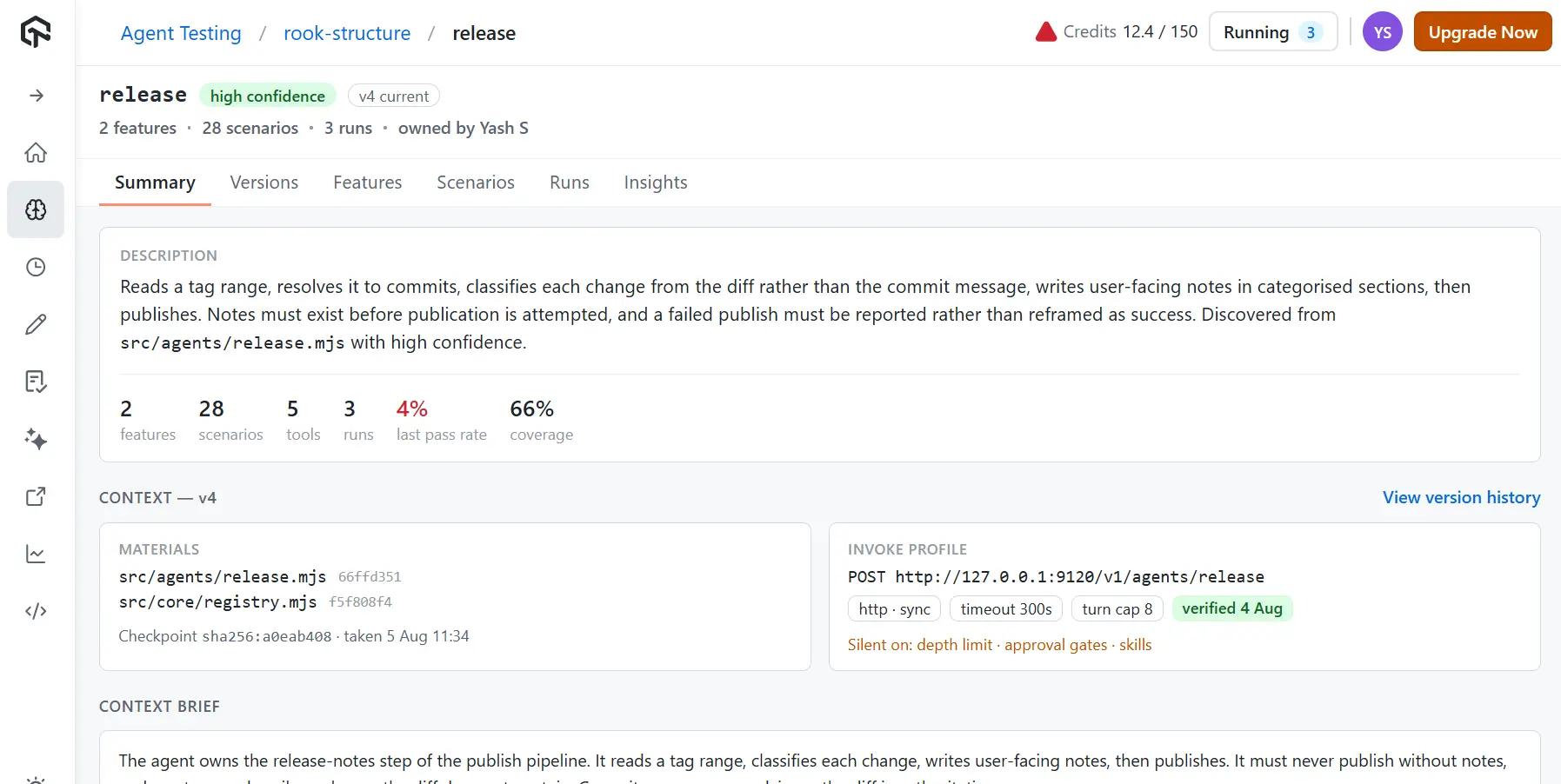
In this Agent Assurance workspace, discovery traced a release agent to src/agents/release.mjs, listed 5 tools and 2 features, and generated 28 scenarios. The invoke profile on the right is the one input it can't derive, and for an SDK agent it's usually a command that passes each scenario's goal to your script. A first run in the terminal UI:
npm install -g @testmuai/rook
rook login
rook
/project
/explore .
/agent
/profile add staging
/generate
/scenarios list
/sync
/run
/ui
Agent Assurance is pre-alpha, so commands and stored file formats can still change. It invokes the agent for real and can't roll its writes back, so point it at staging.

Next Steps
Begin Claude Agent SDK testing with the coverage test. List every tool your agent is allowed, mark the ones that can write, and fail the build when any of them sits outside a guard, the sandbox, or disallowed_tools; then add the hook recorder and one state assertion per write tool.
When you want generated scenarios against the real agent, follow the Agent Assurance quickstart and point it at your staging checkout.
Author

Samyak Goyal
Blogs: 34

Samyak Goyal is a Senior Member of Technical Staff at TestMu AI engineering Kane CLI, the command-line tool that runs browser automation from the terminal, where a flow described in natural language executes in a real Chrome browser and returns pass or fail with shareable proof. He is a backend engineer with 4+ years of experience, previously an SDE at Innovaccer, where he built APIs, introduced Kafka, and cut deployment from weeks to hours. Samyak also builds multi-agent systems, skill-orchestration frameworks, and a personal copilot that indexes 200+ microservice repositories.
Reviewer

Anubhav Singhmaar
Reviewer
Anubhav Singhmaar is an AI Product Manager at TestMu AI driving Kane CLI, the command-line tool that brings browser automation to the terminal, turning natural-language flows into runs in a real Chrome browser that return pass or fail with shareable proof. He owns the roadmap and prioritization and works with engineering to ship developer-facing features. Before TestMu AI, he spent over four years at Sprinklr owning enterprise voice AI across APAC and EMEA. A mechanical engineer turned product manager, he grounds guidance in real QA workflows.


Claude Agent SDK Testing FAQs
Did you find this page helpful?
More Related Blogs

TestMu AI forEnterprise
Get access to solutions built on Enterprise
grade security, privacy, & compliance
- Advanced access controls
- Advanced data retention rules
- Advanced Local Testing
- Premium Support options
- Early access to beta features
- Private Slack Channel
- Unlimited Manual Accessibility DevTools Tests