
Run End-to-End Tests from Your Terminal with Kane CLI
Author and Run Tests Right from the Terminal in Natural Language, with an Evidence-Backed Pass or Fail from a Real Browser.
npm install -g @testmuai/kane-cli
OpenCode Browse vs Kane CLI: An OpenCode Browser for Agents vs a Release Test
OpenCode Browse 0.1.0 dropped Playwright for a Rust binary that drives your own browser. Kane CLI adds saved tests, pass or fail verdicts and CI exit codes.
Published on:
When a coding agent fixes a bug and then checks the fix in your browser, the agent that wrote the change is also the one deciding that it works. OpenCode Browse, whose version 0.1.0 shipped on 16 November 2026, makes that browser step lighter and closer to your real session.
What it does not add is a test that runs the same way twice, or a verdict a CI runner can read. This comparison puts OpenCode Browse next to Kane CLI from TestMu AI, using the Browse README, its npm releases and two published write-ups, and shows which job each tool fits.
Overview
Use OpenCode Browse to explore and Kane CLI to gate releases. OpenCode Browse lets an AI coding agent drive your real, signed-in Chromium browser over MCP, and version 0.1.0 replaced Playwright with one Rust binary. Kane CLI, the testing agent from TestMu AI, saves plain-English tests, replays them in CI and returns pass or fail with exit codes and evidence.
What is the difference between OpenCode Browse and Kane CLI?
- Best for signed-in tasks: OpenCode Browse - the agent works in tabs where you are already logged in, and hands a tab back to you for a login, 2FA prompt or payment, then continues after you click Continue.
- Best for a light install: OpenCode Browse - since 0.1.0 it is one Rust binary with no Playwright dependency, and its install script needs no Node.js, so it is cheap to keep running during a coding session.
- Best for release gating: Kane CLI - a saved _test.md file replays unchanged steps from cache with no LLM cost, and exit codes 0 to 3 let any CI runner block a merge on the result.
- Best for audit evidence: Kane CLI - each run writes an .evidence pack with every step, screenshot, console and network log and the verdict, which a reviewer can open without rerunning the test.
What Is OpenCode Browse?
OpenCode Browse is an MCP server plus a Chromium extension from Anomaly, the company behind OpenCode. It lets an AI coding agent work inside the browser you already use, with your tabs, logins and extensions, instead of starting a clean browser. Anomaly announced it on 7 November 2026, according to Flavio Copes' hands-on review of Browse.
The OpenCode Browse product page and the Browse README on GitHub, both read on 18 November 2026, describe these capabilities:
- Background tabs - agents open tabs in the background, grouped and collapsed, and leave your other tabs alone.
- Handoffs - when a login, 2FA prompt or payment needs a person, the agent hands the tab back and continues after you click Continue.
- Lent tabs - clicking the toolbar button on an open tab lends it to the agent, and a second click takes it back.
- Capture - screenshots, a screenshot_diff tool that compares with a baseline, tab recordings to a video file, and network and console capture with credentials redacted.
- Emulation - an emulate tool changes viewport, color scheme, user agent, geolocation and more.
- Allowed sites - an allowlist keeps an agent's tab on the sites you name.
- Browsers - Chrome, Edge, Brave, Arc, Helium, Vivaldi, Opera and Chromium. Firefox and Safari are not listed.
- Clients - any MCP client, including OpenCode, Claude Code, Cursor, Codex and Zed.
Browse needs both parts, the binary and the extension. The product page starts you at the Chrome Web Store extension, which walks you through the rest. The README starts from the install script, whose install step adds the MCP server to your agents, opens the store page when no browser has the extension yet, and pairs it.
# Install script from the Browse README (macOS, Linux)
curl -fsSL https://opencode.ai/browse/install | bash
Did OpenCode Browse Drop Playwright?
Yes. The Browse 0.1.0 release notes, published on 16 November 2026, describe one native binary of a few MB, with no Node.js or Playwright underneath, that is the CLI, the relay and the MCP server. The relay talks the Chrome DevTools Protocol to each tab through the extension.
According to AlphaSignal's report on Browse 0.1.0, OpenCode says the rewrite uses one twenty-fifth of the memory and ships a binary one twenty-third the previous size. AlphaSignal reports these as OpenCode's own figures and gives no baseline.
MCP clients other than OpenCode still get an execute tool, which runs JavaScript in an embedded engine (QuickJS) against a Playwright-style page object. The object copies the Playwright API style, and the Playwright library itself is no longer installed.
Releases are moving fast. The @opencode/browse npm package listed 0.1.5 as the latest stable release on 18 November 2026, the sixth stable release in about 30 hours, so re-read the tool list before you build on it.
Dropping Playwright makes Browse lighter for agents, and it does not turn Browse into a test runner. As of 18 November 2026, the Browse docs describe no saved-test format, no pass/fail verdict and no CI exit codes. A script can be rerun with browse execute --file, but nothing grades the result.
Flavio Copes, reviewing version 0.1.1, calls Browse "a poor fit for testing a web app you're building", because "a clean browser that Playwright launches gives you the same result every time, and that's what you want in a test."
What Is Kane CLI?
Kane CLI is an end-to-end testing agent for developers and their coding agents, built by TestMu AI. You describe a user journey in plain English, and Kane CLI runs it in a real Chrome browser or on a mobile target and returns a pass or fail backed by evidence. It works from Claude Code, Cursor, Codex, Gemini CLI, GitHub Actions and any CI runner.
npm install -g @testmuai/kane-cli
kane-cli login
kane-cli run --url https://staging.example.com \
  "Add the blue mug to the cart, check out as a guest,
   and verify the order total matches the cart"

# In CI: replay a committed test from cache
kane-cli testmd run tests/checkout_test.md --headless --agent- Exit codes - 0 for pass, 1 for fail, 2 for a setup or auth error and 3 for a timeout or cancellation, so any CI runner can block a merge on the result.
- Agent mode - the agent flag returns structured NDJSON, one JSON object per line, that a coding agent can parse.
- Surfaces - web in real Chrome, API requests and responses, Android Emulator, iOS Simulator and real devices.
The details in this section come from the Kane CLI product page and the Kane CLI introduction docs, read on 18 November 2026.
How Does a Saved Kane CLI Test Run in CI?
With OpenCode Browse, the agent decides what to do on every run. Kane CLI uses the model only when it has to, and each test moves through these states:
- Author - the model works out the path once. For each step, Kane CLI takes a snapshot (DOM, accessibility tree and screenshot), acts like a user, then asserts, checking the DOM first with vision as a fallback.
- Replay - the saved _test.md file replays unchanged steps from cache with no agent and no LLM cost, as the Kane CLI test.md docs describe. Replay is what runs in CI. Devin Bots vs Kane CLI shows why replay matters when coding bots open pull requests in bulk.
- Heal - the model comes back only when replay cannot find its target. Step-heal re-finds one element by what it is, not where it sat, and flow-heal re-plans the route only when a step cannot be healed at all.
Healing changes the path, never the acceptance criteria. A Kane CLI pass means every acceptance criterion for the scenario was met, and re-authored steps are recorded for review.
The run below shows that rule on the TestMu AI ecommerce playground. Kane CLI added one iPhone to the cart, read a cart total of $123.20 and failed the assertion that the order total shows $18.00, rather than adjusting the check until it passed.
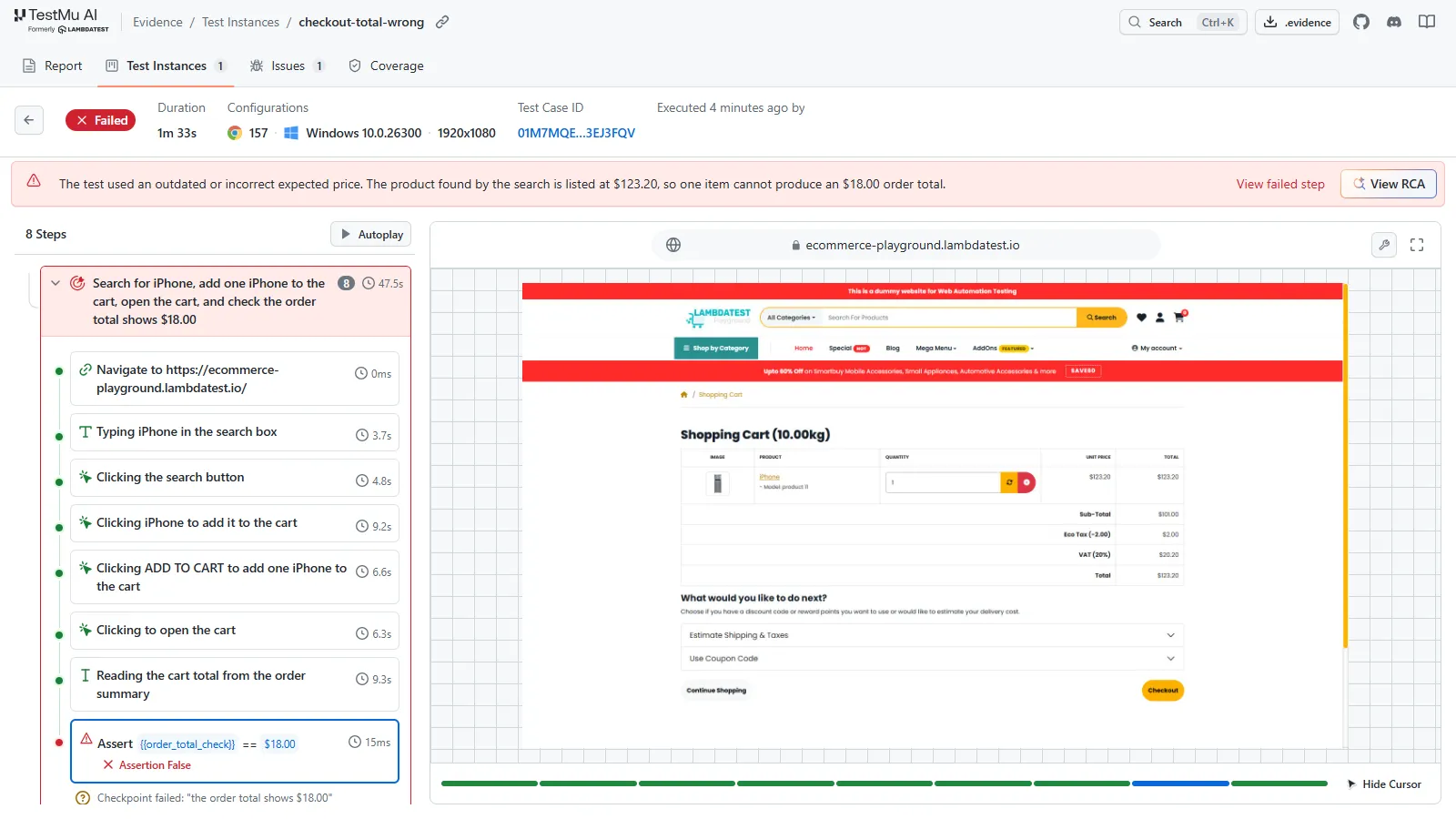
The banner at the top of that evidence page says the test used an outdated or incorrect expected price. That is a finding for a person to review, and Kane CLI reports it as a failure instead of deciding it on its own.
How Do OpenCode Browse and Kane CLI Compare?
Browse facts in this table were checked on 18 November 2026 against the README and the npm package linked above, and the OpenCode Browse product page.
| Aspect | OpenCode Browse | Kane CLI |
|---|---|---|
| What it is | MCP server and Chromium extension that lets an agent drive your browser | Testing agent that turns a plain-English check into a saved, replayable test |
| Main job | Exploring, debugging and doing tasks in signed-in tabs | Verifying a user journey and gating a release |
| How it runs | The agent calls MCP tools; a Rust relay drives your tabs over the Chrome DevTools Protocol (no Playwright since 0.1.0) | Author once with a model, then replay from cache; the model returns only to heal |
| Where it runs | Your local Chromium browser profile | Local real Chrome; Android Emulator and iOS Simulator on an Apple Silicon Mac; TestMu AI cloud and real devices |
| Mobile | Viewport and user-agent emulation in desktop Chromium | Android Emulator, iOS Simulator and real devices |
| CI replay without an LLM | A saved execute script reruns from the CLI; no test format, verdict or exit-code contract is documented | Yes, a saved _test.md file replays unchanged steps with no LLM cost |
| Pass/fail verdict | Not described; the agent interprets results | Every acceptance criterion must pass; exit codes 0 to 3 |
| Who judges the result | The same agent that drove the browser | Kane CLI, separate from the coding agent |
| Evidence | Screenshots, screenshot diffs, tab recordings, network and console capture (credentials redacted) | An .evidence pack with steps, screenshots, console and network logs and the verdict; uploaded to Test Manager by default, and posted as a PR comment by the GitHub Action |
| Visual checks | screenshot_diff compares with a baseline in your local browser; baseline approval, per-branch baselines and cross-browser runs are not described | DOM-first assertions with vision fallback; SmartUI on the same platform adds approved baselines, branch-aware baselines and noise filtering |
| Browsers and devices | Chromium-family browsers on your machine | Real Chrome, locally or on TestMu AI's cloud, plus native Android and iOS apps on emulators, simulators and real devices |
| Logged-in flows | Strong: reuses your sessions and hands back for 2FA | Masked secrets and variables; saved logins and profiles |
| Code you can keep | Agent-written execute scripts only; no test format | Any recorded flow exports as Playwright code |
| Pricing model | MIT licence and no account; model costs come from your agent's provider | No charge to install; runs use KaneAI credits; new accounts can claim 10,000 credits valid for 30 days |
| Best for | Interactive agent work in authenticated tabs | Repeatable checks that block a bad merge |
Where Is OpenCode Browse Stronger Than Kane CLI?
OpenCode Browse is the better pick for these jobs:
- Your real, signed-in browser - Browse reuses the sessions, cookies and extensions you already have, which removes setup for internal tools, admin panels and dashboards behind SSO.
- Human hand-off - the agent passes a tab back for 2FA, a payment or a login and picks up where it stopped.
- Light to run - since 0.1.0, Browse is one Rust binary with no Playwright install, and the install script needs no Node.js (the npm package is a small launcher that needs Node 22 or newer).
- MIT licence, any MCP client - Browse is MIT-licensed, has nothing to sign in to and works with any MCP client, so it fits teams that do not want another account.
- Debugging capture - redacted network traffic and console logs help a developer see why a page broke while they fix it.
- One-off tasks - filling a form, checking a page after a deploy or reproducing a bug report does not need a saved test.
If the goal is to let your agent look at the app while it codes, OpenCode Browse is a reasonable choice. For the same job from Anthropic's agent, see how Claude Code browser testing works.
Why Does Kane CLI Win for Release Gating?
Every change in Browse 0.1.0 improves the agent's hand on your browser, and none of it adds saved tests, verdicts or a CI gate. A release gate needs those, and Kane CLI is built for them:
- The verdict is separate from the builder - with Browse, the coding agent that wrote the change also drives the browser and decides whether it worked. Kane CLI is a separate testing agent: the coding agent can call it, but it never grades its own change.
- The same test runs the same way - replay runs saved steps from cache with no LLM, while a browsing agent re-decides the path each run, which costs tokens and can take a different route.
- Pass means every criterion passed - Kane CLI checks every acceptance criterion and cannot heal a wrong total into a green build.
- CI understands the result - exit codes 0 to 3 and NDJSON output plug into GitHub Actions or any runner.
- Evidence someone else can audit - the .evidence pack holds every step, screenshot, console and network log and the verdict, so a reviewer can step through it without rerunning anything.
- Native mobile apps, not a resized tab - Browse's emulate tool changes viewport and user agent inside desktop Chromium. Kane CLI tests native Android and iOS apps on an emulator or simulator (locally on an Apple Silicon Mac) and on real devices, and runs saved tests on TestMu AI's cloud through HyperExecute.
- Repeatable input - by default Browse moves the mouse in curves and paces typing so sites are less likely to spot the agent, a setting you can turn off. A release test needs the same path on every run and an assertion at each step.
- Your profile stays out of the release check - the Browse README says "Treat code an agent runs as code running as you" about its execute sandbox, and calls its tab limits "Guardrails, not a data boundary." Kane CLI runs headless in CI or on TestMu AI's cloud, so the gate does not depend on anyone's everyday signed-in browser.
Can I Use OpenCode Browse and Kane CLI Together?
Yes. They do different jobs in one loop:
- OpenCode with Browse writes and debugs the change - the agent opens the app in your browser, reproduces the bug and checks its fix by eye.
- The agent calls Kane CLI to verify - from OpenCode or any coding agent, it runs kane-cli run in agent mode, reads the NDJSON result and fixes failures before it opens the pull request.
- CI replays the saved test on every pull request - a headless run in agent mode blocks the merge on exit code 1, and the Kane CLI GitHub Action posts the result as a PR comment.
- The reviewer opens the evidence - the .evidence pack or the PR comment shows what passed and what failed.
Kane CLI ships agent instructions (an AGENTS.md file) so a coding agent knows when and how to call it, and the guides on Kane CLI for coding agents cover the setup. Browse is an MCP browser server, so if you are weighing MCP browser tools for testing, also read Playwright CLI vs MCP, and when to add Kane CLI.
For how OpenCode itself compares with a managed coding agent, see OpenCode vs Claude Code.

Note: Kane CLI runs a plain-English check in real Chrome, writes an evidence pack and returns an exit code your CI can gate on. Create a TestMu AI account and claim 10,000 Kane CLI credits valid for 30 days.
Can OpenCode Browse's screenshot_diff Catch Visual Regressions?
Partly. OpenCode Browse has a screenshot_diff tool that compares a screenshot with a baseline image, so an agent can spot a change while it works. It runs in your own Chromium browser at whatever viewport the agent emulates.
The README does not describe who approves a baseline, baselines per branch, filtering of rendering noise, or running the same comparison across browsers and devices. A release check needs those parts.
On TestMu AI, Kane CLI asserts each step against the DOM first, with vision as a fallback, and SmartUI handles pixel and layout regression. SmartUI compares against approved baselines, keeps branch-aware baselines, filters anti-aliasing and font-rendering noise, and covers web, mobile, Figma designs and PDFs.
Use screenshot_diff for a quick look during development, and SmartUI when a visual change should block a release. For how SmartUI's visual AI works, see AI visual testing with SmartUI.
What Are Kane CLI's Limits?
- Changed behavior behind an unchanged label - when a button keeps its label but does something else, Kane CLI is built to fail that step rather than heal it, so you get a red build to investigate instead of a quiet pass.
- No personal browser - Kane CLI does not drive your everyday browser. For signed-in, one-off tasks in your own tabs, OpenCode Browse is the better tool.
- Credits on every run - runs use KaneAI credits, local runs included, although unchanged steps of a saved test replay with no LLM cost.
If you already use Playwright, keep it: Kane CLI exports any recorded flow as Playwright code, so your team still owns standard code after Browse dropped the library. See Kane CLI vs Playwright for that comparison, and the roundup of the best AI browser testing CLI tools for the wider field.
How Do I Try Kane CLI With OpenCode?
Install it, point it at one flow your OpenCode agent just changed, and read the exit code:
npm install -g @testmuai/kane-cli
kane-cli login
kane-cli run --url https://your-staging-url \
  "Sign in as the test user and verify the dashboard
   shows this month's invoices"
The CLI costs nothing to install, and new accounts can claim 10,000 KaneAI credits valid for 30 days, as the TestMu AI pricing page lists in its KaneAI section. To wire the result into your agent or pipeline, the Kane CLI agent mode docs list the NDJSON events a run emits.
Testing from the terminal? Kane CLI by TestMu AI lets SDETs and developers plan, write, run and debug tests from the command line.
Author

Bhawana
Blogs: 77


Bhawana is a Community Evangelist at TestMu AI with over 3 years of experience creating technically accurate, strategy-driven content in software testing. She has authored 50+ blogs on test automation, cross-browser testing, mobile testing, and real device testing. She also serves as Product Marketing Manager for Kane CLI, the command-line tool that runs browser automation from the terminal using natural-language flows in a real Chrome browser. Bhawana is certified in KaneAI, Selenium, Appium, Playwright, and Cypress, reflecting her hands-on knowledge of modern automation practices. On LinkedIn, she is followed by 6000+ QA engineers, testers, AI automation testers, and tech leaders.
Reviewer

Shahzeb Hoda
Reviewer
Shahzeb Hoda is the Associate Director of Marketing and a Community Contributor at TestMu AI, leading strategic initiatives in developer marketing, content, and community growth. With 10+ years of experience in quality engineering, software testing, automation testing, and e-learning, he has authored and reviewed 70+ technical articles on software testing and automation. Shahzeb holds an M.Tech in Computer Science from BIT, Mesra, and is certified in Selenium, Cypress, Playwright, Appium, and KaneAI. He brings deep expertise in CI/CD pipeline automation, cross-browser testing, AI-driven testing practices, and framework documentation. On LinkedIn, he is followed by 3,700+ engineers, developers, DevOps professionals, tech leaders, and enthusiasts.


OpenCode Browse vs Kane CLI FAQs
Did you find this page helpful?
More Related Blogs



TestMu AI forEnterprise
Get access to solutions built on Enterprise
grade security, privacy, & compliance
- Advanced access controls
- Advanced data retention rules
- Advanced Local Testing
- Premium Support options
- Early access to beta features
- Private Slack Channel
- Unlimited Manual Accessibility DevTools Tests