

Power Your Software Testing with AI Agents and Cloud
The Native AI-Agentic Cloud Platform to Supercharge Quality Engineering. Test Intelligently and Ship Faster.


- TestMu AI (Formerly LambdaTest)
- /
- Blog
- /
- Debugging Mobile Pages with Developers Tools and easy Integrations
Debug on TestMu AI Mobile Devices with Developer Tools and Enjoy Easy Integrations
When you launch a website on a real mobile device and encounter a bug, it becomes impossible to debug it. So, to help you TestMu AI has launched mobile developer tools to make debugging on mobile devices easier for you.
Last Updated on:
Debugging a live bug on a real mobile device is possible directly inside TestMu AI's real-time testing console: switch to mobile view, launch an Browser emulator or iOS simulator, then click the developer tools icon on the left-hand menu bar. Coverage spans Android 7.0 and above running Chrome plus every iOS simulator, with remaining devices planned to follow.

Mobile Devices supporting Dev Tools:
Android:
- Galaxy S9 Plus
- Galaxy Note 9
- Galaxy Tab S4 10.5
- Galaxy S9
- Test on Google Pixel 3 XL
- Google Pixel 3
- Google Pixel 2 XL
- Google Pixel 2
- One Plus 6T
- Sony Xperia xz2
- Xiaomi MI 8
- Galaxy S8+
- Galaxy S8
- Galaxy J7 max
- Google Pixel XL
- Google Pixel
- Nexus 6p
- Nexus 5x
- LG V20
- Huawei Honor 6x
- Oppo R9
iOS:
All iPhones and iPads

Note: Try LT Debug Chrome Extension for debugging websites!
How to use mobile developer tools on Mobile Devices?
Step 1:. Go to the real time console by selecting real time tests from the menu bar.
Step 2: After launching real time, switch to mobile devices by clicking on the following icon

Step 3: Select the android emulator online or iOS simulator you want to test upon from the list above and enter the URL before clicking on launch.
Step 4: Once you click on launch, a mobile device will open up with the desired configuration that you’ve selected.
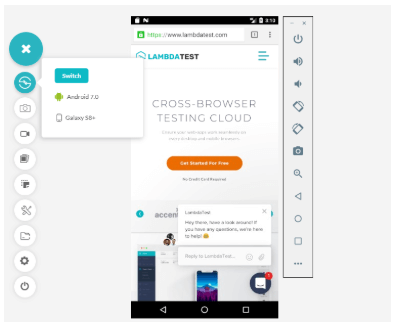
Step 5: You’ll see a developer tools option on the menu bar on the left hand side, click on it to open the dev tools.
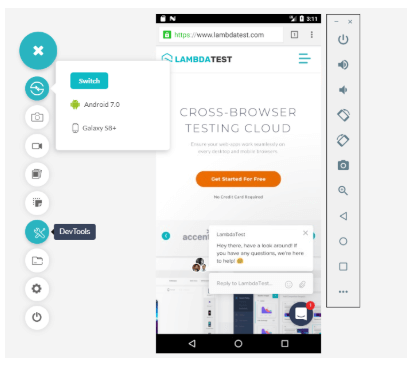
Step 6: Once you click on it, the dev tools will open and you can then start debugging your website/ web app.
In addition to dev tools we also have some brand new amazing integrations in house for you. Now you can move your bugs directly to GitHub, Slack, and JIRA from your TestMu AI account and that too in the middle of a TestMu AI test session.
Integrate with GitHub

Integrate with Slack

Integrate with JIRA

Integrate with Trello

Integrate with Gitlab

Integrate with Bitbucket

Integrate with VSTS
Integrate with Paymo
Integrate with TeamWork
Integrate with BugHerd
Integrate with ClubHouse

Integrate with Mantis
All you need to do is to install that integration, authorize it, and start logging bugs. If you use any other bug management tool like Asana, Trello, GitLab, Bitbucket then don’t worry, you can use them with TestMu AI too 😉 !
Just simple steps and integrate your TestMu AI account with JIRA, Asana, Slack, Trello, GitHub, GitLab, Bitbucket. If you use some other tool, don’t hesitate to tell us and we’ll bring it right here on our platform for you!
Hope you like our devtools and new integrations. In case you have any feedback or input for us, just leave us a message at support@testmuai.com.
You can watch the video here

100+ Free Online Tools From TestMu AI!
TestMu AI has come up with an index of 100+ free online tools for developers and testers. From HTML, XML, and JSON formatters to robust data generators, and hash calculators. TestMu AI’s free online tools are built to help engineering teams accelerate and be more productive with their daily activities.
Code Tidy
- JSON Prettify
- JSON Minify
- HTML Prettify
- HTML Minify
- JavaScript Minify
- CSS Minify
- CSS Prettify
- XML Minify
- XML Prettify
Data Format
- IDN Encode
- IDN Decode
- XML to JSON Converter
- JSON to XML Converter
- BCD to Decimal
- HEX to Decimal
- Decimal to BCD
- UTF8 Decode
- UTF8 Encode
- HEX to RGB Converter
- RGB to HEX Converter
- HTML to Markdown Converter
- Markdown to HTML Converter
- Decimal to Gray Code Converter
- Gray Code to Decimal
- URL Decode
- URL Encode
- Base64 Encode
- Base64 Decode
- Text to HTML Entities Converter
- HTML Entities to Text Converter
Random Data
- Random JSON Generator
- Random XML Generator
- Random CSV Generator
- Random YAML Generator
- Placeholder Image Generator
- Random Binary Generator
- Random Character Generator
- Random Color Generator
- Random Date Generator
- Random Decimal Fraction Generator
- Random Decimal Generator
- Random GUID Generator
- Random HEX Generator
- Random Octal Generator
- Random IP Generator
- Random MAC Generator
- Random Number Generator
- Random Paragraph Generator
- Random Password Generator
- Random Time Generator
- Random UUID Generator
- Random Sentence Generator
- Random String Generator
- Random Word Generator
- Random Data from RegEXP
- Test Data Generator
- Lorem Ipsum Generator
- Credit Card Number Generator
- QR Code Generator
- Random Byte Generator
Security Tools
- Hash Calculator
- HMAC Generator
- CRC32 Hash Calculator
- CRC32B Hash Calculator
- Ripe MD 128 Hash Calculator
- Ripe MD 160 Hash Calculator
- Ripe MD 256 Hash Calculator
- Ripe MD 320 Hash Calculator
- MD2 Hash Calculator
- MD4 Hash Calculator
- Adler32 Hash Calculator
- Gost Hash Calculator
- Whirlpool Hash Calculator
- MD5 Hash Calculator
- SHA1 Hash Calculator
- SHA256 Hash Calculator
- SHA384 Hash Calculator
- SHA512 Hash Calculator
Utils
- Find and Replace String
- HTML Escape
- HTML Unescape
- Difference Checker
- Shuffle Letters
- Shuffle Text Lines
- Sorting List
- Split Your String
- Text Lowercase
- Text Uppercase
- Text Repeater
- Text Rotator
- Character Count
- Word Count
- Lines Count
- Sentence Count
- URL Parse
- JSON Escape
- JSON Unescape
- Extract Text from HTML
- Extract Text from JSON
- Extract Text from XML
- Strip HTML
- JSON Validator
Author

TestMu AI
Blogs: 290


TestMu AI is World's First Full Stack AI Agentic Quality Engineering platform that empowers teams to test intelligently, smarter, and ship faster. Built for scale, it offers a full-stack testing cloud with 10K+ real devices and 3,000+ browsers. With AI-native test management, MCP servers, and agent-based automation, TestMu AI supports Selenium, Appium, Playwright, and all major frameworks. AI Agents like HyperExecute and KaneAI bring the power of AI and cloud into your software testing workflow, enabling seamless automation testing with 120+ integrations. TestMu AI Agents accelerate your testing throughout the entire SDLC, from test planning and authoring to automation, infrastructure, execution, RCA, and reporting.


Did you find this page helpful?
More Related Blogs
TestMu AI forEnterprise
Get access to solutions built on Enterprise
grade security, privacy, & compliance
- Advanced access controls
- Advanced data retention rules
- Advanced Local Testing
- Premium Support options
- Early access to beta features
- Private Slack Channel
- Unlimited Manual Accessibility DevTools Tests