

Power Your Software Testing with AI Agents and Cloud
The Native AI-Agentic Cloud Platform to Supercharge Quality Engineering. Test Intelligently and Ship Faster.


- TestMu AI (Formerly LambdaTest)
- /
- Blog
- /
- New Experience, Adaptive Heal and Dynamic Test in KaneAI
New Experience, Adaptive Heal and Dynamic Test in KaneAI
New Experience is the new KaneAI authoring engine behind Adaptive Heal and Dynamic Test. Set the strategy, review the draft it produces, approve or decline.
Published on:
A recorded test replays the steps it was authored with. When the application moves, a step stops matching the page, and until now that meant one outcome: the run ended there.
Several things have shipped in KaneAI since, and they connect. A new authoring engine, a new setting that decides what happens to a failing step, and a new report that only the new engine can produce.
What is new
- New Experience - the new authoring engine, alongside the original Classic. Every test case now carries a label showing which one authored it, and the two features below read that label.
- Evidence Reporting - a fuller report covering coverage details and the business use cases behind the tests, available when every test case in a run is New Experience and the run is on Chrome.
- Self-maintenance - one setting holding Adaptive Heal and Dynamic Test plus Retry on Failure, set for an organization, a project or a single run.
- Auto-approve changes - decides whether a re-authored version becomes current straight away or waits in Version History for a verdict. It ships switched off.
Check out this detailed documentation to set up Adaptive Heal and Dynamic Test in KaneAI.
New Experience and Evidence Reporting
Start here, because everything below depends on it. KaneAI now authors test cases on two engines: the original one is Classic, the new one is New Experience, and test cases are divided between them accordingly.
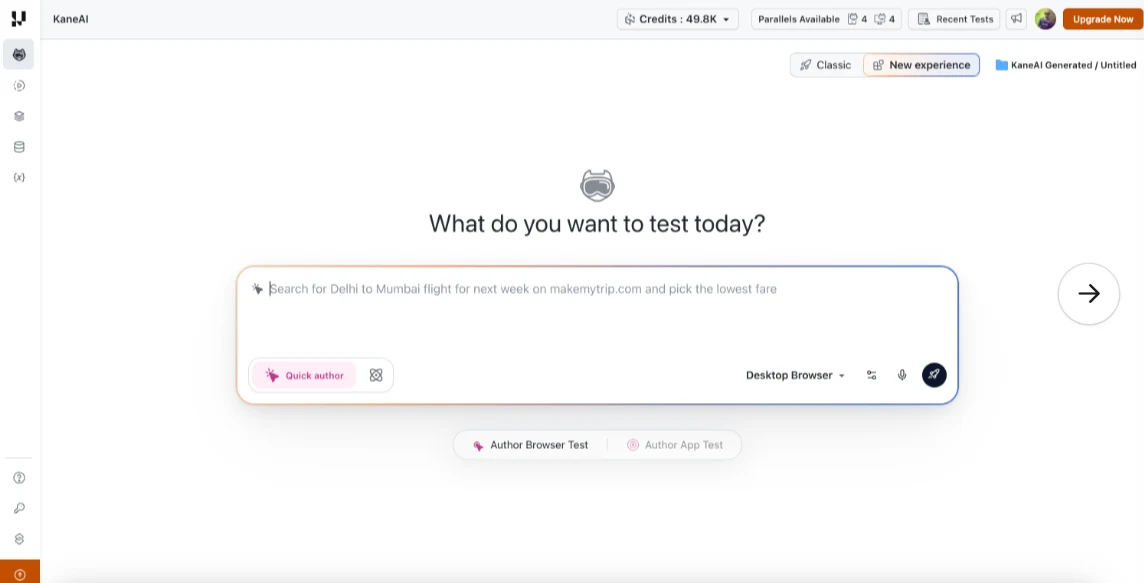
You pick the engine when you author, and the choice travels with the test case from there.
- Every test case carries a label - it shows the experience it was authored with, so you can see at a glance which engine is behind it.
- Availability - New Experience currently covers Desktop Web browsers only, the same surface Kane CLI runs on.
- Self-maintenance reads that label - everything in the rest of this post applies to New Experience test cases on Chrome. A Classic test case replays its recorded steps and is never re-authored, whichever strategy is selected.
- Evidence Reporting reads it too - a run produces an Evidence Report in place of the standard report only when every test case in it is authored with New Experience and the run is configured to execute on Chrome.
- One Classic case blocks the whole run - a single Classic test case makes the run ineligible, and it produces the Classic report instead.
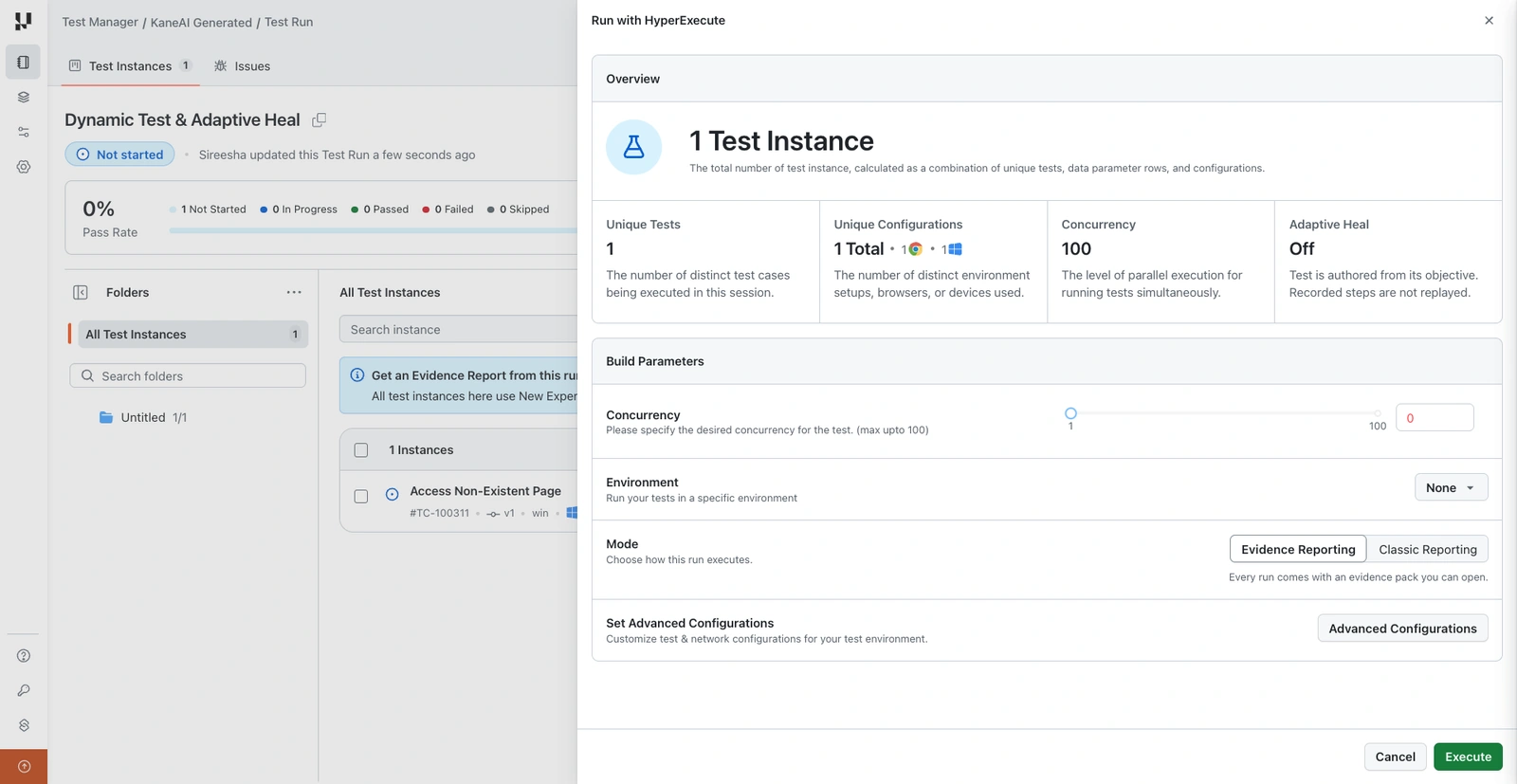
Under Build Parameters, Mode chooses how the run executes. Evidence Reporting is selected by default where the run qualifies, and Classic Reporting runs the same test run with the standard report instead.
Where a run does not qualify, the saved run flags which instances are blocking Evidence Reporting and the execute button reads Run with Classic Report. The Evidence Report itself covers the run in more detail than the standard one, including coverage details and the business use cases behind the tests.
One Setting, Four Ways a Failing Step Can End
Auto-Heal recovers an element locator where it can, and it runs in every test run. Self-maintenance decides what happens to a step Auto-Heal cannot recover.
- Off - the default. Recorded steps stay as they are, Auto-Heal still runs, and a step it cannot recover ends the run and is reported.
- Adaptive Heal - replays the recorded steps, and re-authors from the failing objective onward when one of them fails.
- Dynamic Test - never replays. Every objective is authored again on every run, whether or not anything fails.
- Retry on Failure - replays, and on failure runs the whole test again from the start without changing anything in it.
Only one can be active, because all three answer the same question in different ways. Selecting one clears the others.
Adaptive Heal
Adaptive Heal re-authors the test when an objective fails to replay, so the run continues instead of stopping at the failure. What it re-authors is wider than the step that broke.
- Scope - the objective that contains the failing step, and every objective after it. Objectives that already ran keep the result they replayed.
- Output - the re-authored content is saved as a new version of the test case, and by default that version waits for your approval before it becomes current.
- The run itself - finishes on the re-authored content either way, whether or not you approve the version afterwards.
- Credits - re-authoring is authoring work, so it consumes authoring credits. One trigger re-authors a whole objective and everything after it, so the cost grows with how much of the test sits after the failure.
Reach for it when your application changes often enough that a recorded step goes stale, but the test is still describing the right thing. A run in which nothing fails to replay does not trigger it at all.
Adaptive Heal Is Not Auto-Heal
The names are close and the features are not. One repairs a locator and leaves your test alone; the other rewrites part of your test and asks you to sign it off.
Auto-Heal works through a locator in two stages, and stops there.
- It tries the other locators captured for that same element when the primary one fails.
- If all of them fail, it rebuilds the locator from the step's original natural language instruction.
- It creates no version and needs no approval, and it runs whatever you select under Self-maintenance.
Both can act on the same run: Auto-Heal goes first, and Adaptive Heal handles the step it could not recover. For the wider picture, see self-healing test automation and agentic regression testing.
Dynamic Test
Dynamic Test authors the test from its objectives instead of replaying the recorded steps. It does not wait for a failure, because the recorded steps are never used.
- When to use it - for pages that change so much that a recorded script is a liability.
- What it costs - every run authors the test again, so every run consumes authoring credits. Replaying a recorded test consumes credits only when Auto-Heal triggers.
- The organization-level caveat - turning it on at that level commits every eligible run in scope to that cost.
Adaptive Heal and Dynamic Test are the same act with different triggers.
| Adaptive Heal | Dynamic Test | |
|---|---|---|
| Replays recorded steps | Yes, and re-authors only where the replay fails | No, the recorded steps are never used |
| What triggers re-authoring | An objective failing to replay | Nothing. It happens on every run |
| Scope of a re-author | The failing objective and every one after it | Every objective in the test case |
| When credits are consumed | Only on a run where something failed to replay | On every run |

Note: Set a self-maintenance strategy on one KaneAI test run, let it re-author a stale objective, then approve or decline the draft in Version History. Start free and try it on a single run before you set a project default.
Retry on Failure
Retry on Failure runs the whole test again from the start after it fails. Nothing about the test is changed, so nothing needs approval.
- Maximum Retries - sets how many further attempts to make, up to 5.
- Run level only - it is not an organization or project setting, so it is chosen per run.
- An age condition on the code - it re-runs a test case only when the exported code was generated on or after May 10, 2026. For code generated before that date, a retry runs only when the test runner command itself fails.
Nothing Becomes Current Until You Approve It
Adaptive Heal and Dynamic Test both produce a new version of the test case, and Auto-approve changes decides what happens to it.
| Auto-approve | What happens to the new version |
|---|---|
| Off, the default | Held in Version History and becomes current only after your approval |
| On | Becomes current immediately, without review, and is marked in Version History as approved that way |
The control applies only to the two strategies that produce a version. With Retry on Failure selected it is disabled, because nothing about the test changes and there is nothing to approve.
- Where the draft appears - in the test case's Version History, attributed to the strategy that produced it rather than to the person who started the run.
- One test case, one draft - a run can include the same test case under several configurations and still produces a single draft, because it is one test case.
- Approve - makes it the current version and regenerates the exported code for it.
- Decline - discards it and leaves the current version untouched.
- While it waits - a draft cannot be edited. Approve or decline it first, then edit the result like any other version.
A re-authored objective is sometimes right, because the application moved on and the test needs to follow. Sometimes the step failed because the product genuinely broke, and re-authoring around it turns a real defect into a passing test, which is what reviewing the change keeps visible.
Set It for the Org, the Project or One Run
Self-maintenance is set at three levels, and each one is a starting position for the level below it.
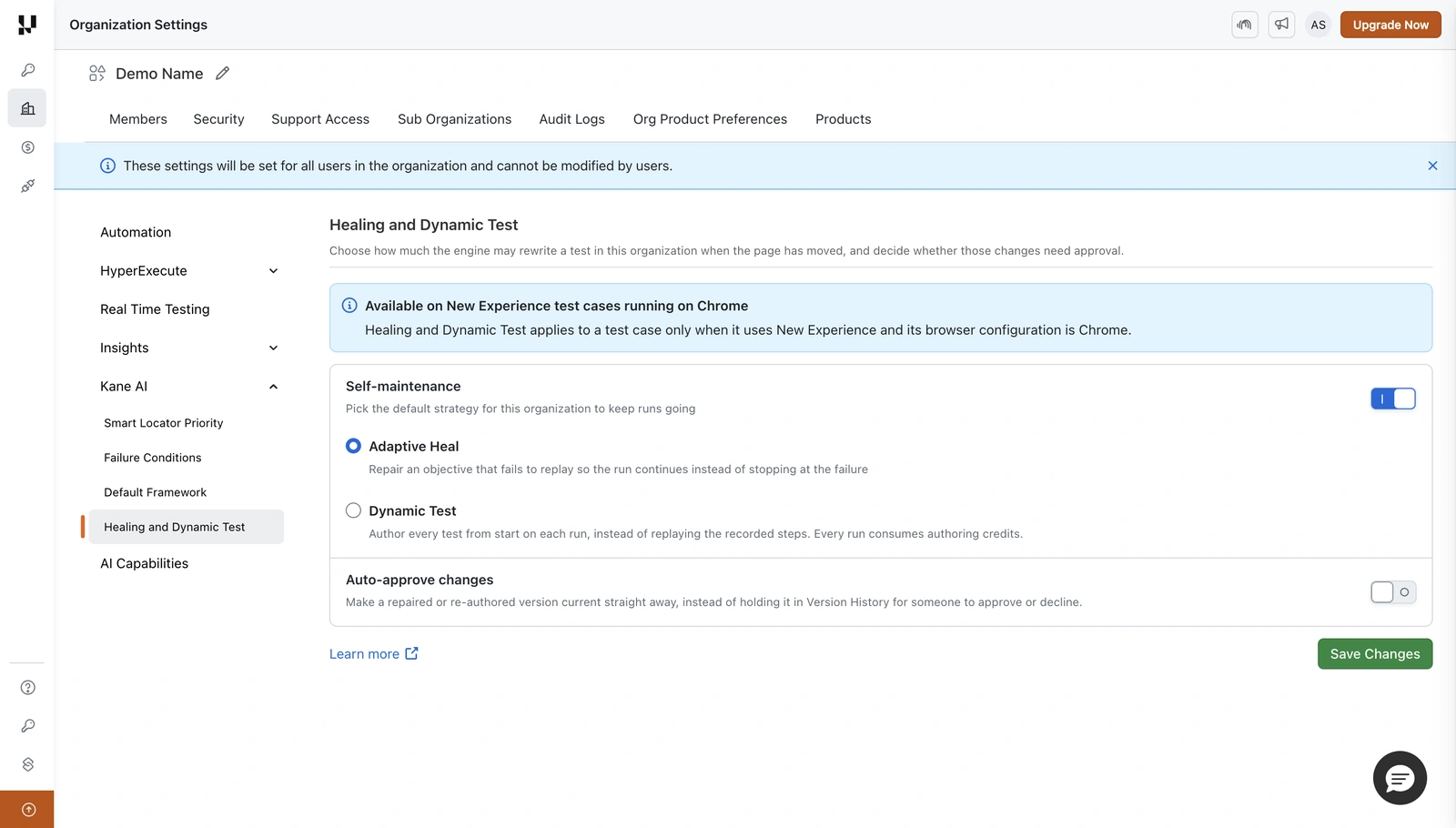
A project starts from the organization value and keeps its own once you change it there, under Test Manager, Project Settings, Healing and Dynamic Test.
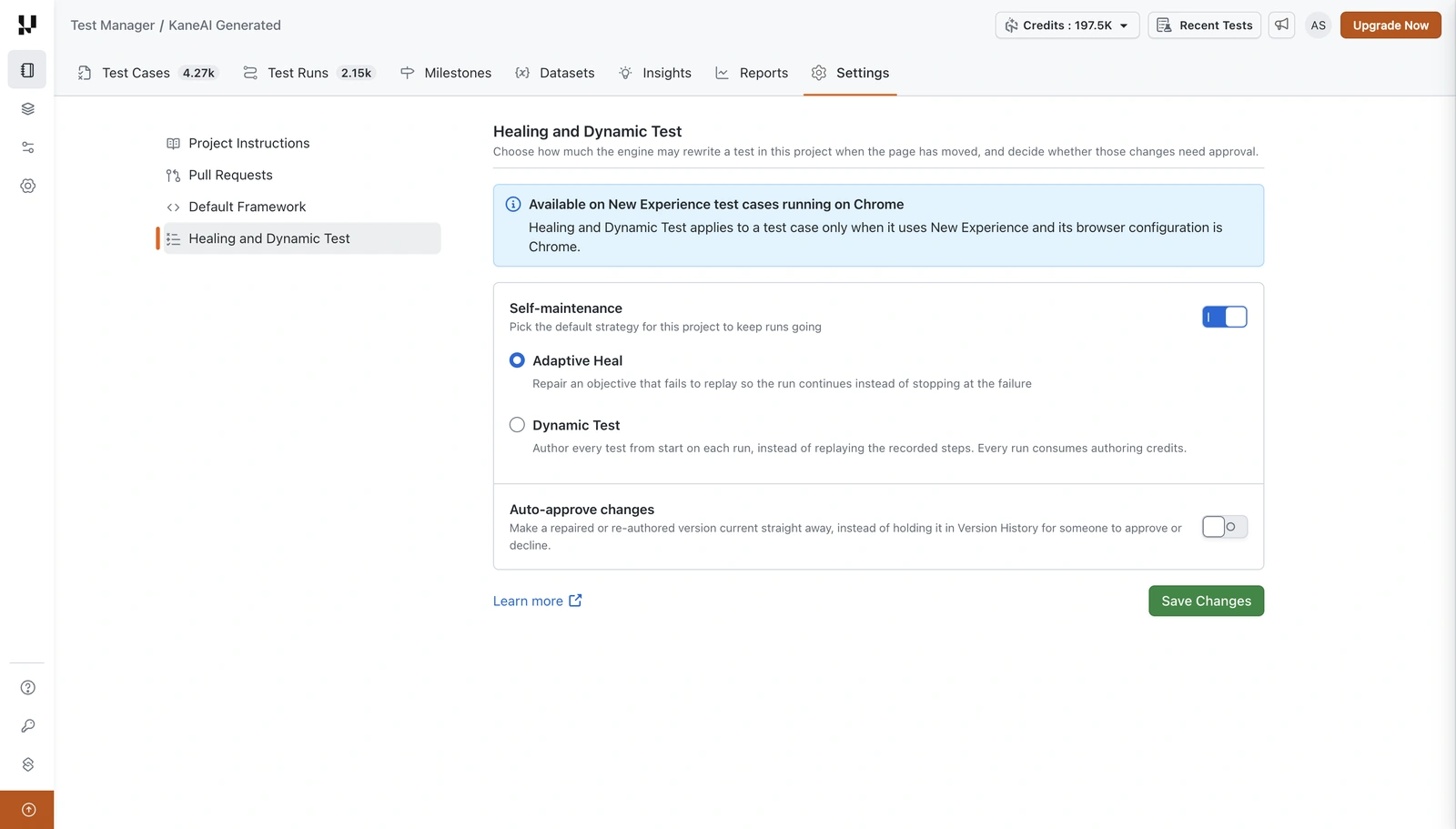
To set it for a single run, open Advanced Configurations on the test run screen. Retry on Failure appears here and nowhere else.
- Turn Self-maintenance on.
- Select Adaptive Heal, Dynamic Test or Retry on Failure.
- For Adaptive Heal or Dynamic Test, set Auto-approve changes. For Retry on Failure, set Maximum Retries.
- Click Execute.
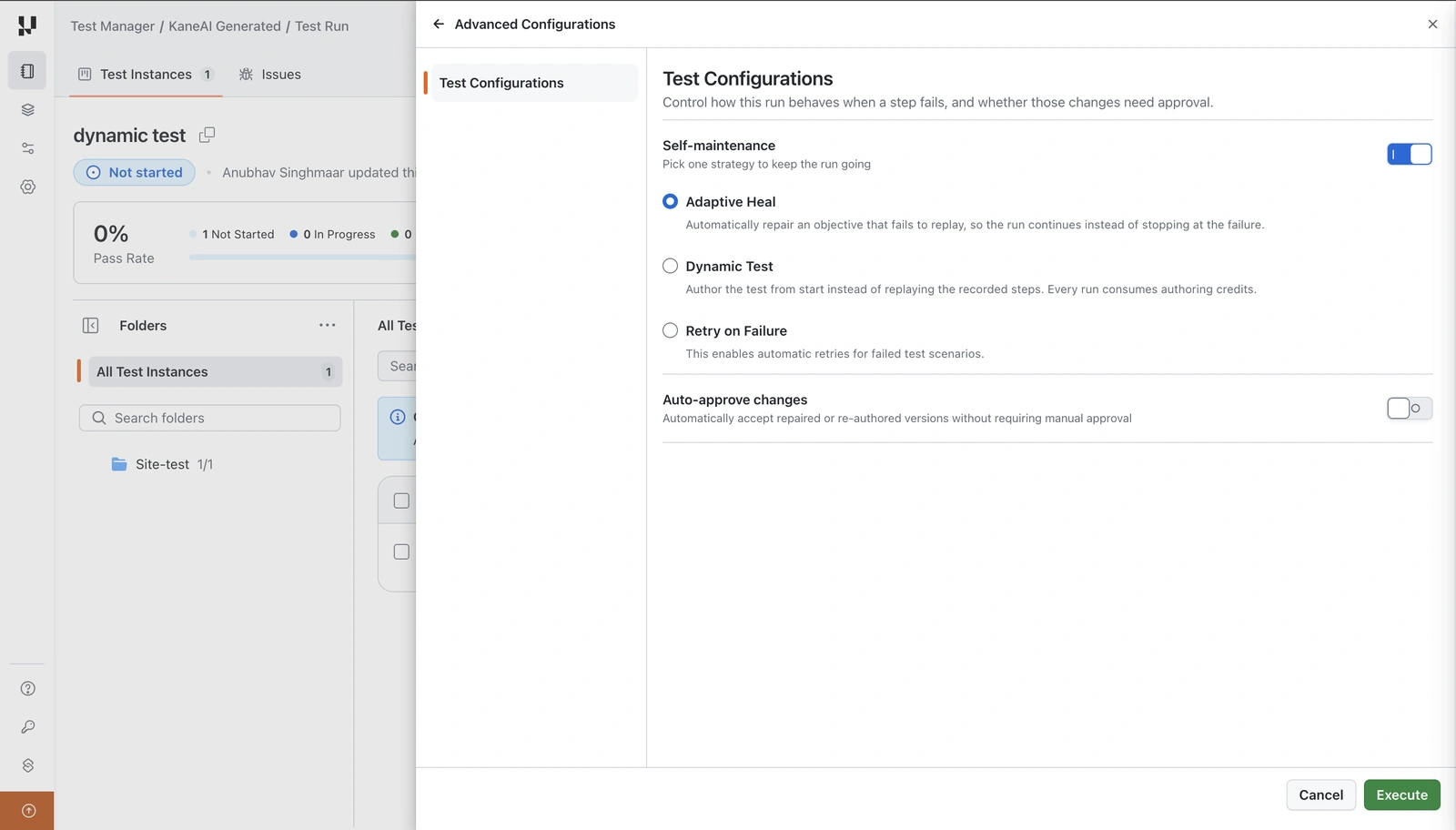
Changing it in a run never writes back to the project or the organization, so a run-level choice is a one-off rather than a new default.
The Run with HyperExecute panel carries a strategy tile in its Overview, beside the number of test instances, unique configurations and concurrency. Confirm the strategy in Advanced Configurations before you execute, because that is where the organization, project and run-level values resolve for that run. The rest of the panel is covered in the KaneAI test runs documentation.
Limits and Eligibility
- New Experience and Chrome only - a test case on any other browser, or one not using New Experience, replays its recorded steps and nothing is re-authored, whatever is selected.
- One strategy at a time - selecting one clears the others, so a run cannot combine re-authoring with retries.
- Retry on Failure has no org or project equivalent - it exists at the run level only.
- Existing runs are not eligible - turning Self-maintenance on applies from that point forward, and only runs created while it is on use Adaptive Heal or Dynamic Test.
- Mobile and app test cases are out of scope - New Experience covers Desktop Web browsers only, so anything else replays its recorded steps whichever strategy is selected.
Try It on One Run
- Pick the test case that breaks most often on UI churn, and check it uses New Experience on Chrome.
- Select Adaptive Heal in Advanced Configurations, with Auto-approve changes left off.
- Execute, and let the run finish on whatever it re-authors.
- Open the draft in Version History and read it against the current version before you approve or decline it.
That one review tells you what the strategy is worth on your application, and what a re-authored objective actually looks like. For how to decide which of your tests should get it and which should keep failing loudly, see AI test maintenance without false passes.
Author

Bhavya Hada
Blogs: 28


Bhavya Hada is a Community Contributor at TestMu AI with over three years of experience in software testing and quality assurance. She has authored 20+ articles on software testing, test automation, QA, and other tech topics. She holds certifications in Automation Testing, KaneAI, Selenium, Appium, Playwright, and Cypress. At TestMu AI, Bhavya leads marketing initiatives around AI-driven test automation and develops technical content across blogs, social media, newsletters, and community forums. On LinkedIn, she is followed by 4,000+ QA engineers, testers, and tech professionals.
Reviewer

Abhishek Mishra
Reviewer
Abhishek Mishra is a Technical Product Manager at TestMu AI, where he owns Test Manager, the test management product. He has over 8 years of experience in product management and market analysis. His expertise spans across AI-native software testing, product strategy, and analytics. Previously, Abhishek served as the Product Lead at IndiaClan and co-founded Gartley618 Technologies, where he led innovative projects in quantitative trading and blockchain. He holds a B.Tech degree.


Adaptive Heal FAQs
Did you find this page helpful?
More Related Blogs
TestMu AI forEnterprise
Get access to solutions built on Enterprise
grade security, privacy, & compliance
- Advanced access controls
- Advanced data retention rules
- Advanced Local Testing
- Premium Support options
- Early access to beta features
- Private Slack Channel
- Unlimited Manual Accessibility DevTools Tests