

Power Your Software Testing with AI Agents and Cloud
The Native AI-Agentic Cloud Platform to Supercharge Quality Engineering. Test Intelligently and Ship Faster.


- TestMu AI (Formerly LambdaTest)
- /
- Blog
- /
- iPhone 18 Pro and iPhone 18 Pro Max Are Now Live on TestMu AI Real Devices and Simulators
iPhone 18 Pro and iPhone 18 Pro Max Are Now Live on TestMu AI Real Devices and Simulators
iPhone 18 Pro and iPhone 18 Pro Max are live on TestMu AI real devices on iOS 27 and as iOS 27.0 simulators. See the viewport and HDR data Safari reported.
Published on:
An iPhone 18 Pro owner can file a bug against a page your team tested only on the simulator. When I loaded the same page on a real iPhone 18 Pro and on the iPhone 18 Pro simulator, both on iOS 27.0, only the real device matched the (dynamic-range: high) media query. Any HDR-only styling on that page reaches iPhone 18 Pro owners without anyone on your team seeing it render.
Apple put the iPhone 18 Pro and iPhone 18 Pro Max on sale on September 18, 2026 in more than 65 countries and regions, with 20 more following on September 25, according to its iPhone 18 Pro announcement. Every measurement in this iPhone 18 Pro testing guide comes from TestMu AI sessions I ran on September 22, 2026.
Key Takeaways
- The iPhone 18 Pro and iPhone 18 Pro Max are available on TestMu AI real devices on iOS 27 for live and automated testing, and as iOS 27.0 simulators for manual Real Time Testing and Appium automation.
- In my Safari sessions, the iPhone 18 Pro and iPhone 18 Pro Max report the same 402 x 714 and 440 x 796 portrait viewports as the iPhone 17 Pro and iPhone 17 Pro Max, at a devicePixelRatio of 3.
- Real iPhone 18 Pro and Pro Max devices matched the (dynamic-range: high) media query and both simulators did not, so HDR styling has to be verified on a real device.
- In my Safari 27 sessions on iOS 27.0, the user agent reported iPhone OS 18_7, so any version check that parses that token reads an iOS 27 device as iOS 18.
- Apple's TN3187 says an app built with the SDK that follows iOS 26 won't launch without the UIScene life cycle, so rebuild with Xcode 27 and launch the app before running any other test.
iPhone 18 Pro vs iPhone 17 Pro Specs for Testing
Apple kept the display size, resolution, and pixel density the same between the two generations, and the visible display change is a smaller, redesigned Dynamic Island. The iPhone 18 Pro tech specs list a 6.3-inch display at 2622 x 1206 pixels and a 6.9-inch Pro Max display at 2868 x 1320, both at 460 ppi, the same figures Apple's support specs give for the iPhone 17 Pro and iPhone 17 Pro Max.
| Area | iPhone 17 Pro and 17 Pro Max | iPhone 18 Pro and 18 Pro Max |
|---|---|---|
| Screen size | 6.3 inches and 6.9 inches | 6.3 inches and 6.9 inches |
| Resolution | 2622 x 1206 and 2868 x 1320 at 460 ppi | 2622 x 1206 and 2868 x 1320 at 460 ppi |
| Dynamic Island | Dynamic Island | A smaller, redesigned Dynamic Island that can show three Live Activities at once |
| Chip | A19 Pro | A20 Pro, built on a 2-nanometer process |
| Shipping OS | iOS 26 | iOS 27 |
Apple's announcement and tech specs describe these hardware changes, and each needs a real device to verify:
- Variable aperture - The tech specs list four aperture settings for the 48MP Fusion Main camera, f/1.48, f/1.8, f/2.8, and f/4.0, and the announcement says an API gives developers control across that range. An app that calls the new API needs a real device to exercise it.
- Three Live Activities - The Dynamic Island can now show three Live Activities at once. The iPhone 18 Pro simulator screenshot in the next section draws no Dynamic Island, so check on a real device that your Live Activity still reads clearly beside two others.
- Sustained performance - Apple says the redesigned vapor chamber enables up to a 40 percent gain in sustained performance over the previous generation. Frame-time and thermal baselines recorded on an iPhone 17 Pro no longer describe the iPhone 18 Pro.
Real iPhone 18 Pro vs iPhone 18 Pro Simulator
On September 22, 2026, I ran Safari on four TestMu AI sessions: a real iPhone 18 Pro, a real iPhone 18 Pro Max, and the iPhone 18 Pro and iPhone 18 Pro Max simulators, all on iOS 27.0 under the build name iPhone 18 Pro Launch Viewport Check. Each session loaded the Selenium Playground, read the values below with JavaScript in portrait and again after a WebDriver orientation change to landscape, and set viewport-fit=cover before reading the safe-area insets.
| Reading (18 Pro / 18 Pro Max) | Real device | Simulator |
|---|---|---|
| Portrait viewport | 402 x 714 / 440 x 796 | 402 x 714 / 440 x 796 |
| Landscape viewport | 874 x 402 / 956 x 440 | 874 x 402 / 956 x 440 |
| screen.width x screen.height | 402 x 874 / 440 x 956 | 402 x 874 / 440 x 956 |
| devicePixelRatio | 3 / 3 | 3 / 3 |
| Landscape safe-area insets | 62 px left and right, 20 px bottom | 62 px left and right, 20 px bottom |
| (color-gamut: p3) | Matches on both | Matches on both |
| (dynamic-range: high) | Matches on both | Does not match on either |
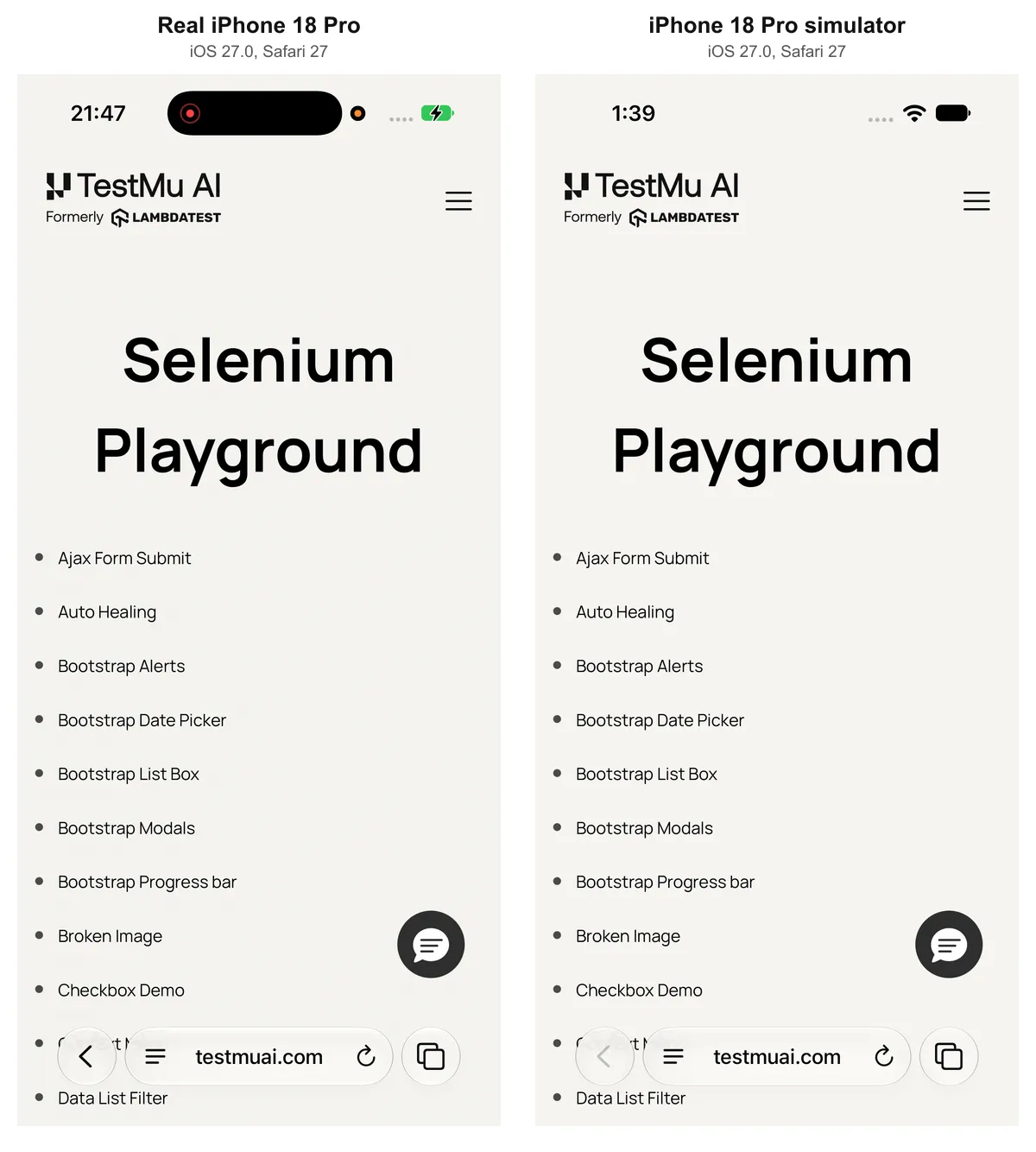
The real device screenshot shows the Dynamic Island in its active state, while the simulator screenshot draws no island at all, so mask the status bar and Dynamic Island region before you compare screenshots from the two.
Apple's Device Hub documentation gives the same split: run on simulated devices "to quickly evaluate new features and fix bugs," and on physical devices "to test features or services that have hardware dependencies." For the iPhone 18 Pro, these checks belong on the real device:
- HDR rendering - Neither simulator matched (dynamic-range: high), while every real device I tested did, the iPhone 17 Pro models included. Assert that the query matches on a real device and check which image or video source your page loaded.
- Face ID - In a live App Testing session, TestMu AI can pass or fail the Face ID prompt for an uploaded app on iOS 13 and later that calls the evaluatePolicy and canEvaluatePolicy methods of LAContext. The guide to biometric authentication on real devices covers the settings toggle you enable before the session starts.
- Camera and scanning - For native apps you upload for App Testing, image and video injection feeds a photo or QR code into the camera APIs on a real iPhone 18 Pro, which tests capture and scanning without a physical target. Camera flows inside Safari fall outside the injection feature.
All of these run on the TestMu AI real device cloud, which gives you 10,000+ real Android and iOS devices, with device logs during live sessions and a video recording of every automated run. For checks earlier in a sprint, the iOS simulator online covers iPhone simulators without any Xcode setup. The comparison of emulators, simulators, and real devices shows where each option stops being useful.

Note: Book a real iPhone 18 Pro or iPhone 18 Pro Max on iOS 27 for the HDR, Face ID, and camera checks above. Try TestMu AI free on a real iPhone 18 Pro
Safari 27 Changes That Affect iPhone 18 Pro Testing
Starting with Safari 26.0, the Safari user agent no longer lists the current iOS version, and the WebKit Safari 26.0 feature announcement gives the iOS example as iPhone OS 18_6 with Version/26.0. On iOS 27, the real devices I tested report iPhone OS 18_7 with Version/27.0, so the OS token moved but still never shows 27.
To separate the new hardware from the new OS, the table adds three more real device sessions from the same build: the iPhone 17 Pro and iPhone 17 Pro Max on iOS 26.0, and the iPhone 17 Pro Max on iOS 27.0.
| Real device and iOS | OS token in user agent | Safari token | Portrait viewport | Landscape viewport |
|---|---|---|---|---|
| iPhone 17 Pro, iOS 26.0 | 18_6 | Version/26.0 | 402 x 714 | 874 x 382 |
| iPhone 17 Pro Max, iOS 26.0 | 18_6 | Version/26.0 | 440 x 796 | 956 x 420 |
| iPhone 17 Pro Max, iOS 27.0 | 18_7 | Version/27.0 | 440 x 796 | 956 x 440 |
| iPhone 18 Pro, iOS 27.0 | 18_7 | Version/27.0 | 402 x 714 | 874 x 402 |
| iPhone 18 Pro Max, iOS 27.0 | 18_7 | Version/27.0 | 440 x 796 | 956 x 440 |
- User agent checks - Code that reads iPhone OS 18_7 treats an iOS 27 device as iOS 18. Detect the feature you need, and when you must know the release, read the Version/27.0 token.
- Landscape height - On the same iPhone 17 Pro Max, the landscape viewport grows from 956 x 420 on iOS 26 to 956 x 440 on iOS 27, which matches the iPhone 18 Pro Max, so the extra 20 px comes from iOS 27 rather than the new hardware. Portrait stayed the same on both, so the re-check is landscape only: fixed headers, bottom bars, and bottom-fixed elements padded by env(safe-area-inset-bottom), which measured 20 px.
- Scroll anchoring - Apple's Safari 27 release notes say Safari 27 enabled scroll anchoring, which prevents visible jumps in scroll position when content is inserted or removed above the viewport. Re-run any test that asserts scroll position after lazy-loaded images, ads, or feed items appear above where the page is scrolled.
- WebDriver screenshots - The same notes list a fix for Safari WebDriver full page screenshots that were clipped to the viewport, so re-check any full page baselines captured through the Safari WebDriver before Safari 27.
The devicePixelRatio read 3 in every session I ran, the iPhone 17 Pro models included.
iOS 27 SDK Checks Before You Test
An app rebuilt with Xcode 27 has to adopt the UIScene life cycle before it will launch. Apple's TN3187 technical note states: "In the next major release following iOS 26, UIScene lifecycle will be required when building with the latest SDK; otherwise, your app won't launch."
- UIScene adoption - If the build your users run today came from Xcode 26, test it on the iPhone 18 Pro as it is, since TN3187 ties the requirement to building with the latest SDK. Launch the Xcode 27 build before anything else runs, because an app still on the app-delegate life cycle fails at launch and every downstream test then fails for that one reason.
- Device Hub - Apple's Device Hub documentation says Xcode manages simulated and physical devices in Device Hub, and the Safari 27 release notes list a fix so the Safari Develop menu and WebDriver launch Device Hub instead of Simulator when it is available. Check any local script that opens Simulator by name.
- Cloud runs - TestMu AI hosts both the simulators and the real devices, so no local Device Hub or Simulator setup is needed. Safari tests switch between the two with the capabilities in the next section, while app tests need an .ipa for real devices and a zipped simulator .app for simulators.
How to Start Testing on iPhone 18 Pro
| How you test | Device and iOS | How to start |
|---|---|---|
| Real Time Testing (manual) | iOS simulator on iOS 27.0 | Open Real Time Testing, select Virtual Mobile under Web Browser Testing, choose iOS and the iPhone 18 Pro or iPhone 18 Pro Max, enter a URL, and click Start. |
| Real device (manual) | Real device on iOS 27 | Open Real Devices, select iOS, pick the model, then upload an .ipa, install from the App Store or TestFlight, or enter a URL to test in Safari. |
| Real device (automation) | Real device on iOS 27 | Run Appium, XCUITest, or Detox suites with isRealMobile set to true and the platform version set to 27. |
| Virtual device (automation) | iOS simulator on iOS 27.0 | Run Appium suites with isRealMobile set to false, the platform version set to 27.0, and Appium 3.3.0. Simulator app automation is in beta and is enabled through TestMu AI sales. |
Virtual Mobile sessions in Real Time Testing run the iPhone 18 Pro on the iOS 27.0 simulator, which covers viewport, user agent, scroll, and launch checks, while anything in the hardware lists above needs a Real Devices session. For native app testing on a simulator, upload a simulator build: the guide to building your iOS app for simulator testing says a build intended for a physical iPhone will not work on the Simulator, even if the CPU architecture matches, and asks for the .app compressed into a .zip archive.
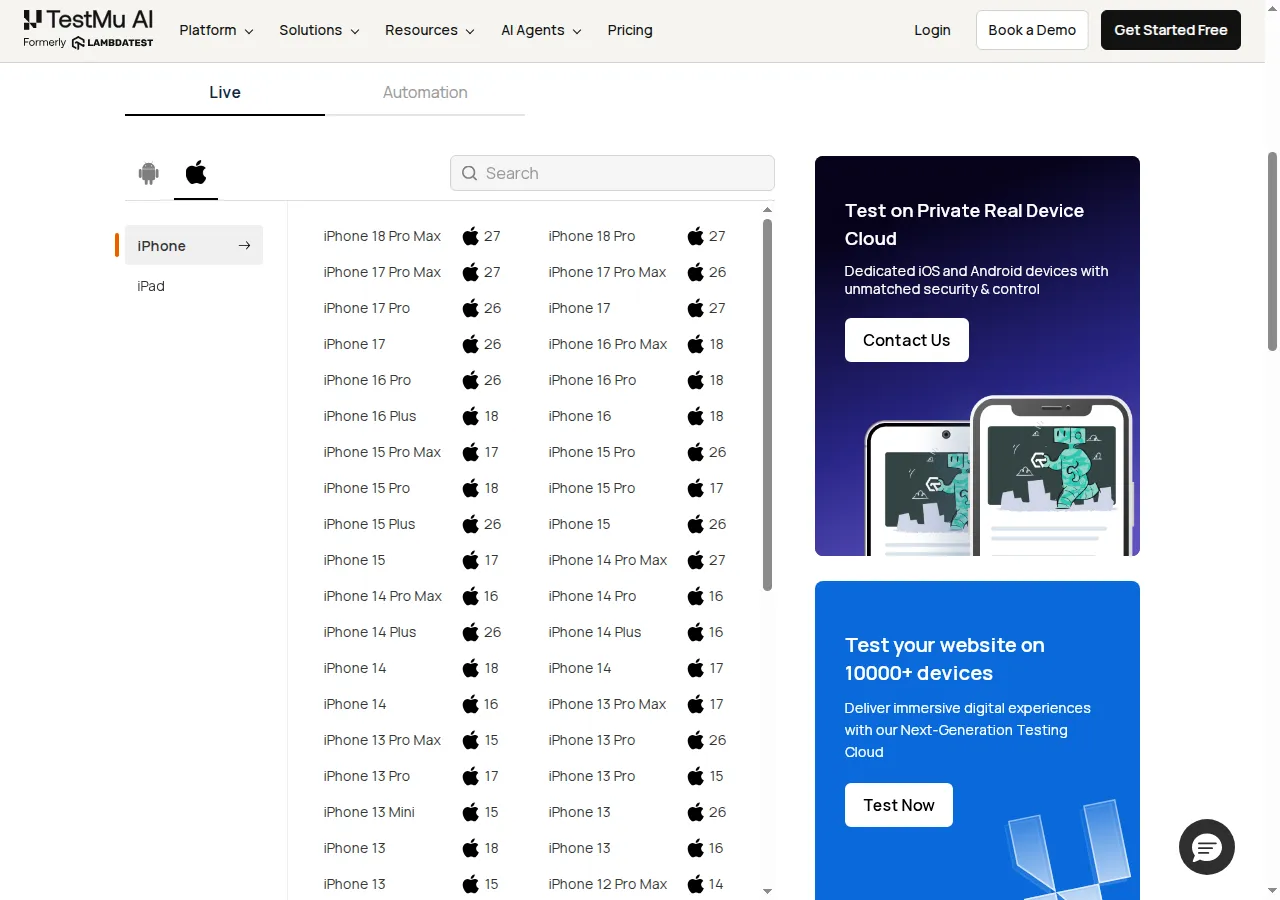
Both models sit at the top of the iPhone section on iOS 27, above the iPhone 17 Pro Max on iOS 27 and iOS 26. The current list of real devices shows every bookable model with its OS versions.
For automation, the script below uses the core capabilities from my sessions and reads the portrait viewport, the devicePixelRatio, and the HDR media query. Install the driver with npm install selenium-webdriver, then export LT_USERNAME and LT_ACCESS_KEY with the username and access key from your TestMu AI account.
Setting isRealMobile to true books the real device, and setting it to false runs the simulator. The TestMu AI capabilities generator lists real devices by major version (27) and simulators by runtime version (27.0), and it offers Appium 3.3.0 as the only Appium version for iOS 27.0 simulators:
const { Builder } = require("selenium-webdriver");

const options = (isRealMobile) => ({
  browserName: "Safari",
  "LT:Options": {
    username: process.env.LT_USERNAME,
    accessKey: process.env.LT_ACCESS_KEY,
    platformName: "ios",
    deviceName: "iPhone 18 Pro",
    platformVersion: isRealMobile ? "27" : "27.0",
    isRealMobile,
    ...(isRealMobile ? {} : { appiumVersion: "3.3.0" }),
    build: "iPhone 18 Pro Launch Viewport Check",
    name: isRealMobile ? "iPhone 18 Pro real device" : "iPhone 18 Pro simulator",
    w3c: true
  }
});

(async () => {
  for (const isRealMobile of [true, false]) {
    const driver = await new Builder()
      .usingServer("https://mobile-hub.lambdatest.com/wd/hub")
      .withCapabilities(options(isRealMobile))
      .build();
    try {
      await driver.get("https://www.testmuai.com/selenium-playground/");
      const reading = await driver.executeScript(
        "return [innerWidth, innerHeight, devicePixelRatio, matchMedia('(dynamic-range: high)').matches];"
      );
      console.log(isRealMobile ? "real" : "simulator", reading);
    } finally {
      await driver.quit();
    }
  }
})();
The script opens a real device session and then a simulator session, one after the other, and printed real [ 402, 714, 3, true ] and simulator [ 402, 714, 3, false ] when I ran it. Swap deviceName to iPhone 18 Pro Max to run the same check on the larger screen.

Summing Up
Book a real iPhone 18 Pro and load your highest-traffic page in Safari, then compare its (dynamic-range: high) and landscape readings with the tables above. The mobile web automation on real devices documentation walks through the isRealMobile capability and a first script, and mobile app automation runs your app suite on the iPhone 18 Pro and iPhone 18 Pro Max in parallel.
Two related launch posts cover the rest of this release cycle: iOS 27 on real devices and the Pixel 11 Pro and Pixel 11 Pro XL launch on Android 17.
Author

Sai Krishna
Blogs: 21

Sai Krishna is Director of Engineering at TestMu AI (formerly LambdaTest), where he leads agentic AI for quality engineering, building AI agents that autonomously drive mobile and conversational test automation. His current focus is Agent Testing and Model Context Protocol (MCP) support for mobile. He is a core contributor and member of the Appium open-source project and the creator of AppiumTestDistribution and appium-device-farm. With over 14 years of experience including more than 9 years at Thoughtworks as a Principal Consultant, he holds a BSc in Electronics and speaks regularly at TestMu and Appium Conf on Appium, mobile automation, and agentic AI in testing.
Reviewer

Srinivasan Sekar
Reviewer
Srinivasan Sekar is Director of Engineering at TestMu AI (formerly LambdaTest), where he leads engineering and open-source initiatives behind the Selenium and Appium automation grid and owns TestMu AI's MCP Server. A committer to Appium and a contributor to Selenium, WebdriverIO, Taiko, and AppiumTestDistribution, he brings over 15 years of experience in quality engineering and open-source technologies. He is the author of the Apress book 'The MCP Standard: A Developer's Guide to Building Universal AI Tools with the Model Context Protocol,' a Certified Kubernetes and Cloud Native Associate, and an international conference speaker. Before TestMu AI he spent over eight years at Thoughtworks as a Principal Consultant and Quality Architect. Srinivasan holds a B.Tech in Information Technology from Anna University.


iPhone 18 Pro Testing FAQs
Did you find this page helpful?
More Related Blogs
TestMu AI forEnterprise
Get access to solutions built on Enterprise
grade security, privacy, & compliance
- Advanced access controls
- Advanced data retention rules
- Advanced Local Testing
- Premium Support options
- Early access to beta features
- Private Slack Channel
- Unlimited Manual Accessibility DevTools Tests