

Power Your Software Testing with AI Agents and Cloud
The Native AI-Agentic Cloud Platform to Supercharge Quality Engineering. Test Intelligently and Ship Faster.


- TestMu AI (Formerly LambdaTest)
- /
- Blog
- /
- Migrate a Katalon Project Into Test Manager
Migrate a Katalon Project Into Test Manager
Import a Katalon project zip into TestMu AI Test Manager. Review the translated steps, decide on unsupported cases and masked variables, then run the import.
Published on:
A QA team with four years of Katalon Studio suites decides to move to an AI-native workspace. The tests still describe the right flows, but moving them means someone re-reads every case and retypes it, and that someone has a sprint to run. So the migration keeps slipping, and the old tool keeps running alongside the new one.
You can now import a Katalon project into TestMu AI Test Manager from a single zip file. Every imported case arrives as an already-authored KaneAI test case in a new Test Manager project, and the review wizard shows you exactly what will and will not come across before anything is created.
How the Katalon Importer Works
The importer reads a Katalon Studio project zip, translates the operations it recognizes into KaneAI instructions, and writes the result into a new project as authored test cases rather than static records. Imported cases carry the New Experience label, so they are editable in the agent from the moment the import finishes.
- Authored, not archived - cases land as KaneAI New Experience tests you can open, edit, and run, not as a read-only copy of the original suite.
- Compatibility shown before import - the wizard lists which steps translate, which are excluded, and which the agent handles itself.
- Partial imports are a choice - cases with unsupported steps stay excluded unless you deliberately include the rest of the case.
- Masked values are restored on the way in - you supply each missing value and decide whether it is stored as a secret or a global variable.
This is the second source tool with a built-in importer in Test Manager, which is the planning and traceability layer of the platform rather than a standalone case repository. The first covered a different source tool and is documented in the walkthrough for the qTest to Test Manager migration.
Before You Start
Gather these before you open the importer, then check the one constraint that decides whether migration is the right route at all.
- An active account with Test Manager access - the importer lives inside Test Manager, under Projects.
- A Katalon Studio project packaged as one .zip file, up to 500 MB - containing desktop web test cases.
- Values for any masked variables - the export masks them, and the wizard will ask you to supply each one.
The constraint is scope: migration supports desktop web tests only. Mobile app tests are not imported, so a mixed project brings across its web suites and leaves the rest behind. Each import also creates a new Test Manager project, which means migration is a clean landing rather than a merge into an existing workspace.
Running the Migration
The flow is an upload followed by a four-screen review. Nothing is created until the final confirmation, so you can walk the whole wizard and back out.
- Go to Test Manager, open Projects, then open the dropdown beside Create Project and select Import Data. Choose Katalon from the Import from dropdown.
- Enter a project name, drag in the Katalon zip or browse for it, optionally add a description and tags, then click Analyze File. Test Manager reads the archive and reports the test suites and test cases it finds.
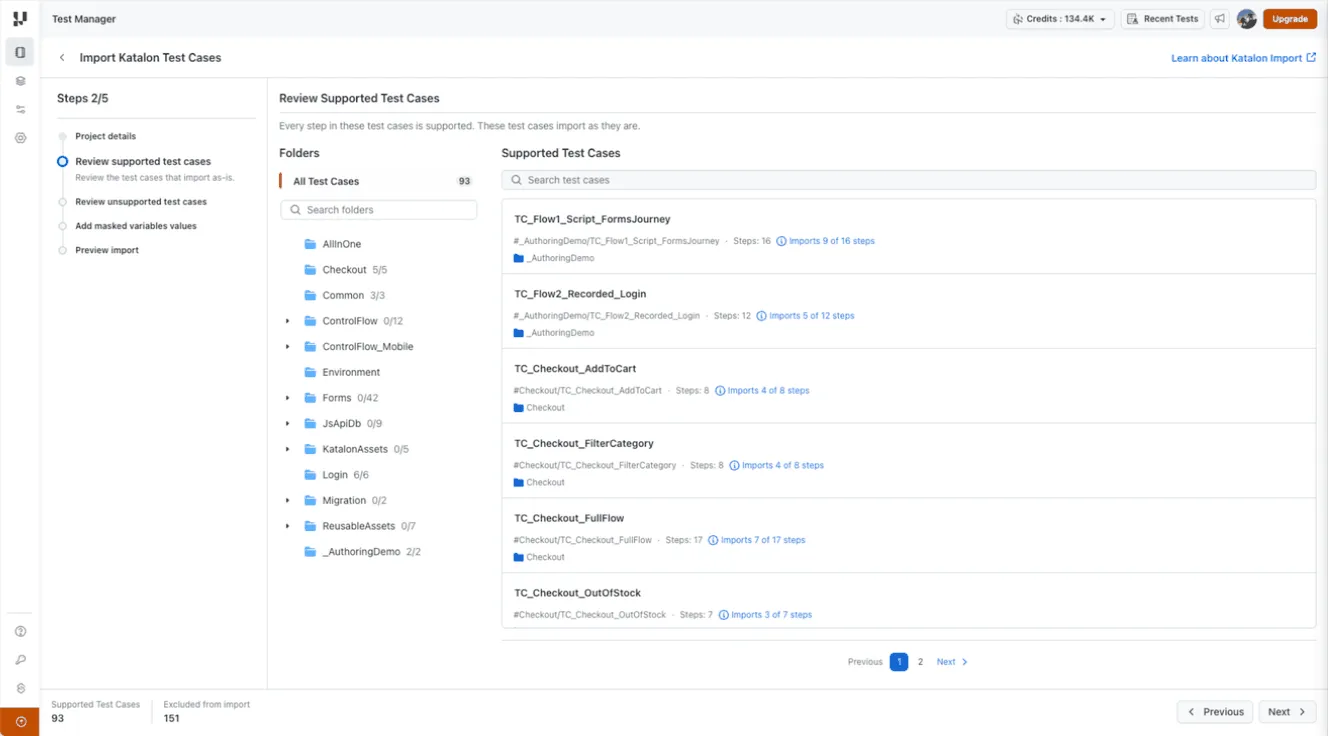
- Review the supported test cases. Browse the folder tree or search, click into a case to inspect its steps, translated instructions, and source file references, and check the Imports X of Y steps count on each one.
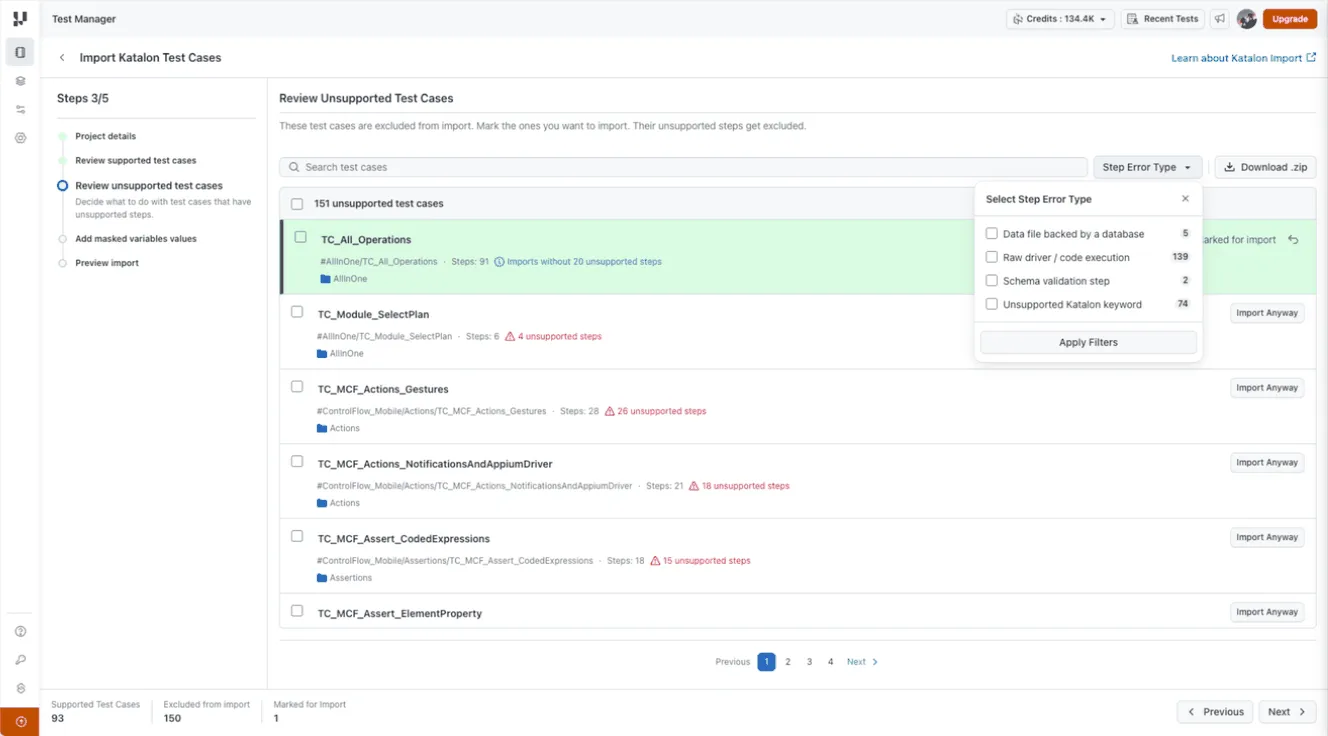
- Review the unsupported test cases, which are excluded by default. Filter by Step Error Type to see why, and use Import Anyway on any case whose remaining steps are still worth having.
- Supply the masked variable values, choosing Secret for sensitive entries and Global Variable for the rest.
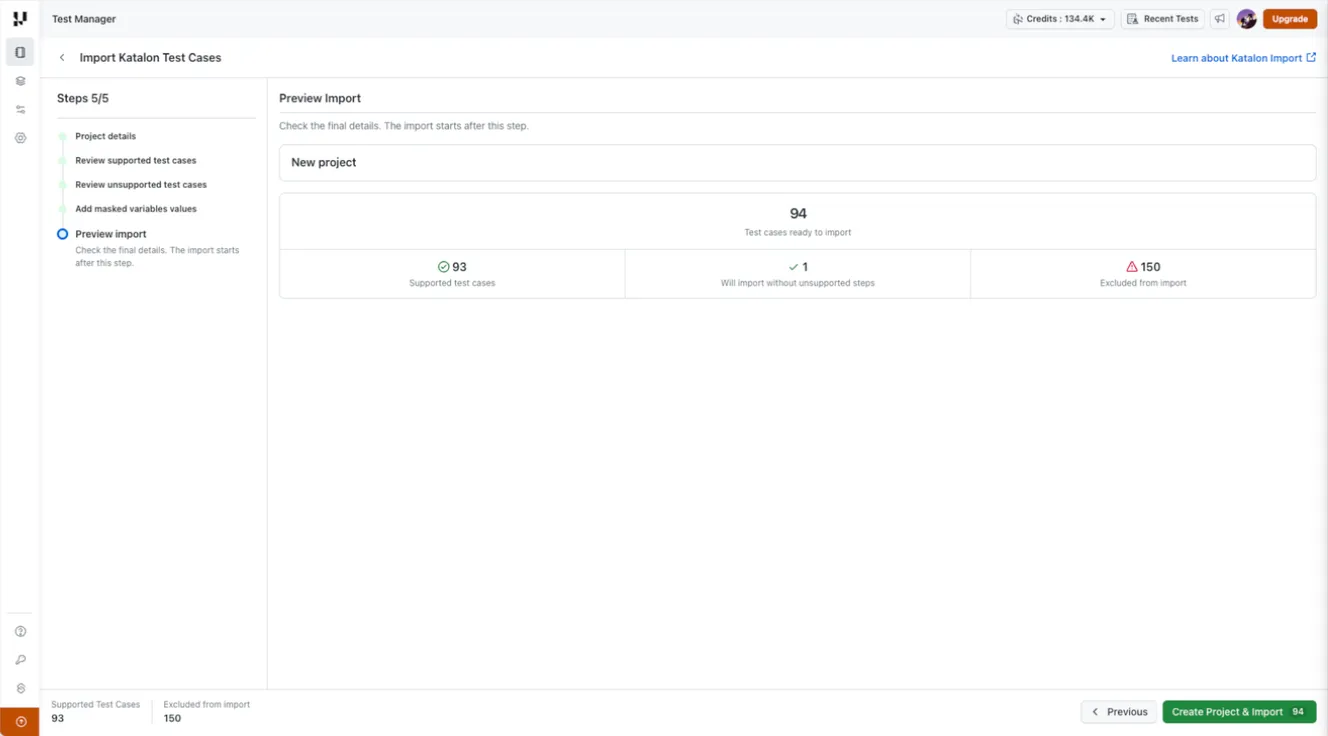
- Check the preview counts, then click Create Project & Import. The number on the button is the number of cases selected.
- Track progress on the Projects page while the import runs in the background. An email arrives when it completes.
The Step Error Type filter is the fastest way to triage a large project. It groups incompatibilities into data files backed by a database, raw driver or code execution, schema validation steps, and unsupported Katalon keywords, so you can judge a whole category at once instead of opening cases one at a time.

Note: Test Manager gives every project AI test case generation, folder and cycle management, and requirement-to-defect traceability in one workspace. Start free with TestMu AI
Reviewing Steps Before You Commit
A supported case can still import fewer steps than it started with, and the reason is visible on each step. Reading these labels during review is what separates a migration you can trust from one you discover problems in later.
| Step label | What it means |
|---|---|
| Translated instruction | The operation is represented as a KaneAI instruction. Read the conversion note attached to it. |
| Commented out | The step is omitted from the executable import. On its own it does not make the case unsupported. |
| Handled by KaneAI | The agent handles the operation, so it is not imported as a separate instruction. Opening, maximizing, and closing the browser are the examples shown in review. |
| Step excluded from import | The operation is unsupported and will not be included if you import the rest of the case. |
Conversion notes matter even on cases that appear in the supported list, because a translation can be close without being identical. The review flags these directly: sendKeys is approximated as typing, so append behaviour may differ, and checking a checkbox is approximated as clicking, so the original only-if-unchecked behaviour is lost.
Import Anyway deserves its own warning. It excludes the unsupported steps and imports the remainder, which means the resulting test may no longer cover what the original case was written to prove. Treat those cases as drafts to repair, not as coverage you already have.
Migration Scope
The boundary is worth reading before you plan the cutover, because the gaps are the work that remains after the import finishes.
| Migrates | Does not migrate |
|---|---|
| Supported desktop web cases, as authored KaneAI New Experience tests | Mobile app test cases |
| Partially supported cases you marked with Import Anyway, minus their unsupported steps | Generated code, which you produce separately when you need it |
| Supported Katalon operations, translated into KaneAI instructions | Step screenshots, until you edit or run the test in the agent playground |
| Masked variable values you supplied, saved as a secret or a global variable | Excluded cases, unsupported steps, and commented-out steps |
| Test run history and previous execution results |
The run-history line is the one teams most often plan around. The import brings over test cases, not executions, so historical pass and fail data stays in the source tool. If that record matters for an audit, keep the old project readable for as long as your retention policy requires.

After the Import
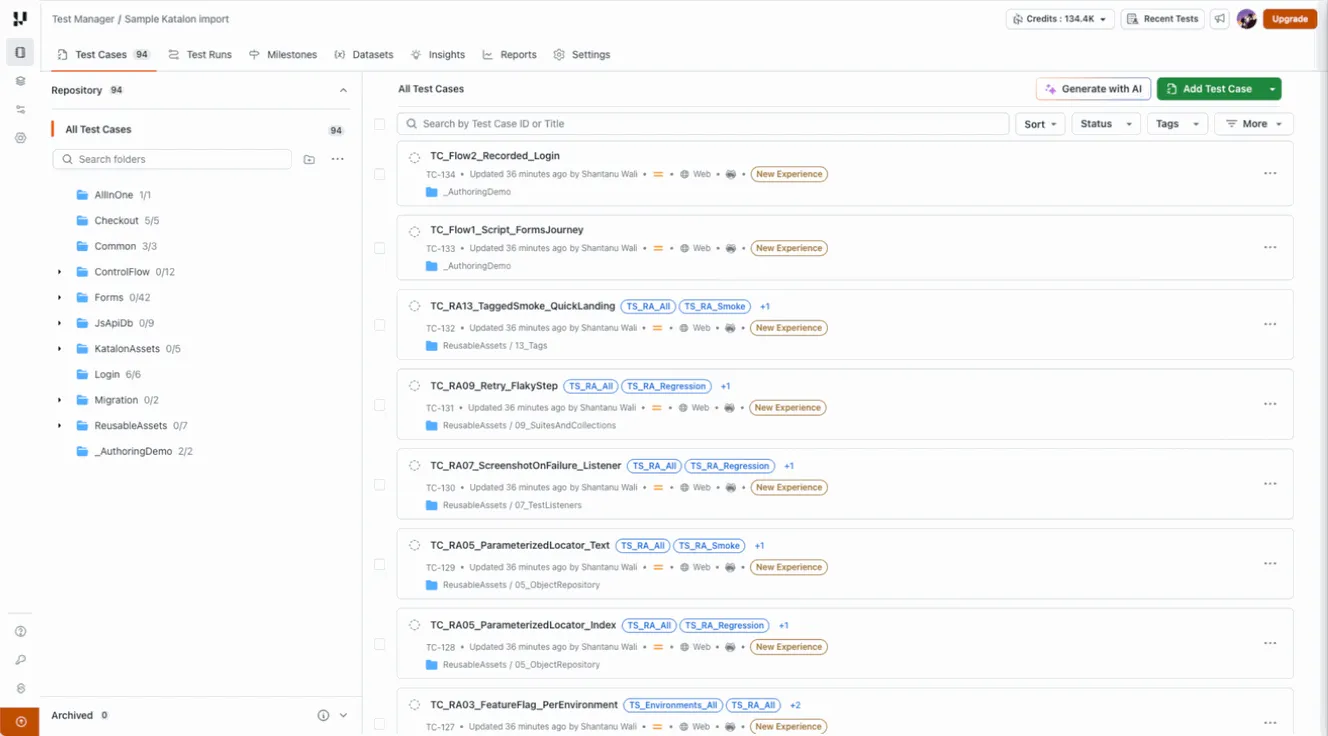
An imported suite is a starting position, not a finished migration. Four passes turn it into coverage you can rely on.
- Check the instructions against the originals - open a case in Test Summary and compare its authored instructions and variable references with the Katalon source.
- Repair the partial cases first - anything imported through Import Anyway is missing steps by design, so add or rewrite the missing behaviour before it counts as coverage.
- Run them in the agent playground - editing or running a test in KaneAI validates its behaviour and is also what produces the step screenshots the import does not include.
- Organize before you scale - group the imported cases into folders and cycles so the new project starts with the structure described in this guide to test management.
Imported cases behave like any other case in the workspace from that point on. They can be edited, versioned, grouped into plans and cycles, and linked to defects, the same way a case written from scratch is handled. If your repository arrived with duplicates from years of parallel authoring, the walkthrough on test deduplication in Test Manager covers the clean-up pass.
Conclusion
Start with one Katalon suite rather than the whole project. Zip it, run it through the wizard, and read the Imports X of Y counts and conversion notes on the supported list before you click through, because that review is where you learn how your particular style of Katalon authoring translates.
The full step reference, including every unsupported step category, is in the documentation on one-click migration from Katalon. For how cases are structured once they land, the test case guide covers the fundamentals.
Author

Bhavya Hada
Blogs: 29


Bhavya Hada is a Community Contributor at TestMu AI with over three years of experience in software testing and quality assurance. She has authored 20+ articles on software testing, test automation, QA, and other tech topics. She holds certifications in Automation Testing, KaneAI, Selenium, Appium, Playwright, and Cypress. At TestMu AI, Bhavya leads marketing initiatives around AI-driven test automation and develops technical content across blogs, social media, newsletters, and community forums. On LinkedIn, she is followed by 4,000+ QA engineers, testers, and tech professionals.
Reviewer

Abhishek Mishra
Reviewer
Abhishek Mishra is a Technical Product Manager at TestMu AI, where he owns Test Manager, the test management product. He has over 8 years of experience in product management and market analysis. His expertise spans across AI-native software testing, product strategy, and analytics. Previously, Abhishek served as the Product Lead at IndiaClan and co-founded Gartley618 Technologies, where he led innovative projects in quantitative trading and blockchain. He holds a B.Tech degree.


Katalon Migration FAQs
Did you find this page helpful?
More Related Blogs
TestMu AI forEnterprise
Get access to solutions built on Enterprise
grade security, privacy, & compliance
- Advanced access controls
- Advanced data retention rules
- Advanced Local Testing
- Premium Support options
- Early access to beta features
- Private Slack Channel
- Unlimited Manual Accessibility DevTools Tests