

Power Your Software Testing with AI Agents and Cloud
The Native AI-Agentic Cloud Platform to Supercharge Quality Engineering. Test Intelligently and Ship Faster.


- TestMu AI (Formerly LambdaTest)
- /
- Blog
- /
- Introducing Test Deduplication and Archive Test Cases in Test Manager
Introducing Test Deduplication and Archive Test Cases in Test Manager
The Test Deduplication Agent scans your Test Manager project for duplicate test cases and scores every match. Archive the ones you are unsure about.
Published on:
Every test repository collects copies. Two people write the same login test in one sprint. A regression suite gets copied for a release and never merged back.
The copies cost you later: slower runs, fixes that land in one copy and miss the others, and coverage reports that overstate what is covered. Past a few thousand cases, nobody finds them by hand.
The Test Deduplication Agent, now in Test Manager, finds them for you. It deletes nothing on its own. You get a scored review queue and make every call. Archiving ships in the same release, so anything you are unsure about can leave the repository without being destroyed.
How Duplicate Detection Works
Detection is semantic. The agent turns each test case's title, steps and description into a vector embedding, then searches the scope you picked for near neighbours. Cases that say the same thing in different words get matched.
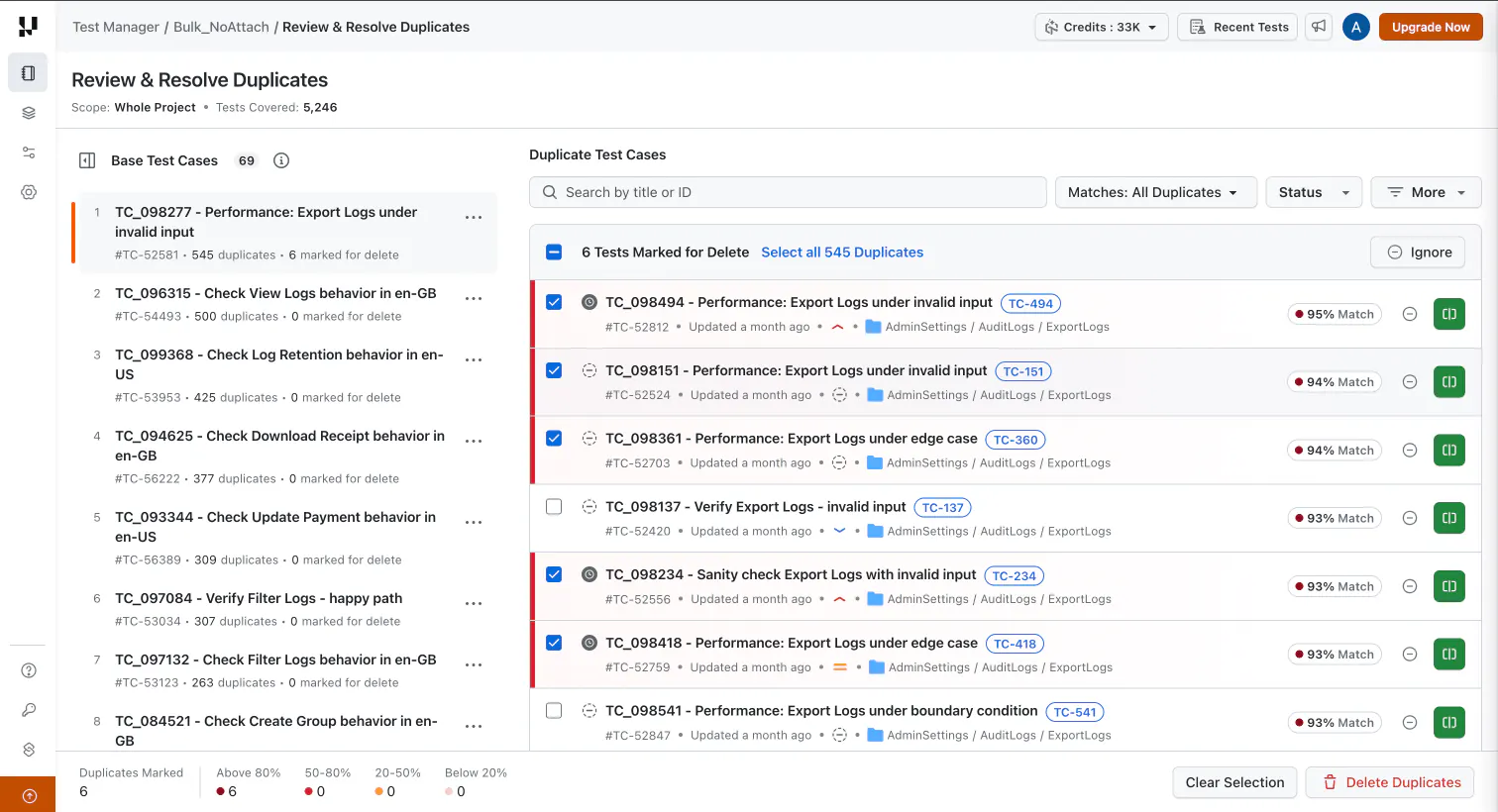
Each match scores from 0 to 100, in four bands: above 80%, 50 to 80%, 20 to 50% and below 20%. Matches are grouped around a base test case, the one that stays when you delete its duplicates.
Title-only cases are still scanned, but their scores are less reliable. Add steps first.
Run a Duplicate Scan
- Open Review Duplicates - open the project in Test Manager, go to the Test Cases tab, and click Review Duplicates in the toolbar.
- Set the scope - the whole project, or one folder including its sub-folders. On large projects, scan a folder at a time.
- Set the minimum match score - from 1 to 100. It controls how many results come back and has no effect on detection accuracy. Start at 80 or above to surface near-certain duplicates, then lower it on later passes.
- Start the scan - click Review Duplicates. Test Manager opens the Review & Resolve Duplicates page, which shows the scope, a running count of tests covered, and progress by stage. You can stop at any point.
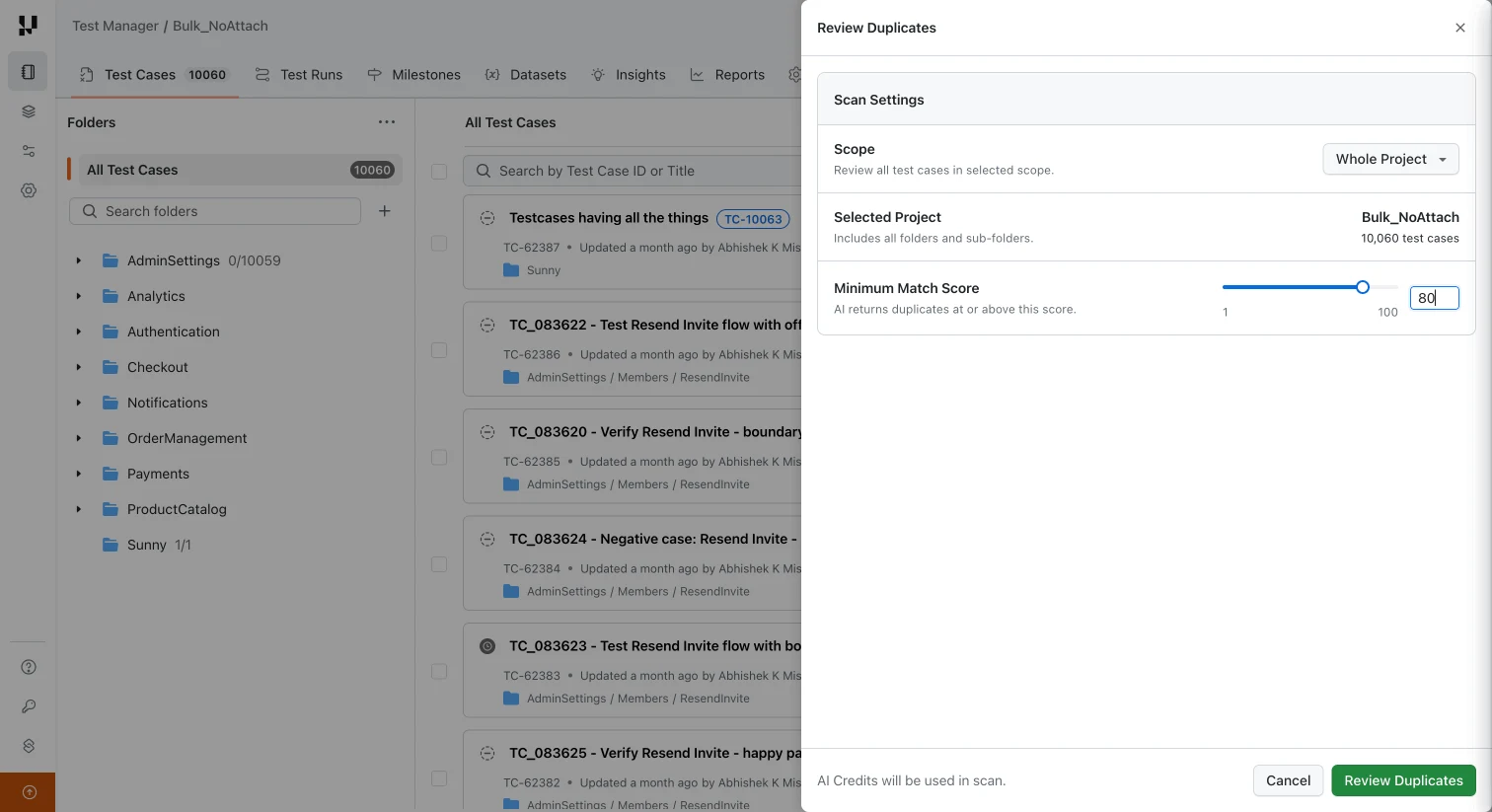
A scan costs a flat 5 credits, charged only when it finds at least one duplicate group. An empty scan costs nothing, and the price does not change with scan size. A project runs one scan at a time, and a scope needs at least two test cases. See credits management for how credits work, drawn from the same balance as the rest of TestMu AI test management.
Check out this detailed documentation to deduplicate test cases in Test Manager.
Review and Compare Matches
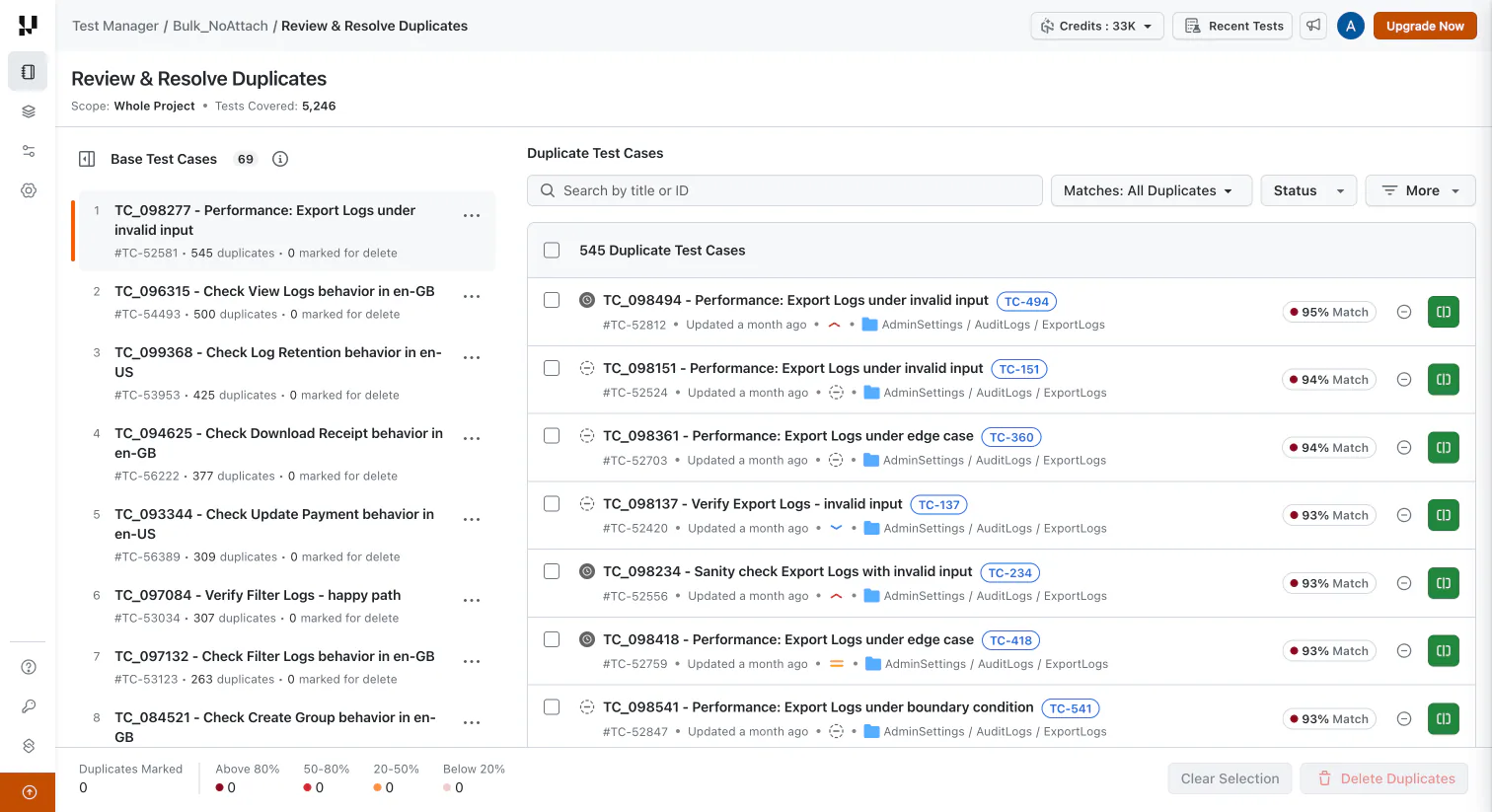
- Work through results - pick a base test case on the left to see its duplicates and % match on the right. Ignore or Compare each one.
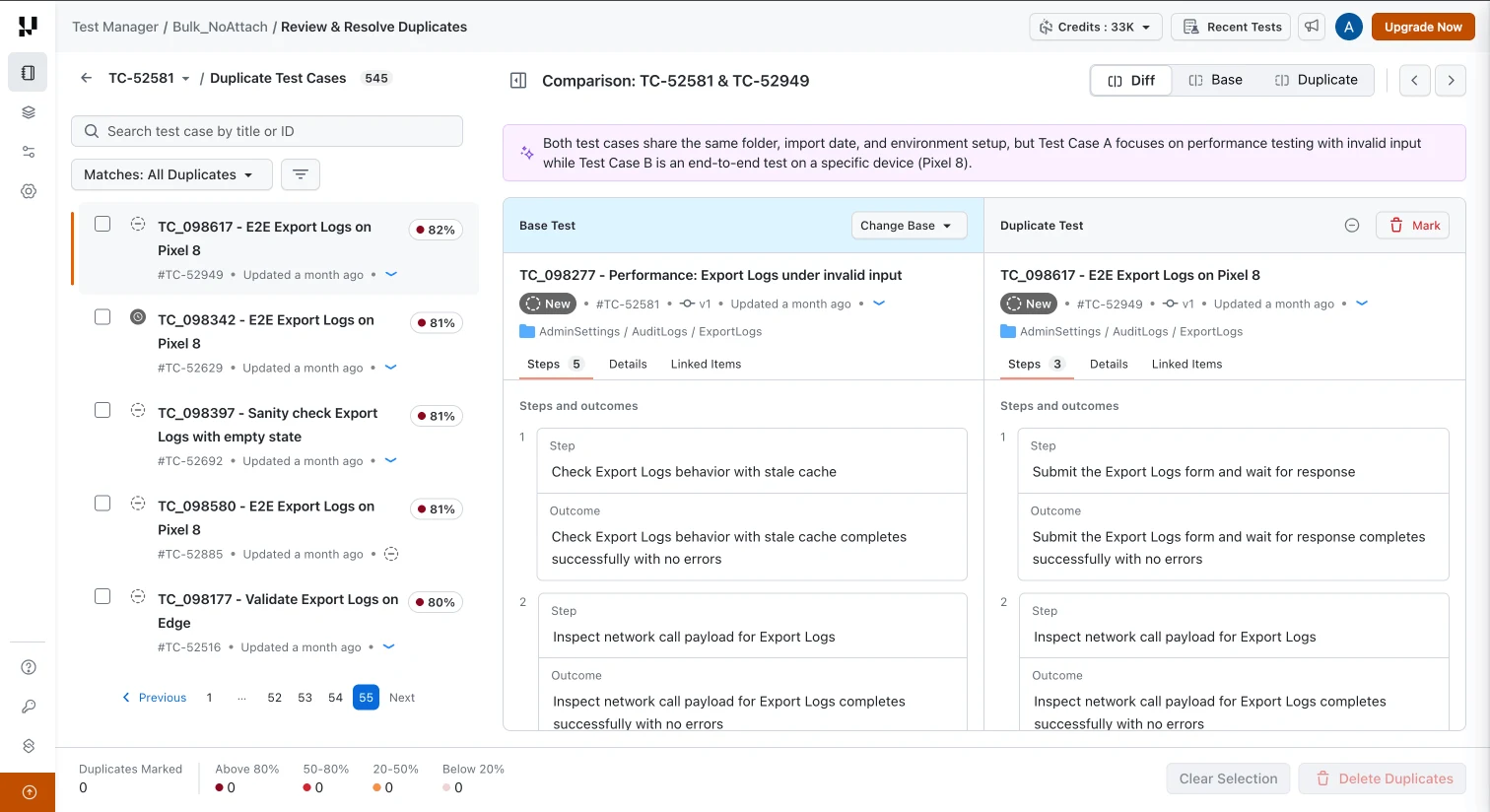
- Compare against the base - view both side by side with an AI summary of the differences, then Ignore or Mark for deletion.
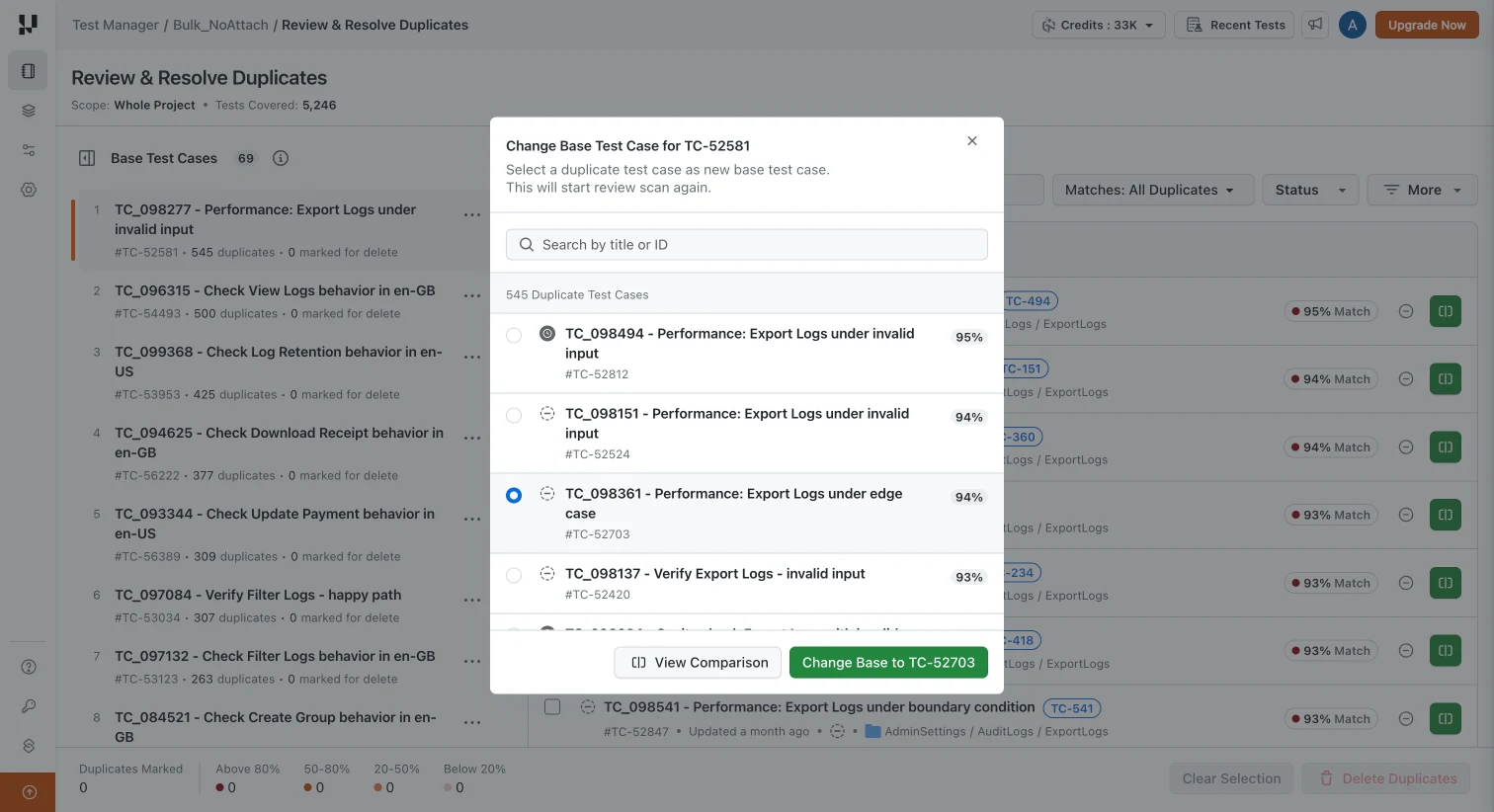
- Change the base - promote a better duplicate from the base menu. Matches are recalculated at no extra credit cost.
Delete Duplicates
- Mark for deletion - use the row checkbox, Mark, or Select all. The footer shows the total marked by match band.
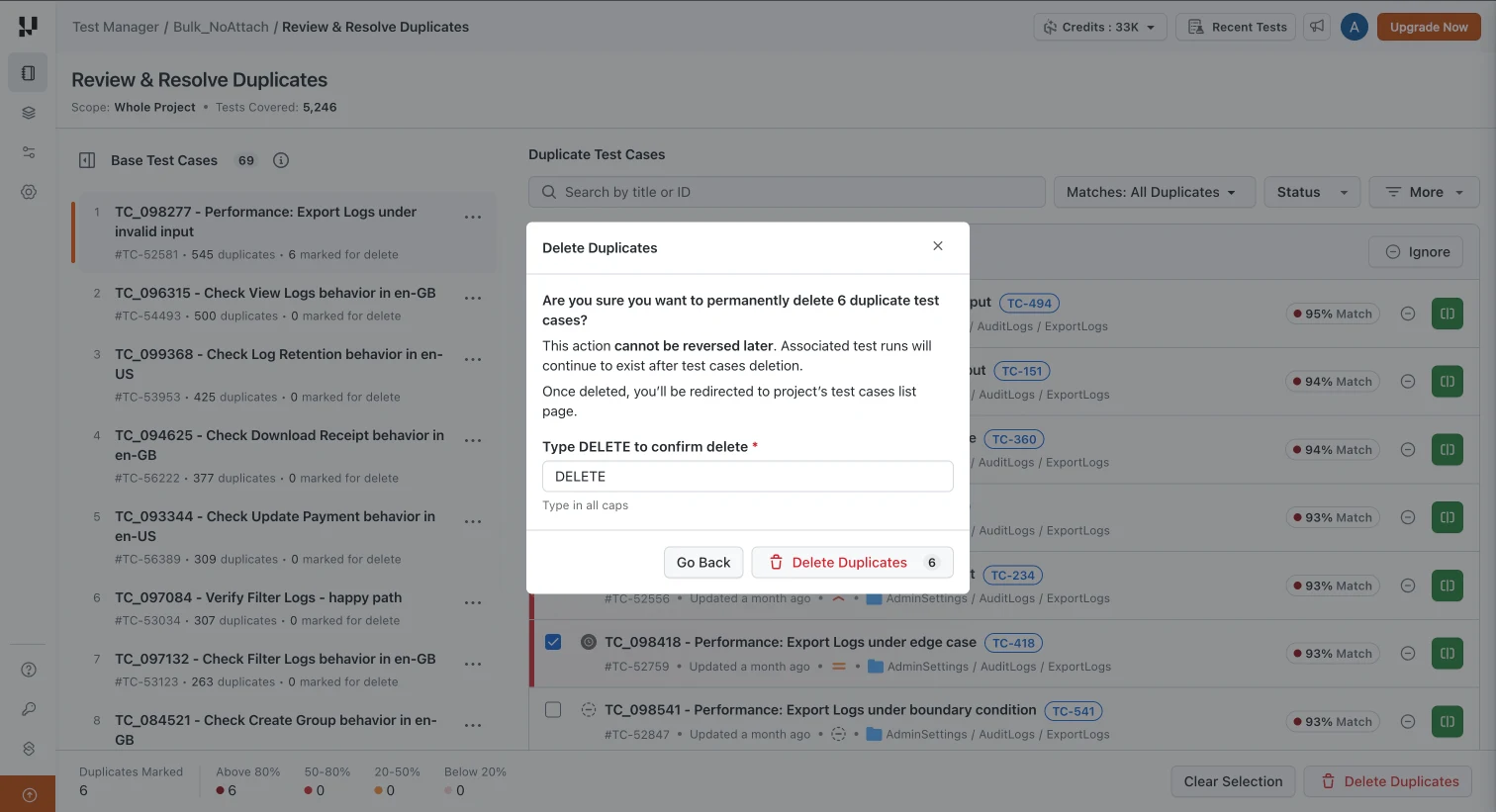
- Confirm the deletion - click Delete Duplicates and type DELETE. Deletion is permanent; associated test runs remain.
Scan Coverage
- Manual test cases only, including KaneAI-authored cases in Test Manager. Automation scripts are not analysed.
- Duplicates are detected within a single project, and archived test cases are excluded.
- Very large projects should be scanned folder by folder.
- It clears duplicates that already exist. Stopping new ones is handled by Smart Context, which checks your repository before generating test cases with AI.
Good test case management stops new copies. Test case deduplication clears the ones already there.
New: Archive Test Cases
Test Manager now also supports archiving test cases. An archived test case is read-only and drops out of lists, search, runs, reports, and duplicate scans, but keeps its ID, history, and past results. Archive one from its three-dot menu or up to 500 at once, and unarchive from the Archived section to restore it unchanged. Every action is logged in version history.
For scan matches you are not ready to delete, click Ignore, then archive the test case instead.
Check out this detailed documentation to archive test cases in Test Manager.

Note: Scan for duplicate test cases, archive test cases you are not sure about, and restore them later, all inside TestMu AI Test Manager. Start free and run your first scan on one folder.
New: Bulk Move, Copy, and Delete Test Runs
Select up to 1,000 test runs and move, copy, or delete them in one action, or drag them onto a folder. Moved runs keep their ID, URL, and history. Copies start fresh at Not Started, ready for the next regression pass. See test run bulk actions.
New: Generate Manual Steps or BDD Scenarios
The AI test case generator can now write manual steps or BDD scenarios. Manual steps are the default. Turn on the Gherkin Format toggle to get Given / When / Then instead. Refining, saving, and KaneAI automation work the same in both formats.
Start With One Folder
Pick the folder you suspect is messiest, set the minimum match score to 80, and see what comes back. A first pass takes minutes and usually tells you how big the problem is across the rest of the project. Delete the exact copies, archive what you are unsure about. When you are ready to scale past one folder, duplicate test case detection with AI covers the full strategy: what each match band should trigger, what never to merge, and how to measure the cleanup.
Author

Bhavya Hada
Blogs: 28


Bhavya Hada is a Community Contributor at TestMu AI with over three years of experience in software testing and quality assurance. She has authored 20+ articles on software testing, test automation, QA, and other tech topics. She holds certifications in Automation Testing, KaneAI, Selenium, Appium, Playwright, and Cypress. At TestMu AI, Bhavya leads marketing initiatives around AI-driven test automation and develops technical content across blogs, social media, newsletters, and community forums. On LinkedIn, she is followed by 4,000+ QA engineers, testers, and tech professionals.
Reviewer

Abhishek Mishra
Reviewer
Abhishek Mishra is a Technical Product Manager at TestMu AI, where he owns Test Manager, the test management product. He has over 8 years of experience in product management and market analysis. His expertise spans across AI-native software testing, product strategy, and analytics. Previously, Abhishek served as the Product Lead at IndiaClan and co-founded Gartley618 Technologies, where he led innovative projects in quantitative trading and blockchain. He holds a B.Tech degree.


Test Deduplication FAQs
Did you find this page helpful?
More Related Blogs
TestMu AI forEnterprise
Get access to solutions built on Enterprise
grade security, privacy, & compliance
- Advanced access controls
- Advanced data retention rules
- Advanced Local Testing
- Premium Support options
- Early access to beta features
- Private Slack Channel
- Unlimited Manual Accessibility DevTools Tests