

Power Your Software Testing with AI Agents and Cloud
The Native AI-Agentic Cloud Platform to Supercharge Quality Engineering. Test Intelligently and Ship Faster.


- TestMu AI (Formerly LambdaTest)
- /
- Learning Hub
- /
- Top 35+ PWA Interview Questions Every Developer Should Know
Top 35+ PWA Interview Questions Every Developer Should Know
Explore 35+ PWA interview questions, key features, and insights on PWAs’ benefits, drawbacks, and how they enhance user experience and engagement.
Last Updated on:
A Progressive Web App (PWA) merges the best features of web and mobile apps, delivering an app-like experience through web browsers. PWAs provide native app features such as offline access, push notifications, and smooth performance across devices, boosting user engagement and accessibility.
With the rising significance of PWAs, developers must master this technology to remain competitive. Key concepts like service workers, caching strategies, and offline capabilities are crucial for creating high-performance applications. The main challenge lies in preparing for PWA-related roles, given the wide range of technologies and concepts. Preparing for relevant PWA interview questions can help you crack the interview.
Key Takeaways
- Progressive Web Apps are built with HTML, CSS, and JavaScript from a single codebase that runs on any device and offers an experience similar to a native app.
- A true PWA requires HTTPS, one or more service workers, and a web app manifest file.
- The web app manifest is a JSON file that tells the browser how a PWA should behave when installed on a desktop or mobile device.
- Service workers act as a proxy between the browser and the network on a separate thread, which enables caching and offline use, but service workers cannot modify the DOM directly.
- IndexedDB is a NoSQL storage system that keeps large amounts of structured data in the browser for a PWA.
- Unlike native apps, PWAs run in a web browser, so search engines can index PWA content.

Note: We have compiled all PWA Interview Questions for you in a template format. Check it out now!
Beginner-Level PWA Interview Questions
Here are some essential PWA interview questions for freshers. These questions cover fundamental concepts and are designed to help you build a strong foundation in Progressive Web Apps (PWAs).
1. What Are Progressive Web Apps?
Progressive Web Apps (PWAs) are applications built with HTML, CSS, and JavaScript, using a single codebase that can run on any device. They provide a similar experience to native apps, adapting to device functions while operating in web browsers like websites. PWAs enable features such as offline access, push notifications, and interaction with device hardware, mimicking mobile apps designed for specific operating systems.
2. State Some of the Key Features of PWAs
Some of the key features of PWAs are as follows:
- Responsiveness and Compatibility: It ensures full responsiveness and compatibility with different browsers, allowing users to access crucial functionality and content regardless of the browser used.
- Connection Independence: It can operate without an internet connection and work well on unreliable networks, ensuring a smooth user experience.
- Security: These are delivered using HTTPS, ensuring a secure platform that prevents unauthorized access to content.
- App-Like Interface: It mimics the browsing and engagement of built-in applications, providing a recognizable and easy-to-use interface.
- Push Notifications: It supports push notifications, enhancing user engagement and promoting frequent app usage.
- Automatic Updates: It can automatically update itself to ensure it remains current and functional.
- Easy Installation: It is easily installed directly from the web, bypassing traditional app stores, and can be added to a device's home screen by visiting the site.
3. What Web-Related Advantages Does PWA Offer?
PWAs function in web browsers in a similar manner to conventional websites. This method provides various important benefits:
- Indexing by Search Engines: PWAs can be included in search engine results, making them easily discoverable.
- Simple Sharing and Starting: PWAs are shareable and accessible through regular web links, allowing users to access them without needing to download them from app stores.
- Safety: PWAs use secure HTTPS endpoints and other protective measures to ensure a secure browsing experience.
- Adaptive Design: PWAs adjust to different screen sizes, orientations, and input methods, ensuring a consistent user interface across devices.
- Accessing Advanced Web APIs: PWAs can utilize advanced web APIs like WebBluetooth, WebUSB, WebPayment, WebAuthn, and WebAssembly, enabling powerful and interactive features.
4. What Is the Difference Between PWAs and Native Apps?
Below are the key differences between PWAs and Native Apps:
| Feature | Progressive Web Apps (PWAs) | Native Apps |
|---|---|---|
| Development | Built with web technologies (HTML, CSS, JavaScript) | Developed using platform-specific languages (Swift, Java, Kotlin) |
| Installation | Installed via web browser or home screen shortcut | Downloaded from app stores (Google Play, App Store) |
| Access | Accessed via URL or web link | Accessed via the app icon on the device |
| Offline Support | Works offline and on low-quality networks | Works offline by default, because the code and assets are installed on the device |
| Performance | It may have slower performance compared to native apps | Typically offers smoother performance and faster access to device features |
| Features | Limited access to device hardware and APIs | Full access to device hardware and platform-specific APIs |
| Updates | Self-updating through web technologies | Updates are managed through app stores and user downloads |
| Distribution | Shared and distributed via URLs | Distributed through app stores |
| Platform Support | Runs on multiple platforms (cross-platform) | Platform-specific (iOS, Android, etc.) |
5. State Web Apps vs. Progressive Web Apps
Below are the differences between Web and Progressive Web Apps:
| Feature | Web Apps | Progressive Web Apps (PWAs) |
|---|---|---|
| Installation | Accessed via a web browser | It can be installed and accessed via the home screen |
| Offline Support | Requires internet connection for full functionality | Works offline and on low-quality networks |
| App-like Features | Typically follows standard web design principles | Provides app-like interface and interactions |
| Access to APIs | Limited access to device APIs and hardware | Accesses advanced web APIs like push notifications |
| Security | Relies on HTTPS for security | Served over HTTPS for secure browsing |
| Discoverability | Relies on SEO and web promotion for visibility | Indexed by search engines |
| Updates | Updates managed by web app developer | Can update automatically |
| Distribution | No app store distribution | Shared via URLs, not through app stores |
6. What Criteria Define an App as a PWA?
Below are the criteria that ensure an app is a PWA:
- Progressive: Offers basic usability on older browsers while being fully operational on newer ones.
- Offline Capability: Works without relying on a network, allowing for offline use or in areas with weak connectivity.
- Installable: It can be installed and accessed from the device's home screen.
- Discoverable: Search engines can easily locate the app's contents.
- Re-engageable: Capable of sending notifications when new content is available.
- Shareable: Easily shared via a URL link.
7. State Common Process of Developing PWA
Developing a complete Progressive Web App (PWA) that provides a great user experience on every device requires following these guidelines:
- Creating a Plan for Your App: Establish objectives and desired features, prioritize user experience, and create design ideas and wireframes. Gather input from stakeholders and users.
- Creating the User Interface: Develop a compatible user interface for all platforms and devices, focusing on user involvement and interaction.
- Designing the User Interface: Use HTML, CSS, JavaScript, and frameworks like Angular, React, or Vue.js. Ensure mobile-first design and scalability for larger screens.
- Putting Service Workers into Action: Register and integrate service workers for offline capabilities, caching, and push notifications.
- Incorporation of Push Notifications: Use the Push API and service workers to enable push notifications and obtain user permission.
- Enhancing Efficiency: Optimize the PWA by using code splitting and caching to improve loading times.
- Conducting Tests and Fixing Issues: Test the PWA on various devices, browsers, and network conditions. Collect user feedback for updates and enhancements.
When developing and testing PWAs locally, challenges such as device fragmentation, browser compatibility, simulating various network conditions, and testing push notifications can arise.
To address these issues, developers can use cloud-based platforms to resolve device fragmentation, ensure browser compatibility, simulate different network conditions, and test push notifications.
One such platform is TestMu AI. It is an AI-Native test execution platform that offers manual and automated cross-browser testing with over 3000 real devices, browsers, and OS combinations. It allows you to test your PWAs across various browsers and operating systems to ensure consistency and compatibility.

With this platform, you can test Progressive Web Apps functionality and appearance across different scenarios. To learn more about it, you can use these tips to effectively test PWAs.
8. What Are the Advantages of PWA?
Some of the advantages of PWAs are as follows:
- It can work offline due to its built-in service workers feature. This allows PWA to be operational without any service connection.
- It can be downloaded directly from the website, which removes the requirement of sending the request to the visitors to the third-party app store. This leads to improving the user experience and helps improve the loyalty of users.
- It offers enhanced security by using HTTPS, which helps mitigate risks and ensures the safety of data stored in the app.
- It provides better performance than other types of apps, enhancing the user experience and reducing user abandonment.
9. What Are the Disadvantages of PWA?
PWA also has certain disadvantages that should not be ignored. Some of those are as follows:
- Limited Access to System Features: It restricts access to native system features compared to native apps. Not all browsers fully support these features yet.
- Less Support on iOS: Support is broadest on Android and in Chromium browsers. iOS has supported web push and app badges for apps added to the Home Screen since iOS 16.4, but Safari still has no install prompt, no Background Sync, and stricter storage limits.
- No Review Process: It bypasses the app store review process, speeding up deployment but missing out on app store promotion.
10. What Difference Does PWA Make for End Users?
For end users, PWAs offer the convenience of accessing an app directly from a browser without additional installation steps, similar to a website. They are optimized for mobile devices and support native functions like push notifications, gesture navigation, camera use, QR/barcode scanning, and geolocation.
11. Why Should You Implement PWA?
Some of the key reasons why you should implement PWA are as follows:
- Lower Costs: Use one team and technology for both browsers and mobile, reducing expenses.
- Increased Visibility: Improve search engine visibility.
- Better Performance: Enhance page load times and responsiveness.
- Easier User Acquisition: Simplify access through the browser rather than requiring app downloads.
- Higher Engagement: Boost user interaction and conversion rates, as well as reduce bounce rates.
- Fewer Mobile App Issues: Avoid delays in deployment, updates, and app store requirements.
- Seamless Integration: Easily integrate with existing or new backend systems.
The PWA interview questions listed are crucial for beginners aiming to prepare effectively for PWA interviews. These fundamental questions address core concepts and practical aspects of PWA, helping you build a solid foundation.
As you advance, delving into intermediate and advanced-level PWA interview questions will enhance your expertise, providing a more comprehensive understanding of PWA development and enabling you to excel in interviews and professional roles.
Key Takeaway: Beginner-level PWA interview questions cover what Progressive Web Apps are, key features such as responsiveness and browser compatibility, web advantages such as search engine indexing, and how PWAs differ from native apps and regular web apps.
Intermediate-Level PWA Interview Questions
Below is a collection of PWA interview questions created for individuals advancing to an intermediate level of Progressive Web App development. These questions are designed for those who already have foundational knowledge of PWAs and are seeking to deepen their understanding of more complex features and functionalities.
12. What Are the Main Components of Progressive Web Apps?
Not every web app qualifies as a Progressive Web App (PWA). True PWAs consist of an encrypted HTTP protocol (HTTPS), one or more service workers, a manifest file, and a core architecture that enables fast loading. Let's examine these components and the benefits they bring to progressive web apps.
- Encrypted HTTP Protocol (HTTPS): Ensures the web application is secure and trustworthy, allowing users to conduct secure transactions.
- Service Workers: Scripts that manage network requests and asset caching, enabling reliable, fast web pages that can function offline.
- Manifest File: A JSON file that controls how the app appears to users, detailing the app's name, start URL, icons, and other necessary information.
- Core Architecture: Includes efficient resource caching strategies and a responsive user interface, resulting in faster loading times and a seamless shift from website to app format.
13. What Pre-requisite Resources Are Required for the Development of PWA?
Getting started with the development of PWA is easy. You will need the following essential resources to start:
- Tools: Utilize a technology stack like Angular, React, Vue, or Lit. AngularJS reached end of life in 2021, and Lit replaced the Polymer library. For example, Angular provides a guide for converting an existing Angular app into a PWA.
- HTTPS: Ensure your server supports HTTPS to secure user data and add an extra layer of protection.
- Application Shell: The initial interface users see as essential for creating a positive first impression.
- Service Workers: Enable offline functionality, advanced caching, and background tasks like push notifications and data fetching.
- Manifest File: Created using a Web App Manifest Generator, this JSON file defines the PWA's appearance and operation, including the app's name, description, icons, and colors.
14. What Is a Web App Manifest?
The web app manifest is a JSON file that provides browsers with details on how a progressive web app (PWA) should behave when installed on a user's desktop or device. A typical manifest file includes:
- The name of the app
- The icons the app should display
- The URL to be opened upon launching the app
The manifest file is commonly named manifest.json and is usually located in the website's root directory. Although the specification suggests using the .webmanifest extension, using .json might be preferred for readability.
15. What Do Push Notifications Refer to Regarding PWAs?
Push notifications in Progressive Web Apps (PWAs) allow web applications to send real-time updates to users, even when the app is inactive.
They function as a powerful tool for involvement, especially useful for purposes like news, social media, online shopping, and customized promotions and notifications.
Important parts:
- Service Worker: Acts as an intermediary between the server and the user's device.
- Push API: Enables smooth communication between the web application and specific Push Services.
- Push Service: A notification delivery system is controlled by external providers, guaranteeing messages are sent to the assigned recipient's device.
- User Interface: Displays notifications on the user's device, allowing interaction as needed.
16. What Is the Method to Ascertain if Your Web Application Has Been Included in the User’s Home Screen?
You can determine if a Progressive Web App (PWA) has been added to a user's home screen by using JavaScript and browser-specific methods.
Key Methods:
- Check the Display Mode: The manifest only declares the preferred display mode. At runtime, window.matchMedia("(display-mode: standalone)").matches returns true when the app was launched from the home screen, and Safari on iOS also exposes navigator.standalone.
- Listen for the Install Events: In Chromium browsers, the beforeinstallprompt event fires while the app is installable but not installed, and the appinstalled event fires after the user installs it.
17. What Is IndexedDB, and How Is It Used in PWAs?
IndexedDB is a NoSQL storage system that stores large amounts of structured data directly in the browser. It supports advanced operations such as search, retrieval, and transactions to ensure data integrity.
Usage in PWAs:
- Large and Structured Data: IndexedDB handles substantial and structured datasets, including files and blobs.
- Efficient Searches: It uses indexes to facilitate quick searches within the data.
- Scalability: Compared to DOM Storage, IndexedDB is better suited for managing larger and more complex datasets.
Note: Validate the working of your PWAs across various browsers and OS combinations. Try TestMu AI Now!
The intermediate-level PWA interview questions listed above are designed to help individuals with foundational knowledge refine their skills and prepare for interviews.
Key Takeaway: Intermediate-level PWA interview questions cover the main PWA components, the resources needed for PWA development, the web app manifest, push notifications that reach users even when the app is inactive, home screen detection, and IndexedDB.
Experienced-Level PWA Interview Questions
This set of PWA interview questions is for those who already know the basics of Progressive Web Apps and want to go deeper. These questions cover advanced topics to help you build a stronger understanding of PWA features and best practices.
Practicing these PWA interview questions will prepare you for interviews and give you the knowledge to handle complex aspects of PWA development.
18. What Are the Frameworks Used to Build PWA?
Some of the popular progressive web app frameworks are mentioned below:
- Angular: A comprehensive framework that provides built-in support for building PWAs, including service workers and application shell architecture.
- React.js: A library for building user interfaces that can be used with Vite and the vite-plugin-pwa plugin, or with Next.js, to enable PWA capabilities. Create React App, the older choice, was deprecated in 2025.
- Vue.js: A flexible framework that, combined with Vite and the vite-plugin-pwa plugin or with Nuxt, offers easy setup for PWAs with service worker support. The Vue CLI is in maintenance mode.
- Svelte: A modern framework that compiles components into highly optimized JavaScript, with plugins available for PWA support.
19. Vue or React: Which Technology to Choose?
Vue and React are the most commonly used tools to help build PWAs, and the choice between using Vue or React completely depends on the project and business needs.
- Vue.js: It is ideal for smaller projects due to its simplicity and ease of use. It is funded by its community and sponsors instead of a single corporation, and it has been stable and actively maintained for over a decade.
- React.js: It is backed by Meta and, supported by a large community, is suitable for larger projects. It offers greater control over project architecture, better suitability for enterprise needs, and robust libraries like Redux and Next.js.
20. Can You List the Core Pillars of a PWA?
Progressive Web Applications follow core principles to provide a reliable and engaging user experience across different platforms.
- App-Shell and Shell-First Navigation: Separates the visual part of the app from the data, caching the interface for quick navigation and consistent performance after the initial load.
- Service Workers: Background scripts that enable caching, offline functionality, and push notifications.
- Web App Manifest: A JSON file that controls the app's appearance and behavior on the user's device, including the ability to add it to the home screen and customize the splash screen.
- Responsive Design: Ensures the app adapts to various devices and screen sizes for compatibility and a consistent user experience.
- HTTPS: Requires secure connections to protect data and ensure integrity.
- Fast: Ensures quick load times for a better user experience and improved SEO.
- Safe: Ensures the app is served over HTTPS for user security.
- Engaging: Utilizes features like push notifications to enhance user engagement.
21. Describe the Role of the Service Worker in a PWA
The service worker plays a crucial in a PWA for:
- Network Proxy: Intercepts network requests and uses cached data when offline.
- Cache Management: Stores and retrieves assets like HTML, CSS, and media files.
- Background Synchronization: Syncs data even when the app is not in use.
- Push Notifications: Sends notifications to keep users updated on app changes.
22. Explain How PWA Achieve Offline Functionality
PWAs use technologies and strategies to ensure core functionality in offline or low-connectivity situations. Key methods include using Service Workers for caching, optimizing UI/UX for offline use, and implementing data synchronization techniques.
- Service Workers & Caching:
- Role: Act as intermediaries between the PWA and the network.
- Caching: Save essential resources (HTML, CSS, JavaScript, API responses) for offline use.
- Cache Storage: Use different caches (Application, Navigation, Data) to store resources.
- Cache Updates: Include versioning or cache-busting to update resources as needed.
- Offline First Strategies:
- Data Integrity: Focus on ensuring access to cached data when offline and sync with the backend when possible.
- Pre-Caching: Cache elements likely to be interacted with to improve the offline experience.
- Synchronization Mechanisms:
- Event Listeners: Monitor network events to trigger actions when connectivity changes.
- Background Sync: Queue data for later synchronization when back online.
- Real-Time Databases and Offline Storage:
- IndexedDB: Client-side storage for large or structured data.
- Web Storage: LocalStorage and sessionStorage for simple key-value storage.
- Real-Time Databases: Use services like Firebase for real-time data sync and offline management.
- User Guidance and Consistency:
- Offline Indicators: Show visual cues or alerts to inform users of offline status and limited capabilities.
- Data Consistency: Ensure operations are synchronized with the backend when online.
- Security:
- Access Validation: Validate data authenticity and integrity before syncing when back online.
- Validation Mechanisms: Use unique identifiers or versions to track and validate data transactions.
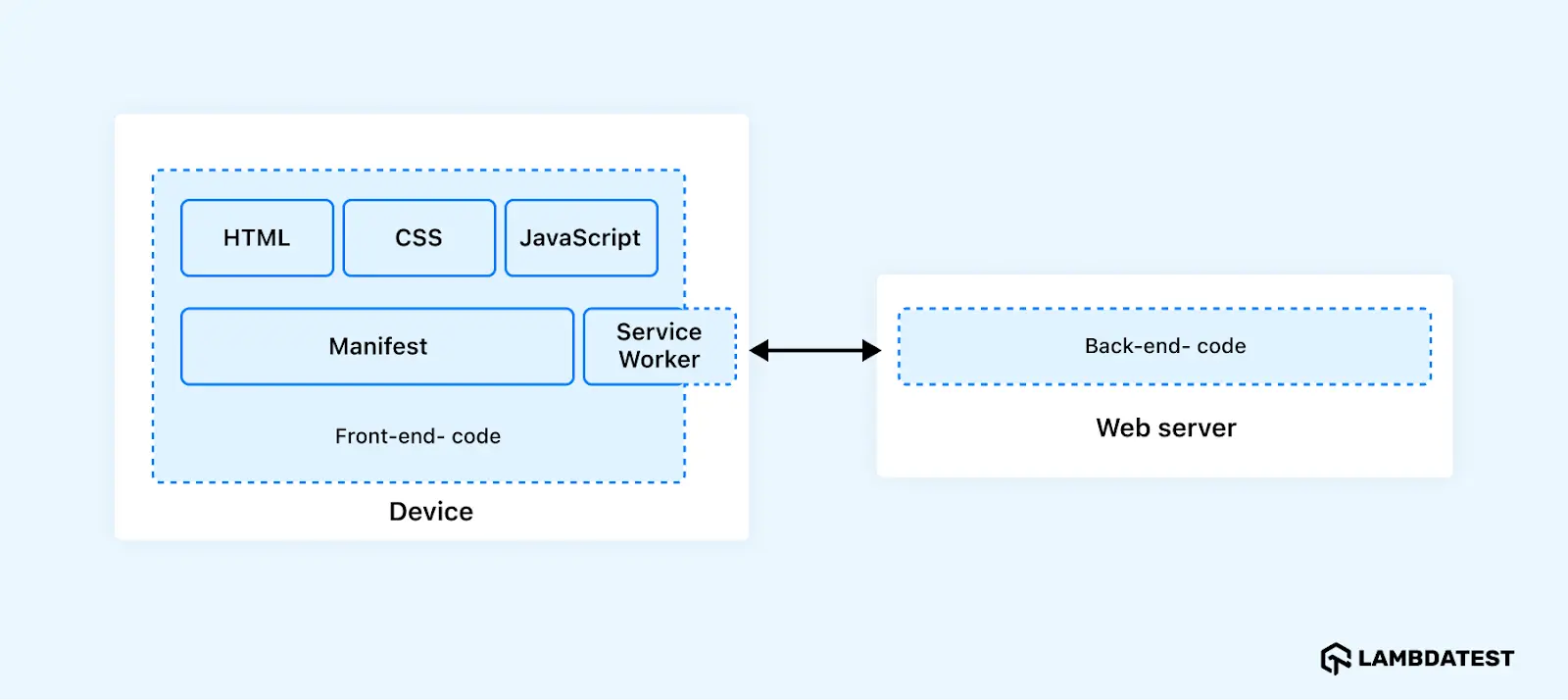
23. Explain the Architecture of the PWAs
PWAs use HTML, CSS, and JavaScript and are distributed via web servers accessible through HTTPS. They consist of both front-end and back-end components:
- Back-End: Developed with languages like ASP.NET, Java, Node.js, or PHP, though not always necessary for all PWAs.
- Front-End: Includes HTML for content, CSS for layout and appearance, and JavaScript for interactive features. A JSON manifest file provides app details to the host operating system.
Architecture Overview:
- Device: Executes on the user's device, including HTML, CSS, JavaScript, Service Worker, and Manifest file.
- Web server: Hosts the back-end code and front-end assets.
24. How Do Service Workers Work?
Service workers act as a proxy between the browser and the network, handling non-UI tasks on a separate thread. They start and stop as needed, conserving CPU and battery resources. Service workers enable offline functionality by caching API responses and intercepting network requests, leading to faster load times and a seamless offline experience.
25. How to Update Service Workers?
At some point, your service worker will require updating. Then, you will be required to adhere to these actions.
- Update the Service Worker File: Modify the service worker JavaScript file. When users visit your site, the browser will check for changes in the script file. Any difference, even a single byte, will be detected as a new version.
- Trigger the Install Event: The browser will initiate the new service worker, starting the install event.
- Wait for Existing Pages to Close: The new service worker will enter a waiting state while the old service worker manages current pages.
- Activate the New Service Worker: Once all open pages are closed, the old service worker will be terminated, and the new service worker will be activated, triggering its activation event.
26. What Are the Actions That Service Workers Cannot Perform?
There are certain limitations to what service workers cannot do, such as:
- Cannot Change DOM Elements: Service workers cannot directly modify the webpage or access the DOM because they run on a separate thread. Communication with the window can be done via post messages.
- Cannot Work Without HTTPS: Service workers require HTTPS to function, but they can operate on localhost during development.
27. What Does CacheStorage Refer to?
CacheStorage is a browser feature used to store and retrieve network requests and responses. It saves requests as keys and their corresponding responses as values. While not a Service Worker API itself, it enables service workers to cache network responses, providing offline functionality when users are not connected to the internet. The cache object, an instance of CacheStorage, allows for interacting with the cache to get, store, and remove objects.
28. What Caching Strategies Do You Know for Service Workers?
There are five common framework-agnostic caching strategies:
- Cache Only: Only cached assets are used without accessing the network.
- Network Only: Accesses the network for all requests without using the cache.
- Stale While Revalidate: Provides data from the cache immediately while fetching an updated version from the network. The updated data is then stored in the cache for future use.
- Cache First: Serves the cached response and goes to the network only when the asset is not in the cache. It suits versioned static assets such as scripts, styles, and fonts.
- Network First: Tries the network and falls back to the cache when the request fails or times out. It suits content that changes often, such as API responses and HTML pages.
29. What Is the Service Worker Lifecycle?
The service worker lifecycle involves four main stages: registration, installation, activation, and update.
- Registration: The web application registers the service worker, which is then downloaded and installed.
- Installation: The service worker installs in the background but does not take control until all tabs using the old service worker are closed.
- Activation: The new service worker activates and takes over from the previous worker.
- Update: When changes are made to the service worker file, a new worker installs in the background and becomes active once all tabs using the old worker are closed.
30. What Are the Security Requirements for a PWA?
PWAs integrate the best of web and mobile applications, prioritizing security and user experience comprehensively.
Key Features:
- HTTPS: Essential for securing data integrity and confidentiality.
- Service Workers: Manage network requests, offer offline capabilities, and prevent unauthorized access.
- Content Security Policy (CSP): Restricts resource loading sources to protect against XSS attacks.
- Sandboxing: Limits the execution context of components like iframes for added security.
- Push Notifications: Require user permission to maintain control over data.
- App Transport Security: Secures data transfers between the app and web servers.
Together with other features, such as reliable Internet connections through background sync, these elements create a robust security framework.
31. What Is the State of PWA Support Across Browsers and Platforms in 2026?
- Android and Chromium desktop: Chrome, Edge, and Samsung Internet offer the full feature set: an install prompt, web push, Background Sync, app shortcuts, and file handling.
- iOS and iPadOS: Every browser can add a web app to the Home Screen. Web push and badges work for installed apps since iOS 16.4, and the script-writable storage of an installed app is exempt from the seven-day cleanup that Safari applies to websites.
- macOS: Safari 17 and later can add any website to the Dock as a web app.
- App stores: A PWA can be listed in Google Play through a Trusted Web Activity and in the Microsoft Store, with tools such as PWABuilder creating the packages.
Because support differs, every capability is used behind feature detection, and the core journey of the app must work as a normal website.
32. Which Modern Web APIs Extend the Capabilities of a PWA?
The capabilities project of the Chromium team, known as Project Fugu, closed much of the gap between web apps and native apps. The APIs that interviewers ask about most are:
- File System Access and File Handling: Open and save files on the device, and register the PWA as a handler for a file type.
- Web Share and Web Share Target: Share content to other apps, and receive shared content through the share_target manifest member.
- Badging API: Show an unread count on the app icon.
- App shortcuts and Window Controls Overlay: Jump-list actions through the shortcuts manifest member, and a custom title bar on desktop.
- Screen Wake Lock, Periodic Background Sync, and WebAuthn passkeys: Keep the screen on, refresh content in the background, and sign in without a password.
Several of these APIs exist in Chromium browsers only, so the code checks for each API before it uses it.
33. How Do You Test a Progressive Web App?
- Installability: The Application panel of Chrome DevTools validates the manifest, the icons, and the service worker. Lighthouse removed its separate PWA category in version 12, so the DevTools checks and manual tests replaced that score.
- Offline behavior: Switch the network to offline in DevTools or in an automated test, reload, and verify the cached pages and the offline fallback.
- Service worker updates: Deploy a new version and verify that old caches are deleted and that users receive the update without stale assets.
- Real browsers and devices: Install, push, and storage behave differently in Chrome, Safari, Edge, and Firefox, so the flows are repeated on real Android and iOS devices and desktop browsers, for example on a cloud platform such as TestMu AI.
- Performance: Measure Core Web Vitals on a throttled network for both the first visit and the repeat visit.
34. Explain the Concept of Background Sync in PWAs
Background sync in PWAs allows data updates or actions, like form submissions or file uploads, to be synchronized with web servers once the device reconnects to the internet. This feature ensures a seamless user experience despite intermittent connectivity.
Key Advantages:
- Seamless and Reliable: Ensures data and tasks are not lost due to connectivity issues.
- Improved Engagement: Users can complete tasks without needing to stay online.
Developer and IT Concerns:
- Resource Efficient: Syncs occur opportunistically, minimizing unnecessary data usage.
- Data Integrity and Security: Data is validated on the server side to ensure integrity and security.
The Background Sync API is available in Chromium browsers only. Safari and Firefox do not support it, so a production PWA also keeps the pending requests in IndexedDB and retries them when the app opens again or when the online event fires.
Key Takeaway: Experienced-level PWA interview questions cover PWA frameworks such as Angular, core pillars such as the app shell, offline functionality through service worker caching, service worker limits, caching strategies such as Cache First and Stale While Revalidate, platform support, PWA testing, and background sync.
AI and Agentic PWA Interview Questions
A PWA already caches its assets and works offline, which makes it a natural host for AI features that run on the device. Interviews in 2026 also cover the review of service worker code that an AI agent or a coding assistant wrote.
35. How Can a PWA Run AI Features on the Device or Offline?
- Built-in browser AI: Chrome ships built-in AI APIs, such as the Summarizer, Translator, and Prompt APIs, which run a small model that the browser downloads and manages. They exist in a few browsers only, so they are used behind feature detection with a server fallback.
- Models in the app: Libraries such as Transformers.js and ONNX Runtime Web run models with WebAssembly or WebGPU. The model files are stored in Cache Storage or the origin private file system, so the feature keeps working offline.
- Costs to plan for: Model files range from tens of megabytes to several gigabytes, so the download is optional, resumable, and checked against the storage quota, and inference runs in a Web Worker to keep the interface responsive.
On-device inference keeps user data on the device and removes the cost of a server call, while larger tasks still go to a server model when the device is online.
36. What Do You Check in Service Worker Code That an AI Assistant or Agent Generated?
- Unversioned caches: No cache name version and no cleanup in the activate event, so users keep stale assets forever.
- Caching everything: Cache First applied to HTML pages and API responses, or error responses and opaque cross-origin responses stored without a check.
- Aggressive activation: skipWaiting() and clients.claim() added without considering a page that runs old code against new cached assets.
- Missing offline fallback: A fetch handler that rejects when both the network and the cache fail.
- Outdated patterns: The removed Application Cache, or hand-written caching where Workbox would be safer.
Key Takeaway: A PWA can run AI on the device through built-in browser AI APIs or through models executed with WebAssembly and WebGPU and cached for offline use, and generated service worker code is reviewed for unversioned caches, over-caching, unsafe activation, and a missing offline fallback.
Conclusion
Understanding Progressive Web Apps (PWAs) is crucial in today’s digital landscape. Developers should enhance their skills in PWA development to stay ahead in modern web development. This guide has covered 35+ PWA interview questions, addressing key topics such as caching techniques, service workers, and offline functionalities.
By mastering these concepts, developers can significantly improve user experiences and leverage the full potential of PWAs to build faster and more reliable web apps. Continued learning and application of these principles will help developers thrive in the evolving world of web technologies.
Author

Nazneen Ahmad
Blogs: 39


Nazneen Ahmad is a freelance Technical Content SEO Writer with over 6 years of experience in crafting high ranking content on software testing, web development, and medical case studies. She has written 60+ technical blogs, including 50+ top-ranking articles focused on software testing and web development. Certified in Automation Basic and Advanced Training - XO 10, she blends subject knowledge with SEO strategies to create user focused, authoritative content. Over time, she has shifted from quick, keyword-heavy drafts to producing content that prioritizes user intent, readability, and topical authority to deliver lasting value.
Reviewer

Shravan Mahajan
Reviewer
Shravan Mahajan is a Software Engineer at TestMu AI building Kane CLI, the command-line tool that runs browser automation from the terminal, describing flows in natural language that execute in a real Chrome browser and return pass or fail with shareable proof. He has an experience of 6 years in the Technical industry. His top skills are JavaScript, React.js, and full-stack development. At Fractal he built automated data pipelines with T-SQL, SSIS, Python, and Azure. He is also a Microsoft Certified Azure Data Engineer Associate.
Frequently asked questions
Did you find this page helpful?
More Related Learning Hubs
TestMu AI forEnterprise
Get access to solutions built on Enterprise
grade security, privacy, & compliance
- Advanced access controls
- Advanced data retention rules
- Advanced Local Testing
- Premium Support options
- Early access to beta features
- Private Slack Channel
- Unlimited Manual Accessibility DevTools Tests