
Power Your Software Testing with AI Agents and Cloud
The Native AI-Agentic Cloud Platform to Supercharge Quality Engineering. Test Intelligently and Ship Faster.


- TestMu AI (Formerly LambdaTest)
- /
- Blog
- /
- Progressive Web Apps: Shaping the Future of Mobile Web Experiences
Progressive Web Apps: Shaping the Future of Mobile Web Experiences
Discover the importance of progressive web apps and its impact on the future of mobile web. Explore how they revolutionize user experiences and performance.
Last Updated on:
On This Page
- What are Progressive Web Apps?
- Advantages of PWAs
- Progressive Web Apps vs. Native Web Apps: What are the differences?
- Progressive Web Apps vs. Responsive Web Apps: What are the differences?
- Effect Of Progressive Web Apps In Different Domains
- How are PWAs being used by organizations?
- How to Test PWAs With TestMu AI?
- AI Agents in PWA Testing
- Conclusion
Progressive web apps (PWAs) let a website install like a native app, work offline, and send push notifications, all from a single codebase in the browser.
A PWA relies on a service worker for offline caching and a web app manifest for the install prompt, icon, and display mode.
This guide covers what PWAs are, their advantages, how they compare with native and responsive web apps, how organizations use them, and how to test them.
Read: Progressive Web Application: Statistics- Infographic
- What are Progressive Web Apps?
- Advantages of PWAs
- Progressive Web Apps vs. Native Web Apps
- Progressive Web Apps vs. Responsive Web Apps
- Effect of Progressive Web Apps in different domains
- How are PWAs being used by organizations?

Key Takeaways
- A progressive web app installs from the browser and works offline through a service worker, without needing an app store.
- A web app manifest file controls a PWA's icon, name, and display mode when a user adds it to the home screen.
- A native app depends on one operating system and its app store, while a progressive web app runs independently across devices and platforms.
- Responsive web design adapts layout to screen size, and a progressive web app adds offline access and push notifications on top of that layout.
- Chrome, Edge, Firefox, and Safari all support core progressive web app features today, including installation and background caching.
- Testing a progressive web app means checking the install prompt, offline fallback, and push notifications across real browsers and devices, not just one browser engine.
What are Progressive Web Apps?

Alex Russell defines Progressive Web Apps as nothing but websites that have taken all the right set of vitamins. Sounds alien? In simple terms, PWAs are well packaged responsive mobile view websites that provide a native app-like experience right through the browser itself. You can install and access directly from the home screen, making it lighter on the device storage and helping you with a rich user experience similar to mobile apps.
By combining websites and native apps’ capabilities, PWAs have managed to break the os-device dependency norm. This means, unlike native apps, progressive web apps are independent of operating systems or devices. They offer multi-device/platform support and can be developed easily with the help of HTML, CSS, or JavaScript.
Moreover, PWAs are called to blur the lines between websites and mobile apps, reducing friction and improving user experience, states Daniel Foley. So far, their massive adoption was limited by browser capabilities. However, as browsers evolve to enable PWA features with technologies like Service Workers and Push Notifications, PWAs will continue to grow.
Why Should You Care?
With the odds stacked against it, here are some stats that might help you understand why progressive web apps can revolutionize.
- After launching its PWA, Thomas Kent lowered its bounce rate by 57% and increased the revenue from organic traffic by 79%.
- PWA for Debenhams helped deliver a 40% increase in mobile revenue and a 20% increase in conversions, driven above-market online growth.
- George, a leading UK clothing brand, reduced page load time for shoppers by 3.8x times by following PWA best practices. The business also saw a 31 percent increase in conversion and 20 percent more page views per visit.
- Caroline from CocoSign shares how lack of engagement on the website enabled them to develop PWA. It resulted in a 25% increase in conversions and faster loading speeds allowing users to spend more time online.
Watch this video to learn how to emulate network conditions in Selenium WebDriver by using the ChromeDevTools Protocol.

Advantages of PWAs
- Budget-Friendly: Building a native app for two platforms costs significantly more than building one progressive web app that runs everywhere, so website owners save on both build and maintenance budget by introducing a PWA on their existing site.
- Easy to Maintain: A progressive web app costs less to maintain than separate native apps for each platform because there is only one codebase to update, including mobile app tests.
- Smaller and Lighter: The size of progressive web applications is smaller than native applications because a PWA loads through the browser instead of a full app package that must be downloaded and installed.
- Lower Bounce Rate: A slow-loading page loses visitors quickly. Progressive web apps are lighter and load faster than native apps, which helps them perform better in search rankings.
- Offline Support: The most important feature of progressive web app development is the ease of access they offer, even if there is zero connectivity. It keeps the information and enables the user to obtain the data by utilizing the Smart cache feature.
Progressive Web Apps vs. Native Web Apps: What are the differences?
Native apps have been the core drivers of technology since Steve Job’s inception of the iPhone, and it just changed how people would use a mobile phone. However, native apps are built for specific operating systems and with a specific set of languages. This depends on the platform’s app store or play store for them to be accessible to the users.
The Fortnite application was recently removed from the Apple App Store, and it sparked mixed reactions across the globe. Similarly, other apps like Paytm being delisted from the google play store ignited conversations on the operating system monopoly.
Epic's Fornite has been removed from the App Store after they implemented direct payments, circumventing Apple's 30% cut.
— Mark Gurman (@markgurman) August 13, 2020
While progressive web apps are simply websites that use modern web technologies for creating seamless experiences that somewhat replicate the native app experience. They are platform-independent and can be easily built. Our expert Joseph from hotheadtech.com describes PWAs as the best of both worlds, the mobile app and the website built with some greatest development innovations. Well, you don’t have to deal with the app store anymore!
Here are some of the key features that differentiate progressive web apps and native apps.
Features | PWAs | Native Apps |
|---|---|---|
Multi-Device | Yes – Works with all the devices independently. | No – Dependent on platform/os |
Push Notifications | Yes | Yes |
Google Indexing | Yes | No |
Download Required | No | Yes |
Low Data Consumption | Yes | No |
GPS Enables | Yes | Yes |

Progressive Web Apps vs. Responsive Web Apps: What are the differences?
Responsive web apps are a comprehensive approach to deliver a better customer experience on various devices. When mobile devices became popular, responsive web design was the first logical move to make websites more useful for mobile users. It has also rapidly become a fundamental necessity for new websites, and almost most of the web designers have adopted it to provide a seamless digital experience to the end-users;
But responsive web apps could not deliver additional features like offline service, push notifications, or other native app-like functionality that users anticipate from their smartphones. These features are necessary from the marketing perspective to bring user engagement and conversions. This, in turn, enforced businesses to move towards progressive web applications to transform their responsive web applications.
Now, you’re curious how different PWA is from responsive web apps? Here are some of the key features that differentiate progressive web apps and responsive web apps.
Run a free responsive test on your own site to see how it performs before choosing between a responsive design and a full progressive web app.
Features | PWAs | Responsive Web Apps |
|---|---|---|
Require Installation | No | No |
Low Cost | Yes | No |
Offline Support | Yes | No |
Push Notifications | Yes | No |
Faster UI | Yes | No |
Multiple Platform Support | Yes | Yes |
Effect Of Progressive Web Apps In Different Domains
According to Bram from vpnAlert, progressive web apps have already started to impact different domains such as businesses, online booking platforms, social media platforms, and media, all of which are shifting towards PWAs. Here are some of the following domains,
Business: After switching to progressive web applications, the business domain will significantly affect the conversion outcome. If you have a web application that has rich functionality and can be launched simply with a click of a button, by definition, it will increase your app usage and go to market delivery.
Media: Smart caching has helped various news portals to increase their interaction rate. When a user visits the website, the particular web page will be saved for later access in the local storage.
Online Booking Platform: Network connectivity has always been a concern when it comes to booking a cab or food ordering. PWA has helped various cab service providers like OLA enhance their network connectivity and conversion rate.
Social Media: Social platforms have also adopted progressive web apps to load faster on mobile browsers and keep users engaged without requiring an app install.
Progressive Web Applications seem to be everywhere and will soon overtake native apps.
How are PWAs being used by organizations?
As the tech sector continues to spend heavily on creative web solutions, PWAs are becoming more prominent. Browser support for progressive web apps has matured well beyond the early days of service workers, and installation, offline caching, and push notifications now work in some form across every major browser engine, though feature depth still varies by browser.
Daniel Cooper from Lolly Co says PWAs are quite useful. Being a software developer and managing director of a digital transformation business, he sees PWA making a big difference in the company for some of his clients. For some clients, PWAs have enabled the company to develop a deeper relationship with its customers and build brand loyalty through push notifications, he says.
Similarly, media giants such as the BBC, The Washington Post, and Forbes have also implemented PWAs to spread their content more efficiently through customers across different types of desktop and mobile devices.
How to Test PWAs With TestMu AI?
As the user interface of a PWA is highly dependent on JavaScript components, unit testing will not provide enough coverage. To test a PWA we must emulate real life scenarios and find ways to automate them.
Testing your progressive web application / mobile friendly test means ensuring that it renders correctly across all major browsers and devices. There are a number of differences between how browsers render web pages, which translates to a lot of extra work to get your site working the same way on Chrome as it does on Safari.
TestMu AI offers you 3000+ combinations of browsers, browser versions, and OS to test your PWAs flawlessly. TestMu AI is one of the world’s leading cross browser testing solutions, providing visual bug detection for every build and real user monitoring to help you track and discover exactly why your site or app broke.
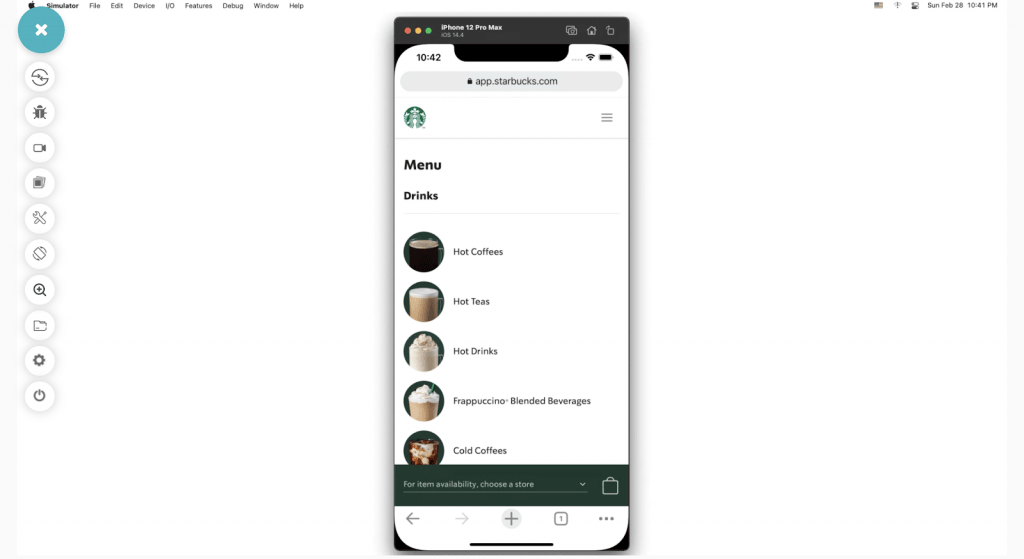
Want to see how it works in practice? Explore top PWA examples that show how leading brands use progressive web apps to improve speed, engagement, and user experience.
How Are AI Agents Changing PWA Testing?
AI test agents now run the install-and-offline checks that used to need a manual pass on every browser, catching a broken service worker or a missing manifest field before it reaches production.
- Automated install checks: An AI agent triggers the browser's install prompt and confirms the web app manifest meets installability rules, flagging a missing icon or scope value without a manual Lighthouse run.
- Offline fallback verification: The agent simulates a dropped connection, reloads the page, and confirms the service worker serves the correct cached fallback instead of a browser error page.
- Cross-browser regression checks: The same install-and-offline flow runs on Chrome, Edge, Firefox, and Safari on real devices, so a caching bug that only shows up on one engine gets caught before release.
- Natural-language test authoring: A tester describes the flow in plain English, such as install the PWA, go offline, confirm the cached page loads, and an AI agent converts it into an executable test without hand-written Selenium or Playwright code.
This shifts PWA testing from a manual checklist into a repeatable, agent-run regression suite that runs on every build.
Conclusion
If we compare progressive web apps, responsive web apps, and native web apps, they have their own advantages and disadvantages. However, you have to determine which application suits your requirements. If you want a consistent mobile experience, then you can choose progressive web apps, and if you’re trying to improve site speed and accessibility for most users, responsive web apps may be a better option. Similarly, if you’re looking for performance and want to access the operating system’s features, choose a native web app.

Austin Siewert
Co-Founder, Steadfast Systems
Discovered @TestMu AI yesterday. Best browser testing tool I've found for my use case. Great pricing model for the limited testing I do 👏
3M+ Devs and QAs rely on TestMu AI
Deliver immersive digital experiences with Next-Generation Mobile Apps and Cross Browser Testing Cloud

Author

Ritesh Shetty
Blogs: 7


Ritesh Shetty is a Community Contributor with experience in building and sharing content around software testing, automation, and technology. A former Content Marketing Manager at TestMu AI, he has contributed to simplifying testing concepts for QA engineers and developers. Currently serving as Head of Growth at Arya.ai, Ritesh continues to connect product, engineering, and quality through impactful knowledge-sharing and community contributions.


Progressive Web Apps FAQs
Did you find this page helpful?
More Related Blogs

TestMu AI forEnterprise
Get access to solutions built on Enterprise
grade security, privacy, & compliance
- Advanced access controls
- Advanced data retention rules
- Advanced Local Testing
- Premium Support options
- Early access to beta features
- Private Slack Channel
- Unlimited Manual Accessibility DevTools Tests