

Power Your Software Testing with AI Agents and Cloud
The Native AI-Agentic Cloud Platform to Supercharge Quality Engineering. Test Intelligently and Ship Faster.


- TestMu AI (Formerly LambdaTest)
- /
- Blog
- /
- Testing A Progressive Web Application With TestMu AI
Testing A Progressive Web Application With TestMu AI
A Progressive Web Application (PWA) works offline, installs to the home screen, and sends push notifications. What to test: HTTPS, speed, and responsiveness.
Last Updated on:
A Progressive Web Application is a website that behaves like a native app: it installs to the home screen, opens full screen without browser chrome, works offline, and pushes notifications without going through an app store update cycle. Testing one means confirming those exact behaviors work under HTTPS, on a real network throttle, and across browsers, since a PWA still runs inside one. This guide covers what qualifies as a PWA, what to test, how cloud-based device testing helps, and how an AI-scaffolded service worker changes the offline-testing checklist.
Key Takeaways
- A Progressive Web Application installs to the home screen, runs full screen, works offline, and sends push notifications without an app store update.
- A Progressive Web Application must keep loading and responding even on a slow or unreliable network connection.
- Serving a Progressive Web Application over HTTPS is required for its service worker and push notifications to function.
- Google's Lighthouse audits a Progressive Web Application's manifest, service worker registration, and HTTPS setup in one report.
- An AI coding assistant can scaffold a service worker in seconds, but a cache-first service worker can serve stale content until the developer adds cache versioning.
- AliExpress recorded a 104% increase in new-user conversion rate after launching its Progressive Web Application, according to Google's web.dev case study.
What makes an application a Progressive Web Application?
Right now based on research and content available on net related to PWA, Google is the highest authority. As per Google developer blogs and guidelines, if your app has the following features then you can say yes, my web application is a progressive web application.
- Progressive: Your web app must work for every user, irrespective of the choice of the browser.
- Connectivity independent: Yes, that’s what is one of the unsung heroes in a PWA. Your web app should work regardless of the internet connection or some of the features must work in no or slow network situations.
- App-like: It should provide an app-like experience to the users. App like experience includes full screen mode, access to various in built accessories like camera, mic, etc.
- Up-to date: Your web application must always be up-to the date and it should not bother the user asking for updates.
- Safe: It should be served over HTTPS.
- Easily Accessible: You can install the app or you can say access it directly from your homescreen with just one click on ‘Add to Homescreen’.
- Fast: A slow-loading page drives users away, especially on a mobile network. Confirm this with performance testing on a throttled connection, not just a fast office network.
- Responsive: As your web application is going to be opened in a browser then it should be responsive.

Austin Siewert
Co-Founder, Steadfast Systems
Discovered @TestMu AI yesterday. Best browser testing tool I've found for my use case. Great pricing model for the limited testing I do 👏
2M+ Devs and QAs rely on TestMu AI
Deliver immersive digital experiences with Next-Generation Mobile Apps and Cross Browser Testing Cloud

Once you’ve developed, it’s time to test!
Developing a Progressive web application is an altogether ball game and a little out-of-scope of this post. If you are intersted, Google has a great tutorial on it here. So once you are done developing a web application, the next immediate step is end-to-end testing.
So, What all is to be tested in a Progressive Web Application?
While testing for a Progressive Web Application, you need to test for these given points:
- Site is served over HTTPS: Safety is one of the major concerns in a Progressive Web Application, hence you need to make sure that your web application passes security testing and is served over HTTPS.How to test? You can use Lighthouse by Google Developers, jitbit, seositecheckup, digicert,ssl shopper, ssl labs,etc to test if your website is served over HTTPS or not.
- Web pages are responsive: Make sure that your web application passes responsive testing across all mobile and desktop devices.How to test? You can use TestMu AI’s responsive feature to test for your web app’s responsiveness.
- Offline Loading: All your web pages or at least some of the web pages must work even when your app is offline. You need to make sure that your web app responds with a 200 when it is offline.How to test? Again, since Google is massively pushing PWA ecosystem, they have some of the best tools for testing PWA apps. For example Lighthouse. Alternative is Wiremock.
- Cross Browser Compatibility: You need to test your web app for cross browser compatibility to ensure that your web app gives a seamless user experience across all browsers.How to test? You can use TestMu AI to test for cross browser compatibility testing.
- Metadata for ‘Add to Homescreen’: You need to test if the web app provides a metadata for ‘Add to Homescreen’.How to test? You can use Lighthouse to test for metadata for ‘Add to Homescreen’.
- Page transitions should be smooth and shouldn’t feel like that they block on the network: Transitions are a key to perceived performance hence they shouldn’t feel snappy as you move around, even on slow internet connection.How to test? This should be done manually on a slow network. When you click on any button or link it should immediately respond either by transitioning immediately to the nest screen and while waiting showing a placeholder loading screen or by a loading indicator till the app waits for the response.
- Each page must have a URL: Every page on you web app must have a URL and all the URLs must be unique.How to test? Test it by checking that every page is linkable by a URL and it is unique to be shared on social media or other platforms. The URLs can also be opened directly in new browsers.
- Shareability: Content should be easily shareable even through full screen mode and it should form cards for all the social media platforms.How to test? Test manually by sharing content from full screen mode. Test for cards can be done as:
- Facebook: Debug the URL by entering the post to be shared and verifying if cards has been generated or not. Test it here.
- Twitter: Check if the type of card for your content by is added to the given HTML’s HEAD of the page:
<meta name="twitter:card" content="summary" />
- Availability of Schema.org Metadata wherever needed: Your webapp should be able to create a rich card if applicable. It helps to improve the appearance of your website by different search engines.
How to test? You can use Google’s Structured data to ensure image, description, title, etc are available or not. - Push Notifications: If push notifications are applicable for your web app they should not be overly aggressive.How to test? Test the push notifications opt-in flow. There should be a clear instruction stating what the site wants permission for and why the user should enable the push notifications.

Watch this video to learn how to test mobile websites on different network conditions by emulating them in Selenium WebDriver with the ChromeDevTools Protocol.

Do AI Coding Assistants Change How You Test a PWA's Offline Behavior?
AI coding assistants such as GitHub Copilot and Cursor can scaffold a service worker and a web app manifest in seconds, but they do not change what this checklist asks you to verify by hand.
These tools usually generate a cache-first service worker because that pattern appears most often in public tutorials and documentation. A cache-first strategy serves the first cached version of a page forever unless the developer adds cache versioning or a network-first fallback, so a real update to the site can silently fail to reach a returning visitor.
Testing this means reloading the PWA after a deploy and confirming the new content actually appears, not just that the offline page loads once, as covered under Offline Loading above.
AI-scaffolded manifests carry the same risk. An assistant often fills the manifest with placeholder values for name, icons, and start URL copied from a tutorial, so the Metadata for Add to Homescreen check above still has to confirm the real values match the deployed app rather than trust the generated file.
AI tools speed up writing the service worker and manifest. They do not remove the two checks this article already asks for: confirming the app updates after a deploy, and confirming the manifest matches the real app.
How TestMu AI can help in testing a Progressive Web Application?
Well, as I have already mentioned, Progressive Web Applications need to be responsive, browser compatible, and can be added to homescreen. How can you make sure that if your web app is fulfilling these criteria or not?
To your aid, with TestMu AI’s real time desktops, emulators, and simulators you can test if the web app you’ve developed is able to meet these. The next immediate question is how? Well, TestMu AI provides you over 3000+ mobile and desktop where you can test for this.

- Adding to desktop or adding to homescreen can be tested if on adding my web app is showing the expected behaviour or not for that mobile or desktop?
- Is my web app showing the responsive behaviour for every mobile and desktop?
- Is the web app compatible with all the browsers and browser versions available?
Here, I’ve demonstrated how you can test for “Add to Homescreen” and “Add to Desktop” using TestMu AI.
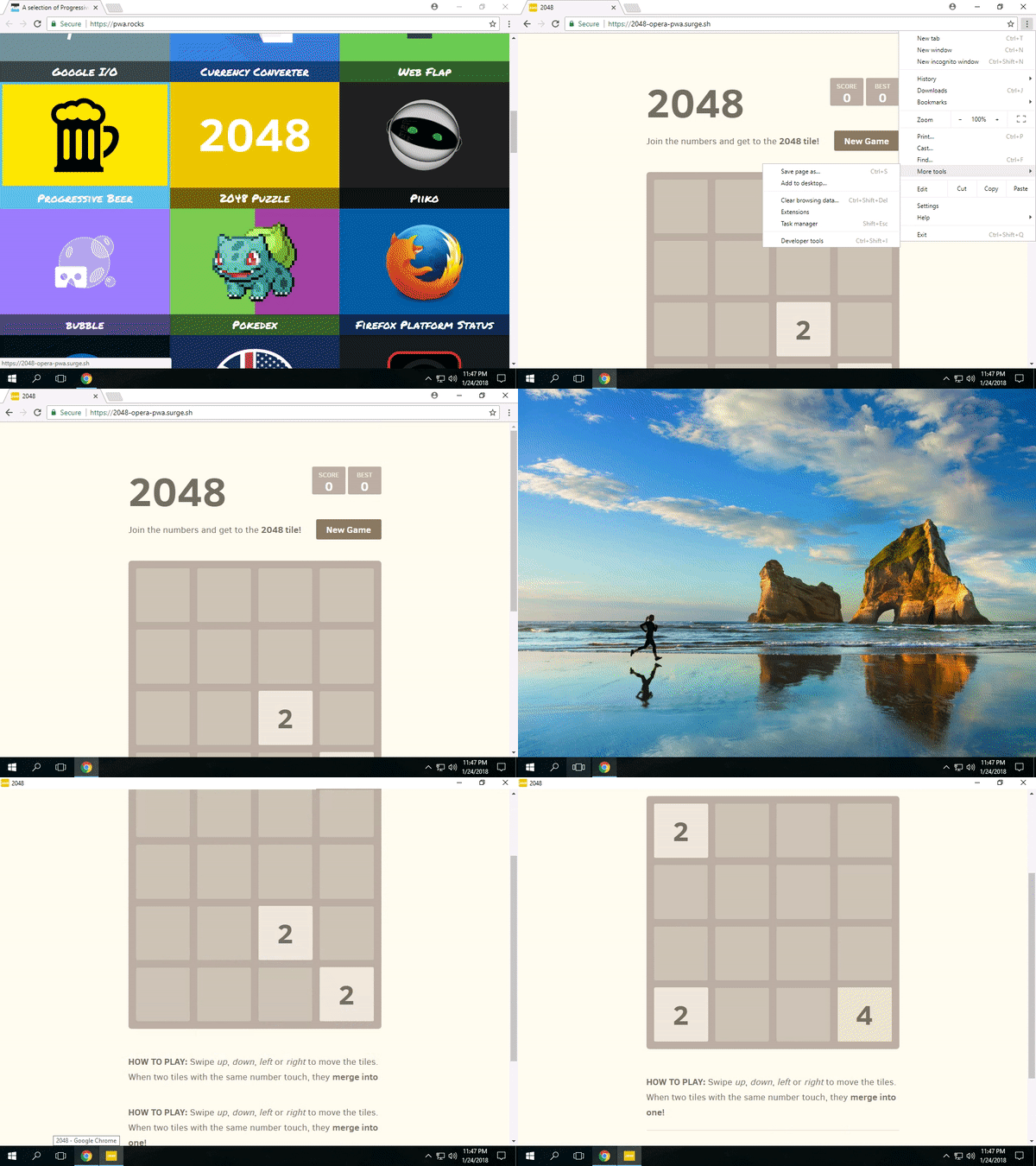
“Add to Desktop” using TestMu AI for Win 10, Chrome 64
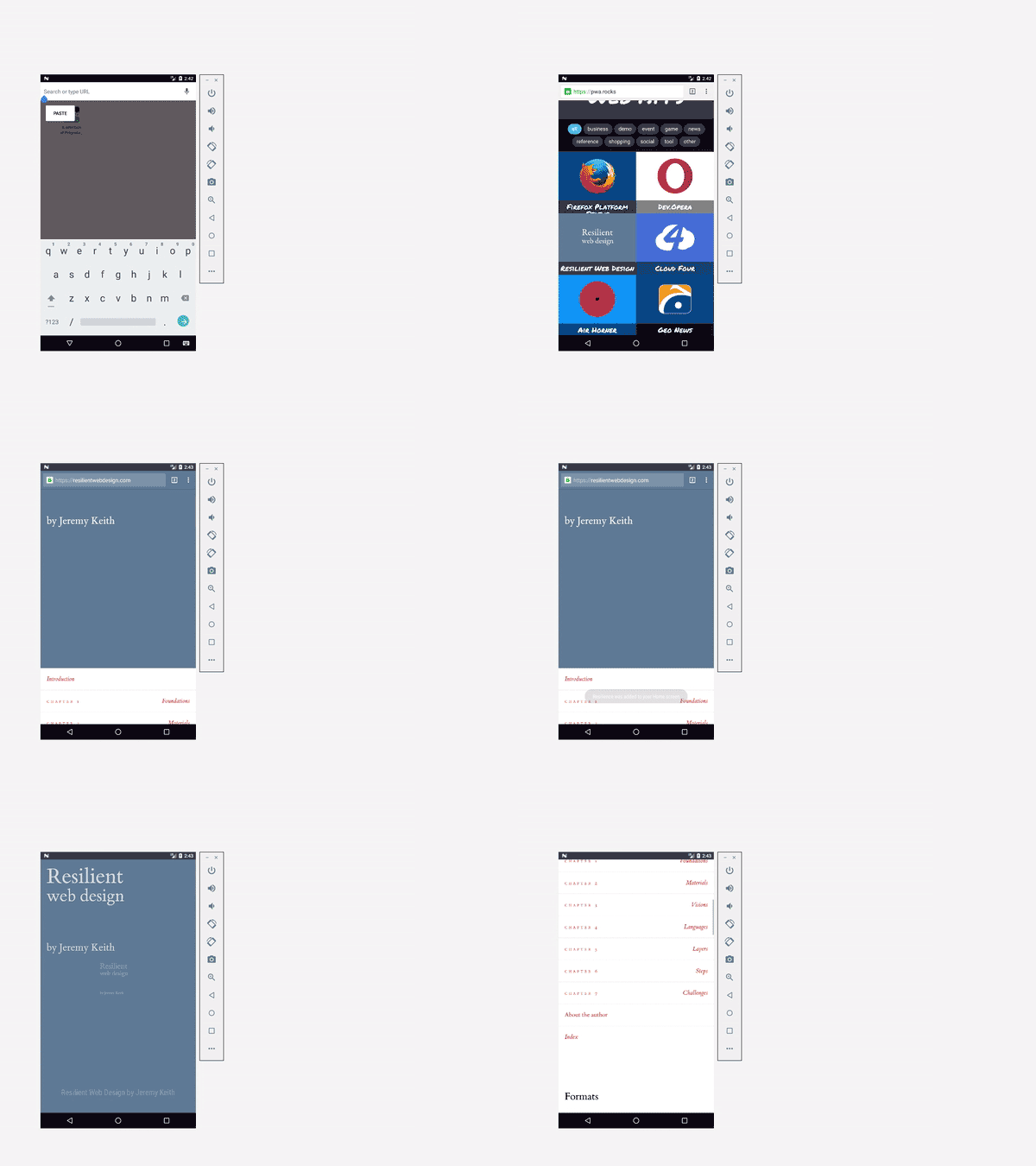
“Add to Homescreen” using TestMu AI for Samsung Gal J7 max
Testing is done. What next?
Once you are done with the testing of your application, you're left with the results of whether your web application is progressive or not. If not, go back and work upon it. If yes, then watch the conversions increase, since PWAs have proved to be a boon for the websites that have implemented it. Alibaba.com, AliExpress, Flipkart, and Lancome are among the PWA examples that made this shift. After launching its PWA, AliExpress saw conversion rates for new users increase by 104%, according to Google's case study. So, what are you waiting for?
Author

Deeksha Agarwal
Blogs: 34


Deeksha is a Senior Product Manager at The Economic Times and a Community Evangelist with 8+ years of experience. She is followed by 6,000+ QA professionals, software testers, tech leaders, and enthusiasts across global communities. Deeksha has authored 40+ expert bios for TestMu AI, focusing on cross-browser testing, mobile app testing, regression testing, usability testing, and automation. Previously at TestMu AI, she drove product growth in native app testing and responsive browser features, combining product leadership with deep QA expertise.


Progressive Web Application Testing FAQs
Did you find this page helpful?
More Related Blogs
TestMu AI forEnterprise
Get access to solutions built on Enterprise
grade security, privacy, & compliance
- Advanced access controls
- Advanced data retention rules
- Advanced Local Testing
- Premium Support options
- Early access to beta features
- Private Slack Channel
- Unlimited Manual Accessibility DevTools Tests