

Power Your Software Testing with AI Agents and Cloud
The Native AI-Agentic Cloud Platform to Supercharge Quality Engineering. Test Intelligently and Ship Faster.


- TestMu AI (Formerly LambdaTest)
- /
- Learning Hub
- /
- Top 50+ JMeter Interview Questions and Answers [2026]
Top 50+ JMeter Interview Questions and Answers [2026]
Prepare with the top 50+ JMeter interview questions and answers for 2026. Covers load testing, samplers, distributed testing, and API performance testing.
Last Updated on:
This JMeter Interview Questions guide compiles the top 50+ JMeter interview questions for 2026 across fresher, intermediate, and experienced levels. Each answer focuses on what hiring managers actually probe: samplers, thread groups, assertions, distributed runs, and CI integration. Use it alongside hands-on practice with a real test plan.
Key Takeaways
Apache JMeter is an open-source, Java-based tool that simulates virtual users to load test web apps, APIs, and databases.
What are the foundational JMeter questions asked in interviews?
- What is JMeter: Open-source Java load testing tool that sends requests from virtual users and collects response data.
- Protocols supported: HTTP/HTTPS, SOAP/REST, JDBC, LDAP, JMS, FTP, and SMTP/POP3/IMAP.
- Execution order: Configuration elements → Pre-Processors → Timers → Samplers → Post-Processors → Assertions → Listeners.
- Thread Group: Entry point of a test plan that sets virtual user count, ramp-up time, and loop count.
What are the core components and scripting questions asked in JMeter interviews?
- Correlation vs Parameterization: Correlation extracts dynamic values like session IDs from responses; parameterization feeds different input data per user from a CSV or variable source.
- Timers: Constant Timer for fixed delay, Gaussian and Poisson Random Timers for variable think time that mimics real users.
- Assertions: Response, Duration, and Size Assertions validate response content, speed, and payload size.
- Processors: Pre-Processors modify requests before they run; Post-Processors extract values from responses for reuse.

Download JMeter Interview Questions
Note: We have compiled all JMeter Interview Questions for your reference in a template format. Check it out now!
Fresher-Level JMeter Interview Questions
The questions below cover the JMeter fundamentals most interviewers open with: what JMeter is, what it tests, and how its core components fit together. These map closely to Apache's official JMeter Getting Started guide[1].
1. What Is Apache JMeter?
Apache JMeter is a Java-based application designed for load and performance testing. Originally built for web applications, it now simulates traffic against HTTP/HTTPS servers, REST and SOAP APIs, databases via JDBC, LDAP, JMS, SMTP/IMAP, and FTP. Interviewers expect a one-line definition ("open-source Java load tester") plus two or three protocols it supports.
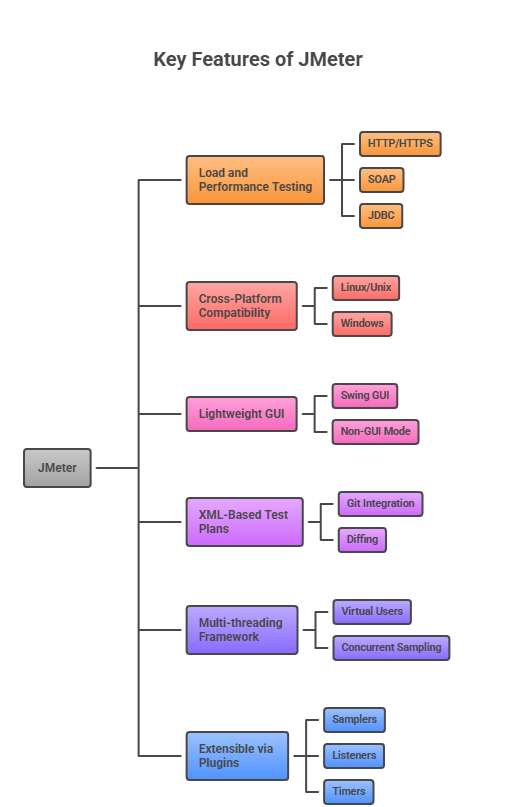
2. What are the Key Features of JMeter?
The key features of JMeter are:
- Load and Performance Testing: Runs load and stress tests against HTTP/HTTPS, SOAP, JDBC databases, LDAP, JMS, POP3/IMAP/SMTP, and FTP.
- Cross-Platform Compatibility: Runs on Linux/Unix via
jmeter.shand on Windows viajmeter.bat. - Lightweight GUI: Built on Swing for the desktop editor, with a non-GUI mode for large runs.
- XML-Based Test Plans: Saves .jmx test plans in XML, making them easy to diff and version in Git.
- Multi-threading Framework: Each thread behaves as a virtual user, enabling concurrent sampling of the target.
- Extensible via Plugins: The JMeter Plugins Manager adds samplers, listeners, and timers for advanced scenarios.
Note: Practice JMeter scripts at scale on a cloud grid. Run distributed load tests with TestMu AI HyperExecute and pair them with real device testing. Try TestMu AI free!
3. What Protocols Does JMeter Support?
JMeter supports a variety of protocols:
- Web Testing: HTTP and HTTPS, including the API calls behind AJAX pages. WebSocket traffic needs a plugin, because JMeter has no native WebSocket sampler.
- Web Services: SOAP and XML-RPC.
- Database Connectivity: JDBC drivers for relational database load testing.
- Directory Services: LDAP.
- Messaging Services: JMS for queue and topic testing.
- Email Services: POP3, IMAP, and SMTP.
- FTP: File transfer performance tests.
4. How Does JMeter Send Requests to the Server?
Requests are generated by Samplers. A Sampler defines what kind of request JMeter fires against the target. Commonly used Samplers include:
- HTTP Request: Sends HTTP/HTTPS requests to a web server or REST API.
- JDBC Request: Executes SQL queries against a database.
- JUnit Request: Runs JUnit tests from within a JMeter thread.
Pair Samplers with timers, assertions, and post-processors to produce realistic load and validate responses.
5. Explain What Correlation Is?
Correlation extracts dynamic values (session tokens, CSRF tokens, IDs) from a server response and passes them into a subsequent request. JMeter handles this through post-processors like the Regular Expression Extractor, JSON Extractor, or CSS Selector Extractor. Correct correlation is the single most common reason a recorded script breaks on the second run.
6. Describe How JMeter Operates?
JMeter spawns one thread per virtual user. Each thread walks the test plan top to bottom, firing Samplers, collecting responses, and computing metrics like response time, throughput, and error rate. Listeners surface those metrics as graphs, tables, or aggregate reports so you can judge the system under test against its SLAs.
7. What Is the Role of Configuration Elements?
Configuration Elements set defaults and shared state that Samplers can consume. HTTP Request Defaults, HTTP Header Manager, CSV Data Set Config, and HTTP Cookie Manager are the most common. They run before Samplers and keep the test plan DRY by removing duplicated headers, hosts, or data values across every request.
8. Explain How the Test Script Recorder Operates
The HTTP(S) Test Script Recorder acts as a proxy between your browser and the target server. You point the browser's proxy settings at JMeter, interact with the app, and JMeter captures every HTTP/HTTPS call as an HTTP Request sampler under a Recording Controller. Use its include/exclude URL filters to strip third-party analytics traffic out of the recording.
9. What Are the Steps To Capture HTTPS Traffic?
Here are the steps to capture HTTPS traffic in current JMeter versions (Workbench was removed in JMeter 4.0[2]; use a Recording Controller instead):
- Add a Recording Controller: Under your Thread Group, add a Recording Controller (Add → Logic Controller → Recording Controller) to hold the captured requests.
- Add the HTTP(S) Test Script Recorder: Add it to the Test Plan (Add → Non-Test Elements) and set the Target Controller to the Recording Controller.
- Set the Proxy Port: Choose a port (default 8888) JMeter will listen on.
- Install the JMeter Root CA: Import the auto-generated
ApacheJMeterTemporaryRootCAcertificate into your browser so TLS interception works. - Configure Browser Proxy: Point your browser's HTTP/HTTPS proxy at localhost on the port you set, then interact with the app.
10. What Are Regular Expressions in JMeter?
Regular expressions in JMeter extract dynamic text from responses using the Regular Expression Extractor post-processor. They are the standard way to pull session tokens, auth codes, or nested IDs out of HTML or JSON and reuse them in later requests. Together with Pre-Processors and Post-Processors, they handle correlation when the response format is not strictly structured.
11. Can You Explain Samplers and Thread Groups?
- Thread Group: The root of any load test. Controls virtual users (threads), ramp-up time, loop count, and test duration.
- Samplers: The workers inside a Thread Group. Each Sampler fires a specific type of request (HTTP, JDBC, JMS) and captures response time, size, and status.
12. How Does JMeter Conduct Testing?
JMeter walks a test plan in a fixed lifecycle. Understanding this sequence is what separates someone who has only clicked through the GUI from someone who has actually debugged a failing run:
- Build the Test Plan: Create a Thread Group with the target virtual users, ramp-up period, and loop count, then add Samplers (HTTP Request, JDBC Request) under it.
- Apply Configuration Elements: Attach HTTP Request Defaults, HTTP Header Manager, Cookie Manager, and CSV Data Set Config so every Sampler shares hosts, headers, and parameterized data.
- Initiate Requests: Each thread (virtual user) fires its assigned Samplers in order, respecting any Timers and Logic Controllers along the way.
- Capture Responses: JMeter records response time, latency, bytes received, and status for every sample into the in-memory SampleResult.
- Post-Process the Response: Regular Expression, JSON, and CSS/JQuery Extractors pull dynamic tokens (auth, session IDs) into JMeter variables for reuse.
- Validate with Assertions: Response, Duration, Size, and JSR223 Assertions mark the sample pass or fail against your SLA or expected payload.
- Aggregate and Report: Listeners such as Aggregate Report, Summary Report, and the HTML dashboard roll up per-sampler response time percentiles, throughput, and error rate.
- Persist the Results: JMeter writes raw samples to a JTL file (CSV or XML) so you can re-run the HTML report with
jmeter -g results.jtl -o report/or feed the data into Grafana, InfluxDB, or Elasticsearch.
13. What Is Performance Testing?
Performance testing validates that an application can handle expected workloads without degrading. It focuses on three pillars:
- Speed: Response time under representative load.
- Scalability: The maximum concurrent users or throughput the system can sustain.
- Stability: Consistent behavior over long-duration runs without memory leaks or degradation.
14. What Are the Typical Techniques Used in Performance Testing?
The five common techniques are Load Testing (expected traffic), Stress Testing (beyond expected), Spike Testing (sudden bursts), Endurance Testing (extended duration), and Volume Testing (large data sets). Each targets a different failure mode, so production SLAs usually require at least Load plus Stress coverage.
15. What Are Some Essential Activities Involved in Performance Testing?
- Planning: Define performance test scenarios, user journeys, and SLAs before any scripting begins.
- Tool Selection: Pick performance testing tools that match the protocol mix (HTTP, JMS, JDBC, gRPC).
- Requirements Analysis: Translate non-functional acceptance criteria (p95 latency, throughput, error rate) into measurable targets.
- Scripting: Implement .jmx files with parameterization, correlation, and assertions so each run is reproducible.
- Execution: Run headless in non-GUI mode on a dedicated injector or cloud grid to avoid skewed metrics.
- Evaluation: Compare results against SLAs, isolate bottlenecks, and feed regressions back to the engineering team.
16. Why Is Performance Testing With JMeter Crucial?
JMeter is free, protocol-rich, and CI-friendly, which makes it the default open-source load tester. It captures response times, throughput, and error rates for both client and server components in one run, so teams can catch bottlenecks before production launches. Combined with HyperExecute on TestMu AI, the same .jmx runs across parallel cloud injectors without rewriting scripts.

17. What Are the Different Types of Processors in JMeter?
JMeter has two processor types:
- Pre-Processors: Run immediately before the associated Sampler to modify requests. Examples: User Parameters, JSR223 PreProcessor, HTML Link Parser.
- Post-Processors: Run after the Sampler response arrives, typically to extract correlation values. Examples: Regular Expression Extractor, JSON Extractor, BeanShell PostProcessor.
18. How Does JMeter Compare to Commercial Load Testing Tools?
Interviewers use this question to check your awareness of the commercial landscape. Expect a quick, side-by-side summary followed by one or two trade-offs you actually care about:
| Dimension | Apache JMeter | Commercial Load Testing Tools |
|---|---|---|
| Licensing | Open-source under Apache 2.0. Free to use, modify, and redistribute. | Paid per virtual user, per injector, or per seat. Enterprise contracts are common. |
| Protocol Coverage | HTTP/S, JDBC, JMS, LDAP, SMTP/POP3/IMAP, FTP natively; others via plugins. | Bundles niche enterprise protocols (Citrix, SAP GUI, Oracle Forms) out of the box. |
| Scripting Model | XML .jmx files editable in GUI; diffable in Git; Groovy/JSR223 for custom logic. | Vendor-specific scripting languages, often paired with a proprietary IDE. |
| CI/CD Integration | Runs headless via jmeter -n in Jenkins, GitHub Actions, GitLab CI, etc. | Typically requires a separate CI plugin or SaaS trigger to fit into pipelines. |
| Scale Model | Distributed master-worker setup, or a cloud grid like TestMu AI HyperExecute for parallel injectors. | Usually tied to the vendor's own SaaS cloud to scale beyond a few injectors. |
| Reporting | Built-in HTML report and JTL output; optional Grafana/InfluxDB dashboards. | Polished out-of-the-box dashboards, often with built-in APM and transaction breakdowns. |
| Learning Curve | Steeper upfront; large community docs and open-source examples. | Lower upfront with vendor training; locks team into that ecosystem. |
Summary: pick JMeter when budget, Git-native workflows, or CI integration matter most. Pick a commercial tool when you need turnkey support for enterprise protocols (Citrix, SAP GUI) or a managed SaaS with APM built in.
19. What Is the Recording Controller?
The Recording Controller is the Logic Controller that holds requests captured by the HTTP(S) Test Script Recorder. It replaced the old Workbench (removed in JMeter 4.0) and lives directly inside a Thread Group. Interviewers often phrase this as "explain Workbench," so flag the version change to show you track the tool's evolution.
20. What Are Listeners, and What Are Their Different Types?
Listeners collect Sampler output and render it as tables, graphs, trees, or files. Common built-in types:
- View Results Tree: Request and response details for debugging. Disable during load runs.
- View Results in Table: Tabular per-sample results.
- Aggregate Report / Summary Report: Rolled-up counts, response time percentiles, and throughput.
- Simple Data Writer: Writes raw JTL output to disk with near-zero overhead, ideal for production-scale runs.
21. Are JMeter Test Plans OS-Dependent?
No. Test plans are saved as portable .jmx XML files and run on any operating system where JMeter can run. The only OS-dependent concern is the path syntax of any referenced CSV or binary files; keep those relative and your .jmx runs unchanged across Windows, Linux, and macOS.
23. Differentiate Between Contains and Matches
Inside a Response Assertion, the two modes behave differently:
- Contains: The regex must match a substring of the response. `ph.b.` matches `alphabet` because `phabe` is a substring.
- Matches: The regex must match the entire response. `al.*t.` matches `alphabet` only if the full string fits the pattern.

The fresher questions above cover the vocabulary interviewers expect in the first 10 minutes. The intermediate questions below assume you have already built and shipped a JMeter plan, and move into distributed runs, correlation under pressure, and assertion design.
Key Takeaway: Fresher-level JMeter interview questions cover what Apache JMeter is, Samplers that generate requests, Configuration Elements that set shared defaults, the Regular Expression Extractor for dynamic response text, and the basics of performance testing.
Intermediate-Level JMeter Interview Questions
These questions assume you have run JMeter against a real application and hit the usual pain points: flaky correlation, distributed runs, and memory limits. They show up frequently for mid-level SDET and performance engineer roles.
24. How Do You Set Up a Master-Slave Configuration in JMeter?
Master-slave (controller-worker) setup powers distributed testing. All machines must be on the same network and run identical JMeter and Java versions. Steps:
- On the master, edit
jmeter.propertiesand add the IP addresses of the worker machines to theremote_hosts=entry. - Save the file and start JMeter on each worker using
jmeter-server. - From the master, use Run → Remote Start and pick a single worker to smoke-test connectivity.
- Once the smoke run passes, use Run → Remote Start All to fire the test across every worker simultaneously.
25. What Do You Understand by Distributed Testing?
Distributed testing splits virtual user load across multiple injectors. One master coordinates, while workers apply the load against the target. The pattern is essential whenever a single machine cannot generate enough traffic (typically beyond 500 to 1,000 threads). For CI pipelines, offloading this to a cloud grid removes the need to maintain dedicated injector hardware.
26. Name a Few Timers in JMeter and Their Purpose
Timers pause thread execution to mimic real user think time. Common options:
- Synchronizing Timer: Holds threads until N have reached the point, then releases them together (useful for coordinated spikes).
- Uniform Random Timer: Uniform random delay within a fixed range.
- Gaussian Random Timer: Delay with a normal distribution around a mean value.
- Constant Timer: A fixed delay between requests, useful as a baseline before tuning.
27. Can You Explain the Ramp-Up Period?
Ramp-up is the time JMeter takes to spin every thread up to active. For 100 threads and a 10-second ramp-up, JMeter starts a new thread every 100 ms. Set this low for spike tests and high for steady-state runs. Ramping too fast makes the first second of the run unrepresentative of real traffic.
28. What Do You Mean by the Rendezvous Point?
A rendezvous point (implemented in JMeter via the Synchronizing Timer) parks threads until a target count arrives, then releases them all at once. This produces a controlled burst of concurrent requests, which is exactly what you need for stress and spike tests against login or checkout endpoints.
29. What Are Pre-Processors in JMeter?
Pre-Processors run immediately before the linked Sampler and mutate the outgoing request. Common types:
- User Parameters: Assigns a different set of values to each thread before the request is sent. The Regular Expression Extractor is a Post-Processor, not a Pre-Processor.
- JSR223 PreProcessor: Runs Groovy scripts to compute dynamic fields.
- URL Rewriting Modifier: Rewrites URL parameters (session IDs) across requests.
- HTML Link Parser: Picks a link from the last response body to drive the next request.
30. What Are the Data Parameterization Options in JMeter?
Parameterization replaces hardcoded values with datasets so each virtual user behaves differently. JMeter provides:
- CSV Data Set Config: Reads a CSV file line by line and binds each column to a variable. Ideal for large datasets of credentials, order IDs, or test records.
- User-Defined Variables: Holds small, shared values like environment hostnames or tokens. Scope is either test-plan-wide or thread-group-local.
- JDBC Pre-Processor: Pulls values directly from a database when the dataset is too large or too volatile for CSV.
- Functions (__RandomString, __UUID, __Random): Generate synthetic values at runtime when real data is not required.

Subscribe to the TestMu AI YouTube Channel for more tutorial videos on automation and performance testing.
31. What Are the Performance Metrics of JMeter?
The metrics JMeter captures are the ones interviewers quote back at you:
- Response Time (Elapsed Time): Time from just before the request is sent to just after the last byte of the response arrives.
- Throughput: Requests completed per second.
- Error Rate: Percentage of failed samples (non-2xx or assertion failures).
- Latency: Time from just before the request is sent to the first byte of the response, also known as time to first byte. Connect Time is the part of it spent on establishing the connection.
- Concurrent Users: Active threads at a given moment.
- Resource Utilization: CPU, memory, and disk I/O on the target, captured via external agents (Prometheus, New Relic) alongside JMeter.
These key performance indicators are the signals you report to stakeholders after every run.
32. What Does the 90th Percentile Represent in JMeter?
The 90th percentile is the response time under which 90% of requests completed. If 100 requests were sent and the results are sorted from fastest to slowest, the 90th percentile is the 90th value in that list. Senior engineers prefer p90/p95/p99 over averages because a single slow outlier can skew averages while percentiles reflect the experience most users actually had.
33. How Can You Reduce Resource Requirements in JMeter?
- Run JMeter in non-GUI mode:
jmeter -n -t test.jmx -l test.jtl -e -o report/. - Disable View Results Tree and View Results in Table during load runs; keep them only while authoring.
- Turn off functional mode on the Test Plan.
- Use a single parameterized Sampler in a loop instead of 20 near-duplicate Samplers.
- Increase heap size in
jmeter.bat/jmeter.sh(HEAP="-Xms2g -Xmx4g") to avoid GC pauses.
34. What Are the Different Ways to Enhance JMeter's Efficiency?
- Use CSV Data Set Config: Externalize test data so test plans stay readable.
- Stay on the latest stable JMeter: 5.6.3 or newer brings HTTP/2 fixes and JDK compatibility[3].
- Prune plugins: Use the Plugins Manager to remove modules you do not use.
- Tune Java heap: Set
-Xmsand-Xmxto the same value to reduce GC churn. - Prefer JSR223 Groovy: Groovy is compiled and runs faster than BeanShell for scripting.
- Add Assertions selectively: Only validate what you actually need; every assertion costs CPU per sample.
35. How to Stop Test Execution in JMeter?
JMeter offers a graceful shutdown and an immediate stop in both modes:
- GUI mode: Use the Stop or Shutdown toolbar buttons. Stop ends the threads immediately, while Shutdown lets every thread finish its current sampler first.
- Non-GUI mode: Run the
shutdown.shorstoptest.shscript (or the .cmd versions) from the bin folder. They send the Shutdown or StopTestNow command to the port on which the running test listens, which is 4445 by default. Ctrl+C also ends the run, but without a clean finish.
36. How Can You Automate Performance Testing With JMeter?
To automate performance testing with JMeter:
- Install Apache JMeter: Download the binary (currently 5.6.3) and extract it on the injector.
- Author the test plan: Define users, ramp-up, and Samplers with parameterized inputs.
- Configure controllers, timers, and assertions: Model realistic user journeys instead of flat loops.
- Run headless: Invoke
jmeter -nfrom your CI job (GitHub Actions, Jenkins) and publish the JTL/HTML report. - Scale on managed load generators: Upload the .jmx to TestMu AI's JMeter cloud load testing and set users, ramp-up, and the regional split in the run form instead of adding injectors by hand.
Pair this with an automation testing platform to route both JMeter load runs and functional regression runs through the same CI pipeline.
37. What Is an Assertion in JMeter and What Are Their Types?
Assertions verify that a Sampler's response matches expectations. Without them, a 500 error with a valid body is still counted as a pass. Common assertions:
- Response Assertion: Regex or substring match against response body, headers, or code.
- Size Assertion: Checks the response byte count falls in an expected range.
- Duration Assertion: Flags the sample as failed if response time exceeds a threshold (useful for SLA gates).
- XML / JSON Assertion: Validates structural integrity or a specific JSONPath/XPath value.
- HTML Assertion: Runs JTidy on the response to catch broken markup.
Advanced readers should know: assertions apply in hierarchical scope, so a Response Assertion placed at Thread Group level validates every Sampler inside it.
Key Takeaway: Intermediate-level JMeter interview questions cover master-slave distributed testing, timers that mimic user think time, the rendezvous point created by the Synchronizing Timer, CSV Data Set Config parameterization, and the 90th percentile response time.
Experienced-Level JMeter Interview Questions
These questions dig into architecture, memory tuning, SSL/TLS setup, WebSockets, and CI integration. They map to senior SDET and Performance Engineer roles that expect you to reason about JMeter's runtime behavior under pressure.
38. How Can Selenium Be Integrated With JMeter Using the WebDriver Sampler?
The WebDriver Set plugin bridges Selenium browser control into JMeter threads. Steps:
- Install the plugin: Use the JMeter Plugins Manager and install "Selenium/WebDriver Support." It places the required JARs under `lib/ext` automatically.
- Add a WebDriver Config: Choose Chrome, Firefox, or a remote grid. For cloud execution, point the remote URL at TestMu AI's Selenium hub.
- Add a WebDriver Sampler: Write the interaction in JavaScript or Groovy (e.g., `WDS.browser.get('https://www.testmuai.com/selenium-playground/')`).
- Use a Thread Group with low counts: WebDriver Samplers are heavy; keep them to tens of threads, not thousands. Mix with HTTP samplers for scale.
- Observe: Add View Results Tree in scripting mode and a Simple Data Writer for production runs.
For scale, pair this with cloud Selenium automation on TestMu AI so browser load comes from real managed environments instead of your injector box.
39. How Many JMS Samplers Are Available in JMeter?
JMeter ships three JMS samplers for the two JMS delivery models: JMS Point-to-Point for queues, and the JMS Publisher and JMS Subscriber pair for topics. For Kafka or AMQP workloads you swap in third-party samplers from the Plugins Manager rather than extending the native JMS samplers.
40. What Is the JMeter Functions Syntax?
JMeter functions are referenced with the ${__functionName(args)} syntax and produce values at runtime. Commonly used functions:
- Time:
${__time()}returns the current epoch in milliseconds, useful for timestamps and cache busting. - Random:
${__Random(min, max, var)}produces an integer betweenminandmaxinclusive, optionally storing it in a variable. - UUID:
${__UUID()}generates an RFC 4122 v4 UUID per call. - StringFromFile:
${__StringFromFile(filename, var, start, end)}reads sequential lines from a file, ideal for rotating test data. - Counter:
${__counter(FALSE)}gives a shared counter across threads; passTRUEfor per-thread counters. - Groovy:
${__groovy(script)}runs inline Groovy and is the fastest scripting option at load-test scale.
41. What Are Gaussian and Poisson Timers in JMeter?
Both timers add random delays modeled on real traffic patterns:
- Gaussian Random Timer: Delay follows a normal distribution around a configurable mean with a specified deviation. Good for steady user think times that cluster around an average.
- Poisson Random Timer: Delay follows a Poisson distribution defined by lambda and an offset. Best for event-driven workloads (orders arriving at a checkout queue) where inter-arrival times spike unpredictably.
42. How Do You Set Up a Spike Test Plan in JMeter?
A spike test ramps load up fast, holds briefly, then drops. Steps:
- Create a Test Plan named 'Spike Test'.
- Add a Thread Group: Use the Ultimate Thread Group plugin or Stepping Thread Group to script the ramp up, hold, and ramp down in discrete phases.
- Add a Synchronizing Timer: Park threads until N arrive, then release them for a true spike.
- Add Samplers: Point at the endpoint under test (e.g., the Ecommerce Playground checkout at ecommerce-playground.lambdatest.io).
- Attach a Duration Assertion: Fail the sample if response time exceeds your SLA so the report flags the spike.
Execute in non-GUI mode: jmeter -n -t spike.jmx -l spike.jtl -e -o report/.
43. How Do You Use JMeter Assertions for Spike Test Performance Validation?
During a spike, averages mask tail failures, so lean on assertions:
- Response Assertion: Ensure the status code stays in the 2xx range and the body still contains the expected success marker.
- Duration Assertion: Fail samples that breach your p95 SLA (for example, 800 ms for a checkout call).
- Size Assertion: Detect truncated or cached error responses that happen to still return 200.
- JSR223 Assertion: Run Groovy for assertions that depend on multiple variables, like cross-checking a session ID against a prior extraction.
Publish the resulting HTML report to your CI artifact store to keep a spike-run history.
44. How Does JMeter Calculate Concurrent Users?
JMeter does not "calculate" concurrency; it simulates it. Each thread in a Thread Group is one virtual user. Setting 100 threads produces up to 100 concurrent requests, assuming no timers pause them.
To size concurrency for production, use Little's Law: Concurrency = Arrival Rate × Average Session Duration. For example, 600 visits per minute at 5 minutes per session yields 3,000 concurrent users on average. Use that number as your Thread Group target.
45. Is JMeter Suitable for .NET Applications?
Yes. JMeter tests any HTTP(S)-exposed application, including ASP.NET MVC, Web API, and Blazor Server back ends. Typical use cases:
- Load testing ASP.NET Razor and Blazor pages.
- Stress testing Web API endpoints under sustained concurrency.
- POST request floods against ASP.NET form endpoints.
- Replaying ASP.NET WebForms ViewState and authentication cookies via the HTTP Cookie Manager.
46. How Does JMeter Determine the Order in Which Test Elements Execute?
JMeter executes elements in a fixed order within each scope:
- Configuration Elements: Set up defaults, headers, and cookies.
- Pre-Processors: Mutate the pending request.
- Timers: Pause before the Sampler fires.
- Sampler: Execute the request.
- Post-Processors: Extract data from the response (skipped if SampleResult is null).
- Assertions: Validate the response (skipped if SampleResult is null).
- Listeners: Record the sample outcome (skipped if SampleResult is null).
Remember the acronym CONF-PTS-PAL: Configuration, Pre-Processors, Timers, Samplers, Post-Processors, Assertions, Listeners.
47. How Do Scoping Rules Function in JMeter?
Scope is hierarchical. A Timer, Assertion, or Processor applies to every Sampler in or below its parent. Place an element at Thread Group level to cover all Samplers inside it, or attach it as a direct child of a Sampler to scope it narrowly. Listeners show the same rule: a Listener under a Thread Group captures every Sampler in that group.
48. How Do You Test a Website's Performance With SSL/TLS in JMeter?
- Trust the server certificate: If the target uses a private CA, import its root into JMeter's jmeter.keystore (or the Java cacerts).
- Configure SSL settings: In HTTP Request Defaults, pin the protocol (TLSv1.2/TLSv1.3) and cipher suite you want to simulate.
- Use HttpClient4: Set the HTTP Implementation to HttpClient4 or Java in
jmeter.propertiesfor more realistic TLS handshake timing. - Capture handshake time: Add a Backend Listener exporting to InfluxDB or Grafana so you can separate TCP+TLS connect time from first-byte time.
49. What Are the Different Approaches to Data Parameterization in JMeter?
- CSV Data Set Config: The default. Best for externalized static datasets.
- JDBC data source: Query a database at test runtime when data is too volatile or large for CSV (e.g., "unused account IDs").
- Parameterized Controller (plugin): Runs the same module with different variable sets, useful for data-driven test fragments.
- HTTP Request + JSR223 PreProcessor: Call an external API at runtime to fetch fresh data per iteration.
Question 30 covered the fresher-level answer; here interviewers expect the runtime-sourced options (JDBC, API) that handle data volatility.
50. How Do You Automate API Testing Using JMeter?
Automating API tests in JMeter follows a clear, repeatable flow:
- Create a Test Plan and add a Thread Group from Add → Threads (Users) → Thread Group.
- Configure the Thread Group: Set threads, ramp-up, loop count, and optionally a scheduled duration.
- Add an HTTP Request Sampler: Specify protocol, host, path, method, headers, and body.
- Add a JSON Extractor and Response Assertion: Pull IDs from the response and assert on status and payload.
- Chain dependent calls: Feed the extracted ID into the next Sampler via
${variable}. - Add a Backend Listener: Stream results to InfluxDB or Prometheus for dashboards.
- Run headless in CI:
jmeter -n -t api.jmx -l results.jtl -e -o report/. - Gate the build: Parse the JTL or use the JMeter Maven plugin to fail the build on SLA breaches.
See the HyperExecute getting-started docs to offload these runs to a managed cloud grid.
51. What Are the Best Practices for Preparing JMeter Scripts?
- Align .jmx files with requirements: Each test plan should map to a documented scenario, not a kitchen sink.
- Organize Test Plan elements: Group Samplers under Transaction Controllers so the report rolls up by user journey.
- Use consistent naming: Prefix Samplers with the journey step (e.g., "01 Login").
- Strip recorder noise: Delete analytics, ad, and font requests captured during recording.
- Enable "Retrieve All Embedded Resources" selectively: Useful for page-load benchmarks, costly for API-only tests.
- Add HTTP Cookie Manager and Cache Manager: Mimic browser session behavior without extra scripting.
- Use realistic timers: Random timers model users better than back-to-back requests.
- Disable verbose listeners for runs: View Results Tree stays off outside scripting mode.
- Tune the heap: Set
-Xmsand-Xmxto the same value; 4 GB is a safe starting point. - Use relative paths: CSV and certificate references should be relative so scripts run on any injector.
- Scale out, not up: When one injector peaks, add distributed workers or a cloud grid instead of stacking threads.
52. What Should You Do and Avoid When the Console Stops Collecting Engine Data?
What to Do:
- Run headless: Non-GUI mode slashes console overhead.
- Monitor vitals: Track CPU and heap usage on the console machine with JVisualVM or Grafana.
- Confirm JTL output: The controller should still be appending rows to the results file.
- Cap throughput: Stay under ~1,000 requests/sec per engine before adding more workers.
What to Avoid:
- GUI mode at scale: Swing consumes memory and blocks the event dispatcher on large datasets.
- Overloading the target: Stress the SUT until it tips over, but keep the injector healthy or metrics collapse.
53. Describe Common Issues in JMeter Scripts
Issue 1: The console is not collecting engine data.
In distributed runs, every worker streams samples back to the master. The master can become a bottleneck, drop samples, or hang. Offload to a local JTL file per worker and aggregate later.
Issue 2: An engine runs out of memory.
Large responses, verbose listeners, or too many Groovy caches will blow past the 1 GB default heap. Tune heap size, switch BeanShell to Groovy, and disable non-essential listeners.
Issue 3: The console freezes.
View Results Tree and Summary Report in GUI mode accumulate in memory. For production runs, move to non-GUI mode and rely on HTML reports generated after the run.
54. How Can You Fix the Common Issues in JMeter?
- Use headless mode: Default to
jmeter -nfor every run outside authoring. - Scale horizontally: Spread threads across multiple workers before pushing a single injector past its limits.
- Monitor both sides: Track injector CPU/heap alongside target server metrics so you know which side is the bottleneck.
- Pilot first: Run with 10 threads to confirm end-to-end correctness before scaling up.
- Baseline before ramp: A full-length smoke at low load catches assertion and correlation bugs cheaply.
- Commit
jmeter.propertiesto source control: Keep heap, HTTP implementation, andremote_hostsvalues versioned with the .jmx.
55. How Do You Assess Performance of a Web Application Using WebSockets in JMeter?
JMeter does not ship a native WebSocket Sampler; install the "WebSocket Samplers by Peter Doornbosch" plugin via Plugins Manager. Then:
- Add a WebSocket Open Connection sampler: One per thread, pointing at the WebSocket URL.
- Send messages: Use "WebSocket Request-Response" for request/reply and "WebSocket Single Read" for pushed frames.
- Close the connection: Always add a Close sampler to release server resources.
- Add listeners: Aggregate Report shows per-sampler latency for each frame exchange.
- Tune heap: WebSocket tests with long-lived threads consume more memory than short-lived HTTP ones; bump
-Xmxaccordingly.
56. How Do You Simulate Actual Network Bandwidth Conditions in JMeter?
Two options depending on what you need to model:
- Install the Bandwidth Shaping Timer plugin: Adds per-sampler bandwidth and latency limits.
- Configure profiles: Define "3G Slow," "Cable," and "Fiber" profiles in the plugin UI.
- Apply the timer at the Thread Group level: Every Sampler inherits the shaping rules.
- Alternative -
cps.properties: For simple global throttling, sethttpclient.socket.http.cpsinjmeter.propertiesto the desired bytes-per-second. - Analyze: Compare Aggregate Report percentiles across profiles to see how tail latency reacts to slow networks.
Key Takeaway: Experienced-level JMeter interview questions cover the WebDriver Sampler for running Selenium inside JMeter, Gaussian and Poisson random timers, threads as virtual users, hierarchical scoping rules, API test automation, and common script issues.
AI and Modern JMeter Interview Questions
Interviews in 2026 place JMeter next to code-first load testing tools, and they add two AI topics: load testing an application that calls a large language model, and using an AI assistant or an AI agent to build and analyze test plans.
57. How Does JMeter Compare With k6, Gatling, and Locust?
- JMeter: GUI-based authoring, the widest protocol coverage (HTTP, JDBC, JMS, LDAP, FTP, mail), and a large plugin ecosystem. It uses one thread per virtual user, so it needs more memory per user, and the XML of a .jmx file is hard to review in a pull request.
- k6: Tests are JavaScript or TypeScript files run by a Go engine from the command line. It is light on resources, has thresholds that fail a CI build, and focuses on HTTP, WebSocket, and gRPC.
- Gatling: Tests are code in Java, Scala, Kotlin, or JavaScript on an asynchronous engine that simulates many users per thread, with detailed HTML reports.
- Locust: User behavior is plain Python code, with an event-based engine and built-in distributed mode.
A balanced answer: JMeter fits teams that need many protocols or prefer a GUI and recording, while code-first tools fit teams that keep load tests in the repository and run them on every build.
58. How Do You Load Test an LLM or AI API With JMeter?
An endpoint backed by a large language model behaves differently from a normal REST API: a response takes seconds, its duration grows with the number of generated tokens, and it is often streamed. The test plan changes accordingly:
- Realistic prompts: Feed prompts of different lengths from a CSV Data Set Config, because a single short prompt hides the real latency distribution.
- Time to first token: For a streamed response, the Latency metric (time to first byte) approximates the time to first token, while Elapsed Time covers the full generation.
- Token throughput: Extract the token usage from the response with a JSON Extractor and report tokens per second, not only requests per second.
- Timeouts and rate limits: Raise the response timeout, treat HTTP 429 as a separate result from a failure, and honor the Retry-After header.
- Cost control: Every request is billed, so cap the output tokens, run short tests, and use a mock or a smaller model while the script is being developed.
59. How Can AI Assistants and Agents Help With JMeter, and What Do You Verify?
An AI assistant is useful for the repetitive parts of JMeter work: JSR223 Groovy scripts, regular expressions and JSONPath expressions for correlation, a first draft of a test plan from an OpenAPI file or a HAR recording, and a summary of a large JTL result file. An agent with command-line access can also run the test in non-GUI mode and compare the report with the previous run. The output still needs a review:
- Invalid test plans: Generated .jmx XML often contains element or property names that do not exist. Open it in the GUI and run one thread before trusting it.
- Outdated scripting: BeanShell elements instead of JSR223 with Groovy, which is slower and no longer recommended.
- Variables inside scripts: JMeter variables written directly into a JSR223 script break script caching. Read them with
vars.get()instead. - Missing realism: No think time, no assertions, and no correlation of dynamic tokens, which produces a test that passes and proves nothing.
- Wrong conclusions: Check an AI summary of the results against the percentiles and error rates in the HTML report.
Key Takeaway: JMeter offers the widest protocol coverage while k6, Gatling, and Locust keep load tests as code, an LLM API is load tested with varied prompts, time to first token, token throughput, and cost limits, and test plans or scripts from an AI assistant are verified in the GUI and against the real report before use.
Conclusion
Your next step is to stop memorizing definitions and start running JMeter against a live target. Download JMeter 5.6.3, follow Apache's Getting Started guide, and record a 5-step journey against the Selenium Playground. Run it at 10, 100, and 1,000 threads locally to feel where a single injector tops out.
Once you hit that ceiling, move execution to TestMu AI HyperExecute to parallelize the same .jmx across managed cloud injectors, and use the HyperExecute documentation to wire the run into your CI pipeline. Pair your JMeter load tests with functional runs on TestMu AI's real device cloud so every release ships with both performance and device coverage proven. See the JMeter performance testing pricing plan for tier options.
Author

Nazneen Ahmad
Blogs: 39


Nazneen Ahmad is a freelance Technical Content SEO Writer with over 6 years of experience in crafting high ranking content on software testing, web development, and medical case studies. She has written 60+ technical blogs, including 50+ top-ranking articles focused on software testing and web development. Certified in Automation Basic and Advanced Training - XO 10, she blends subject knowledge with SEO strategies to create user focused, authoritative content. Over time, she has shifted from quick, keyword-heavy drafts to producing content that prioritizes user intent, readability, and topical authority to deliver lasting value.
Reviewer

Anmol Gupta
Reviewer
Anmol Gupta is Vice President of Product Management at TestMu AI (formerly LambdaTest), driving HyperExecute, the test orchestration cloud that runs and accelerates automated test execution. He led the development of the Unified Test Execution Cloud Platform and now leads a 30-member cross-functional product organization across product lines contributing $7M+ in revenue. He brings over nine years of experience and previously co-founded the SaaS company Timble as CTO, where he grew the team from 5 to 40 and launched an AI KYC platform that processed 600K+ applications in five months while cutting verification time from 12 minutes to under 30 seconds. Anmol holds an MTech and BTech from IIT Delhi.
On This Page
- Fresher-Level Questions
- 1. What Is Apache JMeter?
- 2. Key Features
- 3. Protocols Supported
- 4. Sending Requests
- 5. Correlation
- 6. How JMeter Operates
- 7. Configuration Elements
- 8. Test Script Recorder
- 9. Capturing HTTPS Traffic
- 10. Regular Expressions
- 11. Samplers and Thread Groups
- 12. How JMeter Conducts Testing
- 13. Performance Testing
- 14. Performance Testing Techniques
- 15. Performance Testing Activities
- 16. Why JMeter Is Crucial
- 17. Types of Processors
- 18. Commercial Tools vs JMeter
- 19. Recording Controller
- 20. Listeners and Types
- 21. OS Dependency
- 22. Cookies and Sessions
- 23. Contains vs Matches
- Intermediate-Level Questions
- 24. Master-Slave Configuration
- 25. Distributed Testing
- 26. Timers in JMeter
- 27. Ramp-Up Period
- 28. Rendezvous Point
- 29. Pre-Processors
- 30. Data Parameterization
- 31. Performance Metrics
- 32. 90th Percentile
- 33. Reducing Resource Usage
- 34. Enhancing Efficiency
- 35. Stopping Test Execution
- 36. Automating Performance Tests
- 37. Assertions and Types
- Experienced-Level Questions
- 38. Selenium Integration
- 39. JMS Samplers
- 40. Functions Syntax
- 41. Gaussian and Poisson Timers
- 42. Spike Test Plan
- 43. Assertions for Spike Tests
- 44. Calculating Concurrent Users
- 45. JMeter for .NET Apps
- 46. Test Element Execution Order
- 47. Scoping Rules
- 48. SSL/TLS Testing
- 49. Data Parametrization Approaches
- 50. Automating API Testing
- 51. Best Practices
- 52. Console Engine Data Issues
- 53. Common JMeter Issues
- 54. Fixing Common Issues
- 55. WebSocket Performance
- 56. Simulating Network Conditions
- Conclusion
- Citations
- AI and Modern JMeter Interview Questions
JMeter Interview Questions FAQs
Did you find this page helpful?
More Related Learning Hubs
TestMu AI forEnterprise
Get access to solutions built on Enterprise
grade security, privacy, & compliance
- Advanced access controls
- Advanced data retention rules
- Advanced Local Testing
- Premium Support options
- Early access to beta features
- Private Slack Channel
- Unlimited Manual Accessibility DevTools Tests