

Power Your Software Testing with AI Agents and Cloud
The Native AI-Agentic Cloud Platform to Supercharge Quality Engineering. Test Intelligently and Ship Faster.


- TestMu AI (Formerly LambdaTest)
- /
- Blog
- /
- Cypress CLI and Test Runner: How to Run E2E Tests
Cypress CLI and Test Runner: How to Run E2E Tests
Learn when to use the Cypress CLI (cypress run) or the Test Runner (cypress open), with verified commands, exit codes, and real Cypress 16 run output.
Last Updated on:
A spec that passes while you watch it in the browser still has to pass on a CI machine with no screen. Cypress covers both with one install: the Test Runner (cypress open) for writing and debugging, and the Cypress CLI (cypress run) for headless runs that exit with a pass or fail code.
This guide runs the same two specs in both modes against the TestMu AI eCommerce Playground, a demo store built for web automation testing.
Every console block below is real output from Cypress 16.1.1, plus one run of the same specs on the TestMu AI cloud grid.
Overview
Perform end-to-end testing in Cypress by using the Cypress CLI (cypress run) to execute headless tests in continuous integration pipelines, or the interactive Cypress Test Runner (cypress open) to visually run, debug, and inspect each test step in real time in your browser.
- End-to-End Testing: End-to-end testing validates an application's entire workflow by simulating real user interactions from start to finish, checking that the UI, APIs, and databases work correctly together.
- Cypress Framework: Cypress runs tests inside the browser with automatic waiting and retries, and during cypress run it saves a screenshot of every failed test; video recording is off by default.
- Cypress CLI: The Cypress CLI runs specs headlessly by default, picks a browser with --browser, narrows a run with --spec, and exits with the number of failed tests, the signal a CI job reads. Headless by default: Yes.
- Cypress Test Runner: The Cypress Test Runner, launched with cypress open, always runs headed and shows each command beside the app, so you can time-travel through DOM snapshots of a failed step. Headless: No.
- Cloud Execution: TestMu AI runs the same Cypress specs on 3,000+ browser and OS combinations through the lambdatest-cypress-cli package, with no change to the spec files.
What Is End-to-End (E2E) Testing?
End-to-end (E2E) testing verifies a complete user flow through the real application: the UI, the APIs behind it, the database, and any third-party services, in the order a user reaches them. It runs after unit testing and integration testing, which check single functions and the contracts between modules.
The scenario used throughout this guide logs in to the eCommerce Playground, subscribes to the newsletter, and confirms the success message. That flow crosses a login form, a session cookie, and a server-side update, none of which a unit test can see.
Why Use Cypress for End-to-End Testing?
Cypress is a JavaScript test framework that runs E2E and component tests in a real browser. If you are new to it, the Cypress tutorial covers setup and the core commands.
- Automatic waiting - Queries such as cy.get() retry until the element appears or the default 4-second command timeout runs out, so specs need no fixed sleeps.
- Direct access to the app - Cypress runs inside the browser next to the application, so a spec can read the DOM and stub or spy on network requests with cy.intercept().
- Built-in Test Runner - The interactive runner ships with the npm package, so debugging a spec needs no extra tool or plugin.
- Failure evidence by default - During cypress run, Cypress saves a screenshot of every failed test. Video recording exists but stays off unless you set video: true.
The cypress package recorded 7,149,798 downloads in the week of September 22 to 28, 2026, according to the npm registry downloads API.
For a longer walkthrough of these basics, the three-hour Cypress crash course for beginners below starts from installation.
E2E vs Component Tests in Cypress
One Cypress project can hold two testing types. Component testing mounts a single component, such as a React button or a Vue form, without loading the whole app, while an E2E test visits a URL and drives the full application. The CLI picks the type with a flag: cypress run --e2e (the default) or cypress run --component.
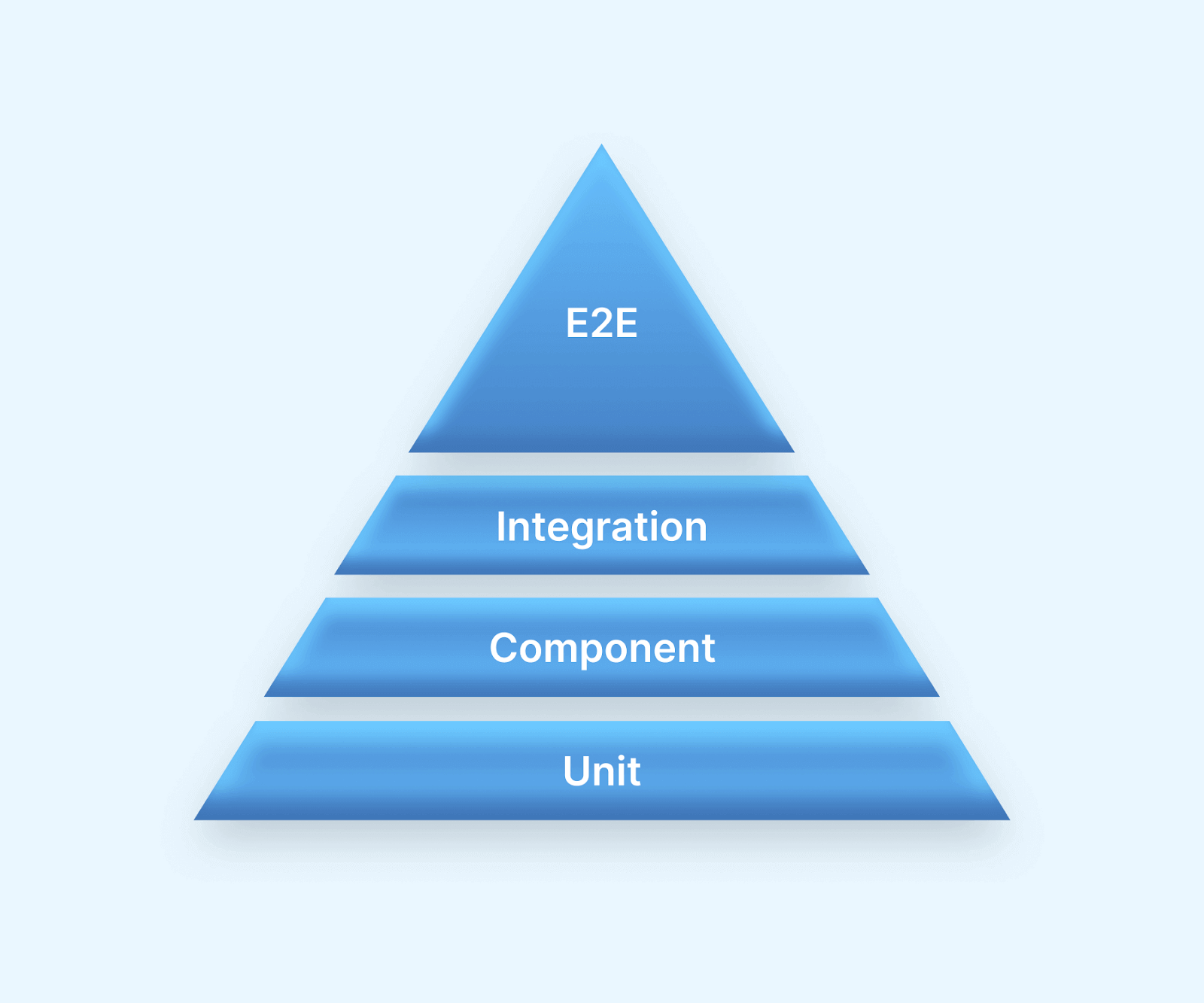
In the test automation pyramid, unit and component tests form the wide, fast base and E2E tests the narrow top:
| Parameter | E2E Tests | Component Tests |
|---|---|---|
| CLI flag | cypress run --e2e (default) | cypress run --component |
| Entry point | cy.visit(url) loads a page of the running app | cy.mount(component) renders one component |
| Scope | A full flow across UI, APIs, and database | One component with stubbed props and dependencies |
| What must be running | The application, usually reached through baseUrl | A dev server Cypress starts from your bundler config |
| Catches | Broken flows, integration errors, and environment issues | Rendering, prop, and state bugs inside one component |
This guide sticks to E2E specs. For mounting components, see the Cypress component testing tutorial.
What Is the Cypress CLI?
The Cypress CLI is the cypress executable installed with the npm package. You call it through npx, yarn, or an npm script, and it installs and verifies the Cypress binary, opens the Test Runner, runs specs headlessly, and applies flags that override configuration for a single run.
- Headless runs for CI - cypress run executes every spec without a visible browser and exits with the number of failed tests, which a continuous integration (CI) job reads as pass or fail.
- Browser selection - --browser chrome, edge, or firefox pins the run to an installed browser instead of the bundled Electron.
- Scoped runs - --spec accepts a file path, a comma-separated list, or a glob, so you rerun only the specs you changed.
- Reporters - --reporter swaps the default spec reporter for any Mocha reporter, such as json or junit, which CI dashboards turn into test reports. HTML reports need a reporter package such as mochawesome.
- Config overrides - --config overrides cypress.config.js values for one run, and --env passes secret values that specs read with cy.env().
- Parallel runs - --parallel splits specs across machines but only together with --record to Cypress Cloud. TestMu AI's HyperExecute can instead split Cypress specs across parallel virtual machines from one YAML file.
Each command and flag below is documented in the Cypress command line reference:
| Cypress CLI Command | What It Does |
|---|---|
| cypress open | Launches the Test Runner, where you pick a testing type, a browser, and a spec. |
| cypress run | Runs every spec headlessly in Electron and prints a results table per spec plus a run summary. |
| cypress run --headed | Shows the browser window during a cypress run. |
| cypress run --browser chrome | Runs the specs in an installed browser instead of Electron. |
| cypress run --spec "cypress/e2e/login/**/*" | Runs only the specs that match the path or glob. |
| cypress run --config pageLoadTimeout=100000 | Overrides configuration values for this run only. |
| cypress run --env apiKey=YOUR_KEY | Passes secret values that specs read with cy.env(). |
| cypress run --reporter json | Replaces the default spec reporter with Mocha's JSON reporter. |
| cypress run --record --key YOUR_RECORD_KEY --parallel | Records results to Cypress Cloud and splits specs across CI machines. |
| cypress install / cypress verify | Downloads the Cypress binary, then checks that it is installed correctly and can run. |
| cypress version | Prints the package, binary, Electron, and bundled Node versions. |
| cypress info | Lists the browsers Cypress detects plus system and environment details. |
| cypress cache list / cypress cache prune | Shows cached Cypress binaries, or deletes all but the installed version. |
For every cypress run flag with per-browser and reporter examples, see the Cypress run command guide.

Note: Point your existing cypress run specs at the TestMu AI cloud grid and run them in parallel without maintaining browsers locally. Try TestMu AI today
What Is the Cypress Test Runner?
The Cypress Test Runner is the interactive app that cypress open launches. You choose a testing type and a browser, click a spec, and Cypress runs it in a real browser next to a command log, re-running it whenever you save the spec file.
- Command log - Every cy command appears in order with its result, so the first red step marks where the test execution broke.
- Time travel - Hovering over a command restores the DOM snapshot taken at that step, so you see the page exactly as the assertion saw it.
- Browser DevTools - The spec runs in a real browser tab, so DevTools work as usual, and cy.pause() stops the run at a chosen step.
- Live reload - Saving a spec re-runs it immediately, so you see the effect of each edit without restarting anything.
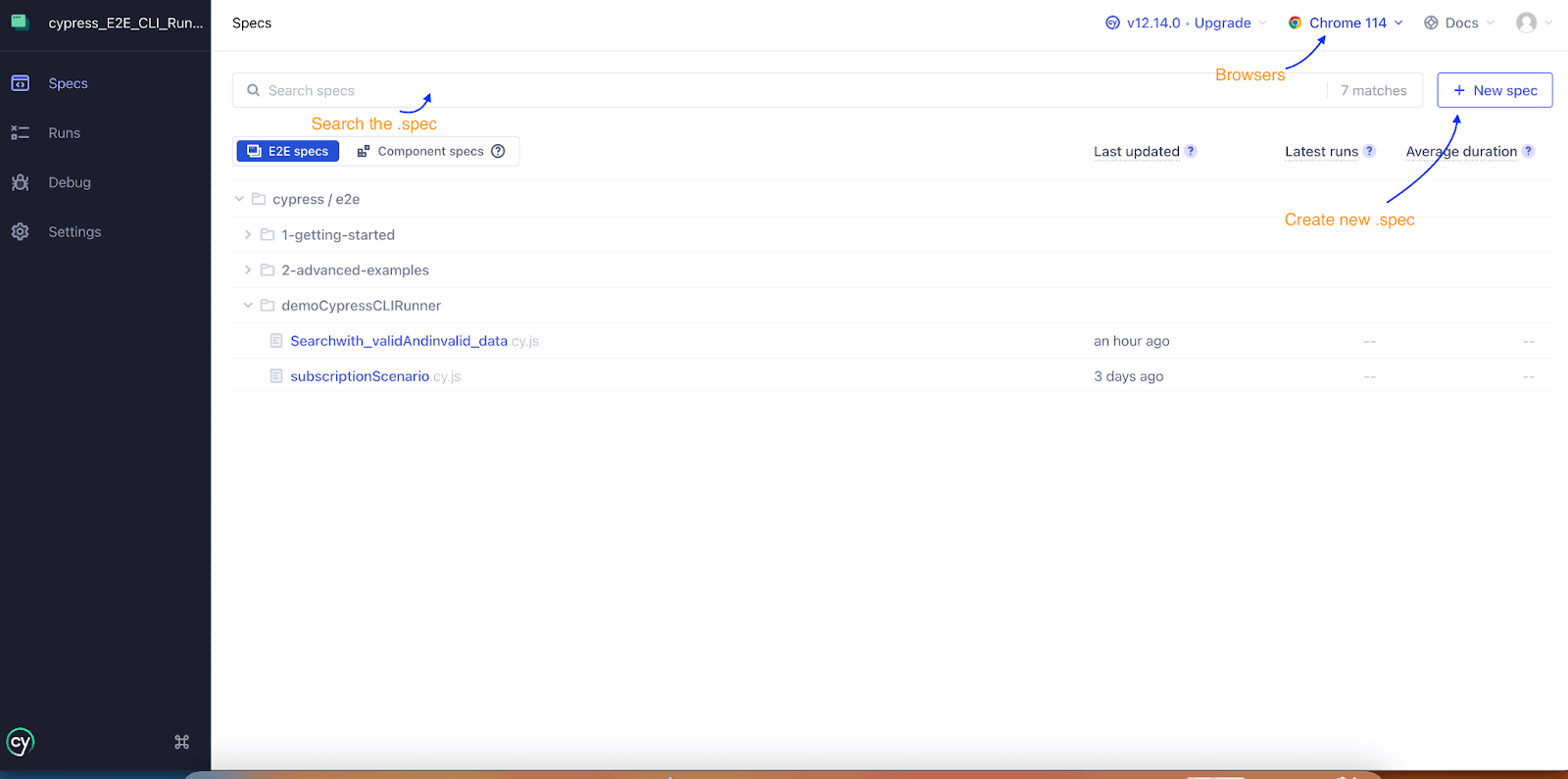
This is the Specs list that opens after yarn cypress open, captured on Cypress 12.14 when this guide was first published; the layout is the same in Cypress 16:
Cypress CLI vs Test Runner: Which Should You Use?
Use the Test Runner while you write or debug a spec, and the CLI everywhere a machine has to decide pass or fail: CI, pre-merge hooks, scheduled regression runs, and AI coding agents. The differences below come from the command line reference and the runs in the next section.
| Attribute | Cypress CLI (cypress run) | Test Runner (cypress open) |
|---|---|---|
| Browser window | Headless by default; add --headed to show it | Always headed |
| Default browser | Electron, deprecated as a test browser since Cypress 16.0.0, so pin --browser chrome | Chosen in the app from the browsers Cypress detects |
| What you see | Spec reporter output, a results table per spec, and a run summary | A live command log beside the app under test |
| Pass or fail signal | Exit code: 0, or the number of failed tests | Green or red tests on screen, with nothing for CI to read |
| Rerun | Run the command again, narrowed with --spec | Automatic when you save the spec |
| Failure evidence | A screenshot per failed test; video only with video: true | Time travel through DOM snapshots, plus DevTools |
| Needs a display | No | Yes |
| Use it for | CI, pre-merge checks, cloud grids, and AI agents | Writing and debugging specs |
The Cypress changelog for 16.0.0 (September 1, 2026) deprecates Electron as a test browser and says it will be removed in a future major version, which is why a bare cypress run now prints a warning.
How to Run Cypress Tests
Both walkthroughs use one project with two specs in cypress/e2e/demoCypressCLIRunner/. Install Cypress as a dev dependency, then add a config file that points cy.visit() at the playground:
npm install --save-dev cypress@16.1.1// cypress.config.js
const { defineConfig } = require('cypress')
module.exports = defineConfig({
e2e: {
baseUrl: 'https://ecommerce-playground.lambdatest.io',
supportFile: false,
},
})Spec 1: log in and subscribe to the newsletter
- Open the account login page.
- Log in with the playground's demo account.
- Open the Newsletter page and select Yes.
- Verify the success alert.
// cypress/e2e/demoCypressCLIRunner/subscriptionScenario.cy.js
describe('Login and subscribe to the newsletter', () => {
  it('logs in and subscribes to the newsletter', () => {
    cy.visit('/index.php?route=account/login')

    // Log in with the demo account
    cy.get('#input-email').type('lambdatestnew@yopmail.com')
    cy.get('#input-password').type('Lambda123', { log: false })
    cy.get('input[value="Login"]').click()

    // Confirm the account page loaded
    cy.url().should('include', 'route=account/account')
    cy.contains('h2', 'My Account').should('be.visible')

    // Open the newsletter page and subscribe
    cy.contains('a', 'Newsletter').click()
    cy.get('#input-newsletter-yes').check({ force: true })
    cy.get('input[value="Continue"]').click()

    // Verify the success message
    cy.get('.alert-success')
      .should('contain', 'Success: Your newsletter subscription has been successfully updated!')
  })
})
Spec 2: search with valid and invalid keywords
- Open the home page.
- Search for Apple and verify that products are listed.
- Search for xyz and verify the no-results message.
// cypress/e2e/demoCypressCLIRunner/Searchwith_validAndinvalid_data.cy.js
describe('Search with valid and invalid keywords', () => {
  beforeEach(() => {
    cy.visit('/')
  })

  it('shows products for a valid keyword', () => {
    cy.get('input[name="search"]').first().type('Apple')
    cy.get('button.type-text').click()

    cy.url().should('include', 'search=Apple')
    cy.contains('h1', 'Search - Apple').should('be.visible')
    cy.get('.product-layout').should('have.length.greaterThan', 0)
  })

  it('shows a no-results message for an invalid keyword', () => {
    cy.get('input[name="search"]').first().type('xyz')
    cy.get('button.type-text').click()

    cy.contains('There is no product that matches the search criteria.').should('be.visible')
  })
})
Both specs use chained cy commands with assertions in .should() and no fixed cy.wait() calls. They were updated for Cypress 16 and pass in the runs below.
The first version of this project is in the author's Cypress_CLI_Runner repository on GitHub.
How to Run Cypress Tests From the CLI
Run every spec headlessly
With no flags, cypress run finds every file that matches the E2E specPattern and runs them one after another in Electron:
$ npx cypress run

  (Run Starting)

  ┌────────────────────────────────────────────────────────────────────────────────────────────────┐
  │ Cypress:        16.1.1                                                                         │
  │ Browser:        Electron 146 (headless) (deprecated)                                           │
  │ Node Version:   v24.14.0 (C:\Program Files\nodejs\node.exe)                                    │
  │ Specs:          2 found (Searchwith_validAndinvalid_data.cy.js, subscriptionScenario.cy.js)    │
  │ Searched:       cypress/e2e/**/*.cy.{js,jsx,ts,tsx}                                            │
  └────────────────────────────────────────────────────────────────────────────────────────────────┘

Warning: The Electron browser is deprecated as a test browser and will be removed in a future version of Cypress.

Switch to Chrome or another installed browser to avoid a breaking change when you upgrade.

  Running:  Searchwith_validAndinvalid_data.cy.js                                           (1 of 2)

  Search with valid and invalid keywords
    √ shows products for a valid keyword (12614ms)
    √ shows a no-results message for an invalid keyword (4147ms)

  2 passing (17s)

  (Results)

  ┌────────────────────────────────────────────────────────────────────────────────────────────────┐
  │ Tests:        2                                                                                │
  │ Passing:      2                                                                                │
  │ Failing:      0                                                                                │
  │ Pending:      0                                                                                │
  │ Skipped:      0                                                                                │
  │ Screenshots:  0                                                                                │
  │ Video:        false                                                                            │
  │ Duration:     16 seconds                                                                       │
  │ Spec Ran:     Searchwith_validAndinvalid_data.cy.js                                            │
  └────────────────────────────────────────────────────────────────────────────────────────────────┘

  Running:  subscriptionScenario.cy.js                                                      (2 of 2)

  Login and subscribe to the newsletter
    √ logs in and subscribes to the newsletter (11087ms)

  1 passing (11s)

  (Run Finished)

       Spec                                              Tests  Passing  Failing  Pending  Skipped
  ┌────────────────────────────────────────────────────────────────────────────────────────────────┐
  │ ✔  Searchwith_validAndinvalid_data.cy.      00:16        2        2        -        -        - │
  │    js                                                                                          │
  ├────────────────────────────────────────────────────────────────────────────────────────────────┤
  │ ✔  subscriptionScenario.cy.js               00:11        1        1        -        -        - │
  └────────────────────────────────────────────────────────────────────────────────────────────────┘
✔ All specs passed! 00:28 3 3 - - -- Run Starting - lists the Cypress version, the browser, Node, and the specs found by the cypress/e2e/**/*.cy.{js,jsx,ts,tsx} glob.
- Electron warning - appears because no --browser was passed, so Cypress fell back to its deprecated default.
- Results - each spec prints its tests with durations, then a table where Video: false confirms recording is off by default.
- Run Finished - summarizes every spec; the process exited with code 0.
Run one spec file
Pass the path with --spec to skip everything else, which is how you rerun the one file you are fixing:
$ npx cypress run --spec cypress/e2e/demoCypressCLIRunner/subscriptionScenario.cy.js

  Running:  subscriptionScenario.cy.js                                                      (1 of 1)

  Login and subscribe to the newsletter
    √ logs in and subscribes to the newsletter (22137ms)

  1 passing (22s)

  (Run Finished)

       Spec                                              Tests  Passing  Failing  Pending  Skipped
  ┌────────────────────────────────────────────────────────────────────────────────────────────────┐
  │ ✔  subscriptionScenario.cy.js               00:22        1        1        -        -        - │
  └────────────────────────────────────────────────────────────────────────────────────────────────┘
    ✔  All specs passed!                        00:22        1        1        -        -        -
Run every spec in headless Chrome
--browser chrome uses the installed Chrome and stays headless, and the Electron warning disappears. The guide to Cypress headless mode covers Firefox and WebKit as well.
$ npx cypress run --browser chrome

  (Run Starting)

  ┌────────────────────────────────────────────────────────────────────────────────────────────────┐
  │ Cypress:        16.1.1                                                                         │
  │ Browser:        Chrome 154 (headless)                                                          │
  │ Node Version:   v24.14.0 (C:\Program Files\nodejs\node.exe)                                    │
  │ Specs:          2 found (Searchwith_validAndinvalid_data.cy.js, subscriptionScenario.cy.js)    │
  │ Searched:       cypress/e2e/**/*.cy.{js,jsx,ts,tsx}                                            │
  └────────────────────────────────────────────────────────────────────────────────────────────────┘

  Running:  Searchwith_validAndinvalid_data.cy.js                                           (1 of 2)

  Search with valid and invalid keywords
    √ shows products for a valid keyword (12971ms)
    √ shows a no-results message for an invalid keyword (2680ms)

  2 passing (16s)

  Running:  subscriptionScenario.cy.js                                                      (2 of 2)

  Login and subscribe to the newsletter
    √ logs in and subscribes to the newsletter (15278ms)

  1 passing (15s)

  (Run Finished)

       Spec                                              Tests  Passing  Failing  Pending  Skipped
  ┌────────────────────────────────────────────────────────────────────────────────────────────────┐
  │ ✔  Searchwith_validAndinvalid_data.cy.      00:15        2        2        -        -        - │
  │    js                                                                                          │
  ├────────────────────────────────────────────────────────────────────────────────────────────────┤
  │ ✔  subscriptionScenario.cy.js               00:15        1        1        -        -        - │
  └────────────────────────────────────────────────────────────────────────────────────────────────┘
    ✔  All specs passed!                        00:31        3        3        -        -        -
Run one spec headed in Chrome
Add --headed to watch the browser during a CLI run; the Browser row drops the "(headless)" label:
$ npx cypress run --spec cypress/e2e/demoCypressCLIRunner/Searchwith_validAndinvalid_data.cy.js --browser chrome --headed

  ┌────────────────────────────────────────────────────────────────────────────────────────────────┐
  │ Cypress:        16.1.1                                                                         │
  │ Browser:        Chrome 154                                                                     │
  │ Node Version:   v24.14.0 (C:\Program Files\nodejs\node.exe)                                    │
  │ Specs:          1 found (Searchwith_validAndinvalid_data.cy.js)                                │
  └────────────────────────────────────────────────────────────────────────────────────────────────┘

  Running:  Searchwith_validAndinvalid_data.cy.js                                           (1 of 1)

  Search with valid and invalid keywords
    √ shows products for a valid keyword (12265ms)
    √ shows a no-results message for an invalid keyword (2973ms)

  2 passing (15s)
Get machine-readable results
--reporter json prints Mocha's JSON report for each spec, trimmed here to its stats object, and the shell's $? holds the exit code:
$ npx cypress run --reporter json --spec cypress/e2e/demoCypressCLIRunner/Searchwith_validAndinvalid_data.cy.js

  Running:  Searchwith_validAndinvalid_data.cy.js                                           (1 of 1)
{
  "stats": {
    "suites": 1,
    "tests": 2,
    "passes": 2,
    "pending": 0,
    "failures": 0,
    "start": "2026-09-30T08:06:24.223Z",
    "end": "2026-09-30T08:06:39.691Z",
    "duration": 15468
  },
  ...
}

$ echo $?
0
See what a failure returns
A third spec that expects the wrong heading shows the failure path: the assertion error, one screenshot saved automatically, and a non-zero exit code.
$ npx cypress run --browser chrome --spec cypress/e2e/failDemo/searchHeading.cy.js

  Running:  searchHeading.cy.js                                                             (1 of 1)

  Search heading check
    1) fails on purpose to show the exit code

  0 passing (20s)
  1 failing

  1) Search heading check
       fails on purpose to show the exit code:
     AssertionError: Timed out retrying after 6000ms: Expected to find content: 'Search - iPhone' within the selector: 'h1' but never did.
      at Context.eval (webpack://cypress-cli-runner-demo/./cypress/e2e/failDemo/searchHeading.cy.js:8:60)

  (Results)

  ┌────────────────────────────────────────────────────────────────────────────────────────────────┐
  │ Tests:        1                                                                                │
  │ Passing:      0                                                                                │
  │ Failing:      1                                                                                │
  │ Pending:      0                                                                                │
  │ Skipped:      0                                                                                │
  │ Screenshots:  1                                                                                │
  │ Video:        false                                                                            │
  │ Duration:     20 seconds                                                                       │
  │ Spec Ran:     searchHeading.cy.js                                                              │
  └────────────────────────────────────────────────────────────────────────────────────────────────┘

  (Run Finished)

       Spec                                              Tests  Passing  Failing  Pending  Skipped
  ┌────────────────────────────────────────────────────────────────────────────────────────────────┐
  │ ✖  searchHeading.cy.js                      00:20        1        -        1        -        - │
  └────────────────────────────────────────────────────────────────────────────────────────────────┘
    ✖  1 of 1 failed (100%)                     00:20        1        -        1        -        -

$ echo $?
1
That exit code is what fails a CI job, so one npx cypress run --browser chrome step is enough to gate a pull request. See how to run Cypress tests with GitHub Actions for a complete workflow file.
How to Run Tests in the Cypress Test Runner
- Run npx cypress open in the project folder.
- Choose E2E Testing as the testing type.
- Pick a browser. Chrome, Edge, and Firefox appear when installed, next to the bundled Electron.
- Click a spec in the Specs list, or type part of its name in the search box to filter the list.
The spec runs in the browser pane on the right while the command log fills in on the left. In this capture the search spec has finished in Chrome, and the page still shows the no-results state from the second test:
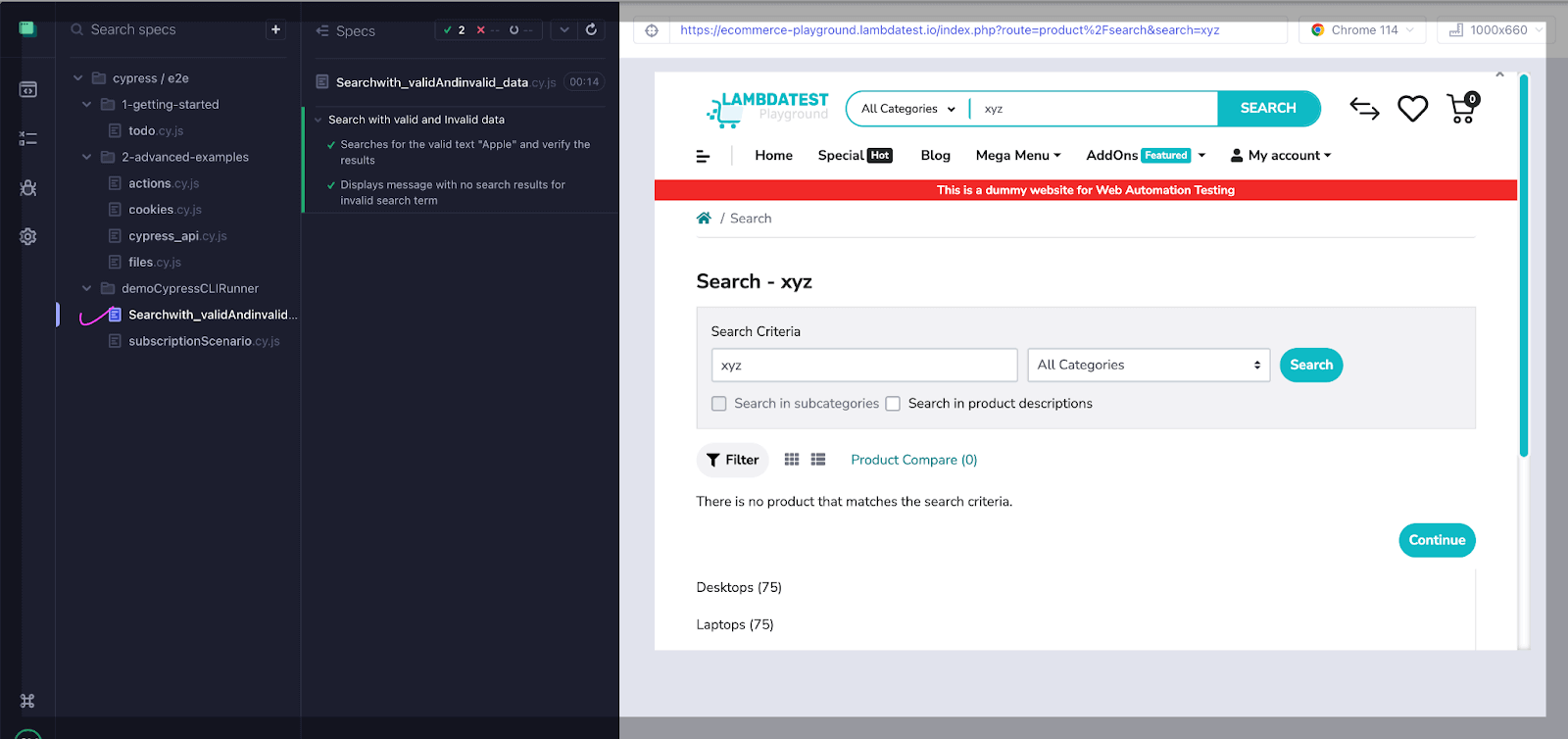
Leave the runner open while you edit: each save re-runs the spec, and hovering over a failed command shows the DOM at that moment. Once a spec passes here, the CLI commands above are what keep it passing in CI.
How to Run the Same Specs on TestMu AI Cloud
A local run covers only the browsers installed on one machine. TestMu AI's Automation Cloud runs existing Cypress specs across 3,000+ browser and OS combinations in parallel, and the lambdatest-cypress-cli package uploads the project without changes to the spec files.
npm install --save-dev lambdatest-cypress-cli
npx lambdatest-cypress init --cv 10

export LT_USERNAME="your_username"
export LT_ACCESS_KEY="your_access_key"
npx lambdatest-cypress run --sync=true
init writes lambdatest-config.json, base_reporter_config.json, and custom_support_file.js. This config runs both specs on Chrome and Edge on Windows 11 with two parallel sessions. Leaving out the lambdatest_auth block makes the CLI read the LT_USERNAME and LT_ACCESS_KEY environment variables, so no credentials sit in the repository.
{
  "browsers": [
    { "browser": "Chrome", "platform": "Windows 11", "versions": ["latest"] },
    { "browser": "MicrosoftEdge", "platform": "Windows 11", "versions": ["latest"] }
  ],
  "run_settings": {
    "reporter_config_file": "base_reporter_config.json",
    "build_name": "Cypress CLI and Test Runner demo",
    "parallels": 2,
    "specs": "./cypress/e2e/demoCypressCLIRunner/*.cy.js",
    "ignore_files": "",
    "network": true,
    "video": true,
    "headless": false,
    "npm_dependencies": {
      "cypress": "16.1.1"
    }
  },
  "tunnel_settings": {
    "tunnel": false,
    "tunnel_name": null
  }
}
With --sync=true, the CLI waits for the build and prints one row per spec and browser. This is the run of the two specs above:
$ npx lambdatest-cypress run --sync=true
Validating lambdatest config
Overriding Cypress Version
Uploaded project file successfully
Archiving ---------  ./cypress/e2e/demoCypressCLIRunner/Searchwith_validAndinvalid_data.cy.js
Archiving ---------  ./cypress/e2e/demoCypressCLIRunner/subscriptionScenario.cy.js
Uploaded tests file successfully
Waiting for build to finish...
┌─────────┬─────────────────────────────────────────┬──────────┬──────────┬─────────────────┬─────────┐
│ (index) │ Spec                                    │ Status   │ Platform │ Browser         │ Version │
├─────────┼─────────────────────────────────────────┼──────────┼──────────┼─────────────────┼─────────┤
│ 0       │ 'subscriptionScenario.cy.js'            │ 'passed' │ 'win11'  │ 'MicrosoftEdge' │ '154.0' │
│ 1       │ 'Searchwith_validAndinvalid_data.cy.js' │ 'passed' │ 'win11'  │ 'chrome'        │ '154.0' │
│ 2       │ 'Searchwith_validAndinvalid_data.cy.js' │ 'passed' │ 'win11'  │ 'MicrosoftEdge' │ '154.0' │
│ 3       │ 'subscriptionScenario.cy.js'            │ 'passed' │ 'win11'  │ 'chrome'        │ '154.0' │
└─────────┴─────────────────────────────────────────┴──────────┴──────────┴─────────────────┴─────────┘
{ passed: 4 }
All four sessions passed on Chrome 154 and Edge 154, with video and network capture turned on in the config. The TestMu AI Cypress CLI commands reference lists the other flags, including --parallels and the build-info and build-stop commands.
To test what you have practiced here, the free Cypress 101 certification from TestMu AI covers command chaining, cy.intercept(), cross-browser testing, and parallel execution.

Austin Siewert
Co-Founder, Steadfast Systems
Discovered @TestMu AI yesterday. Best browser testing tool I've found for my use case. Great pricing model for the limited testing I do 👏
2M+ Devs and QAs rely on TestMu AI
Deliver immersive digital experiences with Next-Generation Mobile Apps and Cross Browser Testing Cloud

How Do AI Coding Agents Run Cypress Tests?
AI coding agents run Cypress through the CLI. A headless cypress run returns an exit code and a report the agent can parse, and since Cypress 15.21.0 the cypress tap command also lets an agent query an open-mode session from the terminal, according to the Cypress changelog.
- Headless execution - The agent runs npx cypress run --browser chrome. A non-zero exit code is the fail signal, and pinning Chrome avoids the deprecated Electron default.
- Machine-readable reports - --reporter json prints a stats object plus each test's title and error, so the agent reads the failure instead of watching a video.
- Scoped reruns - --spec narrows the run to the file the agent just edited, which keeps each fix-and-check cycle short.
- Open-mode access - cypress tap lists specs, reruns one, and reads the DOM, the ARIA tree, and a command's DOM snapshots from a running cypress open session.
- Secrets - Credentials go in --env and are read with cy.env(). Cypress 16.0.0 removed Cypress.env(), so specs an agent copies from older examples fail until they are updated.
The Cypress skill from TestMu AI's open-source agent skills repository gives Claude Code, Cursor, GitHub Copilot, and Gemini CLI these conventions, including chained cy commands with no fixed waits. Give an agent the same command a person would run locally, so any failure it reports can be reproduced by hand.
Conclusion
Add npx cypress run --browser chrome to your CI job, and keep cypress open for writing and debugging specs. When the suite needs browsers your CI machine does not have, run the same specs on the TestMu AI Cypress testing platform by following Getting Started With Cypress Testing in the TestMu AI docs.
Author

Kailash Pathak
Blogs: 12


Kailash Pathak is a Senior QA Lead Manager at 3Pillar Global with over 18 years of experience in software testing and automation. He has built scalable automation frameworks using Selenium, Cypress, and Playwright, integrating them with CI/CD pipelines and aligning them with business goals. He is the author of Web Automation Testing Using Playwright, which ranked #1 in Amazon’s “API & Operating Environments” category for six consecutive months. He is a Microsoft MVP (Most Valuable Professional) in Quality Assurance, a LinkedIn “Top QA Voice” with 19,500+ followers, and a core member of TestMu AI Spartans, DZone, and Applitools Ambassador programs. Kailash holds certifications including AWS (CFL), PMI-ACP®, ITIL®, PRINCE2 Practitioner®, and ISTQB. He has delivered 25+ QA talks across conferences and webinars and actively mentors engineers while driving quality strategies, shift-left testing, and continuous improvement.
Reviewer

Himanshu Sheth
Reviewer
Himanshu Sheth is the Director of Marketing (Technical Content) at TestMu AI, with over 8 years of hands-on experience in Selenium, Cypress, and other test automation frameworks. He has authored more than 130 technical blogs for TestMu AI, covering software testing, automation strategy, and CI/CD. At TestMu AI, he leads the technical content efforts across blogs, YouTube, and social media, while closely collaborating with contributors to enhance content quality and product feedback loops. He has done his graduation with a B.E. in Computer Engineering from Mumbai University. Before TestMu AI, Himanshu led engineering teams in embedded software domains at companies like Samsung Research, Motorola, and NXP Semiconductors. He is a core member of DZone and has been a speaker at several unconferences focused on technical writing and software quality.
Cypress CLI and Test Runner FAQs
Did you find this page helpful?
More Related Blogs
TestMu AI forEnterprise
Get access to solutions built on Enterprise
grade security, privacy, & compliance
- Advanced access controls
- Advanced data retention rules
- Advanced Local Testing
- Premium Support options
- Early access to beta features
- Private Slack Channel
- Unlimited Manual Accessibility DevTools Tests