
Run Web Automation Tests at Scale with Agentic AI
Generate tests with AI agents or automate test suites with Selenium, Playwright and other frameworks. Run tests in parallel on TestMu AI scalable cloud grid.

- TestMu AI (Formerly LambdaTest)
- /
- Learning Hub
- /
- Cypress Timeout: How to Set, Increase and Fix Timeouts
Cypress Timeout: How to Set, Increase and Fix Timeouts
Cypress timeout guide for Cypress 16: the default values, how to set a timeout per command, test or config file, which setting wins and how to fix each error.
Published on:
Concurrency-related issues, such as async waits, race conditions and deadlocks, are the most common cause of flaky tests in JavaScript, according to a study by Hashemi, Tahir and Rasheed of 452 commits from large JavaScript projects on GitHub.
In a Cypress suite, a wait problem usually shows up as Timed out retrying after 4000ms, and the quick fix is to raise defaultCommandTimeout to 10000. The test goes green, every failing command now waits 10 seconds instead of 4 before it reports, and the real cause stays hidden: a click that never registered, a selector that matches nothing, or a header covering the button.
This guide from TestMu AI (formerly LambdaTest) covers every timeout in Cypress 16, where each one is set, which setting wins when several are set, and what each timed out error means. The examples run against the Selenium Playground on a local browser and on the TestMu AI cloud grid, and the error messages are the exact text Cypress 16.2.1 prints. If Cypress is new to you, start with the Cypress tutorial.
TL;DR
A Cypress timeout is the longest time Cypress keeps retrying a command or waiting for an event before it fails the test. Most DOM commands and assertions use defaultCommandTimeout (4000 ms); page loads, network waits and Node tasks have their own limits. Raise the limit on the slow command, and globally only when the whole app is slow.
What Is the Default Timeout in Cypress?
- defaultCommandTimeout: 4000 ms. It covers queries such as cy.get() and cy.contains(), the assertions chained to them, and the actionability checks Cypress runs before .click() or .type().
- pageLoadTimeout: 60000 ms. It limits how long cy.visit(), cy.go() and cy.reload() wait for the page's load event before Cypress fails the navigation.
- requestTimeout: 5000 ms. It limits how long cy.wait('@alias') waits for a matching request to leave the browser, which is the first of its two waits.
- responseTimeout: 30000 ms. It limits the wait for a server response in cy.wait('@alias') and cy.request(), and it also applies to cy.fixture() and cy.screenshot().
- taskTimeout: 60000 ms. It limits how long a cy.task() handler can run in Node, and it replaces execTimeout, which Cypress 16 removed along with cy.exec().
How Do You Fix a Cypress Timeout?
Read which command timed out, then fix the cause: a wrong selector, an action that ran before the page was ready, an element covered by another element, or a step that is genuinely slow. Raise the timeout only on the slow step. TestMu AI runs the same Cypress specs on cloud browsers with command logs and video for each session, which helps with failures that only happen in CI.
What Is a Cypress Timeout?
A Cypress timeout is the maximum time Cypress spends retrying a command before it fails the test. Queries such as cy.get() and cy.contains() retry together with the assertions chained to them. Action commands such as .click() run once, after Cypress has waited for the element to become actionable within the same limit.
The Cypress retry-ability guide says each command that retries does so for up to 4 seconds, the defaultCommandTimeout setting. Before an action such as a click, Cypress also waits until the element is visible, enabled and not behind another element.
A timeout error names the command that ran out of time. That name is the first clue to whether the app was slow or the test waited for the wrong thing.
Cypress Default Timeout Values
The Cypress configuration reference lists five timeout options, all set in milliseconds. The defaults are 4000 for defaultCommandTimeout, 60000 for pageLoadTimeout, 5000 for requestTimeout, 30000 for responseTimeout and 60000 for taskTimeout.
| Option | Default (ms) | What it limits | Commands it covers |
|---|---|---|---|
| defaultCommandTimeout | 4000 | Retrying a query and its assertions, and the actionability checks before an action | cy.get(), cy.contains(), .find(), .should(), .click(), .type() |
| pageLoadTimeout | 60000 | Waiting for the page's load event | cy.visit(), cy.go(), cy.reload() |
| requestTimeout | 5000 | Waiting for a matching request to leave the browser | cy.wait('@alias') |
| responseTimeout | 30000 | Waiting for a response | cy.wait('@alias'), cy.request(), cy.fixture(), cy.setCookie(), cy.clearCookie(), cy.screenshot() |
| taskTimeout | 60000 | Waiting for a Node task to finish | cy.task() |
Two settings sound related but never extend a wait. slowTestThreshold (10000 ms for E2E tests) only colors a slow test orange in the reporter, and retries reruns a failed test from the start.
execTimeout no longer belongs on the list: Cypress 16.0.0 removed it together with cy.exec(). The Cypress 16 section below covers the move to cy.task().
How to Set Timeouts in Cypress
Cypress reads timeouts from the command, the test or suite, Cypress.config(), the config file, the CLI and environment variables. Set the limit at the narrowest level that covers the slow step, so the rest of the suite keeps failing fast.
Timeout on a Single Command
Pass { timeout } as the last argument to a query. The value covers that query and every assertion chained to it, and nothing else in the test changes.
cy.get('#downloadButton').click()

// Retries for up to 15 seconds, then fails
cy.contains('.progress-label', 'Complete!', { timeout: 15000 })

// .should() has no timeout of its own: it inherits the query's
cy.get('.progress-label', { timeout: 15000 }).should('have.text', 'Complete!')
A timeout of 0 turns retrying off, which suits a check that something must not exist at this moment: cy.get('#no-such-element', { timeout: 0 }).should('not.exist') checks once and moves on.
Timeout for One Test or Suite
To increase the timeout for one test, pass a configuration object as the second argument to it(). The same object on describe() covers every test in the block, and both reset when the test or suite ends.
it('waits for the download', { defaultCommandTimeout: 15000 }, () => {
  cy.get('#downloadButton').click()
  cy.contains('.progress-label', 'Complete!')
})

describe('Download demo', { defaultCommandTimeout: 15000 }, () => {
  // every test in this block uses 15000 ms
})
All five timeout options can be set this way. pageLoadTimeout, requestTimeout, responseTimeout and taskTimeout are on the list of values Cypress lets test configuration change, next to defaultCommandTimeout.
Cypress.config() at Runtime
Cypress.config('defaultCommandTimeout', 15000) changes the value for the rest of the spec file, and Cypress resets it when the spec finishes. Where you call it decides which tests see the new value.
- Top of the spec file - the call runs when the spec loads, so the first test already uses the new value.
- Inside a before() hook - the first test in the block also uses the new value.
- Inside a test body - the test that makes the call keeps its starting value and still fails at 4000 ms; the change applies from the next test in the spec.
So a Cypress.config() call placed inside the slow test does not help that test. Give the test a configuration object instead, or move the call to the top of the spec.
// Runs when the spec file loads, so every test in the file gets 15000 ms
Cypress.config('defaultCommandTimeout', 15000)

describe('Download demo', () => {
  it('uses 15000 ms from the first test', () => {
    // ...
  })
})
Cypress 16 also stops Cypress.config() from setting viewportWidth, viewportHeight or blockHosts while a test runs. The attempt fails the test with this error:
CypressError: `Cypress.config()` cannot override `viewportWidth` during test execution
because it would affect the next test rather than the current one. Set `viewportWidth`
in the test configuration of a `describe`/`context` or `it` block instead. To change
the viewport during a test, use `cy.viewport()`.
Global Timeout in the Config File
A global timeout lives in cypress.config.js. A value in the e2e or component block overrides the top-level value for that testing type.
const { defineConfig } = require('cypress')

module.exports = defineConfig({
  defaultCommandTimeout: 4000, // E2E and component tests
  e2e: {
    baseUrl: 'https://www.testmuai.com',
    defaultCommandTimeout: 15000, // E2E tests only
    pageLoadTimeout: 60000,
    requestTimeout: 5000,
    responseTimeout: 30000,
    taskTimeout: 60000,
  },
})
With this file, E2E tests resolve defaultCommandTimeout to 15000 because the e2e block beats the top-level 4000. Guides that set timeouts in cypress.json predate Cypress 10, which moved configuration to cypress.config.js.
CLI Flag and Environment Variables
In CI, override a timeout without editing code. The --config flag sets a value for one Cypress run, and Cypress also reads configuration from environment variables prefixed with CYPRESS_.
# One run, one value
npx cypress run --config defaultCommandTimeout=10000

# Environment variable (macOS and Linux shells)
export CYPRESS_DEFAULT_COMMAND_TIMEOUT=10000
npx cypress run
Cypress Timeout Precedence
When two sources disagree, Cypress 16.2.1 uses the higher row in this table. A per-command option of 2000 ms, for example, fails a test whose own configuration sets 15000 ms.
| Rank | Source | Example | Scope |
|---|---|---|---|
| 1 | Command option | cy.contains(selector, text, { timeout: 2000 }) | That query and its assertions |
| 2 | Test or suite configuration | it(name, { defaultCommandTimeout: 15000 }, fn) | That test or block |
| 3 | --config flag | --config defaultCommandTimeout=4000 | The whole run |
| 4 | CYPRESS_ environment variable | CYPRESS_DEFAULT_COMMAND_TIMEOUT=15000 | The whole run |
| 5 | e2e or component block | e2e: { defaultCommandTimeout: 15000 } | That testing type |
| 6 | Top-level config value | defaultCommandTimeout: 4000 | All testing types |
| 7 | Built-in default | 4000 | Everything else |
Cypress.config() sits outside the ranking because it overwrites the resolved value at the moment it runs, so its effect depends on where you place it.
Reading a Cypress Timeout Error
Each timeout produces its own message, so the first line of the error tells you which setting ran out. These are the messages Cypress 16.2.1 prints for each case.
| Error starts with | Setting behind it | Check first |
|---|---|---|
| Timed out retrying after 4000ms: Expected to find content: 'Complete!' within the selector: '.progress-label' but never did. | defaultCommandTimeout | The selector, and whether the action before it took effect |
| Timed out retrying after 4050ms: cy.click() failed because this element ... is being covered by another element | defaultCommandTimeout (actionability) | What covers the target: a sticky header, a banner or a modal |
| Timed out after waiting 300ms for your remote page to load. | pageLoadTimeout | Scripts and stylesheets that delay the page's load event |
| cy.wait() timed out waiting 2000ms for the 1st request to the route: getOrders. No request ever occurred. | requestTimeout | The intercept's method and URL pattern, and whether the app sent the request at all |
| cy.wait() timed out waiting 3000ms for the 1st response to the route: getCountry. No response ever occurred. | responseTimeout | Backend latency for that endpoint |
| cy.request() timed out waiting 2000ms for a response from your server. | responseTimeout (the timeout option of cy.request) | API latency or an unreachable host |
| cy.task('sleep') timed out after waiting 1000ms. | taskTimeout | The Node handler: a slow job or a promise that never resolves |
| cy.exec() was removed in Cypress version 16.0.0. | None, the command is gone | Move the shell work into cy.task() |
The rest of the error shows the failing command in the Command Log and the line of your spec that queued it. The Cypress debugging guide covers stepping through that log.
Cypress Timeout Demo on the Selenium Playground
The jQuery download progress bar demo on the TestMu AI Selenium Playground makes a good timeout target. After you click Start Download, the label reads Complete! about 8 to 10 seconds later, which is more than twice the default limit.
Default Timeout vs Per-Command Timeout
This spec runs the same download three ways: with the default, with a per-command timeout and with a per-test override.
describe('jQuery download progress bar', () => {
  beforeEach(() => {
    cy.visit('/selenium-playground/jquery-download-progress-bar-demo/')
    // jQuery UI turns #progressbar into a widget after the load event
    cy.get('#progressbar').should('have.class', 'ui-progressbar')
  })

  it('fails with the default 4000 ms timeout', () => {
    cy.get('#downloadButton').click()
    cy.contains('.progress-label', 'Complete!')
  })

  it('passes with a per-command timeout', () => {
    cy.get('#downloadButton').click()
    cy.contains('.progress-label', 'Complete!', { timeout: 15000 })
  })

  it('passes with a per-test override', { defaultCommandTimeout: 15000 }, () => {
    cy.get('#downloadButton').click()
    cy.contains('.progress-label', 'Complete!')
  })
})- Default 4000 ms - fails with "Timed out retrying after 4000ms: Expected to find content: 'Complete!' within the selector: '.progress-label' but never did."
- Per-command timeout of 15000 ms - passes, with each test finishing in 8 to 10 seconds including the page visit.
- Per-test defaultCommandTimeout of 15000 ms - passes in 8 to 12 seconds, leaving headroom under the 15-second limit.
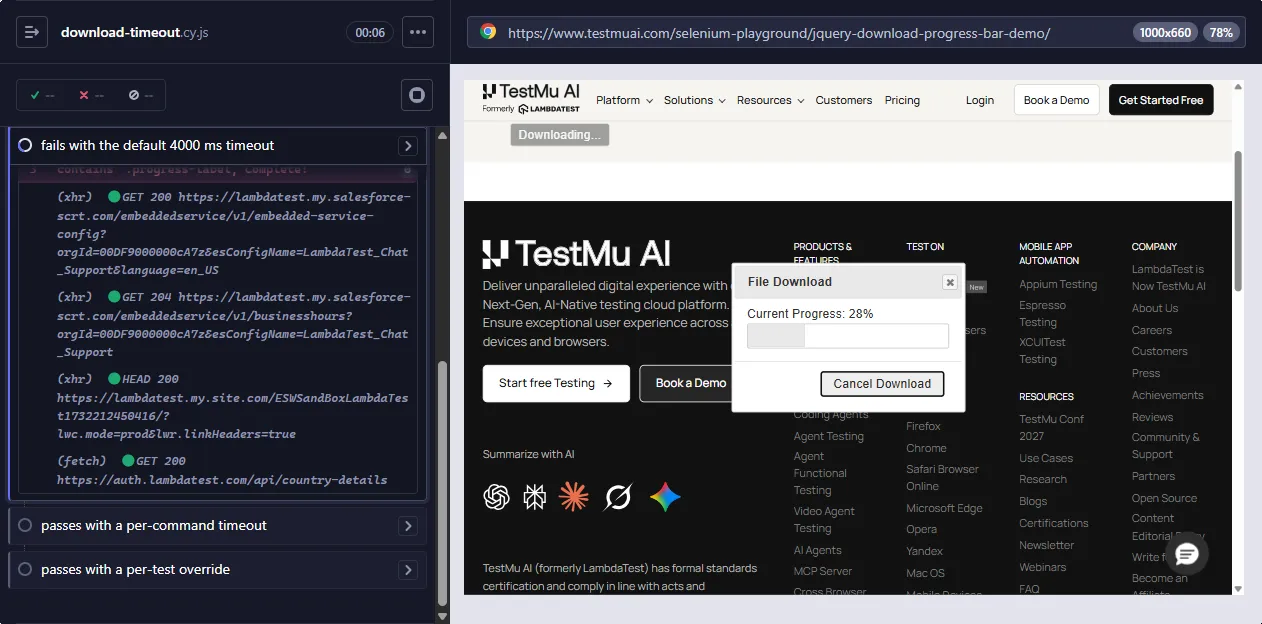
The screenshot Cypress saved at the failure shows the download dialog less than a third done when the 4000 ms limit ran out. The app was working, and the test gave up before the download could finish.
Clicking Before the Page Is Ready
The beforeEach hook above waits for #progressbar to get the ui-progressbar class before clicking. The page loads jQuery UI after its load event, and jQuery UI attaches the button's click handler, while cy.visit() resolves at the load event itself.
Drop that line and the click reaches the button before the handler exists:
it('times out even with a 15 s timeout', () => {
  cy.visit('/selenium-playground/jquery-download-progress-bar-demo/')
  cy.get('#downloadButton').click()
  cy.contains('.progress-label', 'Complete!', { timeout: 15000 })
})
This test fails with "Timed out retrying after 15000ms" even though the limit is almost twice the download time. The download dialog never opened, so the label never changes however long Cypress waits.
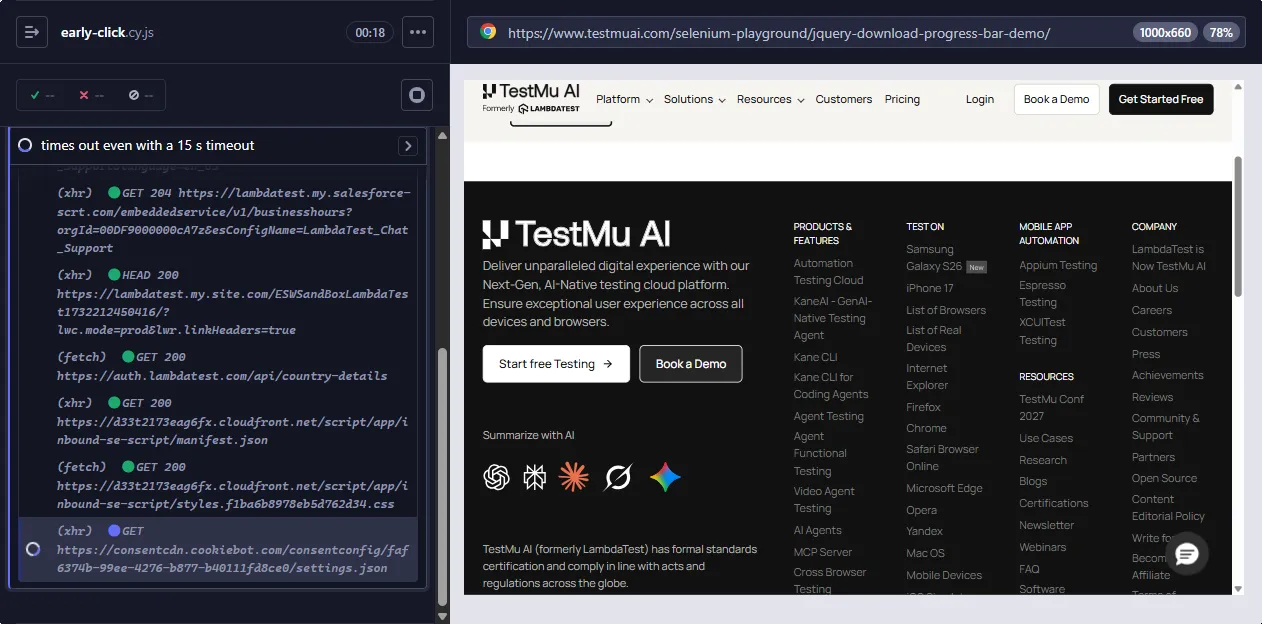
The fix is a readiness check, here the ui-progressbar class, before the click. Use the same pattern on any page that attaches handlers after load, such as a single-page app that hydrates on the client.
Covered Click on the Cloud Grid
On the TestMu AI cloud grid, with Windows 11 and Chrome 156, both overrides passed in every session. In two of three sessions, though, the first test failed at the click rather than at the assertion:
CypressError: Timed out retrying after 4050ms: `cy.click()` failed because this element:

`<button class="... ui-button ui-corner-all ui-widget" id="downloadButton">Start D...</button>`

is being covered by another element:

`<img role="img" src="https://assets.testmuai.com/resources/images/logos/logo.svg" alt="TestMu AI Logo" ...>`

Fix this problem, or use {force: true} to disable error checking.
Cypress scrolls an element into view before acting on it, and at that moment the site header sat over the button. The click's actionability check retried until defaultCommandTimeout ran out, which shows that the same setting governs clicks as well as queries.
Setting scrollBehavior: 'center' on the suite did not prevent it, and later tests in the same session clicked normally. A covered-element error points at page state, such as a header, a banner or a layout shift over the target, so find what covers the element before changing any timeout.

Note: Run the same Cypress specs on TestMu AI's cloud browsers, with the Cypress and Node.js versions pinned in lambdatest-config.json, and compare each session's logs with your local run. To try it, start free.
Network Timeouts in cy.wait() and cy.request()
According to the Cypress cy.wait() docs, waiting on an alias happens in two periods. Cypress first waits up to requestTimeout, 5000 ms by default, for a matching request to leave the browser, then up to responseTimeout, 30000 ms by default, for the server to respond.
The spec below triggers each failure on purpose. The second test delays a request the Playground page sends during load, so no click is involved.
describe('Network wait timeouts', () => {
  it('requestTimeout: no matching request is sent', () => {
    cy.intercept('GET', '**/api/orders*').as('getOrders')
    cy.visit('/selenium-playground/dynamic-data-loading-demo/')
    cy.wait('@getOrders', { requestTimeout: 2000 })
  })

  it('responseTimeout: cy.wait() sees the request but not the response', () => {
    cy.intercept('GET', '**/api/country-details', (req) => {
      req.on('response', (res) => res.setDelay(8000))
    }).as('getCountry')
    cy.visit('/selenium-playground/dynamic-data-loading-demo/')
    cy.wait('@getCountry', { responseTimeout: 3000 })
  })

  it('responseTimeout: cy.request() to a slow endpoint', () => {
    cy.request({ url: 'https://httpbin.org/delay/5', timeout: 2000 })
  })
})- No matching request - "cy.wait() timed out waiting 2000ms for the 1st request to the route: getOrders. No request ever occurred."
- Slow response to a matched request - "cy.wait() timed out waiting 3000ms for the 1st response to the route: getCountry. No response ever occurred."
- Slow cy.request() - "cy.request() timed out waiting 2000ms for a response from your server." The error also prints the method and URL Cypress sent.
A "1st request" error usually means the intercept's method or URL pattern does not match what the app sends, so raising requestTimeout rarely helps. A "1st response" error points at the backend. The Cypress intercept guide covers route matching in detail.
Timeout Changes in Cypress 16
Cypress 16.0.0 removed the cy.exec() command and the execTimeout option, both deprecated in 15.21.0, according to the Cypress changelog. Calling cy.exec() now throws, and setting execTimeout prints a warning and is otherwise ignored.
CypressError: `cy.exec()` was removed in Cypress version 16.0.0. Please update to use
`cy.task()` instead, which runs in Node and does not depend on the operating system,
shell, or terminal of the machine running Cypress.
Move the shell command into a task in setupNodeEvents, then give the call its own timeout in the spec.
// cypress.config.js
const { defineConfig } = require('cypress')
const { execSync } = require('child_process')

module.exports = defineConfig({
  e2e: {
    taskTimeout: 60000,
    setupNodeEvents(on) {
      on('task', {
        seedDatabase() {
          execSync('node scripts/seed.js', { stdio: 'inherit' })
          return null
        },
      })
    },
  },
})

// In the spec, replacing cy.exec('node scripts/seed.js')
cy.task('seedDatabase', null, { timeout: 120000 })
The same release changed other behavior that touches waits and timeouts:
- Node.js 22, 24 or 26+ - Cypress 16 dropped Node.js 20, so CI images and cloud runners need a supported Node version before any timeout setting matters.
- Cookie and storage reads retry - cy.getCookie(), cy.getCookies(), cy.getAllCookies(), cy.getAllLocalStorage() and cy.getAllSessionStorage() are now queries that retry their assertions until they pass or reach defaultCommandTimeout.
- Runtime config limits - viewportWidth, viewportHeight and blockHosts can no longer be set with Cypress.config() during a test; set them in test configuration or call cy.viewport().
- Visibility checks - under the default modern visibility strategy, should('be.visible') passes as soon as the element is rendered, so it no longer waits out an element covering it. Action commands such as .click() still refuse a covered element.
Timeouts on a Cloud Grid
A cloud grid adds limits around the whole session, on top of the Cypress timeouts inside each test. On TestMu AI, the Cypress run settings include max_duration, which stops a test session after 2 to 240 minutes so one stuck spec cannot hold a parallel slot.
{
  "run_settings": {
    "build_name": "Cypress Timeout Demo",
    "parallels": 2,
    "specs": "./cypress/e2e/download-timeout.cy.js",
    "useNodeVersion": "22",
    "npm_dependencies": { "cypress": "16.2.1" },
    "max_duration": 30
  }
}
Cypress 16 runs on Node.js 22, 24 or 26 and later, so pin useNodeVersion to 22 next to the Cypress version. TestMu AI reads the Cypress version from npm_dependencies before package.json.
On HyperExecute, globalTimeout caps a task at 1 to 150 minutes, with 90 as the default, and retryOptions retries a scenario only when its logs match a regular expression. The HyperExecute YAML reference lists Cypress among the frameworks those regex retries support.
globalTimeout: 90
retryOnFailure: true
maxRetries: 2
retryOptions:
  errorRegexps: ["for your remote page to load"]
That pattern retries page-load timeouts, which often come from network or infrastructure delays, and leaves assertion timeouts failing. A retried assertion timeout that passes on the second attempt hides a wait problem you still need to fix.
TestMu AI's automation cloud runs Cypress specs across 3,000+ browser and OS combinations in parallel and records command logs, video, network logs and console logs for every session. Those artifacts explain a timeout that only happens in CI, like the covered button in the demo above.

Cypress Timeout Best Practices
- Read the error before changing a number - the first line names the command and the setting. Fix a wrong selector, an early click or a covered element before you touch a timeout.
- Scope the override - set the timeout on the slow command first, then the test, and globally only when the whole app is slow. The Cypress retry-ability guide gives the same advice and recommends against changing the command timeout globally.
- Wait for readiness, not for time - assert on a signal that the page is ready, like the ui-progressbar class, instead of a fixed cy.wait(5000). The cy.wait() docs call arbitrary waits an anti-pattern.
- Use timeout: 0 for instant checks - a check that something must not exist right now should run once rather than retry for 4 seconds.
- Keep CI values out of the code - set a slower CI limit with CYPRESS_DEFAULT_COMMAND_TIMEOUT or --config, so local runs keep the faster default.
- Retry only infrastructure errors - limit grid retries to page-load or network errors, so a flaky wait still fails where you can see it.
For more habits that cut flaky waits, see Cypress tips and tricks. The Cypress should command guide covers how assertions retry, and exception handling in Cypress covers failures that are not timeouts.
Teams that run several frameworks hit the same problem with different settings: Playwright timeouts and Selenium waits cover the equivalents. To check your Cypress fundamentals, take the Cypress 101 certification.
Conclusion
Take the first line of your failing test's error, match it to the error table above, and fix the cause before you raise a limit; when you do raise one, set it on the slow command. If a timeout fails only in CI, run the spec on TestMu AI's cloud browsers using getting started with Cypress testing, then compare the session's command log and video with your local run.
Testing from the terminal? Kane CLI by TestMu AI lets SDETs and developers plan, write, run and debug tests from the command line.
Author

Himanshu Sheth
Blogs: 144


Himanshu Sheth is the Director of Marketing (Technical Content) at TestMu AI, with over 8 years of hands-on experience in Selenium, Cypress, and other test automation frameworks. He has authored more than 130 technical blogs for TestMu AI, covering software testing, automation strategy, and CI/CD. At TestMu AI, he leads the technical content efforts across blogs, YouTube, and social media, while closely collaborating with contributors to enhance content quality and product feedback loops. He has done his graduation with a B.E. in Computer Engineering from Mumbai University. Before TestMu AI, Himanshu led engineering teams in embedded software domains at companies like Samsung Research, Motorola, and NXP Semiconductors. He is a core member of DZone and has been a speaker at several unconferences focused on technical writing and software quality.
Reviewer

Sri Harsha
Reviewer
Sri Harsha is Engineering Manager of the Open Source Program Office at TestMu AI, where he leads open-source engineering behind the Selenium and Appium automation grid and builds agentic AI systems for quality engineering. He is a member of the Selenium Technical Leadership Committee and a committer to WebdriverIO and Appium, and was recognized with the LambdaTest Delta Award 2023 for Best Contributor in open-source testing. He brings over 10 years of experience in software testing and automation, with earlier roles at EPAM Systems and ZenQ. Sri Harsha holds a B.Tech in Computer Science from Jawaharlal Nehru Technological University.
Cypress Timeout FAQs
Did you find this page helpful?
More Related Learning Hubs

TestMu AI forEnterprise
Get access to solutions built on Enterprise
grade security, privacy, & compliance
- Advanced access controls
- Advanced data retention rules
- Advanced Local Testing
- Premium Support options
- Early access to beta features
- Private Slack Channel
- Unlimited Manual Accessibility DevTools Tests