
Run Tests Up to 70% Faster than Traditional Test Grids
HyperExecute Is an AI-Native Test Orchestration Platform to Run Your Automation Test Suites with Blazing Fast Speed.

Cypress Parallelization: How to Split Specs Across CI Machines
Cypress parallelization compared: Cypress Cloud, cypress-split, CI matrix jobs and HyperExecute auto-split, with configs and a spec-balancing checklist.
Published on:
Short answer: Cypress parallelization splits the spec files across several CI machines so they can run in parallel. The built-in option in Cypress requires recorded runs in Cypress Cloud (free up to 500 test results a month as of Nov 2026). Other free options are the cypress-split plugin or CI matrix jobs. You can also use an orchestrator such as HyperExecute to split the specs from a single YAML file.
When you've got a Cypress suite that takes 20 or 30 minutes to run, every single PR is going to be waiting for it. The obvious solution is to run your specs in parallel. That's the whole idea of parallel testing.
Cypress has a few of its own rules around this, though: it splits by spec file, it's quickest when running on separate machines, and its built-in balancing only works with Cypress Cloud (the free Starter plan is limited to 500 test results per month as of Nov 2026).
This guide looks at four ways of splitting your suite, one that you should definitely avoid, the config for each of those, and then the managed option: HyperExecute from TestMu AI.
TL;DR
Cypress parallelization distributes whole spec files across several CI machines or containers so they run at the same time. Because Cypress hands out work per spec file, not per test, your longest spec file sets the fastest possible run time. Cypress Cloud does the split for recorded runs; without it, a plugin, CI matrix or orchestrator does.
How to Run Cypress Tests in Parallel Locally
- Cypress split in two terminals: Run SPLIT=2 SPLIT_INDEX=0 npx cypress run in one terminal and SPLIT_INDEX=1 in a second. Separate machines required: No. Keep the setup only if total run time drops, because both processes share one machine's CPU and memory.
- Separate machines or containers: Cypress's own parallelization docs advise against single-machine parallel runs because of the resources they need, so reliable gains come from separate CI machines or containers.
Cypress Split vs Cypress Cloud: Balancing Specs by Duration
- cypress-split timings: The free cypress-split plugin reads spec durations from a timings.json file kept in your repo and splits specs so each machine gets a similar load. External service required: No.
- Cypress Cloud: Cypress Cloud balances specs from recorded run history when you run with --record --parallel. Recording to Cypress Cloud required: Yes. Its free Starter plan includes parallelization for up to 500 test results a month as of Nov 2026.
- HyperExecute auto-split: TestMu AI's test orchestration platform splits discovered spec files across the concurrency set in hyperexecute.yaml. Retries configured in YAML: Yes. Videos, screenshots and logs for each test stay in the same job.
How Does Cypress Parallelization Work?
Cypress parallelization is file-based. The Cypress documentation on parallelization (as of Nov 2026) says Cypress hands out whole spec files, not individual tests, so a single 300-test spec file can never be split.
If you need a refresher on the Cypress CLI flags such as --record and --parallel, start there. Two consequences follow:
- Your spec layout is what ultimately determines your speed limit. The longer your spec file is, the longer your run time will be (regardless of how many machines you add).
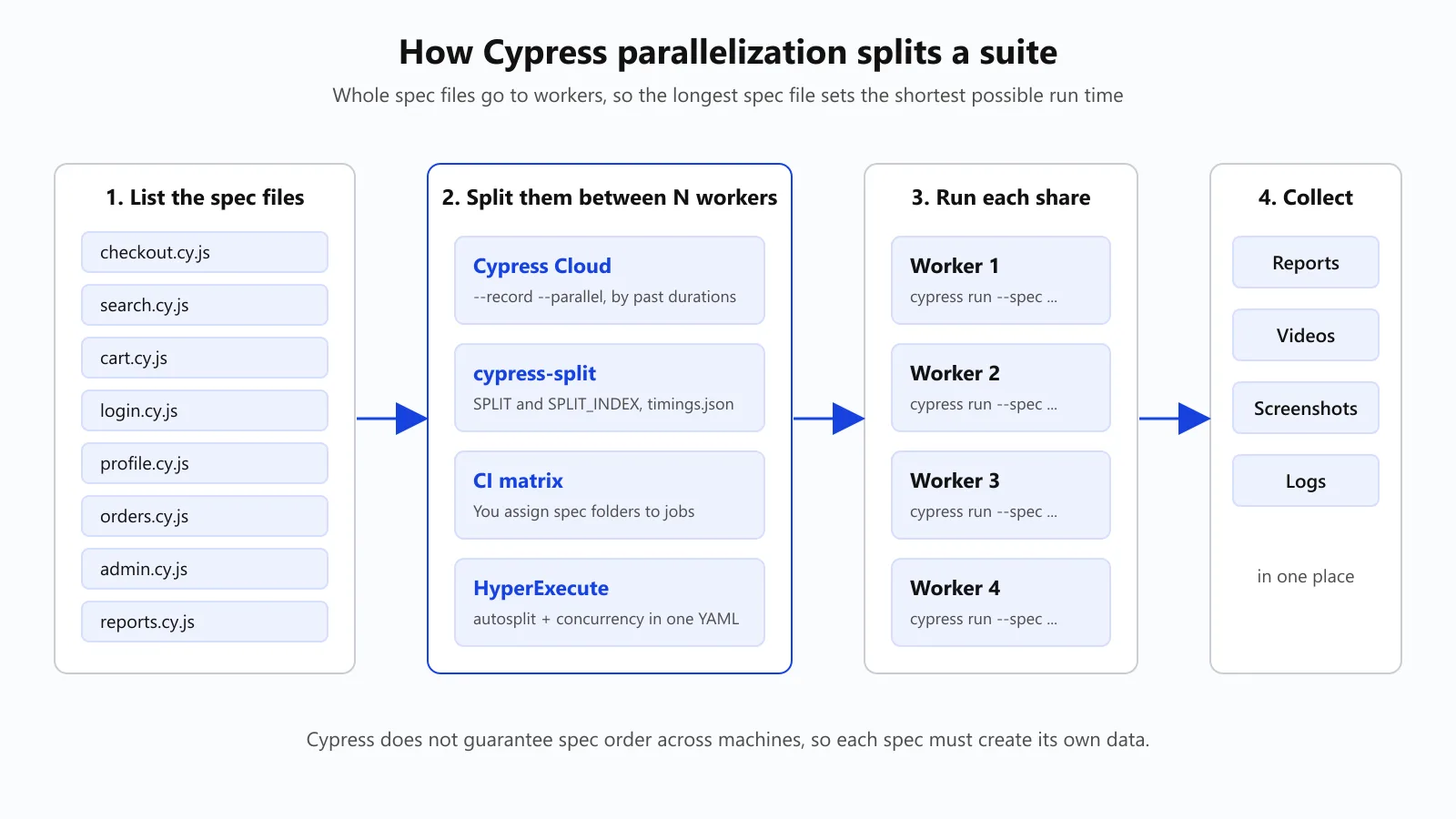
- Order is not guaranteed. Cypress makes it quite clear that spec order is not guaranteed when parallelized, so no spec is going to be guaranteed to run before another.
As of Nov 2026, Cypress's public roadmap has Native Parallel Runs listed as "Evaluating" (it would allow you to run your tests in parallel from the Cypress App even if you're not recording to Cloud). In the meantime, the only options you have are the ones below.
Every option below is of the same format: list the spec files, split them between N workers, run cypress run --spec on each worker, and then collect the results. The options differ in terms of who does the splitting and how evenly you split them.
Which of the Four Cypress Parallelization Options Do You Use?
| Option | Where specs run | How specs are split | Cost | Best for |
|---|---|---|---|---|
1. Cypress Cloud (--record --parallel) | Your CI machines | Cypress assigns specs one at a time using durations from previous runs | Free Starter plan includes parallelization and load balancing up to 500 test results/month; Team plan billed annually (as of Nov 2026) | Small suites, or teams already on a Cypress Cloud plan |
| 2. cypress-split plugin | Your CI machines | By file name, or by recorded durations from a timings.json file | Free npm package | Free balancing on GitHub Actions, GitLab or CircleCI |
| 3. CI matrix with spec folders | Your CI machines | You assign folders to jobs by hand | Free; CI minutes only | Small suites with stable folders |
| Avoid: one machine, several processes | A single machine | Threads on one host | Free | Not recommended for real gains (see below) |
| 4. HyperExecute auto-split | TestMu AI cloud VMs, fresh for each run | Auto-Split spreads specs across the concurrency you set in YAML | TestMu AI plan | Teams that also want retries, artifacts and failure analysis in one place |
If you're going to outgrow the 500 recorded results per month and don't want to go with a Cypress Cloud plan, then start with cypress-split. If your bigger issues are actually CI capacity, artifacts and flaky test triage, then you're better off looking at an orchestrator.
Cypress-Split vs Cypress Cloud: both can balance the specs by previous durations. Cypress-Split keeps the timings in a file in your repo and requires no external service at all. Cypress Cloud stores the run history for you and is free up to 500 test results a month (as of Nov 2026).
As of Nov 2026, you may also come across the tgamauf/cypress-parallel GitHub Action. That one builds a per-spec list for a matrix without the need for Cypress Dashboard, though the repo has been archived (read-only since 2nd June 2026) and it doesn't support defineConfig in cypress.config.* files so again cypress-split is the safer option for a new setup.

Skip the runner plumbing entirely
Note: HyperExecute will run your existing Cypress specs in parallel from a single YAML file, with no modification to your tests at all. Run your first job on HyperExecute.
How Do You Split Your Cypress Specs Across GitHub Actions Jobs?
New to Cypress on GitHub Actions? Start off by just running your Cypress tests with GitHub Actions and then come back here to look at splitting the run.
cypress-split is a free plugin that picks this machine's share of specs from two environment variables: SPLIT (total machines) and SPLIT_INDEX (this machine's zero-based index). It needs no external service.
Set Up cypress-split on GitHub Actions
1. Install the plugin
npm i -D cypress-split2. Register it in cypress.config.js and return the config. If you omit the return, then every machine will run every spec.
const { defineConfig } = require('cypress')
const cypressSplit = require('cypress-split')

module.exports = defineConfig({
  e2e: {
    setupNodeEvents(on, config) {
      cypressSplit(on, config)
      return config
    },
  },
})
3. Add a matrix job. GitHub Actions exposes strategy.job-total (the number of jobs) and strategy.job-index (zero-based), per GitHub's contexts reference. Map them straight to the plugin's variables (action versions as shown in Cypress's GitHub Actions docs, as of Nov 2026):
# .github/workflows/e2e.yml
name: e2e
on: [pull_request]
jobs:
  cypress:
    runs-on: ubuntu-24.04
    strategy:
      fail-fast: false          # let every worker finish so you see all failures
      matrix:
        containers: [1, 2, 3, 4]
    steps:
      - uses: actions/checkout@v7
      - name: Run this worker's share of specs
        uses: cypress-io/github-action@v7
        env:
          SPLIT: ${{ strategy.job-total }}
          SPLIT_INDEX: ${{ strategy.job-index }}
          SPLIT_FILE: timings.json
fail-fast: false. GitHub's reference states that when fail-fast is true, one failing job will cancel all the in-progress jobs in the matrix and thus hide all the other failures.
On GitLab (parallel: 3) and CircleCI (parallelism: 3), the plugin reads the machine index from the CI's own variables, so the command is simply npx cypress run --env split=true.
How Do You Balance the Specs so That No Machine Is Sitting Idle?
Splitting by file name is quick to set up but very uneven (one machine can end up with the three slowest specs).
Cypress-split addresses this with a timings file. The duration of each spec is recorded in timings.json; any spec missing from the file gets the average duration, and the plugin only rewrites the timings file if a spec is new or a duration has changed by more than 10%.
{
  "durations": [
    { "spec": "cypress/e2e/checkout.cy.js", "duration": 61200 },
    { "spec": "cypress/e2e/search.cy.js", "duration": 18400 }
  ]
}
Each parallel job writes its own timings, so you do need to merge them. The plugin comes with cypress-split-merge for that. Author Gleb Bahmutov describes two ways to keep the timings up to date: a single nightly job that just runs and commits fresh timings, or a workflow that merges the timings from the parallel jobs.
In his example, name-based splitting resulted in one machine running two specs for around 70 seconds while the other finished off early. With the timings, the slowest spec was left to run alone, and the rest shared the second machine.
Can You Run Cypress Specs in Parallel on a Single Machine?
You can; it's a trade-off. The cypress-parallel package's README states it can deliver up to a 40% reduction in run time by parallelizing on the same machine.
Cypress's own parallelization documentation actually advises against doing parallel tests on a single machine due to the resources it requires.
In a June 2023 NashTech test of six specs (38 tests), cypress-parallel took 53 seconds with 2 threads and 57 seconds with 4 threads, compared to 42 seconds sequentially (CPU load went up in the process). The same post's GitHub matrix run took about 43 seconds total, limited by an 18-second-long spec.
Whether one machine helps is going to depend on your spare CPU and memory, so you'll need to check it on your own suite. For reliable gains, you'll want to run it on separate machines or containers. For quick local runs, you can often get away with just filtering the specs using --spec.
To try it with cypress-split, open two terminals and give each one its share using the plugin's environment variables:
# terminal 1
SPLIT=2 SPLIT_INDEX=0 npx cypress run

# terminal 2
SPLIT=2 SPLIT_INDEX=1 npx cypress run
Watch the CPU and memory while both are running, and only keep the setup if the total time goes down.
How Do You Run Your Cypress Specs in Parallel on HyperExecute?
HyperExecute is TestMu AI's test orchestration platform. It takes your existing Cypress suite and runs it on fresh cloud VMs via a single YAML file. The HyperExecute Cypress guide covers two modes: Auto-Split (which will take the specs it discovers and split them across the number of parallel sessions you've specified) and Matrix (which will run the combinations that you explicitly list).
The YAML below is a copy of the documented Auto-Split sample (using a Windows runner), with your spec folder in place of the one in the sample. testDiscovery will list the spec files, and HyperExecute will pass each result into testRunnerCommand as $test:
# hyperexecute.yaml
version: 0.1
runson: win
cypress: true
autosplit: true
concurrency: 4            # parallel sessions
retryOnFailure: true
maxRetries: 1

runtime:
  - language: node
    version: "22"

pre:
  - npm install
  - npm install cypress --save-dev

cacheKey: '{{ checksum "package.json" }}'
cacheDirectories:
  - node_modules
  - cypressCache

env:
  CYPRESS_CACHE_FOLDER: cypressCache

testDiscovery:
  type: raw
  mode: static
  command: ls cypress/e2e/2-advanced-examples

testRunnerCommand: npx cypress run --spec ./cypress/e2e/2-advanced-examples/$test --browser=chrome --headed --config video=false

jobLabel: [cypress, autosplit]
The doc sample is pinned to Chrome 95. Set --browser to whichever version of Chrome your HyperExecute runner supports.
Run it via the HyperExecute CLI. The CLI will read your credentials from the LT_USERNAME and LT_ACCESS_KEY environment variables (just copy both of those from your TestMu AI profile into your shell or your CI secrets) so they don't appear on the command line or in a URL:
./hyperexecute --config hyperexecute.yaml --force-clean-artifacts --download-artifacts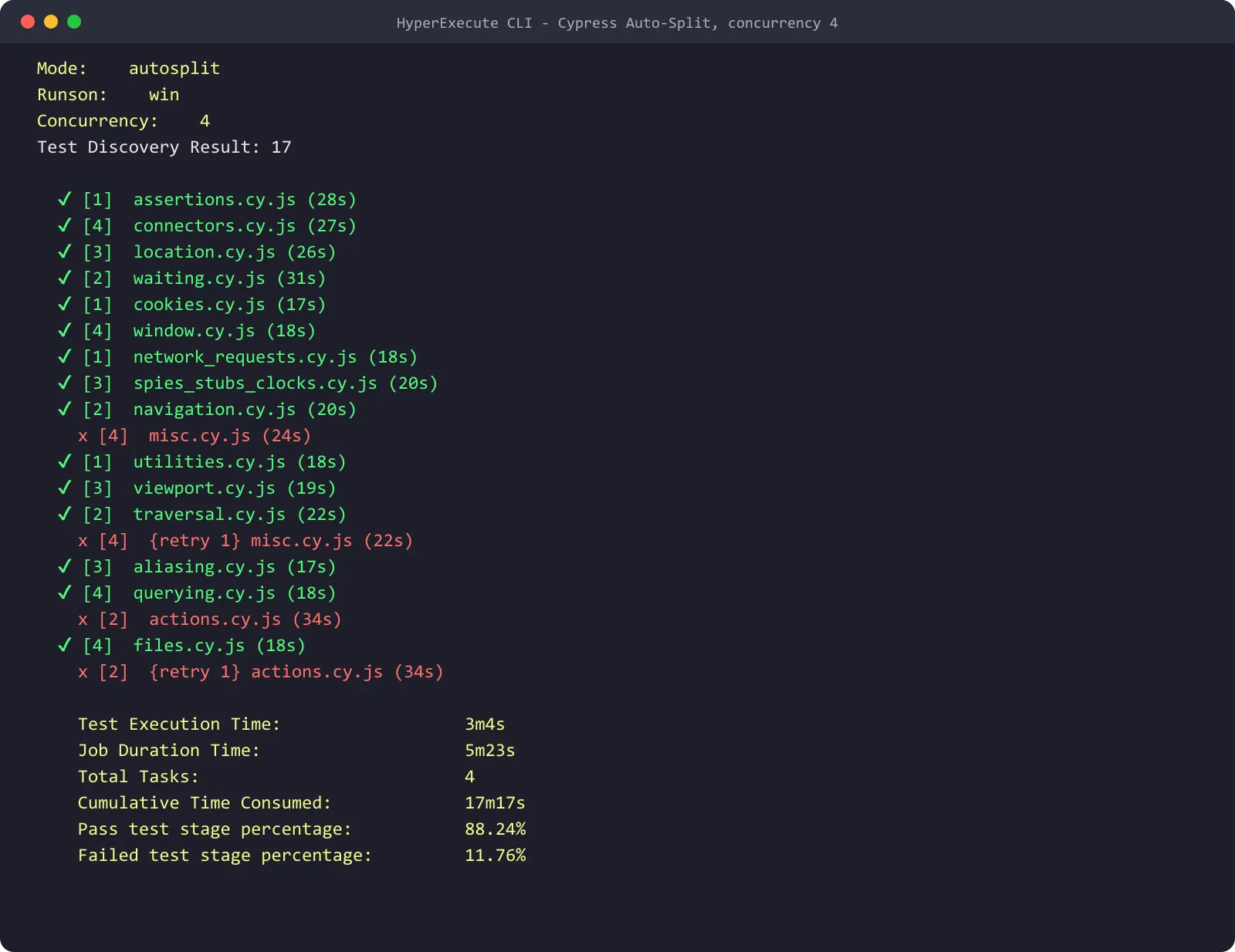
Run against the 17 specs in the doc's sample repo, this YAML split them across four sessions. The job took 5m23s against 17m17s of cumulative session time, and the two specs written for an older Cypress version failed again on retry.
Three things change compared with DIY splitting:
- No timings file to maintain. Auto-Split will distribute the specs across the sessions for you, and TestMu AI's AutoSplit video describes "an automatic reordering mechanism that prioritizes flaky tests that failed in previous runs".
- Retries are explicit.
retryOnFailureandmaxRetriesare in the YAML, so a retried spec is visible in the run (not hidden away in a shell loop). A retry never alters what constitutes a pass: the spec still has to pass its assertions. - One place for results. The HyperExecute page has per-test artifacts (video, screenshots, logs), AI root cause analysis, and flaky test detection via a sliding window (defaults to the last 10 runs). Transavia reports 70% faster test execution and Boomi 78% faster per the same page.
If you just need more parallel browsers for an existing Cypress run, then you can run your Cypress tests in parallel on the TestMu AI cloud by setting parallels as per the Cypress grid guide.

What Breaks When the Cypress Specs Run in Parallel?
The vast majority of new failures you see once you've parallelized are not flaky tests at all. They are tests that were reliant on running in isolation. Look for those first.
| Symptom | Likely cause | Fix |
|---|---|---|
| Spec passes alone, fails in the split run | It relies on data another spec created | Seed the data it needs in its own before hook |
| Two specs fail on the same record | Both edit one shared user or order | Create a unique user or order per spec |
| Failures move between runs | Spec order changed between machines | Remove cross-spec order dependencies |
| One worker always finishes last | One very long spec file | Split that file into smaller specs |
The SPLIT Checklist for Cypress Parallelization
Use this before you add machines:
- S - Spec-sized files. No spec file will run longer than your target run time.
- P - Per-spec data. Each spec creates or resets the data that it uses.
- L - Load balanced. Specs are split by recorded duration, not by name.
- I - Index from CI. The worker count and index come from the CI or the orchestrator; they are not hard-coded.
- T - Tied together results. Reports, videos and screenshots from every worker all end up in one place.
Watch: Splitting Tests in HyperExecute
For a quick visual walkthrough of this concept, watch the videos below from TestMu AI.


Subscribe to the TestMu AI YouTube channel for more tutorials on testing and automation.
Conclusion
Start with the SPLIT checklist, then pick the splitter that fits your suite: Cypress Cloud's free Starter plan for small suites, cypress-split for free balancing on your own CI, or HyperExecute when you also want retries, artifacts, and failure analysis handled for you.
Before you add machines, break up any spec file that runs longer than your target time, because no splitter can divide a single file. Then compare the run's wall-clock time with the total time your workers consume, and keep an extra machine only while it still shortens the run.
Once the split works, fix the specs that only fail in parallel: seed each spec's own data, give it a unique user or order, and drop any reliance on spec order.
Running a growing Cypress suite in CI? HyperExecute by TestMu AI splits your spec files across parallel cloud VMs from one YAML file, with retries and per-test artifacts in the same job.
Author

Japneet Singh Chawla
Blogs: 4

Japneet Singh Chawla is an Engineering Manager at TestMu AI, where he leads a team driving HyperExecute, the AI-native Test Orchestration Cloud Platform, and integrations with Cypress, Provar, Tosca, and Selenium, improving test execution efficiency and driving adoption across 500+ enterprise clients. He also spearheaded zero-downtime deployments that cut release-related downtime by 90%, and mentors new engineers into productive contributors. He brings 9+ years of experience building and scaling distributed systems, SaaS platforms, and developer tools, with deep hands-on backend engineering across Golang, Python, Node.js, Kafka, and Redis. Earlier at Sumo Logic he built award-winning developer tools, including a VS Code Parser Linter, and at Indus Valley Partners he was a founding member of the Sentiment Analyzer team, building ML-powered solutions for financial clients. Japneet holds an MCA in Computer Science from GGSIPU.
Reviewer

Mayank Bhola
Reviewer
Mayank Bhola is Co-Founder and Head of Products at TestMu AI, where he leads the entire product portfolio across KaneAI, Kane CLI, HyperExecute, SmartUI, the Real Device Cloud, Accessibility, and other software testing product lines. As an early Lead Architect he designed and built the company's flagship Tunnel technology from scratch, created the React-based automation platform, and architected the data-intensive pipelines and FAAS services that scale it. He brings more than 10 years of experience in software development and product engineering, with earlier roles as Head of Technology at Juggernaut Books and Senior Software Engineer at PressPlay TV and Zomato. Mayank holds a B.Tech in Computer Engineering from JIIT Noida.


Cypress Parallelization FAQs
Did you find this page helpful?
More Related Blogs

TestMu AI forEnterprise
Get access to solutions built on Enterprise
grade security, privacy, & compliance
- Advanced access controls
- Advanced data retention rules
- Advanced Local Testing
- Premium Support options
- Early access to beta features
- Private Slack Channel
- Unlimited Manual Accessibility DevTools Tests