
Run End-to-End Tests from Your Terminal with Kane CLI
Author and Run Tests Right from the Terminal in Natural Language, with an Evidence-Backed Pass or Fail from a Real Browser.
npm install -g @testmuai/kane-cli
Cypress 16.3: AI Agent Mode, Faster Runs and Upgrade Notes
Cypress 16.3.0 lets AI agents run Cypress unattended, runs every setupNodeEvents handler, starts specs sooner and fixes Chrome 158. Upgrade steps, known bugs.
Published on:
An AI coding agent edits a Cypress spec, starts cypress open to check its change, and then waits on a welcome screen that only a person can dismiss. Cypress 16.3.0, released on November 10, 2026 according to the Cypress changelog, removes that wait and gives the agent terminal output it can act on.
The Cypress 16.3 release also runs every setupNodeEvents handler you register for an event, which can change what a plugin setup does on the first run after the upgrade. I ran 16.2.1 and 16.3.0 against the same specs, locally and on the TestMu AI cloud grid, and the outputs and screenshots below come from those runs.
TL;DR
Cypress 16.3.0 is the latest Cypress version, released on November 10, 2026. It lets AI coding agents run cypress open and cypress tap without a person and runs every setupNodeEvents handler registered for an event. It also starts specs sooner and bundles Electron 43.8.4 with Chromium 150.
- Agent mode: In Cypress 16.3, cypress open with --project, --e2e and --browser skips the welcome screen when Cypress detects an AI coding agent. CYPRESS_AGENT_MODE=1 forces agent mode for an agent Cypress does not recognize, and CYPRESS_AGENT_MODE=0 turns it off.
- cypress tap: With cypress tap, an AI agent runs a spec, polls cypress tap status --json for a verdict, then reads the failed test's Command Log, error and code frame. Cypress Cloud account required: no. Browser required: Chromium-based, in an open-mode session.
- setupNodeEvents handlers: In Cypress 16.3, registering before:run, after:run, before:spec, after:spec, before:browser:launch or after:screenshot twice runs both handlers in order. A handler that used to replace a plugin's handler now runs next to it.
- Spec start time: Cypress 16.3 starts specs sooner when cypress run launches a new browser, which in Electron is every spec. Across 9 paired runs of a 10-spec suite, 16.3.0 finished first 8 times, with a median of 47.4 seconds against 56.0 seconds on 16.2.1.
- Cypress 16 breaking changes: Node.js required: 22, 24 or 26 and above; Node.js 20 and 25 are not supported. Cypress 16 removed Cypress.env(), cy.exec() and cy.end(), and throws when Cypress.config() sets viewportWidth or viewportHeight during a test.
- document.cookie deletes: A page that deletes its own cookie with document.cookie and reloads still sends that cookie in Cypress 16.3.0. The bug is open as issue 35338, so check a failing logout test in a normal browser before changing app code.
- Cloud runs: TestMu AI runs Cypress 16.3.0 specs on Windows 11 with Chrome when lambdatest-config.json pins cypress 16.3.0 in npm_dependencies and sets useNodeVersion to 22, because Cypress 16 does not install on older Node.js.
Cypress 16.3 at a Glance
Two 16.3.0 changes can break a suite that passes on 16.2.1: the setupNodeEvents handler change and the stricter .scrollIntoView() TypeScript types. The rest fix bugs, speed up runs or remove steps an AI agent could not do on its own.
| Change in 16.3.0 | What to do |
|---|---|
AI agents skip the welcome screen in cypress open | Nothing, or set CYPRESS_AGENT_MODE=1 for an agent Cypress does not detect |
cypress tap status reports an error stage | Treat error as a project that failed to load in agent scripts |
Every setupNodeEvents handler runs for six events | Check configs that re-register a plugin's event to replace it |
| Specs start sooner, browser detection is faster | Nothing |
Chrome 158 fixes for the second spec and cy.origin() | Upgrade before your CI image moves to Chrome 158 |
cy.intercept() Set-Cookie edits reach the browser again | Remove workarounds added for 16.0 |
| Header matchers that differ only in casing now throw | Keep one casing per header name in cy.intercept() |
.scrollIntoView() types drop ensureScrollable | Delete the option from TypeScript specs |
| Electron 43.8.4, Chromium 150, bundled Node.js 24.22.1 | Run the CLI on a Node.js release with the same certificate fix |
How AI Agents Run Cypress 16.3 Without a Person
Cypress recognizes common coding agents from the environment variables they set, according to its guide to agent sandboxes. Set CYPRESS_AGENT_MODE=1 for an agent it does not recognize, or CYPRESS_AGENT_MODE=0 to turn recognition off. Recognition alone does not skip the welcome screen: the command still needs --project, a browser (or defaultBrowser) and a testing type.
The detection list ships inside the binary, in resources/app/node_modules/@packages/agent-info/dist/index.js. In 16.3.0 it checks these variables, and IDEs come last so an agent running inside one is reported as the agent:
- Claude Code -
CLAUDECODEorCLAUDE_CODE - Codex -
CODEX_SANDBOXorCODEX_THREAD_ID - Gemini CLI, OpenCode, Cursor and Replit -
GEMINI_CLI,OPENCODE,CURSOR_AGENTandREPL_ID - Auggie, Goose and Junie -
AUGMENT_AGENT,GOOSE_PROVIDER, andJUNIE_DATAorJUNIE_SHIM_PATH - Kiro -
TERM_PROGRAMcontainingkiro, only when neither stdin nor stdout is a terminal - Anything else - a generic
AI_AGENTvariable, which Cypress maps to a known name or reports asother
A person working in a shell that carries one of these variables, such as a Replit workspace with REPL_ID, gets agent behavior too, and CYPRESS_AGENT_MODE=0 turns it off. Started from Claude Code with cypress open --project . --e2e --browser electron, Cypress 16.3.0 attached the browser by the second status poll, with no click in the Cypress window. The Cypress CLI guide compares this open mode with cypress run.
Other 16.3.0 fixes in the changelog remove steps that used to need a person:
- No config file -
cypress open --e2e --project <path>in a project without a Cypress configuration now creates the configuration and support files, starts the project in one launch and prints the files it created. - Config errors in the terminal - configuration errors, warnings and the stack trace of a config file that fails to load now print to the terminal, where an agent waiting on
cypress opencan read them. - Error stage -
cypress tap statusreportserrorwith the reason when the project cannot load, instead ofnot connected. - Sandboxes -
cypress tapno longer deletes the record of a running session it cannot see from another PID namespace, as in a container. - Linux displays - when
DISPLAYpoints at an X server that is not running, Cypress starts its own Xvfb and retries, andcypress open --detachedwrites the app's output to files in the system temp directory. - Binary downloads - a reset connection or a temporary server error during the binary download is retried up to 3 times before the install fails.
How to Run a Spec With cypress tap
The cypress tap commands attach to a running cypress open session and return the Command Log, error and DOM details the Cypress app shows. They work only with open-mode sessions in Chromium-based browsers, need Cypress 15.21.0 or later, and need no Cypress Cloud account.
# terminal 1: keep Cypress open in the background
npx cypress open --project . --e2e --browser electron &

# terminal 2, or the agent: run a spec, poll for the verdict, read the failure
npx cypress tap run cypress/e2e/removed/removed-apis.cy.js
npx cypress tap status --json
npx cypress tap reporter
npx cypress tap reporter --test-id r4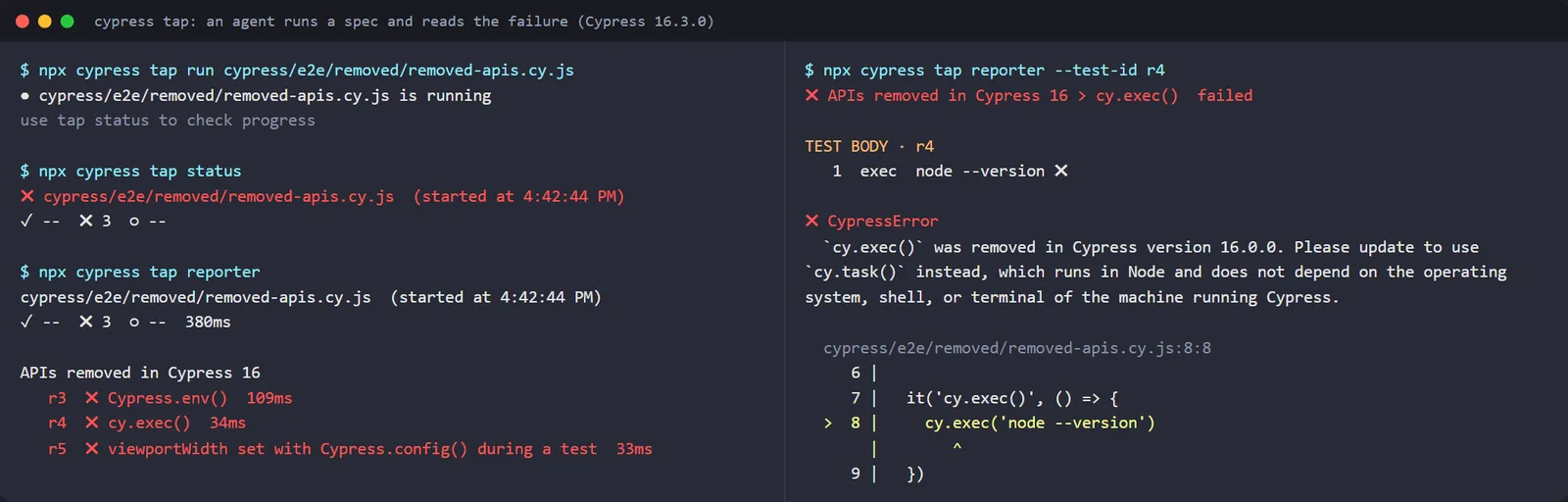
Poll cypress tap status --json until status is passed or failed, and check startedAt before trusting the verdict: a rerun leaves the previous result readable until the new run starts. This is the status of a passing run, with the process ID and project path removed:
{
  "status": "passed",
  "testingType": "e2e",
  "browserAttached": true,
  "browserName": "Electron",
  "totalSpecs": 15,
  "spec": "cypress/e2e/playground/multi-select.cy.js",
  "startedAt": "2026-11-12T11:12:15.407Z",
  "totalTests": 1,
  "results": { "passed": 1, "failed": 0, "pending": 0, "skipped": 0 }
}
To give Claude Code these steps as reusable instructions, see the Cypress skill guide.
ELECTRON_RUN_AS_NODE in Agent Shells
Some AI agent environments set ELECTRON_RUN_AS_NODE, which makes an Electron binary start as plain Node.js. Since 16.3.0, cypress open ignores the variable and prints a warning, while cypress run still honors it:
$ npx cypress open --project . --e2e --browser electron
ELECTRON_RUN_AS_NODE is set and was ignored because `cypress open` needs the app window.
With the variable still set, cypress run stops before the first spec and prints no test output (on Windows, the binary exits with code 3221225501). Clear it for the run:
# bash or zsh: clear it for one command
env -u ELECTRON_RUN_AS_NODE npx cypress run

# PowerShell: clear it for the session
Remove-Item Env:ELECTRON_RUN_AS_NODE -ErrorAction SilentlyContinue
npx cypress run
Every setupNodeEvents Handler Now Runs
Before 16.3.0, registering before:run, after:run, before:spec, after:spec, before:browser:launch or after:screenshot a second time replaced the first handler. 16.3.0 runs every handler in registration order. before:browser:launch and after:screenshot handlers each receive the previous handler's result, and a handler that throws stops the ones after it.
// cypress.config.js
const { defineConfig } = require('cypress')

module.exports = defineConfig({
  e2e: {
    setupNodeEvents(on, config) {
      // a plugin registers its handlers first
      on('before:spec', (spec) => console.log(`[plugin] before:spec ${spec.name}`))
      on('after:run', () => console.log('[plugin] after:run, uploading results'))

      // your own handlers for the same events
      on('before:spec', (spec) => console.log(`[mine]   before:spec ${spec.name}`))
      on('after:run', () => console.log('[mine]   after:run, writing summary'))

      return config
    },
  },
})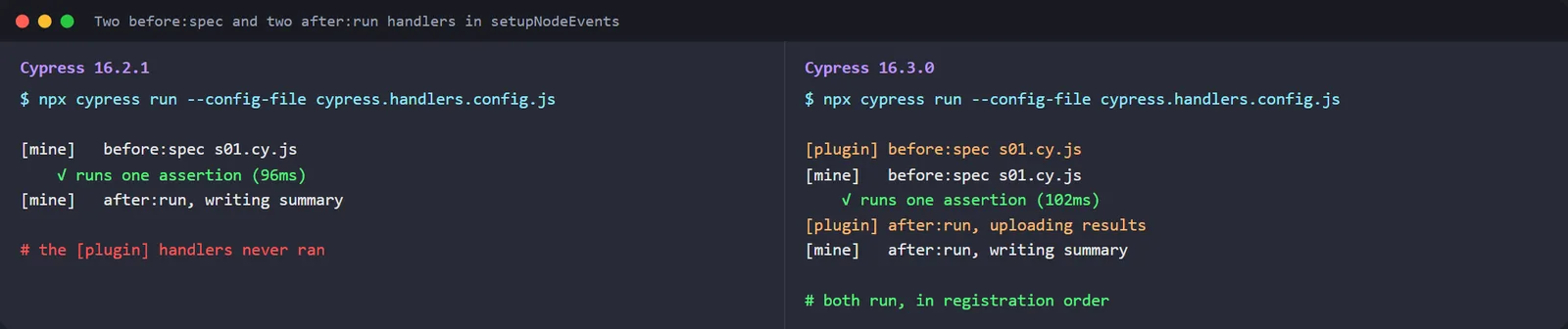
Configs that re-registered an event on purpose to replace a plugin's handler, such as a reporter's after:run upload, change behavior: after the upgrade, the plugin's handler runs again next to yours. Find those registrations first:
grep -nE "on\('(before|after):" cypress.config.*To keep only your handler for one event, hand the plugin an on that skips that event and register yours on the real on:
// cypress.config.js
const { defineConfig } = require('cypress')
const reportingPlugin = require('./reporting-plugin')

module.exports = defineConfig({
  e2e: {
    setupNodeEvents(on, config) {
      // hand the plugin an `on` that drops its after:run handler
      const onWithoutAfterRun = (event, handler) => {
        if (event !== 'after:run') on(event, handler)
      }
      reportingPlugin(onWithoutAfterRun, config)

      on('after:run', () => console.log('[mine]   after:run, writing summary'))
      return config
    },
  },
})
On 16.3.0 this config prints the plugin's before:spec line and only your after:run line.
Spec Start Time: Cypress 16.2.1 vs 16.3.0
In cypress run, 16.3.0 starts a spec sooner whenever Cypress launches a new browser for it. In Electron that is every spec unless component testing's experimentalSingleTabRunMode is on; in other browsers it is the first spec and any spec after the browser exits unexpectedly. Finding the installed browsers before the first spec also takes less time.
To see the effect on wall-clock time, I ran 10 one-assertion specs in headless Electron nine times on each version, alternating which version went first. One-line specs make browser startup most of the run.
| 10-spec run, headless Electron | Cypress 16.2.1 | Cypress 16.3.0 |
|---|---|---|
| Median of 9 runs | 56.0 s | 47.4 s |
| Fastest run | 46.4 s | 35.9 s |
| Slowest run | 105.0 s | 87.6 s |
| Pairs finished first | 1 of 9 | 8 of 9 |
The median paired saving was 7.5 seconds, about 0.75 seconds per spec, but single runs swung by more than that, so compare medians over several runs in your own CI before quoting a figure. The two versions also bundle different Electron builds (41.7.0 and 43.8.4), which makes this a release-against-release comparison, not a test of one fix.
Cypress 16.3 Bug Fixes That Change Test Results
Several 16.3.0 fixes change whether a test passes. A test that failed for a Cypress reason can start passing after the upgrade, and a few mistakes that Cypress used to ignore now throw.
Chrome 158 Fixes
In Chrome 158 and later, cypress run no longer stops with * is not a valid URL when it opens a second spec. Navigating inside cy.origin() with injectDocumentDomain enabled no longer fails with Blocked a frame with origin, an error that started because Chrome 158 stopped firing the unload events Cypress used to track navigations.
The TestMu AI grid's latest Chrome on Windows 11 resolved to Chrome 157 in the cloud runs later in this article, so upgrading Cypress before your CI browser reaches 158 avoids both errors.
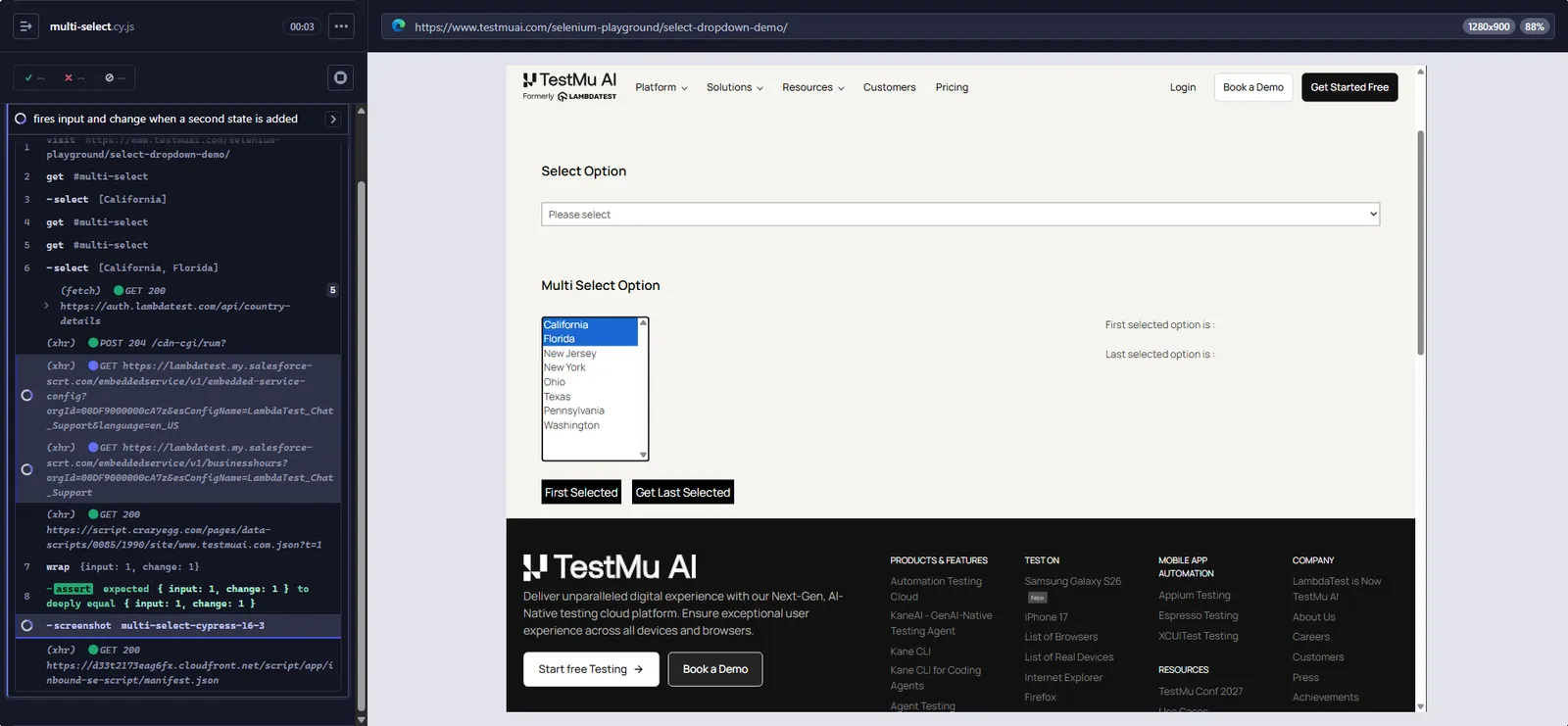
.select() Fires Events on Multi-Selects
On a <select multiple>, .select() did not fire input and change when the selection changed but the first selected option stayed the same. This spec counts both events on the Selenium Playground's select dropdown demo:
// cypress/e2e/playground/multi-select.cy.js
describe('Multi Select List Demo', () => {
  it('fires input and change when a second state is added', () => {
    cy.visit('https://www.testmuai.com/selenium-playground/select-dropdown-demo/')
    cy.get('#multi-select').select(['California'])

    const fired = { input: 0, change: 0 }
    cy.get('#multi-select').then(($select) => {
      $select[0].addEventListener('input', () => fired.input++)
      $select[0].addEventListener('change', () => fired.change++)
    })

    // California stays the first selected option
    cy.get('#multi-select').select(['California', 'Florida'])
    cy.wrap(fired).should('deep.equal', { input: 1, change: 1 })
  })
})
Cypress 16.2.1 fires neither event and the spec fails:
  Multi Select List Demo
    1) fires input and change when a second state is added

  0 passing (11s)
  1 failing

  1) Multi Select List Demo
       fires input and change when a second state is added:

      Timed out retrying after 4000ms
      + expected - actual

      -{ input: 0, change: 0 }
      +{ input: 1, change: 1 }
Cypress 16.3.0 fires one of each, and the same spec passes in about 1.6 seconds. Other fixes that can flip a result:
- Scroll duration -
cy.scrollTo()and.scrollIntoView()read a stringdurationsuch as'2000'as milliseconds instead of always animating for 400ms. - Falsy fixtures -
cy.fixture()now caches empty or falsy fixtures, such as an empty.txtfile or a.jsonfile holding only0,falseornull, instead of rereading the file on every call. - Assertion messages - a value containing
#{exp},#{act}or#{this}now shows the real value in the failure message and the Command Log. - Inline source maps - a spec whose bundle carries a large inline source map no longer crashes the browser tab and leaves
cypress runhanging. - Config process exits - when the process that loads your config exits, for example after
process.exit()insetupNodeEvents, the run stops with an error naming the exit code instead of hanging. - Unsafe ports - a randomly assigned port that browsers refuse, such as 10080, is redrawn instead of failing with
ERR_UNSAFE_PORT.
Bundled Electron 43, Chromium 150 and Node.js 24.22.1
16.3.0 moves bundled Electron from 41.7.0 to 43.8.4 to address the compromised eMudhra intermediate certificates, Chromium from 146.0.7680.216 to 150.0.7871.250 and bundled Node.js from 24.15.0 to 24.22.1. Connections Cypress makes itself, such as to Cypress Cloud, now reject certificates issued through those intermediates.
Code in setupNodeEvents runs on the Node.js that runs the cypress CLI, not the bundled one, so that Node.js release needs the same certificate fix.
- Smaller binary - the binary drops a copy of TypeScript it never used, because Cypress loads TypeScript from your project.
- .scrollIntoView() types - passing
ensureScrollableto.scrollIntoView()now fails to compile in TypeScript. Delete it; scrolling behaves the same. - Editor chooser - the Custom option is gone. Set the
LAUNCH_EDITORenvironment variable to open an editor Cypress does not detect. - Security updates -
systeminformation5.33.18,node-forge1.4.3 andjimp1.6.1 address vulnerabilities reported in security scans. - Electron browser - deprecated as a test browser since 16.0.0. The
cypress runheader printsElectron 150 (headless) (deprecated), so setdefaultBrowseror pass--browser chromebefore it is removed.
Upgrading From Cypress 15 to 16.3
Cypress 16 needs Node.js 22.x, 24.x, or 26.x and above to install the binary, and the Cypress migration guide lists Node.js 20 and Node.js 25 as no longer supported. The guide also tells a project below Cypress 15 to upgrade one major version at a time.
If your suite is older still, the Cypress 10 migration guide covers the move to cypress.config.js.
Removed APIs and the Errors They Throw
Each removed API fails with a CypressError that names its replacement. These are the messages 16.3.0 prints for the three you are most likely to hit:
1) APIs removed in Cypress 16
     Cypress.env():
   CypressError: `Cypress.env()` was removed in Cypress version 16.0.0. Please update to use `Cypress.expose()` for non-sensitive values, or `cy.env()` for sensitive values.

The key being accessed was: `apiUrl`

This call may come from a plugin. Update the plugin to a version that supports Cypress 16.

2) APIs removed in Cypress 16
     cy.exec():
   CypressError: `cy.exec()` was removed in Cypress version 16.0.0. Please update to use `cy.task()` instead, which runs in Node and does not depend on the operating system, shell, or terminal of the machine running Cypress.

3) APIs removed in Cypress 16
     viewportWidth set with Cypress.config() during a test:
   Error: CypressError: `Cypress.config()` cannot override `viewportWidth` during test execution because it would affect the next test rather than the current one. Set `viewportWidth` in the test configuration of a `describe`/`context` or `it` block instead. To change the viewport during a test, use `cy.viewport()`.
The replacements below pass on 16.3.0. Public values go in a top-level expose block, secrets stay in env, and cy.exec() becomes a task registered in setupNodeEvents:
// cypress.config.js
const { defineConfig } = require('cypress')

module.exports = defineConfig({
  expose: {
    apiUrl: 'https://www.testmuai.com/selenium-playground/', // public, readable in the browser
  },
  env: {
    apiKey: 'set-from-CYPRESS_apiKey-in-ci', // secret, read with cy.env()
  },
  e2e: {
    setupNodeEvents(on, config) {
      on('task', {
        nodeVersion() {
          return process.version
        },
      })
      return config
    },
  },
})
// cypress/e2e/migrated.cy.js
describe('Cypress 16 replacements', () => {
it('reads a public value with Cypress.expose()', () => {
expect(Cypress.expose('apiUrl')).to.contain('selenium-playground')
})
it('reads a secret with cy.env()', () => {
cy.env(['apiKey']).then(({ apiKey }) => {
expect(Boolean(apiKey)).to.be.true
})
})
it('runs Node code with cy.task() instead of cy.exec()', () => {
cy.task('nodeVersion').should('match', /^v\d+\./)
})
it('sets the viewport per test', { viewportWidth: 375, viewportHeight: 667 }, () => {
cy.visit('https://www.testmuai.com/selenium-playground/simple-form-demo/')
cy.window().its('innerWidth').should('eq', 375)
})
})Use cy.env() for secrets, because it yields only the keys you request; Cypress.expose() values are readable by any code in the browser, including your app and third-party scripts. cy.env() has its own default wait that does not follow defaultCommandTimeout, so pass a timeout option to a slow lookup, as the Cypress timeout guide shows for other commands.
Cypress 16.0 also moved Chrome, Chromium and Edge onto the native browser network, where your app negotiates HTTP/2 or HTTP/3 with your server as it does in production. Firefox, WebKit and Electron keep the legacy network path.
In Cypress's post on HTTP/2 support, a page loading 1,000 images finished in 1,362ms over HTTP/2 against 3,896ms over HTTP/1.1.
Other 16.0 changes to check when you skip straight from 15.x:
- forceHttp1 - setting it to
trueroutes every browser back through the legacy network path, but the option is deprecated on arrival and meant only as a temporary escape hatch. - keystrokeDelay - the default dropped from 10 to 0. Set
keystrokeDelay: 10only if a test depended on the old pause between keystrokes. - visibilityStrategy - the modern visibility algorithm is the default;
'legacy'is deprecated. - manageBrowserMemory - replaces
experimentalMemoryManagementand defaults totrue, so replace an oldfalserather than deleting it. - Cookie and storage queries - cookie and storage getters retry like queries, so overwrite them with
Cypress.Commands.overwriteQuery()and move assertions out of.then(). - Removed options -
cy.end(),execTimeout,allowCypressEnv,experimentalSourceRewriting, CoffeeScript specs and theenvkey in per-test config (useexpose) are gone. - Component testing - needs Angular 21+, Vite 8+ or Next.js 15.0.4+ where you use them.
Cypress 16.1 and 16.2 Additions
- trustedCertificates (16.1.0) - declare a self-signed or internal-CA certificate your app presents, and Chrome, Chromium and Edge treat that origin as trusted, so its static assets cache across navigations as they do in production.
- cy.getByRole() (16.2.0) - finds elements by ARIA role and accessible name, for example
cy.getByRole('tab', { name: 'Billing' }), and skips elements hidden from the accessibility tree unless you pass{ hidden: true }. - cy.go() (16.2.0) - waits for the page it navigates to before the next command and yields the window again, fixing intermittent back and forward failures that started in 15.0.0.
- Hang fixes - 16.1.0 fixed Chrome runs that stopped producing output and hung, and 16.2.1 fixed a hang at the first cross-origin
cy.visit()for specs bundled above about 75 MB and passing runs that exited with code 1.
Known Issues in Cypress 16.3.0 (as of November 12, 2026)
On Apple silicon, the darwin-arm64 binary bundles three helpers built for x86_64 only (trash, term-size and fsevents), tracked in issue #35342. Without Rosetta, the trash step that cypress run performs with the default trashAssetsBeforeRuns fails with spawn Unknown system error -86, and Cypress leaves the old screenshots, videos and downloads in place.
A page that deletes its own cookie with document.cookie and then reloads still sends the deleted cookie under Cypress, tracked in issue #35338, which was reported against 16.2.1.
A small page that sets a session cookie and logs out that way still failed on 16.3.0 in Electron 150 and Chrome 157, while the same flow in a normal Chrome window logged out. If a logout test fails like this, repeat the flow in a normal browser before changing app code.
How to Upgrade to Cypress 16.3
- Run
node --versionand move CI to Node.js 22, 24 or 26 and above if it prints anything older. - Bump Cypress on a branch and verify the binary.
- Search your config for events registered twice and decide which handlers should run.
- Run
tsc --noEmitif your specs are TypeScript, to catchensureScrollable. - Run the suite in Chrome as well as your usual browser, and set
defaultBrowserif you still rely on Electron.
git switch -c chore/cypress-16.3
npm install --save-dev cypress@16.3.0
npx cypress verify
grep -nE "on\('(before|after):" cypress.config.*   # events registered twice?
npx tsc --noEmit                                    # catches ensureScrollable on .scrollIntoView()
npx cypress run --browser chrome
On a fresh machine or CI image, the install Cypress guide covers the npm and direct-download routes.
How to Check Your Cypress Version
Run npx cypress version in the project. It prints the npm package version and the binary version separately, plus the bundled Electron and Node.js versions:
$ npx cypress version
Cypress package version: 16.3.0
Cypress binary version: 16.3.0
Electron version: 43.8.4
Bundled Node version: 24.22.1
If the package and binary versions differ, run npx cypress install to download the binary that matches the package.
Roll Back to Cypress 16.2.1
If 16.3.0 breaks a plugin you cannot fix yet, pin 16.2.1. It keeps the 16.0 behavior and drops only the 16.3 changes:
npm install --save-dev cypress@16.2.1
npx cypress install
npx cypress version
16.2.1 brings back the cy.intercept() Set-Cookie regression and the Chrome 158 failures, so treat the pin as temporary.
Running Cypress 16.3 on TestMu AI
TestMu AI's Automation Cloud runs existing Cypress specs across 3,000+ browser and OS combinations without a rewrite, and records network logs, console logs, video, screenshots and a command log for every session.
TestMu AI's supported Cypress versions page states that it supports every major, minor and patch release of Cypress. Pin 16.3.0 in npm_dependencies and set useNodeVersion to 22, because Cypress 16 does not install on older Node.js:
{
  "browsers": [
    { "browser": "Chrome", "platform": "Windows 11", "versions": ["latest"] }
  ],
  "run_settings": {
    "reporter_config_file": "base_reporter_config.json",
    "build_name": "Cypress 16.3.0 Release Check",
    "parallels": 3,
    "specs": "./cypress/e2e/*.cy.js",
    "ignore_files": "",
    "network": false,
    "video": true,
    "headless": false,
    "downloads": "./cypress/results",
    "useNodeVersion": "22",
    "npm_dependencies": {
      "cypress": "16.3.0"
    }
  },
  "tunnel_settings": {
    "tunnel": false,
    "tunnel_name": null
  }
}
Without a lambdatest_auth block, the CLI reads your credentials from the environment. Run it next to a base_reporter_config.json and it waits for the build and prints one row per spec:
export LT_USERNAME="<your TestMu AI username>"
export LT_ACCESS_KEY="<your TestMu AI access key>"
npm install --save-dev lambdatest-cypress-cli
npx lambdatest-cypress run --sync=true
Setting user name from environment
Setting access key from environment
Uploaded tests successfully Check Dashboard :https://automation.lambdatest.com/build?build=111768271
Waiting for build to finish...
┌─────────┬──────────────────────┬──────────┬──────────┬──────────┬─────────┐
│ (index) │ Spec │ Status │ Platform │ Browser │ Version │
├─────────┼──────────────────────┼──────────┼──────────┼──────────┼─────────┤
│ 0 │ 'simple-form.cy.js' │ 'passed' │ 'win11' │ 'chrome' │ '157.0' │
│ 1 │ 'multi-select.cy.js' │ 'passed' │ 'win11' │ 'chrome' │ '157.0' │
│ 2 │ 'checkbox.cy.js' │ 'passed' │ 'win11' │ 'chrome' │ '157.0' │
└─────────┴──────────────────────┴──────────┴──────────┴──────────┴─────────┘
{ passed: 3 }The first cloud run failed two of the three specs with is being covered by another element: the Playground's fixed header sat over the element after Cypress scrolled it to the top of the default 1000x660 viewport. A centered scroll and a taller viewport fixed both, and all three specs passed on Windows 11 with Chrome 157:
// cypress.config.js
const { defineConfig } = require('cypress')

module.exports = defineConfig({
  e2e: {
    viewportWidth: 1280,
    viewportHeight: 900,
    scrollBehavior: 'center',
    // keep runner screenshots inside the folder the CLI downloads
    screenshotsFolder: 'cypress/results/screenshots',
  },
})
Leave cypress_config_file out of run_settings for Cypress 10 and later. lambdatest-cypress-cli 3.0.52 stops with Error!! --ccf flag, cypress_config_file, cypress.json is not supported with cypress>=10 and asks for --cy="--config-file <file path>" instead.

Note: Run your Cypress 16.3.0 specs in parallel on TestMu AI, with video, console logs and network logs recorded for every session. To try it, start free.
Conclusion
Run npx cypress version first. If it prints 16.2.1 or older, bump to Cypress 16.3 on a branch, search your config for events registered twice, and run the suite in Chrome as well as your CI browser.
To run the same specs across browsers on TestMu AI Automation Cloud, follow the getting started with Cypress testing guide and pin cypress 16.3.0 in lambdatest-config.json.
Testing from the terminal? Kane CLI by TestMu AI lets SDETs and developers plan, write, run and debug tests from the command line.
Author

Srinivasan Sekar
Blogs: 20


Srinivasan Sekar is Director of Engineering at TestMu AI, where he leads engineering and open-source initiatives behind the Selenium and Appium automation grid and owns TestMu AI's MCP Server. A committer to Appium and a contributor to Selenium, WebdriverIO, Taiko, and AppiumTestDistribution, he brings over 15 years of experience in quality engineering and open-source technologies. He is the author of the Apress book 'The MCP Standard: A Developer's Guide to Building Universal AI Tools with the Model Context Protocol,' a Certified Kubernetes and Cloud Native Associate, and an international conference speaker. Before TestMu AI he spent over eight years at Thoughtworks as a Principal Consultant and Quality Architect. Srinivasan holds a B.Tech in Information Technology from Anna University.
Reviewer

Sri Harsha
Reviewer
Sri Harsha is Engineering Manager of the Open Source Program Office at TestMu AI, where he leads open-source engineering behind the Selenium and Appium automation grid and builds agentic AI systems for quality engineering. He is a member of the Selenium Technical Leadership Committee and a committer to WebdriverIO and Appium, and was recognized with the LambdaTest Delta Award 2023 for Best Contributor in open-source testing. He brings over 10 years of experience in software testing and automation, with earlier roles at EPAM Systems and ZenQ. Sri Harsha holds a B.Tech in Computer Science from Jawaharlal Nehru Technological University.


Cypress 16.3 FAQs
Did you find this page helpful?
More Related Blogs

TestMu AI forEnterprise
Get access to solutions built on Enterprise
grade security, privacy, & compliance
- Advanced access controls
- Advanced data retention rules
- Advanced Local Testing
- Premium Support options
- Early access to beta features
- Private Slack Channel
- Unlimited Manual Accessibility DevTools Tests