

Power Your Software Testing with AI Agents and Cloud
The Native AI-Agentic Cloud Platform to Supercharge Quality Engineering. Test Intelligently and Ship Faster.


- TestMu AI (Formerly LambdaTest)
- /
- Blog
- /
- Cypress Jenkins Tutorial: Run Cypress Tests in Your CI/CD Pipeline
Cypress Jenkins Tutorial: Run Cypress Tests in Your CI/CD Pipeline
Learn how to run Cypress tests in Jenkins CI/CD pipelines. Covers setup, Docker, parallel testing, cloud execution, and troubleshooting.
Last Updated on:
Cypress tests that pass on a local machine often fail in Jenkins because of headless Chrome crashes, missing Node.js dependencies, or configuration gaps that never show up outside CI. Closing that gap takes about 15 minutes: install the NodeJS plugin, wire a pipeline to a Jenkinsfile, then layer on Docker, parallel browsers, or cloud execution as needed.
TL;DR
Running Cypress in Jenkins means wiring a Node-enabled pipeline to a Jenkinsfile that runs npm ci and npx cypress run in a build stage. Whether you stay on local agents or add Docker, parallel browsers, or a cloud grid depends on how much scale and environment stability your suite needs.
- NodeJS plugin - Jenkins ships without Node, so install the plugin and pick Node 18 or 20 for Cypress 13+.
- Pipeline over Freestyle - A Jenkinsfile keeps build config in version control, unlike click-through Freestyle jobs.
- Docker for stability - The cypress/included image bundles browsers and dependencies, ending most agent setup drift.
- Parallel and cloud - Use the parallel directive for browsers, or a cloud grid for spec-level load balancing.
- CI-only failures - Fix crashes with shm-size, higher timeouts, Xvfb, and writable cache directories.
Quick Start
Quick Setup (3 Commands)
Already have Jenkins with the NodeJS plugin? Here's the fastest path:
# 1. Install dependencies
npm ci

# 2. Run tests
npx cypress run

# 3. (Optional) Run headless on specific browser
npx cypress run --browser chrome --headless
Add these to a Jenkinsfile and you're done. Keep reading for Docker, parallel testing, and cloud execution setups.
How to Run Cypress With Jenkins?
Running Cypress tests in Jenkins requires three steps: install the NodeJS plugin, create a project, and configure your pipeline. Here's the complete process.
Install the NodeJS Plugin
Jenkins doesn't include Node.js by default. Install the NodeJS plugin first:
- Go to Manage Jenkins > Plugins > Available plugins
- Search for NodeJS plugin and install it
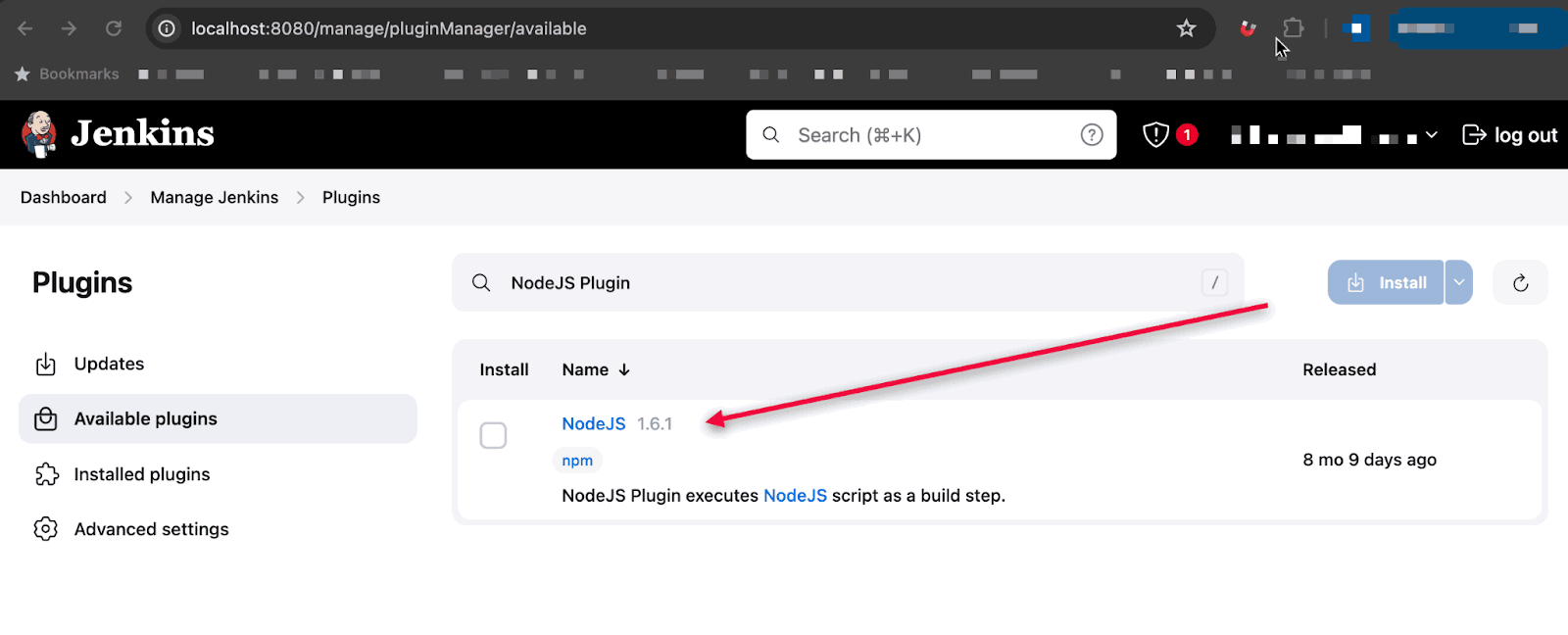
- Go to Manage Jenkins > Global Tool Configuration
- Click Add NodeJS
- Name it (e.g., "Node 20"), check Install automatically, select Node.js 18.x or 20.x
- Click Save
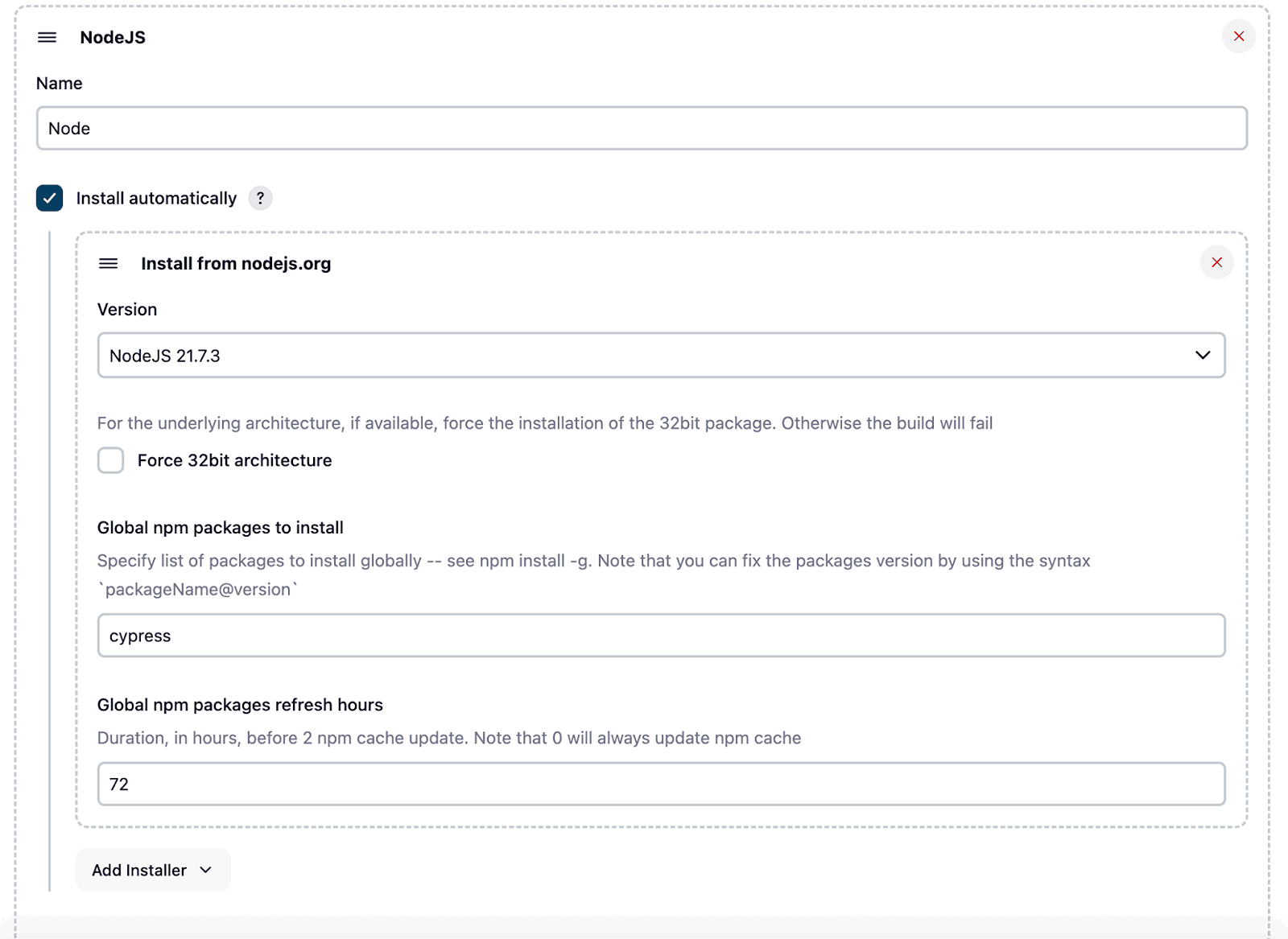
Cypress 13+ requires Node.js 18 or higher. Choose the latest LTS version for best compatibility.
Maintaining these Cypress specs by hand, then chasing why they crash only inside a Jenkins agent, eats hours across a suite. KaneAI, TestMu AI's GenAI-native testing agent, authors and maintains those Cypress tests from plain-English prompts so your pipeline runs stable specs, not brittle ones.
- Natural-language authoring - Describe a test in plain English and KaneAI generates and runs it for you.
- Self-healing - Smart element detection updates locators automatically when the UI changes.
- Framework export - Exports to Selenium, Cypress, Playwright, or Appium, so there is no lock-in.
- Multiple inputs - Turns PRDs, Jira tickets, PDFs, recordings, and GitHub PRs into test cases.
- Broad coverage - Tests web and native iOS/Android, plus API, database, and network validation.
- Reusable modules - Save common flows as reusable blocks with version history.
Read the KaneAI documentation to get started.

Create a Jenkins Project
You have two options: Freestyle project or Pipeline. Pipeline is recommended because you can version control your build configuration.
Option A: Freestyle Project
Best for simple setups or teams new to Jenkins.
- Click New Item, select Freestyle project
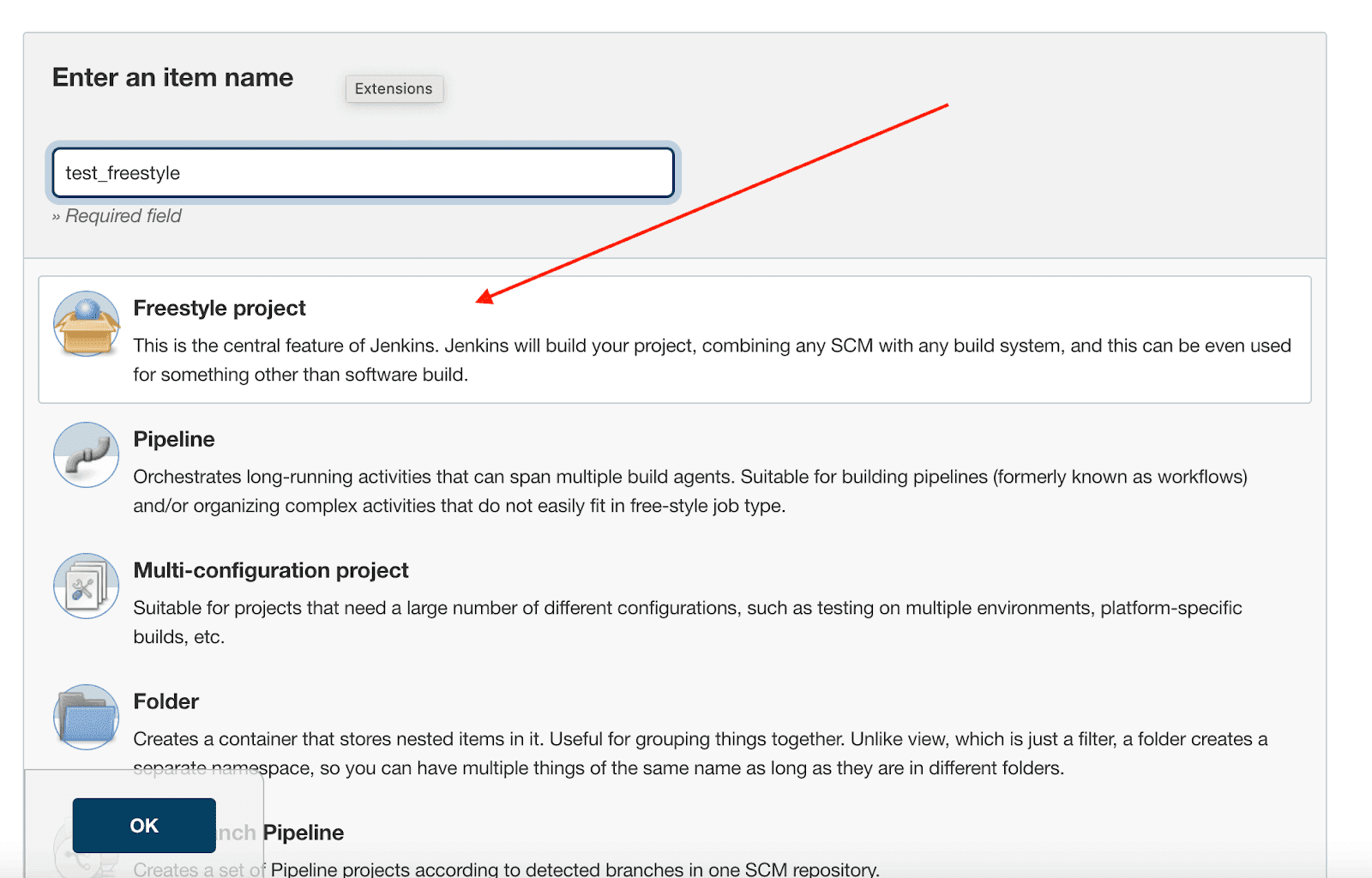
- In Source Code Management, add your Git repository URL and credentials
- In Build Environment, check Provide Node & npm bin/ folder to PATH

- Select your NodeJS installation from the dropdown
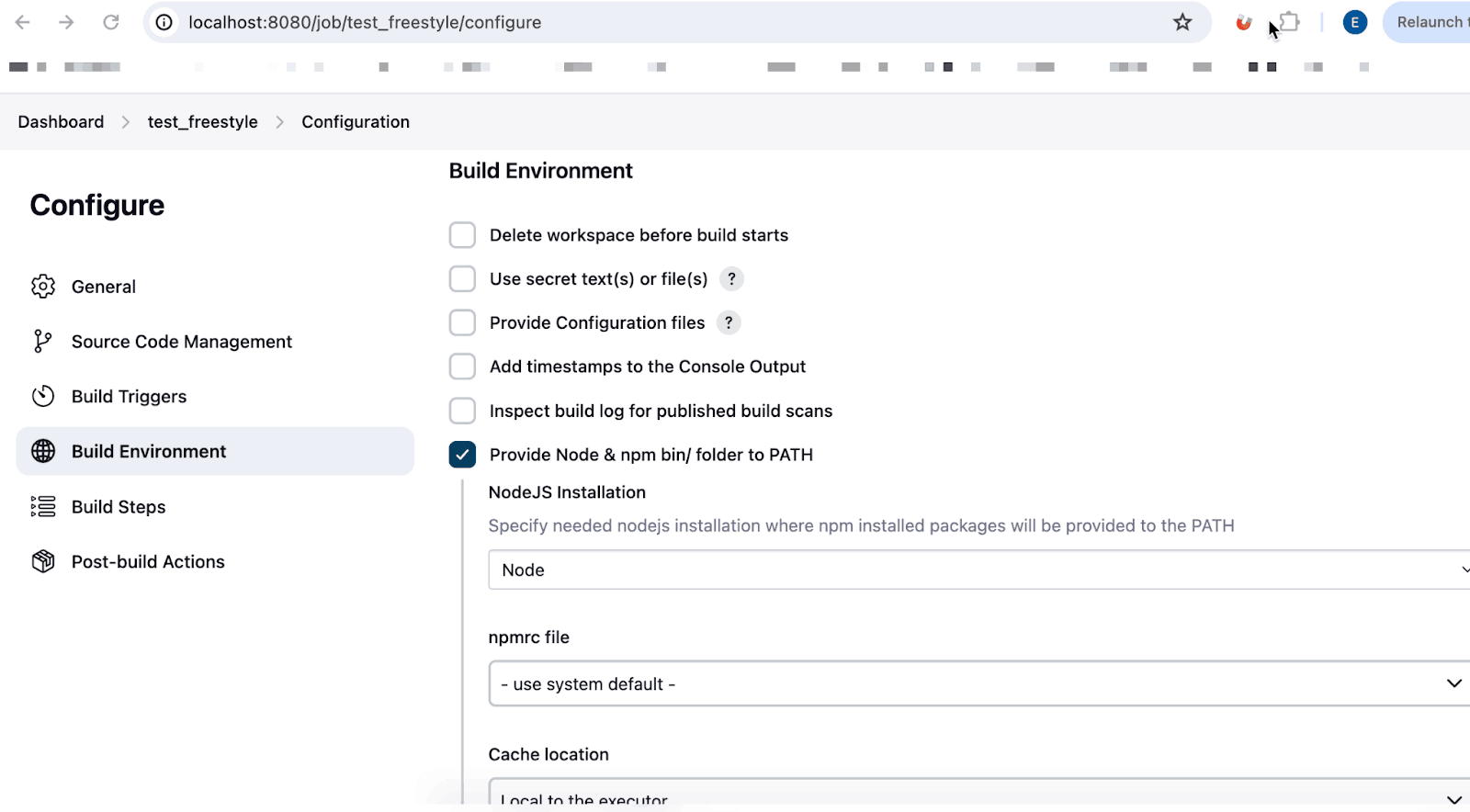
- Add Execute shell build step:
npm ci
npx cypress run- Click Save, then Build Now
Option B: Pipeline Project (Recommended)
Best for teams who want build configuration as code.
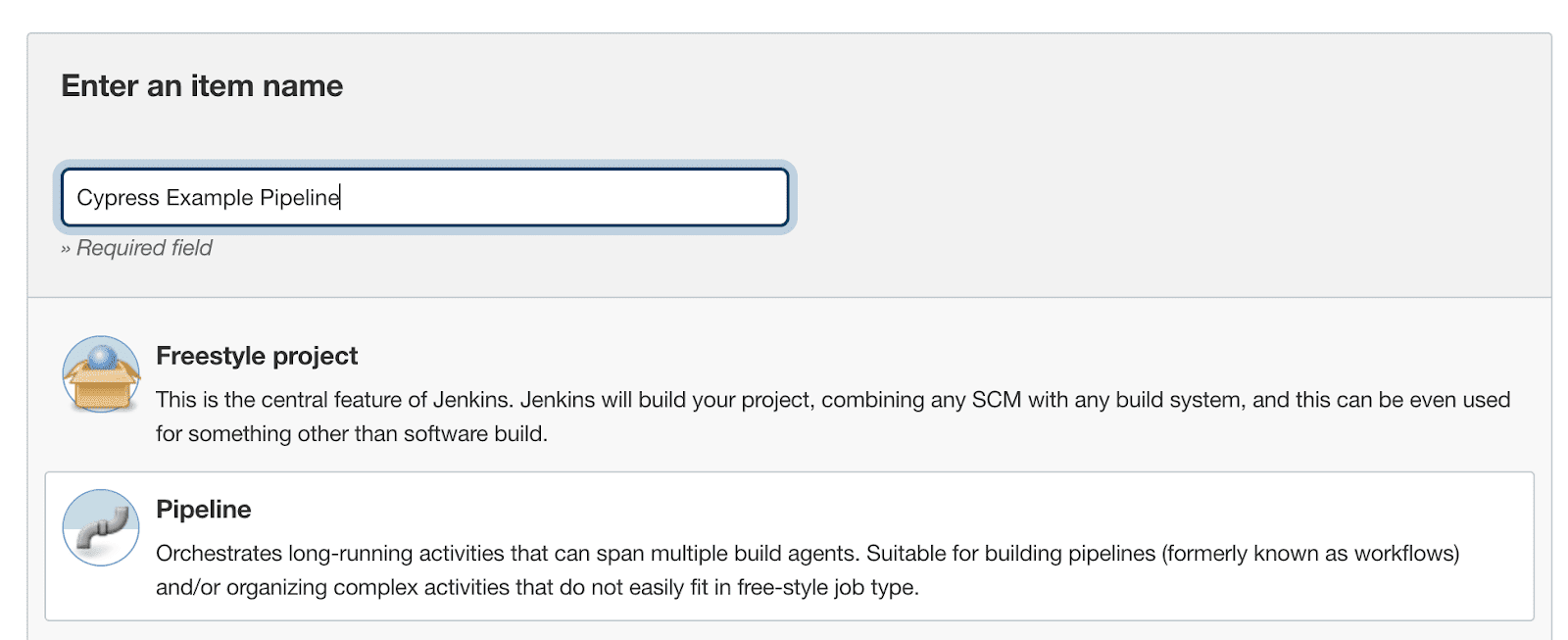
- Click New Item, select Pipeline
- In Pipeline section, select Pipeline script from SCM
- Add your Git repository URL
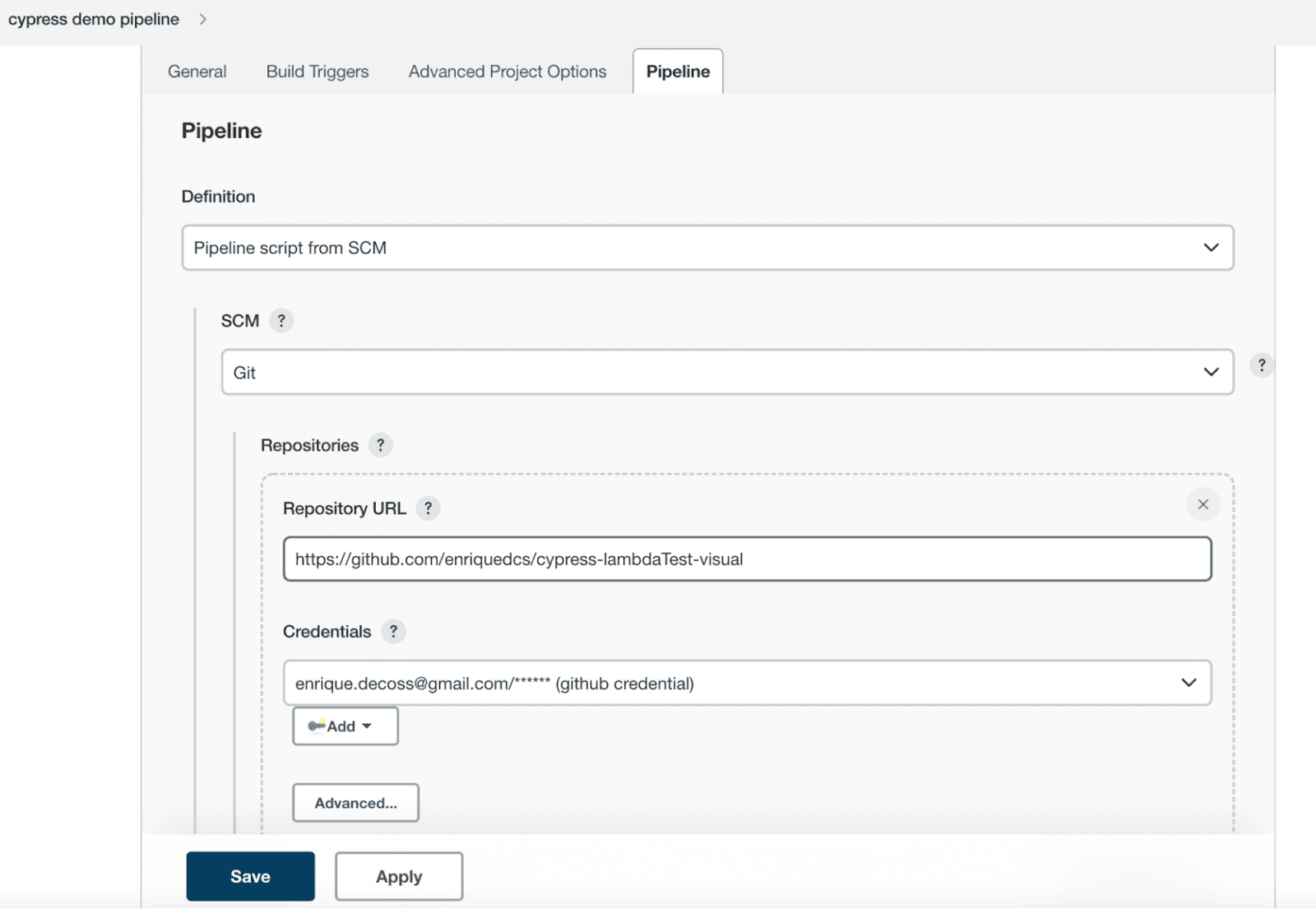
- Set Script Path to
Jenkinsfile - Click Save
Create Your Jenkinsfile
Create a Jenkinsfile in your repository root. This declarative pipeline defines your build stages:
pipeline {
    agent any
    tools {nodejs "Node 20"}

    stages {
        stage('Install') {
            steps {
                sh 'npm ci'
            }
        }
        stage('Test') {
            steps {
                sh 'npx cypress run'
            }
        }
    }

    post {
        always {
            archiveArtifacts artifacts: 'cypress/screenshots/**/*.png', allowEmptyArchive: true
            archiveArtifacts artifacts: 'cypress/videos/**/*.mp4', allowEmptyArchive: true
        }
    }
}
Click Build Now. Your Cypress tests will run, and screenshots/videos are saved as build artifacts.
You can view the pipeline execution results on the Jenkins Dashboard.
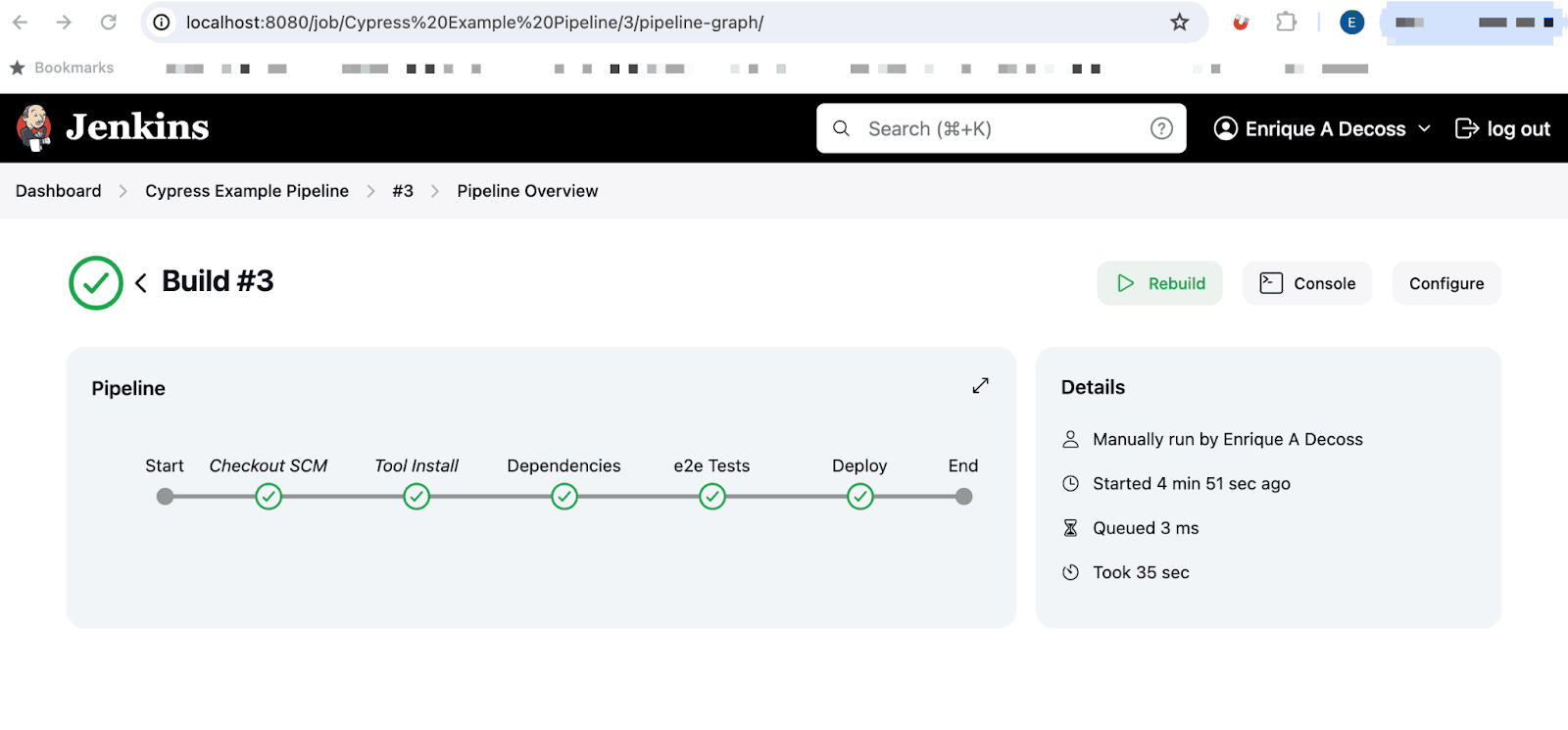
That covers the basic setup. The sections below explain Docker integration, parallel testing, and cloud execution for more advanced use cases.
Run Cypress in Jenkins With Docker
Docker eliminates environment setup issues. Instead of installing Node.js and browsers on every Jenkins agent, use the official Cypress image that has everything pre-configured.
Benefits:
- Consistent environments across local and CI
- No agent configuration needed
- Easy version updates (change one line)
pipeline {
    agent {
        docker {
            image 'cypress/included:13.6.0'
            args '--shm-size=2g'
        }
    }

    stages {
        stage('Install') {
            steps {
                sh 'npm ci'
            }
        }
        stage('Test') {
            steps {
                sh 'npx cypress run'
            }
        }
    }
}
The --shm-size=2g flag prevents Chrome from crashing due to insufficient shared memory.
Available Cypress Docker images:
| Image | Contents | Use Case |
|---|---|---|
cypress/base | Node.js + OS dependencies | Custom setups |
cypress/browsers | Base + Chrome, Firefox, Edge | Multi-browser testing |
cypress/included | Browsers + Cypress pre-installed | Fastest setup (recommended) |
Run Cypress Tests in Parallel With Jenkins
Parallel testing speeds up execution by running tests across multiple browsers simultaneously:
pipeline {
    agent none

    stages {
        stage('Test') {
            parallel {
                stage('Chrome') {
                    agent { docker { image 'cypress/included:13.6.0' } }
                    steps {
                        sh 'npm ci && npx cypress run --browser chrome'
                    }
                }
                stage('Firefox') {
                    agent { docker { image 'cypress/included:13.6.0' } }
                    steps {
                        sh 'npm ci && npx cypress run --browser firefox'
                    }
                }
                stage('Edge') {
                    agent { docker { image 'cypress/included:13.6.0' } }
                    steps {
                        sh 'npm ci && npx cypress run --browser edge'
                    }
                }
            }
        }
    }
}
This runs your entire test suite on Chrome, Firefox, and Edge at the same time. For automatic load balancing across many spec files, use a cloud platform like TestMu AI.

Integrate Cypress Jenkins Pipeline With Cloud Grid
TestMu AI provides 50+ real browsers and operating systems without infrastructure management. It's ideal for Cypress testing at scale on a remote test lab.
Benefits:
- 50+ browser/OS combinations
- Automatic parallel testing
- No infrastructure to maintain
- Test results dashboard with videos and logs
Install the TestMu AI Jenkins Plugin
- Go to Manage Jenkins > Plugins > Available
- Search "TestMu AI" and install
Configure Your Pipeline for Cloud Execution
pipeline {
    agent any
    tools {nodejs "Node 20"}

    stages {
        stage('Install') {
            steps {
                sh 'npm ci'
                sh 'npm install lambdatest-cypress-cli'
            }
        }
        stage('Test') {
            steps {
                sh 'npx lambdatest-cypress run'
            }
        }
    }
}
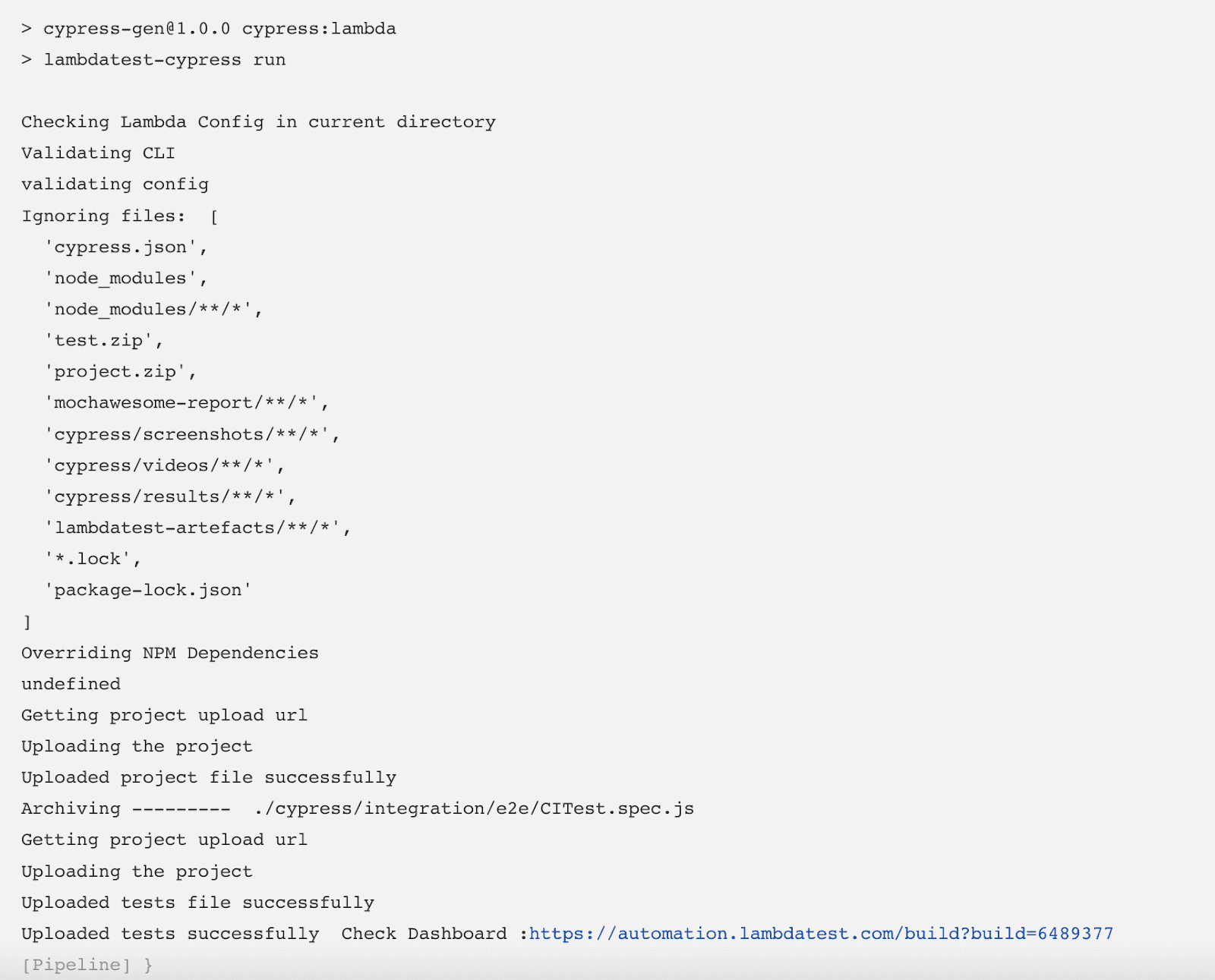
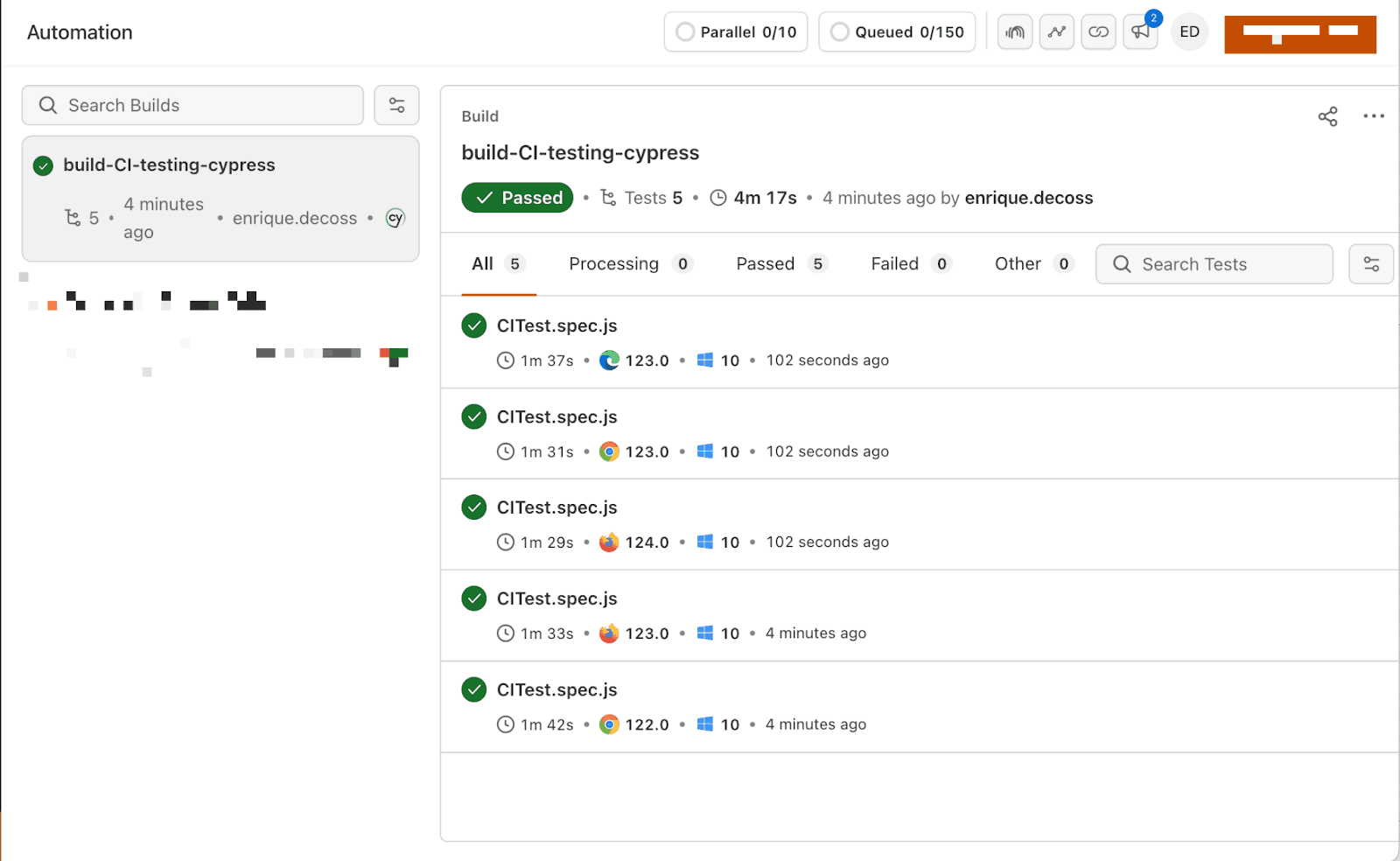
When the build completes, tests are uploaded to the TestMu AI Web Automation Dashboard.
Set Up the Configuration File
Install the TestMu AI Cypress CLI and initialize:
npm install -g lambdatest-cypress-cli
lambdatest-cypress init
Configure lambdatest-config.json:
{
    "lambdatest_auth": {
        "username": "<Your username>",
        "access_key": "<Your access key>"
    },
    "browsers": [
        {"browser": "Chrome", "platform": "Windows 10", "versions": ["latest"]},
        {"browser": "Firefox", "platform": "Windows 10", "versions": ["latest"]},
        {"browser": "MicrosoftEdge", "platform": "Windows 10", "versions": ["latest"]}
    ],
    "run_settings": {
        "build_name": "Jenkins-Cypress-Build",
        "parallels": 5,
        "specs": "./cypress/e2e/**/*.cy.js"
    }
}
Get credentials from Password & Security.
To test locally hosted pages, enable the tunnel:
"tunnel_settings": {
    "tunnel": true,
    "tunnelName": "jenkins-tunnel"
}
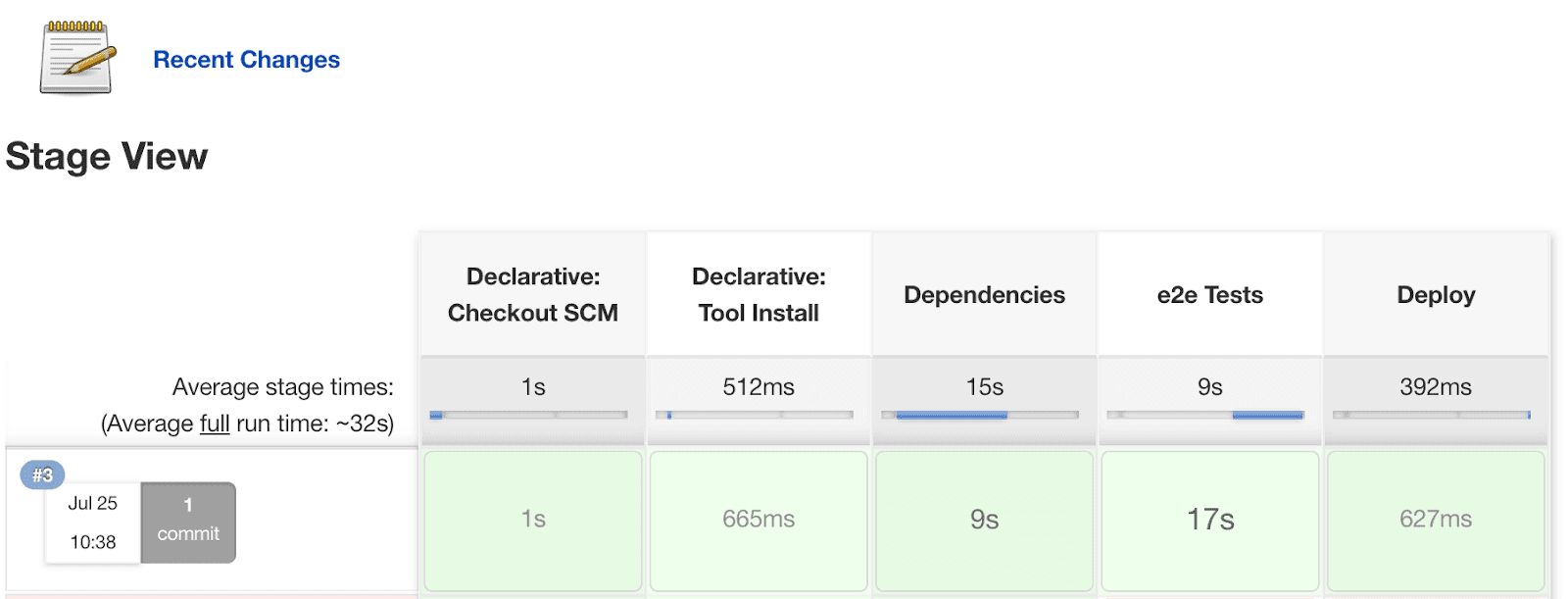
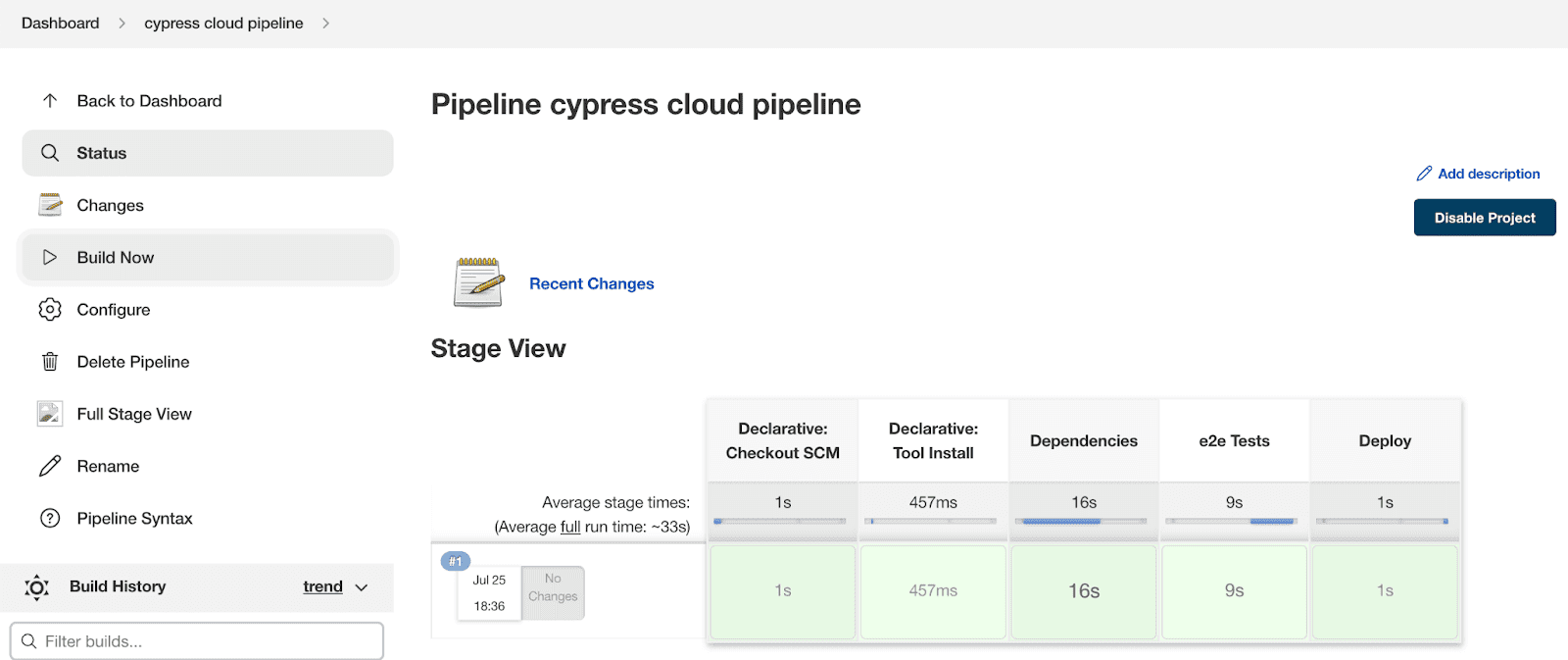
With Cypress parallel testing on TestMu AI, a 50-minute test suite can finish in under 5 minutes.
Without Cypress Cloud Grid (test timing):
With Cypress Cloud Grid (test timing):
Get started with Cypress e2e testing on the cloud today.
Cypress Jenkins vs GitHub Actions
This comparison comes up constantly, and there's no universal answer. The right choice depends on your team's situation.
When to Choose Jenkins for Cypress?
You need infrastructure control. Jenkins runs on your servers. If you're in a regulated industry, handle sensitive data, or have strict compliance requirements, self-hosted infrastructure isn't optional.
Your repository isn't on GitHub. Using GitLab, Bitbucket, or a self-hosted Git server? Jenkins works with all of them. GitHub Actions is GitHub-only.
| Aspect | Jenkins | GitHub Actions |
|---|---|---|
| Hosting | Self-hosted | Cloud |
| Setup | Hours | Minutes |
| Config | Groovy | YAML |
| Cost | Server costs | Per-minute |
| Git Provider | Any | GitHub only |
Use Jenkins when: You need infrastructure control or your code isn't on GitHub.
Use GitHub Actions when: Your code is on GitHub and you want simplicity.
Troubleshooting Cypress Jenkins Issues
Cannot Find Module 'cypress'
Clear caches and reinstall:
rm -rf node_modules
rm -rf ~/.cache/Cypress
npm ci
npx cypress verify
Chrome Crashes in Headless Mode
This usually happens due to insufficient shared memory. For Docker, add the shm-size flag:
args '--shm-size=2g'Or add browser launch flags in cypress.config.js:
module.exports = defineConfig({
  e2e: {
    setupNodeEvents(on, config) {
      on('before:browser:launch', (browser, launchOptions) => {
        if (browser.family === 'chromium') {
          launchOptions.args.push('--disable-dev-shm-usage');
          launchOptions.args.push('--no-sandbox');
        }
        return launchOptions;
      });
    },
  },
});
Test Timeouts
CI environments are slower than local machines. Increase timeouts:
// cypress.config.js
module.exports = defineConfig({
  defaultCommandTimeout: 10000,
  pageLoadTimeout: 60000,
  requestTimeout: 10000,
});
Xvfb Display Issues on Linux
Cypress needs a display server. Docker images handle this automatically. Otherwise, use:
xvfb-run npx cypress runPermission Denied Errors
Override cache directories to writable locations:
environment {
    npm_config_cache = "${WORKSPACE}/.npm-cache"
    CYPRESS_CACHE_FOLDER = "${WORKSPACE}/.cypress-cache"
}
Conclusion
This tutorial covered how to run Cypress with Jenkins using Freestyle projects, Pipelines, Docker, and cloud integration with TestMu AI. Cypress is ideal for end-to-end testing because unlike Selenium, it requires no extra drivers.
New to Cypress? Start with getting started with Cypress.
For more on automation testing, CI/CD, and the Software Development Life Cycle, check our Learning Hub.

Note: Run your Cypress tests across 50+ browsers. Try TestMu AI Today!
Author

Enrique
Blogs: 11


Enrique DeCoss, Senior Quality Assurance Manager at FICO is an industry leader in quality strategy with 16+ of experience implementing automation tools. Enrique has a strong background in Testing Tools, API testing strategies, performance testing, Linux OS and testing techniques. Enrique loves to share his in-depth knowledge in competencies including, Selenium, JavaScript, Python, ML testing tools, cloud computing, agile methodologies, and people Management.
Reviewer

Himanshu Sheth
Reviewer
Himanshu Sheth is the Director of Marketing (Technical Content) at TestMu AI, with over 8 years of hands-on experience in Selenium, Cypress, and other test automation frameworks. He has authored more than 130 technical blogs for TestMu AI, covering software testing, automation strategy, and CI/CD. At TestMu AI, he leads the technical content efforts across blogs, YouTube, and social media, while closely collaborating with contributors to enhance content quality and product feedback loops. He has done his graduation with a B.E. in Computer Engineering from Mumbai University. Before TestMu AI, Himanshu led engineering teams in embedded software domains at companies like Samsung Research, Motorola, and NXP Semiconductors. He is a core member of DZone and has been a speaker at several unconferences focused on technical writing and software quality.
Jenkins & Cypress Tutorial FAQs
Did you find this page helpful?
More Related Blogs
TestMu AI forEnterprise
Get access to solutions built on Enterprise
grade security, privacy, & compliance
- Advanced access controls
- Advanced data retention rules
- Advanced Local Testing
- Premium Support options
- Early access to beta features
- Private Slack Channel
- Unlimited Manual Accessibility DevTools Tests