

Power Your Software Testing with AI Agents and Cloud
The Native AI-Agentic Cloud Platform to Supercharge Quality Engineering. Test Intelligently and Ship Faster.


- TestMu AI (Formerly LambdaTest)
- /
- Learning Hub
- /
- What is Component Testing: Techniques, Tools, and Process
What is Component Testing: Techniques, Tools, and Process
This Component testing tutorial delves deeper into its importance, techniques, phases, and how to perform Component testing with examples.
Last Updated on:
On This Page
- Overview
- What is Component testing
- Software vs Hardware Component Testing
- Why perform Component testing
- Advantages of Component testing
- Scope of Component testing
- Common defects and failures in Component testing
- What do you verify in Component testing
- When Component testing is done
- Contributing factors for Component testing
- Component testing techniques
- Phases of Component testing
- How to create Component test cases
- How can Component test drivers and stubs be built methodically
- Modern Component Testing Tools
- AI Agents in Component Testing
- How Component testing fit with other QA methods
- Component Testing and Shift Left
- Component testing vs Unit testing
- How Component testing differs from Interface, Integration, and System testing
- How to perform Component testing using TestMu AI
- Limitations of Component testing
- Wrapping Up
- Frequently Asked Questions (FAQs)
OVERVIEW
Component testing verifies a single software component, such as a UI module, class, or API endpoint, in isolation before it joins the rest of the system.
Each component is tested in accordance with a test strategy and test plan, isolated using stubs, drivers, or mocks, then verified with tools such as Vitest, Cypress, and Playwright.
This guide covers component testing techniques, its phases, modern tools and frameworks, and how it differs from unit, integration, and system testing.

What is Component testing?
Component testing involves testing the usability of each component of the software application. The behavior of each component is also evaluated along with the usability test. Testing of this type requires each component to be in an independent state and controllable.
It calls for a test strategy and plan where we consider every software component separately. Here, the testers perform the Component testing instead of the developers, who typically perform unit testing. However, before Component testing, the development team completes the unit testing process.
Let's say that a software application consists of three components. Before integration testing is performed, each component is tested independently by the tester as part of the development cycle. In the early stages of the development cycle, bugs can be found very early, saving time.
In Component testing, programmers use a test structure or debugging tools to test the code they have written with the support of integrated development environments(IDEs). Component testing detects defects immediately and fixes them without maintaining records.
Testing the entire system is challenging due to the magnitude of the software applications. There may be several test coverage gaps as well. Therefore, it is recommended to do Component testing first and then integrate or perform functional testing later.
Software vs Hardware Component Testing
A quick disambiguation before going further, because "component testing" means two genuinely different things depending on the industry you are in, and search results mix them freely.
Software component testing is the subject of this guide. The component is a unit of code: a UI button, a module, a class, or an API. You verify it in isolation by calling it with known inputs and asserting on its behavior, using test frameworks and, where a dependency is not available, stubs, drivers, or mocks.
Hardware component testing is electronics. The component is a physical part, such as a resistor, a capacitor, a diode, or a microchip, and it is tested on the bench with instruments rather than code. An engineer uses a digital multimeter to check that a resistor matches its rated resistance, that a capacitor holds charge, or that a connection has continuity, isolating each part before it is soldered into a board.
The two are unrelated in practice but identical in philosophy, which is presumably why they share a name: prove each part works on its own before you assemble it, because a fault is far cheaper to find in one component than in a finished system. Everything that follows on this page concerns software.
Why perform Component testing?
Since now we have covered the fundamentals of Component testing, let's dive into the facts about why you should opt for it.
- To deal with component customization, it provides us with a tool that can update and modify an existing model and produce a new one.
- The second strategy uses operational scripts and tests stubs to emulate a component's particular functional behavior from a black-box perspective.
- The flexibility to modify and reuse test stubs throughout the component evolution process greatly benefits this approach.
- After acquiring all components, you can perform detailed testing by validating all potential issues on live web servers. However, this is impossible for unit testing, where you can't test each unit on live servers.
- Component testing helps identify and fix issues faster, avoiding costly setbacks, effort, and time. It also allows the development team to test the software components for any avoidable bugs before passing them on to the QA team.
Advantages of Component testing
Verifying the test object's input/output behavior is the primary goal of Component testing. It ensures that the functionality of the test object precisely corresponds with the given specification.
- Component testing helps find and solve defects in the software code and verifies each component of the product, lowering risks.
- Discovering bugs in the Component testing aids in finding errors in the software's source code. Additionally, it verifies the application's usage of control flow, functions, data structures, etc.
- It evaluates the component's performance, both functionally and non-functionally. Component testing guarantees that the system design and requirements are aligned with the user's expectations and needs.
- Component testing is crucial for building and sustaining confidence in the components; fewer bug traces are available through additional testing, which raises the quality of the product.
- Developers can find the coding issues and fix them to stop defects from advancing to higher testing tiers. Errors are therefore less likely to occur at higher testing levels.
Scope of Component testing
All testing and development activities that fall under the purview of a component-based development project refer to Component testing. It includes all tests and testing activities performed during component development by the organization and all testing activities carried out by its user.
- An organization aims to deliver a high-quality reusable product that meets its functional and behavioral specifications.
- A tester may compare the tested component's various elements, classes, or subcomponents to evaluate the interactions.
- It focuses on assessing the component's underlying logic, data, and application structure and the proper operation of its internal algorithms.
The component tester will often do a second test to determine whether the module functions effectively inside the context of other application components.
Common defects and failures in Component testing
Software component tests evaluate the correctness of a specific unit of source code produced during the software coding process. The following are typical defects found in it:
- Poor functionality: Running component tests often results in the identification of incorrect functionality. For example, when a user needs a discount coupon on a shopping website, a component doesn't return the discount value.
- Data flow issues: When an integrating component provides data to another component, the data flow typically causes errors. For example, when customers enter a discount code, the discount component only takes alphanumeric characters. Creating discount codes with special characters is the component that generates these discounts. However, if the discount component uses these discount codes, it will cause data flow issues.
- Incorrect code logic: The component test identifies any issues with the code logic. For example, an offer - buy one get one free logic on a shopping site works when one item is in the cart. However, it doesn't work when three items are in the cart.
What do you verify in Component testing?
Component testing may include checking for functional or non-functional features of system components. It can consist of resource behavior testing (e.g., finding memory leaks), performance testing, structural testing, and so on.
It examines all of the modules' core functionality. There are entry and exit requirements as mentioned below:
- Entry requirements for Component testing: The smallest possible amount of components should be built and put through unit testing.
- Exit requirements for Component testing: All components and module features must be operational. Additionally, no critical, high, or medium severity issues and priorities are listed in the defect record.
When is Component testing done?
After unit testing, Component testing is carried out. As components are tested as soon as they are generated, there is a possibility that the results obtained from a component under test are dependent on other components that are not yet created.
Depending on the development lifecycle model, you can perform Component testing in isolation from other system components. The isolation is used to keep external influences away. So, to test that component, you need to simulate the interaction between the software application's components using stubs and drivers.
After Component testing, integration testing is performed. Generally, testers execute Component testing. The developers perform unit testing in which they test the specific functionality or procedure. After unit testing is completed, Component testing follows.
Contributing factors for Component testing
In this section of the Component testing tutorial, let’s look at the main contributing factors to Component testing.
- Test strategy: A component tester's goal is to integrate an already-existing feature into the component framework and evaluate how well they perform together.
- System prerequisites: The Component testing builds on the pre-designed criteria. The testers put all the critical features of the software components through their paces during this phase.
- Components' technical details: It would be best if you always had an insight into most components, commercial ones in particular, through the component's interface.
- Implementations of components: Testers will use the developed projects and perform standard producer tests by mixing and integrating various third-party innovations, making it possible for end-users to communicate with one another.
Component testing techniques
You can do Component testing using two different methods.
- CTIS (Component testing in small)
- CTIL (Component testing in large)
CTIS (Component testing in small): CTIS is an option, whether the software components are separated or not. It refers to testing that evaluates by isolating other members. For example, consider a website with multiple pages as an illustration. Component testing in small means analyzing or testing each web page separately while dividing or isolating other components.
Every software comprises several parts, each of which has further subdivisions. In a nutshell, Component testing in small is the process of assessing each element independently of the others.
CTIL (Component testing in large): Component testing in large generally refers to testing software components together rather than separately. For example, a software application with three parts: Component X, Component Y, and Component Z.
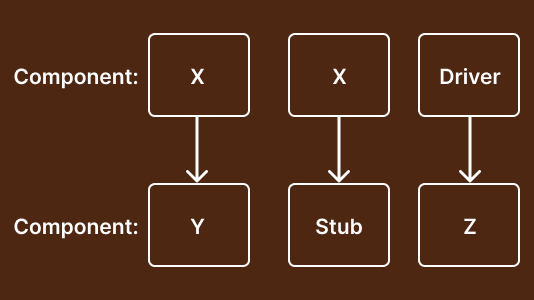
A developer who developed Component Y wants it tested. However, some of Component Y's functionalities depend on Component X and Component Z. The functionality flow is X->Y->Z. A calling function is referred to as a driver, while the called function is referred to as a stub.
The remaining elements, X and Z, have not yet been created. As a result, until you construct the two components, we use stub and driver in place of component X and component Z to test component Y. The functionality flow is X->Y->Z. A calling function is referred to as a Driver, while the called function is referred to as a Stub.
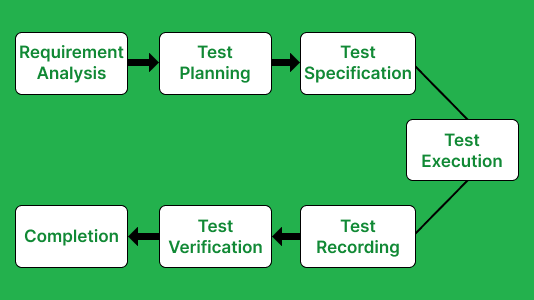
Phases of Component testing
The following seven stages refer to completing the Component testing process:
- Requirement analysis: Requirement analysis, the initial stage of Component testing, involves identifying the user requirements connected to each component.
- Test strategy: The Component testing process moves on to the test strategy phase when the requirement analysis phase is complete. The test intends to assess the requirements provided by the users or clients at this phase.
- Test specification: After finishing the test strategy stage, we will proceed to the test specification stage. This stage involves identifying the test cases to be executed and those that can be skipped.
- Test implementation: It is the next phase in the Component testing process. We can only implement the test cases after determining the user requirements or specifications.
- Test recording: Test recording will take the following stage if you suitably accomplish all of the above processes. We have records of the flaws found during the execution of Component testing at this stage of the Component testing procedure.
- Test verification: The step of test verification will begin once you record the bugs. It is the procedure of determining whether or not the product complies with the specification.
- Test execution: Upon completing the preceding steps, we will move on to the final stage of Component testing, i.e., test execution. You can evaluate the outcomes in this specific process to produce a high-quality outcome.
Also, explore our comprehensive guide on test execution engines, gaining insights into their functionalities to elevate your testing workflow with automation.
The flowchart below will help you understand the different phases of Component testing.
How to create Component test cases?
You can create Component test cases from work products, such as software designs or data models. Each tested component uses a series of test cases, each examining a particular input/output pair or partial capability.
Example of Component testing
Let's look at two web pages: login and homepage. Both pages have a connection in terms of functionality.
- Login page: When you enter a valid user ID and password in the text boxes and click the submit button on the website, you will reach the home page.
- Home page: Login is one element in this scenario, while the home page is another. Component testing is the process of independently evaluating each page.
Below are the website component test cases of both pages (login and home page).
Test Case 1:
- Input an invalid user ID to see if the system prompts the user with a warning.
- Enter an incorrect user name and password, choose "RESET," and then verify that the information entered in the user ID and deletion of password text boxes occurs or not.
- After providing a valid user address and password, press the "Login" button.
Test Case 2:
- Check to see whether the homepage features any welcoming messages.
- Verify if clicking on the website's left-side links is feasible.
- Verify that the manager ID is visible in the page's center.
How can Component test drivers and stubs be built methodically?
Both integration and Component testing use stubs and drivers. Let’s understand what stubs and drivers are.
- Stubs: Stubs are code snippets that receive requests from the top module and send the response.
- Drivers: Drivers are dummy programs used to invoke the functions of the lowest module when the calling function does not exist.
Engineers now construct module-specific or product-specific test drivers and stubs based on provided needs and design standards using ad-hoc methods. The Component testing method's primary challenge is that the test drivers and stubs it generates only apply to a single project (or product). The old process adds to the expense of creating component test drivers and stubs.
According to the component engineering paradigm, components can have the ability to be customized by engineers to meet specific needs.
However, the conventional method of building component test drivers and stubs is exceptionally costly and ineffective in dealing with various software components and their customized functionalities. Therefore, we need more systematic approaches to building test drivers and stubs for multiple parts and modifications. The main challenge here is to provide a component's manageable, reusable, and configurable test drivers and stubs.
Drivers for testing components must be script-based applications that solely use their black-box capabilities. It consists of two groups. The first group consists of test drivers that conduct certain incoming functions or operations of components; each of these test drivers performs a distinct function. The second group consists of scenario-specific test drivers, each serving a specific set of a component's black-box actions or procedures.
Building component frameworks requires the use of component test stubs. Each test stub replicates a component's black-box behavior or function. Generating test stubs may be done using one of two methods.
- The first approach uses formal models to mimic elements in a "black box" perspective. Instances of such models include finite state machines, decision tables.
- Message request-and-response tables. Model reuse and organized stub creation are its main benefits.
Modern Component Testing Tools and Frameworks
Stubs and drivers are the classical way to isolate a component, and they still describe the concept accurately. In modern frontend work, though, you rarely hand-write them. The frameworks below do the isolating for you: they mount a single component in a virtual or real browser, let you interact with it, and assert on what the user would see, all without booting the rest of the application.
Vitest
A test runner built on Vite, and increasingly the default for new projects. It is Jest-compatible in API, so migration is usually mechanical, but it is dramatically faster because it reuses Vite's transform pipeline and only re-runs what changed. It renders components in a simulated DOM (jsdom or happy-dom) rather than a real browser, which is what makes it quick enough to leave running in watch mode while you work.
React Testing Library
Not a runner but a set of querying utilities, usually paired with Vitest or Jest. Its contribution is a philosophy: query the component the way a user would, by visible text, label, or role, rather than by CSS class or internal state. That single constraint is why RTL tests survive refactoring. A test that finds a button by its accessible name still passes when you rename the class; one bound to implementation details does not.
Cypress Component Testing
Cypress mounts your component in a real browser rather than a simulated DOM, which is the trade-off worth understanding. It is slower than Vitest, and in exchange you get real layout, real CSS, real event handling, and the interactive test runner where you can pause and inspect the component mid-test. If a bug only appears when something is actually painted, a jsdom-based runner will never see it.
Can You Use Playwright for Component Testing?
Yes, though with a caveat that matters. Playwright is best known for end-to-end testing, but it ships a component testing feature that mounts a single component in a real browser, supporting React, Vue, and Svelte. It gives you Playwright's strengths at component level: real browser rendering across Chromium, Firefox, and WebKit, auto-waiting, and tracing.
The caveat is that Playwright component testing is still experimental. The API is not covered by Playwright's usual stability guarantees and can change between releases, so weigh that before standardising a large suite on it. The practical position for most teams: if you already run Playwright for E2E, its component testing is a natural extension and worth trialling. If you are choosing fresh and want stability today, Vitest with React Testing Library for speed, or Cypress where real-browser fidelity matters, are the safer picks.
Mocking dependencies
Whichever tool you choose, the isolation problem stubs and drivers were invented for does not disappear. A component that fetches data, reads from a store, or calls an API still needs those dependencies replaced. Mocking is the modern equivalent: substitute the real dependency with a controlled fake that returns exactly what your test needs, including the error and empty states that are awkward to produce for real.
The discipline is knowing when to stop. Mock the boundaries, such as network calls, timers, and third-party services. Do not mock the component's own internals, because a test where everything is mocked verifies only that your mocks were configured correctly, which is a fact about your test rather than about your software.
| Parameters | Vitest + RTL | Cypress | Playwright |
|---|---|---|---|
| Runs in | Simulated DOM (jsdom) | Real browser | Real browser |
| Speed | Fastest | Slower | Slower |
| Maturity | Stable | Stable | Experimental for components |
| Best for | Logic, props, rendering, watch mode | Visual and interaction fidelity | Teams already on Playwright E2E |
| Cross-browser | No, simulated only | Chromium, Firefox, WebKit | Chromium, Firefox, WebKit |
How Do AI Agents Help With Component Testing?
AI coding assistants can draft a starting component test from a component's props and JSX, and AI visual diffing flags a real UI regression instead of pixel noise. A person still has to confirm the assertions check real behavior, not just the mock's own return value.
- AI-generated test scaffolds: Assistants such as GitHub Copilot, Cursor, and Claude Code can read a component's props and JSX and draft a starting Vitest or React Testing Library test, cutting the boilerplate of writing assertions by hand.
- AI test-case generation: Tools such as Qodo, formerly CodiumAI, suggest additional test cases and edge-case assertions for a component's existing code path that a developer did not think to write.
- AI visual diffing: Chromatic's AI-assisted diffing compares component screenshots across builds, flags a genuine visual regression, and filters out flaky renders that a plain pixel-by-pixel diff would flag as false positives.
- False confidence risk: A generated test that only checks its own mocked return value still passes, so a person must read each assertion and confirm it verifies real component behavior.
None of this removes Vitest, React Testing Library, Cypress, or Playwright from the workflow. AI speeds up writing the test; a person still decides what the component is supposed to do.
How does Component testing fit with other QA methods?
Component testing is vital in software testing. Let's break this down using the following aspects:
- Enables in-depth examination: Following the acquisition of each module or component, the Component testing execution allows for a thorough evaluation. You can check it thoroughly for any potential issues on real web servers. And when compared to unit testing, where each unit does not test on live servers, this feature ultimately distinguishes Component testing from unit testing.
- Identification of early bugs: Component testing can be used at any level, enabling us to find and solve issues very quickly, saving significant amounts of time and money. Additionally, before handing the component off to the quality assurance team, the development team may test it for all avoidable issues or flaws.
How Component Testing Enables a Shift Left Strategy
The clearest way to see where component testing belongs is the testing pyramid. Unit tests form the wide base: numerous, fast, cheap. End-to-end tests sit at the narrow top: few, slow, expensive, and the most brittle. Component and integration tests occupy the middle, and that middle is where most teams are thinnest.
The pyramid is a statement about economics rather than taste. A test at the base runs in milliseconds and points at one function. The same defect caught at the top takes minutes to run, and tells you only that checkout failed somewhere across a dozen collaborating parts. Teams with an inverted pyramid, meaning few unit tests and a large E2E suite, get slow feedback and vague failures, which is why their suites end up distrusted and skipped.
Component testing is what makes shift left practical at the UI layer. Shifting left means moving verification earlier, toward where the code is written, and the argument is purely about cost: a defect caught as the developer types costs almost nothing, because the person who wrote it still has the context. The same defect found in a release candidate costs triage, a context switch, a fix, a re-test, and a delayed release. Nothing about the bug changed, only when it was found.
Before component testing tools existed, UI verification had nowhere to go but the top of the pyramid: you could unit test a pure function, but checking that a form component showed the right validation error meant booting the whole app and driving a browser. That is a slow, flaky feedback loop, and it happens late. Mounting the component in isolation collapses that loop to seconds and moves it to the developer's machine.
Two consequences follow, and both matter more than the speed itself:
- Failures point somewhere specific: When a component test fails, one component is at fault. When an E2E test fails, the defect is somewhere across everything that journey touched, and finding it is the actual work.
- Bugs stop propagating: A broken component verified in isolation never reaches integration, so it cannot cause a confusing failure three layers up in a system test that had nothing to do with the real cause.
This does not remove the need for E2E testing. Something still has to prove the parts work together, and component tests will never catch an integration failure by definition. The point is proportion: use component tests to verify each part does its job, and reserve the slow, expensive tests at the top for the handful of journeys that genuinely must work end to end.
Component testing vs Unit testing
The testing team performs component or module testing. Removing all potential defects saves money and time in the long run. The following are some significant differences between component testing and unit testing:
| Component Testing | Unit Testing |
|---|---|
| Component testing is carried out by testers at the application level. | Unit testing is performed by the developers at a granular level. |
| Component testing involves evaluating each piece of software separately, whether or not it is isolated from other device objects or components. | Unit testing determines whether a specific program or code is performing as intended. |
| Component testing entails validating application cases and data provided. | Unit testing analyzes against technical specifications. |
| Component testing is a type of black box testing. | Unit testing is a form of white box testing. |
| When performing Component testing, the tester is unaware of the software's internal architecture. | Developers are acquainted with the software's underlying design when doing unit tests. |
| Component testing is carried out only after the entire piece of software has been developed. It is more complex than unit testing. | Unit testing is carried out following each development stage. |
As a result, Component testing is essential for identifying flaws and defects. We recommend that you undertake Component testing before going on to unit testing to ensure that each component of the application functions properly.
How Component testing differs from Interface, Integration, and System testing?
In this section of the Component testing tutorial, let’s look into the difference between several testing methods concerning the Component testing method.
- Component testing is the precise and most effective method for estimating how well a module or component of software will perform at any development point. As previously stated, the smallest unit of an independently tested application is a component. The layer that connects the two members is called an interface. Interface testing refers to the interface or platform on which the two members communicate.
- Unit testing determines whether a specific program or code is performing as intended. Whether or not it is isolated from other device objects or components, each piece of software is evaluated separately during Component testing.
- The interface test has undergone some structural adjustment. Since most of these interfaces are APIs or Web Services, testing them wouldn't resemble a "black box" approach; instead, you would use a tool like SOAP UI or another API testing method.
- During the integration test, different tested components are combined and tested sequentially, one by one. Also, it’s important to ensure that the various components perform as expected when putting together one at a time and that data is not changed as it moves from one module to another.
After integrating and testing each component, you can perform system testing to evaluate the entire software application or system.
How to perform Component testing using TestMu AI?
The most accurate and effective technique to gauge how well a module or software component will perform at any level of development is through Component testing.
As technology evolves, you will see a sudden shift in how organizations operate. Traditionally, a dedicated team of testers would create manual test cases and scenarios and record their testing observations in Excel sheets. Therefore, you must spend a lot of time configuring your testing and infrastructure requirements.

This is where cloud testing platforms like TestMu AI solve your testing needs. It allows you to test your websites and web applications on an online browser farm of over 3000+ desktop and mobile browsers online.
The following are some of the features of TestMu AI’s platform:
- Perform test automation with Selenium, Cypress, Playwright, Puppeteer, Appium, Espresso, and Taiko
- Real-time testing of websites and mobile applications.
- Run app test automation on a myriad of real devices.
- Achieve faster test execution with parallel testing.
- Test your mobile application features, gestures, and interaction.
- Geolocation testing and localization testing of web and mobile applications.
- Enterprise-ready TestMu AI tunnel to perform local testing of privately hosted applications.
Let’s see how to perform real-time Component testing on the TestMu AI platform.
- Login to your TestMu AI account. If you don’t have an existing account, register for free.
- Go to Real Time Testing > Browser Testing from the left sidebar.
- Enter the website URL, and pick your browser VERSION, OS, and RESOLUTION on which you wish to run the test. Then, click START.
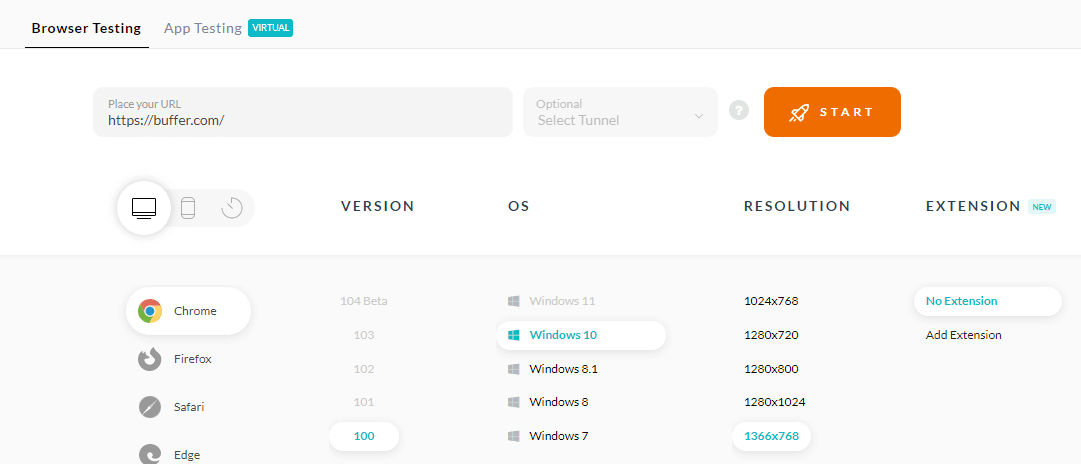
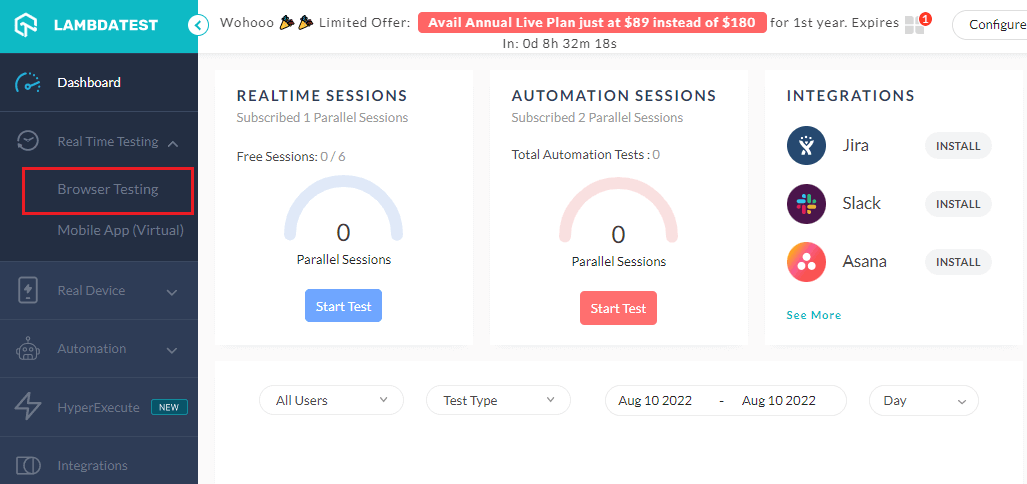
It will route you to a cloud-based virtual machine running a real operating system. Here you can perform real-time Component testing of your websites or web applications.
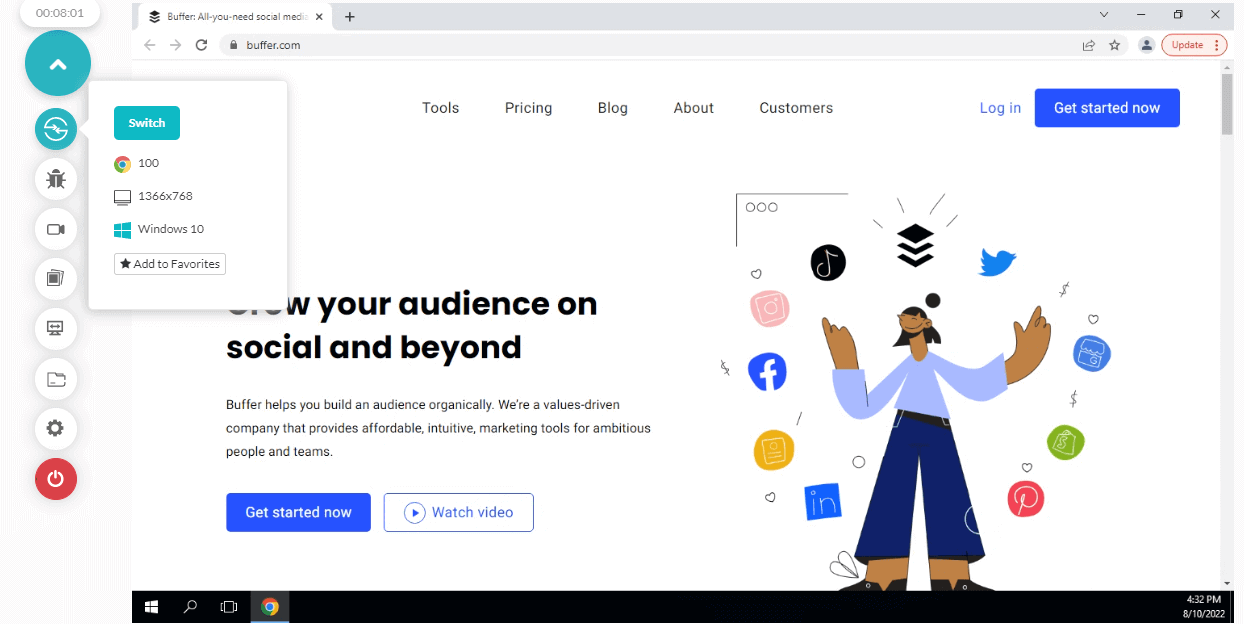
Look at the video tutorial below to learn how to perform real-time testing on the TestMu AI platform.
Subscribe to TestMu AI YouTube Channel, and check out the latest tutorials around Selenium automation testing, Cypress testing, real-time testing, and more.
Limitations of Component testing
Component testing validates that each software package operates according to requirements and guidelines. You can find the main issues that make Component testing complex or challenging in the list stated below.
- Testing a component in a different situation: In Component testing, segments are created in a development environment and utilized by the user in a particular deployment context. An initial component test can only evaluate the component following a specific user profile.
- Inadequate controllability and testability due to lack of access to a component's internal workings: An issue arises when something subjected to testing is hard to monitor. Testing usually includes assumptions about what a user would expect.
- Ensuring a component will function: It is essential to undertake adequate Component testing. It involves determining the amount of testing a tester should carry out along with the type and quantity of testing.

Wrapping up
The divergent perspectives of a software component's stakeholders, the supplier, and the user are what distinguishes component-based testing from traditional testing most fundamentally. It reveals the critical distinction between component-based advances and conventional software systems in validation.
Unlike component-based development, which integrates components according to several user profiles depending on their integrating contexts, traditional system development combines all parts exclusively following a single user profile. By getting rid of any preventable bugs, it saves money and unneeded work in later stages.
After finishing unit testing, Component testing is carried out. Integration testing must always come after Component testing since we may find even tiny flaws during integration testing if the former is true.
Component testing guarantees that each piece of software operates according to expectations and specifications. It is imperative in software engineering to identify issues. It would be better if you prefer to perform Component testing before beginning integration testing to ensure that each application part functions properly.
Author

Sakshi John


Sakshi John is an experienced technical content writer with over 5 years of expertise in automation, AI-driven testing, and cross-browser testing. She has contributed to prominent platforms like TestMu AI and worked as a Communications Consultant at the United Nations APCTT. Sakshi holds a Master's degree in International Relations and has authored numerous technical blogs, enhancing her credibility in the software testing industry.


Component Testing FAQs
Did you find this page helpful?
More Related Learning Hubs
TestMu AI forEnterprise
Get access to solutions built on Enterprise
grade security, privacy, & compliance
- Advanced access controls
- Advanced data retention rules
- Advanced Local Testing
- Premium Support options
- Early access to beta features
- Private Slack Channel
- Unlimited Manual Accessibility DevTools Tests